


Peanut, an app aimed to help connect like-minded moms, launches on Android
Why it matters to you
Being a mom doesn’t mean you have to put your social life on pause. Peanut helps connect moms based on similar interests.
If you’re looking for a significant other, there are tons of dating apps at your disposal like Tinder and Hinge. Bumble even gives women the option to find friends through its BFF mode. Peanut goes even further by connecting like-minded moms to an entire network of other women who are also moms. The app is now available on Android.
We have all heard it before — parenting does not come with a how-to guide. But that does not prevent questions and anxieties to arise, which is where Peanut steps in to make it a little easier. Available in the U.S., U.K., and Canada, the app uses machine learning and a smart algorithm to match moms and moms-to-be based on common values, interests, and the age of their children, to other moms nearby.
After downloading the app, you are asked a series of questions such as how far along you are in your pregnancy and/or the age of your already existing children. When building a profile, you can pick three ways to describe yourself — known as “packs” — with a range of categories like “City Gal,” and “Single Mama.” You can also build out your profile to include more detailed information whenever you want.
Depending on location and commonalities, the app then shows you other moms in your area to connect with. For those who travel often or want to extend potential matches past their homes, there is a toggle feature that allows users to meet up with moms wherever they go. The more the app is used, the more customized the matches become based on the algorithm.
As for interaction, you can chat with other moms in discovery or swipe up to give a wave — which is a fast way to say hi to another mom. If another mom waves back at you, then it is a match. Since being the first one to send a message can be intimidating, you will receive a pop-up of all your shared interests to make it easier along with stickers to make it more fun.
Users can message with another mom one-on-one or with up to 20 other moms in a group chat. Additionally, they can create meetups or send polls within the chats to easily decide on a time that works for everyone. The poll then turns into an event invite that can be integrated into your calendar to conveniently remind you of the date.
Aside from launching on Android, Peanut is introducing another way to create an account for the app. For now, users can only create accounts with a Facebook login but will soon have the option to log in through Google as well — on both Android and iOS. In order to provide top safety and privacy, users can only create a profile through either one of those existing accounts to permit verification checks.
Best Screen Protectors for Samsung Gear S3

What are the best screen protectors for the Samsung Gear S3?
The Samsung Gear S3 is a beefy smartwatch packed with practically everything you’d need no matter your lifestyle. Whether you plan to take it on outdoor hikes or just wear it around the office, there’s always a risk of it banging against a rock or a door frame and getting the touchscreen scuffed up or worse.
We’ve rounded up the best products for keeping your Gear S3 protected, with several options offering a 3-packs of these tempered glass discs so you have a couple of chances at a perfectly clean install, or a few backups if you’re expecting heavy wear.
- Supershieldz Tempered Glass Screen Protector
- OMOTON Full Coverage Tempered Glass Screen Protector
- Skinomi TechSkin Full Coverage Skin and Screen Protector
- Spigen Tempered Glass Screen Protector
Supershieldz Tempered Glass Screen Protector (Frontier / Classic)

Supershieldz is a trusted name in screen protectors, so naturally, you can expect a great product at a great price for your Gear S3. You get three rugged screen protectors that are easy to install and willing to take the wear and abuse that could scratch your watch’s touchscreen. With hydrophobic and oleophobic coatings, your Gear S3 will be functional, clear, and protected.
These screen protectors also come with Supershieldz no-hassle lifetime replacement warranty and are only $8 for a 3-pack.
See at Amazon
OMOTON Full Coverage Tempered Glass Screen Protector (Frontier / Classic)

If you’re looking for full edge-to-edge protection for your Gear S3, OMOTON has a 3-pack of screen protectors with your name on it. They boast 3D laser-cut technology that offers protection for the whole screen where other protectors might leave a small gap where lint and dust could collect. Hydrophobic and Oleophobic screen coatings mean you can use your watch throughout a workout without worrying about gunking things up.
Made of scratch resistant tempered glass, you can get a 3-pack for $8 and keep your watch’s screen well protected for years to come.
See at Amazon
Skinomi TechSkin Full Coverage Skin and Screen Protector (Frontier)

Skinomi only offers one screen protector in its kit, but it also includes a clear protective skin to provide protection for other exposed parts of the Gear S3. Everything is made of military-grade thermoplastic urethane which is flexible and tough, with self-healing properties to make it last. It’s a wet install here, which can feel a bit daunting, but Skinomi gives you everything you need to get the job done — backed by a 100% Risk-Free Lifetime Warranty.
This kit is $16 on Amazon and only comes with one screen protector, but if you’re worried about banging up other parts of your Gear S3 as you live your life maybe the Skinomi skin is what you’re looking for.
See at Amazon
Spigen Tempered Glass Screen Protector (Frontier / Classic)

Spigen is one of our favorite phone accessory makers because they offer great case and protection options for so many different devices and always deliver a premium product. They offer a 2-pack of tempered glass screen protectors for the Gear S3 that fit both the Frontier and Classic models, with rounded edges that feel nice to touch and help avoid chipping.
The kit includes everything needed to install both protectors and is available for just $8 on Amazon.
See at Amazon
Do you use a screen protector for your smartwatch?
What might be an essential accessory for some might feel silly to others. Where do you fall on the debate? Let us know what you use to keep your Gear S3 looking pretty in the comments!
Enjoy wireless music with the 1Voice Sonic Bluetooth headphones for just $23!
Wireless headphones are here to stay. One by one, phone manufacturers are removing the trusted 3.5mm headphone jack from their latest flagship devices as wires are replaced by a Bluetooth connection. Many people are resistant to this because, for the longest while, Bluetooth headphones were very expensive. But there are deals to be had!

That’s why you need to take advantage of this great offer by from Android Central Digital Offers. You can get these sleek looking wireless over-ear headphones from 1Voice for just $22.99. These are perfect for your daily commute or for wearing around the office, delivering 5 hours of your favorite music on a single charge. They include awesome features including a built-in mic and full track and volume controls on the side so you can control your music and answer calls without touching your phone.
It takes two hours to charge them fully, but if you don’t mind a wired connection there’s a 3.5mm cable included for listening music the old fashioned way.
The 1Voice Sonic Bluetooth Headphones typically sold for around $100, but you’ll save 76% thanks to this deal from Android Central! But don’t delay — this deal won’t last long!
See at Android Central Digital Offers
The $150 Samsung 850 EVO 500GB is a great SSD going for one of its lowest prices ever
Our friends at Thrifter are back again, and it’s time to upgrade your PC’s SSD!
The Samsung 850 EVO 500GB SSD is down to $149.99 on Amazon. This SSD normally sits above $170, and for the last few months has fluctuated between $170 and $180. The 850 EVO has been around since 2014, so it has seen a few drops in the past but $150 is one of its lowest prices and a good deal. This is the perfect upgrade for a PC still running its operating system on a slower hard drive (are there any of you left?), or anyone using an older SSD that could do with a speed boost.

The 850 EVO is well-reviewed with a lot of positive results. Windows Central called it the Best Overall SSD for Windows PCs. CNET gave it 4.5 stars. The Wirecutter still considers it to be the best SSD for its balance of performance and price. AnandTech has one of the most thorough reviews of this SSD on the Internet and called it “yet another showcase of Samsung’s engineering talent.”
At this price, the 850 EVO is cheaper than even the more modern competition, like Crucial’s MX300 SSD. It’s not just cheap, it’s also fast with read/write performance up to 540 MB/s and 520 MB/s, respectivelly.
Because Samsung designs SSDs with home-grown engineering, it’s also built for the long-term with twice the endurance of the competition. It’s capable of handling much heavier workloads, and Samsung backs all that up with a five-year warranty.
If you need help installing a new SSD, Windows Central has some tips for that.
Need the small screws necessary to dig into your PC? Get this screwdriver set for just $7.
See at Amazon
More from Thrifter:
- How to get the most out of your Amazon Prime membership
- How to save money when driving
For more great deals be sure to check out our friends at Thrifter now!
What’s new on Amazon Prime Video in September 2017

There’s a lot to watch on Amazon Video. Here’s what’s coming up in September 2017.
Amazon Prime Video has quickly become one of the go-to destinations for on-demand content, thanks in no small part to devices like the $50 Amazon Fire Stick, the $90 Amazon Fire TV, and now the $229 Amazon Echo Show.
That’s the easy part. What’s not quite so easy is keeping up with everything that’s new on Amazon Prime Video — because new shows are always coming and going.
On deck in the coming weeks is one of my favorite movies of all time — with the best chariot race you will ever see. That is, of course, Ben Hur. Set aside a half-day to soak it all in if you haven’t before.
I’m also looking forward (though perhaps not as much as my “Sons of Anarchy”-loving wife) to checking out “The Lost City of Z.” Here’s how Amazon puts it: “The Amazon Original Movie starring Charlie Hunnam and Robert Pattinson, is a biographical drama, based on British explorer Col. Percival Fawcett, who disappeared while searching for a mysterious city in the Amazon in the 1920s.” … So there’s that.
Here’s what you can look forward to in September 2017.
Don’t have Amazon Prime Video yet? Get a free 30-day trial!
What’s on Amazon Prime Video in September
If you’re a member of Amazon Prime (and there’s a pretty good chance you are) there’s a whole world of content available, for free. Here’s what you have to look forward to being added in the month ahead:
Coming Sept. 1
- American Loser (2007)
- American Ruling Class (2007)
- And You Thought Your Parents Were Weird (1991)
- Autopsy (2008)
- Best Seller (1987)
- Bio-Dome (1996)
- Blood Car (2007)
- Boy (2010)
- Breathing (2011)
- Butterfly Effect 3: Revelations (2009)
- Calloused Hands (2013)
- Carrie (1976)
- Charlotte Rampling: The Look (2011)
- Clip (2012)
- Computer Chess (2013)
- Dark Ride (2006)
- Dead Weight (2012)
- Dirty Dancing (1987)
- Disturbing Behavior (1998)
- Double Headed Eagle (1973)
- Double Take (2009)
- Down to Earth (2001)
- Duane Michaels: The Man Who Invented Himself (2012)
- Dying Breed (2009)
- Free Radicals (2003)
- Ganja & Hess (1973)
- Gogol Bordello: Non Stop (2008)
- Hippie Masala (2006)
- Holes in My Shoes (2006)
- Huff (2013)
- In the Land of the Deaf (1994)
- Indecent Proposal (1993)
- Kama Sutra: A Tale of Love (1997)
- Khodorkovsky (2011)
- Kingdom of Shadows (1986)
- Korkoro (2008)
- La Maison de la Radio (2013)
- Lars and the Real Girl (2007)
- Lipstick & Dynamite: The First Ladies of Wrestling (2004)
- Look Both Ways (2005)
- Man About Town (2007)
- Manuscripts Don’t Burn (2013)
- Meditate and Destroy (2007)
- Mistress (1992)
- Mr. X (2014)
- Music from the Big House (2010)
- Nollywood Babylon (2008)
- Offspring (2009)
- Primitive London (1965)
- Princess Kaiulani (2009)
- Pumpkinhead (2009)
- Red Garters (1954)
- River’s Edge (1987)
- Sacred Flesh (2000)
- Sacrifice (2011)
- Schoolgirl Hitchhikers (1973)
- Sleepover (2004)
- Successive Slidings of Pleasure (1974)
- Switchback (1997)
- The Black Stallion (1979)
- The Bloodsucker Leads the Dance (1975)
- The Cove (2009)
- The Cup (2012)
- The Dark Half (1993)
- The Fairy (2011)
- The Giants (2011)
- The Golden Child (1986)
- The Hills Have Eyes 2 (1985)
- The Last Godfather (2011)
- The New Public (2013)
- The Object of Beauty (1991)
- The Rage – Carrie 2 (1999)
- The Revisionaries (2012)
- The Search for One Eyed Jimmy (1993)
- The Sinful Nuns of Saint Valentine (1974)
- The Workshop (2007)
- This Ain’t No Mouse Music (2013)
- Truth in Numbers? Everything According to Wikipedia (2010)
- Unsolved Mysteries: Original Robert Stack Episodes (Season 8)
- Vanishing Waves (2012)
- Videocracy (2009)
- Virgin Among the Living Dead (1978)
- Virgin Witch (1972)
- Web Junkie (2014)
- Wedding Crashers (2005)
- When I Saw You (2013)
- Wide Awake (2006)
- With One Voice (2009)
Coming Sept. 2
- Ben-Hur (2016)
Coming Sept. 7
- The Hunter’s Prayer (2017)
- Tubelight (2017)
Sept. 8
- One Mississippi (Amazon Original, Season 2)
Coming Sept. 9
- The Magnificent Seven (2016)
Coming Sept. 10
- Meri Pyaari Bindu (2017)
Coming Sept. 11
- Frantz (2016)
Coming Sept. 12
- The Ray Bradbury Theater (Season 6)
- ReGenesis (Seasons 2-4)
Coming Sept. 15
- An American Werewolf in London (1981)
- Beauty and the Baker (Season 1)
- Endless Love (1981)
- The Thaw (2009)
- The Women of Brewster Place (1989)
Coming Sept. 16
- Tyler Perry’s Madea Goes to Jail (2009)
Coming Sept. 19
- Straight/Curve: Challenging the Beauty (2017)
Coming Sept. 21
- Kill Switch (2017)
Coming Sept. 22
- Transparent (Amazon Original, Season 4)
Coming Sept. 23
- Elian (2017)
Coming Sept. 25
- Bronte Sisters (Season 1)
- Falling Water (Season 1)
Coming Sept. 26
- Unsolved Mysteries: Original Robert Stack Episodes (Season 9)
- Wishenpoof! (Amazon Original, Season 2a)
Coming Sept. 28
- Dance Flick (2009)
- Thursday Night Football (Chicago Bears at Green Bay Packers)
Coming in September on Amazon Video
Amazon Prime Video brings free content to Prime members. But sometimes Amazon holds back the best of the best for everyone to pay for. Here’s what’s available for purchase in September on Amazon Video:
- Rough Night (Purchase Aug. 25, rent on Sept. 5)
- Captain Underpants (Purchase Aug. 29, rent on Sept. 19)
- It Comes at Night (Purchase Aug. 29, rent on Sept. 12)
- Wonder Woman (Purchase Aug. 29, rent on Sept. 19)
- Pirates of the Caribbean: Dead Men Tell No Tales (Purchase on Sept. 19)
- The Little Hours (Purchase or rent on Sept. 22)
Previously, on Amazon video …
Here’s what was (or still is, depending on when you’re reading this) new on Amazon Video in August.
Coming August 1
- All Dogs Go to Heaven (1989)
- Among Friends (2012)
- Bad Boys (1983)
- Bad Company (1972)
- Benny & Joon (1993)
- Bill & Ted’s Bogus Journey (1991)
- Bill & Ted’s Excellent Adventure (1989)
- Box of Moonlight (1996)
- Breakdown (1997)
- Charley-One-Eye (1973)
- Criminal Law (1988)
- The Dead Zone (1983)
- Eve’s Bayou (1997)
- Far From Home (1989)
- Friends & Lovers (1999)
- The General’s Daughter (1999)
- Ghost (1990)
- Hannie Caulder (1971)
- Harsh Times (2005)
- High Noon (1952)
- The Mod Squad (1999)
- New in Town (2009)
- Once Bitten (1985)
- The Pursuit of D.B. Cooper (1981)
- Save the Last Dance (2001)
- Teen Wolf (1985)
- Teen Wolf Too (1987)
- Terry Fator: Live in Concert (2014)
- Ulee’s Gold (1997)
- Wayne’s World 2 (1993)
Coming August 2
- Valkyrie (2008)
Coming August 5
- The Ticket (2016)
Coming August 15
- Tumble Leaf, Season 3 (2017)
Coming August 17
- Nick Offerman & Megan Mullally: Summer of 69: No Apostrophe (2017)
- Undercover (2016)
Coming August 19
- My Bloody Valentine (2009)
Coming August 20
- In Secret (2013)
Coming August 25
- The Tick, Season 1 (2017)
Coming August 27
- Florence Foster Jenkins (2016)
Coming August 29
- Gimme Shelter (2013)
- Victoria (2016)
Amazon Prime Video

- What’s new on Amazon Prime Video
- Benefits of Amazon Prime
- Get a free 30-day Amazon Prime trial
- Share Prime with friends and family
- Best movies to stream on Prime Video
- Shop smart with Amazon coupons
Here’s why sideloading apps is safer with Android O
Sideloading apps is safer than ever with Android O.
Android has always had a default restriction on installing apps that didn’t come from a first party app store. Apps from Google Play or a manufacturer’s store like Samsung Apps are deemed to be more trustworthy and safe, so they are considered first party app stores, but apps you downloaded from the internet or from another marketplace are not. While the setting was easily disabled, this was the first line of defense to make sure you weren’t installing apps that had malware embedded in them.
By default. only Google Play or other first party app stores have permission to install an app.
Android O brings a much smarter system with a new runtime permission (that means a thing that you will need to approve when you install an app) called Install Unknown apps. With Android 8.0, the first time you attempt to install an app from any third-party method, like a web browser or a messaging app, you have to give permission. This sounds a lot like the previous method, but there is one big change: this is now a per-app setting.
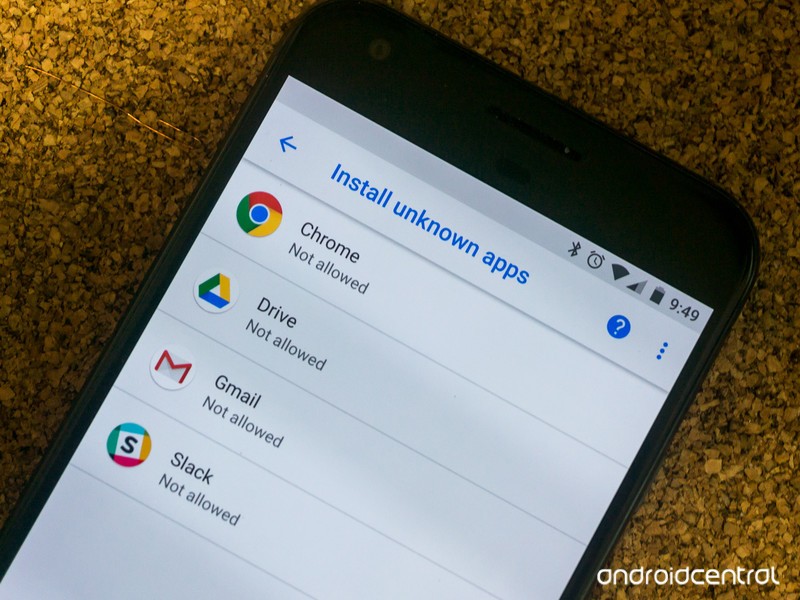
Let’s say you downloaded the latest update for an app instead of waiting for it to roll out to you. You might have used Chrome to visit APKmirror, and when the download is finished Chrome knows to start the package installer (a system tool that only installs apps). If this is the first time you have tried this with Chrome, you’ll be asked if you’re sure you want it to be installed. On the screen that explains this to you, there’s an option to always allow apps downloaded through Chrome to be installed. You can choose to allow that and never be asked again or decline and be asked every time.
The one size fits all approach has been replaced with fine-grained permissions.
You could have also installed an app you downloaded through a Reddit app, and you’ll go through the same exact procedure. Chrome and Reddit, as well as every other app that knows what to do with an APK file, each has their own setting.
This is a huge improvement over the previous “all or nothing” setting for both users and developers alike. It makes our phone more secure because we can pick and choose what apps have our permission, which means more people can safely enable the setting. Having the Amazon App Store program to be able to install other apps but not allow Chrome to install them without asking is just better for everyone.
When you grant permission for an app to do this every time, it goes on a separate list in the settings where you can remove the permission any time you like. You’ll find it here:
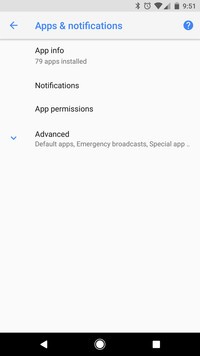
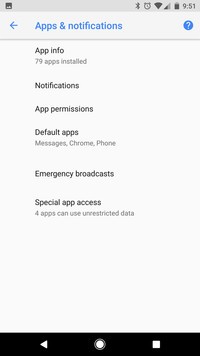
- Open your Settings.
- Navigate to Apps & notifications.
- Tap the Advanced section.
- At the bottom, tap Special app access.
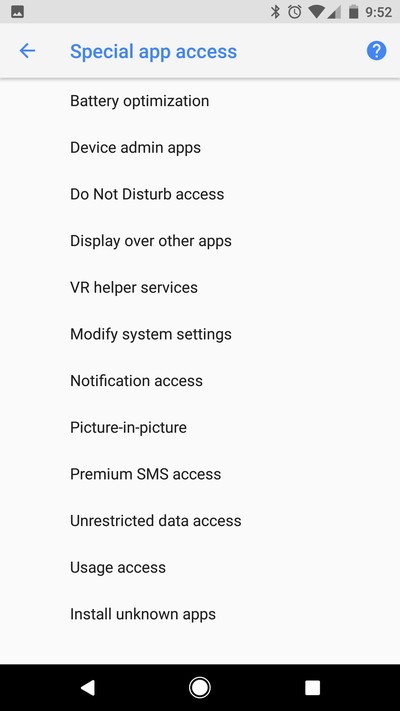
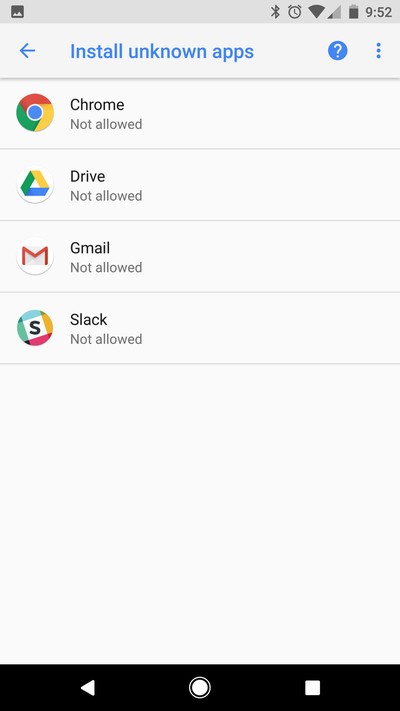
You’ll see Install unknown apps at the bottom of the page, and tapping on it brings up a list of apps and their setting as far as the Install Unknown apps permission is concerned.
This is a big change in how your privacy and security is managed and makes it easy for trustworthy developers to make installing other apps as seamless as possible.
Android O
- Everything new in Android O
- Should you put Android O on your phone?
- How to get the Android O Beta on your Pixel or Nexus
- Join the Discussion
How to watch the Solar eclipse in VR

Watch the eclipse from the comfort of your VR headset.
On August 21, 2017, the United States — or parts of it at least — will experience a total solar eclipse. This awesome meteorological event will be visible for millions of people, but if you aren’t lucky enough to live in the area where it will occur, or don’t have the means to travel for viewing it in person, you can still check it out. That’s because CNN is going to be delivering a livestream of the event available to users of the Gear VR and Oculus Rift.
Keeping reading to get the details so you don’t miss a moment!
Read more at VRHeads
Put Amazon’s Alexa to work with an Echo for just $100
Our friends at Thrifter are back again, this time with an even more affordable way to get an Echo in your home!
If you’ve been considering picking up an Amazon Echo, now is the time. Currently, you can grab one for just $99.99 which is a savings of $80. This isn’t the lowest price we’ve seen on the smart speaker and if you missed out on the previous deals, this is the best you’ll find right now. The Echo allows you to use your voice to do tons of different tasks that you would normally need to pick up your phone or even computer to accomplish.

You can use the Echo to control various smart home accessories, check on the local news, and even order pizza if you wanted to. Amazon has been adding new features to Alexa just about every week so it continues to become smarter and smarter. If you’ve been interested in checking one of these out and have been looking for a discount, this is the perfect way to see what all the hype is about.
The Echo Dot is also down to $44.99, which is $5 off, and Amazon is offering $100 off when buying 2 of the all-new Echo Show when you use the coupon code SHOW2PACK. If you’re looking to take Alexa on the go with you, you can save up to $30 on select Fire Tablets right now!
See at Amazon
For more great deals be sure to check out our friends at Thrifter now!
Amazon Echo
- Tap, Echo or Dot: The ultimate Alexa question
- All about Alexa Skills
- Amazon Echo review
- Echo Dot review
- Top Echo Tips & Tricks
- Amazon Echo vs. Google Home
- Get the latest Alexa news
See at Amazon
AT&T’s new Primetime tablet requires a DIRECTV subscription
AT&T has announced a new tablet that plugs into its DIRECTV service.
Cellular-connected tablets have been around since the first iPad, letting users connect to the Internet even when they’re not around Wi-Fi. This was typically associated with light web browsing, as streaming video over a cellular connection is a fast way to burn through a data cap. As more carriers have brought back unlimited plans and zero rating for certain services, the ability to use a tablet as an on the go streaming device has become easier than ever.

To that end, AT&T has announced a first party tablet centered around content consumption. The AT&T Primetime Tablet is designed specifically for DIRECTV subscribers. In fact, it requires a monthly subscription to DIRECTV for users to buy the device in the first place.
As for specifications, the only directly mentioned specs are the 10-inch, 1080p display, and the 9,070 mAh battery. AT&T does not list which version of Android the tablet runs, but based on the fact the product page mentions “built-in split screen features,” we can presume it uses some version of Android 7.0 Nougat. The tablet will use a custom home screen with gestures for quickly accessing DIRECTV when you just need to watch TV right this second. The spec sheet mentions users will be able to stream to two separate Bluetooth headsets of speakers, which is a very neat feature (but not necesarily part of the Bluetooth 5.0 spec) The device also features dual front-facing speakers with Dolby Atmos and 4 audio presets.
Existing AT&T Unlimited Plus or Unlimited Choice customers can add the Primetime tablet to their existing plans for an additional $20 per month. The device can also be purchased on its own for $29.99 per month for 2 years, totaling $719.76. The Primetime Tablet will be available on AT&T’s online store on in physical retail stores beginning August 25.
See at AT&T
Which unlimited plan should you buy?

Verizon uses Qualcomm’s new X20 modem to go beyond 1Gbps wireless speeds
Qualcomm, Ericsson and Verizon have successfully reached 1.07 gbps download speeds on LTE.
While 5G is a ways away, there’s still some growing room for 4G LTE. Qualcomm has been field testing its X20 LTE modem, which will allow for a theoretical limit of 1.2Gbps download speeds on cellular connections. Now, Verizon, Ericsson and Qualcomm have announced they were able to achieve a stable 1.07Gbps in lab conditions.
The test uses a combination of 12 separate LTE streams on 3X carrier aggregation, along with 4×4 MIMO and 256QAM, technologies that all carriers, especially T-Mobile, have been touting in their quest to eke as much speed out of the current 4G LTE spec as possible.

From Verizon:
This 1.07 Gbps achievement builds on Verizon’s recent announcement about Gigabit LTE with support for License Assisted Access (LAA). Also of significance, the 1.07 Gbps speed was achieved using only three 20MHz carriers of FDD (Frequency Division Duplex using separate transmit and receive frequencies) spectrum, achieving new levels of spectral efficiency for commercial networks and devices. These efficiencies will enable the delivery of the Gigabit class experience to more customers and lead to new wireless innovations.
The companies achieved the 1.07 Gbps industry milestone by using 12 simultaneous LTE streams, which allow for up to 20 percent increase in peak data rates and capacity with a corresponding improvement in average speeds. Ericsson’s Radio System and LTE software, in concert with a mobile test device based on the Snapdragon X20 LTE modem, enabled these high speeds.
In the lab, the 1.07 Gbps speeds were achieved using all licensed band combinations with:
- 12 LTE streams with 3 cell carrier aggregation of FDD spectrum
- 4×4 MIMO per carrier (multiple in, multiple out), which uses multiple antennae at the cell tower and on consumers devices to optimize data speeds
- 256 QAM per carrier, which enables customer devices and the network to exchange information in large amounts, delivering more bits of data in each transmission, significantly enhancing data speeds
Even with this achievement, it will be a long time before consumers are able to see these high speeds. There are no consumer devices that include the Qualcomm X20 modem, but it may be included on next year’s flagship devices, following more successful tests. Even then, carriers will need to upgrade the cellular towers before customers can take advantage of the super high speeds.
What would you do with a super fast LTE connection? Let us know down below!
Learn more about Verizon!

 AIVAnet