


8th Gen Intel Core goes to work in HP’s milspec tested Probook 400 series
Why it matters to you
HP’s Probook 400 combines 8th gen Intel Core processors with durable design and screen sizes up to 17 inches.
Intel announced it’s 8th generation processors today on its Facebook page and official newsroom, and it surprised some industry watchers by focusing on notebook “Kaby Lake+” CPUs rather than the “Coffee Lake” desktop CPUs that many expected. The newest members of Intel’s lineup are quad-core, multi-threaded variants that are best-suited for high-performance laptops, and HP is piggybacking on Intel’s statement with its own announcement if its new HP ProBook 400 G5 series
This marks the fifth generation of the ProBook 400 business-class machines, and HP has announced three new versions, the ProBook 430 G5, ProBook 450 G5, and ProBook 470 G5. In addition to a building a thinner design with new Natural Silver stamped aluminum chassis, HP is also touting the machine’s status as the first to ship with the new CAT-9 modem for faster WWAN speeds, and support the HP Elite USB dock.
The core specifications for each machine are similar, offering a range of CPU options from Celeron 3865U (on the 430 G5 and 45o G5) up to 8th generation Intel Core i5 and i7 CPUs. The 15.6-inch HP ProBook 450 G5 and 17.3-inch HP ProBook 470 G5 offer optional Nvidia GeForce 930MX graphics with 2GB of GDDR3 memory, and all models come standard with Intel HD integrated graphics. Memory is listed at 32GB DDR4-2400 DRAM, and a wide range of storage options are available including hard disk drives (HDDs), and solid-state drives (SSDs). Battery capacity on each model is 48 watt-hours, and support for HP fast charge technology means they can be charged to 90 percent in 90 minutes.
LIke previous ProBook models, the new machines have been tested to MIL-STD 810G standards, and they offer easy serviceability for upgrading and managing a fleet of systems. The HP Elite USB dock uses the ProBooks’ new USB Type-C connection to enable support of dual monitors, and to access an additional RJ-45 wired Ethernet connection. The dock also provides enhanced connectivity with up to five USB Type-A ports.
Here are the specifications for each new HP ProBook 400 G5 model.
HP ProBook 430 G5
Specifications
Display Size:
13.3 inches
Display Type:
HD touch, anti-glare Full HD, HD anti-glare
Display Resolution:
HD (1,366 x 768), Full HD (1,920 x 1,080)
Processor:
Intel Celeron 3865U
Intel Core i3-6006U
Intel Core i3-7100U
Intel Core i5-8250U
Intel Core i7-8550U
Graphics:
Intel HD Graphics 520
Intel HD Graphics 620
Memory:
32GB DDR4-2400
Storage:
1TB SATA 5400 RPM HDD
500GB SATA 7200 RPM HDD
500GB SATA 5400 hybrid HDD
512GB M.2 PCIe NVMe TLC SSD
256GB M.S PCIe NVMe SSD
128GB M.2 SATA TLC SSD
Expansion Slots
SDXC Card Reader
Connectivity:
Intel Dual-Band Wi-Fi and Bluetooth 4.2
Realtek Dual-Band Wi-Fi and Bluetooth 4.2
Ports:
1 x USB 3.1 Type-C
2 x USB 3.0 USB Type-A
1 x HDMI 1.4b
1 x RJ-45 Gigabit Ethernet
1 x audio headphone jack
Battery:
48 watt-hour lithium-ion
Inputs:
HP Premium Keyboard, spill-resistant with optional backlighting
Clickpad with image sensor, multi-touch gesture support
Dimensions:
12.8 in x 9.21 in x 0.78 in (non-touch)
12.83 in x 9.21 in x 0.84 in (touch)
Weight:
3.28 pounds
Operating System:
Windows 10 Pro 64-Bit
Price:
Starting at $620
HP ProBook 450 G5
Specifications
Display Size:
15.6 inches
Display Type:
HD touch, anti-glare Full HD, HD anti-glare
Display Resolution:
HD (1,366 x 768), Full HD (1,920 x 1,080)
Processor:
Intel Celeron 3865U
Intel Core i3-6006U
Intel Core i3-7100U
Intel Core i5-8250U
Intel Core i7-8550U
Graphics:
Intel HD Graphics 520
Intel HD Graphics 620
Nvidia GeForce 930MX 2GB GDDR3
Memory:
32GB DDR4-2400
Storage:
1TB SATA 5400 RPM HDD
500GB SATA 7200 RPM HDD
500GB SATA 5400 hybrid HDD
512GB M.2 PCIe NVMe TLC SSD
256GB M.S PCIe NVMe SSD
128GB M.2 SATA TLC SSD
Expansion Slots
SDXC Card Reader
Connectivity:
Intel Dual-Band Wi-Fi and Bluetooth 4.2
Realtek Dual-Band Wi-Fi and Bluetooth 4.2
Ports:
1 x USB 3.1 Type-C
2 x USB 3.0 USB Type-A
1 x HDMI 1.4b
1 x RJ-45 Gigabit Ethernet
1 x audio headphone jack
Battery:
48 watt-hour lithium-ion
Inputs:
HP Premium Keyboard, spill-resistant with optional backlighting
Clickpad with image sensor, multi-touch gesture support
Dimensions:
14.8 in x 10.4 in x 0.82 in (non-touch)
14.8 in x 10.4 in x 0.9 in (touch)
Weight:
4.64 pounds
Operating System:
Windows 10 Pro 64-Bit
Price:
Starting at $620
HP ProBook 470 G5
Specifications
Display Size:
17.3 inches
Display Type:
Anti-glare Full HD, anti-glare HD+
Display Resolution:
HD+ (1,600 x 900), Full HD (1,920 x 1,080)
Processor:
Intel Core i3-7100U
Intel Core i5-8250U
Intel Core i7-8550U
Graphics:
Intel HD Graphics 620
Optional discrete Nvidia graphics (unspecified)
Memory:
32GB DDR4-2400
Storage:
1TB SATA 5400 RPM HDD
500GB SATA 7200 RPM HDD
500GB SATA 5400 hybrid HDD
512GB M.2 PCIe NVMe TLC SSD
256GB M.S PCIe NVMe SSD
128GB M.2 SATA TLC SSD
Expansion Slots
SDXC Card Reader
Connectivity:
Intel Dual-Band Wi-Fi and Bluetooth 4.2
Realtek Dual-Band Wi-Fi and Bluetooth 4.2
Ports:
1 x USB 3.1 Type-C
2 x USB 3.0 USB Type-A
1 x HDMI 1.4b
1 x RJ-45 Gigabit Ethernet
1 x audio headphone jack
Battery:
48 watt-hour lithium-ion
Inputs:
HP Premium Keyboard, spill-resistant with optional backlighting
Clickpad with image sensor, multi-touch gesture support
Dimensions:
16.29 in x 10.87 in x 0.89 in
Weight:
5.5 pounds
Operating System:
Windows 10 Pro 64-Bit
Price:
Starting at $620
Pricing for the HP ProBook 400 G5 series starts at $620, and the machines will be available for purchase starting in September 2017. HP provides three-year warranties on the ProBook line in some countries, so check your local listing for more information.
A 2-in-1 that can game? Acer’s Nitro 5 Spin gets a boost from 8th gen Intel Core
Why it matters to you
If you liked the Acer Nitro 5 laptop, the company is putting a spin on its latest version sporting eighth-generation Intel processors and a convertible form factor.
Now that Intel is letting its eighth-generation cat out of the bag, OEMs are coming out of the woodwork with solutions based on the new processors. One of these is Acer, who on Monday introduced the Nitro 5 Spin 2-in-1, packing enough performance to appease the on-the-go mainstream PC gamer. That includes stuffing the laptop with a tasty GeForce GTX 1050 discrete graphics chip, and SSD-based storage pushing data along speedy PCI Express freeways. It’s the most powerful 2-in-1 we’ve seen yet — on paper, at least — beating even the HP Spectre x360 15-inch and Samsung Notebook 9 Spin in hardware specifications.
Here are the specifications:
Screen size:
15.6 inches
Screen type:
In-plane Switching (IPS)
Screen resolution:
1,920 x 1,080
Processor:
8th Gen Intel Core
Graphics:
GeForce GTX 1050
Memory:
Up to 16GB DDR4
Storage:
Up to 512GB PCI Express-based SSD
Connectivity:
Wireless AC (MU-MIMO)
Ports (right):
1x USB 2.0 Type-A
1x SD card reader
1x Headphone jack
Ports (left):
2x USB 3.1 Gen1 Type-A
1x USB 3.1 Gen1 Type-C
1x HDMI
Audio:
2x Front-facing speakers
1x Subwoofer
Bonus features:
Keyboard with red backlighting
Fingerprint scanner supporting Windows Hello
Dimensions:
15.01  x 10.16 (D) x 0.70 (H) inches
Weight:
4.85 pounds
Battery:
48 Wh 3220 mAh 15.2 V 4-cell Li ion
Availability:
October
Starting price:
$1,000
As the specs show, the Nitro 5 Spin isn’t exactly out to compete with the big boys in the PC gaming market – that’s what Acer’s high-end Predator family is for. But there’s plenty of oomph here to get decent visuals and framerates in League of Legends, DOTA 2, and according to Acer, even Overwatch. The 2-in-1 can definitely power the HTC Vive and Oculus Rift headsets too, but meeting the 90 frames per second requirement for barf-free VR experiences likely won’t happen.
Unlike the regular Nitro 5, the Nitro 5 Spin has a special hinge to accommodate different ways to play PC games. It’s classified as a 2-in-1 PC, enabling you to switch its form factor between four modes: Laptop, Tent, Display (Theater), and Tablet. This should prove useful when you don’t want a gaming notebook heating up your lap. The Nitro 5 Spin includes the same all-aluminum chassis, black brushed hairline finish, and red accents found on previous versions.
Other features packed into the Acer Nitro 5 Spin include BluelightShield, which blue light emissions, an omni-directional ExoAmp Antenna maximizing the Wireless AC connection, and several technologies that provide “improved bass and multi-dimensional sound.” The sound will reverse too, during Tent and Tablet screen modes.
Taken as a whole, the Acer Nitro 5 Spin is arguably the perfect example of what Intel hopes the 8th gen Core will make possible. An entry-level gaming notebook that’s also a 2-in-1 wasn’t feasible with the more powerful 7th gen quad-core chips, but with the more efficient 8th gen models, it’s possible.
We’re eager to see how the Acer Nitro 5 Spin stacks up in the real world, but we’ll have to be patient. It won’t be made available in North America until sometime during October for a starting price of $1,000.
A 2-in-1 that can game? Acer’s Nitro 5 Spin gets a boost from 8th gen Intel Core
Why it matters to you
If you liked the Acer Nitro 5 laptop, the company is putting a spin on its latest version sporting eighth-generation Intel processors and a convertible form factor.
Now that Intel is letting its eighth-generation cat out of the bag, OEMs are coming out of the woodwork with solutions based on the new processors. One of these is Acer, who on Monday introduced the Nitro 5 Spin 2-in-1, packing enough performance to appease the on-the-go mainstream PC gamer. That includes stuffing the laptop with a tasty GeForce GTX 1050 discrete graphics chip, and SSD-based storage pushing data along speedy PCI Express freeways. It’s the most powerful 2-in-1 we’ve seen yet — on paper, at least — beating even the HP Spectre x360 15-inch and Samsung Notebook 9 Spin in hardware specifications.
Here are the specifications:
Screen size:
15.6 inches
Screen type:
In-plane Switching (IPS)
Screen resolution:
1,920 x 1,080
Processor:
8th Gen Intel Core
Graphics:
GeForce GTX 1050
Memory:
Up to 16GB DDR4
Storage:
Up to 512GB PCI Express-based SSD
Connectivity:
Wireless AC (MU-MIMO)
Ports (right):
1x USB 2.0 Type-A
1x SD card reader
1x Headphone jack
Ports (left):
2x USB 3.1 Gen1 Type-A
1x USB 3.1 Gen1 Type-C
1x HDMI
Audio:
2x Front-facing speakers
1x Subwoofer
Bonus features:
Keyboard with red backlighting
Fingerprint scanner supporting Windows Hello
Dimensions:
15.01 x 10.16 (D) x 0.70 (H) inches
Weight:
4.85 pounds
Battery:
48 Wh 3220 mAh 15.2 V 4-cell Li ion
Availability:
October
Starting price:
$1,000
As the specs show, the Nitro 5 Spin isn’t exactly out to compete with the big boys in the PC gaming market – that’s what Acer’s high-end Predator family is for. But there’s plenty of oomph here to get decent visuals and framerates in League of Legends, DOTA 2, and according to Acer, even Overwatch. The 2-in-1 can definitely power the HTC Vive and Oculus Rift headsets too, but meeting the 90 frames per second requirement for barf-free VR experiences likely won’t happen.
Unlike the regular Nitro 5, the Nitro 5 Spin has a special hinge to accommodate different ways to play PC games. It’s classified as a 2-in-1 PC, enabling you to switch its form factor between four modes: Laptop, Tent, Display (Theater), and Tablet. This should prove useful when you don’t want a gaming notebook heating up your lap. The Nitro 5 Spin includes the same all-aluminum chassis, black brushed hairline finish, and red accents found on previous versions.
Other features packed into the Acer Nitro 5 Spin include BluelightShield, which blue light emissions, an omni-directional ExoAmp Antenna maximizing the Wireless AC connection, and several technologies that provide “improved bass and multi-dimensional sound.” The sound will reverse too, during Tent and Tablet screen modes.
Taken as a whole, the Acer Nitro 5 Spin is arguably the perfect example of what Intel hopes the 8th gen Core will make possible. An entry-level gaming notebook that’s also a 2-in-1 wasn’t feasible with the more powerful 7th gen quad-core chips, but with the more efficient 8th gen models, it’s possible.
We’re eager to see how the Acer Nitro 5 Spin stacks up in the real world, but we’ll have to be patient. It won’t be made available in North America until sometime during October for a starting price of $1,000.
HTC Vive, the best virtual reality headset, is now $200 easier to buy
Why it matters to you
Now available at $600, the HTC Vive is more affordable, and more competitive with the Oculus Rift.
HTC has announced a permanent $200 price drop for its Vive virtual reality headset, bringing its cost down to $600. This development arrives just as Oculus’ Summer of Rift promotion is coming to a close, putting the devices in serious competition. The Rift with Touch will rise back to $500 — in a slimmer bundle that discards some extras — after its promotion ends.
All Vive purchases come with a free trial for the Viveport subscription service, which allows users to sample up to five games every month. The headset is also bundled with some free software — the ever-popular Tilt Brush by Google, Everest VR, and Richie’s Plank Experience.
“Our goal at Vive has always been to offer the best and most advanced VR system and drive mass market adoption for VR across the globe,” said Cher Wang, HTC’s chairwoman. “We’re continuing to deliver on that commitment with this new price for Vive, making VR more accessible to a broader audience, and driving the entire VR industry forward.”
“It has been coming for a long time,” Rikard Stieber, the president of Viveport, told Digital Trends. Even as recently as June 2017, HTC officials remained bullish that the Vive wouldn’t be getting a significant price cut any time soon — but make no mistake, this is a serious shot across the bow of Oculus.
“We’re the leading player, and we’re definitely the undisputed high-end system,” said Stieber. “We don’t necessarily look too closely at the competition, so we’re kind of playing out our own strategy.” He did note that different companies offering different headsets is a boon to the wider VR ecosystem.
HTC has high hopes that lowering the price of the Vive will make the hardware more accessible to new audiences. Many gamers have been interested in VR from the start, and now that cost isn’t as much of as a barrier to entry, there’s hope many of them will decide to jump in.
“There’s always this early adopter in the family or in the household that pushes it,” Stieber explained. “But I do think that VR will be for the entire family — it doesn’t matter if it’s for the gamer kid, or if it’s the creative girls in the family, or if the mom wants to have a fantastic experience. I think it will be much more mainstream than it is today.”
All that being said, the price drop is coming at a great time for gamers who have been holding off making the jump to VR. It takes effect today — and with Fallout 4 VR and Doom VFR set to drop over the next few months, the Vive is a very tempting prospect at $599.
Xiaomi Mi Mix 2 concept video shows off razor-thin bezels
The Mi Mix 2 will be a true bezel-less phone.
The Galaxy S8 and LG G6 took the idea of bezel-less displays mainstream, but it was Xiaomi’s Mi Mix that kicked things off last year. It looks like the Chinese manufacturer is aiming for an even more ambitious design for its successor, if a new video shared by the phone’s designer Philippe Starck is any indication.
The video shows off a virtually bezel-less front panel, with just the bottom part of the phone sporting a thin bezel to accommodate the front camera. The effect is quite striking, and makes the FullVision 18:9 display on the LG G6 look outdated by comparison. Xiaomi slotted in a piezoelectric ceramic driver in lieu of an earpiece and used an ultrasonic distance sensor in place of a traditional proximity sensor, so it’ll be interesting to see what’s in store for the Mi Mix 2.
Xiaomi unveiled the Mi Mix last October, and we’ll likely see the Mi Mix 2 make its debut at around the same time. The latest rumors suggest the phone will feature a 6.4-inch QHD panel, Snapdragon 835, 6GB of RAM, 128GB storage, 19MP rear camera, 13MP front shooter, and a massive 4500mAh battery along with Android 7.1.1 Nougat.
The Mi Mix was sold in limited quantities, but here’s to hoping that changes with the Mi Mix 2. What are your thoughts on Xiaomi’s upcoming bezel-less phone?
Intel’s eighth-gen CPUs will be more powerful than we thought
Earlier this year, we didn’t expect much from Intel’s eighth-generation Core processors. But at Computex in May, the company surprised us all by revealing they’ll be 30 percent faster than last year’s chips. That alone would have been notable, but now Intel is making an even bolder claim: They’re actually 40 percent speedier. At least, that’s the case for one of its laptop chips when running through the Sysmark benchmark. And when it comes to five-year-old computers — the kind Intel expects the majority of consumers to upgrade from — they’re twice as fast at productivity tasks.
So how did Intel manage this feat? For the first time, it managed to cram four CPU cores into its U-series chips, which have typically been intended for ultraportable laptops and hybrid devices. To go quad-core with the company’s previous chips, you’d have to step up to its H-series CPUs, which are designed for more performance-focused notebooks. Additionally, Intel managed to squeeze another 500MHz of Turbo Boost performance into the chips, allowing them to reach speeds up to 4.2GHz. Whereas last year’s seventh-generation CPUs were focused on improving 4K performance, the coming offerings will feature far more raw performance.
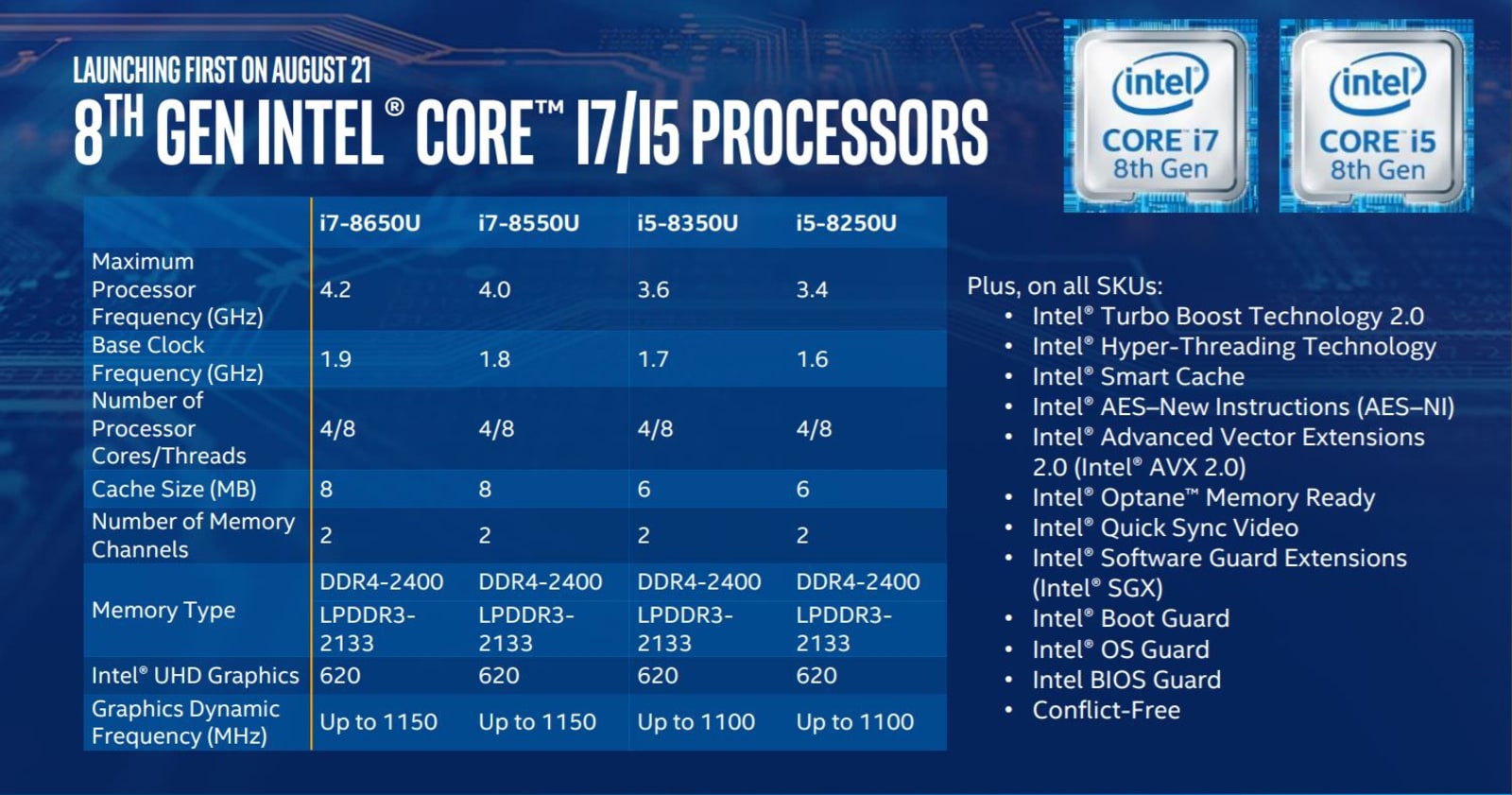
The eighth-generation Core family for ultraportables ranges from the i5-8250U, with speeds between 1.6GHz and 3.4GHz, and the i7-8650U, clocking from 1.9GHz to 4.2GHz. They’re all quad-core chips, but as usual, you can expect better performance from the i7 lineup.
As for other notable stats, Intel claims the 8250U can encode a 4K video 14.7 times faster than a five-year-old PC running a comparable chip. In real-world terms, the eighth-gen chip converted the 4K clip in three minutes, compared with 45 minutes with its third-gen sibling. Unsurprisingly, then, the older your computer is, the bigger performance jump you’ll notice.
Despite having more power under the hood, Intel says the new CPUs won’t be a step backward when it comes to battery life. Unfortunately, there’s nothing really pushing battery life forward, either. Its current benchmarks indicate that laptops running these chips should feature around 10 hours of battery life when playing 4K video. That’s pretty much the same as before. To be fair, though, last year’s chips also reclaimed some battery life with more efficient 4K performance.
Intel is basically following through with its typical game plan: Release a new batch of chips for ultraportables, and then ramp things up on the desktop end. With quad-core performance, we might finally be able to see ultraportable notebooks that can go toe-to-toe with last year’s beefier machines. And the company continues to look ahead; during a private briefing, I got a chance to see a few device prototypes that looked nothing like PCs we have today. I can’t say much about them, but overall, they made it clear that Intel isn’t just planning to coast on traditional PCs forever.
You can expect the first batch of laptops with eighth-generation Intel CPUs in September. Desktop models will follow later in the fall. Looking ahead even further into next year, the company expects to release its first 10-nanometer chips as part of this generation as well.
HTC cuts the Vive VR headset’s price to $599
You knew HTC wouldn’t let the Oculus Rift’s price cut go unanswered for long. As of today, HTC has permanently lowered the price of the Vive headset by $200, to $599/£599. That’s still $100 more than you’d pay for a Rift/Touch combo, but it’s far easier to swallow than before and might keep HTC’s approach to room-scale VR under your consideration. As before, you get trial access to the Viveport monthly app subscription service as well as free titles like Everest VR and Google’s Tilt Brush.
The company tells us this isn’t about clearing inventory, so this isn’t an indication of how well the Vive is selling. It’s strictly a competitive move, in other words, and it’s probably not an indication of new Vive hardware on the horizon.
It’s hard to imagine HTC not cutting the price of the Vive — there was no way people were going to pay $300 more than Oculus’ setup for a comparable experience. Even so, it’s a significant moment for high-end VR. Neither the Vive nor the Rift is what you’d call an impulse purchase after all this (that may have to wait until $200 wireless headsets), but they might now be inexpensive enough that they’re treated less as novelties and more as mainstream (if still costly) peripherals.
Source: Vive
FBI reportedly advising companies to ditch Kaspersky apps
Kaspersky Lab’s tussle with the US government could have ramifications for its dealings with the private sector. A new report claims the FBI has been meeting with companies to warn them of the threat posed by the cybersecurity firm. The briefings are the latest chapter in an ongoing saga concerning the use of Kaspersky’s products by government agencies. Officials claim the company is a Russian stooge that can’t be trusted with protecting America’s critical infrastructure. The company denies these claims — its CEO Eugene Kaspersky has even offered up its source code in a bid to clear his firm’s name.
It appears that olive branch went unnoticed. Throughout the year, the FBI has been meeting with US firms to convince them to remove Kaspersky Lab’s tools from their systems, according to officials that spoke to CyberScoop. In view of the cyberattacks that crippled Ukraine’s power grid in 2016, the FBI has reportedly focussed its briefings on companies in the energy sector. Although, it has also supposedly met with major tech firms too.
The law enforcement agency has apparently been sharing its threat assessment with the companies, including Kaspersky Lab’s alleged deep ties with Russian intelligence. However, the meetings have reportedly yielded mixed results. Whereas firms in the energy sector have been quick to cooperate, tech giants have resisted taking swift action, claims CyberScoop.
The revelations follow a wave of allegations against Kaspersky Lab by the US government. As recently as June, a draft version of a Senate bill proposed barring the Defense Department from doing business with the company. Then, in July, a Congressional panel ordered multiple government agencies to hand over their documents and communications about the cybersecurity software provider.
In a statement released last month, the firm said: “Kaspersky Lab, and its executives, do not have inappropriate ties with any government.” It’s a stance the company has reiterated multiple times to no avail.
Source: CyberScoop
Replacement screens can be used to hijack your phone
A new study has shown that one of the most common fixes to a stock smartphone ailment can be used to steal your data, and compromise your device. In the newly published paper, researchers from Israel’s Ben-Gurion University of the Negev reveal how a replacement screen can easily be altered to override your mobile. By embedding a malicious integrated chip within a third-party touchscreen, the research team were able to manipulate the communications system on a Huawei Nexus 6P and LG G Pad 7.0. This essentially allowed them to record keyboard inputs, snap pictures of the user and forward them via email, install apps, and direct the user to phishing websites. A second class of attack also saw them exploit vulnerabilities in the handset’s operating system kernel.
Scariest of all, the researchers claim these hazardous screens can be made to look identical to the real thing — meaning even handset technicians may not be able to distinguish the difference. Furthermore, the entire process is file-less, allowing it to go undetected by anti-virus software.
This type of low-cost attack is known as the “chip-in-the-middle” scenario. To carry out their malicious tasks, the researchers used an Arduino platform running on an ATmega328 micro-controller module. They also used an STM32L432 micro-controller, adding that most other micro-controllers could also do the job. They then used a hot air blower to separate the touchscreen controller from the main assembly boards, in order to access its copper pads. Next, they soldered a copper wire to attach their chips to the device.
Although this set-up looks far from inconspicuous, the team claims a little more effort could easily hide the altered part within a reassembled device. It’s not just Android phones that are at risk either. The paper also indicates that iPhones could fall prey to the same types of attacks.
Source: Yossi Oren
Watch the ‘Uneekbot’ shoe-making robot stitch sandals on demand
When Portland, Oregon-based Keen Footwear introduced its Uneek sandal back in 2015, the outdoor industry sat up and took notice. The entire shoe is held together by a single cord that weaves its way through both the sole and a lightweight upper. It looks as unique as its offbeat construction.
So, when the company searched for ways to push the Uneek brand in new directions, it knew it had to come with something as original as the shoe itself. It found exactly what it was looking for in the form of the Uneekbot, a specially developed robot capable of building custom versions of the sandal, anytime or anywhere.
The world’s smallest shoe factory
Developed in conjunction with a company called the House of Design — which specializes in making one-of-a-kind automation solutions — the Uneekbot has been dubbed “the world’s smallest shoe factory.” The system consists of two robotic arms, several custom fixtures, and a tablet which serves as the robot’s controller, allowing users to start and stop the shoemaking process or input important variables.
When activated, the two arms work together to create a custom pair of Uneek sandals, automatically selecting the proper colored cord before seamlessly weaving it through the shoe’s other components. In fact, on its fastest setting, the robot completes its task in just six minutes, which is roughly half the time it takes someone to accomplish the same work by hand. The shoe is then handed off to an actual human, who checks the Uneekbot’s work for quality control and finishes the last few steps of its construction.
“The Uneekbot’s hardware consists of off-the-shelf products that can be purchased online, but it’s the software — created by House of Design — that makes it special,” said Rory Fuerst, Jr., Keen’s director of innovation, to Digital Trends. “Everyone else told me it wasn’t possible to create a robot that could do what we wanted but the team at House of Design simply went to work developing the code to make it happen.”
The sandal-making robot hits the road
The result was a portable shoe factory that can go just about anywhere, allowing Keen to take the Uneek story on the road. The system first made its debut at the Outdoor Retailer gear show in Salt Lake City last August and has since traveled to sports shows in Friedrichshafen and Munich, Germany.
Everyone else told me it wasn’t possible to create a robot that could do what we wanted.
Recently, the robot appeared in Tokyo — where the Uneek shoes are in high demand — which, coupled with the Japanese obsession with robots, made the device a popular attraction for those who saw it in action. Crowds gathered around Keen’s pop-up Uneekbot Factory Store in the city’s fashionable Bank Gallery building just to watch the robot go about its work.
“The Uneekbot is really a great way to showcase what we’re trying to accomplish here in Japan,” Naoji Takeda told us — he’s Keen’s manager in Japan and witnessed the brand’s growth first-hand following the introduction of the Uneek sandal. “It not only allows us to deliver custom made shoes in under 30 minutes but it brings the manufacturing process closer to the consumer, making it much more environmentally friendly, too.”
An eye on the environment
Like much of the outdoor industry, Keen’s interested in reducing its carbon footprint whenever and wherever possible. The Uneekbot helps accomplish this by eliminating excess waste and dramatically reducing the time required to create a single shoe. It also eliminates fossil fuel emissions (and costs) associated with shipping footwear to the consumer. In fact, Takeda says the raw materials required to create eight shoes using the robot ship in a single shoe box. Customers simply fill out a form selecting the size and color of their shoe and in 30 minutes, they can grab them on their way home.
“Uneekbot is a bakery,” he said. “The robot is an oven and we make exactly what we sell.”
While the robot is fast and efficient at making shoes, don’t expect for it to take over Keen’s entire production line. In order to maintain current levels of output, a completely robotic workforce simply isn’t economically feasible right now. Still, the company continues to look for ways to improve that process and Uneekbot is a great proof of concept of what the future looks like.
In the meantime, the little robot continues its world tour. After wrapping up its stay in the Bank Gallery, it then headed to the men’s fashion outlet Beams Harajuku before proceeding on to Outdoor Retailer once again. All in a day’s work for Keen and the Uneekbot, which continue to redefine what is possible for the shoe industry.
 AIVAnet