


Android O features you’ll love: Background execution limits

Android O keeps apps under control when you’re not actively using them.
Your Android phone will let you do many things at once, even though all of them might not be on your screen. Besides system processes that can do things like checking your location or seeing if you have any new email, apps can be opened and then be left to run in the background while we are doing something else.
A good example would be when you open your favorite music player and cue up a playlist to listen to while you check out Facebook or do a little web browsing. The music app is running in the background, doing its thing while you’re looking at something else.
But some apps can be sent completely to the background. In our example of Android O’s Background execution limits, the music player is not on the screen and running as a background app, but it’s still interacting with us and playing music. Other apps that we’ve opened and switched away from should be treated differently because we’re not doing anything with them.
This can have an effect on the limited resources of your phone. Apps running can use RAM and take processing time away from other apps that need a turn or even the app you’re currently using in the foreground (what you see on your screen.) While Android has always had some restrictions on what an app can do while it’s not on your screen, Android O brings smarter limitations to help conserve system resources and battery life by determining when an app is really in the background and can be idle, then keeping it quiet but ready for when you want to use it again.
While this video is Android Nougat specific, it does a great job explaining how background services can affect the apps you’re actively using and ways to keep things in check.
What’s new or changed in Android O
- Background Service Limitations. The system now does a few routine checks to see if an app can be considered as being in the background. It checks to see that the app or any of the activities (things an app can do or initiate) aren’t visible on the screen. It then checks to see if another app is connected to it or uses any information from it, and finally, it checks for a few high-priority services like being able to act as a keyboard or if it is actively listening for voice input.
If none of these things are true the app is considered as running in the background. When an app is first considered to be in the background, it has a short window where it’s allowed to do its thing in case it needs to start something that would move it to a foreground app or service. Once that time is over the app is forced to be idle. Idle apps are also given short windows periodically in case they need to connect or start services, but other than those times it sits and uses very little resources until we switch back to it.
- Broadcast Limitations. Broadcasts are done by the system when specific events happen. When you switch your phone in and out of Airplane Mode, for example, a broadcast is sent to let apps know what happened. Developers can set up their apps to listen for specific broadcasts and write code so the apps do something when they happen. If an app is listening for broadcasts, every time one is sent the app uses system resources to see if any action is needed.
Apps built for Android O can no longer register to listen for broadcast messages that don’t directly target the app itself unless they are started and running (not in the background according to the rules above). These changes started with Android N, and changes in O are a bit more strict. Because this could limit what a developer might want to do, new tools to schedule specific jobs using their own apps processes have been developed. There are also a few broadcasts exempt from all of this, like when the time zone changes or the phone was plugged into the charger. Every app can listen for those, and react accordingly.
By limiting how an app can listen and what it can listen for, apps that have been designated as being in the background won’t wake up to see if they need to do anything as often. “Sleeping” apps use far fewer resources.
Why you’ll love it
We want our phones to do a lot of things. But no matter what we’re asking it to do, while we are looking at the screen we expect things to be smooth and responsive.
We’ve all felt the frustration that comes with keyboard lag once in a while, and it’s not a good experience. By keeping a tighter leash on the apps we’re not looking at, memory, processing power, and battery life is used more efficiently and we’ll see less of things like keyboard lag. The end user — that’s us! — doesn’t have to do anything here because these changes are part of the system. Even better, older apps that weren’t built with Android O in mind can be set to follow these rules from the apps setting page.
Changes like this get combined with the great hardware we see every year and mean your phone can do the things you ask of it even better!
Android O
- Everything new in Android O
- Should you put Android O on your phone?
- How to get the Android O Beta on your Pixel or Nexus
- Join the Discussion
Celebrate the eclipse with this dark-as-night theme pack!

Some themes are beautiful, some themes are functional, and dark themes are both.
Dark themes are more than an expression of taste and emotion. On devices using AMOLED displays, dark themes can help you save a little bit of battery. Because on AMOLED screens, true, hex black #000000 is displayed by turning off the pixel completely. The more black on an AMOLED screen, the fewer pixels being powered and lit. Now, some apps have AMOLED black themes. Some phones have AMOLED black system themes, like the Samsung Galaxy S8, and if they’re available for your phone, that is excellent.
For the rest of us, there’s always dark home screen themes, which are an excellent exercise in balance, minimalism, and Android ingenuity.
Come to the dark side!
Wallpapers

Batman Beyond was the first Batman show I regularly watched as a kid. He’ll always hold a special place in the Batcave of my heart. And this background of Terry McGinnis in the darkness of Gotham, only visible by his bright red bat symbol and two white, dangerous eyes makes me wanna curl up on the couch and watch a few seasons.
Batman Beyond AMOLED wallpaper
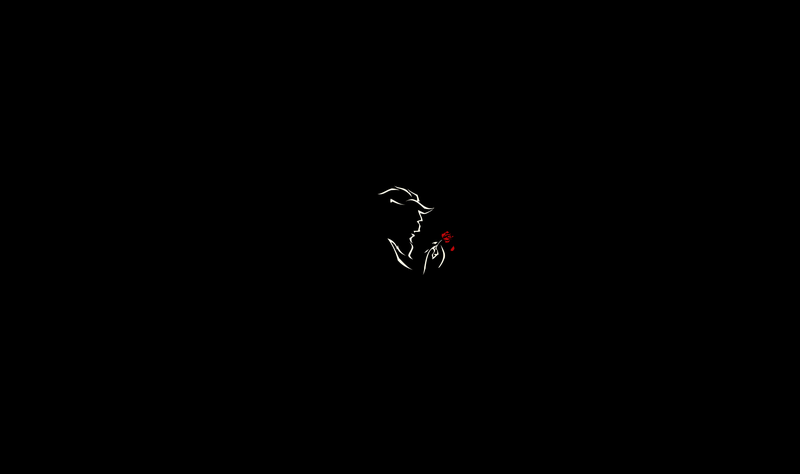
This Beauty and the Beast Minimalist Wallpaper by chrisaloo is proof that sometimes less is more, and it also adds an air of refinement to the often drab world of AMOLED themes. We’ve had to tweak the color balance and exposure on this wallpaper slightly to ensure that it’s turning on as few pixels as it can, but it’s worth it for a wallpaper that conserves energy while inspiring enchantment.
Beauty and the Beast Minimalist Wallpaper by chrisaloo (modified for AMOLED)

Tron is a franchise that was made for dark themes, with the lights of a lightcycle and its rider cutting across the home screen and the abyss of the grid with precision and power. This is another wallpaper we’ve featured before, any it’s also a wallpaper that needed its levels tweaked, both to make it AMOLED black and to better match the icon pack to come.
Tron Lightcycle (modified for AMOLED)

If you want as few pixels as possible turned on, then you’re going to want a completely, 100% Hex Black wallpaper. It’s not showy, it’s not stylish, but it is black as the abyss and it is ready to apply to your home screen.
Black Hex Wallpaper by Siege36
How to apply your wallpaper
Long-press an open space on your home screen.
Tap Wallpapers.
Tap Pick image.


Select your downloaded wallpaper.
Make sure your image is centered on the screen to your liking.
Tap Set wallpaper.


Icon packs

There are a lot of white icon packs out there, but few have the style and the sheer number of supported icons as Whicons by Randle. Whicons will light up more pixels than the next icon packs, but I’m willing to take that for two reasons. First, there are far fewer holes in my app drawer with Whicons. Second, I find that Whicons are easier to recognize, especially on first glance, which means I can open my app and get done to turn off my screen that much quicker. If you really, really want to fire fewer pixels with Whicons, consider turning down the icon scale on your launcher to shrink your icons down.
Also, Whicons just goes better with the Batman Beyond and Beauty and the Beast wallpapers.
Whicons by Randle

Want to get clean icons with as few pixels lit as possible? You need Lines, an icon pack that consists of outlines. Lines is one of the most popular packs on Google Play, but even for its popularity and pedigree (Lines has been around for a long time), it isn’t without faults. The pack’s mask for unthemed icons is paltry, and a number of system and Google icons included in the pack are vintage, to put it nicely. But if you want as few pixels lit as possible, it’s hard to beat the thin white Lines icon pack.
Lines by Nate Wren Design

For our Tron theme, we of course need some icon from The Grid. This icon pack is a variant of Lines, but with a blue glow and subtle reflection for depth. As with Lines, it’s got some older icons for some Google apps, and there’s bound to be a few holes in your app drawer, but you should be able to fill your dock with beautiful, electric blue icons.
The Grid by Nate Wren Design
How to apply an icon pack
Open your desired icon pack.
Tap Apply (the icon with the arrow in it).


Tap your launcher.
Tap OK or Apply, depending on your launcher.


If your launcher isn’t listed in step 4, your launcher might not be supported. Check the icon pack settings in your specific launcher, and if your launcher isn’t supported, consider using another launcher.
How to apply an individual icon
Long-press an icon you wish to change.
Tap Edit.
Tap the icon window to change the icon.


Select your desired icon pack.
Tap the open app icon in the top right corner of the screen to enter the pack’s icon picker. It’s hard to see the white icon on the white bar for Whicons, but it is there.
Search for the app icon you wish to use using the search bar at the top of the screen.


Tap your desired icon.
Tap Done.


Widgets and why we’re not using them
Now, this is normally where we’d get widget-happy, but we’re not going to do that today. See, most AMOLED black themes are designed to light up as few pixels as possible, and widgets will light up pixels for little or no real benefit. If we want to see the weather, we can open our favorite weather app or just ask Google Assistant. If we want to control our music, we can swipe down and use the notification.
If you have a widget you absolutely get a lot of use out of, feel free to use it. After all this is your home screen. In the spirit of AMOLED minimalism, however, we’re leaving them out of the guide.
Folders, app drawers and gestures
Now, in lieu of going overboard with widgets, we’re going to tweak our home screen launchers in order to get maximum usefulness out of minimum pixels. There’s a number of ways we can do this:
- Remove widgets and the Google Search bar, should your launcher allow it. Search bars can look great when themed properly, but why have it taking up space when you can get to Google by simply long-pressing the home button?
- Use gesture shortcuts to replace app shortcuts on your home screen. Same functionality, zero extra pixels.
- Some launchers allow you to turn off the status bar on the home screen, blanking out a few more pixels. I personally prefer seeing the status bar so that I don’t use a clock widget to see the time, but to each their own.
- We can turn off the transparent white dock overlay that was applied with the Pixel style on some launchers like Action Launcher and Nova Launcher These overlays are under Dock settings and are easily disabled.
Home screen folders and how to theme them
Home screen folders can help you squeeze more icons into your home screen without turning it into a sea of icons, allowing you to keep your apps closeby and organized while keeping fewer pixels turned on at a time. By tinting your folder background black, you can actually turn off some pixels on both the folder icon and when you open the folder itself.
Open Nova Settings.
Tap Folders.
Tap Folder background.


Tap Pixel Launcher.
Under Window, tap Backgrounds.

Drag the Transparency at the bottom of the window to 0%.
Tap Black.


Here’s how to theme your folder in Action Launcher.
Open Action Settings.
Tap Quicktheme.
Tap Folder icon background.


Tap Black.
Tap OK.
Tap Folder & Shutter background.
Tap Black.
Tap OK.


Actually, while you’re in that Quicktheme menu, you can pretty well black out your launcher by just going down the whole menu and setting everything to Black.
How far will you go?

There’s ways to get a dark theme down to absolute minimum pixels. Some users have completely replaced their on-screen app shortcuts with gesture shortcuts so their home screen is pure black. Some forgo app shortcuts altogether and just search for apps as needed. Some of us are willing to turn on a few extra pixels for some personality in our AMOLED theme. It depends on your level of creativity and devotion.
So… how far are you willing to take a dark theme?
Pick up a Fire Tablet for as little as $40 right now
Our friends at Thrifter are back again, this time with a great deal on Amazon’s Fire tablets!
Amazon’s Fire Tablets have become far more popular in recent years, and it’s for a good reason. These tablets pack some great specs into a truly affordable package, and right now they are even more affordable. Amazon is offering $10 off its entry-level 7-inch Fire Tablet with 8GB of storage, dropping the price down to just $39.99. You can grab the 16GB version for $59.99, or jump up to the 8-inch tablet with 16GB of storage for the same price.
These price drops are all on the latest generation of Fire Tablets, which are thinner and lighter than the previous ones, and have a more durable display.

- Beautiful 7″ IPS display with higher contrast and sharper text, a 1.3 GHz quad-core processor, and up to 8 hours of battery life. 8 or 16 GB of internal storage and a microSD slot for up to 256 GB of expandable storage.
- Now with Alexa, for quick access to the information and entertainment you want. Ask questions, play music, check your calendar, get the news, weather, and more – just press the home button and ask.
- Enjoy millions of movies, TV shows, songs, Kindle eBooks, apps and games – including Netflix, Facebook, HBO, Spotify, and more
- Prime members get unlimited access to over a thousand books and magazines, millions of songs, and thousands of movies and TV episodes – at no additional cost
- Watch downloaded videos anywhere with a Prime membership, Netflix plan, or Showtime subscription
- Enhance your entertainment experience with features you only get from Amazon, including ASAP, X-Ray, On Deck, Blue Shade, and FreeTime Parental Controls
The internal storage on these is a bit low and fills up pretty quickly, but luckily you can easily add a microSD card and gain additional storage in just a few seconds.
If you aren’t looking for a full tablet, Amazon also has a bunch of its Kindle e-readers on sale right now so be sure to check them out!
See at Amazon
More from Thrifter
- How to save money while driving
- Tips for becoming an expert eBay seller
For more great deals be sure to check out our friends at Thrifter now!
Huawei Mate 9: Big, bold, and still beautiful nine months later

The Chinese company’s flagship smartphone is still a great buy, though the competition has vastly increased in the nine months since its debut.
Plenty can happen in nine months. A human baby gestates over the period of nine months, for example, or you can try to grow over four inches of hair. Nine months is also a good time to check in with a smartphone after its initial launch. That’s plenty of time for a device to effectively gestate within the general consumer populace.
It’s been nearly nine months since the Huawei Mate 9 launched globally. The phablet-sized device was Huawei’s great big flagship of last year. It was deemed fast, with its homemade system-on-a-chip, and it offered great battery life and solid camera performance by way of its dual-camera system. But how has it aged since its debut? Let’s check in with the Chinese company’s enormous smartphone and how it fares against the current crop of competition.

It’s big
Wide body against the narrow masses
Since the Mate 9’s launch, we’ve seen smartphones effectively shrink in size while still affording plenty of room for the screen. In that sense, the Mate 9 feels like it’s already aged eons, and while it may be nearly as slim as its rivals, it’s 5.9-inch 1080p display is big in comparison. Unlike the Samsung Galaxy S8 and LG G6’s elongated, narrow candy bar shape, the Mate 9 is like a mini-sized tablet. Though you might appreciate the extra bezel for holding the device and typing two-handed, that’s not the direction flagships are headed these days.
The Mate 9 feels like it’s already aged eons.
The Mate 9 has other features working in its favor, like a rear fingerprint sensor, which is easy to reach in spite of its larger size. You can customize it to work with a variety of gestures, too, and it’s still faster to use than the Galaxy S8’s fingerprint sensor.
I like the Mate 9’s display, even if it is merely an IPS LCD, compared to the Porsche Design variant’s vibrant AMOLED display. I also like its beefy audio capabilities; the phone has a dual-speaker setup so that you can hear its strength even through Snapchat or Instagram Stories. It’s excellent for podcasts, though it’s still a bit tinny when you playback music at the highest volume. But it broadcasts better than the Pixel.
You might actually appreciate the Mate 9’s bezels in this newly bezel-less world.
On the inside, the Mate 9 runs on Huawei’s homemade Kirin 960 processor, which you can now also find in the Huawei P10 and Honor 9. At the time of the Mate 9’s launch, it was the first mass-market chip to use ARM’s new Cortex-A73 design, though now you can find a modified version of it powering the Snapdragon 835. The Kirin 960 is speedy, and with 4GB of RAM, the Mate 9 moves swimmingly through gameplay and processor-intensive apps. I can’t believe it’s not a Snapdragon, and that’s the point, isn’t it?
As for the Mate 9’s 4000mAh battery — it must be the way that I’m using it because I’ve had to plug in this phone every other day since I switched back to it. But I will say that I’ve had some major issues with the Android O developer preview on my Pixel XL, so the Mate 9 has been a surefire Godsend. I can keep the screen on while waiting for my Lyft and watch YouTube TV on the ride home without fear of killing off what little battery I have left. I expected better standby time with the massive pack, but it’s vastly better than what the Pixel’s been offering me.

EMUI has never looked better
Not the Android you’re typically used to
You’ve likely heard us echo it through the Android Central hallways: Huawei’s software has long been its Achilles’ heel, at least until EMUI 5.0 based on Android 7.0 Nougat showed up. It’s what the Mate 9 is running right now, and it looks good, though some of its features won’t be available if you decide to employ another launcher, like App Twin.
We’ve since seen EMUI 5.1 hit the market months after the Mate 9’s debut, so it’s weird not to have the software update yet. There are plenty of threads pointing to its existence, but nothing is confirmed for the Mate 9.

Different flavors of Android.
So what kind of Android are you getting with the Mate 9? You’re getting a darker color scheme, default apps like the dialer and messaging app that aren’t Google’s, and Amazon Alexa (it was added on in a software update earlier this year). You’re also getting the option for an application drawer, which wasn’t a feature available on Huawei-made phones before, as well as themes and a vastly different notification shade. It’s not as clean as the interface you’d find on the Google Pixel or even Samsung’s revamped Galaxy interface, but it has features you’ve used before, like a night mode and multi-window mode. You can also use add-on features like the aforementioned App Twin to clone Facebook and WhatsApp and use two accounts at a time.
Fortunately, Android has this way about it that lets you customize things to your liking. I enjoy using the Mate 9 with the Evie Launcher, for instance, which lets me choose my icon pack. There are other methods you can use to get into the nitty gritty of the interface, too, if you abhor it. But I don’t mind the experience of using the phone as long as I’ve got another launcher to spruce it up.

Powered by Leica
A great set of rear-facing cameras
Huawei’s long been a partner with camera maker Leica, and the German company has once again exerted its influence over the Mate 9’s rear-facing cameras. This phone comes equipped with dual 20-megapixel and 12-megapixel cameras. The former focuses on monochrome and the latter hones in on color. Together, they have a symbiotic relationship with the goal of getting you the best shot.


Huawei Mate 9 camera samples.
There’s little information on what’s happening with software updates.
The dual-lens, dual-sensor setup is efficient at capturing the mood, even if does tend to overexpose bright and sunny shots. I loved tinkering around with the wide-aperture mode turned on, and though the Mate 9’s primary camera aperture doesn’t go as low as the competition, it makes up for it with the aid of optical image stabilization. OIS still isn’t a guarantee for most mobile phones.
The Mate 9’s dual cameras also help make it capable of bokeh-like “portrait” effects. It’s an impressive shooter in well-lit scenic panorama situations, too, though some scenes will look drowned out when it’s overcast. You can also choose between three different color modes, including one that helps the colors pop up in an otherwise dull setting. Conversely, it can also overdo the adjustments and contribute to an overly processed photo. Pictures taken at dusk also have a tendency to come out grainy. Still, I love shooting with the Mate 9, though it’s nothing compared to the shots I’ve managed with the Pixel XL.

Nine months later
Mate 9 is a worthy phone with too much competition
I’ve received plenty of queries asking about Android-powered smartphones that are under $500. If you’re on a network like AT&T or T-Mobile and you’re looking for an unlocked, global device that’s different than the status quo, the Mate 9 is a great deal. In addition to its giant 4000mAh battery — which, hey, will get you through a day and a half of average use without a charge — it has an impressive dual-camera setup and a beautiful 5.9-inch screen. I like its wider body, too, as it’s easier to handle and multitask with than some of the newer, all-glass devices hitting the market.

Perhaps the only caveat to the Mate 9 is that there’s little information on what’s happening with software updates. We’re still wondering: when is EMUI 5.1 making its way over to the device? I should also note that the Mate 9 in my possession is stuck on the Android security patch from April 5, 2017. And I’m not alone, as I discovered in our forums.
Nine months on and there is already a host of smartphones worth the cash over the Huawei Mate 9. With the deals going on right now for Samsung and LG’s flagship devices, you may wonder whether it’s worth grabbing one of these at its current price of $450. The answer is yes, particularly if you’re looking for a wide-bodied, unlocked phone to last you several trips around the earth. But there’s no reason to choose this particular device over any other. If you can spare the extra cash, about $150 will net you one of the latest flagships on sale or you can nab a year-old device like the Google Pixel at a much cheaper price. Or if you’d rather stick with the Huawei family, don’t forget the Honor 9 is now available at Amazon.
See at Amazon
Moto X4 comes into focus in clearest set of leaks yet
The Moto X4 has been shown off in another round of images on Google+.
The Motorola Moto X4 has been teased a few times already, and we have a new round of images and some information courtesy of Google+ user Jerry Yin. The phone looks just like it did in the other leaks, from the pill-shaped fingerprint sensor to the dual cameras on the back of the device.


The image shows the display lit up, and the software looks like Motorola’s clean take on Android we’ve come to know and love. Yin discussed the specifications in the comments, and says the device will be powered by the Qualcomm Snapdragon 630, rather than the Snapdragon 660 that earlier leaks suggested. The display will be an LCD panel, rather than the AMOLED panels found on the more expensive Moto Z line. AMOLED panels have the advantage of being able to turn on select pixels, while LCD panels light up the entire display, even for fully black pixels. This means an LCD panel will — in theory — use more battery power for Moto Display.
Not corroborated (at least, not yet) in the comments was carrier availability for the device. The Moto X4 is rumored to be able to work on Google’s Project Fi service, which would make it the first non-Google phone to officially work on the service. That would also provide a critical mid-range option as Nexus 5X and 6P users look to replace their devices. As nice as the Pixels are, they’re also a few hundred dollars more expensive than the last Nexus phones were. If the Moto X4 worked with Project Fi, that would be a nice, mid-range option for Fi users.
Are you interested in the Moto X4? Let us know down below!
Amazon’s 1-day sale on blasters proves today is Nerf or Nothin’
Our friends at Thrifter are back again, so put down the game controller and shoot some blasters in real life!
When I was a kid the best Nerf blaster you could get was the equivalent of a Revolutionary War musket. It fired one ball at a time, not very far, and not very accurately. These days Nerf guns have enough firepower to start an international incident in your living room or workplace, and Amazon has taken to gun-running with a huge sale on Nerf ball and dart blasters. These prices expire at the end of the day.

Here’s a breakdown of some of the guns on sale:
- Rival Khaos MXVI-4000 Blaster for $33 (from $47) – This is the lowest price ever on this blaster, which has only dropped below $47 once before in the last year.
- Rival Apollo XV-700 for $13 (from $20) –
This is the lowest price ever on this blaster. - N-Strike Elite Retaliator Blaster for $19 (from $25) – This is the lowest price on this blaster since last year’s Black Friday sales.
- N-Strike Elite Stockade Blaster for $23 (from $31) – This is the lowest price in more than a year, beating last year’s Black Friday prices.
- 75 Darts for N-Strike Elite blasters for $9 (from $12)
- 100 Balls refill for Rival blasters for $18 (from $24.49) – Everyone knows the worst part about Nerf blasters is chasing down your expended ammunition. Buy these and you can stay safe behind your overturned table while your friend risks everything for one more dart.
- Lazer Tag Phoenix LTX for $48 (from $64) – For the sophisticated Nerf user who doesn’t need balls or darts. This 2-player laser tag system is at its lowest price ever.
All of these guns have great user reviews on Amazon. The Rival Apollo has 4.3 stars based on more than 360 reviews, for example. Check out the full list for more Nerf guns:
See at Amazon
More from Thrifter:
- How to get the most out of your Amazon Prime membership
- How to save money when driving
For more great deals be sure to check out our friends at Thrifter now!
Kickstarter commemorates Voyager with projects celebrating humanity
Forty years ago, the two Voyager probes were launched and to honor the anniversary, Kickstarter has created Projects of Earth — a group of campaigns inspired by the Voyager’s Golden Record that offer “unique perspectives on humanity, culture and life on Earth.” All of the projects will be launched between August 20th and September 5th — the two dates of each of the Voyager probe launches — and like the Golden Record, are meant to capture a portrait of our world as it exists today.

One of the projects included in the collection is a reflective sculpture created by artist Trevor Paglen in collaboration with the Nevada Museum of Art. The plan is to launch it into orbit around Earth where it will be visible in the night sky and exist as the only purely artistic satellite. Another project features a sequel to the Golden Record led by Jon Lomberg, the design director of the original. He wants to persuade NASA to upload it onto the New Horizons spacecraft. The PLANETS Foundation has a campaign for a new kind of telescope made with 16 five-meter mirrors in a ring that will be used to search for life on exoplanets. Other projects include documentaries, murals, digital paintings, a rover, a really cool lamp and eclipse-focused photography.

Some projects are up now and others will roll out over the next two weeks. You can find them all here.
Images: [Kickstarter/Trevor Paglen/Nevada Museum of Art] [Kickstarter/Bobby Genalo]
Source: Kickstarter
UK says online hate crime is as serious as offline offences
The UK’s Crown Prosecution Service (CPS) today laid out a renewed commitment to tackling hate crime, including making sure that online offences are being dealt with appropriately. In its public statements, the CPS affirmed that cases of digital hate crime will be treated “with same robust and proactive approach used with offline offending,” and that there is no difference in the serious of such crimes.
The CPS announcement is particularly topical in light of the recent violence in Charlottesville in the US, and is part of a bigger-picture government push to address hate crime that began last summer. The CPS explains that its job isn’t just to pursue online instances, but to understand the potential for hate crime on social media and be aware of the different community policies and takedown procedures across platforms.
The CPS also considers the impact of hate crimes on the wider community as well as the individual, and recognises the importance of identifying “amplifiers or disseminators,” aka retweeters and sharers, as well as the original poster. Finally, it’s also important to note that children spouting inconsiderate remarks “may not appreciate the potential harm and seriousness of their communications.”
One of the roles of the CPS is to advise law enforcement and criminal prosecutors on how to approach certain cases and offences. Last year, the CPS updated guidelines to reflect the potential for social media and the internet in general to be forums for bullying, trolling and other types of harassment. These guidelines, including prosecution advice for hate crimes, are updated regularly.
The public statements issued today aren’t quite the same thing. Online hate crimes aren’t only now being considered serious offences and subject to prosecution. Public statements communicate intent, showing that the CPS considers hate crime a priority — particularly considering prosecutions of these offences are at an all-time high — and a policy area that demands specific attention.
These statements also serve as a warning of sorts — the message for potential offenders being your online activity doesn’t fall outside the scope of the law. It’s also a call for victims to report any and all forms of hate crime. Just because it happened on Facebook doesn’t make it any less serious an offence.
Source: Crown Prosecution Service
The solar eclipse hype is annoying, but the event is worth it
By now, it’s possible that you are completely fatigued by the August 21st total solar eclipse and all the media hype surrounding it — and it hasn’t even happened yet. It seems as though every outlet is talking nonstop about this event. But this actually is a big deal, which is why it’s gotten so much coverage. Let us break it down for you; this is one of those rare cases where the actual event is worth all the hype around it.
Total solar eclipses occur when the moon moves between our planet and the sun, and our satellite casts its shadow on the Earth. The moon appears to fully block out the sun, which only happens because of a remarkable coincidence. The moon is 400 times smaller than the sun, but the sun’s distance from us is 400 times that of the Earth to the Moon, so they appear to be the same size in our sky. Therefore, during a total solar eclipse, the moon completely blocks out the sun and the star’s corona (the surrounding halo) is visible. These events don’t occur often; they happen roughly every one and a half years somewhere on Earth (often in difficult-to-reach places such as the middle of an ocean or Antarctica). But it’s usually rare to see them more than once in the same location in a short period of time.
There hasn’t been a total solar eclipse viewable from the continental United States since the 1970s. An event on February 26th, 1979 covered Washington, Oregon, Idaho, Montana and North Dakota, but it was a pretty cloudy day. The last eclipse most people remember seeing was on March 3rd, 1970. The path of totality (or where the moon fully covers the sun) traveled up the Eastern seaboard of the United States, from Florida through Virginia.

But why has this solar eclipse gotten so much coverage? There are a few reasons. First, it hasn’t happened in 40 years in the US. That alone is enough to get people excited. Second, it travels a path that barrels across the country, from Oregon to South Carolina. Third, what happens during a total solar eclipse is, quite frankly, cool. As the moon begins to cover the sun, the star will become a crescent. You can watch this process through eclipse glasses (do not try to watch through sunglasses or unprotected eyes).
It takes a long time, about an hour and a half, for the moon to fully obscure the sun, but when it does, you’ll experience totality. Day will instantly become night, as if a curtain has dropped over the Earth. The temperature will drop 10 to 15 degrees F. The stars and planets will come out. Animals and insects will act as though night has come. The sun’s corona (the fiery halo around the star) will be visible to the naked eye. It will only last for roughly two minutes, but it’s such an incredible, once-in-a-lifetime experience that people have taken to chasing solar eclipses all around the world. This one just happens to be right in our backyard.
If you’re reading this and lamenting the fact that you won’t be in the path of totality during the 2017 eclipse, never fear. There’s another total solar eclipse occurring in the US on April 8th, 2024. (This explains why so many of us are amused that people have taken to calling this “The Eclipse of the Century” and “The Great American Eclipse. No, it’s really not.) It will cut a narrower arc across the country, traveling from Texas to New Hampshire. This will be just as spectacular of an event, and totality will last a bit longer that time around (four minutes at its peak). After that, you’ll have to wait until 2045 for the next one to hit the US.

If you’re going to miss the 2024 eclipse as well but still want to see one, you’ll have to travel to the middle of the Pacific Ocean (July 2nd, 2019), Chile and Argentina (December 14th, 2020), or Antarctica (December 4th, 2021). After that, the next major total eclipse to travel over land will be on August 2nd, 2027, mainly over northern Africa.
If you aren’t in the path of totality, but still want to follow along with the 2017 eclipse, we have a guide on how to do just that. You may be able to view a partial eclipse from where you are (with proper glasses and filters, of course) or you can follow a livestream from one of many sources. The nonstop chatter surrounding the eclipse is a bit annoying, but even if the hype has made you jaded, it’s not worth missing this genuinely cool event.
Images: Getty Images (Solar eclipse); Jose Manuel Ribeiro / Reuters (Eclipse sequence)
‘Final Fantasy XV’ coming to PC early next year
Square Enix has milked Final Fantasy XV, offering not only PS4 and Xbox One console versions, but also a (bad) free mobile game, branded Sony Walkman and even a cookbook. What it doesn’t have yet, surprisingly, is a Windows version of the game, but that’s going to change soon. Final Fantasy XV Windows Edition is coming in early 2017, NVIDIA announced during its Gamescom press conference, and is of course loaded with NVIDIA tweaks and features.
Square Enix and NVIDIA didn’t say whether there’s any new material, but the game is bound too look good on Windows, thanks to Square Enix’s next-gen Luminous Engine and an alphabet soup of NVIDIA GeForce features. That includes NVIDIA Flow, Hairworks, ShadowWorks, Turf Effects and VXAO (voxel ambient occlusion), offering more realistic fluid and fire, hair and fur, shadow-casting, vegetation and light occlusion physics.
It’ll also support GeForce Experience sharing tech, along with NVIDIA Ansel, a screen-capture tool that lets you do in-game photography complete with filters, HDR, and 360-degree VR images. Finally, it’ll use NVIDIA’s ShadowPlay Highlights, letting you create highlights of the best action during gaming sesssion.
There’s no specific date, but the San Francisco Game Developers Conference (GDC) in March, 2018 seems a promising time frame. During NVIDIA’s press conference, director Hajime Tabata said Final Fantasy XV Windows Edition would be the highest quality version of the game yet, and it shows in the video below.
Source: NVIDIA
 AIVAnet