


The Morning After: Thursday, August 10th 2017
Today we’re looking at edible robot surgeons, EVs that will go (some) distance, and free apples. In-game ones, but still! Happy Thursday morning.
Revealed by the feds.
Here’s how Tesla’s long-range Model 3 covers 310 miles

A bunch of EPA certification documents have finally revealed that the long-range version of Tesla’s Model 3 is equipped with a 350-volt, 230-amp-hour battery pack. Of course, that’s the $44,000 version, so anyone sticking with the $35k base model will have a battery pack rated for 220 miles on a charge.
‘Innerspace’ was actually a documentary.
Edible robot surgeons will cure you from the inside out

In the near future, robots will no longer be cutting into us — from the outside, at least. Here’s a rundown of several edible robots in development to promote healing from within.
A reason to watch a news channel.Nintendo’s Switch news channel is giving away free ‘Zelda’ food

Free apples! Free meat!
Reminder: ‘Rez’ is one of the best games ever.‘Rez Infinite’ on PC and VR is pure digital nirvana

The debut of Rez on PCs ($25 on Steam and the Oculus Store) and in VR on the Oculus Rift and HTC Vive may be the purest expression of Rez so far.
But it will only go two-thirds as far, according to a spec sheet leak.
Nissan’s next Leaf will be $5,000 cheaper than the Model 3
Want a cheap EV and willing to settle for less range? You might choose the Nissan Leaf over the Chevy Bolt or Tesla Model 3. According to a (now pulled) leak on car-sales site Autobytel, as seen by our sister site Autoblog, the 2018 Nissan Leaf will cost $29,990 for the base model with a 40 kWh battery — $5,000 less than either the base Bolt or Model 3. With two-thirds the capacity of either model, however, the incoming Leaf will have a range significantly less than its rivals.
Lights out.NBC’s Seeso comedy streaming service will shut down later this year
The bad news is that Seeso is going away. The good news is that several originals, like HarmonQuest and MBMaM have already found a new home on another service called VRV. Taking on Netflix as a niche service isn’t easy — hopefully Disney is taking notes.
But wait, there’s more…
- How to get fired in the tech industry
- Amazon invests in Andy Rubin’s Essential phone project
- BMW’s i3 is a long-range concept car you can actually buy
- Acer’s latest Chromebook packs speed in a tiny rugged body
- Anker’s $35 Genie is a cheaper Echo Dot
Cassini will take five victory laps before plunging into Saturn
Over the past few months, Cassini took the closest pictures of Saturn’s rings we’ve ever seen that it was pretty easy to forget that the probe was nearing its end. It actually dove in and out of the rings to prepare for its poetic death, and now it’s down to its last orbits around the planet. On August 14th, 12:22 AM Eastern, Cassini will begin its final five passes over Saturn, going as close as 1,010 to 1,060 miles above the planet’s clouds to observe its auroras and finer features not visible from a higher altitude.
While that’s still far away from the planet’s surface, NASA expects the atmosphere there to be dense enough to require the use of the probe’s mini-rocket thrusters. Cassini’s ground team believe they can last the whole five passes, since they have experience navigating that kind of atmosphere from the probe’s close flybys of Titan. In case the atmosphere turns out denser than they expect, though, they’ll raise the probe’s altitude a bit to be safe.
During its final pass on September 11th, the probe will go near enough Titan for the moon’s gravity to slow down its orbit, bending its path and marking the beginning of its final days. Despite everything Cassini has done to enrich our knowledge of the second largest planet in our solar system, it’s running low on the rocket fuel used to adjust its course. Sending it plunging into Saturn on September 15th while all its instruments are working is better than leaving it in the vicinity to potentially complicate future missions. That means we can expect more images and data from the probe in the future — even after it’s done breaking up like a meteor on the planet’s surface.
Source: NASA JPL
Mayor of London promises public 4G on the Tube by 2019
Mayor of London Sadiq Khan has vowed to bring proper mobile connectivity to the London Underground, including platforms and tunnels, by 2019. It’s a promise that we’ve heard many times before, but this time it might actually happen because it’s tied to a crucial network upgrade for the emergency services. A trunked radio system called Airwave, owned by Motorola Solutions, is due to be switched off before 2020. It’ll be replaced by the Emergency Services Network (ESN), a 4G and 5G-ready service managed by EE. Khan’s hope is that the new infrastructure required for ESN can also be offered to commuter and tourists on the Underground.
“If we are to remain competitive in the global economy, we need to ensure every Londoner is able to access a fast and reliable digital connection,” Khan said. “That means working to boost connectivity across London – tackling not-spots, delivering connectivity in the London Underground and working with local authorities to provide digital infrastructure fitting of a global tech hub.” The new deadline will be hard to meet, however. As The Register reports, the UK Public Accounts Committee has warned the government about likely delays. Transport for London has also said it’s not “absolutely confident” it can make the January 2019 deadline. Oof.
Wi-Fi has been available on the London Underground since 2012. While useful, it’s only available on platforms and escalators — as soon as your train leaves the station, the connection drops and you have to wait until the next stop. Reliable and widely available 4G would solve the problem and also mitigate some of the demand inflicted on the WiFi network. With Airwave on borrowed time, the introduction of 4G is a matter of when, not if. The new Elizabeth Line, set to launch in December 2018, will have mobile connectivity off the bat. For the rest of the Tube network, however, it could be a long wait as EE and TfL sort out the emergency services first.
Vivaldi Web Browser 1.11 Brings Enhanced Reader Mode and Accessibility Features
Vivaldi web browser, the spiritual successor to Opera 12, reached version 1.11 on Thursday, bringing an improved Reader Mode, animation controls, and advanced accessibility features to the highly configurable Mac app.
Vivaldi, which claims to be the most customizable browser for power users, has quietly been carving its own niche in the desktop web browser market and now boasts over 1 million users. The browser is aimed at staunch technologists, heavy internet users, and previous Opera web browser users disgruntled by Opera’s transition to the Blink layout engine, which removed many popular features.

First up in v1.11, there are tweaks to Vivaldi’s existing Reader Mode, which offers a clutter-free reading environment by stripping off unwanted advertisements, videos and other distractions. Users can now adjust the settings at the top of the page they’re currently viewing in the Reader Mode, including the ability to choose the font type and size of the text, set the column width and line height, as well as select either dark or light background.

On top of those changes, Vivaldi’s custom Themes add another dimension, allowing users to choose their custom Theme and apply it to the Reader Mode. Custom Themes in Vivaldi also have programmatic support to enforce minimal contrast, which aims to make the browser more comfortable for people with visual impairments.
Elsewhere, Vivaldi now offers a simple way of turning off GIF animations, for people who react to flashing images and want to avoid them. Clicking on the Toggle Images icon in the Status Bar at the bottom of the screen reveals three options for loading animations – always, once or never.

There’s also an improvement to Editable Mouse Gestures in Vivaldi that let users execute a command with a simple movement of the mouse. In version 1.11, users have increased control over this feature with the ability to set the minimum stroke length for the gesture they want to register. Additional accessibility options in this version also include quick commands and keyboard shortcuts, and the ability to zoom on selected pages and set a zoom level on a per tab basis.
Vivaldi browser is a free download for Mac available directly from the Vivaldi website.
Tags: Opera browser, Vivaldi
Discuss this article in our forums
Anker’s $35 Smart Speaker With Built-in Alexa Claims Better Audio Than Amazon’s Echo Dot
Popular accessory company Anker launched its own low-cost smart speaker with built-in Alexa on Wednesday called the Eufy Genie. Costing $35, the Genie is a little bigger than Amazon’s Echo Dot, which retails at $50, but claims to offer stronger bass and double the volume of Amazon’s equivalent device thanks to a 2W speaker.
The Genie’s list of features pretty much tallies with Echo Dot’s abilities, so it can play music, control other smart home devices, order products, answer questions, set calendars, report the weather and news, and more.
According to Anker, it’s also possible to use the Amazon Alexa app with the Genie to access over 10,000 skills and services, such as Pandora, Domino’s Pizza, Uber, ESPN, NPR News, and more. Future updates from Eufy are said to include the ability directly control Spotify with your voice, and Alexa messaging and calling.
The Genie also links up to other smart products under Anker’s Eufy brand, which include a robotic vacuum cleaner, air purifier devices, and a range of domestic lighting. According to The Verge, Anker also plans to introduce a $40 version of the Eufy Genie that includes Bluetooth support, which might let it connect to external speakers for playing music.
The Eufy Genie is available to pre-order off Amazon today but doesn’t ship until August 16. Further details on the Genie and Anker’s other products under the Eufy brand can be found on the Eufy website.
Note: Amazon is an affiliate of MacRumors and we may benefit from clicked links in this article.
Tags: Anker, Amazon Echo, Alexa
Discuss this article in our forums
IKEA Trådfri Smart Lighting System Now Supports Apple HomeKit
IKEA’s Trådfri smart lighting system is now officially compatible with HomeKit, Apple’s smart home management platform.
The support was confirmed in IKEA’s response to a question posted on its Facebook page this morning, after a customer noticed a change in the technical specifications on the company’s Trådfri product page.
According to a thread in the Philips Hue developer support forum, IKEA’s smart lighting is now also compatible with the Philips Hue Bridge, once the products’ software has been manually updated.
Therefore, existing product owners need to ensure they have the latest firmware upgrade for their Trådfri devices to pair them with Amazon Alexa, Apple HomeKit, Google Home, or the Philips Hue Bridge.
IKEA had promised HomeKit support for its affordable range of home lighting products back in May. The system was originally announced in late March, and includes LED bulbs, illuminated panels, a motion sensor kit, a gateway kit, and dimming lights.
(Thanks, Tom!)
Tags: HomeKit, Ikea
Discuss this article in our forums
Kaspersky and Microsoft reach truce over antivirus software
Microsoft and Kaspersky Lab appear to have reached a truce over their ongoing antivirus (AV) software battle. The Moscow-based cyber security firm has agreed to withdraw antitrust complaints following Microsoft’s announcement that it would change the way it delivers security updates to users.
The dispute between the two companies began in 2016 when Kaspersky accused Microsoft of anti-competitiveness. The company argued that the US tech giant wasn’t giving other developers enough notice of updates and new releases that would mess up third-party security software settings. As such, users’ computers would either be left unprotected or would automatically default to Windows Defender.
Now Microsoft has agreed to work more closely with AV vendors before software updates are issued to help mitigate compatibility issues. In a blog post, the company said it planned to implement a number of changes, such as giving AV partners certainty around release dates, allowing them to use their own alerts and notifications, and modifying the way Windows tells users about their installed AV software.
This isn’t the first time Microsoft has found itself in hot water for pushing its own solutions onto users. In 2013 the European Union fined the company $732 million for failing to respect an antitrust settlement. Obviously, another fine of that size would barely make a dent in Microsoft’s coffers, but with cyber security becoming an increasingly mainstream consumer focus, it can’t afford to make any mistakes in this area.
Via: Reuters
Source: Windows Blogs
Lenovo Z2 Plus review: Nine months later

The Z2 Plus is still one of the best value propositions in India.
When Lenovo launched the Z2 Plus last October, it was one of the most affordable devices to be powered by the Snapdragon 820. The variant with 4GB of RAM and 64GB storage cost ₹19,999 ($315), making it the go-to phone for those looking to find the most value for their money.
Nine months on, the Z2 Plus continues to be an attractive proposition. The device has picked up a steep discount and is now retailing for just ₹10,999 ($175). By comparison, the Redmi Note 4 with the Snapdragon 625 costs ₹12,999. Read on to find out how the Z2 Plus has fared in the nine months following its launch, and whether it’s still one of the best phones in this segment.

Pocket rocket
Durable hardware in a fiberglass chassis
Most phones in the budget segment now offer a metal construction, and as there are only so many ways to differentiate when you’re using a metal unibody, they start to look alike. That isn’t the case with the Z2 Plus. With a squarish design and a fiberglass frame, the phone certainly manages to stand out.
I’m also a fan of the Z2 Plus’ 5-inch form factor. With most manufacturers settling on 5.5 inches as the de facto screen size, the market for small devices with high-end internals has been underserved, and Lenovo is catering to those customers. The smaller screen size makes a world of difference when using the phone one-handed, and Lenovo’s U-Touch gesture-based navigation system works really well. The feature is now available on Motorola devices as One Button Nav, allowing you to swipe on the home button to navigate the interface.
The Z2 Plus features a roll cage that sees key components mounted on a roll cage, with the idea inspired by the company’s ThinkPad range. Doing so gives the phone better resistance to tumbles, and that’s in line with what I’ve seen over the last nine months. My Z2 Plus has seen its share of tumbles, and it came away without any damage. There’s the odd nick around the sides of the frame, but the phone has weathered abuse really well, particularly when you consider it has a glass panel at the front and back.
The only downside is the sheer amount of scratches the phone has picked up at the back. The glass back is not only prone to smudges, but it also picks up abrasions at an alarming rate. The phone also tends to slide off flat surfaces. If you’re interested in the Z2 Plus, you should consider investing in a case.
The Z2 Plus is an absolute beast when it comes to day-to-day performance.
As a refresher, the Z2 Plus features a 2.15GHz Snapdragon 820, 4GB of RAM, 64GB storage, 13-megapixel ISOCELL camera with 4K video recording, 8MP front shooter, Wi-Fi ac, USB-C, and a 3500mAh battery. The fact that it is available for the equivalent of $175 makes it one of the best deals in this segment.
The phone absolutely flies when it comes to everyday performance, and it continues to be reliable nine months after its debut. I haven’t noticed any lag or slowdowns, and the 5-inch Full HD panel is one of the better displays in this category. However, the ambient light sensor is still finicky — it automatically turns down the brightness of the screen for no reason.
The 3500mAh battery on the Z2 Plus continues to last a day, even with heavy usage. Lenovo doesn’t include a Quick Charge 3.0 wall charger with the device, but you should be able to pick up an Aukey charger for around ₹1,199.

No Android O for you
Software updates are an issue
The Z2 Plus ran Android 6.0.1 Marshmallow out of the box, and the phone has picked up the Nougat update earlier this year. That’s about it as far as platform updates go, as Lenovo has mentioned that it won’t roll out the Android O update to the phone. Lenovo has been lethargic when it comes to delivering security updates as well. In August 2017, the phone is running the March 1, 2017 security patch.
The Z2 Plus is based on ZUI (2.5.104), and like any ROM designed for the Chinese market, there are a lot of customizations. The one I dislike the most is the sparse notification pane — there’s no way to access quick toggles, and the pane’s only function is to show incoming notifications. The quick toggles are accessible through a swipe up from the bottom of the screen.
The Z2 Plus won’t be getting the Android O update.
ZUI has a few redeeming qualities — the ROM offers the Google Now Launcher as default, and that means you get an app drawer. The custom skin certainly offers a lot of features, like the ability to adjust the color temperature for the display, a blue light filter, double tap to wake the screen, the aforementioned U-Touch navigation, a native screen record feature, and more.
Lenovo recently announced that all of its devices going forward would ship with stock Android. That’s a commendable move, but the Z2 Plus will not be picking up that update — the phone will be based on ZUI for the foreseeable future.
And while the device won’t be getting any official platform updates, there are plenty of options available elsewhere. With the Z2 Plus catered to an enthusiast segment, there won’t be any shortage of custom ROMs for the device anytime soon.

Not a strength though
Camera is dependable
Lenovo used a 13MP Samsung ISOCELL imaging sensor in the Z2 Plus, and the company’s camera app has a lot of features. The interface itself looks out of place when seen against the rest of the UI, but you get easy options to switch between photo and video modes, toggling the front and rear cameras, accessing the gallery, enabling HDR, flash, and more.


The phone can certainly take dencet images in bright conditions, but it doesn’t fare so well at night — a common issue in this segment. Photos shot in low-light conditions tend to be washed out, and there’s a lot of noise.

Still great
Lenovo Z2 Plus Nine months on
The Z2 Plus has aged very well, and is easily one of the best deals in this segment. For ₹10,999, it manages to undercut every other phone in this category, while delivering an overall experience that’s comparable to phones costing thrice as much. The glass design is plain and may not be to everyone’s liking, but the phone itself is durable.
Just from a hardware point of view, the Z2 Plus delivers incredible value for your money. The one major downside is that the phone won’t receive further platform updates, but the enthusiast community should have a custom ROM available a few months after Android O makes its debut. If you don’t mind flashing ROMs, then the Z2 Plus is an amazing deal. If you’re picking up the phone, be sure to get the variant with 4GB of RAM and 64GB storage.
See at Amazon
Google’s mobile app now suggests shortcuts to help you get stuff done
Google’s mobile app now shows shortcuts above the news feed.
Google is rolling out an update to its mobile app in India that introduces shortcuts to the home screen. The shortcuts live above the news feed, and give you an easy way to find the latest score in a cricket match, or view the weather information or driving time to a nearby point of interest.
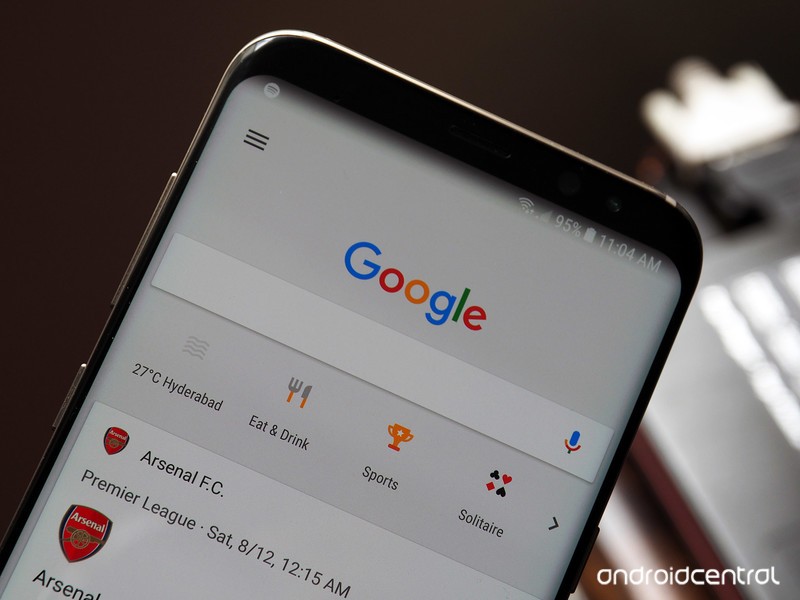
The home screen of the Google app features four often-used shortcuts, and the rest are accessible by selecting the arrow button to the right. The full list of shortcuts includes everything from nearby attractions, ATM and fuel station locations, restaurant suggestions, sport updates, weather information including sunset and sunrise times, travel planning, and much more.
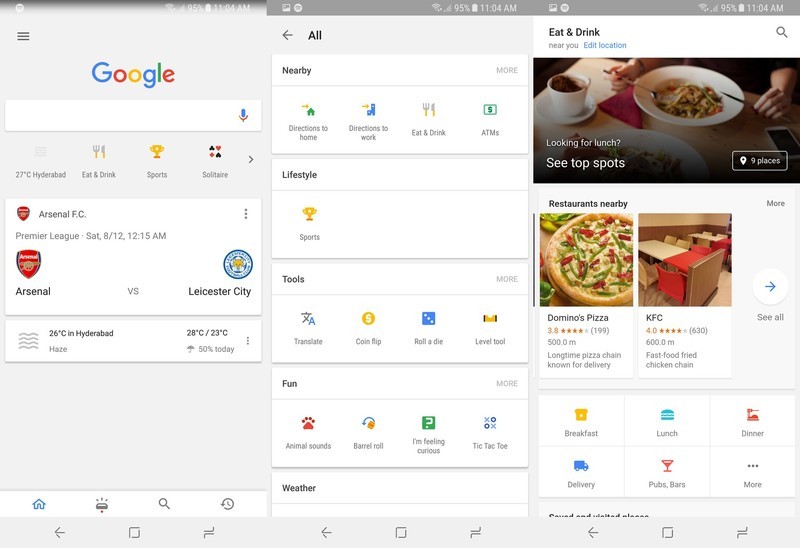
For things like restaurant listings, you’ll be able to choose from breakfast, lunch, and dinner options, and find watering holes in your area. There’s also a section that lets you jump into games like Tic-tac-toe and Solitaire, or you can listen to animal sounds if you like. Google mentions that it will add new shortcuts for “big moments” and events as needed.
The new feature is designed to make it easier for customers in India to find all the service Google offers, and boost usage of its mobile app. The update is now live in the country, so if you’re interested in taking a look at the new shortcuts, head to the Google app on your phone.
Lenovo’s Tango-ready PHAB 2 Pro won’t be picking up the Nougat update
Lenovo is abandoning the PHAB series.
Lenovo partnered with Google to roll out the first consumer-ready Tango phone, the PHAB 2 Pro, late last year for $500. The phone launched with Android 6.0 Marshmallow, and it looks like that’s where it’ll stay, as Lenovo’s update tracker page mentions that the phone won’t be getting the Android 7.0 Nougat update.

It’s not just the PHAB 2 Pro that is being left behind either. The rest of the devices in the PHAB 2 series — the PHAB 2 Plus and the PHAB 2 — will also not be picking up an update to Nougat. Furthermore, with most of Lenovo’s current devices picking up one platform update, none of the phones in its roster will be making the switch to Android O.
For what it’s worth, Lenovo rolled out the Android 7.0 Nougat update to several budget phones in India earlier this year, including the K6 Note, K6 Power, P2, and the Z2 Plus. The company is also moving to stock Android in a bid to roll out faster updates, but the fact that the $500 PHAB 2 Pro won’t be picking up a single platform update is unacceptable.
 AIVAnet