


Which company does the #nobezels look better: Apple or Essential?
As the bezel wars rage on, two competitors take similar strategies to allow space for components.
The Essential Phone was announced earlier this year with a striking design decision: the phone has almost zero bezels. Rather than placing the front facing camera on the bottom of the phone like the Xiaomi Mix Mix, the selfie camera is on top, splitting the status bar in two. If leaks are to be believed, the upcoming iPhone 8 will utilize a similar design language.

Evan Blass, better known as @evleaks, has released an image showing the iPhone 8 inside of a (presumably) third party case. This rumored design is corroborated by MKBHD’s hands on of an iPhone 8 model used by accessory manufacturers. Both sources show the iPhone 8 with minimal bezels – even eliminating the trademark home button and Touch ID sensor. Like Essential, Apple is splitting the status area in two. Unlike Essential, Apple looks to be cramming in extra sensors to run the FaceID feature, meaning more of the status bar will be cut out.
iPhone 8 (encased) pic.twitter.com/9LpARCAML2
— Evan Blass (@evleaks) August 8, 2017
Deciding which device looks better is certainly subjective. Assuming these renders and models are true, I think the iPhone 8 will look better. Using a wider portion of the status bar makes the insertion of the components look less drastic, to my eyes at least. On the other hand, all color options of the Essential Phone will have a black front, making the protrusion less noticeable when the phone is off. Ultimately, beauty is in the eyes of the beholder. The Essential Phone has been set back by numerous delays, so consumers may well have a chance to view the iPhone 8 first.
Which design do you prefer? Let us know in the comments below!
Continue this discussion in the forums!
Download the leaked Galaxy Note 8 wallpapers!
Download Samsung’s Galaxy Note 8 wallpapers now!
The Samsung Galaxy Note 8 isn’t being announced for a few more weeks yet, but given its proximity to public testers, the inevitability of leaks increases by the day. We know what it looks like, what features it will have, and now we have a series of wallpapers that will ship on the phone come September.
Like the Galaxy S8 before it, the new wallpapers are soft, abstract and bucolic — exactly what you want to see when you turn on an Infinity Display.
Interested in taking them for a spin on your phone? Hit up the gallery below and get downloading!


Samsung Galaxy Note 8
- Galaxy Note 8: Everything we know so far
- Rumored Galaxy Note 8 specs
- All Galaxy Note 8 news
- Should you buy the Galaxy S8+ or wait for the Note 8?
- The buttonless future of Samsung phones
- Join our Galaxy Note 8 forums
How to upgrade your PlayStation 4 Pro hard drive

Upgrading your PlayStation 4 Pro hard drive doesn’t have to give you a headache..intro
Your PlayStation 4 Pro is a gaming beast, capable of delivering you tons of excellent games, apps, experiences, and even VR if you’ve picked up a PlayStation VR. The time may come when you want to upgrade your hard drive, and when that happens, it isn’t a super long and drawn-out process.
You will need some know-how, and a Phillips head screwdriver to do it, but accessing and replacing your hard drive isn’t nearly so difficult as it was with earlier consoles. We’ve got the details you need right here!
- How to back up saved data
- How to upgrade your HDD
- How to get new system software
- How to copy backed up saved data
How to back up your saved data
Turn on your PlayStation 4.
Log in to your account.
Plug in a USB device.
Open the Settings menu.
Select Application Saved Data Management.
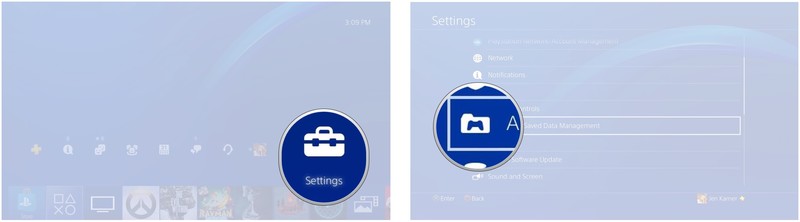
Select Saved Data in System Storage.
Select Copy to USB Device

Select a title.
Press the x button to select the saved data you want to copy.
Select copy.
How to upgrade your hard drive
Unplug your PlayStation 4, and flip it upside down.
Remove the HDD bay cover.
Remove the screw.
Pull the HDD bracket to remove it.
Remove the four screws from the HDD mounting bracket.
Remove the HDD from the mounting bracket.
Insert your new HDD into the mounting bracket.
Replace the screws. (be careful not to over tighten them)
Reinsert the HDD mounting bracket.
Replace the screw.
Reattach the HDD cover.
Install the system software.
How to get new system software
Open system software on your computer.
Download the software.
Save it to a USB storage device. (it’ll take up about 1GB of data)
Plug that USB storage device into your PlayStation 4 system to install the software.
How to copy backed up saved data to your PlayStation 4
Connect the USB storage device that contains your saved data.
Open Settings.
Open Application Saved Data Management.
Select Saved Data on USB device.
Select Copy to System Storage.

Select a title.
Press the X button to select the data you want to copy to your console.
Select Copy.
Questions?
Do you still have questions about how to upgrade your PlayStation 4 Pro hard drive? Have you upgraded your hard drive, or had to transfer saves between consoles? Let us know in the comments below!
PlayStation 4

- PS4 vs. PS4 Slim vs. PS4 Pro: Which should you buy?
- PlayStation VR Review
- Playing PS4 games through your phone is awesome
Amazon
Soul XTRA review: The Bluetooth headphones you can wash
Last year, I reviewed four different headsets with acoustic noise canceling (which actively eliminates external sounds so you can better hear your music). That feature can be great on a plane or a train, but those headsets tend to cup your ears in non-breathable cans that can feel like little mini-saunas in the summer time … and there are plenty of places out in the world where you don’t always want perfect acoustic isolation.
So for the past six months, whenever I’ve gone out for a walk to listen to one of my favorite podcasts, I’ve swapped out my usual Bose QC35s for the Soul XTRA performance Bluetooth headphones. They’re lightweight sport headphones with safety lights and breathable earcups you can wash off – but you need to find ’em at the right price. Check out MrMobile’s Soul XTRA review and then check out my take on the noise-canceling competition from Bose, Sony, Sennheiser and Plantronics!
Featured Products
- Soul XTRA Performance Headphones on Amazon
- Soul XTRA Performance Headphones via Soul
- Kript Reversible Micro-USB magnetic cable
Stay social, my friends
- YouTube
- The Web
- Snapchat
Best gear for watching the 2017 total solar eclipse

On August 21, the moon will completely cover the sun for 2.5 minutes. If you’re planning on watching the total solar eclipse, you’ll want to bring a couple of things with you.
2017 marks the first time in nearly 40 years that North America has seen a total solar eclipse. It’s also the first time in nearly 100 years that a total solar eclipse will be seen from the East Coast of the U.S. to the West Coast. It’s kind of a big deal. Hopefully, if you’re somewhere near the Path of Totality, you’ve got plans for making a day trip to a wide-open field for the 2 minutes and 40 seconds of total solar eclipse. Here’s a list of the gear you’ll want for viewing the eclipse, plus essentials to have with you on the trip.
- The best gear for viewing the total solar eclipse
- Other essential gear for your trip to the total solar eclipse site
The best gear for viewing the total solar eclipse
It’s very important that you only use ISO-certified 12312-2-compliant gear when looking directly at the sun. This can’t be stressed enough. Do not use standard sunglasses and do not purchase cheap eclipse viewing glasses that are not certified. NASA provides a list of certified manufacturers of eclipse viewing gear. Here’s the certified gear we think will be the best for viewing the eclipse this year.
American Paper Optics eclipse viewing glasses

My personal favorite eclipse viewing glasses come from American Paper Optics. I’ve got a five-pack of the astronaut-themed glasses. The company makes dozens of different themes (including Bill Nye), but the most important part is that they are ISO-certified. On Amazon, these glasses range in price from about $4 to about $6 each, but the more you buy, the better the deal is. Remember, only get the ISO-certified glasses.
See at Amazon
Celestron ISO-Certified 2X power viewers

If you’d like a slightly closer look at the solar eclipse, these $10 power viewers are perfect. They zoom in by 2x magnification, enough to catch a glimpse at sunspots. They’re made from sturdy cardboard and fold up so you can slip them into your pocket. The lens film is made by American Paper Optics, and is certified to protect your eyes from the sun, even when you’re looking at it magnified.
See at Best Buy
Meade EclipseView 60mm f/13 AZ Achro Refractor Telescope

If you’re hoping to get a really close look at the sun during the solar eclipse (or any time, really), this refractor telescope is specially designed for viewing the fiery ball of light in the sky.The eyepiece is top-down and features a red dot finder and sun finder scope so you can line up the view without having to look directly at the sun. This particular eclipse viewing telescope is particularly cool because you can remove the white-light solar filter and use it for star-gazing as well. Meade is one of NASA’s recommended certified manufacturers of eclipse viewing gear. As far as hobby telescopes go, it’s relatively inexpensive at only $106.
See at Amazon
DayStar add-on solar filters for camera and telescope lenses

If you’ve already got a standard astronomy telescope or a DSLR camera, you don’t have to spend a lot of extra money on a special eclipse viewing version. Instead, you can get a filter. DayStar is a NASA-recommended company that makes a variety of lens filters for different sizes. If you’re only planning on using a sun-viewing filter on August 21, you can get an inexpensive cardboard one for about $25. If you prefer a more sturdy filter for long-term use, grab a polymer one for about $50 or an aluminum one for about $60. No matter which level of use you get, make sure it fits the lens you plan to use.
See at B&H Photography
AmazonBasics 50-Inch Lightweight Tripod

If you’re planning on taking pictures or video of the solar eclipse, do yourself a favor and make sure you have a tripod. Whether you’re photographing with your phone or getting video with a GoPro, a tripod will guarantee a steady hand so you don’t accidentally jitter while capturing the event. It will also make it easier for you to get pictures of things going on around you with one device while keeping another device perfectly lined up for the eclipse shoot.
We’ve selected this inexpensive lightweight tripod as a recommendation for anyone that isn’t heavily invested in photography, but want a tripod for the eclipse event. If you’re looking to get into serious photography, you might want something a little sturdier, but for a one-time shot, this is the perfect fit, and only about $14.
If you’re planning on using your phone to take pictures, you can grab a universal phone mount adapter to go with it.
See at Amazon
Other essential gear for your trip to the total solar eclipse site
Battery charger
Just like you’d bring a portable battery charger with you on a road trip or day out, it’s smart to have one on your trip to the eclipse event. You wouldn’t want to be without juice just as the total solar eclipse hits, would you? Most location within the Path of Totality are going to be super crowded, so you can’t assume you can just run back home for a charge up.
Best portable chargers
Sunscreen
Don’t assume that, because it’s not totally bright outside, that you won’t get a sunburn while standing around under the sun. The Skin Cancer Foundation recommends a broad spectrum UVA/UVB sunscreen with an SPF of 30 or higher. Make sure you reapply every two hour.
Water
Water is our source of life. We can go weeks without food, but might die from dehydration without water for only three days. Make sure you bring plenty of water on your trip to the total solar eclipse event. I don’t mean one bottle of water to last you all day, either. Crowds within the Path of Totality are going to be huge, and a quick trip to the corner store for more water will probably be impossible. Bring a lot of water for you and your family to make sure you’re properly hydrated for the day.
Protective sun wear
Sunscreen is great for keeping your skin from burning, but protective sun wear is even better. Grab a hat, a pair of UV-blocking sun glasses, an umbrella, and any other clothing or accessories you can think of to shade you under the hot sun.
Totality: The Great American Eclipses of 2017 and 2024
Brush up on your knowledge of eclipses with this educational book by Mark Littmann and Fred Espenak. It includes diagrams for showing how to view and photograph the eclipse, historical stories about total eclipses and what people thought of them in the ancient past, and information about the next total solar eclipse, coming in 2024. If you grab this book early, you’ll be able to show off your smarts at the eclipse after party. It’s only about $24 for the hardcover version or $13 on Kindle.
See at Amazon
What are you bringing to the total solar eclipse party?
Are you planning on taking a trip to somewhere within the Path of Totality? Where are you headed? Have you viewed a total solar eclipse before? What did you bring with you?
Grab an unlocked refurbished 32GB Pixel XL for just $415
Our friends at Thrifter are back again, this time with an exclusive deal on a refurbished Pixel XL.
Daily Steals is currently offering the unlocked 32GB Pixel XL in refurbished condition for just $415 with the coupon code THRFTPIXEL. We’ve recently seen a few deals hit for both refurbished and new Pixels, but the best price previously was $449 from Woot! for the black version.
This time around you can pick between silver, black, and even the blue. If you’re looking for the smaller Pixel, you can grab the 32GB version in black for $379.99, or the 128GB version in black or silver for $409.99.

These units may show signs of wear, as they are refurbished, but they are guaranteed to work like new. Daily Steals is backing them with a full 90-day warranty, and you are able to return or exchange the phone within 30 days. At this price, odds are this deal won’t stick around for long, so be sure to grab one now, before they are gone!
See at Daily Steals
More from Thrifter
- Upgrade your makeup bag this summer on a budget
- How to avoid baggage fees
For more great deals be sure to check out our friends at Thrifter now!
Facebook shutters its teen-focused social app Lifestage
Last year, Facebook released a new social media app called Lifestage. It was aimed at high schoolers (you couldn’t even access the app’s features if you were older than 21) and allowed users to connect with other students in their school or schools nearby. But as is often the case in the tough-to-enter social media world, Lifestage never gained much traction and Facebook has officially pulled it from the App Store, Business Insider reports.
Along with a lack of popularity, Lifestage was also mired with security concerns. Though anyone older than 21 wasn’t able to add themselves to a listed high school in the area or search for any individual accounts, simply entering a younger age during the app setup would get you access to those features. Not great for an app geared towards minors.
A Facebook spokesperson confirmed to us that Lifestage will no longer be supported and told us that feedback from the app has influenced similar features across the Facebook app, “Teens continue to make up an important part of the global community on Facebook, and we’ve learned a lot from Lifestage. We will continue to incorporate these learnings into features in the main Facebook app.”
Source: Business Insider
All 2017 iPhones to Come in Only Three Colors, Launch Simultaneously in September
Apple’s upcoming 2017 iPhones, including the “iPhone 8,” the iPhone 7s, and the iPhone 7s Plus, will be available in just three colors — black, silver, and gold — according to a new investor note shared today by respectable KGI Securities analyst Ming-Chi Kuo.
Kuo previously said the iPhone 8 would be available in a limited number of colors, but made no mention of its two companion devices. His three color list seemingly matches up with an iPhone 8 dummy model leak that we saw earlier this week, but one of the dummy model shades displayed was more of a copper than a gold, so it’s not clear if it’s an accurate depiction of the colors we can expect.
If Apple does plan on introducing the iPhone in just three hues this year, we won’t be seeing rose gold or the multiple shades of black that were available in the iPhone 7.
According to Kuo, all three iPhone models expected in 2017 will also support fast charging, but he warns that consumers may need to purchase a Type-C power adapter to enable faster charging. The current iPad Pro has a similar feature — it uses the MacBook’s $49 29W USB-C power adapter for fast charging.
Kuo now believes Apple will begin production verification tests on the iPhone 8 in late August, leading to mass production in mid-September, which is earlier than Kuo’s previous estimates that suggested mass production might not begin until the middle of October.
With mass production starting earlier, Kuo expects Apple will announce all three iPhone models simultaneously in September, with plans to launch them all on the same date. The OLED version will be in short supply, though, with Kuo forecasting shipments of 2-4 million units in the third quarter.
The OLED version will be in short supply as we forecast shipments in 3Q17 will be 2-4mn units or less. We do not think production of the OLED iPhone will pick up substantially before 4Q17; and given strong demand, tight supply may persist until 1Q18 before improving much.
Though a September launch is expected, supplies of the iPhone 8 may be constrained until the first quarter of 2018 due to an expected high demand. Still, Kuo’s latest prediction is a rosier outlook than we’ve seen in the past, as some former rumors suggested Apple could potentially announce the iPhone 8 and then delay its launch until October or November.
Related Roundup: iPhone 8
Tag: Ming-Chi Kuo
Discuss this article in our forums
 AIVAnet