


You’ll soon be able to search eBay using just images on its mobile app
Why it matters to you
This new feature further expands the use of image-based search, and demonstrates the strength of the underlying artificial intelligence.
In an effort to improve the eBay shopping experience — and keep you shopping on the site — you’ll soon be able to find and purchase items by simply taking a photo. On Wednesday, July 26, the company announced two new upcoming features — Image Search and Find It On eBay — which will allow shoppers to use pictures instead of words to search for items through the mobile app.
Through artificial intelligence and machine learning, you’ll now be able to find any item you’re searching for using only visuals and the search bar. This especially comes in handy if you ever spot a pair of shoes or a piece of furniture that you’re interested in, but don’t necessarily know the exact name of. The new features on eBay’s mobile app will apparently be able to guide you to similar items if not the exact match.
If your phone is filled with photos of desired items you’ve seen in person or screenshots from scrolling through social media, they won’t just have to sit in your camera roll anymore. With the Image Search feature, you can either take a photo or pull up the existing screenshot from your album and enter it into the search bar right on the app. Your results will consist of the closest matches to the item for you to then purchase.
With the second feature called Find It On eBay, users can shop on any social platform like Pinterest or Instagram. When you see an item you’re interested in, you’ll see the option to “Find it now” on your smartphone via the eBay icon. Once you “share” the image with eBay, you can crop the photo to highlight the exact item you’re looking for and the mobile app will pull up search results.
The eBay mobile app uses two parts of artificial intelligence — known as computer vision and deep learning — to easily find the items you’re looking for. Once you upload the image, it goes through a deep learning model — known as a convolutional neural network — that processes the image and produces a representation of it to compare to live listings on eBay. The items are then ranked based on visual similarity, and surface as your options to choose from — which eBay hopes will lead to your purchase of the item through its site.
Image Search and Find It On eBay will be rolling out in the Fall. The Image Search feature will be available for both Android and iOS, however, the Find It On eBay feature will only be supported on Android upon launch.
Best Small Android Phone
- Best overall
- Best alternative
- Best for camera buffs
- Best on a budget
- Best tiny
Best Overall
Google Pixel
See at Verizon
See at Google Store
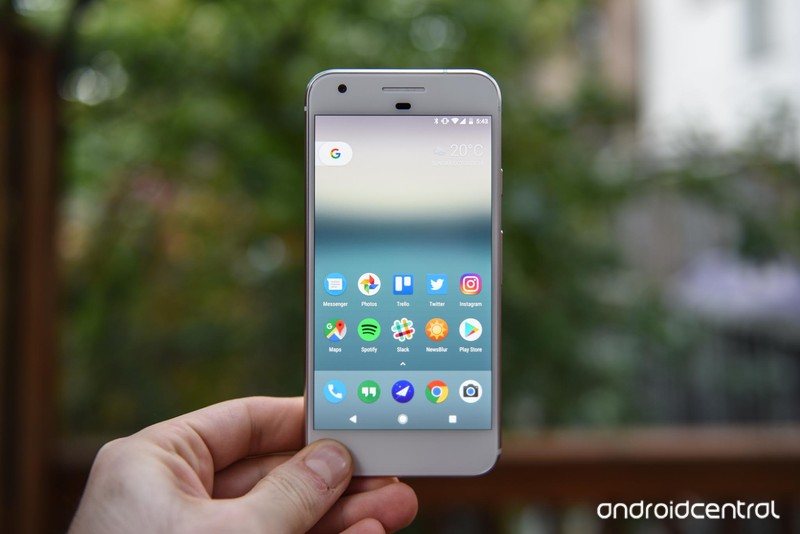
Like the iPhone and the Samsung Galaxy S8, Google’s Pixel comes in two sizes: Really Big and Just Right. The latter is the Google Pixel with a 5-inch Full HD display that fits comfortably in the palm of any hand.
The Pixel is packed with a Snapdragon 821 processor and 4GB of RAM. It’s available with up to 128GB of storage space. Its 2770mAh battery might not seem like much compared to other phones its size, but with its 1080p display and Nougat’s revamped Doze mode, you’ll likely be seeing a little bit more on-screen time than other devices in its class. The Pixel’s 12-megapixel rear-facing camera is also still really impressive, even when compared to the abilities of the newer Galaxy S8.
Bottom line: If you’re looking for Google’s Android in a compact size, the Pixel is it.
One more thing: There’s a new Pixel coming soon, but that doesn’t damper our love for the original, especially since it’s getting Android O any week now.
Why the Google Pixel is the best
It’s Google in a handheld smartphone.
Google’s Nexus devices feel like a relic of the past compared to its new Pixel lineup. The 5-inch Pixel is a particularly attractive package for anyone looking for a premium Android experience without all the extra software fluff. And so what if it sort of looks like the iPhone? It also comes in a really attractive Really Blue color.
Its performance is impressive, too, especially for a stock Android device. Its rear-facing camera produces some impressive photos and you can easily back them up with unlimited Google Photo storage. What’s more: Google Assistant baked into the operating system is still awesome, not to mention it’s become quite robust over time.
Best “still great” alternative
Samsung Galaxy S7

See at AT&T
See at Sprint
See at T-Mobile
See at Verizon
See at Amazon
Last year’s Samsung flagship is this year’s pint-sized alternative. On the inside, it’s fueled by still-great internals, like a Qualcomm Snapdragon 820 processor and 4GB of RAM. It also offers solid battery life and an impressive rear-facing camera that you can confidently utilize as your primary shooter. Best of all, the Galaxy S7’s screen is a 5.1-inch Quad HD Super AMOLED display, so even though it’s a smaller screen, you’ll still get stunning, TV-like quality from the dullest of YouTube videos.
Bottom line: It may be surpassed by the Galaxy S8, but the GS7 is still a welterweight fighter if we ever saw one.
One More thing: You can probaby pick up a new Galaxy S7 for around $400 these days if you have a keen eye for discounts.
Best for camera buffs
Huawei P10

See at Amazon
Not feeling what Samsung and Google have to offer? Try the Huawei P10 instead. This 5.1-inch device comes packed with a whole host of goodies, including 64GB of storage, Android 7.0, and a dual camera that’s made in partnership with Leica. The P10 also boasts a new portrait mode, which works a lot like what you see produced by your friends who utilize it on the iPhone 7 Plus, and it’s equipped with optical image stabilization, too. All this runs on Huawei’s own Kirin 960 processor and 3200mAh of all-day battery.
Bottom-line: The Huawei P10 is a worthy choice if a good camera and all-day battery life are you main concern.
One more thing: The Huawei P10 will only work with GSM carriers. Verizon and Sprint are not compatible with this phone.
Best affordable phone
Moto G5 Plus

See at Amazon
The Moto G5 Plus is one of the best smartphone deals today. It’s compact but not tiny, with a 5.2-inch Full HD display, and it packs a lot for that metal chassis, including a Snapdragon 625 processor and an excellent 12MP rear camera. The 3000mAh battery lasts a while, and the ultra-simple Android 7.1.1-based software is about as good as you’ll get for the price.
Bottom-line: The Moto G5 Plus is an excellent choice if you’re looking for an affordable unlocked phone in a compact size.
One more thing: If you want to save a bit of money, you can go with the Amazon Prime Exclusive version.
Best “really tiny” phone
Xperia X Compact

See at Amazon
Bet you didn’t think we’d offer up a Sony smartphone as a choice, but the Xperia X Compact is worth the consideration—especially if you’re looking for something that’s under five inches. Inside, the Xperia X Compact runs on mid-range Snapdragon 650, 3GB of RAM, and a 2,700mAh battery. It’s equipped with a 720p IPS display, though that’s all you really need from a 4.6-inch screen. It also supports Quick Charge 3.0, so that you can quickly charge it up during your layover, and it offers a solid 23-megapixel rear-facing camera with laser autofocus.
Bottom-line: The Xperia X Compact is great for anyone who’s been grumbling that smartphones are just too big in this day and age.
One more thing: Sony’s got a pretty good legacy of smartphone updates, even on older devices.
Conclusion
Folks, if you’re looking for a compact smartphone that’s got as much power and capability as the laptop on your desk, the Pixel is the way to go. It’s the perfect representation of the way Google wants you to use Android. And it’s a mere 5 inches, which makes it comfortable enough for a variety of hand sizes. It’s also got Google Assistant, which is quickly morphing into something more than just a cool trick to show your friends.
Best Overall
Google Pixel
See at Verizon
See at Google Store
Like the iPhone and the Samsung Galaxy S8, Google’s Pixel comes in two sizes: Really Big and Just Right. The latter is the Google Pixel with a 5-inch Full HD display that fits comfortably in the palm of any hand.
The Pixel is packed with a Snapdragon 821 processor and 4GB of RAM. It’s available with up to 128GB of storage space. Its 2770mAh battery might not seem like much compared to other phones its size, but with its 1080p display and Nougat’s revamped Doze mode, you’ll likely be seeing a little bit more on-screen time than other devices in its class. The Pixel’s 12-megapixel rear-facing camera is also still really impressive, even when compared to the abilities of the newer Galaxy S8.
Bottom line: If you’re looking for Google’s Android in a compact size, the Pixel is it.
One more thing: There’s a new Pixel coming soon, but that doesn’t damper our love for the original, especially since it’s getting Android O any week now.
Update, July 2017: This post has been refreshed with the most up-to-date information. We still recommend the Google Pixel if you’re looking for a really small phone, though the Huawei P10 is a close runner-up.
No, the international Moto Z2 Force doesn’t have a headphone jack

Moto sinks rumors of a 3.5mm headphone jack in the global model.
In the hours following the Moto Z2 Force announcement, rumors have percolated online suggesting that unlike the U.S. models, international versions of the phone, with 6GB of RAM and 128GB of storage, would feature a 3.5mm headphone jack. Predictable consternation followed, as it seemed Moto fans in the U.S. might be getting a raw deal — American Z2 Forces, like the earlier Moto Z, use USB Type-C for wired audio, as opposed to the older and more universal port.
However, we’ve been told by the manufacturer that there’s nothing to these rumors, and that all Z2 Forces have the same USB-C port only for audio.
A Motorola representative confirmed that the report is incorrect and that regardless of memory configuration or region the hardware is the same.
So there you go. You’ll be living the #donglelife when it comes to wired audio, wherever you buy the Moto Z2 Force — which isn’t great, but at least the experience is consistent throughout the world.
More: Moto Z2 Force hands-on preview
Meizu Pro 7 and Pro 7 Plus are now official with dual screens and dual rear cameras
The Pro 7 Plus is first phone to be powered by MediaTek’s 10nm Helio X30.
After months of leaks and rumors, Meizu’s Pro 7 and Pro 7 Plus are now official. The standout feature on the phones is the secondary display at the back, which allows you to take selfies using the dual rear cameras. Meizu went with a similar configuration as Huawei for its dual camera configuration — the primary 12MP lens is an RGB sensor, and the secondary 12MP sensor shoots in monochrome. Meizu is using the same imaging sensors for both cameras, Sony’s IMX386.

The secondary AMOLED display at the back can be used for music playback, date and weather-related information, and as a viewfinder for the rear cameras. The Pro 7 Plus is the more interesting of the two, featuring a 5.7-inch QHD Super AMOLED display at the front, and MediaTek’s Helio X30 under the hood. The 10nm chipset has 10 cores made up of three clusters — two Cortex A73 cores that go up to 2.6GHz, four Cortex A53 cores clocked at 2.2GHz, and four energy-efficient Cortex A35 cores at 1.9GHz.
The phone also 6GB of LPDDR4X RAM, 64GB/128GB UFS 2.1 storage, 16MP front shooter, and a 3500mAh battery. Meizu is rolling out its latest mCharge 4.0 fast charging solution with the Pro 7 Plus, which uses a 25W (5V/5A) charging current to deliver up to a 67% charge in just over 30 minutes.
Meanwhile, the Pro 7 has a 5.2-inch Full HD panel, and is powered by MediaTek’s Helio P25 SoC. Other specs include 4GB of RAM, 64GB storage, 16MP front camera, and a 3000mAh battery with mCharge 3.0. Both phones feature a Cirrus Logic (CS43130) high-fidelity chip for 32-bit audio, and are running an Android 7.0 Nougat-based build of Flyme OS.
No word on pricing or availability, but the phones will likely be limited to China initially. We should know more in the coming weeks.
Keep your phone charged no matter where you are for just $47
If you’re going to be away from a power outlet for quite a while, then that external battery pack you have will only charge your so much before it dies as well. You need an external power bank that runs on nature’s battery.
Harness the power of the Sun for $47! Learn more
The ZeroLemon SolarJuice is an external solar battery with a 26,800mAh capacity, which can charge the average Android phone five to eight times, depending on the phone and your use. This battery bank features a USB-C port, a USB-A port, and a QC 3.0 port for capable phones, as well as a Micro-USB port for input if you can’t wait on the Sun. The SolarJuice regularly retails for $99.99, but through Android Central Digital Offers, you can get it for $46.99, a savings of 53%.

If you’re out on the trail or gone camping for a week, the SolarJuice can help keep your devices charged the whole time, and you can charge up to three devices simultaneously. The casing is rain-resistant, dirt-proof, and shock-proof, as well as compact and portable, making it perfect for the great outdoors. There’s also a handy flashlight with four brightness settings to help you out in the dark.
If you’re looking for a way to keep your devices charged no matter where you go, then you need a solar battery pack, and the ZeroLemon SolarJuice is one of the best around. Snag it for only $59.99 at Android Central Digital Offers.
Harness the power of the Sun for $47! Learn more
Be Legendary with these Pokémon wallpapers!

Your phone is full of Pokémon now. Don’t you need a wallpaper that is, too?
Pokémon Go has been out for over a year now, and if you’ve lapsed your play in this summer heat (I know I have), then you’re not alone. Whether you’ve been out raiding all weekend or you’re just looking for a little nostalgic nerdiness on your home screen, we’ve got the Pokémon wallpapers for you!

There have been a lot of starter Pokémon over the various generations of games, but the original trinity will always be fan favorites. This minimalist wallpaper by Krukmeister, one of many, is awesome not just in the way it keeps these iconic water Pokémon instantly recognizable with only the barest of shapes, but in that on your Android smartphone, this is three wallpapers in one. I’m partial to Wartortle (those ears and tail, man!), but depending on your mood, you could have a cute little Squirtle or a cannon-packing Blastoise on your home screen.
Now if only Squirtle had some shades….
Gen I Water Starter Minimalist Vector by Krukmeister

Lapras, the Transport Pokémon, is one of the many that have remained out of my reach here in hot, hellish Texas. And if Pokémon were real, Lapras would be my home boy. Sure, Pikachu’s cut and shoulder-friendly, but Lapras is a beauty and a freaking tank! Not to mention as an ice type, Lapras could help me keep cool in these hot summers while we go float down a river or two… WEAPONIX also has an entire series in this style, so you can find your favorite Original Generation Pokémon to display proudly on your Pokedex — I mean home screen.
Laprasby WEAPONIX
Wild Pokémon Living in the City by Ninja-Jamal

There are Pokémon living all around us…
Okay, maybe they aren’t quite this plentiful in the city, and maybe we only have 140 Pokémon from Kanto right now, but it’d be nice to image all these Pokémon are sitting in an alley, waiting for us right now. Especially that Snorlax in the back. Or that poor Jigglypuff that just needs a hug… Don’t cry, Jigglypuff! I’ll sing with you!
Wild Pokémon Living in the City by Ninja-Jamal
Team Mystic

Team Mystic, aka The Blue Team (and the BEST team), knows no team but the Bird in the North, whose name is Articuno!
DABIRDINDANORF was the first team mascot to become catchable in-game with this weekend’s Pokémon Go Fest, and I can’t wait to get my hands on one! It’s icy, it’s cool, it’s powerful, and in this Texas heat, I’d be dying to have Articuno sharing its chill with me.
Download
Moltres by Tharalin (Team Valor)

Team Valor can be a bit intense. It’s the team that focuses on strength, and defines itself by it. Their emblem and their bird is Moltres, their ‘Lord of Light’. If you see a circle of Pokémon GO trainers who shout “Fire and blood!”, that would be Valor. It’s an intense team, but maybe you’ve got what it takes…
Moltres by Tharalin (Team Valor)
Zapdos by MrRedButcher (Team Instinct)

There is no shelter from the storm.
Yeah, Instinct may not be quite as popular as Valor or Mystic, but can we all agree that the Zapdos above is freaking terrifying? And a legendary bird that commands lightning is not the kind of bird you want to mess with, because unlike the water-hating Moltres or the temperature-challenged Articuno, Zapdos could be anywhere just waiting to short out your phone when you finally corner that Pikachu.
Zapdos by MrRedButcher (Team Instinct)
The Legendary Kindness

Lugia and Articuno have made it to Pokémon Go (GO MYSTIC!!!!), but the Legendary that I’m really waiting and hoping for is Entei. Sure, Entei may not be as intimidating as Lugia and the Legendary birds, but I don’t keep a Lugia plushie by my bed!
…Uh, yeah, I keep an Entei plushie on my nightstand. And you can keep one on your home screen with this sick wallpaper!
The Legendary Kindness (original)
The Legendary Kindness (edited wallpaper)
Pokémon Go
- Pokémon Go Game Guide!
- Pokémon Go Gen 2 FAQ
- Pokémon Go tips and tricks
- How to deal with GPS errors in-game
- How to play without killing your battery
- Join our Pokémon Go forums!
A smartphone user’s guide to staying focused throughout the day

Plenty of Android apps are distracting, but some can be helpful at keeping you productive, too.
“Get off Instagram and stay off Twitter” has become my mantra as I work in silence at home, with every distraction at my whim and no one around to hold me accountable. Frankly, this is the perfect time for AI to come into play and save me from myself, but until I can command something like Google Home to keep me in check, I’ll have to rely on a series of apps.
I see you, those of you placing your smartphone in front of you, right next to the keyboard so that you can glance at notifications throughout the workday. You thought you had everyone in the office fooled by putting it on silent mode. Don’t feel bad: I’m the same, which is why I want to share my new routine with those of you who are just as glued to their smartphones as I am.
Employ a to-do list

Trello is an incredibly helpful tool if all you need to do is get what’s inside your brain dumped out onto a project management board.
I start off every morning by peeking at my paper to-do list from the afternoon before. From there, I make any adjustments as I pore through email. Some people like to use Google Keep for its long-running to-do list feature, but I prefer the pen and paper method for the sheer fact that I like to doodle.
Then, I head into Trello, a robust project management tool that helps me organize my tasks for the week and offers satisfying visual feedback when I complete a project. The free version is limited in its functionality and only lets you choose one plug-in, but you can access your boards from a smartphone or browser.
Develop a routine

I respond well to bright colors and positive reinforcement, so Fabulous was a natural fit for ensuring I stuck to a consistent routine of daily check-ins and timely breaks. The app offers coaching based on research conducted at Duke University to help with common habits like drinking water and developing a nighttime routine. You might find you prefer its gamification elements if you’re a fan of immediate feedback, though you’ll have to pay a monthly membership fee to unlock all of its useful features.
If you like the idea of making a game out of developing a daily habit but would rather not spend any money, try out the personalized RPG called Habitica. Or check out our suggestions for other helpful, habit-forming apps.
Stay on task
Perhaps the most important part of the workday is how much you get done within a set period. My favorite app to use is Forest, which lets me “grow” a tiny forest based on how long I stay productive throughout the day. With every marathon of productivity, the app produces a virtual tree for me to plant in my forest. Each tree also garners me points, which I can then redeem to help plant a tree through Trees for the Future. The app silences my notifications and keeps me from going to the Android home screen, while the accompanying Chrome extension is useful for blocking Twitter and Instagram during peak hours.

For those of you who like more bells and whistles with apps that keep you on task, Brain Focus Productivity Timer has favorable ratings in the Google Play Store and receives consistent updates. The app lets you pause and resume work sessions and color code them as you need, and it disables Wi-Fi and sounds from catching your attention. If you spring for the pro version, you can unlock additional calendar integration, widgets, and compatibility with Android Wear.
There’s one other app I use to stay on task — the task of sleeping, that is. I thought I could get away with an app that tracks my progress, but it doesn’t penalize enough for me to care. SleepTown does, however, and it’s a bit like Forest in that it requires me to do what I’ve set out to do, with great consequences if I don’t.
SleepTown helps with keeping me off my phone after a certain hour. Like Forest, the more often I avoid picking up my phone after I’m supposed to be sleep, the more houses I build to add to the suburb of SleepTown. The app requires that you pay 99 cents to unlock the ability to save the houses to your town, but I’m finding the small price worth the utility.
How do you stay on track?
While researching for this article, I came across a vast number of methods for staying focused, including a helpful explainer from Lifehacker and this list of online tools. Or, you can take Wired’s advice, and avoid push notifications entirely.
How do you stay on task? Do you even bother using your smartphone? Leave a comment and let us know.
Waze on Android Auto: Invaluable feedback and alerts with sub-par maps and routing
Would it kill anyone to give us real-time reporting in Google Maps instead?
One of the best ways to take advantage of Android Auto is with navigation. No more messing with your phone to figure out where you’re going and how long it’ll take to get there. Just tell it where you want to go, maybe tap once or twice, and that’s it.
And Google Maps has been brilliant for this. Missing, however, has been Waze. Until now.

Some 14 months after first being announced at the Google I/O developer conference — and after a few months of semi-private beta testing — Waze is now available for Android Auto in public release.
As with anything Android and Google, there always are a few things you need to know, however. And these are they:
How to get Waze for Android Auto
Two apps you need: the Android Auto app, of course (because how else will Waze connect to Android Auto in your car, right?), and the Waze app itself.
There’s one caveat here, though. While Android Auto will run without a connected head unit — there’s a nice little car mode that you definitely should check out if you haven’t already — Waze requires the full-on Android Auto experience. If you don’t plug your phone into your car to use Android Auto, you’ll just need to keep using the same old Waze app you’ve been using.
Why Waze on Android Auto? The feedback
Why would you want Waze when there’s a perfectly good Google Maps app already installed? (Longtime Wazers already know the answer to this.)
 User feedback. As in real-time notifications if you’re coming up on a construction area or an accident. Or if there’s a speed trap ahead. Or some other obstacle in the road.
When you’re using Waze, you’re able to report when you see issues other drivers might want to know about. And other drivers then see that information in real time, as a little icon on the screen, as well as through an audible alert. You can contribute to the cause, or not, but everyone gets to take advantage of it.
I’ve been using Google Maps on Android Auto for a couple years now, and it’s been great. And I’ll probably continue using it when I’m driving somewhere new. (More on that in a second.) But in town, where I’m less concerned about figuring out how to get where I want to go and more concerned about what’s on the road on the way? That’s where Waze is perfect.
Waze on Android Auto — the good, the bad, the ugly, and the “ads”
If you have Waze installed on your phone and are connected to Android Auto, you’re good to go. Just hit the map icon again on the screen, choose Waze, and you’re there. You can just let it run and see what things are like near your car at any given time, or you can set a destination, either with your voice or by tapping the screen. Pretty standard stuff, really. (Pro tip: Make sure you have home and work pre-determined, and take a few minutes to add other “favorite” places when you’re not connected to your car.)
Real-time feedback from other drivers can be invaluable.
If you tell Android Auto to navigate somewhere, it’ll default to whichever map app you were using last — Waze or Google Maps. That’s a small thing (it’d be better to be able to say which app you want to use) and not something that’s actually bothered me. It’s just something to note.
We’ve already mentioned the real-time driver feedback. That’s the “good” part of Waze on Android Auto. It’s intuitive and mostly easy to use. If you’re new to Waze, it could take a little while to get used to how far down into the options you have to go.
It takes three taps to report the most basic obstacle. For others, it’s four. That’s a few more taps than I want it to take. For instance, to report construction, you have to go through Main reporting button > Hazard > Hazard on road > Construction. (And that doesn’t take into account that plenty of time there’s construction that’s not actually on the road, but that’s another thing for another time.)
 Waze on the left, Google Maps on the right. One is decidedly better looking.
And this is where we run into the first real miss with Waze on Android Auto. After more than a year in development (and that’s just the time we know about), you can’t use your voice to report cops or construction. That’s a missing feature at best, and a liability at worst, taking your eyes off the road. (And keeping you focused on the drive ahead is the point of this whole thing.) That’ll change at some point, I’m sure. But for now, it’s missing.
The design itself of Waze’s maps leaves a LOT to be desired.
And I’m not going to go into all the other things that veteran Wazers will note are absent from the Android Auto version. Because, frankly, I don’t care. I don’t want to worry about earning points or being able to virtually “wave” to other drivers. It’s a bad idea in a phone app, and it’s a bad idea in a native Android Auto instance.
I will, however, mention the other standout feature of Waze on Android auto, and it’s not a good one. The design of the maps themselves is not good. That’s a strange thing to say, given that Google owns Waze as well as Google Maps. But if you’ve ever wondered just how big a difference there was between owning the former and actually being responsible for the latter, here you go.
The visuals in Google Maps are so much better than Waze. That’s true whether you’re in a bird’s-eye view or zoomed in at street level. (And Google Maps is smarter about when to use which, too.) That’s true for the look of the streets and routes themselves, and it’s true for the labels you see there, and on landmarks and destinations. It’s exactly as good as we’ve come to expect from Waze, and nowhere near as good as what you want in a Google-owned map.
I’m also not crazy about the routing I’ve seen from Waze. (This isn’t a new complaint.) Your mileage will vary depending on your location, of course. But Google Maps definitely is smarter about keeping me off side streets and avoiding more turns than necessary, even if there’s more traffic on the major thoroughfares.
 A local ad on Waze in Pensacola, Fla.
And finally, there are the “ads.” While you’ve likely seen them on the phone version of the app, there aren’t what you’d consider normal display ads anywhere in Waze on Android Auto — or in any Android Auto app I’ve seen, for that matter. But Waze still has featured businesses. “Branded pins,” they’re called. Wonder why Whataburger or Taco Bell are so prominent on your map? It’s because they paid to be. And they’re not the only ones. Anyone can buy an ad on Waze, including local retailers.
This actually hasn’t bothered me maybe as much as it should. Is it silly? Yeah. Annoying? A little. Does it make me want to eat at either? Nope. I’d actually say in terms of what those of us in the business call “native advertising,” it’s actually done pretty well. Tap one of those pins and it’ll give you a little info about the business, and tap again to navigate to it. It’s not what I’d consider to be intrusive at all.
What’s next for Waze?
There’s still plenty of work to be done for Waze on Android Auto. The UI of the maps definitely needs work. You can’t yet send your ETA to someone. And there are plenty of edge cases veteran Wazers can come up with. (Some things, however, are best left outside of Android Auto, I’d argue, where minimization remains a priority.)
For now? If you’ve got an Android Auto-compatible car or head unit, it’s definitely worth checking out. While the user interface is lacking, the feedback from your fellow drivers can be invaluable.


All About Android Auto
- Getting started with Android Auto in your car
- Using Android Auto natively on your phone
- Android Auto news
- Waze on Android Auto
- Join the Android Auto discussion!
Pokémon Go Fest’s big flop shows Niantic needs to think bigger
This past weekend’s Pokémon Go Fest felt like a bit of a flashback to 2016. Users were having connection problems and couldn’t even sign into the game. People were angry, and refunds were doled out. But the truth is that game developer Niantic has spent the past year ironing out those issues, and the game has improved quite a bit. The festival in Chicago was intended as a love letter to those who stuck through it all and kept playing, while also giving the company a chance to unveil long-awaited Legendary Pokémon. Instead, it was a mess that showed the developer is still struggling with unexpected success.
Attendees paid $20 for a ticket or more waited hours to get inside the event at Grant Park only to be unable to play at all once they entered. While there were some server issues, a lot of the problems stemmed from the cellphone towers in the immediate area, which were overloaded with Pokémon Go-related traffic. It got better once Niantic opened up the “capture area” with all its event-related Poké goodies to 2 miles, which allowed attendees who had already left the park enjoy some of the activities they had been promised. As a last-ditch effort to placate angry fans, Niantic offered refunds and released the Legendary Pokémon to everyone anyway.
On the surface, the idea that Grant Park could support an event of this type seems reasonable. The park is a popular tourist destination and has hosted Lollapalooza since 2005. But even if a single event in the park had thousands of people milling about, they weren’t all using their phones the entire time. And Pokémon Go Fest was very much focused on getting attendees to do just that: The events listed on the website include “increased Pokémon encounters” and “special PokéStops,” with the only real world element being a trio of “team lounges” for resting as well as mingling with other players.
Niantic certainly considered the possibility the towers might be overloaded. Its event organizer contacted the major providers to arrange for adequate cell coverage. While some carriers, like Fest sponsor Sprint, deployed mobile units to handle the extra traffic, others felt that the existing infrastructure in the park was adequate. Indeed, users reported the most problems with AT&T and Verizon. Niantic had no alternate arrangements in place, even though it still considered network problems a possibility and asked attendees to not livestream the event.
Niantic also did not receive assistance from The Pokémon Company International (TPCi), which manages the brand and successfully runs events like the Pokémon World Championships. Such competitions may involve more than just card or video gaming, with costumed characters and activities like stage shows and shopping. TPCi’s experience running events would have been a huge help at Pokémon Go Fest, providing things for players to do and managing the upset crowds better while the connection problems were dealt with.
Instead, Niantic handled this event largely on its own. The company has some experience running events for its other AR title, Ingress, with players working together toward a common goal. The challenges at the Pokémon Go event would have followed a similar format, with players working together in the highly anticipated raid battle to unlock Legendary Pokémon like Lugia for the first time. But those Ingress gatherings were a lot smaller.
Pokémon Go has been likened to a reskinned Ingress a lot over the past year, a perception that Niantic only bolsters when it treats the former like the latter. PokéStops were placed at the same locations as Ingress portals, which resulted in players walking up to decidedly family-unfriendly locations like funeral homes and strip clubs. And instead of the company targeting casual gamers that make up the bulk of its current fanbase, it doled out the beta for Pokémon Go mostly to Ingress players,.
But Ingress is an original property, while Pokémon is a brand that has been around for 20 years. The Pokémon series is a consistent best-seller on Nintendo systems, and the TV show has been running for 20 seasons, with the movies to match. Pokémon Go exploded in a way that Niantic was unprepared for, leading to last year’s catastrophic server problems.

The company can no longer say that Pokémon Go’s popularity is unexpected. Not when the app remains in the top 20 in both the App Store and Google Play Store after a year, and certainly not when its own ads tout how many millions of Pokémon are being caught every single day in New York or Tokyo. The tickets for Pokémon Go Fest sold out in 10 minutes and were being scalped for hundreds of dollars. Niantic knew exactly how many people were going to show, and still somehow couldn’t handle it.
The company’s biggest asset right now is its massive fanbase, and many of its communications over the past year have focused on the game’s community. But, while the company has staffed up in order to try and support the game on a technical level, we haven’t seen the same commitment in programs and events to support that fandom. The Pokémon Go Fest was the right idea, but Niantic didn’t push for the logistical support it needed to succeed. If Ingress is a small-town fair, Pokémon Go is the Lollapalooza of mobile games, and it needs to be treated as such.
Facebook’s first wave of original TV shows is almost ready
Based on previous reports about Facebook’s ambitious original programming plans, the social network was supposed to launch its first shows in June. Well, July is almost up, and we’ve yet to hear about them, because they aren’t quite ready yet. According to Bloomberg, Facebook’s new Video section is finally going online in mid-August “after several false starts” if everything goes well this time. 1 Hacker Way has reportedly been asking partners to turn in the first episodes of their projects, but some of them are taking longer than expected and might even cause further delays.
Facebook hasn’t confirmed the project’s launch yet, but it hasn’t exactly been keeping its efforts a secret either. In 2016, it hired CollegeHumor co-founder Ricky Van Veen, who admitted that the company is exploring funding video content, including “original and licensed scripted, unscripted” shows. It also hired former MTV executive Mina Lefevre who worked on Teen Wolf and Scream to lead its efforts in creating original programs.
The social network has reportedly teamed up with several media companies to conjure up both short inexpensive shows and bid-budget productions. We can apparently expect the more inexpensive offerings to be similar to decently produced YouTube videos and the premium ones to be more like legit TV series. Bloomberg says Facebook isn’t trying to compete with Netflix or HBO, though, so something on the same scale as Game of Thrones is probably out of the question.
Source: Bloomberg
 AIVAnet