


Prime Day brings rare discounts on Philips Hue smart lighting
Amazon recently discounted a selection of Philips Hue products during its Prime Day sale. Philips Hue is a line of smart bulbs which can be automated via the Philips Hue app to turn on or off even when you’re not home.

The following deals are available for Philips Hue products during Amazon’s Prime Day:
- White and Color Ambiance LED Bulb – $39.99 (was $49.99)
- White and Color Ambiance Starter Kit – $138.95 (was ~$175)
- Hue Go Portable LED Smart Light – $50.81 (was $79.99)
If you’re looking for more ways to make your home a smart home, we also just posted a guide on the best smart home accessory discounts available for Prime Day featuring items such as a garage door opener that works via app and a ceiling fan you can talk to.
See at Amazon
How to save videos in YouTube for Android
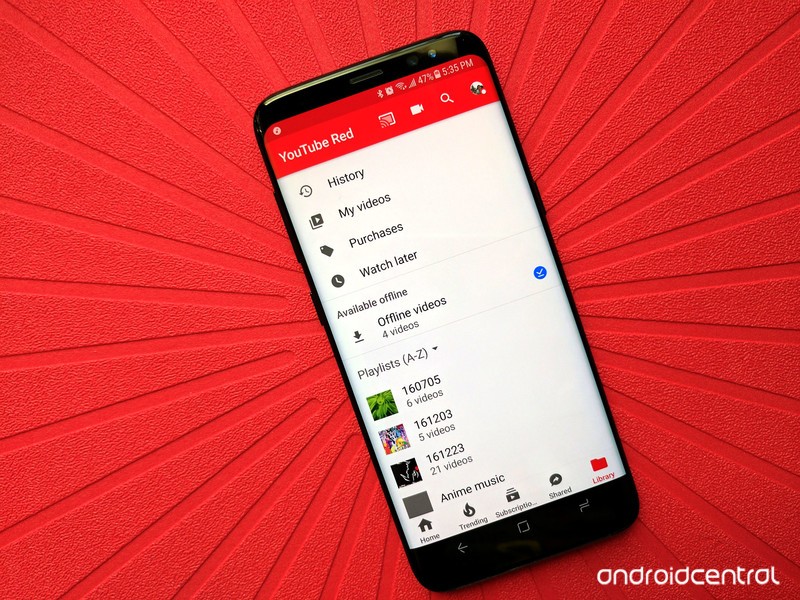
There’s so much to watch on YouTube, you can’t possibly watch it all.
And it’s always the same story: you’ve spent twice as long as you intended to sitting there watch mindless YouTube videos when you find one you know you’re gonna love, but if you don’t get moving now, you’re gonna be late and get fired. But when you come back later you can’t remember what that video was! Then the only time you can watch it is on this stupid Wi-Fi-less flight. And thus a video you could’ve loved is lost to time…
Never again. We can save them! We have the technology.
- How to add a YouTube video to Watch Later
- How to save a video to play offline
- How to save a playlist to play offline
- How to schedule save offline downloads for Wi-Fi
- How to schedule save offline downloads for overnight (India Only)
How to add a YouTube video to Watch Later
Watch later is the playlist that every YouTuber has but not every YouTuber uses. Remember that annoying little plus that used to pop up in the bottom corner of every video thumbnail you moused over on the YouTube website? That was an Add to Watch Later button. Watch later can be a carefully curated playlist of unseen and interesting videos… or it can be a dumping ground for videos you mean to watch when you get home from work but forget to watch for a few months. No matter how you use it, here’s how to add videos to it.
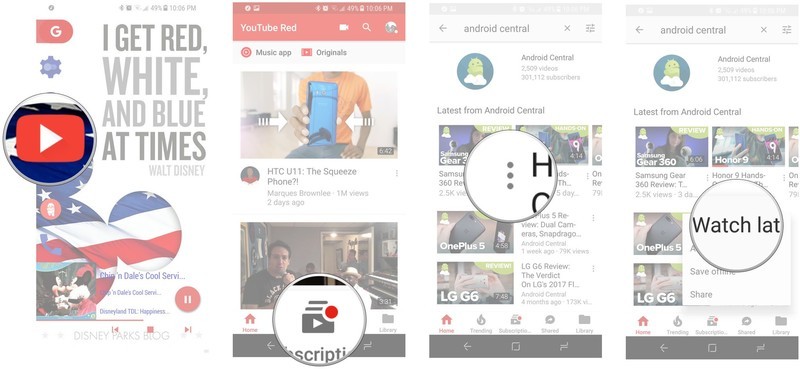
Launch the YouTube app from your Home screen or the app drawer.
Search for a video you want to watch later.
Tap the three dots to the right under a video’s title.
Tap Add to Watch later.
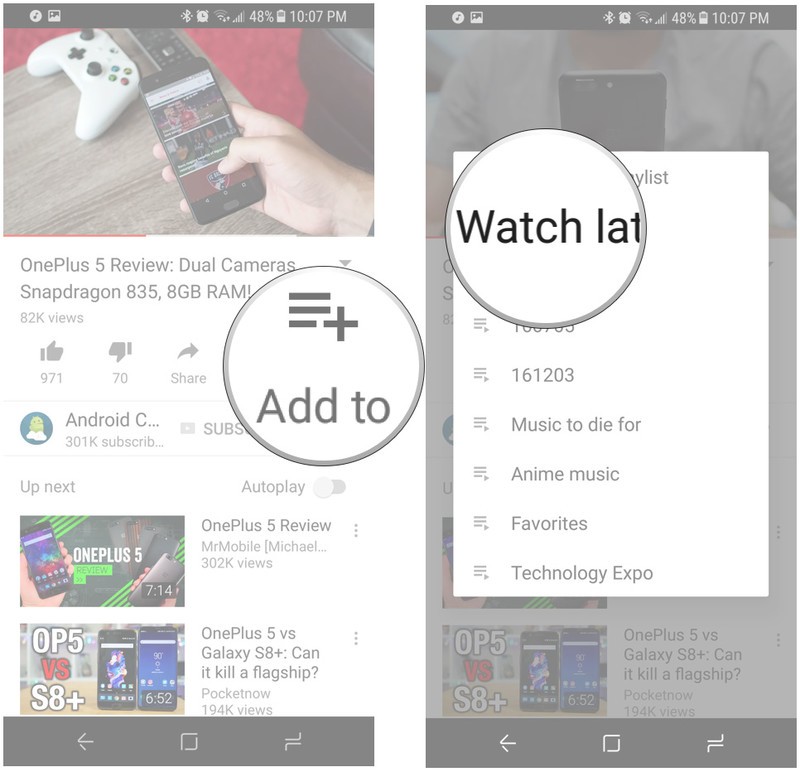
If you’re already watching a video and want to save it for later, it’s even easier.
Tap Add to in the video listing.
Tap Watch later.
How to save a video to play offline
Downloading YouTube videos to watch offline can save you oodles of data if you have the presence of mind to download while you’re on good Wi-Fi, and in areas where data connections can be spotty as best, offline might be the only real way to watch YouTube. If you live in India or 15 other countries, congratulations! You can save videos for offline viewing without a subscription.
If you live in the United States or four other countries where YouTube Red is available, then if you subscribe to the service, you can save videos for offline viewing in YouTube. If your country is outside these two circles, I’m sorry, but the official YouTube app won’t let you download videos for easy offline playback.
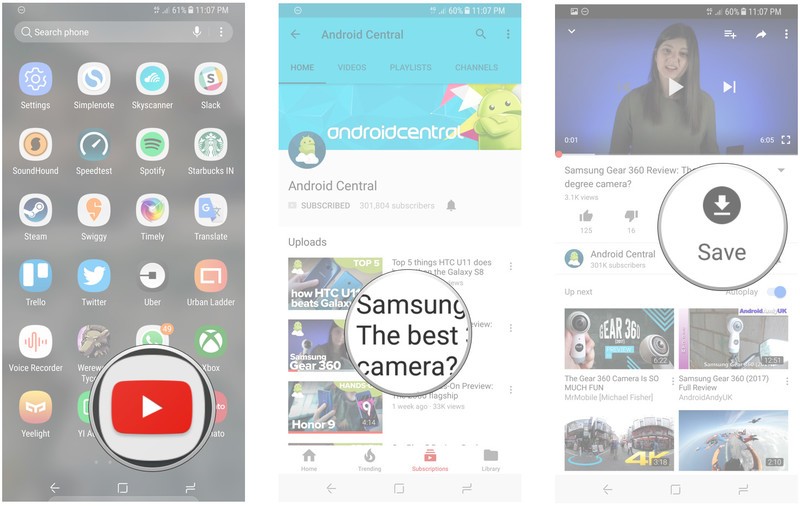
Should you be lucky enough to have the option of saving YouTube videos for offline viewing, here’s how it works.
Launch the YouTube app from your home screen or the app drawer.
Tap on a video you want to save for offline viewing.
Tap Save, which should sit between the Share and Add to buttons below the video’s title.
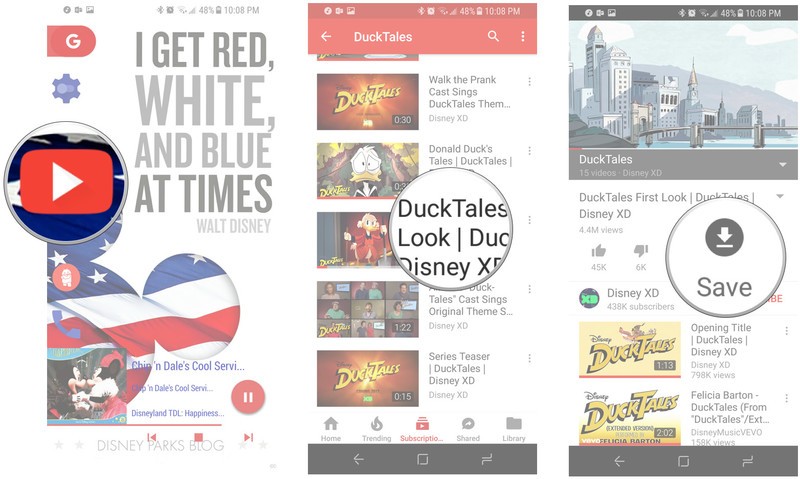
Tap the ** video quality** you wish to save your video in.
Tap OK.
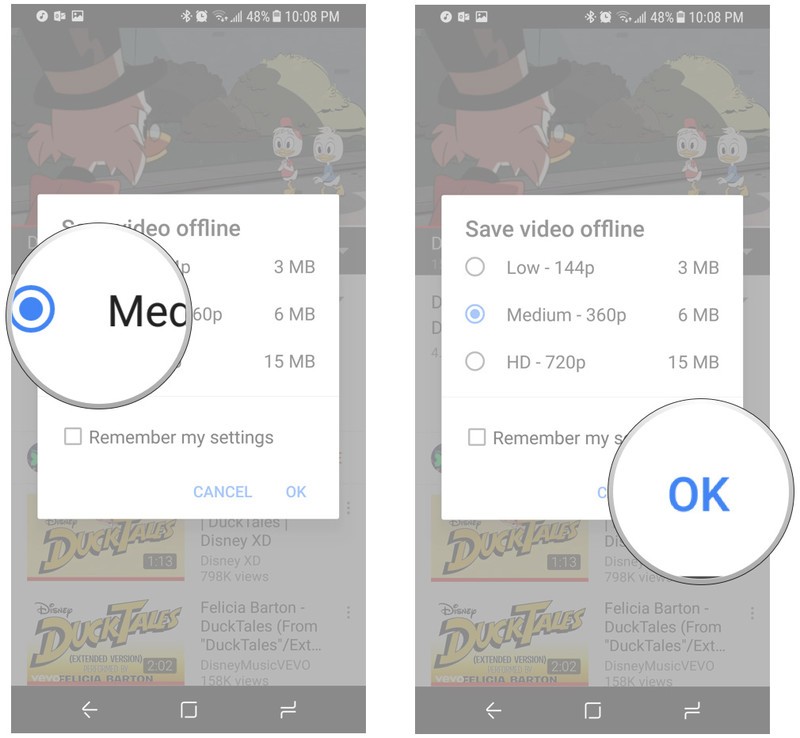
Depending on the settings you’ve set for offline saves, YouTube will automatically begin downloading the video or wait for Wi-Fi to begin downloading.
How to save a playlist to play offline
If you’ve got an entire playlist you want to watch offline, you can save that playlist without having to individually download every single video.
Launch the YouTube app from your home screen or the app drawer.
Tap Library.
Tap on a playlist you want to save for offline viewing.
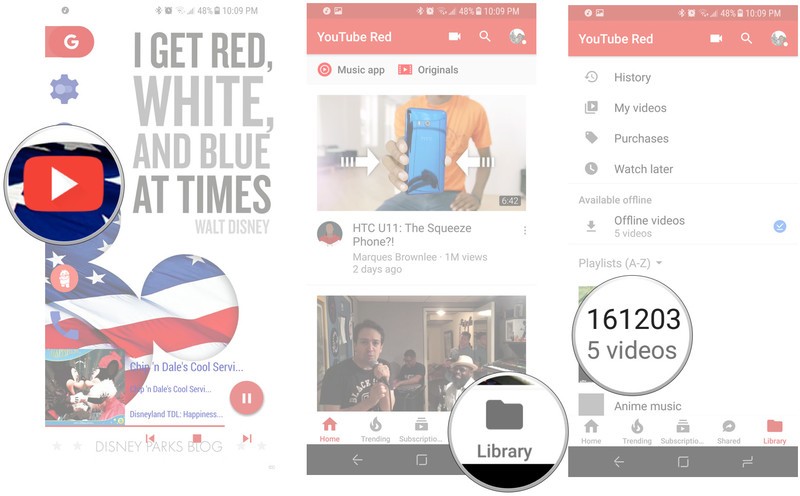
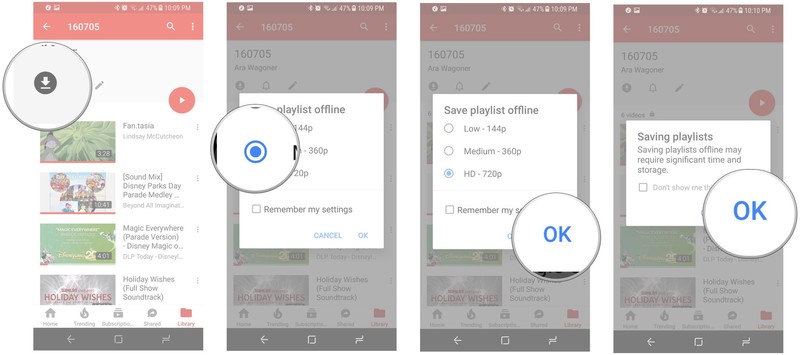
Tap Download, the icon directly below the playlist name.
Tap the quality you wish to save your video in.
Tap OK.
Tap OK on the pop-up that says downloading a playlist can take a lot of time and data.
How to schedule offline downloading for Wi-Fi
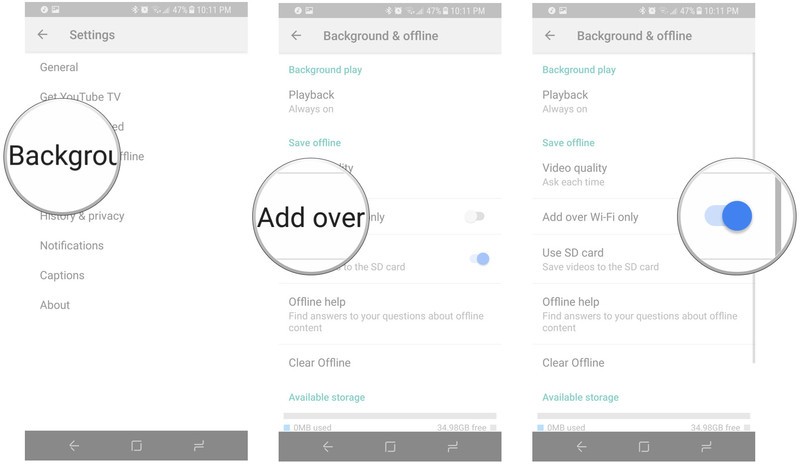
Not everyone can afford unlimited data plans, so if you want to save videos for offline viewing so that you don’t spend precious mobile data, YouTube can wait to download that video until you’re off paid data and onto Wi-Fi.
Launch the YouTube app.
Tap your avatar in the top right corner.
Tap Settings.
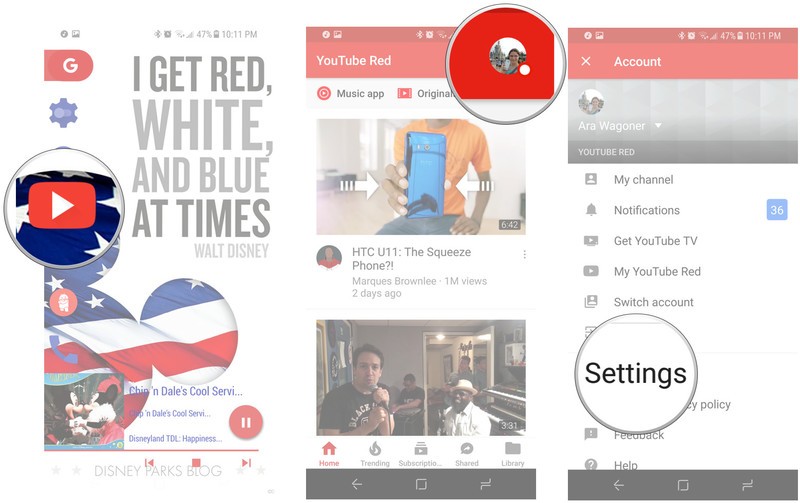
Tap Background & offline.
Under Save offline, tap Add over Wi-Fi only. Once activated, the toggle should turn blue.
How to schedule save offline downloads for overnight (India Only)
India has another extra special feature for YouTube, only available to users of select mobile operators: Smart Offline. It allows users to select videos they want to download, and then have them download overnight when data is cheaper.
Launch the YouTube app.
Tap on a video you want to save for offline viewing.
Tap Save, which should sit between the Share and Add to buttons below the video’s title.
Tap the quality you wish to save your video in.
Tap Save overnight.
Tap OK.
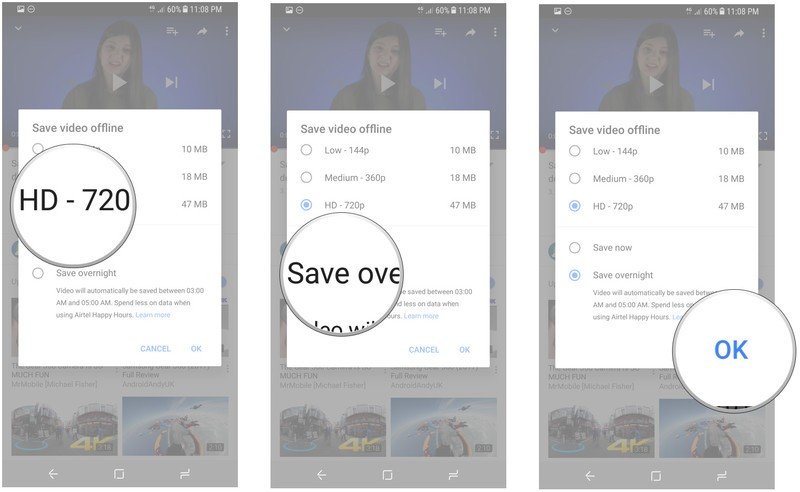
If you’re using Smart Offline, your videos will also automatically download if you connect to Wi-Fi in another bid to save you precious mobile data.
Questions?
Let us know in the comments below.
Android Wear goes extra-high-end with the Louis Vuitton Tambour Horizon
Luxury continues to be a big focus.
Google is continuing its strategy of partnering with well-established fashion brands to make unique Android Wear watches, and now one of the most recognizable names, Louis Vuitton, is on board with its new Tambour Horizon. An exquisite combination of metal, leather and sapphire made in Switzerland and wrapped around the same core specs as every other Android Wear 2.0 watch.
This is a 42 mm case that Louis Vuitton says is “exceptionally compact for a connected watch” (though it’s 12.55 mm thick) and combines with your choice of 60 different detachable straps. The screen and back are both covered in sapphire, as you’d expect, but that back plate is just for looks — there isn’t a heart rate sensor there.
A relative bargain compared to other Louis Vuitton watches.
The rest of the specs are roughly standard, with a 1.2-inch 390×390 AMOLED display (no flat tire!), a Snapdragon Wear 2100 processor, 300mAh battery, 512MB of RAM and 4GB of storage. Louis Vuitton does claim 30 meters of water resistance, though, which is great.
Outside of the core Android Wear 2.0 experience, Louis Vuitton also includes a “my flight” function for following your travel details, a “city guide” for accessing LV-curated guides and of course plenty of “iconic Louis Vuitton watch dials” to complement the hardware and make sure everyone knows you have a Louis Vuitton smartwatch.
And yes, the Tambour Horizon is quite expensive: $2450 for the stainless steel model, and a cool $2900 for the black variant. Massively expensive by Android Wear smartwatch standards, but a great deal if you’re comparing to other Louis Vuitton watches that can approach $10,000. We actually wouldn’t be surprised if this was a decent seller in some markets — that Louis Vuitton brand is strong.
Android Wear
- Everything you need to know about Android Wear 2.0
- LG Watch Sport review
- LG Watch Style review
- These watches will get Android Wear 2.0
- Discuss Android Wear in the forums!
Should I run a VPN on my Android phone?
If you want or need to use a VPN, the pros outweigh the cons when it comes to using one on your phone, too.
With recent news of privacy-eroding deregulation and the ever-present threat of online data theft, VPNs are in the news more than ever. While the merits of which one is the best and why is a hot subject, little attention is paid to the obvious question — should I use one on my phone?
We’re here to talk about if you should and the reasons why!
More: The best VPN services of 2017
What is a VPN?
A VPN is a Virtual Private Network. That’s a technical term for what’s essentially a welcome middleman between you and the internet at large.
A VPN is a service you connect to that sends and receives data across the internet on your behalf. When you set up and enable a VPN, all of your internet traffic goes through it, both ways. Ideally, this traffic is encrypted and only the two parties who should have access to the information are able to use it.

A VPN is a gateway that sends and receives data on your behalf.
There are a lot of different ways to set up a VPN and some are used for specific reasons. VPNs make excellent ad-blockers and companies like AdGuard offer a free VPN service that filters out ads from a known list of servers. Your work may use a VPN that can encrypt data on your machine before you send it and it can only be decrypted by the server at work while leaving other traffic untouched. Or you might want a U.S. based VPN to try all the services Google hasn’t rolled out the rest of the world yet.

Advertisement
But mostly what people are talking about when we mention a VPN is a service that is designed to protect your identity on the internet by intercepting all the traffic so that it looks like it’s not coming from or going back to you or your location.
What advantages does a VPN offer?
In the broad sense, a VPN only does one thing: direct internet traffic. But directing internet traffic has a lot of advantages!
As mentioned above, you can block ads or create a private session between you and your work network or you can even have a VPN that directs traffic to a different server depending on your login: Paid users of a service can have more perks and a faster connection than non-paid. But there are two reasons most people use a VPN:
-
Access to an otherwise restricted source. There are a plenty of things like media streaming services that can’t or won’t let you use them if you’re not in the right place. We see this a lot with professional sports streams. Depending on distribution rights, you might not be able to stream a Tigers game if you live in the greater Detroit area. You can use a VPN that’s hosted somewhere with geographic access and the service will work because that’s where it thinks you are.
-
Security and privacy. A VPN is not foolproof, but using one with wholly encrypted connections from a reputable company creates what’s called a tunnel that acts as a one-stop connection between you and whatever you’re doing on the internet. This makes the data difficult to intercept by anyone or any service (except the VPN company itself) and if it were grabbed, almost impossible to decipher. While a lot of people think of this as a way to hide who you are, it can also be used to verify who you are. Both are strong reasons to use a VPN, and people like journalists and investigators can see or say things in private. And so can everyone else. Privacy is not just for the select few.
Of course, people with bad intentions can use a VPN to have the same privacy and security. Like encryption, we shouldn’t let this fact make us think that they are a bad thing overall.
The downsides of using a VPN
Like everything else, there are downsides to using a VPN. And we shouldn’t gloss over them because we want to tout the privacy factor.
Operating a VPN is difficult so make sure you choose a good company.
The biggest is the technical hurdle. Effectively operating a VPN requires an understanding of network security issues and a way to make sure it is effective against them. All the privacy and security of using a VPN goes out the window if the administrator doesn’t know exactly how things like the Same Origin Policy or CORS work and what they need to do to work around the issues they present where cookies (small files a website uses to “remember” you) are involved. This stuff is pretty complicated.
VPN service for as little as $6.49 per month! Learn more
Advertisement
That’s why you have to know you are using a VPN service you trust. The company must be honest and open with their policies in relation to privacy and be fully competent and up-to-date on how computer networking is constantly evolving. Don’t try to rent an online server and run your own VPN if you don’t know what you’re doing and don’t jump on a friends home-brewed VPN unless they know what they are doing. Stick to recommend companies that have been scrutinized and audited by the pros.
A couple of other things that might not be great about using a VPN:
- The connection can be terrible. You might have great internet service and all the things you like are fast, but when you place a VPN in the mix you probably will see things get slower. Sometimes, too slow. The good news is that another VPN may not be too slow.
- You share an internet address with others. A VPN masks your internet address (I.P.) and replaces it with their own. That means if I get blocked from a service while using that address and you get it the next time, you’re blocked, too. An otherwise excellent VPN company may end up being blocked at your favorite website, or your bank, or the IRS site you file your taxes through. This can also add extra scrutiny by law enforcement when you’ve done nothing wrong: The person using that address before you may have been doing something sketchy.
So, should I or shouldn’t I?

Sure!
While not everyone wants or needs to use a VPN if you do there’s no reason not to use it with your phone. Most VPN companies have an easy to setup app you can install that gets you connected and has an easy way to turn things on and off. Some even have extras for things like bandwidth monitoring so you know how close you are to any data limits. And a properly configured VPN (we go back to those technical hurdles) should work for all data that moves in and out of your phone, whether you’re on Wi-Fi or using your data connection.
A VPN works with your web browser and every app on your phone.
You will have a little bit of extra overhead, as an app that encrypts and decrypts the data and properly routes it through the VPN is running in the background, but the impact is minimal with a properly coded VPN app or a manual setup. You won’t notice a proper VPN app when it’s running unless you look for it. Google themselves use a VPN for Project Fi users who connect to public Wi-Fi hotspots. You’ll literally not know anything extra is happening.
The downsides still remain, but as long as you’re using a recommended company who has a safe and secure VPN service, you’ll probably never run into any of them. We hate to say “probably” as much as you hate hearing it, but it’s true. Customers who would cause themselves to be blacklisted from a service or draw the attention of law enforcement usually aren’t using consumer VPN services.
Advertisement
Look for a company that’s recommended by other people who share similar interests, has a great app for your phone, and has a clear and concise set of policies (and read them). If you want or need a VPN, there’s no reason not to use it on your phone!
Updated July 2017 with the latest information and compatibility with newer phones.
Renault aims to make toll booths a breeze for autonomous cars
With autonomous vehicles at the top of car manufacturer’s to-do lists, many are focusing on the basic technology required to get self-driving cars on the road — and we’ve seen a number of partnerships formed as a result. Renault, however, is looking further ahead and has partnered with French road toll operator Sanef to develop technology that works with existing road infrastructure. Namely toll barriers, which Sanef, with 1,700km of road under its control, is famously zealous about.
One of the overarching questions surrounding self-driving cars is what happens at barrier road crossings — a simple obstacle for a regular car and driver but a massive challenge for autonomous vehicles in providing continuous eyes-off/hands-off travel. The two firms are therefore developing equipment which will allow toll road infrastructure to communicate with cars using short-range WiFi, enabling the vehicles to take appropriate action.
The pair initially started work on the project in June 2016, trialling its developments along the A13 freeway in Normandy, with research expected to continue until 2018. According to Renault, the car will receive information about an upcoming toll barrier about one kilometer in advance and will then anticipate and take its position in a lane compatible with autonomous vehicles. The car will slow down according to speed signs, and will stay in the center of the lane using sensors and virtual lines derived from a high-definition map of the site.
“Maximising safety for drivers, passengers and others with autonomous cars requires several stakeholders in both government and the private sector working together, each bringing unique expertise.” said Renault’s Mathieu Lips, commenting on the unique partnership. “Our goal is to work with Sanef to develop advances in safety and the right solutions to bring as soon as possible to customers the most comfortable travel in autonomous drive without interruption.”
Via: The Engineer
Source: Renault
Spotify closes in on new Sony licensing deal
Spotify has been clamoring to strike deals with major and minor labels before it goes public, and now it’s one step closer. Billboard reports that a deal has been struck between Sony and the music streaming service. The deal’s terms haven’t been made public, though the specifics are similar to Universal’s agreement with Spotify.
Universal Music Group was the first major record label to sign a new agreement with Spotify back in April. Under the terms of that deal, Spotify allowed Universal’s artists to make their new albums available to paid subscribers only for two weeks. For a long time, Spotify held fast to its refusal to separate content into premium versus free tiers, making its entire catalog available whether users paid for the service or not.
After the Universal deal, major indie label Merlin followed suit and signed a deal that allows its artists to withhold their new music from free-tier Spotify users for two weeks. It’s likely that Spotify didn’t have much of a choice in the matter; in exchange for relenting, Spotify receives a break in fees it has to pay, which is crucial to the streaming service’s growth.
The only major label deal that’s outstanding is Warner Music Group, and that’s likely coming soon. Spotify is racing to have deals in place because a robust music library will make it easier to attract investors once it goes public. It remains to be seen what Spotify will have to give up in order to get that deal in place.
Via: Variety
Source: Billboard
Engadget giveaway: Win a 1TB My Passport SSD courtesy of Western Digital!
A bit like bulky luggage, large file sizes can cramp your style when you’re trying to shuffle them around the place. Luckily, external SSDs are here to help out. Western Digital’s My Passport series now offers the fastest speeds of a WD-branded portable drive to date, with its My Passport SSD providing transfer rates of up to 515MB/s over USB-C (while supporting the USB 3.1 standard and more). These speedy little drives work with both Mac and PC platforms and offer 256-bit AES Hardware Encryption to help provide some security as you jet set around with your data. On top of all that, they happen to look nice, too. WD has provided us with two of its 1TB My Passport SSDs for a pair of lucky readers this week. Just head down to the Rafflecopter widget below for up to three chances at winning!
a Rafflecopter giveaway

- Entries are handled through the Rafflecopter widget above. Comments are no longer accepted as valid methods of entry. You may enter without any obligation to social media accounts, though we may offer them as opportunities for extra entries. Your email address is required so we can get in touch with you if you win, but it will not be given to third parties.
- Contest is open to all residents of the 50 States, the District of Columbia, and Canada (excluding Quebec), 18 or older! Sorry, we don’t make this rule (we hate excluding anyone), so direct your anger at our lawyers and contest laws if you have to be mad.
- Winners will be chosen randomly. Two (2) winners will each receive one (1) WD My Passport SSD 1TB ($400).
- If you are chosen, you will be notified by email. Winners must respond within three days of being contacted. If you do not respond within that period, another winner will be chosen. Make sure that the account you use to enter the contest includes your real name and a contact email. We do not track any of this information for marketing or third-party purposes.
- This unit is purely for promotional giveaway. Engadget and AOL are not held liable to honor warranties, exchanges or customer service.
- The full list of rules, in all its legalese glory, can be found here.
- Entries can be submitted until July 12th at 11:59PM ET. Good luck!
The Wirecutter’s Best Amazon Prime Day Deals: AM Edition
This post was done in partnership with The Wirecutter, a buyer’s guide to the best technology. When readers choose to buy The Wirecutter’s independently chosen editorial picks, they may earn affiliate commissions that support their work. Read their continuously updated list of deals here.
You may have already seen Engadget posting reviews from our friends at The Wirecutter, as well as their weekly deals. Today, we’ll also be publishing some of the best deals they’ve found on Prime Day.
Anova Precision Cooker Wi-Fi

Street price: $170; MSRP: $170; Deal price: $130
Here’s the best price we’ve seen on this model, over $20 below our previous low. The Bluetooth model is also on sale for $100, which isn’t quite a new low, but a better than average deal.
The Anova Precision Cooker WiFi is our pick for the best sous vide gear. Tim Barribeau and Nick Guy wrote, “The Anova Precision Cooker WiFi is the best bet for most home cooks due to its low price, small size, and flexibility. It’s one of the cheapest ways to get into sous vide cooking, and thanks to an innovative adjustable attachment system, the Anova works with a much smaller volume of water than the earliest iteration did—so there’s now no need to heat up a gallon of water just to cook a couple of chicken breasts.”
Philips Hue White and Color Ambiance A19 3rd Gen Starter Kit

Street price: $190; MSRP: $200; Deal price: $140
This is the best sale we’ve seen on the latest gen, getting close to matching the best prices we’ve seen on the 2nd gen models. We haven’t seen many substantial discounts on the 3rd gen, and since individual bulbs are on sale for $10 less, it’s a great time to grab these.
The Philips Hue White and Color Ambiance Starter Kit is our pick for the best smart LED light bulbs. Grant Clauser writes, “Philips Hue is not just a smart bulb; it’s a whole smart system. The color-adjustable A19 bulbs can remake the look of a room in seconds. Multiple app options and device compatibility make it the best overall choice.”
ASUS ZenBook UX330UA-AH54 13.3-inch Ultra-Slim Laptop

Street price: $700; MSRP: $760; Deal price: $630
This is the first good sale we’ve seen on our budget pick, a big $70 off of the street price. It’s already a great value at $700, so the additional savings make it an even better deal.
The Asus ZenBook UX330UA is our budget pick for the best ultrabook. Kimber Streams wrote, “Its specs are nearly identical to those of our top pick—except for a slower solid-state drive—but it costs about $350 less. The only things holding the ZenBook back from being our top pick are its less reliable trackpad, larger size, and lack of Thunderbolt 3.”
Eufy RoboVac 11 Robot Vacuum

Street price: $220; MSRP: $500; Deal price: $190 w/ code PRIME008
While this isn’t the lowest price we’ve seen in the past, it’s still a great deal and nice $30 drop from the normal street price. We’ve only seen this robot vacuum on sale twice in the past, so this is a fairly rare deal. The only time we’ve seen it lower was during an Amazon Deal of the Day, so this sale is likely the best price we’ll see outside of those one-off sales. Make sure to use code: PRIME008 in order to get the deal price of $190.
The Eufy Robovac 11 is our new top pick in our guide to the best robot vacuums. Liam McCabe wrote, “The Eufy RoboVac 11 is the smart-money pick for most people who want a robot vacuum cleaner. In our testing and research, the RoboVac 11 was the most likely to complete a cleaning cycle on its own, without getting stuck and waiting for a human to rescue it. That’s the most important part of a robot vacuum’s job, and the Eufy 11 does it better than almost any other model we’ve seen, even those that cost hundreds more.
Amazon Basics Backpack for SLR/DSLR

Street price: $27; MSRP: $30; Deal price: $20
The first good drop we’ve seen on our affordable camera backpack pick. Already a great value at $27, this drop to $20 makes it even better.
The Amazon Basics Backpack is our affordable pick in our favorite camera bags guide. The WC staff wrote, “The affordably priced AmazonBasics Backpack is deceptively small but holds a great deal of gear. We were surprised to find it easily fit a 13-inch laptop, a DSLR, two lenses, a flash, and lots of extras, including batteries, business cards, tissues, memory cards, lens cleaner, personal items, and more.”
Deals change all the time, and some of these may have expired. To see an updated list of current deals, please go to The Wirecutter.com.
Magic Leap is still figuring out what ‘mixed reality’ is
Magic Leap CEO Rony Abovitz recently said at an investor conference that the company’s ‘mixed reality’ headset (?) “is not far away” from launch, whatever that really means. While the mysterious startup might be closing in on consumer-ready hardware, it’s still in the process of discovering exactly what ‘mixed reality’ is. Delivering the opening keynote at gaming conference Develop:Brighton today, Magic Leap’s Graeme Devine said, “There’s huge expectations that mixed reality will come of the gate and, oh boy! It’ll be here and it’ll be just like Minority Report right away… And no, we’ve never seen that with any platform. So that ask is impossible.”
Magic Leap is a startup that feels like it came from the mind of a Silicon Valley writer, rather than having any place in the real world. It’s raised well over a billion dollars in funding, counting giants such as Google and Alibaba among its investors, and yet most of the world is all but oblivious to what the company is working on behind closed doors.
We know it’s some form of augmented reality wearable, and one that uses digital light field tech to project images into your eye, mimicking the natural way light hits your retinas. The tech is supposed to make digital objects so real it’s “like dreaming with your eyes open.”
Magic Leap doesn’t like the term ‘augmented reality.’ As Devine put it today, if virtual reality immerses you in another world, and augmented reality puts digital objects on top of your world, then Magic Leap does neither. It’s developing ‘mixed reality,’ where digital objects and characters become part of your world. It works alongside the context of your reality: From what time it is to where you are, to what’s in front of you, where you’re looking and who you’re with. “Mixed reality is digital content that interacts with the real world, and with you,” says Devine.
The company imagines mixed reality as an entirely new platform. Not a peripheral, like a console is to a TV, or a VR headset is to a PC, but something new. “Mixed reality has the opportunity to lift people’s heads up again, and put information back out in front of people… Mixed reality has the opportunity to actually place you back into where you should be instead of hanging out on a smartphone.”

The only problem with creating something entirely new is figuring out where to start. “If the platform is to succeed, we need a very different kind of application,” Devine said. “And there, we’ve no idea of the controls because it’s everything. It’s my hands, it’s my head pose, it’s my gaze, it’s my smartphone, it’s things I write down on a piece of paper, it’s controllers… it’s everything. It’s everything that we use in the real world today. And that’s really hard.”
Devine is adamant that “mixed reality is going to change the world” — which he says with all the enthusiasm you’d expect from someone with the title Chief Game Wizard at the world’s most secretive and hyped startup. He knows, though, that people won’t be buying whatever hardware the company is cooking up, but experiences. “It’s most of what we do.”

Describing the company’s experience prototyping process, Devine says Magic Leap is still learning what mixed reality means. But there are a few key musts internal pitches are built around: The idea must be indispensable and something you’d return to every day. It also has to be something only mixed reality can deliver and sell people on the entire concept. And most importantly, “can Magic Leap learn from it?”
Devine compares what Magic Leap is doing to the evolution of the TV. Everyone has one, it has become the vehicle for other creative formats like games consoles, and various technologies has evolved around it to make perfect use of the display. But as a platform, it took decades to get there, and Magic Leap must make a similar journey.
Despite the startup not knowing exactly what mixed reality is or where it needs to go, Devine does believe in the existence of a ‘killer app’ he calls “everyday adventure.” There’s a tech demo/concept Magic Leap likes to revisit called “Ghost Girl.” This specter, known as Alice — Magic Leapers are never far from an Alice in Wonderland reference — lives in your house, and together you discover, over the course of endless meetings, more about her story.

“Alice is a companion that spends time with you. She interacts, she has conversations with you, she talks to you, she hangs out with you. All these things are simmering in the world, they are not very far away… Alice can be as real a ghost as you want a ghost to be.”
“The key thing is everyday adventure,” Devine continues. “Things you might actually want to do with Alice every single day.”

“And it can be Star Wars, it can be Harry Potter, it can be Finding Dory… and I can be a lawyer, I can be a plumber, I can work at Starbucks. I will have everyday adventure added to my life, by an app store of realities.” This is likely a long way off though, remember — the seed of what mixed reality could be. “Iteration in a new medium is a must. It will take us time to get there, to that conversation, to Alice being real. But I see it. I see it in my wanderings. It’s coming. It’s there. We will have that.”
“Everyday adventure, I believe, will define a generation.”
‘Stranger Things’ season 2 premieres October 27th
You won’t have to wait until Halloween to find out what the second season of Stranger Things entails. Netflix has announced that the follow-up to the nostalgic thriller will arrive a few days earlier, on October 27th. The accompanying teasers haven’t revealed more than you would have already seen in the Super Bowl TV spot, but they might be enough to whet your appetite: there’s an element of Lovecraftian horror as a creature from the Upside Down looms large over Hawkins, Indiana. While there’s no guarantee that the Duffer Brothers will live up to the rapidly mounting hype for their show, they’re at least good at sustaining that hype for months.
Some doors can’t be closed. #StrangerThings2 arrives on October 27. pic.twitter.com/NALL5HQalg
— Stranger Things (@Stranger_Things) July 11, 2017
Source: Stranger Things (Twitter)
 AIVAnet