


The buzzbox beehive monitor is like a Fitbit for honeybees
Why it matters to you
Hive monitoring devices like BuzzBox could help us stabilize dwindling honeybee populations all over the world
The plight of the world’s honeybees and their struggle against colony collapse disorder has been well documented. In 2016 alone, more than 40 percent of colonies in the United States perished. To fight this troubling trend, many beekeepers have turned to technology for help — and soon they might have another high tech tool at their disposal. Say hellow to BuzzBox: an innovative hive monitoring device designed to keep beekeepers more in touch with their buzzing broods.
Bees are finicky creatures, and a wide variety of different factors can affect the overall activity and health of a given hive. The BuzzBox system is based around a series of sensors that track these factors — things like ambient temperature, humidity, barometric pressure, and more. As an added bonus, the entire unit is powered via a two-watt solar panel. The device also has a a built-in anti-theft accelerometer to monitor movement just in case someone tries to nab your kit and/or hived.
The BuzzBox is also capable of recording and analyzing the acoustics inside of a hive and recognize patterns over time. This enables the device to detect a panoply of diseases, parasites, and other health issues facing a colony — which gives beekeepers time to intercede before the issues spread to the entire hive.
All of this information is readily available via the accompanying BuzzBox Hive Health Monitor app (available on both Android and iOS). Once installed, the app will will allow beekeepers to receive updates from BuzzBox, and more aptly monitor their hives and analyze the data they create. The app will be able to track and relay information pertaining to collapsed colonies, swarm and pre-swarm behavior, and also detect a missing Queen (a common factor in collapsed colonies).
The campaign’s creators plan to incorporate other features in the future based on community beekeeper feedback. Currently, BuzzBox is working with a lab to gather data from 24 hives that have been exposed to an array of pesticides. The company hopes these pesticides will prompt the exposed bees to emit a unique audio signal. This acoustic fingerprint could be used to add a pesticide toxicity detection element to the platform. The company claims the BuzzBox will be automatically updated with more accurate hive health reports as the company learns other indicators.
Pokémon Go Plus ring adapter and themed decals set for Japanese release
Why it matters to you
Pokémon Go was ubiquitous last summer, and this new accessory is just one part of a larger strategy to reclaim that level of popularity.
Niantic Inc. is currently hard at work doing everything its power to ensure that the first-anniversary celebrations for Pokémon Go catapult the game toward the level of popularity it enjoyed upon its release last summer. In Japan, that effort will be supported by a brand-new way to utilize the Pokémon Go Plus wearable that launched last year.
A new adapter will allow players to wear their Pokémon Go Plus device as a ring on their finger, giving them easy access to it whenever they need to let loose a Pokéball. Previously, the hardware was confined to the user’s wrist.
The ring adapter costs around $3.50, and doesn’t include the actual Pokémon Go Plus hardware, according to a report from Gamespot. There’s currently no confirmation that it will be made available outside of Japan, but given that the Pokémon Go Plus device sold like hot cakes when it launched internationally, there’s reason to believe that the product will eventually reach the U.S.
The Pokémon Go Plus wearable allows players to perform certain actions in-game without reaching for their phone. It gives off an alert when a Pokéstop is nearby, and also can be used to capture Pokémon when they’re in the vicinity.
However, there are some questions about how useful the hardware is at this stage of the game. A recent update to Pokémon Go added the ability to gain items at gyms in much the same way as a Pokéstop, but it has been confirmed that the Pokémon Go Plus wearable won’t be updated to support this new mechanic — much to the frustration of players on Reddit.
It’s understandable that technical issues might make adding this kind of functionality difficult. However, it’s strange to see new Pokémon Go Plus accessories being released when the hardware isn’t in step with the current version of the game.
The Pokémon Go Plus ring accessory launches on July 15 in Japan, and will be on sale at Pokémon Centers across the country. As well as the adapter, special decals for the wearable based on the designs of Great Balls, Ultra Balls, and Master Balls are also set to be made available.
The Secret To Saving Money On Cellphones and Service

You can save money on your phone and plan if you do a bit of homework before you buy.
It’s never fun to pay more than you need to. And that includes your phone and plan you use with it.
Like most things, you can find a balance where you pay for what you actually use and need rather than pay what someone else thinks you need. That’s the real secret to saving money on your phone and the service — your needs. Once you know what you need, what you want and where to get it you can save yourself a nice chunk of cash.

Advertisement
Your phone

A new phone is the biggest single cash outlay, but only a small part of the total costs. It’s not hard to spend $1,000 or so on a new phone, and there are plenty of folks who need the things a $1,000 phone can offer.
Know what you want, what you need, and the difference between the two.
While I’m not saying those phones aren’t worth $1,000 (that’s for you to decide), I am saying that you can probably find something that does exactly what you need for a lot less cash. The key is knowing what you need, what you don’t need, and the difference between the two.
Make a list of what you expect to do with your phone before you check out what’s available. Some of us only want to make calls and send texts. Others primarily use Facebook. Or love 3D games. You should also look at secondary features that aren’t quite as important but still matter — how fast a critical bug will be fixed or how easy it would be to use the phone abroad. You know how you use the phone you have right now. If you don’t yet have a smartphone, you know why you want one. Pay attention to your needs and don’t be distracted by the latest shiny thing.
Where to buy? And how.

This is important, too. You can get a new phone online from places like Amazon or eBay, through a big-box store like Best Buy or CPW, or through a carrier’s store. Buying a phone is really easy when so many places are selling. But not all shopping is equal.
Price is the obvious thing, but other factors like extra warranty or insurance costs come into play. Be sure to consider things you pay extra for and if they’re worth it. I might not buy insurance from Amazon for a $199 phone, but I probably would for a $799 phone. Look at what’s covered and what part of a replacement or repair fee you have to pay before you just click or say yes.
You can buy a phone almost anywhere and that means a lot for your wallet.
And don’t forget about financing. Ideally, we all want to pay cash for things and be done with it but sometimes that’s just not possible. If you need to finance a phone, never use your credit card (and its monthly interest fees) if you can find cheaper financing through the place you’re buying it from. Most carriers will offer 0% financing as long as you stay with them for service, so if that’s your plan it’s not a bad idea. Just be mindful that finance fees can (and do) add up and your phone might cost a lot more than what it says on the sticker if you don’t pay attention.
Know what you want to buy before you get started. Never walk into a store to buy a phone unless you know exactly what phone you want to buy. And if it’s not available don’t settle for something else just for the instant gratification. That’s an easy way to pay too much for something you didn’t really want or need.
Finally, don’t forget about buying used. If you can find a reputable place that brokers used phones (in the U.S. we like Swappa) or know someone who is getting rid of their phone, don’t be afraid to have a look. There are plenty of phones out there that are like-new but the owner is an enthusiast and wants to move on to the next thing. If you find one you might be able to get what you want for even less.
Your service

Like buying the phone, buying the service all comes down to what you need.
Not too long ago that meant visiting the local carrier store in the mall and signing up for a 24-month agreement that included hefty fees if you changed your mind. Some carriers still offer these sorts of postpaid plans and they work well for many, but there are plenty of other options now. Prepaid service can be great, especially if you’ve figured out just what you need as written above. But with so many different companies offering service today, it’s important to consider a few things before you buy.
There are three things you really need to do before you buy service for your phone:
- Know what service works best where you need it. This is the single most important thing to consider when you pay for cell service. We all want to get the cheapest option that fits our needs, but it never makes sense to pay for something that doesn’t work when you need it to work. This is super important if you buy a phone that’s not unlocked, and something you need to know before you give any money to any company. Ask your friends, check out the online coverage maps and think about the places you will be going.
- Know what you use every month. If you make 300 minutes of voice calls and use 3GB of data on average each and every month, you should never pay more to get more than you need. Always leave yourself a little headroom (especially at first) by finding out how to add more minutes or data in the middle of the month or getting the next higher usage tier. And don’t be afraid to change what you’re paying for if you find out you are using more or less than you originally planned.
- Know what service you’re paying for. This sounds silly, but you need to know in advance if the cell service you’re buying includes features like tethering or international texting. Many people just need the basics without any frills, but if you need any frills you need to check before you buy — you’re not likely to get a refund.
More: These are all the ways you can save data and monitor your data usage
Advertisement
If it ain’t broke

The final and possibly most difficult thing to consider: do you really need something new or something different? You might be able to save some money by changing carriers or cutting back on the plan you’re paying for, but that’s not what we mean here. We’re talking about throwing in the towel and moving on to something new.
Don’t buy a new phone just because it’s new.
There are plenty of good reasons to do so, but also plenty of reasons not to. You don’t have to buy the newest thing or jump to a new platform, especially if the new features aren’t important to you. Moving to the next big thing from Apple or Samsung might not be worthwhile and will probably cost you some serious cash. Sure, those are great phones and we all have a twinge of desire inside when we see the cool commercials, but if you’re not going to use any of the things that make them stand out (and make them expensive) think before you leap.
Besides, you can probably buy the same phone next year for a lot less when early adopters move on and sell theirs!
A secret is you
As you can see, there’s no real secret to saving a little money when you buy a phone or when you pay your bill each month. It just takes a little legwork on your part, but it can (and will) pay off in the long run. If you need to change a few things or you just want to save a few dollars every month, you won’t go wrong if you follow this advice.
ZTE launches a $100 phone on AT&T you may actually want
The Blade Spark sounds like a drone, but it’s a phone. Sorry, that’s all I got.
AT&T is launching a new ZTE-branded budget phone today, and it’s actually quite nice for its $99.99 MSRP.
Dubbed the Blade Spark, it’s yet another in the quickly-expanding line of Blade smartphones that seem to appear like rabbit offspring at various U.S. carriers. Previous incarnations of the Blade have arrived at Cricket Wireless, Sprint, Boost Mobile, and others, and while they share a number of aesthetic similarities and a tendency to stick to an under-$200 price, they’re all bespoke, built for those particular carrier’s needs. It’s like we’re back in 2011 all over again.
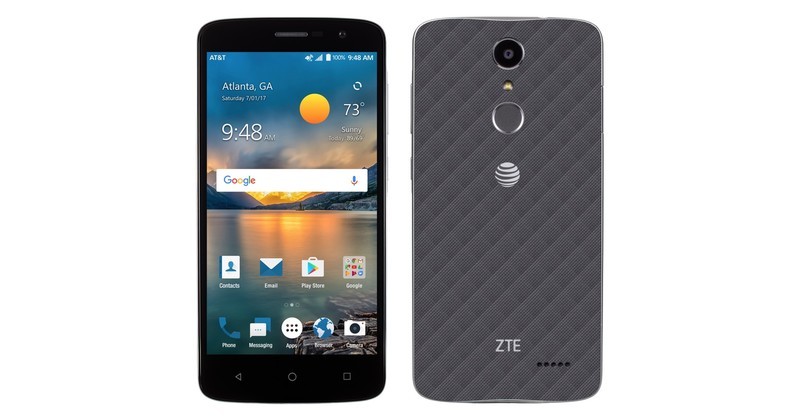
As for the Blade Spark in particular, it’s a 5.5-inch device with a 720p display, a 1.4GHz quad-core Snapdragon 425 processor, 2GB of RAM, 16GB of internal storage, a 3140mAh battery, a rear fingerprint sensor, a 13MP rear camera, a 5MP front-facing camera with an accompanying “selfie” button on the phone’s side that can be triggered when the screen is off, and Android 7.1.1 Nougat.
Suffice it to say, this phone isn’t going to blow anyone away. But judging from the last few ZTE phones I’ve used, I think it’s a safe bet that it’s going to be impressive for the price, with better-than-expected build quality and software that mercifully doesn’t suck.
See at Amazon Prepaid
Alternative carriers (MVNOS)
- What is an alternative mobile carrier?
- What are the advantages of going with an alternative carrier?
- How to make sure your phone works on a prepaid alternative carrier
- 8 Important Considerations When Switching To An MVNO
- These are the cheapest data plans you can buy in the U.S.
- Mint SIM vs. Cricket Wireless: Which is better for you?
Protect your devices as they charge with these discounted Belkin Surge Protectors
Our friends at Thrifter are back again, this time with some great deals on surge protectors to keep your devices safe!
Odds are you have to charge more than one of your devices every single day, which means that they spend a lot of time connected to a wall to power up the battery. Did you know that a power surge could come through and potentially ruin those pieces of electronics at any time? Wouldn’t that stink? Well, luckily, protecting your devices isn’t extremely expensive. Today, Amazon has some great deals on Belkin surge protectors that can prevent your devices from being affected.

The most popular option is also the smallest, the SurgePlus Mini travel swivel surge protector, which is down to just $11.99. It has 3 outlets, 2 USB connected, offers a 918 Joules protection, and comes with a lifetime warranty and $75,000 in connected equipment warranty. There is also the Belkin 8-outlet pivot-plug for $13.99 with protection against 2,160 Joules, and the Belkin 12-outlet power strip for $16.99, which has a 6-foot cord and the largest protection at 3,996 Joules.
These prices are good for today, July 14, only, so don’t miss out. Trust me when I say that buying one of these is far less expensive than replacing a gadget that fries during a surge.
See at Amazon
For more great deals be sure to check out our friends at Thrifter now!
Ending soon, score 10GB of Data with unlimited text and calling from $27 Per Month
Looking for a killer deal on a new cell phone plan for yourself? Don’t miss this awesome offer from Mint SIM!

Update: This deal will be ending soon, so if you haven’t already taken advantage of it, now’s the time!
In the recent years, we’ve seen a whole lot happen to cell phone plans. First unlimited data, then price hikes, then tiered data, cheaper plans, the return of unlimited data and so much more. Competition continues to grow in this field, and Mint SIM is getting in on the action with some extremely aggressive pricing for its plans. Mint SIM is an alternative carrier that offers you an extremely affordable way to have the data you need on your phone, and right now you can save an additional 20% off any 6- or 12-month plan using the coupon ACMINTSIM20.
Mint SIM utilizes T-Mobile’s growing 4G LTE network to ensure you have great coverage and fast speeds across most of the United States. The way it works is Mint SIM buys access to networks and packages and then is able to resell them to its customers for better rates than the major carriers are charging.
Save 20% with coupon ACMINTSIM20 Learn More
With Mint SIM you can port your existing number over, or start service with a new one if you wish. You can pay monthly, or buy in 3, 6, or 12-month bundles, which help you save even more.
The additional 20% off comes when you buy either 6 or 12-months, but the savings is pretty big. The Big Four carriers charge upwards of $90 a month to gain access to a reasonable amount of data, meaning you are paying nearly $1,100 a year for service. With Mint SIM you can get 10GB of data per month with unlimited talk and text for just $323 for the year.
You can’t afford to miss out on this deal Learn More
There are a ton of deals out there, but none of them are quite this good. You can use the unlocked phone of your choice with any of these plans, so pick one you like, order a new SIM card and give it a shot today!
10GB per month at $27 based on one year plan using coupon code. Does not include regulatory fees of $4.

Samsung Game Live brings easy game livestreaming to Galaxy users
Want to show the world how much you rock at your favorite mobile game? Samsung’s got you covered.
Whether you want to showcase insane strategies, superior technique, or just how insanely dedicated you are to that one game you refuse to put down, Samsung has a new app in the Galaxy Apps store that aims to make sharing your gaming prowess with the world much easier. Game Live is a one-stop streaming process that will let you go live with your favorite Android games in less than a minute, letting you quickly fire off a stream and then get straight to what you’re really here to do: kick butt in your favorite game.

Game Live can send your stream live to Twitch, Facebook Live, and YouTube, with a variety of options for what audio and resolution you want to broadcast at. You can choose to use either your microphone, the game’s audio, or both while you stream, and you can choose to stream at four qualities: Low, Medium, High, and Ultra. Game Live can only stream up to 4 GB videos, so the lower you set your quality, the longer your live stream can last at a time. By default, Game Live will save your stream videos to Gallery, but if you’re strapped for space you can choose to just stream them and watch the replay on the service of your choice.
The app is simple to set up and even simpler to use once you log in to your streaming platform of choice (YouTube, of course, being a single-touch sign-in). You can even share the link to your stream on Twitter and SMS to tell your friends to come watch you destroy this campaign! Game Link is a free app, but being on Galaxy Apps, it’s only meant for Samsung devices.
Game Live on Galaxy Apps
Best VPN apps for Android

Keep your browsing secure and anonymous with a quality VPN service.
Using a Virtual Private Network (VPN) when you’re online is becoming more and more important than ever these days. While the internet is a public space, a VPN acts like an invisibility cloak and makes your online activity virtually anonymous, making it hard for someone to track you when you’re online — whether you’re concerned about your internet service provider, the government, or malicious hackers.
We’ve previously looked at the best VPN services across all platforms, but here we’re going to specifically look at VPNs for your Android devices. These are apps that are free to download, but typically require you to pay a monthly or yearly subscription. We’ve run down the best, so check it out!
Not sure if you need a VPN? We’ve got your explainer right here.
Private Internet Access VPN

For those who are new to using a VPN, one of the most important features will be an easy-to-use interface. You want something as easy as flipping a switch. Private Internet Access offers just that, with an extremely simple Android app. Best of all, a yearly subscription is around $40, which is one of the lowest prices you’ll find for a premium VPN.

Advertisement
Private Internet Access uses over 3,000 servers in 24 different countries and has received numerous nominations as one of the best commercial VPNs you can use. They don’t log any of your online activity and the app is compatible not only with your Android devices, but also any computers running Windows, macOS or Linux.
Learn more at Private Internet Access.
Download: VPN by Private Internet Access (Free, $39.99/year or $6.95/month subscription)
ExpressVPN

ExpressVPN is another highly-rated premium VPN service that has been praised for its customer service and includes all the features you’d expect from a top-rated VPN such as unlimited bandwidth, unlimited speed, and strong encryption. You’re able to connect up to three devices simultaneously via ExpressVPNs thousands of servers in more than 94 different countries.
The app for Android is easy to use for beginners, with settings and features that heavy users will appreciate. Subscriptions are a bit pricier but ExpressVPN offers a 7-day free trial and a no-hassle, 100% money-back guarantee for your first 30 days of service, so you can try it out for yourself.
Learn more at ExpressVPN.
Download: ExpressVPN (Free, $99.95/year, or $12.95/month subscription)
NordVPN

NordVPN is a great option if you’re looking for an encrypted connection for up to six devices. Operated out of Panama, NordVPN has no legal obligation to record the activity of its users, so you can confidently connect to one of more than 1000 servers in 57 different countries.
It, too, comes highly recommended from a variety of outlets including CNET and PCMag, with an app for Android that’s dead simple to use. Connect to a server with the press of a button and keep your phone protected when browsing on public Wi-Fi.
Advertisement
You can try NordVPN for free with a 7-day trial before deciding whether to commit to a subscription.
Learn more at NordVPN.
Download: NordVPN (Free, $69/year or $11.95/month subscription)
TunnelBear VPN

Don’t mistake the cartoony layout of TunnelBear VPN’s Android app — it’s a simple-to-use app that offers serious VPN protection. You can create an account for free, which gives you 500MB of secure data a month but we’d recommend checking out a paid subscription that lets you connect up to five different devices at a time to servers in 20 different countries.
The Android app is actually fun to use, and you got to give TunnelBear credit for really doubling down on its name by really running with the concept. TunnelBear does not currently support torrenting, so if that’s an important feature you’re best to look elsewhere. If you’re only looking for a casual VPN for your phone, TunnelBear is a great free option with affordable pricing for upgrading to the premium service.
Learn more at TunnelBear VPN.
Download: TunnelBear VPN (Free, $59.88/year or $9.99/month subscription)
How Bandai Namco is (and isn’t) changing ‘Duelyst’
There’s something about Duelyst. Its magic might stem from the fact that it’s gorgeous, with floaty, bright pixel art in a rich fantasy world — or it might be the blend of card-based strategy and turn-based tactics. It might run even deeper than that: Counterplay Games is a 14-person, independent studio co-founded by Keith Lee, the former lead producer on Diablo III, and staffed by veterans of League of Legends, Overwatch and XCOM.
Whatever makes Duelyst shine, it certainly caught the eye of Bandai Namco, one of the gaming industry’s oldest and largest studios. Bandai Namco just signed on to publish Duelyst, freeing up the developers at Counterplay to focus on, well, development.
“Most players don’t realize that marketing can take up more than 50 percent of a development team’s time and effort,” Lee tells Engadget. “This inevitably takes away from core game development, so we’re glad these responsibilities are off our plate.”
On a meta level, daily life at Counterplay hasn’t changed since the Bandai Namco partnership. The team still holds daily stand-ups, weekly production reviews and other consistent meetings that have been standard since Duelyst’s inception.
“We work like a military unit, with clear accountability and a set of escalating protocols,” Lee says.
What has changed is the work itself — Bandai Namco is now handling all of the marketing, promotional campaigns and customer support for Duelyst. This includes behind-the-scenes tasks like writing newsletters, staying active on social media, creating local content, organizing events and communicating with players across a multitude of channels. Now that Counterplay doesn’t have to worry about these things, it can create more — and more diverse — content for Duelyst.

“We now get to focus 100 percent on game development, including card design, card balance, play testing, pixel sprites, animation artwork, lore, new game modes and in-game features,” Lee says.
This is what makes partnering with a publisher so appealing to so many independent studios. Most developers would rather focus on actually creating, updating and growing their games rather than running Twitter accounts and writing mass emails. That’s exactly how publishers can help, alongside financial support.
What keeps some developers away from publishers is a fear of losing control over their creative vision. That’s not the case with Bandai Namco, Lee says.
“Bandai Namco will often offer really good suggestions and insightful feedback since they play Duelyst frequently and they even run their own office tournament brackets,” he says. “But, ultimately, final creative decisions rest with us.”

Under the publishing deal, Duelyst players have to link their accounts to Bandai Namco’s own system, and both studios are trying to make this process as painless as possible. Players get gifts for logging into the BNEA system, and a new currency, Diamonds, makes it easier for Counterplay and Bandai Namco to hold regular in-game sales. Most Duelyst fans are happy with the publishing partnership, though a small faction of players has expressed discomfort with the move.
“It is, however, a bit of a straw man, since some community players are channeling their frustrations from having been burned by game publishers in the past,” Lee says. “But, from what I’ve read, there’s hasn’t been any negativity specifically directed toward Bandai Namco as a publisher. We chose them because they’re reputable, and I’m personally a huge Soulsborne fan.”
Lee has now worked at nearly every level of the video-game industry, from leading a multimillion-dollar AAA team to going fully indie and, finally, finding a publisher. He calls game development an emotional ultramarathon.
“The most important thing is being able to find coworkers that you enjoy working with unconditionally,” Lee says. “It sounds incredibly obvious, but being able to find colleagues that have your back, and that you can truly laugh with, solve challenging problems with, and talk about games all day with, is what makes all the difference in this industry.”

Lee says he’s found this working-life harmony at Counterplay Games — and with Bandai Namco.
“We haven’t had a single developer leave the company since our inception, and as we continue to grow, we hope to keep our team culture the same,” he says. “To sum it up, we’re free thinkers with high levels of persistence and curiosity, and we encourage working on ’20 percent time’ experimental projects, like Google’s famous policy. As a result, there are quite a slew of unique technologies, internal tools, and games that we hope to announce in the future.”
Microsoft borrows from Xbox and PCs to improve enterprise services
Microsoft is taking inspiration from its Xbox and desktop beta tests, and bringing faster updates to its (admittedly tamer) Windows Server arm. Starting later this year, the company plans to deliver two rounds of updates each year, one in spring and one in fall, for Server customers. It’s started things off with a new Insider Preview for Windows Server — just like Microsoft does with other services. It has been planning a beta program for a while, and this should bring some of its enterprise offerings closer to the faster (and yeah, we know, more interesting) Xbox and Windows 10 desktop updates.
Insider Preview, which launches today, should mean faster updates to help keep its business services on top of customer demands. It’s also another sign of the company, gradually, contorting itself into a service company. It recently announced Microsoft 365, which combined Windows 10, Office 365 and the company’s Enterprise software into a convenient all-in-one business bundle, and an easier (?) sell to IT departments.
The next phase, however, will depend on its Server users, according to Microsoft — which is pointing users to its Insider program for both early access and more influence on future updates.
Source: Microsoft
 AIVAnet