


HTC U11 owners will be able to chat with Alexa starting Monday
Why it matters to you
Integration with HTC’s U11 is good news for the many people who rely on Alexa as their digital assistant of choice.
Another digital companion is on its way to the HTC U11 to go toe-to-toe with Google Assistant. HTC has announced via its American Twitter account that Amazon’s Alexa will debut on the phone on July 17.
Alexa was promoted ahead of the U11’s June release, but wasn’t ready by the time the device launched. Earlier this week, HTC updated its Edge Sense app, which controls the phone’s squeezable frame functions, with an Alexa shortcut. While the shortcut can be switched on in the settings, it doesn’t seem to be operational at the moment, and presumably won’t work until Monday’s launch.
With the addition of Alexa, the gleaming, liquid glass-backed handset will offer up a total of three different digital aides, including Google Assistant and HTC’s own Sense Companion. Thankfully, Sense Companion doesn’t retread the same ground as Google and Amazon — it uses artificial intelligence to monitor your usage and offer suggestions, ranging from apps to try out to what you should wear on a rainy day. We found the assistant helpful in our review, but not necessarily a reason to run out and buy the phone.
So what can Alexa do on the HTC U11? We won’t quite know until it launches, but having Alexa on board gives the U11 the distinction of being the only phone where you’ll be able to summon Alexa by name out of the box, without the need for a standalone app. In this sense, it should work similarly to Amazon’s Echo smart speaker. HTC’s latest tease for the feature shows a person calling on Alexa while the device is asleep.
In addition to bringing Alexa into the fold, the recent update for the Edge Sense app also improves the feedback animation whenever Edge Sense is triggered. This should make squeezing the phone a more responsive experience overall.
Today’s news follows a rumor from earlier in the week that HTC is looking to deliver a number of updates for U11 users in the near future, such as 60 frames-per-second video recording at 1080p and an option for more accurate color calibration. Owners only had to wait about a month to get Alexa, so hopefully continued updates arrive in an equally timely fashion.
PC sales take a tumble as buyers push back against higher prices
Why it matters to you
PC makers need a strong market if they’re going to continue to improve their products, and continued slow sales aren’t helping.
After roughly five years of declining PC sales, things looked ripe for a turnaround. The rate of decline had already started to slow and some analysts previously speculated that PC sales might start to pick up. The slowdown was attributable to the growth of mobile devices, particularly smartphones, while improvements in PC quality promised to stem the tide. However, a 4.3 percent decrease in the second quarter of 2017 has thrown a monkey wrench in that prediction.
The news comes via Gartner, which published its latest report on worldwide PC shipments. The report covers desktop, notebook, and ultramobile premium (think Microsoft Surface) PCs but leaves out Chromebooks and iPads. That means that the continued growth in Google’s Chrome OS platform isn’t accounted for in this report.
Total PC shipments during the second quarter of 2017 totaled 61.1 million units, representing the 4.3 percent year-over-year decrease from 2016 mentioned earlier. That’s the lowest number of PCs shipped in a quarter since 2007 and results in the 11th straight quarterly decrease in a row.
Gartner
The reasons for this particular decline are potentially less related to PCs being less desired by consumers and more about the recent increases in components costs that have driven up PC prices. DRAM, solid-state disks (SSDs,), and LCD panels have all seen upticks in prices based on a number of supply factors, and that has resulted in some manufacturers passing higher costs on to buyers. Toss in the fact that PCs aren’t becoming obsolete nearly as quickly, allowing consumers to put off purchases more easily, and you have the perfect recipe for poor sales.
If you’re HP, however, and particularly considering the important U.S. market, the news isn’t all bad. HP maintained its top spot in the second quarter and managed a solid 6.5 percent growth in U.S. sales from 2016. That’s likely due at least in part to HP producing some excellent machines, such as the Spectre x360 13, Spectre x360 15, and EliteBook x360 G2 that we’ve rated highly, and in fact ranked among the best mobile PCs money can buy.
Gartner
Lenovo was a big loser in the quarter, down 16.3 percent in the U.S. and dropping to third place. Dell managed to remain in second place and Apple maintained its fourth place position in U.S. sales despite a 9.6 percent decrease. Asus was the biggest loser in the U.S., dropping a massive 40.7 percent. Worldwide, the results are similar, with the most notable move being HP taking over the top spot from Lenovo.
Going forward, the outlook for PC sales remains guarded. Chromebooks continue to sell well but aren’t yet perceived as a true PC replacement. That could change, and if it does Windows 10 and MacOS would continue to struggle. That’s important to us as consumers because PC manufacturers need the incentive of sales and profits to continue to make the excellent machines we’ve enjoyed over the last several years. So far, the outlook remains a bit gloomy.
Sprint Flex lets you lease a new smartphone now, buy or upgrade later
Do I really want to own this phone?
When you’re upgrading to a new device, it can be hard to know if it’s a device you’ll want to keep for a few years, especially if you haven’t held it and played with it yet.
When you upgrade, though, most carriers have two plans and want you to pick one: installments to own the phone or monthly fees to lease the phone. So what if you chose the latter but start hating your phone months down the line? Well, Sprint wants to keep you from committing completely to a phone you might despise with its new financing plan, Sprint Flex.

Sprint Flex lets you lease a phone for 18 months, and at the end of those 18 months, you can choose to either upgrade to a new phone, pay off your phone in a lump sum, or pay off your phone with another six months of installment payments. The annual upgrade programs Galaxy Forever (and iPhone Forever) are included in the program. For $5 more per month, you can bump any other device up to an annual upgrade as well.
Sprint is also unveiling a “value menu” of cheap smartphones for users to choose from if they’re looking more affordable phones with Sprint Deals, which can offer different discounts depending on your credit, and you’re still eligible for an annual upgrade if you pay on-time.
See at Sprint

Protect every device on your network forever for only $225!
Sure, you have a firewall and antivirus on your PC, but what about all the other devices on your network? The ever-growing threat of hacking should be taken seriously; your webcam is always watching and your phone and tablet contain important data. If you’re in the process of automating your home, you also have to take into account your lightbulbs, fridge, doorbell, thermostat, etc.
Protect every device on your network forever for $225 Learn more
What you need is a simple way to protect all devices on your network from malware and hackers. Enter CUJO Smart Internet Security Firewall. This little device connects to your network and uses its machine learning protocols to put into place protection for every other device on your network.

Right now, thanks to Android Central Digital Offers, you can get the CUJO device and a lifetime free subscription to their service at 9% off — that’s a total price of $225 for this brand new product. With CUJO connected to your network, you can monitor devices through the mobile app, plus you’ll receive instant notifications if there are any security threats.
Get a CUJO Smart Internet Security Firewall for $225 Learn more
Ready to protect all your devices and your automated home from hackers and security threats? The CUJO Smart Internet Security Firewall is the gadget you’ve been waiting for. Don’t hesitate; this deal doesn’t last forever.
Google wants you to upgrade to (its) better two-factor authentication
Two-factor authentication is still the best way to keep yourself safe from password breaches, but some 2FAs are better than others.
Two-factor authentication has had a bad couple of weeks. Not only was a prominent developer, Justin Williams, forced to defend a phishing attack against him to PayPal and AT&T, but it’s becoming increasingly clear that SMS-based two-factory authentication is a new vector for hacking.

As a result, Google is doing something about that: since SMS-based two-factor authentication is more susceptible to phishing attacks — someone could potentially intercept a text message or clone a SIM card, as is what happened with Williams — the company wants people to switch to prompt-based verification:
Starting next week, 2-SV SMS users will see an invitation to try Google prompts when they sign in. The invitation will give users a way to preview the new Google prompts sign in flow instead of SMS, and, afterward, choose whether to keep it enabled or opt-out.
Overall, this is being done because SMS text message verifications and one-time codes are more susceptible to phishing attempts by attackers. By relying on account authentication instead of SMS, administrators can be sure that their mobile policies will be enforced on the device and authentication is happening through an encrypted connection.
Basically, prompt-based verification is secure, and cannot be intercepted since it runs through Google Play Services. The only way this could potentially be a security issue is if someone steals a phone that is registered to accepts 2FA prompts from Google, but it’s really easy to deregister a device from any web browser should that unfortunate event occur.
Two-factor authentication: Everything you need to know
Which phone accessories do you use every day? [Roundtable]

These are the things we need every day.
Gadgets nerds love accessories almost as much as the gadgets they are used with, and we’re no exception. Really. You should see our Amazon order history.
But some of the accessories we use get a little more attention than the others and we really don’t want to go without them. Check out the phone accessories we rely on.
Ara Wagoner

I am a recent convert on the whole Spigen Ring fad, but I’ll admit that it does make it easier to one-hand increasingly tall and cumbersome phones. I am putting my ring on a Caseology case rather than on the phone itself, both because I am an ardent case-user and because it makes it easier to get it off when I need to take pictures.
Oh, and my most important phone accessory is, of course, my headphones. You’ll be hearing more about those next week, so stay tuned!
Grab a Spigen Ring at Amazon
Andrew Martonik

I have so many gadgets, accessories, add-ons and doodads around that I could go on for days here. But there are a handful that I can guarantee I’ll use just about every single day, no matter which phone I’m using.
On my desk, I have a Ventev 6-port charging station to keep all of my devices topped up when not in use. Rather than keep a Micro-USB cable around for older devices, I have these USB-C to Micro-USB adapters. I have so many different USB-C cables I haven’t standardized on one brand, but I do like the styling and robustness of the OnePlus Dash USB-C cables. I’m wearing my Bose QC 35 headphones all day, every day.
When I’m out of the house, I’ve taken a liking to carrying this massive 26,800mAh battery from Anker because it can charge up everything, including my MacBook Pro. I’ve also been using the iOttie One Touch 3 car mount for my phone because it’s sturdy and highly adjustable, and I’m now using Android Auto every time I drive.
Daniel Bader

Phone accessories are like potato chips: once you start, you can’t stop. I usually buy a few good, solid cases for a new phone, but after swapping out a bunch in the early days and weeks I tend to settle on one, and that usually comes from one of two companies, Speck or Spigen. I love Speck’s quality, and its Presidio case for the Galaxy S8 is the perfect blend of protection and unobtrusiveness. Similarly, I love Spigen’s Liquid Air Armor for the Galaxy S8, which has held up incredibly well since I bought the phone in April.
To charge the phone, I’ve lately been lugging around this admittedly overpriced Nomad Powerpack battery, which combines USB-C fast charging with Tile Bluetooth locating into a compact, rugged package.
When I have a wall plug handy, my Anker six-port USB wall charger does the trick, and to listen I music I’ve recently been enjoying the heck out of V-Moda’s Crossfade 2 Wireless headphones, which you must buy if you don’t need noise cancellation. They’re amazing.
Marc Lagace

My go-to phone accessory is a Spigen Style Ring, which I make sure to slap on any phone I use. Admittedly, a style ring is not for everyone and arguments that it ruins the flow of the design of a phone are totally valid. But it’s just so handy on its own. I’m constantly using it as a kickstand to watch videos on a table, and I instinctively use it to keep my phone secure when taking a photo or talking on the phone.
Then there’s the included car mount, which is one of the more minimalist options you’ll find for mounting your phone on the dash. There are cheaper versions of the style ring available, but I trust the build quality that Spigen consistently delivers. Speaking of in-car accessories, I use the Flexsmart X2 Bluetooth FM transmitter to connect my phone to my ancient car stereo while the included USB port lets me charge my phone on the go. How well it works in your car will depend on the location of the 12V port in your car.
Jen Karner

I tend to go pretty simple with my day to day accessories. These include my Belkin USB-C car charger which works with both my Pixel XL and my Samsung Galaxy S8.
The only other accessory that I use on a daily is a case. I haven’t found one for my S8 that I’m particularly fond of, but I used an Incipio case with my Pixel. I managed to drop it a half dozen times without so much as denting the case, and since I am the clumsiest person on the planet a solid case is a must have.
Jerry Hildenbrand

I don’t use one of those Spigen Ring thingies, but now I think I might want to …
Anyhoo, I use a lot of stuff but have very few single things that stand out. I have a mishmash of USB-C cables, but I really like this 10-foot braided USB-A to USB-C cable from iOrange and just leave it plugged into my desktop. It’s great as a charger or when I need to copy something from a phone to my computer. I have the business end tucked into this slick little cable organizer. Best $7 I ever spent.
I also get a little (OK, a lot) OCD when it comes to smudgy screens. I have several of these microfiber mist sprayer screen cleaning things from AM and keep one in my laptop bag and the glove box in the car as well as on my desk. A couple of quick pumps of magic juice (it tastes horrible) then you wipe it clean with the little block and everything is clean and shiny. Until I touch it again and smear it. I swear I must have frog slime in my fingers or something.
What about you?
Take a minute to let everyone know your essential accessories in the comments. We’ll probably use them for our wishlists!
Google Maps now tells you how long a future trip will take
“If I don’t leave now, it’s only going to take longer.”

It’s hard to know the perfect time to go somewhere, because there’s no one outside mailmen and UPS drivers that really know when traffic is best in your city… except for Google Maps. With millions of users and millions more Waze users helping them graph traffic in real-time, day after day, Google Maps really can tell when the best time is to go run down to that trendy bistro downtown with a handy new chart.

The graph tells you how long your trip would take if you leave right now, the green bar, against the grey average times across the last half hour and next two hours. This can help you gauge whether traffic is better than average right now, or if you should consider going later when travel times are lower (like say after rush hour).
This could be a great help when planning errands or lunch dates, but given the relatively small window, it’d be nice to see this chart expand so we could see if it’s better to go in the morning or afternoon, but it’s still early days. It’s currently available in the U.S. and UK, but hopefully, more markets will see it soon. This chart also appears to be a server-side push, as there was no app update before it appeared.
There’s an AI storm brewing between Google and Microsoft

Both companies announced larger AI initiatives this week, and it’s all under the guise of making humanity great again.
Ever wonder whether artificial intelligence is a one-trick pony? Are there other practical applications for AI, besides giving a marketing edge to the latest smartphone releases? That’s what Google, and a whole host of other technology companies, are aiming to figure out.
This week, Google announced the People + AI Research Initiative (or PAIR), a new program devoted to advancing the use of artificial intelligence. According to the official blog, the program plans to bring together numerous researchers from Google and several outside research facilities to effectively “redesign the ways people interact with AI systems.” The underlying goal is to figure out the “human side” of it all, including its application in various trades and industries. Google is even opening up its Facets Overview and Facets Drive visualization tools so that AI engineers can unpack it and study the machine learning process:
We think this is important because training data is a key ingredient in modern AI systems, but it can often be a source of opacity and confusion. Indeed, one of the ways that ML engineering seems different than traditional software engineering is a stronger need to debug not just code, but data too. With Facets, engineers can more easily debug and understand what they’re building. You can read full details at our open source repository.
For its part, Google seems primarily focused on building out its human-centered machine learning (HCML) engine, which exists to help address where AI can assist with actual human needs. That might include research related to climate change, medical advancement, or just ensuring your virtual keyboard knows you’re about to switch into typing in another language.
Microsoft took this week to also announce its AI-focused research lab, aptly titled Microsoft Research AI. The program focuses on developing “general-purpose artificial intelligence technology” — just like Google. Microsoft has hired a team of scientists to work in its Redmond facility, and it’s even bringing cognitive psychologists on board.
Apple and Facebook have their own ambitions related to the AI space, as well, though the social network is a bit farther along than Cupertino at present. There’s also a hefty number of start-ups and smaller companies attempting to develop their own very specific use cases for AI, likely in a bid to get scooped up by one of the Big Four.
Automation is a majorly hot topic in the tech world right now, but you don’t have to study Silicon Valley to feel the effects of that.
Automation is a majorly hot topic in the tech world right now, but you don’t have to study the Silicon Valley to feel the effects of that. Instead, swipe over to the left on your Google Pixel’s Home screen, or yell out to the Google Home unit sitting in your kitchen. Those are all examples of how automation and artificial intelligence have come into play in our daily lives. Those of us who can afford it are also experiencing it behind the wheel of a Tesla Model X — I didn’t realize the depth of what AI can do until I was autonomously chauffeured down a windy Sonoma County road at 40 miles-per-hour.
For companies like Google and Microsoft, jumping on the AI train also means being able to maintain relevance. Google began as a search company, but as the Internet extends its reach past computer browsers and mobile devices, Google will have to find its way into other future-facing spaces, whether it’s in the home or at the university research lab. Microsoft, too, started with personal computers and a desktop operating system, but as we become less reliant on those particular machines, the company has to find other means of applications for its products. The company’s AI for Earth is an excellent example of this, as it offers its artificial intelligence tools to researchers and organizations to help solve climate issues.
Make no mistake: these initiatives aren’t merely for advancing artificial intelligence. It’s to sell us, the homosapiens, on the idea that there’s a practical element to it — a viable choice for a time when more technology and machinery is becoming autonomous. In this race, however, the prize isn’t reserved for the company with the most robust AI engine, but for the one that can do the best job of convincing humanity that this is all required to help move us forward as a species.
How to clean your Samsung Gear VR

Keeping your Gear VR clean isn’t a difficult process.
Samsung’s Gear VR can take you places, let you play games, and even watch your favorite movies from within VR. After you’ve been playing with it a bit, you’re going to want to make sure that you keep your headset clean. This is doubly true if you plan on sharing your Gear VR with friends; after all, nobody wants to put on a dirty headset. Thankfully, cleaning your Gear VR is a breeze and shouldn’t take more than a few minutes at a time.
We have the details for you here!
Read more at VRHeads
These products and services work with Google Home
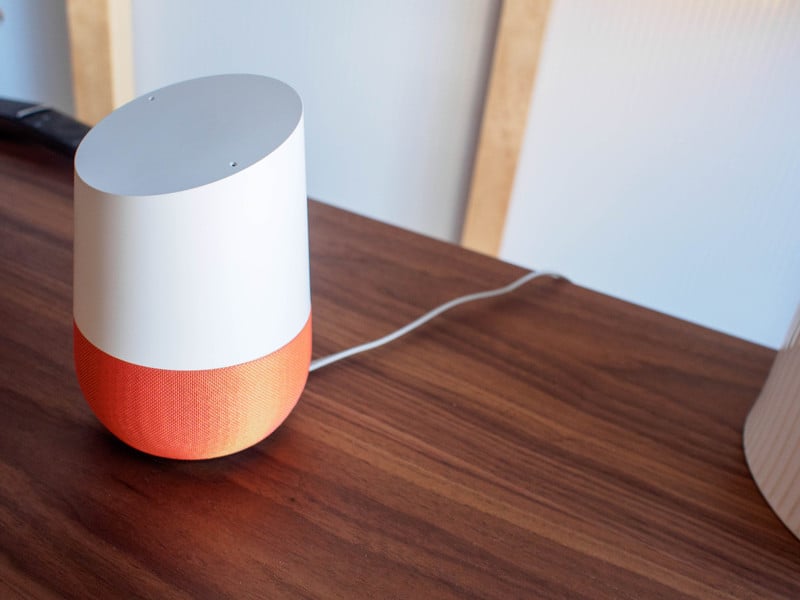
Which products and services work with Google Home?
Google first introduced Google Home to the world back in May at Google I/O 2016, later revealing the final product alongside the Pixel in October. From everything we’ve seen, Google Home seems primed to eventually link up with any smart device in your home and allow you to control everything with just the sound of your voice.
Google has announced which products and services will be supported at launch, but there’s sure to be plenty more to come in the future. Continue to check back to this article in the coming months, as we’ll surely be updating this list as more products and services are added. We’ve broken things down into two categories — home automation products and supported services.
Home automation
- Chromecast
- Nest
- SmartThings
- Phillips Hue
- LIFX Smart Lights
- TP-Link Smart Home
- Vivint Home Security
- Rachio Sprinklers
- Logitech Harmony
- Geeni Connected Tech
- August Smart Locks
- iHome Control
- Hive Home Automation
- Honeywell
- NuBryte Smart Home Automation
- Smartika
Supported services
- Spotify
- Pandora
- Google Play Music
- TuneIn Radio
- YouTube
- IFTTT
Home automation
Chromecast
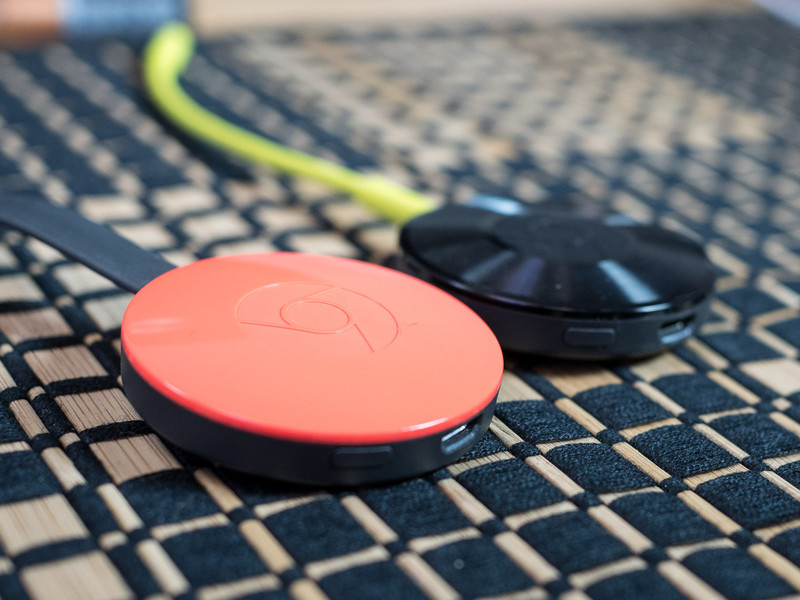
It should come as little surprise that Google Home works with Chromecast. Google hit it out of the park with their compact, Wi-Fi enabled dongles for video or audio that you simply hook up to your TV or stereo and allow you to stream media straight from your phone, tablet, or laptop.
Google Home takes things to the next level by allowing you cast video and audio from its supported services using only your voice. As if Chromecast wasn’t convenient enough already. I can think of many scenarios where I might want to pull up something from YouTube or change a playlist while I’m busy in the kitchen or otherwise preoccupied. Currently only YouTube is supported for video, but expect more services to be added — Netflix, Hulu and the like — as time goes on. We’ve linked to the 2015 model below, which remains a fantastic value at only $35… but it only displays at 1080p. If you’re interested in some higher definition, Google is set to start shipping a new Chromecast for 2016 — the Chromecast Ultra — which costs twice as much but supports 4K video.
See at Google
Chromecast-enabled TVs and Speakers

If you’re looking to upgrade your home theatre setup and would like streamline things with less dongles, there’s a growling selection of Smart TVs with Chromecast built right, with 4K sets available from the following brands:
- Vizio
- Sharp
- Toshiba
- Sony
- Philips
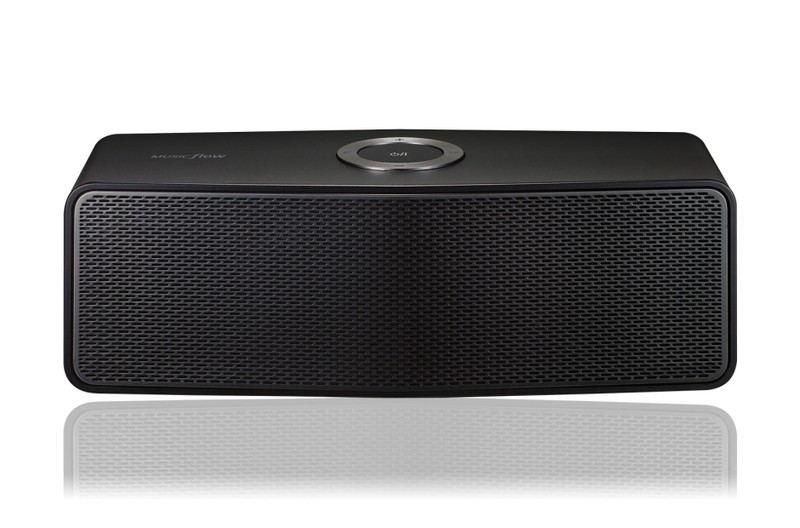
For streaming audio, the biggest gap currently is a lack of support for Sonos. There doesn’t appear to be any timetable for adding Sonos into the Google Home ecosystem which is frustrating for anyone who’s invested in — or looking to start building out — a Sonos system throughout their home.
But you still have options. Nine brands currently offer Chromecast-enabled speakers, soundbars and subwoofers:
- Vizio
- Sony
- LG
- Philips
- B&O Play
- Grundig
- Polk
- Bang & Olufsen
- Raumfeld
Nest
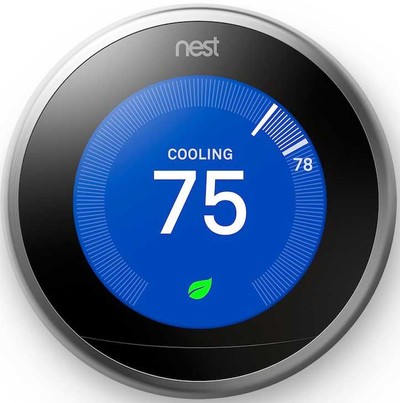
Nest is one of the best known manufacturers of smart home automation products, which include self-learning, Wi-Fi-enabled thermostats, smoke detectors and security cameras.
With Google Home and a Nest thermostat, you’ll be able to effortlessly control the temperature of your home using only your voice. Nest also works well with other smart products, such as lights, doorbells, and smart locks.
See at Amazon
SmartThings
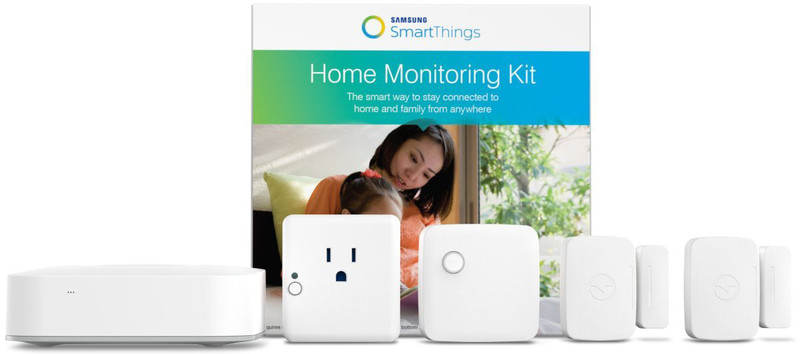
Samsung’s SmartThings is a very capable and customizable home automation system that features five different smart sensors for home monitoring, all linked together wirelessly via the Hub. The SmartThings Home Monitoring Kit comes with a Hub, two Multipurpose Sensors, a Motion Sensor and an Outlet. You can configure them however you like in your home, then get instant notifications if anything is out of the normal. You can also buy additional sensors, including an Arrival Sensor and a Water Leak Sensor.
SmartThings is incredibly versatile as it is, but we’re super excited to see what integration with Google Home will look like.
See at Amazon
Phillips Hue
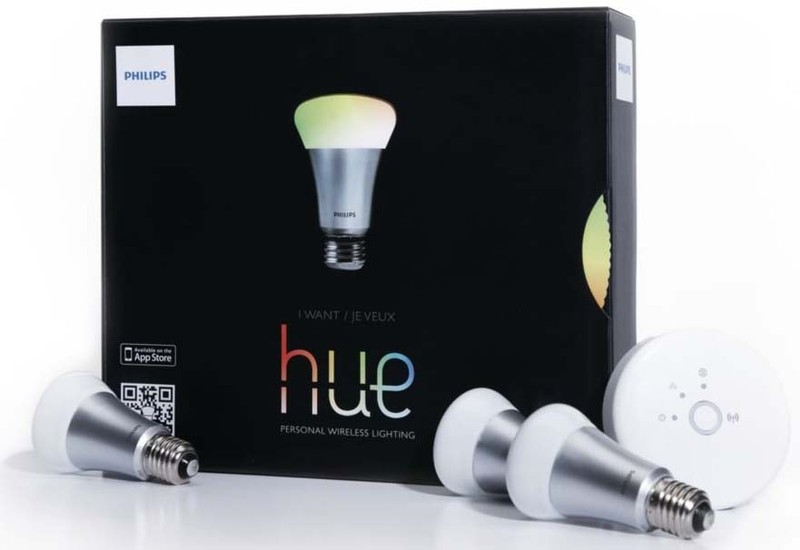
Phillips is one of the leading manufacturers of wireless LED smart bulbs. The Phillips Hue lineup features a multitude of different lighting options for around your home, which must be configured through the Phillips Hue Bridge via. You’re able to connect up to 50 lights to one Bridge and then configure and control them in so many different ways.
We should expect Google Home to work just as well with Phillips Hue lights as it does with Apple Home Kit, meaning you’ll be able to set and adjust your Phillips Hue lights throughout your house without leaving the couch, or easily turn off all the lights when you’re leaving the house or it’s time for bed.
See at Amazon
LIFX Smart Lights

LIFX offers their third generation of smart bulbs for both indoors and outdoors. Both offer 1100 lumens of brightness, with options to customize the look with 16 million colors and 1000 shades of warm to cool whites.
A single bulb starts at $59.99, but if you’re planning to do up your home with LIFX bulbs, you’re definitely better off buying in bulk. You save $66 by getting the Master Pack, which comes with six bulbs.
See at LIFX
TP-Link Smart Home
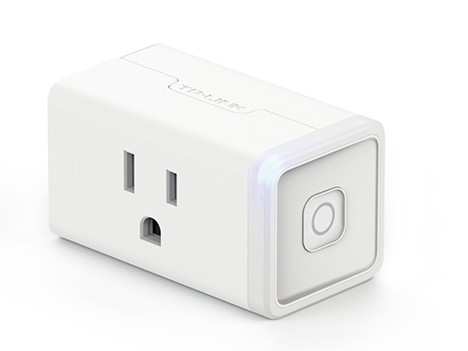
TP-Link offers a line of smart plugs and switches that allow you to convert the lamps and appliances you already own into smart devices you can automate to power on or control with your voice.
Their newest smart plug, the Smart Wi-Fi Plug Mini, is their most compact option yet, leaving the second outlet free.
See at Amazon
Wink hub automation
Wink’s latest smart home hub, the Wink Hub 2, works with products from Z-Wave and Zigbee, offering a wide range of home automation options.
If you’ve built your home automation around a Wink Hub, you can control all your Wink-compatible lighting products (lightbulbs, switches, dimmers, and outlets) and thermostats using Google Assistant on Google home. It’s all integrated right into the Google Home app, letting you group lights in specific rooms and control everything using only your voice and Google Assistant.
See at Wink
Vivint Home Security
Vivint offers complete home automation and security packages for those who don’t want to piece their home automation together one component at a time. The system features a main control panel that moderates communication between you and all your home automation devices, including lights, security cameras, thermostats, and smart locks. The main console features a touch-screen dashboard and two-way talk to Vivint Smart Home security monitoring teams.
Beginning in April, Vivint will integrate with Google Home allowing you full control over your smart home security and devices around your home using only your voice. If you’re interested, you’ll need to call Vivint to inquire about pricing and set up an installation appointment.
Learn More
Rachio Sprinklers
If your home has an automated sprinkler system, Rachio wants to save you money on your water bill by optimizing your sprinkler system to only turn on when it needs to. They offer a Wi-Fi-connected controller for your sprinkler system which checks the local forecast and will adjust schedules based on past, present, and future weather, and will also make intelligent seasonal adjustments as needed.
With the new Google Assistant integration, you will be able to control your sprinkler system using only your voice to turn the water on or off, and also update your schedule as needed.
Learn More
Logitech Harmony
Logitech continues to dominate the smart remote sector, with its Harmony Elite remote and hub package allowing you to connect and control more devices than ever from the couch.
With the latest integration with Google Assistant, you can do even more without even picking up the remote at all!
Learn More
Geeni Connected Tech
Geeni Offers intuitive solutions for your smart home automation goals. Their products range from security cameras, lighting, as well as smart plugs and power strips. Everything is controlled in the Geeni app, but now with integration with Google Assistant, you also have the option to control things with your voice, too.
See at MyGeeni
August Smart Locks

August offers elegant smart locks to help keep your home secure. You’re able to remotely control your front door from anywhere using the August Connect app.
With the new integration with Google Assistant, you’ll be able to ask Google to confirm whether your front door is unlocked when you’re expecting company, and lock the doors when you’re headed to bed. Both the first and second generations of August Smart Locks are compatible with Google Assistant, though you’ll also need a August Connect Wi-Fi Bridge to get everything connected.
See at Amazon
iHome Control

iHome has been a popular name in home speakers and alarm clocks that connect to your smartphone, so it should come as little surprise that the company has also gotten into the smart home sector.
They feature a line of smart home accessories that work with Google Assistant, including the SmartMonitor, which offers 24/7 home monitoring using built-in sensors for motion, temperature, light, sound, and humidity.
They also offer three different smart plug models, with the iSP8 model including a handy RF remote control with programmable buttons that allow you to control individual or grouped plugs without opening your phone. It’s a great option for guests or younger kids in the home.
Learn more
Hive Home Automation
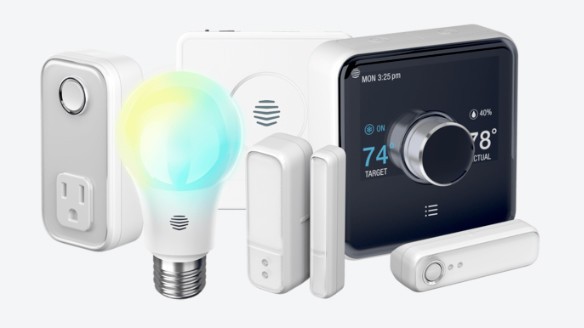
Hive offers a full suite of home automation products which allow you to set up smart automation for comfort and security. The products they offer include a home hub, smart thermostat, motion sensors, smart plugs, and smart bulbs. You’re able to control everything using Google Assistant by creating some commands using IFTTT.
Hive offers their products via a monthly subscription service — the standard package is available for $29.99 a month and includes a Hive Hub, two Hive Active Plugs, four Hive Active Lights, two Window or Door Sensors, one Motion Sensor, and the Hive Active Thermostat. It’s a bit of a different model for smart home automation, but might be appealing to renters or folks not ready to fully invest in owning home automation products just yet
Learn more
Honeywell
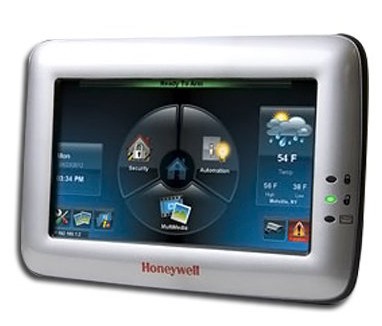
Honeywell offers a wide range of home automation solutions for around your home that are built into its Tuxedo Touch Home Security and Automation Controller. Honeywell’s products use Z-Wave and are fully compatible with Google Home.
If you’re looking to connect your Z-Wave-enabled thermostat, smart bulbs, smart locks, and other smart home products together via a single home hub, with mobile integration that allows you to control everything remotely from your smartphone, Honeywell offers a compelling
Read more about the Honeywell Home Automation system here, then visit the Honeywell website to find a dealer location near you.
Learn More
NuBryte Smart Home Automation
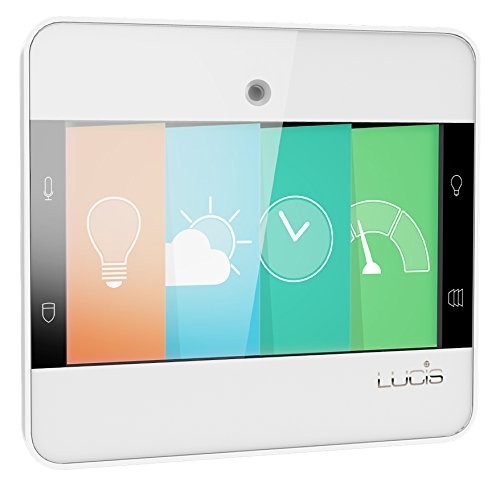
NuBryte offers a smart home automation solution that’s pretty comprehensive and customizable. The system is built around the NuBryte Touchpoint Smart Console, which NuBryte recommends putting one in each of the main rooms of your home.
Each console replaces the light switch in the room (available in single and double switch models) and includes built-in camera for motion detection, touch-free controls for your lighting, a built-in intercom for room-to-room communication and whole home broadcasting when it’s time for dinner, along with a home hub for integrating other smart home sensors and integrations. Full integration with Google Home means you’ll be able to control things in a room without a console by using your voice.
NuBryte is coming out with their own line of complementary smart switches as well, which are expected to launch this summer.
Learn More
Smartika
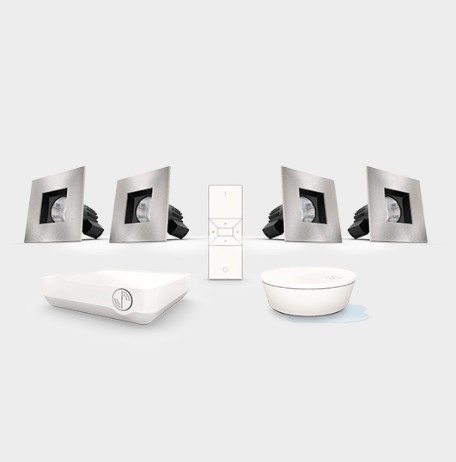
Smartika is a Canadian company that offers rather stylish home automation products for lighting your home which are fully compatible with Google Home as well as Amazon Alexa and IFTTT.
Everything is controlled via the Smartika Hub, which lets you create groups and scenes by programming automated functions. The Hub also lets you connect to the Smartika mobile app, which lets you easily interconnect and control all your Smartika products.
Beyond the Hub, Smartika offers five different lighting fixtures, which range from $135 for a recessed ceiling lights to $500 for a full tracklight setup with four adjustable lights — perfect for a kitchen renovation.
Installation is available for those living in Quebec and Ontario, otherwise you’re left to install things on your own via the included installation and user manual.
Learn More
Supported services
Spotify
Over 100 million people use Spotify for all their music streaming needs. Of those, 40 million are paid subscribers. The point here is that Spotify is massively popular and if you aren’t already using it, you probably know a bunch of people who do.
With Google Home, simply say “OK Google”, followed by your favourite artist, album, song, or playlist, and your music will almost instantly start playing through the Google Home speaker. This is absolutely perfect for playing music in the kitchen when your hands are too messy to be handling a phone, or for setting the right mood for a party or intimate evening. We’re also eager to see how smooth it is to use Google Home to cast your Spotify music to your Chromecast Audio-enabled speakers for an even better audio experience.
Pandora

Pandora is a fantastic music recommendation platform which is used by over 200 million people in the U.S., Australia, and New Zealand. It’s a customizable internet radio streaming service that allows you to curate your own streams using algorithms that recommends new music it knows you’ll love based on your musical tastes and how you’ve rated other music.
With Google Home, you’ll be able to throw on your favorite Pandora station using just your voice. In its current iteration, Google Assistant is unable to identify songs like Shazam or other apps of that sort, but we’d hope to see your Google Assistant give you the information about a song you’ve just discovered on Pandora, just by asking “what song is playing?” as well as an option to rate songs and skip if necessary.
Google Play Music

Kind of a no brainer, but Google Home will obviously play well with Google Play Music. And that’s great news, since Google has slowly build its core music app to encompass a full-fledged streaming service featuring 35 million songs available on-demand (with a subscription) along with mood- and activity-based stations (you may have known it as Songza), along with being a great option for podcasts. A natural fit with Google Home, you’ll definitely want to get a Google Play Music subscription if you don’t already have one.
TuneIn

Believe it or not, but some people actually prefer to listen to the radio. TuneIn is absolutely the go-to app for accessing online radio, music, and talk stations. Even with the free version, you get access to over 100,000 radio stations from around the world, along with over five million podcasts as well. If you decide to upgrade to the premium subscription, you’ll also get access to live NFL and MLB play-by-play, along with a large library of audiobooks.
It will be really interesting to see how third-party streaming services such as TuneIn are integrated into the Google Home experience via the Google Assistant, whether you’ll be able to make a broad request (“Play a top-40 radio station from the UK in TuneIn”) or stick to more specific requests based on your app usage (“Play my favorite local radio station in TuneIn”).
YouTube

YouTube is another obvious starting point for Google to incorporating video search and playback controls with Google Home. Some might be disappointed with a lack of support at launch for Netflix, Hulu and other video services, but with so much content available on YouTube and natural alignment within Google’s existing ecosystem (hello, Chromecast), it’s a great place for Google to fine tune their voice searching capabilities before opening things up for other video services.
Google Assistant on the Pixel currently only works well with YouTube for video — you can ask to open up Netflix or other apps, but have to navigate the rest of the way from there. But we’re likely not too far off from being able to come home, say “OK Google, cast The Office on Netflix to the living room” and binge watch the night away, for better or for worse.
YouTube is also the world’s largest music streaming service, becoming such a primary destination for lovers of music that they came out with the YouTube Music app. A subscription to YouTube Red is required.
The YouTube Music app isn’t available for everyone just yet, but it too is listed as being compatible with Google Home. The Pixel’s Google Assistant frequently completes music requests using YouTube, so we’d imagine it to be just as smooth an experience with Google Home.
IFTTT
IFTTT is a free web service that lets you create chains of conditional commands, called “recipes,” to automate processes between apps and smart home devices. IFTTT is an abbreviation of “If This Then That”, and that’s exactly how the recipes function. For example, say you’re concerned about your teenager getting into the liquor cabinet when you’re away. If you have a SmartThings Multipurpose Sensor on the liquor cabinet door, you can create an IFTTT recipe that goes “if the liquor cabinet door is opened, call my phone,” so you’ll know instantly if something’s up.
IFTTT is compatible with a ridiculous number of IoT devices, applications, and online services — including Google’s OnHub router — and is something you should definitely check out with or without Google Home.
Check out IFTTT recipes created for Google Assistant
What do you think?
Are there any services or products you’re hoping to connect and control via Google Home? Let us know in the comments!
Updated July, 2017: Added new smart home products compatible with Google Home from iHome, Hive, Honeywell, NuBryte, and Smartika.
Google Hardware

- Google Wifi review
- Google Home review
- Everything you need to know about the Chromecast Ultra
- Chromecast vs Chromecast Ultra: Which should you buy?
Google Wifi:
Google
Amazon
Google Home:
Google
Best Buy
Chromecast Ultra:
Google
Best Buy
 AIVAnet