


AMD is unintentionally profiting from cryptocurrency miners
A digital gold rush always has one obvious winner: the people who make the tools necessary to mine in the first place. AMD, for instance, has found itself the beneficiary of an increase in demand for its graphics cards, although it doesn’t believe that it’s a sustainable, long-term business. The company revealed as much during its earnings, with profits in the graphics card business increasing by 51 percent year on year.
Despite this huge upswing in interest, it’s not an area that AMD sees its future, which it’s insisting is still the gaming market. During the call, CEO Lisa Su said that the company had seen some “elevated demand,” but that it’s not “looking at [cryptocurrency] as a long-term growth driver.” That’s despite some of its partners, like ASUS, producing dedicated currency-mining cards that are better tweaked for constant use.
Of course, cryptocurrency is essentially a computational arms race, with the person with the most power liable to win. That has led to some outlandish — and unverifiable — stories, such as Quartz reporting that Marco Streng claiming he has chartered a Boeing 747 to ship graphics cards to his digital mining facilities. As that report elaborates, the current Etherium boom is worth around $7.2 million a day, although with all bubbles, it remains to be seen if the investment will provide a decent return.
Via: CNBC
Source: AMD
Microsoft Closes Down ‘Word Flow’ Keyboard for iOS, Points Users to SwiftKey
In April of 2016, Microsoft opened up a beta test and then launched its Word Flow Windows Phone keyboard on the iOS App Store in the United States. Over a year later, some users have noticed that Microsoft has now closed down the app and removed it from Apple’s App Store (via WindowsCentral).
On Word Flow’s Microsoft Garage page, the company notes that “the Word Flow experiment is now complete,” and suggests that users download SwiftKey. Microsoft acquired SwiftKey in February of 2016, so it appears that the company has decided to focus solely on one predictive keyboard app on the iOS App Store.
As with all apps removed from Apple’s App Store, when attempting to visit old links for Word Flow on iTunes [Direct Link], an error message now reads, “The item you’ve requested is not currently available in the U.S. store.”
The Word Flow experiment is now complete! We encourage you to download the SwiftKey Keyboard from the App Store. The SwiftKey product team is frequently building and evaluating new features for SwiftKey and shipping updates.
Like many third-party keyboard apps, Word Flow incorporated GIFs, theme customization options, and machine learning for better predictive texts. The app’s standout feature was “Arc Mode,” which curved the iOS keyboard into a circular shape and hugged the side of the iPhone that a user would type on, allowing for comfortable one-handed typing.
Now that it’s gone, users won’t have access to Arc Mode, but SwiftKey includes many of the same features as Word Flow, including a swipe-to-type ability. The app was updated about two weeks ago with emoji prediction, new themes, upgraded 3D Touch features, and more languages. SwiftKey is available to download from the iOS App Store for free. [Direct Link]
Tag: Microsoft
Discuss this article in our forums
Ring Debuts New Spotlight Cam With Wired, Battery, and Solar Models for Home Security
Ring, maker of the popular video doorbells and recently launched Floodlight Cam, is today announcing a new line of Spotlight Cams.
Similar in function to the Floodlight Cam but with a different lighting system, the new Spotlight Cam features LED light panels that automatically turn on when motion is detected, as well as a 1080p camera with night vision, two-way audio, and a 110 dB siren to let homeowners see activity around their homes and communicate with people who set foot on their property.
Wired model
The Ring Spotlight Cam will integrate with other Ring products through the Ring app to provide a complete security solution around the perimeter of the home.
Ring’s new Spotlight Cam is available in either black or white and will be available in three versions: Wired, Battery, and Solar. The Wired version includes a 270-degree horizontal motion detection angle, 140-degree camera field of view, and a 20-foot power cable. It is priced at $199 and is available to order today with shipments starting in 7–10 days.
 Solar model
The Battery ($199) and Solar ($229) versions have a narrower 160-degree motion detection angle but the same 140-degree camera field of view as the wired version. The Battery and Solar models each come with a single 6000 mAh battery pack, but the light itself can hold two battery packs for maximum battery life. Extra battery packs are priced at $29 each. The Solar model comes with a Ring Solar Panel to keep the battery packs charged at all times. The Battery and Solar models are available for pre-order today and will begin shipping in the fall.
Tag: Ring
Discuss this article in our forums
How Austin brought the human touch to smart city planning
Your city is dumb. The potholed streets, coin-operated parking meters, and drafty brick buildings many of us interact with every day haven’t changed much in a century. But it’s finally happening. From Oslo to San Diego, cities across the globe are installing technology to gather data in the hopes of saving money, becoming cleaner, reducing traffic, and improving urban life. In Digital Trends’ Smart Cities series, we’ll examine how smart cities deal with everything from energy management, to disaster preparedness, to public safety, and what it all means for you.
What makes a “smart city” and what makes for smart city planning aren’t always the same thing. Just ask Ted Lehr.
“I’ve sat in rooms with a bunch of affluent professionals talking about the importance of increasing bike ridership, the greenness of our trails, and reducing the carbon footprint,” Lehr, a data architect with the city of Austin, told Digital Trends. Put another group of people in a room, he noted, and they’ll say their biggest problems are finding a third job or figuring out how to take their children to the doctor without getting fired.
“Those are the folks that we need to talk about when we talk about smartness,” he said. “And if we’re not, we’re just ignoring them in the way we’ve just been ignoring folks like this forever.”
“You’re not really solving a problem; you’re making a cushy life cushier.”
The Department of Transportation’s Smart City Challenge spurred a lot of cities to kick off or refine blueprints for becoming more connected, both in terms of technology and mobility. Austin started with a plan to make it easier to access busy and gentrifying areas — a move that’s often the first priority for many cities, but often easier said than done.
Austin is among the most economically segregated cities in the U.S., according to “Segregated City,” a 2015 report from the University of Toronto’s Martin Prosperity Institute. “It’s easy to put new sensors and all this crazy stuff in places that are well wired and affluent and where people are receptive to the technology,” Lehr said. “You’re not really solving a problem; you’re making a cushy life cushier.” Instead, the city decided to take a step back and see where technology and other investments could make the biggest impact.
Granted
Austin lost out to Columbus, Ohio, for the DOT challenge, but it was one of the winners of the Smart Cities Council Readiness Challenge Grant. It’s also hoping to work with several universities throughout Texas as part of a National Science Foundation 5G research grant to explore new technology for healthcare, public safety, and others.
The grant will focus on using “new technologies to meet old challenges of mobility and affordability,” Mayor Steve Adler said in a statement, and put the city “that much closer to creating a comprehensive and inclusive strategy to use technology in a way that benefits communities that are usually left behind.”
Credit: Gavin Hellier/Getty Images
Take infrastructure for example, something that’s crucial to any well-functioning city — and that extends to wireless networks, too. That’s especially true as more Internet of Things devices connect to them. “And as important as these connected devices are, they’re just meaningless gadgets without connectivity,” Chelsea Collier, editor of Smart Cities Connect, told Austin Business Journal. “High-speed connectivity is literally the lifeblood of our current economy and will drive future innovation.” For Austin, it’s important that the network be equally strong throughout the city, not just in the areas closest to the university.
At a recent smart city readiness workshop, some of the suggestions participants had included putting up kiosks in a variety of neighborhoods to get ideas and feedback from people with different backgrounds. Others wanted to use data to connect residents with affordable housing.
In another attempt to gather feedback, the city council made the Smart City Strategic Roadmap available online so staff members could respond to comments about the six priorities it focuses on: affordability, safety, mobility, health, culture, and government works. Anyone can look at the spreadsheet mapping the city’s 81 projects geared at making Austin smarter, tracking the progress each one has made.
The human touch
In addition to soliciting feedback in person and online, some solutions came from data provided by the housing department or energy department. (Austin also has ambitious goals, such as becoming carbon-neutral by 2050.) “The uptake of energy efficiency in one neighborhood, say a poor community, is different from the uptake you’re going to get in a wealthy community, so they have different programs and ways of figuring it out. It’s very data driven,” said Lehr. But relying solely on data without what he calls the “human touch” can lead to disproportionately focusing on wealthy communities. Mimicking Boston’s program for reporting potholes — using smartphones’ sensors to detect when someone’s driven over one — would likely concentrate repairs in areas where affluent drivers have not only a phone but data plans, said Kerry O’Connor, Austin’s Chief Innovation Officer.
Relying solely on data without the “human touch” can lead to problems.
When it comes to the city’s data, the human touch matters in terms of privacy as well. Consider how researchers at the University of Texas used data in 2007 that was released as part of the $1 million Netflix Prize. The streaming company hoped the info would spur people to improve its movie recommendations; instead, graduate student Arvind Narayanan and professor Vitaly Shmatikov found they could identify anonymized users by comparing reviews they published on IMDb. While all that may reveal about you is your love of ‘90s teen flicks, it could also indicate your religion, for example.
Lehr sees it as “an illustration of the problem cities face in putting open data out. Current privacy laws “are based on ideas from the 1950s, ‘60s, ‘40s, ‘70s of what people can do, the slowness, the lack of technology,” he said. Whether to make data accessible isn’t simply a yes or no question, he said, but may first require some additional protection to ensure privacy and security.
Mint SIM Buyer’s Guide: How to get the lowest data prices in the U.S.
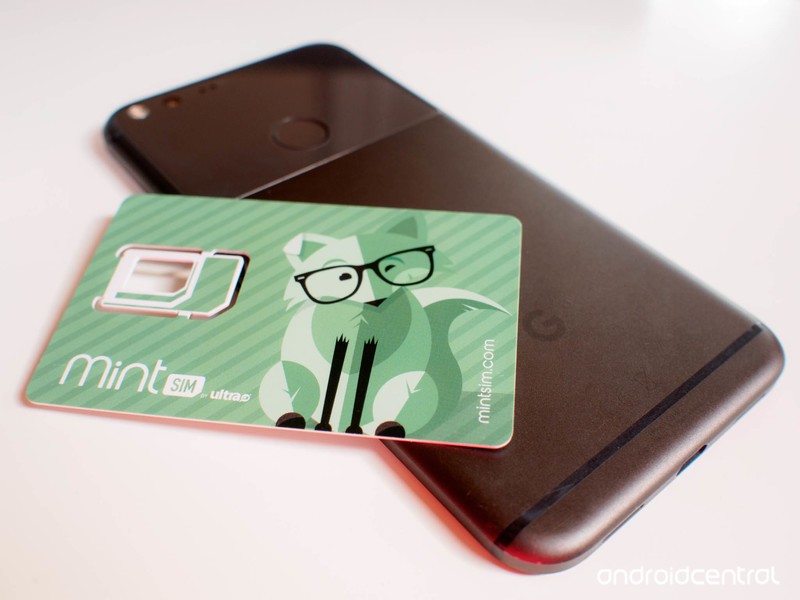
Everything you need to know about Mint SIM in one easy place.
Buying phone service or changing carriers is never fun. But it should be! Saving money or having a better data connection is great.
Mint SIM takes the process of buying and setting up your new account and makes it simple. Even so, there are always a few things you should know before you get started.
We’re here to help with that. Read on for a few tips and answers to help you get the most from Mint SIM!

Advertisement
Best Phones
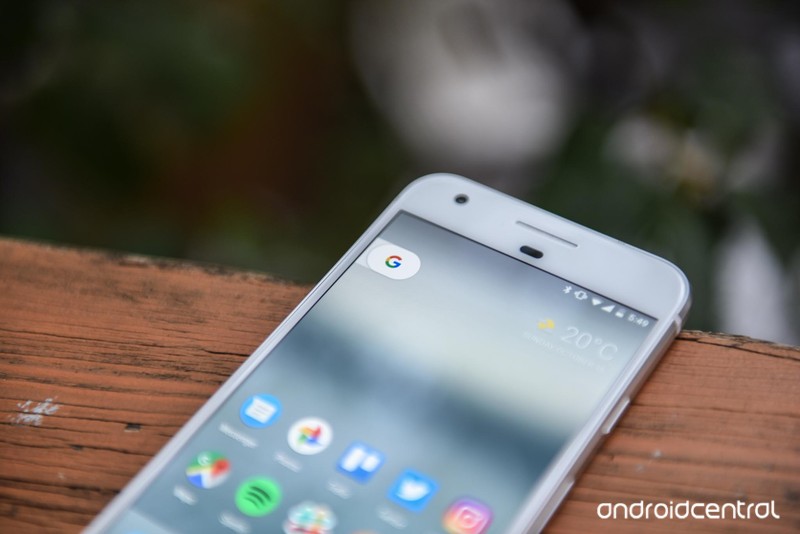
One of the best things about using an MVNO for your phone service is that there are plenty of unlocked phones that just work. Mint SIM is no exception, and most any modern phone built to use on T-Mobile works with everything Mint SIM has to offer — including Wi-Fi calling.
We’ve built a short list of the best phones to use with Mint SIM if you’re looking for something new, and our top pick is the Google Pixel. With the Pixel you get everything Google has to offer on the services side, combined with a great camera and first crack at anything new Google brings to Android.
If a Pixel is more than you were planning on spending, the OnePlus 5 and Moto G5 Plus are ready to jump in and each offers a great value to use with your Mint SIM plan.
More: The best phones to use with Mint SIM
Best Deals on Mint SIM
Mint SIM offers several different ways to pay for your plan, and that brings a few compelling deals. You buy in advance, and plans with 2GB per month of high-speed data as well as 5GB per month and a whopping 10GB per month are available.

You can pay for 3 months, 6 months or 12 months in advance and get service as low as $15 per month for 2GB of high-speed data. If you want the convenience of paying for the whole year in one shot, a 2GB per month plan still comes out at just $15 a month. The value scales well, too: 10GB per month plans are just $25 per month.
Compare that to others and you see why buying “in bulk” makes sense.
We track extra deals and savings codes for Mint SIM all in one spot, so be sure to take a look before you click any buttons!
More: Mint SIM Deals & Promo Codes
Mint SIM FAQ
It’s normal to have a few questions when you switch carriers. Things like international rates and extra data add-ons can be confusing for even the seasoned mobile enthusiast.
Mint SIM knows this and has a broad set of support options. You’ll find the answers to most questions right in Mint’s FAQ pages.
Another option is your fellow users! Cheap data pricing means plenty of people are using Mint, and there’s a good chance you’ll get an answer to any question quickly through online forums.
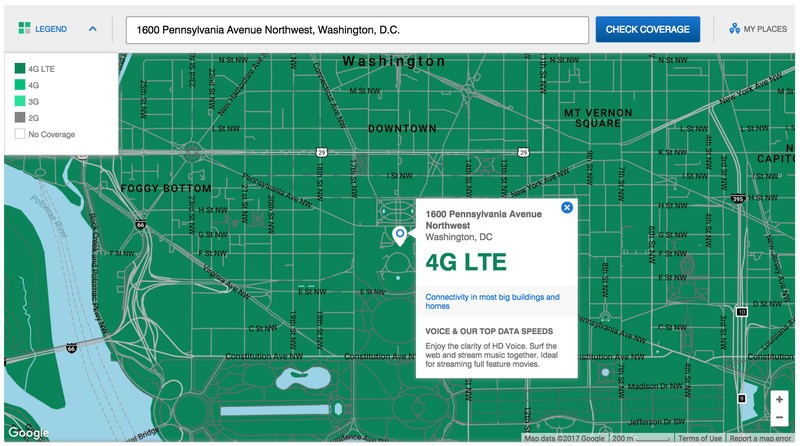
A few common questions and their answers:
-
Q: Will my existing phone work on a Mint SIM plan?
- A: You’ll need a phone that’s GSM compatible (with U.S. radio bands (1700/2100 MHz (AWS), 1900 MHz, 850 MHz), is SIM unlocked and in working order.
- For full compatibility, including 4G LTE data connectivity, you’ll need a phone that supports the AWS bands (1700/2100 MHz) as well as Band 12 (700 MHz). Phones that only support 1900 MHZ and 850 MHz will be able to use the service, but you won’t have access to high-speed data in as many places.
- If you’re not sure the phone you have will work, give Mint a call at 844-646-8746 (6-6 PT Mon-Fri, 8-5 PT on Saturday) or you can chat with a specialist at the Mint SIM website.
-
Q: What’s the return policy?
- A: You can get a refund for a service plan anytime within 7 days by filling in a form at the Mint SIM website. You can get a refund for any unused SIM cards within 10 days of purchase. The returned cards must be in their original, unopened packaging. To start the return process for phones purchased through Mint SIM, email returns@mintsim.com.
-
Q: How do I set up my Android?
- A: Visit Mint SIM’s Android setup page for all the details and full instructions.
Advertisement
To see more Questions and their answers, visit Mint SIM’s FAQ pages.
Mint SIM FAQ: Let’s get you sorted out!
If you’re still searching for the right answer, you can reach support by email or phone. Send a message to support@mintsim.com anytime, or call 844-MINT-SIM (844-646-8746) for live support Monday-Friday between 6AM and 6PM (PT) or Saturday between 8AM and 5PM (PT).
How to cancel Mint SIM service

Like all MVNO prepaid plans, you’re paying in advance and once paid for, the service is yours to use for the duration. You won’t be getting your money back. Mint SIM does have a 7-day guarantee so if things don’t work out for you you can get a refund, but consider the money spent once that passes.
Actually canceling your service is easy. Once the months you’ve paid for are over, you’ll get a text notice letting you know. You can reactivate by adding funds to your account to continue the service for 30 days. After 30 days, your number is released and you’ll lose it and after 60 days you can consider your Mint SIM account closed.
The important thing to remember here is that you’ll lose your number if you don’t act. Porting phone numbers is fairly easy no matter where you end up, but you’ll need to be sure to go through that process before your number is returned to the pool for someone else to get.
You’ll find information about porting your number from Mint SIM to a new carrier at that carrier’s web site.
How to port your number to Mint SIM

When you get your Mint SIM SIM card, you will need to activate it. That’s a simple process you can do online and all you need is the 11 digit number printed on the card. If you would rather talk to a live person during the activation process, you can call (844) 646-8746 from any other phone to get started.
Activate your Mint SIM account
During the activation process, you’ll have the option to use your existing number. You’ll need to provide the number to Mint SIM as well as the account number from the carrier you’re using now. If the account has a PIN or other access code, you’ll need to supply that, too. You’ll be able to get all this information from your current carrier if you need any help/
Once you supply the information needed, Mint takes it from there. Mint SIM contacts your existing carrier and gets the number freed so they can assign it to your SIM card.
This can take up to 24 hours for the process to complete, but usually, it doesn’t and you’ll be up and running quickly. During the actual number porting, you will not be able to use your number. Prepare for this just in case it takes a full day. You can set up an emergency Google Voice number and use it on a phone or even a computer with a Wi-Fi connection, and this makes a great backup if you need one.
We think Mint SIM is a great deal, and use the service ourselves. We’re here to help get you started and answer any questions that might come up so your transition to great phone service on the cheap is pain free. If you need any help and are unsure where to look, drop a comment below and the awesome user community can help!
Alternative carriers (MVNOS)

- What is an alternative mobile carrier?
- What are the advantages of going with an alternative carrier?
- How to make sure your phone works on a prepaid alternative carrier
- 8 Important Considerations When Switching To An MVNO
- These are the cheapest data plans you can buy in the U.S.
- Mint SIM vs. Cricket Wireless: Which is better for you?

The Morning After: Monday, July 31st 2017
Hey, good morning!
Welcome to the new week. Over the weekend, we talked about our new robot friends, HTC’s return to flagship smartphone form and fines for walking while texting — if you’re in Honolulu.
They only want your love (and occasionally some anonymized metadata.)
Who needs friends when robots are this sociable?

From social robots to military tools, where do you draw the line? How do you add personality to a robot, and why would you?
Don’t let its style overshadow its substance.
HTC U11 review: more than just gimmicks

We know it’s shiny, but don’t let its looks distract you. After a few underwhelming phones, HTC refined its smartphone formula and pushed out the U11, a gimmick-laden flagship actually worth using. The pressure-sensitive Edge Sense turns the sides of the phone into a one big convenience key, which is handy but unimaginative. There are three virtual assistants to choose from, though most people will only ever use one. And that beautiful glass finish? Well, just be very careful with it. Despite all that, the U11 delivers true flagship-level performance, and an excellent camera experience, period, not just excellent for HTC. The build quality is generally fantastic, and HTC has finally made a handsome body that’s also water-resistant. While this might sound like a mixed bag, the U11’s strengths definitely outweigh its flaws.
It also requires you to link your phone number to chat apps.
Russia’s censorship law bans proxies and VPNs
President Putin has signed a law that, as of November 1st, prohibits technology which lets you access banned websites, including virtual private networks and proxies. Internet providers will have to block websites hosting these tools. The measure is ostensibly meant to curb extremist content, but that’s just pretext — this is really about preventing Russians from seeing content that might be critical of Putin, not to mention communicating in secret.
Accordingly, the president has signed another law requiring that chat apps identify users through their phone numbers after January 1st, 2018. Some messaging clients already encourage you to link an account to a phone number, but this law makes it mandatory — Facebook and others can’t reject the idea even if they want to offer some kind of anonymity. As a reminder, the next Russian elections are set to be held in March 2018.
It didn’t have much choice, but freedom of speech will suffer.
Apple pulls VPN apps following China crackdown
In other VPN news, ExpressVPN, Star VPN and other developers report that Apple has pulled their apps from the App Store in China for allegedly including “content that is illegal” in the country. Some clients are still on other platforms (including ExpressVPN, for now) while others remain, so it’s not a uniform cull at this point. However, this is still a big blow to attempts to circumvent China’s mounting internet censorship through encrypted communication — not to mention companies that may have been depending on those apps for remote-work connections. Apple has issued a statement noting that it pulled the apps in response to Chinese rules requiring that VPN developers obtain a government license.
You’ll risk a fine if you can’t focus on crossing the street.
Honolulu is the first big US city to ban phone use at crosswalks

Honolulu has officially drawn a line in the sand — it’s the first major US city to pass a law that fines you for crossing the street while using your phone. As of October 25th, the Hawaiian burg can ask you to pay between $15 to $99 if you’re caught looking at a mobile device while you’re strutting the crosswalk. How much you pay depends on whether or not you’re a repeat offender.
But wait, there’s more…
- ‘Dota 2’ won’t be so intimidating to newcomers
- Campy horror game ‘Night Trap’ arrives on PS4 August 11th
- Chinese scientists created the largest virtual universe
- Netflix’s ‘Castlevania’ showrunner Adi Shankar on nerddom and season two
- After Math: As the cash flows
Self-driving car demo is the first to cross the US-Canada border
As a rule, self-driving car tests tend to be limited to the country where they started. But that’s not how people drive — what happens when your autonomous vehicle crosses the border? Continental and Magna plan to find out. They’re planning to pilot two driverless vehicles all the way from southeastern Michigan to Sarnia, Ontario, making this the first cross-border test of its kind. The machines won’t be in complete control for the entire route, but they’ll use a combination of cameras, lidar and radar to take over when they can, including two key border crossings (the Detroit-Windsor Tunnel and the Blue Water Bridge).
This isn’t the first autonomous driving-related agreement involving Michigan and Ontario, but it’s an important one: it’ll explore rules and regulations in addition to usual self-driving data collection.
As you might guess, tests like this will be vital to making autonomy a practical reality. Driverless vehicles need to know how to adapt to changing road rules, such as different signage and units of measurement. While this isn’t the greatest challenge, it has to be overcome if you’re ever going to embark on cross-border shopping trips without touching your steering wheel.
Source: Continental
Apple Pulls VPN Apps From China App Store As Russia Signs Law Banning Their Use
Russia has banned VPNs and other software that enables users to gain anonymous access to websites. The new law was signed by President Vladimir Putin on Monday and will come into effect on November 1st (via TechCrunch).
Leonid Levin, chairman of the Duma’s committee on information policy and technology, was quoted by state-run media as saying that the new law is not targeted at “introducing new bans for law-abiding citizens” but aims to prohibit access to illegal content.
However, privacy advocates see the law as another way for the Russian government to restrict access to political content that it disagrees with. In 2015, it became mandatory for all user data from Russian citizens to be stored in Russian-based servers, and last year another law was passed making it necessary for internet service providers to retain traffic data for up to a year.
Recently the government threatened to block access to the Telegram encrypted messaging platform unless the company that runs the app provides more information about itself.
Elsewhere, virtual private networks took another blow over the weekend, as reports emerged that Apple has removed the majority of VPN apps from the App Store in China, following regulations passed earlier in the year that require such apps to be authorized by the Chinese government.
The action was first revealed by ExpressVPN, a provider based outside of China. The company said in a blog post that “all major VPN apps” including its own had been removed from the App Store. It also shared a note from Apple explaining that its app was removed because “it includes content that is illegal in China”.
“We’re disappointed in this development, as it represents the most drastic measure the Chinese government has taken to block the use of VPNs to date, and we are troubled to see Apple aiding China’s censorship efforts. ExpressVPN strongly condemns these measures, which threaten free speech and civil liberties,” ExpressVPN wrote on its blog.
A few hours later, Apple shared a statement with TechCrunch explaining its decision to pull the apps from its App Store in China:
Earlier this year China’s MIIT announced that all developers offering VPNs must obtain a license from the government. We have been required to remove some VPN apps in China that do not meet the new regulations. These apps remain available in all other markets where they do business.
Earlier this month, China reportedly started blocking some features of the WhatsApp messaging service, as authorities continued to tighten controls over the country’s internet.
Note: Due to the political nature of the discussion regarding this topic, the discussion thread is located in our Politics, Religion, Social Issues forum. All forum members and site visitors are welcome to read and follow the thread, but posting is limited to forum members with at least 100 posts.
Tags: China, Russia, VPN
Discuss this article in our forums
Woman uses foot-massage machine on her shoulders with tragic consequences
Why it matters to you
It’s best you stick with the primary purpose of your gadgets rather than using them for something they’re not designed for.
If you decide to splash out on a particular type of foot massager anytime soon, be sure to use it only on your feet and keep it well away from all other parts of your body.
An elderly woman in Japan’s northern island of Hokkaido paid with her life last week when she apparently tried to use a foot massager to relieve tension in her neck and shoulders.
It’s thought that the 77-year-old Japanese woman suffocated when her clothes became caught in the machine’s electric-powered rollers, which were exposed as the device’s cover had at some point been removed. Her relatives found her lying unconscious on the floor of her home but she died a short while later, the Mainichi Shimbun reported.
Hokkaido Police
Made by Saitama-based Matoba, the massage machine has been in the news before for all the wrong reasons. Three separate fatal accidents similar to last week’s tragedy were reported back in 2008, prompting the firm to accompany its product with a note warning owners not to remove the cover and to use it with feet only.
But the device hit the headlines again three years ago when yet another person in Japan died after apparently having used it incorrectly.
The warnings are evidently failing to deter some people from removing the cover and applying the machine to their neck and shoulders, a particularly dangerous act as it appears the foot massager has no mechanism to make it automatically stop should fabrics or other items become entangled in the rollers.
Gadget disasters
Serious accidents involving gadgets are thankfully rare, but from time to time they do hit the headlines. A London man, for example, was fatally electrocuted in 2016 after attempting to charge his smartphone while taking a bath, and in 2015 a South Korean woman had a scary run in with a robot vacuum.
She’d fallen asleep on the floor when her autonomous vacuum trundled over and tried to sweep her up. Unfortunately for the woman, her long hair got caught up in the machine’s rotating brushes, resulting in a rude awakening that led to a “desperate rescue request” to first responders, who arrived in time to free her from the machine’s clutches before any serious injury occurred.
Genetic engineering creates an unnaturally blue flower
Blue flowers are rare in nature, and for good reason: the color is usually the result of mutations and quirks of acidity levels rather than an actual blue pigment. That makes genetically engineering a blue flower tricky, since you can’t just make a straightforward tweak and expect a garden full of unnatural hues. Scientists have just managed a breakthrough, though. They’ve produced the first truly blue chrysanthemum (above) by splicing in genes from two naturally blue flowers, the butterfly pea and Canterbury bell. The modifications shifted the plant’s acidity level, turning normally reddish pigments to the blue you see above.
The approach is generic enough that you could theoretically apply it to other flowering plants. Blue roses, anyone? There are broader possibilities, too. While the exact techniques clearly won’t translate to other lifeforms, this might hint at what’s required to produce blue eyes or feathers. And these color changes would be useful for more than just cosmetics. Pollinating insects tend to prefer blue, so this could help spread plant life that has trouble competing in a given habitat.
Just don’t count on picking up a blue bouquet. You need a permit to sell any genetically modified organism in the US, and there’s a real concern that these gene-modified flowers might spread and create havoc in local ecosystems. The research team hopes to make tweaked chrysanthemums that don’t breed, but that also means you’re unlikely to see them widely distributed even if they do move beyond the lab. Any public availability would likely hinge on a careful understanding of the flowers’ long-term impact.
Via: New York Times
Source: Science Advances
 AIVAnet