


Apple’s ‘iPhone 8’ Might Not Ship Until Late 2017, Side Button Touch ID Unlikely
Though Apple’s radically redesigned “iPhone 8” is expected to be introduced in September alongside standard iPhone 7s and 7s Plus devices, it may not start shipping out to consumers until October to early November, according to new information shared today by Japanese site Mac Otakara [Google Translate].
Citing information from supply chain sources and various accessory makers, Mac Otakara says the iPhone 8 will not ship until the first half of the first quarter of fiscal 2018, translating to sometime in October or November. This is in line with many previous rumors and analyst predictions hinting at a delayed mass production timeline.
An iPhone 8 rendering based on leaked CAD drawings that depicts the much larger side button
The site’s sources have only seen a front display panel component in black, suggesting Apple may only release the iPhone 8 in black. Previous rumors have suggested it will be available in a limited number of colors, with white unconfirmed.
There has been some speculation that because Apple is removing the Home button from the iPhone and introducing a larger side button Touch ID could be built into said side button, but Mac Otakara does not believe that is the case. Side button components are said to be solid with no additional sensors or parts needed for Touch ID, suggesting the side button is just a simple power button.
With rumors of both rear and side button Touch ID quashed, it’s looking more like reports suggesting Touch ID is built into the display or removed entirely are accurate.
Apple was said to be planning to build Touch ID into the display of the device, but rumors now indicate its efforts may have been unsuccessful, with the company instead planning to replace Touch ID with facial recognition.
Reports are still mixed, however, so it’s not yet entirely clear if Touch ID has been eliminated, but Mac Otakara says the possibility of in-display Touch ID “seems to be low.”
Based on images of screen protectors, the site believes there are several new front-facing sensors accessory makers will need to compensate for, further pointing towards the inclusion of new 3D sensors for facial recognition purposes. The front-facing FaceTime camera may also be relocated to the right of the device.

With August fast approaching, we’re only about five or six weeks away from the prospective debut date of the iPhone 8 and its companion devices, based on past launch timelines. In recent years, iPhone launch events have taken place during the first or second week of September.
Related Roundup: iPhone 8
Discuss this article in our forums
Sonic the Hedgehog – A central line of Nostalgia
For those of you too young to remember (damn, does typing that make me feel old), Sega used to be a really big deal. It was Nintendo’s chief rival, with Sonic playing the part of Mario. Sonic’s library of games spans every generation of console and dozens of titles since 1991, beginning with this one – Sonic the Hedgehog.

Generally speaking, the games revolved around an anthropomorphized hedgehog (that does not look like the notoriously slow hedgehog at all) running around at blazing speeds collecting rings, saving roboticized animals (that are strangely not anthropomorphized), and later, collecting Chaos Emeralds; all while battling the nefarious Dr. Robotnik. Still with me? No? Oh well – the short of it is that the games were mostly, as many games of yesteryear tended to be, a side-scrolling platformer.
What made this game different, though, was its sense of verticality. While Mario often jumped into the air to reach new heights, he rarely ever elevated to another screen entirely, or descended below his starting location in any given level – Sonic’s levels, by comparison, often involved backtracking and changing elevation in order to advance. Furthermore, Sonic’s collecting of rings – and a finite number of rings in each level – encouraged exploration in a way that Mario games of the time never did.

Sonic’s early games could be played a couple different ways; either you can explore each level thoroughly, collecting all the rings you could find and figuring out the proper amount of speed and distance to grab hard-to-reach locations…or you could zip around at Mach Jesus, blitzing through the map as fast as hedgehog-ly possible. Either method, however, requires good timing and precision jumping in order to avoid hazards, reach platforms, an generally navigate the map. On a gamepad, those precise jumps are pretty doable – on a touchscreen with a virtual joystick, though? Forget it. Gaining any kind of momentum moving to the left is next to impossible, making backtracking or fighting a boss a nightmare.
Which brings me to the crux of the matter. Sega has done a wonderful job of recreating the world of Sonic using original assets, as well as some additional content from the Sonic and Knuckles expansion cartridge. But its work on the migration from gamepad to virtual controls did not fair well. Instead of sticking with the tried-and-true Directional Pad that worked so well in the past, it went with a wildly unresponsive joystick that makes precision movements impossible.
Story time. I used to play Sonic the Hedgehog (2, not 1 or 3) with my little sister when we were young. She would always plug in a second controller to play Tails, and I would always inevitably leave her behind, only to see her come flying back in with her little whirly tail. The blight of being an older brother, I would always think. We played that game for hours. We played other games too, but that one was one of my favorites (along with the Streets of Rage series – hint hint, Sega).
Aaand we’re back. I spent hundreds of hours on the Sonic franchise when I was young – which makes it all the more disappointing that Sega flubbed the delivery so spectacularly. If you can master the finicky and clumsy controls, you’re in for a treat – Sonic the Hedgehog is an absolute gem of a classic, and a true shot of nostalgia for old-school gamers.
Waze joins the crowd, brings community-sourced navigation to Android Auto
Why it matters to you
Waze boasts a dedicated community of drivers who swear by it, and now they can use their favorite navigation app through the display built into their vehicle’s dashboard.
After weeks of beta testing, Waze is finally releasing its long-awaited Android Auto app to the public. The Google-owned company made the announcement today, and all users need to do to get started is download the latest update.
Waze has been one of Android Auto’s most highly requested apps practically since the platform launched, as it offers a number of features not found in Google Maps. You can report road conditions, and occasionally the app may ask you to confirm what others users have reported. It’s a simple but powerful system built on a loyal community of users, now made even better through the use of your car’s own infotainment screen.
Though the presence of a larger display in your car’s dash always makes navigation easier, Waze is hoping you’ll keep your hands on the wheel and use your voice as much as possible. The app supports “OK Google” commands, so you can start your journey without fiddling with the on-screen map. It also works with your car’s full range of built-in controls, including steering wheel buttons, and features customization visual and audio alerts.
Waze does not yet support Android Auto on your phone’s display, but the company says it’s coming in an upcoming update. Furthermore, some additional features, like speed limit indicators, will also arrive later on, according to The Verge. At this stage, there are no plans to bring the app to Apple’s CarPlay, due to restrictions against third-party navigation apps.
While Android Auto and CarPlay offer a much more convenient and safer way to interact with your phone on the road, the experience is still a bit awkward for drivers. Standard controls for the climate system and stereo are still housed in the manufacturer’s own interface, so users frequently need to leave their phone apps to adjust other settings.
For this reason, Google and Volvo recently worked together on developing a deeply integrated, cohesive experience for upcoming vehicles that operates more like a traditional infotainment system — encapsulating all controls, rather than those that simply concern Android. It has been styled to blend in with Volvo’s existing user interface, but still contains all the benefits you’d expect from Google’s apps, like location ratings and hours of operation in Maps, for example. Volvo will release its first cars in this partnership later this year.
Google Maps and Search will show crisis information via SOS Alerts
Why it matters to you
If you’re unlucky enough to get caught in a natural or man-made disaster, Google’s SOS Alerts can help get you the information you need.
Whether it’s in the aftermath of a natural disaster or a terrorist attack, most of us want actionable, up-to-the-minute information about the situation on the ground. That’s the idea behind SOS Alerts, a new feature in Google Maps and Google Search that prominently highlights top stories, websites, and other useful information.
In Google’s Search app for iOS and Android, SOS Alerts will appear at the top of search results for the incident or location. Swiping up on the tab will show such information as emergency phone numbers, websites, and translations of useful phrases, plus related maps and top stories. You’ll see official alerts and tweets from first responders, too, and in some cases a timeline-like overview of the situation and donation opportunities.
SOS Alerts aren’t just limited to Google Search. They’ll appear in Google Maps, too, where you’ll see real-time updates on road closures, traffic slowdowns, and transit problems. A tappable icon on the map with more information will appear near the location of the crisis, along with a card containing such information as helpful phone numbers and websites.
In some cases, Google will be a little more proactive. If you’re in or close to the affected area, you’ll get a notification on your smartphone that will direct you to the aforementioned news, maps, and resources.
Google isn’t rolling out SOS Alerts as a half-baked feature. The company says it has worked closely with organizations and government agencies “on the front lines of relief efforts,” including the Red Cross and the Federal Emergency Management Agency, in the U.S., and in other countries such agencies as the Philippine Atmospheric Geophysical and Astronomical Services Administration, to supply SOS Alerts with real-time information.
Initially, SOS Alerts will be available in 12 locations, including the U.S., Canada, Australia, Japan, India, and Brazil. Google says a lack of local partners hindered the feature’s launch in the U.K. and other parts of Europe, but that it’s working to recruit more agencies and nonprofit organizations in the coming months.
SOS Alerts may be Google’s latest crisis-monitoring efforts, but it’s not the only one.
Google used its Person Finder tool to help people check the status of loved ones in the aftermath of the 2011 earthquakes and tsunami in Japan. And it has deployed Crises Maps — toggleable Google Maps layers that highlight dangerous areas and emergency services — during Hurricane Sandy and other natural disasters.
Facebook, which offers a parallel service that lets members tell friends they’re safe, has been criticized for activating it under “inappropriate” circumstances. But Google says it has set up a dedicated team to decide which events warrant an SOS Alert.
“We hope you never need to use crisis response features, but if you do, they’re designed to help keep you, and those you love, safe and informed,” Yossi Matias, vice president of engineering at Google, wrote in a blog post.
Windows Insiders can now jump ahead of the Fall Creators Update
Why it matters to you
If you’re the kind of Windows user that likes to stay one step ahead of the crowd, you’ll want to opt in to test Redstone 4 as soon as possible.
At Build 2017, Microsoft confirmed that the Fall Creators Update for Windows 10 would be distributed to users before the end of the year. Now, there are signs that active development is coming to a close — and users who are part of the Insider program can opt in to preview the next big feature update, which has not yet been officially announced.
The Fall Creators Update is currently at the stage of development where builds that were previously part of the RS_PRERELEASE branch are now being transitioned over to the RS3_RELEASE branch, according to a report from Windows Supersite. This means that they are undergoing the final stages of internal testing ahead of their wide release.
From this point onward, fixing bugs and performance issues will be the priority, rather than adding new features. Members of the Insider program might not find that all too compelling, so they’re being given the option to skip ahead to the next update, which is known by the code name Redstone 4. Microsoft hasn’t offered up this opportunity for the three previous Windows 10 feature updates.
Apparently, only a limited number of Insider program members will be permitted to test out Redstone 4 at this time, according to comments published via the Windows Feedback Hub. It stands to reason that more and more users will be admitted as we get closer to the update’s expected spring 2018 release date.
Anyone that wants to opt in to this testing should open the Settings app, and navigate to the Windows Insider Program link in the Update & Security section. Using the dropdown menu labelled ‘What kind of content would you like to receive?’ select ‘Skip ahead to the next Windows release.’ The app will then advise you on whether or not there are any remaining spots for testers.
It’s worth remembering that Redstone 4 is very early pre-release software. Insider program members are used to builds sometimes being a little rough around the edges, but with so much work to do, things are likely to get even more unstable before they start to improve. Still, users who want to remain on the cutting edge of Windows 10 will want to opt in while there are still spots available.
Get the most out of your rig with the best PC gaming accessories money can buy
So, you have a lightning-quick gaming rig all set up and ready to go. Through its tempered glass side panel, the internal components are awash in the neon glow from your LED-lit fans, RAM, and motherboard. Plugging your old keyboard and mouse into it would seem like an affront to your PC’s raw unbridled power. It would be an unacceptable breach of etiquette — or worse, disrespect. Don’t worry, we’ve got you covered. Here we’ve assembled a list of the best PC gaming accessories money can buy.
Each one was hand-selected to complement your gaming rig, to bring out the best in those cutting-edge internals, and elevate your gaming experience. Let’s get started.
Logitech G Pro Keyboard ($130)
That old store-brand keyboard, faded and filled with years and years worth of crumbs, just won’t do. You need something tactile, quick, stylish. Something that will respond to each and every keystroke with a satisfying mechanical click, a keyboard fine-tuned like a musical instrument.
You need the Logitech G Pro. It’s a professional-grade gaming keyboard with fully customizable per-key RGB illumination, and one very important quality — it has 26-key rollover. That means you can press every single alphabetical key on the keyboard at the exact same time, and they would all register without delay — here’s a quick explainer on ‘ghosting’ and how it hurts your gaming experience.
Some lesser keyboards stumble when you try to use multi-key combinations — but that won’t do for the best PC gaming accessories. For instance, moving left and forward, while sprinting, jumping, and hitting Q to fire off an ability all at once. This would be a problem for some keyboards, those poor unfortunates destined for a lifetime of office work. Not for the Logitech G Pro. Read our full review here.
Buy one now from:
Amazon
Razer Mamba Gaming Mouse ($150)
The humble mouse is easy to overlook. After all, what’s the real difference between the cheap plastic husk sitting on your desk, and a custom-weighted precision instrument with carefully tensioned buttons and an ergonomic design that will fit you like a glove? As you might have guessed, gaming mice are a breed apart from their domestic cousins.
To make your enemies into mincemeat, to feel truly connected to the worlds you’ll explore, you need a real gaming mouse. Something like the Razer Mamba. It’s expensive for a mouse, at $150. But once you feel it, once you use it for the first time, you’ll know you made a sound decision. The Mamba glides across nearly any surface, its 16,000 DPI sensor reading every nuance of the surface as it goes.
The buttons offer custom-tensioning, so you can tune them to respond like a hair trigger, or to really require some weight behind each and every click. Additionally, it features two customizable buttons which rest just under your right thumb, in addition to the typical left and right mouse buttons. And it features Razer’s signature Chroma lighting, so it’s capable of a wide variety of visual effects, whether it’s in wired or wireless mode. Read our review here.
Buy one now from:
Amazon
Steelseries Arctis 7 Gaming Headset ($150)
A gaming desktop is a device engineered to delight your optic nerves, rendering richly detailed worlds with startling fidelity. But there’s more to these worlds than what we see. Surrounding yourself in a vivid soundscape brings another level of immersion to PC gaming, plus you’ll need a good comfy headset to yell at your Overwatch teammates when they just won’t stay on the point.
The Arctis 7 offers 7.1 DTS surround sound, wired or wireless use, and it’s built for long-term wear. Seriously, these things are extremely comfortable even during intense gaming. Read our review here.
Buy one now from:
Amazon
HTC Vive VR Headset ($800)
HTC Vive
There is no greater PC gaming accessory than saturating your senses with a reality beyond this one. To enter the digital realms though, one must be equipped, prepared. For this you will need a stout heart, an iron will, and an HTC Vive.
And about $800. If that’s a threshold you don’t mind crossing, the HTC Vive is the best way to enjoy virtual reality on the PC. The Oculus Rift recently came down in price — it’s available for $400 — but it still doesn’t offer as good of a room-scale experiences which make the Vive such an attractive device.
Set up the included lighthouses, connect the cables to your PC, don the Vive proper, and try to keep your footing as you’re shorn from our base reality of crude matter and transported into the virtual realms eternal. Read our review here.
Buy one now from:
Amazon
Xbox One Wireless Controller ($62)
PC gaming doesn’t often mix well with gamepads; they’re not as precise as a mouse and keyboard setup, but there are games out there for which the best tool for the job is a plain old controller. In those instances, it’s important to have one of the best engineered gamepads on the market, rather than some off-brand with bizarre compatibility issues.
That’s why it’s never a bad idea to have an Xbox One controller handy. The new version, exemplified by the Xbox One Recon Tech Special, can connect to your PC via a wired connection or over Bluetooth. It’s comfortable to hold for long periods of time, and the soft tension behind the triggers offer just enough resistance so you can really make use of their pressure sensitivity. Read our full review here.
Buy one now from:
Amazon
Oculus Rift owners can now launch SteamVR games from Oculus Home
Why it matters to you
The next version of Oculus Home is set to make it much easier for Rift owners to keep track of the software they bought from various different storefronts.
Up until now, Oculus Rift users have been forced to maintain two separate game libraries for titles they bought via Steam and titles they bought from the Oculus Store. However, an upcoming update to the Oculus Home app will offer up a way of keeping all your software in one convenient location.
The update will allow users to launch SteamVR apps that support the Rift headset directly from Oculus Home, according to RoadtoVR. There is no word on when the 1.17 software update will be made available but a pre-release version has already been released for users who want to test out the functionality immediately.
“We know people sideload apps for a variety of reasons,” read a forum post by Oculus’ community manager Andres Hernandez. “So we’ve included some options to help provide flexibility and control of what’s displayed.”
To access this functionality right now, users need to sign into the Public Test Channel, which they can do from the Beta section of the Oculus Settings app. After they have downloaded the latest pre-release version of the Oculus software, they can use the filter options in the library to show outside titles.
At the moment, there is no way to import all the software you bought on other storefronts at once. Instead, these titles will be added to your library one by one, whenever you open them with Steam for the first time. Once they are added to the Oculus Home interface, they blend in, even being accompanied by their own thumbnail.
When friends see you on their contact list while you are playing a game bought elsewhere, you will simply appear as online, without any information about which title you are enjoying. It’s also possible to remove individual outside titles from your Oculus Home library.
It makes a lot of sense for Oculus to offer up this functionality, as it makes it easier for users to think of Oculus Home is the place to go for all their virtual reality content. With Valve also making improvements to its SteamVR Home app, the two companies look set to go head to head with their rival pieces of software.
Phoozy is an astronaut suit and ‘thermal capsule’ for your phone
Why it matters to you
To some it may seem like overkill, but the reasonable price makes the Phoozy something to consider carrying along on your next trip through the wild outdoors, or even the beach.
Many beachgoers put their phones in plastic bags to protect their valuables from water and sand. While that’s better than no protection at all, it’s not the perfect solution. Leave your device out in the sun, and it can quickly overheat, doing some serious damage over the long term. That’s part of the thinking behind the Phoozy, a “thermal capsule” for your phone developed to protect it from the elements.
The product basically resembles a small pouch with a highly reflective material on the outside. If it sort of looks like what astronauts wear, that’s because it is, according to the company. Thanks to that outer “Chromium Shell,” the Phoozy can send 90 percent of the sun’s rays away from your phone. Beneath the surface, there’s a harder core that boasts military-grade drop protection, and a soft-touch inner lining to ensure your phone doesn’t get scuffed up bouncing around in there.
Roll that all together, and the Phoozy is built to handle some serious abuse, including extreme heat and cold, serious falls, and even being dropped in the ocean. And if your phone does go for a swim in the Phoozy, the pouch has been designed to float.
The Phoozy accomplishes all this while maintaining your phone’s safe operating temperature. Of course, you’ll have to take it out to use it, which is a downside. But if you have a particularly active lifestyle, you won’t need to worry about your $700 investment being destroyed as you’re getting on with the rest of your life. And that offers some valuable peace of mind.
Unfortunately, the product isn’t quite one-size-fits all — Phoozy makes a differently sized pouch for every phone. Actually, the company goes a step further, with two color options. Though the standard silver is offered for a majority of devices, there’s a gold option on the way for the Samsung Galaxy S8 and S8 Plus.
No matter what phone you buy it for, the Phoozy runs $30. That’s not an awful price considering Lifeproof cases start at $90, and don’t accomplish half of what the Phoozy does. You also won’t be forced to put your phone in a bulky, hard plastic case, which is another plus.
You’ll soon be able to search eBay using just images on its mobile app
Why it matters to you
This new feature further expands the use of image-based search, and demonstrates the strength of the underlying artificial intelligence.
In an effort to improve the eBay shopping experience — and keep you shopping on the site — you’ll soon be able to find and purchase items by simply taking a photo. On Wednesday, July 26, the company announced two new upcoming features — Image Search and Find It On eBay — which will allow shoppers to use pictures instead of words to search for items through the mobile app.
Through artificial intelligence and machine learning, you’ll now be able to find any item you’re searching for using only visuals and the search bar. This especially comes in handy if you ever spot a pair of shoes or a piece of furniture that you’re interested in, but don’t necessarily know the exact name of. The new features on eBay’s mobile app will apparently be able to guide you to similar items if not the exact match.
If your phone is filled with photos of desired items you’ve seen in person or screenshots from scrolling through social media, they won’t just have to sit in your camera roll anymore. With the Image Search feature, you can either take a photo or pull up the existing screenshot from your album and enter it into the search bar right on the app. Your results will consist of the closest matches to the item for you to then purchase.
With the second feature called Find It On eBay, users can shop on any social platform like Pinterest or Instagram. When you see an item you’re interested in, you’ll see the option to “Find it now” on your smartphone via the eBay icon. Once you “share” the image with eBay, you can crop the photo to highlight the exact item you’re looking for and the mobile app will pull up search results.
The eBay mobile app uses two parts of artificial intelligence — known as computer vision and deep learning — to easily find the items you’re looking for. Once you upload the image, it goes through a deep learning model — known as a convolutional neural network — that processes the image and produces a representation of it to compare to live listings on eBay. The items are then ranked based on visual similarity, and surface as your options to choose from — which eBay hopes will lead to your purchase of the item through its site.
Image Search and Find It On eBay will be rolling out in the Fall. The Image Search feature will be available for both Android and iOS, however, the Find It On eBay feature will only be supported on Android upon launch.
Best Small Android Phone
- Best overall
- Best alternative
- Best for camera buffs
- Best on a budget
- Best tiny
Best Overall
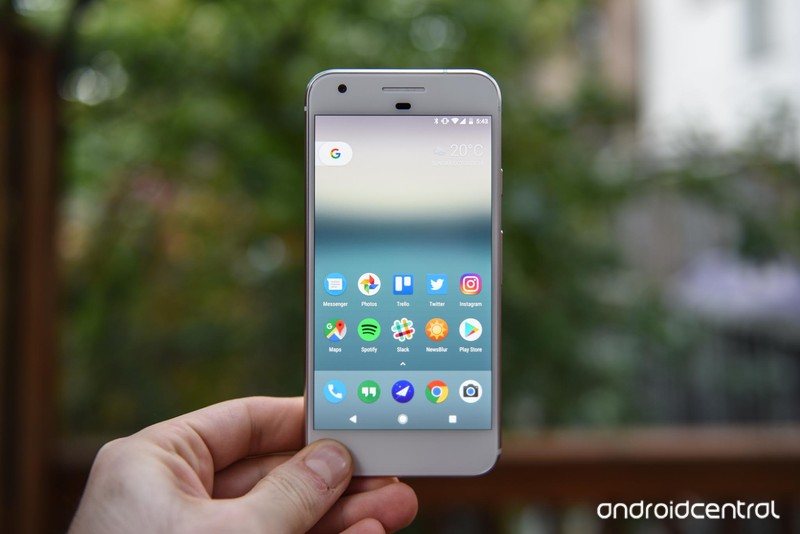
Google Pixel
See at Verizon
See at Google Store
Like the iPhone and the Samsung Galaxy S8, Google’s Pixel comes in two sizes: Really Big and Just Right. The latter is the Google Pixel with a 5-inch Full HD display that fits comfortably in the palm of any hand.
The Pixel is packed with a Snapdragon 821 processor and 4GB of RAM. It’s available with up to 128GB of storage space. Its 2770mAh battery might not seem like much compared to other phones its size, but with its 1080p display and Nougat’s revamped Doze mode, you’ll likely be seeing a little bit more on-screen time than other devices in its class. The Pixel’s 12-megapixel rear-facing camera is also still really impressive, even when compared to the abilities of the newer Galaxy S8.
Bottom line: If you’re looking for Google’s Android in a compact size, the Pixel is it.
One more thing: There’s a new Pixel coming soon, but that doesn’t damper our love for the original, especially since it’s getting Android O any week now.
Why the Google Pixel is the best
It’s Google in a handheld smartphone.
Google’s Nexus devices feel like a relic of the past compared to its new Pixel lineup. The 5-inch Pixel is a particularly attractive package for anyone looking for a premium Android experience without all the extra software fluff. And so what if it sort of looks like the iPhone? It also comes in a really attractive Really Blue color.
Its performance is impressive, too, especially for a stock Android device. Its rear-facing camera produces some impressive photos and you can easily back them up with unlimited Google Photo storage. What’s more: Google Assistant baked into the operating system is still awesome, not to mention it’s become quite robust over time.
Best “still great” alternative
Samsung Galaxy S7

See at AT&T
See at Sprint
See at T-Mobile
See at Verizon
See at Amazon
Last year’s Samsung flagship is this year’s pint-sized alternative. On the inside, it’s fueled by still-great internals, like a Qualcomm Snapdragon 820 processor and 4GB of RAM. It also offers solid battery life and an impressive rear-facing camera that you can confidently utilize as your primary shooter. Best of all, the Galaxy S7’s screen is a 5.1-inch Quad HD Super AMOLED display, so even though it’s a smaller screen, you’ll still get stunning, TV-like quality from the dullest of YouTube videos.
Bottom line: It may be surpassed by the Galaxy S8, but the GS7 is still a welterweight fighter if we ever saw one.
One More thing: You can probaby pick up a new Galaxy S7 for around $400 these days if you have a keen eye for discounts.
Best for camera buffs
Huawei P10

See at Amazon
Not feeling what Samsung and Google have to offer? Try the Huawei P10 instead. This 5.1-inch device comes packed with a whole host of goodies, including 64GB of storage, Android 7.0, and a dual camera that’s made in partnership with Leica. The P10 also boasts a new portrait mode, which works a lot like what you see produced by your friends who utilize it on the iPhone 7 Plus, and it’s equipped with optical image stabilization, too. All this runs on Huawei’s own Kirin 960 processor and 3200mAh of all-day battery.
Bottom-line: The Huawei P10 is a worthy choice if a good camera and all-day battery life are you main concern.
One more thing: The Huawei P10 will only work with GSM carriers. Verizon and Sprint are not compatible with this phone.
Best affordable phone
Moto G5 Plus

See at Amazon
The Moto G5 Plus is one of the best smartphone deals today. It’s compact but not tiny, with a 5.2-inch Full HD display, and it packs a lot for that metal chassis, including a Snapdragon 625 processor and an excellent 12MP rear camera. The 3000mAh battery lasts a while, and the ultra-simple Android 7.1.1-based software is about as good as you’ll get for the price.
Bottom-line: The Moto G5 Plus is an excellent choice if you’re looking for an affordable unlocked phone in a compact size.
One more thing: If you want to save a bit of money, you can go with the Amazon Prime Exclusive version.
Best “really tiny” phone
Xperia X Compact

See at Amazon
Bet you didn’t think we’d offer up a Sony smartphone as a choice, but the Xperia X Compact is worth the consideration—especially if you’re looking for something that’s under five inches. Inside, the Xperia X Compact runs on mid-range Snapdragon 650, 3GB of RAM, and a 2,700mAh battery. It’s equipped with a 720p IPS display, though that’s all you really need from a 4.6-inch screen. It also supports Quick Charge 3.0, so that you can quickly charge it up during your layover, and it offers a solid 23-megapixel rear-facing camera with laser autofocus.
Bottom-line: The Xperia X Compact is great for anyone who’s been grumbling that smartphones are just too big in this day and age.
One more thing: Sony’s got a pretty good legacy of smartphone updates, even on older devices.
Conclusion
Folks, if you’re looking for a compact smartphone that’s got as much power and capability as the laptop on your desk, the Pixel is the way to go. It’s the perfect representation of the way Google wants you to use Android. And it’s a mere 5 inches, which makes it comfortable enough for a variety of hand sizes. It’s also got Google Assistant, which is quickly morphing into something more than just a cool trick to show your friends.
Best Overall
Google Pixel
See at Verizon
See at Google Store
Like the iPhone and the Samsung Galaxy S8, Google’s Pixel comes in two sizes: Really Big and Just Right. The latter is the Google Pixel with a 5-inch Full HD display that fits comfortably in the palm of any hand.
The Pixel is packed with a Snapdragon 821 processor and 4GB of RAM. It’s available with up to 128GB of storage space. Its 2770mAh battery might not seem like much compared to other phones its size, but with its 1080p display and Nougat’s revamped Doze mode, you’ll likely be seeing a little bit more on-screen time than other devices in its class. The Pixel’s 12-megapixel rear-facing camera is also still really impressive, even when compared to the abilities of the newer Galaxy S8.
Bottom line: If you’re looking for Google’s Android in a compact size, the Pixel is it.
One more thing: There’s a new Pixel coming soon, but that doesn’t damper our love for the original, especially since it’s getting Android O any week now.
Update, July 2017: This post has been refreshed with the most up-to-date information. We still recommend the Google Pixel if you’re looking for a really small phone, though the Huawei P10 is a close runner-up.
 AIVAnet