


1 in 5 teenagers have been bullied online, cyberbullying statistics suggest
Why it matters to you
A new study gives us new insight to how often our young people are exposed to cyberbullying.
A new study suggests that half of teens and young adults between ages 12 and 20 have been bullied and 17 percent experience bullying online. The cyberbullying statistics come from Ditch the Label, one of the largest anti-bullying organizations in the world, and a study of more than 10,000 youths in the U.K.
According to the survey, more youths experienced cyberbullying on Instagram than any other platform at 42 percent, with Facebook following close behind at 37 percent. Snapchat ranked third at 31 percent. While the survey participants use YouTube more than any other platform, the video-focused social media was only responsible for 10 percent of the reported cyber bullying.
Seventy-one percent of the survey participants said that social media platforms do not do enough to prevent cyberbullying.
The survey also considered the other side of the story, asking the same age group how often they were the bullies, instead of being on the receiving end. Nearly 70 percent of those surveyed said they were abusive online toward another user, compared to just 12 percent that admitted to bullying in general. Despite the prevalence of youth initiating the bullying, more than 60 percent disagreed with the idea that “saying something nasty” is less hurtful online than in person.
“Cyberbullying continues to be one of the biggest challenges facing young people online,” Ditch the Label CEO Liam Hackett wrote about the cyberbullying statistics. “This research uncovers the true extent and impact of online abuse, finding that the majority of young people have at some point done something that could be considered as abusive online behavior.”
While 24 percent of the participants that were bullied stopped using a social media account because of their experience, 75 percent of the participants overall say they check their social media accounts several times a day. More than 60 percent said they could not go a whole day without checking social media.
The impact of social media on the younger generations also goes beyond just obvious cyberbullying, the study suggests. About 40 percent of respondents said it is always OK to edit a selfie before sharing it. Twelve percent said they would feel bad if no one liked that selfie. Twenty percent admitted their life looks more exciting based on their social media profiles than their real life.
Best Tempered Glass Screen Protectors for LG G6

The taller the phone, the longer the screen — protect it!
Your LG G6’s screen is extra long, so there’s more to get scratched and scuffed. A tempered glass screen protector is the perfect way to keep the most important part of your phone safe and blemish-free. Here are the best you can buy.
- Yootech
- Omoton
- Spigen
- Supershieldz
Yootech

Yootech’s two-pack of tempered glass screen protectors is a great value for around $8. Yootech guarantees bubble-free installation and promises 99.9% clarity, meaning you shouldn’t notice the protector on your screen at all. It also won’t mess with touch sensitivity, which is awesome because you don’t want to have to reach your thumb all the way up your phone twice.
See at Amazon
Omoton

Omoton’s tempered glass screen protectors are always highly rated on Amazon, and that’s because they’re easy to install and reliable. And for $7 for a two-pack, you really can’t go wrong. These protectors are scratch-resistant and feature a hydrophobic and oleophobic coating to repel water and fingerprints.
See at Amazon
Spigen

Spigen, maker of fine phone cases, makes a great tempered glass screen protector for your LG G6. This is a two-pack of case-friendly tempered glass screen protectors for $8 that leave a little room around the edges so that you can, presumably, pop a Spigen case on your phone without worrying about it peeling up at the edges (other cases will still work, of course)q.
Spigen’s protectors get a lifetime replacement warrant, so if anything goes wrong, let them know and they’ll send you a new one.
See at Amazon
Supershieldz

If you’re looking for the best value, then the Supershieldz three-pack is where it’s at — only $8. These protectors also come with a hydrophobic/oleophobic coating, so water will bead and roll off and you shouldn’t have to constantly be wiping your screen with your shirt to get the fingerprints off.
See at Amazon
Got a favorite?
Tell us about it in the comments below.
Updated July 2017: These are still your best options for keeping your LG G6’s screen scratch-free.
LG G6
- LG G6 review!
- LG G6 specs
- LG G6 vs. Google Pixel: The two best cameras right now
- Everything you need to know about the G6’s cameras
- LG forums
Verizon
Sprint
T-Mobile
AT&T
B&H
Moto Z2 Force leak reveals smaller battery, dual cameras and Snapdragon 835
Motorola continues all of its trends — for better or worse.
We’re less than a week away from the July 25 launch event where Motorola will unveil what we expect to be the Moto Z2 Force, the successor to not only the Moto Z Force Droid but at the same time also the standard Moto Z. As usual, Venturebeat has some leaked promotional materials that point to what we can expect from the launch.

The renders show off a phone that looks like a higher-end version of the Moto Z2 Play’s design, with that back plate that will of course be compatible with Moto Mods. On front it will once again have a 2560×1440 ShatterShield display. The rear shows off dual 12MP cameras, which is the thing to do in 2017.
Exactly as we saw with the Moto Z2 Play, Motorola is expected to cut the battery capacity on the Moto Z2 Force — down to just 2730mAh from the previously large 3500mAh. That’s more than a 20% haircut, and only some of that will be made up for by the more power-efficient Snapdragon 835 processor. In exchange for that drop in battery size, Motorola is obviously going with a thinner chassis here, which will make it easier to add a Moto Mod without making the combined package as large.
A 20% haircut in battery capacity is tough to swallow.
The drop in battery size makes a little more sense when you consider that the Moto Z2 Force seems to be taking over for both the Moto Z Force Droid and Moto Z, having to fit a more mainstream size and weight expectation. And for as small as the 2730mAh capacity is (and yes, it’s quite small), it’s larger than last year’s Moto Z, which had just 2600mAh. But if this is the capacity, it’ll be a tough hurdle to overcome for some buyers who just can’t trust a flagship with a sub-3000mAh battery.
One potentially frustrating part about this leak is that it points to a continuation of Motorola’s tactic of using a variety of different memory and storage combinations in different areas. (A tactic used by just about every other manufacturer, it should be said.) VB’s report says that the U.S. Moto Z2 Force will have “just” 4GB of RAM, while international versions will have 6GB — it’s not uncommon, but still frustrating for what is expected to be a top-tier high-price phone.
We’ll get the full breakdown of the Moto Z2 Force on July 25, when its event kicks off at 11:00 a.m. ET.
Augmented Empire brings an awesome story-drive cyberpunk strategy game to Gear VR

It’s time to join the revolution.
It’s a dark future with revolution brewing amongst the lower tiers of citizens in New Savannah, and the elite gathering for the ascension of Willa Thorne to the ultimate citizen, Level 10. When her estranged mother breaks in to warn her and is then gunned down, a series of events is set into motion that will take Willa far from the hallowed halls of the city and into the depths of the world she inhabits. With a robot aiding her, a plan to make a heist, and revolution on the horizon, there is a lot going on.
Augmented Empire delivers an awesome experience that will have you begging for one more mission as you try to unravel what is going on. It’s available on Oculus now, and we’ve got all the details for you here!
Read more at VRHeads
How to fix OnePlus 5 battery life problems
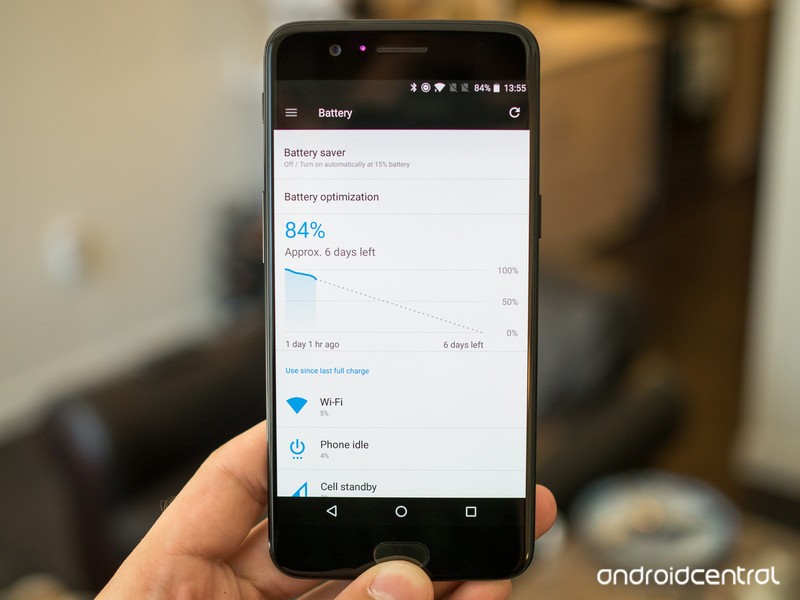
No matter how long your battery lasts, there will always be someone who needs more.
The OnePlus 5 has above-average battery life thanks to its lean software, efficient processor, and 3300mAh battery. But not everyone uses their phone the same way or has the same demands from the limited power supply — some of us need more longevity than others. This difference in configuration means that some may have a combination of factors leading to lower battery life than expected.
If you’re in need of longer battery life from your OnePlus 5, we have a handful of great tips to help you out. Read on.
Look for unnecessarily power-hungry apps
Misbehaving apps are one of the most common causes of bad battery life, and they can often be the easiest ones to diagnose as well. Head into your Settings and then Battery to see your usage over the last charge cycle — it’s best to do this near the end of the day to get the most complete picture of things.
Apps should be conscious of your battery life, too.
You’ll see many typical battery drainers here like Wi-Fi, cell standby, Android System, and the screen, but if you see an individual app cracking the top few places in usage there’s a good chance it’s doing something it isn’t supposed to. Now if you just spent the last 3 hours streaming Google Play Music, it’s understandable that it used a lot of battery, but if you haven’t opened Facebook all day and it took up 8% of your battery, it’s worth investigating.
The best thing you can do is reboot your phone or at least force close the app in question, followed by clearing its data to start over from scratch. If it continues to drain your battery, consider uninstalling it altogether.
Turn off Google Play auto updates

Google Play has this pesky habit of automatically updating apps, and sometimes with app updates actually changing its settings back to auto-update apps. You can understand why, because most people don’t want to think about app updates, but then again most we want to control just what happens on our phones too.
To save battery life, you can turn off automatic updating of apps through Google Play. Go into Google Play, open the sidebar menu and tap Settings then tap Auto-update apps to adjust the setting. Most people will be okay with letting app updates happen on Wi-Fi, but if you want to keep your battery life in check you should turn it off entirely.
Just remember to check periodically for updates or at least turn on notifications for pending updates so you don’t forget.
Turn off radios you’re not using
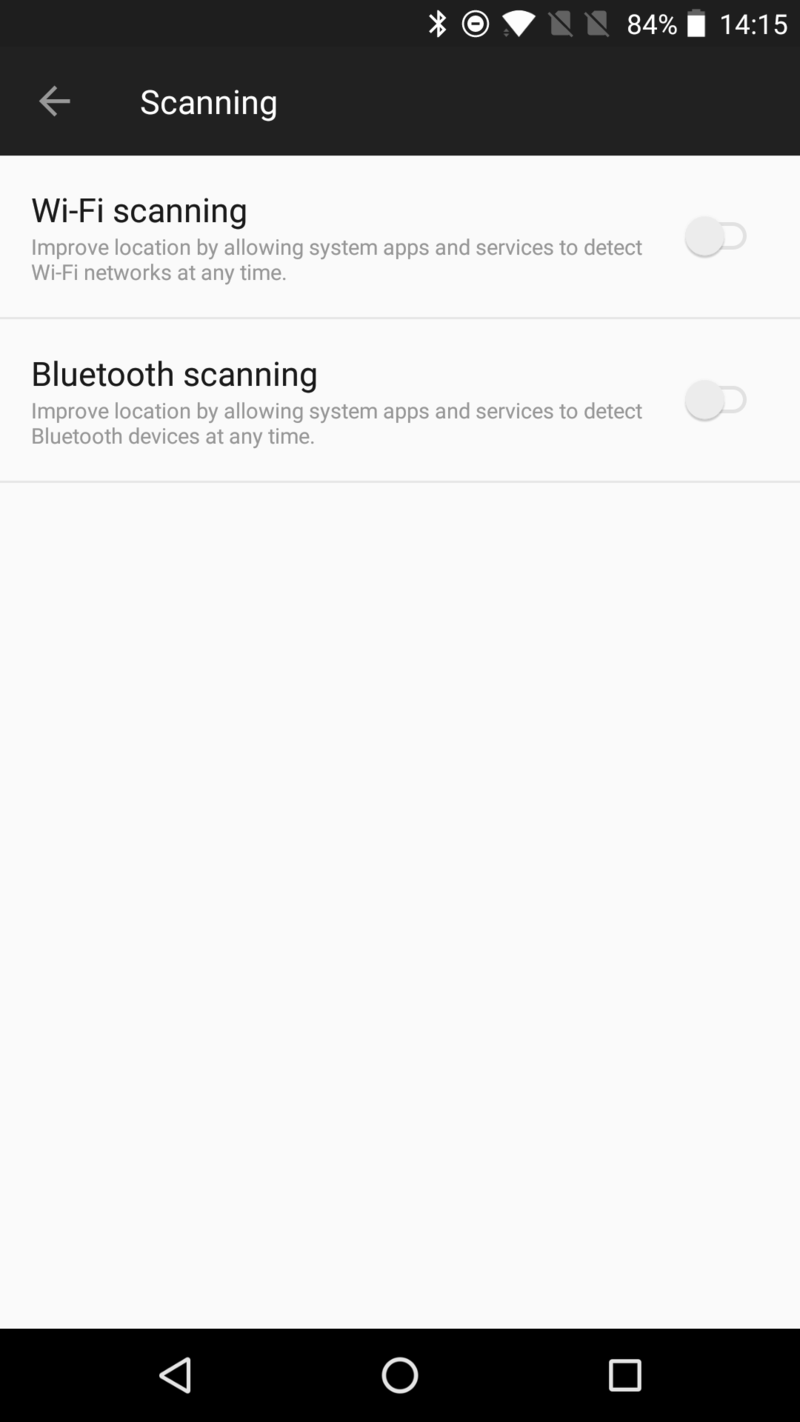
This is something simple you can to to save battery life, though the amount saved isn’t necessarily going to be substantial. If you’re not going to be using Wi-Fi or Bluetooth for a long period of time, it’s worth simply turning them off.
If you’re extra worried about battery life and want the full effect, you should also turn off the feature that lets the phone scan for Wi-Fi networks and Bluetooth devices to improve location services. You can find the setting in Settings, Location and Scanning under the menu button. You can turn off one or both as you see fit — just remember that this may negatively impact an app’s ability to accurately locate your device in the world.
Tweak your display settings
Smartphone screens are more efficient than ever, and the OnePlus 5’s 1080p panel really doesn’t use much juice, but there is still a direct correlation between screen brightness and battery usage. To save battery, consider dropping the screen brightness using the slider in the notification shade quick settings.
Extra battery life is great, but so is being able to see your screen.
Unless you can remember to constantly be on top of adjusting your brightness, the best balance of usability and battery will be simply using the “Adaptive brightness” setting. When you’re outside or in a bright room it’ll crank up so your view isn’t impacted, but when it’s darker it will save battery (and your eyes) by lowering it. Extra battery life is great, but so is being able to see your screen in every situation!
While you’re in the display settings of your phone, consider turning down the “Sleep” time. This is the interval at which your screen will dim and turn off when it hasn’t been touched. Simply moving from 1 or 2 minutes down to 30 seconds will have a positive influence on your battery life over the course of the day.
Use Battery saver mode
The built-in “Battery saver” mode does exactly what it says: saves you battery. It does so by reducing your brightness, throttling back performance, cutting back vibration, limiting location services and cuts way back on apps accessing data in the background. Adding it all up, it can seriously improve longevity without dramatically impacting your experience.
Battery saver walks a nice line of improving battery life while keeping your phone usable.
You can turn on Battery saver manually from the notification shade quick settings, or you can also set it to come on automatically — most people will choose the latter. In Settings, Battery and Battery saver you can choose when it comes on. Simply choose between 15% and 5% battery to have it trigger; if it is on, it’ll turn off automatically when you plug your phone in.
You won’t want to use your phone in Battery saver mode all of the time, but if you’re in a situation where you know your battery is draining quickly and you can’t afford to have it die on you before the end of the day it’s worth being proactive and tossing on Battery saver early.
Take advantage of Dash Charge
Yes, we know, this doesn’t exactly make your battery itself last longer — but it does help your phone get through the heavier-than-usual days you sometimes encounter. If you get to the point where your battery is draining faster than expected, and you have a long day ahead of you, the best thing you can do is toss it on a proper Dash Charge charger for a little bit.
Because of the way Dash Charge works, you can get an incredible amount of charge back in just 15 or 30 minutes — probably enough to comfortably make it through the rest of you hectic day. There’s a Dash Charge charger in the box with the OnePlus 5, and you can also get a compatible car charger from OnePlus.
OnePlus 5
- Complete OnePlus 5 review
- OnePlus 5 specs
- Which OnePlus 5 model should you buy?
- Camera comparison: OnePlus 5 vs. Galaxy S8
- The latest OnePlus 5 news
- Join the discussion in the forums
OnePlus
ASUS getting back into phones in the UK starting with Zenfone AR
After a few years away, ASUS has announced it will begin selling smartphones in the UK again.
It begins with the Google Tango powered Zenfone AR which will be up for pre-order from ASUS directly beginning on July 21.

ASUS isn’t coming back with a budget phone, then. The Zenfone AR will cost a fairly hefty £799, and the premium is certainly added with having Tango. Folks who pre-order will also get a Google Daydream View included for free, while the first 30 will get a swanky box full of goodies.
Those super early orders will come in a wooden chest with the phone, Daydream View, some headphones, a case, screen protector and a whole lot of style.
The Zenfone AR has plenty of hardware to go with the price, too. You’re getting a 5.7-inch QHD display, 8GB of RAM, Snapdragon 821 processor and 128GB of internal storage.
More: Early hands-on with the Zenfone AR
It’s also not the last phone Brits will be seeing from ASUS. While the U.S., Asia and even other parts of Europe have seen the more recent Zenfone launches, the UK hasn’t had anything since the very first Zenfone. Which wasn’t very good.
The next one we’ll be expecting to see hasn’t been announced yet, but it doesn’t take a genius to imagine that will be the Zenfone 4, since 4 comes right after 3. Nevertheless, it’s good to see another name throwing its hat into the British smartphone ring, even if the Zenfone AR isn’t probably going to attract the mass market.
Google Street View takes you aboard the ISS
Astronauts aboard the International Space Station just got an adorable floating camera, but what do we get? While nobody’s handing out free rides to the ISS, you can digitally explore it now that it’s up on Google Street View.
Since there’s no gravity, the astronauts make use of surfaces in every direction, so the Street View in space truly spans 360 degrees. But that’s not all: Google included info nodes for the curious to learn more about the station’s technical machinery and points of interest. As TechCrunch points out, there happened to be a SpaceX Dragon capsule docked to the ISS during shooting, so you can spot that too.
While Street View’s controls are a little wonky for three-dimensional navigation, it’s still a fascinating and accessible tour of a place many of us will never see in person. Start your orbital journey of humanity’s most remote manned outpost here.
Via: TechCrunch
Source: Google Street View
Tidal’s redesigned app puts more emphasis on music discovery
Tidal’s been in the news recently, as Jay-Z debuted his new album 4:44 as a Tidal-Sprint exclusive (which wasn’t without some controversy, as last-minute subscribers to the streaming music service weren’t allowed access to the album). Then, just a week later, the album was released to other streaming services (well, except Spotify). But now, Tidal has some non-Jay-Z related news: An updated version of Tidal’s app is out today, and it’s got a completely new layout. In fact, it looks a lot like Apple Music and Spotify.
Overall, there’s more emphasis on music discovery and recommendations. Now, when you pull up the Explore tab, you’ll find a new Genre + Moods section, along with suggested new artists and album at the bottom. The homepage also displays different genres and new editorial picks; it’s updated every day.

The navigation has also changed; it’s moved to the bottom, like other streaming services. The Now Playing screen has become easier to navigate as well. You can swipe right to see the queue of songs you have up next, swipe left to see new song suggestions or tap the album cover to see the album’s credits.

We always appreciate an emphasis on usability, so these new updates from Tidal are welcome. You can download version 2.0 of the app in the App Store and Google Play Store starting today.
Google brings its fancy Motion Stills GIF-making app to Android
Motion Stills has existed in a strange space for the past year. It’s a Google-made app but it’s been available only on iOS, piggybacking off Apple’s Live Photos function to create dramatic, stabilized GIFs and short videos. Android owners, Google’s main user base, were left out of the fun entirely — until today.
Motion Stills is available on Android, complete with a handful of updates. A new recording interface allows users to capture a short video with a single tap, like snapping a photo, or condense a longer recording (up to one minute long) with the Fast Forward function. On Android, Motion Stills comes with a fresh trimming algorithm that’s designed to protect against accidental camera shakes and pocket shots. Just like on iOS, users can capture their shots without an internet connection.

Google redesigned the Android app’s video pipeline so that it processes each frame of a video as it’s recorded. “By computing intermediate motion metadata, we are able to immediately stabilize the recording while still performing loop optimization over the full sequence,” the Google Research blog says. “All this leads to instant results after recording — no waiting required to share your new GIF.”
Now that Motion Stills is on Android, Google says it’s considering integrating the tech into its proprietary tools like Google Photos.
Apple users, don’t fear: When iOS 11 launches later this year, it’ll bring Motion Stills-esque updates to Live Photos. That might be one reason Google decided to (finally) move Motion Stills to Android.
Source: Google Research
Facebook Pages can now build their own communities
Today, Facebook is rolling out a new feature called “Groups for Pages,” which will let artists, brands, businesses and newspapers create their own fan clubs. The company says the idea stems from two reporters at The Washington Post who started a Facebook group called PostThis, where they interact with some of “the most avid fans” of the paper on a daily basis. Facebook says right now there are more than 70 million Pages on its platform, so this going to be great for many users who want to let their loyal supporters feel more connected to them.
Via: TechCrunch
Source: Facebook
 AIVAnet