


The Ataribox crowd-funded console is no hoax, and here’s everything we know
Despite Atari CEO Fred Chesnais saying that the company wouldn’t create another console, a teaser trailer surfaced in June during the E3 2017 gaming expo revealing the Ataribox. At first, it looked to be a revamp of 1980’s classic Atari 2600 console akin to what Nintendo is doing with its miniature Classic Edition consoles. But then Chesnais said that Atari was back in the hardware business, and that the Ataribox would be based on PC technology. Naturally, that opened the doors to lots of speculation.
Weeks later, Atari supposedly sent an email blast to gamers who signed up for notifications via the Ataribox website. That email was immediately verified by the Ataribox page on Facebook, which posted the same images found in the email. That debunked any notion that the email was fake, given its pictures look nothing like the unit showcased in the teaser trailer outside the wood grain texture and black ribbed surface.
What will it look like?
What the email failed to mention was that Ataribox will be crowd-funded. The information actually surfaced in a French note to investors last month, which didn’t bubble to the surface despite all the brewing hype around the mysterious device. “To limit risk taking, this product will initially be launched within the framework of a crowdfunding campaign,” the note said. Clearly, this indicates the project is pretty early in development, so its final look may change.
That said, images currently showcase two external designs: one with a solid black shell save for a red illuminated panel on the back, and another resembling the classic Atari 2600 with a black chassis and a wood grain front. Note that the black/red design sports a front-facing red illuminated Atari logo, while the black/brown design has a front-facing white illuminated logo.
Based on those two prototypes, the overall form factor is similar to the Atari 2600, although it sheds the blocky body of 1980 for the more rounded, futuristic look of 2017. It features a raised, somewhat triangular back complemented by a black ribbed surface that wraps around the device’s body. The front panel can actually be wood or glass, the company says, with four indicator lights glowing through the material.
What hardware will it have?
According to the email blast, the Ataribox will sport four USB ports, one HDMI port, and an SD card slot on the back. Given the Ataribox is a crowd-funded project, that lineup could change before the product goes retail, especially the four USB ports located on the back. Consoles typically have ports for controllers on the front for better reach, and for added protection against reactive console spinning due to cord pulling.
Right now, we have no idea what’s inside the Ataribox outside the “PC technology” description provided by Chesnais. The email says it has “modern internal specs,” which should be a given based on the ports installed on the back. Atari likely won’t be competing with the Xbox One and PlayStation 4, but rather targeting a wider audience looking for a lower price point.
That said, the processor inside will depend on the direction Atari will take with its software.
What games will it play?
That’s the missing piece of the Ataribox puzzle. The company says that the console will play current and classic gaming content. However, the console’s library will depend on the underlying operating system. We don’t know what that operating system is, yet.
Atari states that it will play “modern” content. Right now, the only Linux-based game published by Atari on Steam is Atari Vault. If the Ataribox is based on Windows, then it will support games such as Alone in the Dark (2008), RollerCoaster Tycoon World, Haunted House, and more.
Honestly, we can’t do more than guess at this point. Atari’s “current and classic” comment suggests the publisher’s old-school titles will make an appearance, as you’d expect, but it’s hard to say if “current” means recent Atari games only, or games from other publishers as well.
When will it be available?
Given the Ataribox is based on crowd funding, there’s no telling when the console will appear. ”There are a lot of milestones, challenges, and decision points in front of us in the months ahead,” Atari says. Consoles usually take at least a couple years, even when they’re simple (like the Ouya), so we likely won’t see the Ataribox in 2017.
Hundreds of NASA archive videos are being uploaded to YouTube
Why it matters to you
The YouTube uploads will make this stunning and historical footage easier to access.
Space buffs, get ready to blast off! NASA is currently uploading hundreds of stunning archival films to YouTube.
Recovered from the archives of NASA’s Armstrong Flight Research Center (AFRC) in Edwards, California, the footage covers decades of pivotal research and development undertaken by the agency and Air Force. Among the short clips is footage of space shuttle landing research, tests on the Lunar Landing Research Vehicle, and flights of the first supersonic aircraft, Motherboard reports.
To be sure, this footage has long been available to the public but viewing it meant you had to know it existed and know where to find it. The footage was relatively hidden in the Dryden Aircraft Movie Collection, which could be accessed through the Dryden Flight Research Center website.
But, thanks to the AFRC social media specialists, the 500 or so videos are migrating to a YouTube channel. Around 300 have already been uploaded.
“NASA has so much digital content that tends to be overlooked by the public, given the difficulty that exists in actually locating the content,” Rebecca Richardson, social media manager for NASA Armstrong, told Motherboard. “Our hope is that by moving the content to more accessible platforms, NASA fans and media personnel will be able to access the content more regularly and become more fully immersed in what is happening at NASA.”
The films are brief — usually under two minutes — but cover an impressive range of missions. Some are serene, like the early morning takeoff of a space shuttle. Others are intense, like the first launch of the Hyper-X aircraft. Some are even kind of funny, like the clip of the “flying bathtub” and the training exercise that shows crew member being chucked backward out of a shuttle.
Here are a couple videos to wet your whistle.
In this quick clip, NASA’s 747 Shuttle Carrier Aircraft carries the space shuttle Atlantis during an early-morning takeoff at Edward Air Force Base in the Mojave Desert. Atlantis was to be returned to the Kennedy Space Center in Florida after a 140-day mission to the International Space Station.
Emergency rescue missions are never funny but training exercises sure can be, especially when they involve hiking astronauts down a slide. Here a crew is “rescued” from a space shuttle during a training exercise at Edwards Air Force Base.
Google Play Store’s new Editors Choice pages put curated apps front and center
Why it matters to you
Google’s new Editors’ Choice pages will make it easier to compare apps, and find the right one for your needs.
Finding new apps on the Google Play Store can be a daunting task. Even though the storefront has gone through numerous iterations over the past several years, the abundance of options can still make it tough to come across something that catches your eye. Fortunately, Google is rolling out a redesigned Editors’ Choice section today, July 19, that delivers more curated recommendations to users in simple, brief packages.
There are a couple app guides already live, like the five essential road trip apps, or the best apps for learning a new language. Google Play’s editors have handpicked a selection of apps for a variety of categories, and each one is accompanied by a quick blurb as well as three standout features. These pages are available on both mobile and desktop versions of the store, and are currently live in Australia, Canada, Great Britain, Japan, South Korea, and the United States, with other regions to follow soon.
The goal, Google says, is to “take out the guesswork” in trying out different apps to find the right fit. It’s something Apple is also attempting to do with the upcoming App Store redesign planned for iOS 11. After the update arrives in the fall, users will be presented with a new “Today” page upon opening the App Store. The tab will highlight different iPhone and iPad apps on a daily basis in an effort to encourage shoppers to visit more regularly.
In addition to making it easier to find apps, Google also plans to make it easier to use them with the release of Instant Apps. Fully unveiled at the company’s I/O conference in May, Instant Apps allow developers to post a lightweight version of their apps that users can experience immediately — no download necessary. Instant Apps won’t always offer the same degree of functionality as full apps, though they should be better-equipped than mobile web pages and are ideal for one-time uses.
A good example is Hotel Tonight, one of the first companies to make an Instant App available to the public. It’s a nice fit for the platform because it allows users to easily make a booking without necessitating a full install of the app, which they’ll probably only use for a weekend. There are many more Instant Apps out in the wild, like Periscope, The Weather Channel, and Ticketmaster — though they’re still only available on certain devices at the moment.
Apple patent surfaces for iPhone ‘panic button’ using Touch ID tech
Why it matters to you
Having a quick way to trigger emergency services discreetly is a tremendously useful resource all phones should have, and this was at one time Apple’s proposed solution.
An Apple patent dating back to 2013 that uses the iPhone’s Touch ID fingerprint sensor in an interesting way has surfaced this week. The proposal would turn the device’s home button into a “panic button” for scenarios when the user is in danger.
Called “Biometric Initiated Communication,” the technology relies on Touch ID’s ability to distinguish between different fingers, as well as the strength or position of each press of the home button. Apple was seemingly at one point considering allowing users to record certain fingers or patterns as a panic response, according to SlashGear. That trigger could be used to directly and discreetly alert emergency services, theoretically without alerting an assailant.
Personal safety has become an increasingly important consideration of mobile devices — particularly phones, as we carry them around with us all day. While this patent is roughly four years old at this point, Touch ID may not have been dependable enough at the time for Apple to launch such a feature, or it may have been scrapped for other reasons. As always with patents, there is the possibility it might eventually materialize for consumers one day — perhaps in the iPhone 8.
Granted, it’s not a perfect proposal, and maybe Apple felt it wasn’t effective enough at what it set out to do. There’s always the threat of accidentally setting off the panic function, if it’s too simple. However, a pattern or scheme that’s overly complex could be too difficult to trigger in a potential life-or-death situation. It’s a delicate balance to strike, and hopefully a phone maker will eventually stumble upon the right one.
In April 2016, India mandated that all smartphones must come equipped with a panic button of some sort before the end of the year. The law came as part of the government’s efforts to improve women’s safety and stamp out sexual assault. Eventually, the “button” arrived in several forms — one of which was a new national emergency number, 112, as India previously lacked a centralized emergency hotline, CNN reported at the time. The country’s Ministry of Communications and Information Technology also worked with phone manufacturers to make quickly pressing the power button three times another way to notify authorities.
India is building solar powered commuter trains to cut down on carbon emissions
Why it matters to you
A fleet of solar powered locomotives could significantly curb global carbon emissions.
As the cost of solar technologies continues to drop, more companies are beginning to explore clean energy sources in an effort to curb costs. Indian Railways, the largest rail network in Asia, has unveiled its first train equipped with a series of rooftop solar panels to cut emissions and minimize fuel consumption.
The state-run locomotive system displayed the train, known as the Diesel Electric Multiple Unit (DEMU), on July 14. While the unit, and others like it, will still be pulled by a diesel-powered locomotive, the new rooftop solar panels will power the onboard lights, fans, and information display systems within the passenger coaches. These solar panels will replace the diesel generators on each coach. The DEMU was designed by Noida-based Jakson Engineers, under the guidance of the Indian Railways Organization for Alternate Fuels (IROAF).
Indian Railways plans to retrofit a fleet of existing trains, each with 16 solar panels to replace the diesel generators traditionally used to power the coach amenities and appliances. Based on current projections, six solar powered coaches alone could potentially save Indian Railways roughly 21,000 liters of diesel and almost $20,000 annually. The company plans to use the first DEMU on the suburban railway network in New Delhi. Once fully implemented, the company believes this program will save it more than $6 billion over the next decade.
Indian Railways operates roughly 11,000 trains each day, and spends nearly $2.5 billion annually on diesel alone (or roughly 70 percent of its total fuel expenditures). With these massive figures in mind, the company has an ambitious plan to incorporate solar power to its locomotive network. By the end of the decade, Indian Railways hopes to produce nearly 1,000 megawatts (MW) of solar power and boost this total to 5,000 MW by 2025.
That said, the company certainly has some work to do if it plans to meet these lofty clean energy targets. The company has only installed roughly 16 MW of solar capacity at the moment. However, there are plans to create nearly 255 MW of additional rooftop solar capacity and another 250 MW of land-based solar power in the future. With one of the largest rail operators on the planet taking a major step towards clean energy, we can only hope other companies will follow suit.
Apple opens digital journal to showcase its machine learning developments
Why it matters to you
Machine learning is paving the way for advanced AI of the future and one of the most important parts of that will involve it being able to understand what it is seeing.
Apple opened a new digital journal to showcase some of the developments it is making in the field of machine learning. In the first entry, it explains what it is doing to help improve the realism of synthetic images, which can, in turn, be used to teach algorithms how to classify images, without needing to painstakingly label them manually.
One of the biggest hurdles in artificial intelligence is teaching it things that humans take for granted. While you could conceivably hand-program an AI to understand everything, that would take a very, very long time and would be nigh on impossible to power. Instead, machine learning lets us teach algorithms much like you would a human, but that requires specialist techniques.
When it comes to teaching how to classify images, synthetic images can be used, but as Apple points out in its first blog post, that can lead to poor generalizations, because of the low quality of a synthetic image. That is why it’s been working on developing better, more detailed images for machines to learn from.
Although this is far from a new technique, it has traditionally been a costly one. Apple developed a much more economical “refiner” which is able to look at unlabeled real images and reference them to refine synthetic images into something much closer to reality.
However, how do you select the correct real image to give the refiner a strong source material to base its refinements on? That requires a secondary image identifier, known as the discriminator. It goes back and forth with the refiner attempting to “trick” the discriminator by gradually building up the synthetic image until it possesses far more of the details of the real images. Once the discriminator can no longer properly categorize them, the simulation halts and moves on to a new image.
This teaches both the discriminator and the refiner while they compete, thereby gradually enhancing the tools as they build up a strong library of detailed synthetic images.
The learning process is a detailed one, with Apple going to great lengths to preserve original aspects of images while avoiding the artifacts that can build up during image processing. It is worth it though, as further testing has shown vastly improved performance for image categorization based on refined synthetic images, especially when they have been refined multiple times.
Best HDR-capable TVs under $500

HDR video needs the right display, and you can get a great one for under $500.
HDR can make a dramatic difference in how things on your TV look when you’re watching, and since more and more HDR content is being produced and released, your next TV should support it. Paired with a Chromecast Ultra, you can have your own theatre experience right in your home.
That doesn’t mean you have to break the bank, though. There are a few great HDR-capable sets that check in under $500 to give you the higher contrast, better color accuracy and wide color gamut used to display HDR content.
More: What is HDR?
Hisense 50H8C 50-inch

Hisense may not be a common household name in many places, but that doesn’t mean you should overlook its television sets. Over the past few years, the company has made huge improvements to its sets, adding a number of key features that people look for when buying their next television. From its built-in smart features to HDR compatibility and more, you get a whole lot more than you would imagine when buying the Hisense 50H8C.
From PCMag’s review of the TV:
The Hisense 50H8C offers very good performance at a very low price for a 4K television. Even with its excellent color accuracy, though, it fails to stand out in the rapidly expanding budget 4K category. Hisense’s Linux-based, Android-like smart TV interface is a bit awkward compared with the more accessible systems used in Roku TVs, and the fact that only half of the HDMI ports are HDMI 2.0 (and those ports are the less conveniently placed ones) hinder this otherwise strong television.
It may not offer all the bells and whistles that some other sets do, or the best performance, but for the price it is hard to beat this one. You can pick up the 50-inch Hisense for just $500 at many retailers, making it quite a deal.
See at Best Buy
LG Electronics 43UJ6300 43-Inch 4K Ultra HD Smart LED TV

LG makes televisions for just about any budget. The 43-inch UJ6300 brings LG’s famous display technology, a sizeable display and a great price tag in addition to 4K HDR capability.
The UJ6300 is the 2017 update of the 43UH6100, which received great reviews. Rtings.com has this to say about the UJ6300:
The motion handling of the UJ6600 is good. It has a fast response time, resulting in only a short trail following fast moving objects. The backlight flickers by default, and there is, unfortunately, no option to reduce this frequency and clear up fast-paced content. Movies from a Blu-ray player or DVDs are smooth, but some minor judder is present when movies are watched from a HTPC or cable. Most people don’t notice this so it isn’t an issue.
They love the lack of input lag, but ding the set for non-uniform black levels and brightness. It rates a 7.1 out of 10 on their scale and is great for mixed use.
The LG UJ6300 gives you 4K HDR capability paired with the webOS operating system, and is a great value if you’re looking for an HDR smart TV under $500.
See at Amazon
Samsung Electronics UN40MU6300 40-Inch 4K Ultra HD Smart LED TV

Most any list of best TVs will have Samsung representing a model that fits the category. Of course, they have a compelling 4K HDR TV that checks in under $500.
The UN40MU6300 is a 40-inch set that brings Samsung’s UHD color management, backlit LED panel and connectivity options through the Samsung One Remote. It’s also a smart TV with access to Samsung Apps and the SmartView mirroring service so you can share content from your Samsung phone.
Rtings.com likes the contrast ratio and no input-lag response, but dings the set for picture quality when sitting at an angle. The end score is 7.4 out of 10. They had this to say about the set overall:
It has a great contrast ratio, which means it has deep and even blacks that are essential for a great picture. The MU6300 also has low input lag, making it a good choice for a gaming TV. It doesn’t have the widest viewing angles, but it deals with reflections and gets bright enough to be suitable for most environments.
At the price point, the Samsung UN40MU6300 will give you one of the best 4K HDR TVs you can buy.
See at Amazon
Your favorite?
If you have a favorite HDR TV that checks in under $500, be sure to drop a link in the comments so everyone can have a look.
Samsung brings Coral Blue Galaxy S8 to the U.S.
Coral Blue is coming to the Galaxy S8, and to you, starting July 21.
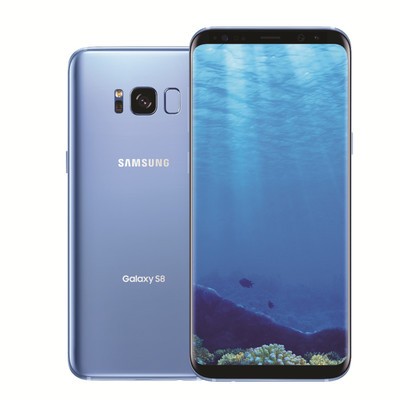
Samsung is bringing its popular Coral Blue color to the Galaxy S8 and S8+ starting July 21.
The new handset color will be sold exclusively at Best Buy stores and online, as well as at Samsung.com. Customers will be able to get the fresh color in AT&T, Verizon, Sprint and unlocked versions.
Best Buy is offering a nice promotion, too: customers who buy the AT&T model of the phone can get a second unit free if they’re a DirecTV customer, which is technically a $400 savings, according to Samsung. Samsung’s website is also offering a promotion for the next few days, discounting the unlocked model by $150, bringing the Galaxy S8 itself down to $575, the lowest price we’ve seen for the unlocked model so far.
See at Best Buy
Samsung Galaxy S8 and S8+
- Galaxy S8 and S8+ review!
- Galaxy S8 and S8+ specs
- Everything you need to know about the Galaxy S8’s cameras
- Get to know Samsung Bixby
- Join our Galaxy S8 forums
Verizon
AT&T
T-Mobile
Sprint
Unlocked
Get these awesome weather-proof Bluetooth Earbuds for just $25!
It’s summer time, which means that people are taking advantage of the beautiful weather and getting outside more. Whether you’re just going for a walk to the local park or hitting the pavement for some run training, it’s always better if you’re able to bring your own tunes along with you. But who wants to deal with headphone wires? No one, that’s who!
Get great new earbuds for just $25! Learn more
Right now, you can get these awesome FRESHeBUDS Pro Magnetic Bluetooth Earbuds for just $25. We’re sure You’ll be impressed with the features jammed into these little buds.

These Bluetooth buds are connected by a wire so you won’t lose one if it pops out of your ear during a workout. They’re sweat and water resistant and designed to fit snuggly in your ear, with a battery that takes 90 minutes for a full charge and lasts for 10 hours of playback. But what really sets these apart from other Bluetooth earbuds are the magnetic features that keep them secure around your neck, and automatically connects to your phone via Bluetooth when you disconnect them.
Get great new earbuds for just $25! Learn more
The only thing that’s cooler than these headphones is the price — at $25, you’re saving 79% off the regular price of $119.99, it’s quite the deal.
From blah to blob: The history of Android emoji

A reflection on the yellow-bellied emoji that many of us have come to love over the years.
If you’ve been following along with what’s to come in Android O, then you’ve likely heard that Google is retiring its line of blob-like emoji. Plenty of loyal Android users have expressed their joy over the upgrade to circular emoji, conforming to the rest of the emoji standards set forth in the mobile world, but there is also a host of us who had long rued the day that this would happen. That day was World Emoji Day, which the Internet celebrated with great fanfare this week. It’s the day that Google reminded us it’s still retiring the blobs to that Great Big Emoji Farm in the sky. #blobvoyage
But Android didn’t always employ yellow blobs as its emoji schtick. A long time ago, in the heydays of Android, you were lucky to have emoji at all — and if you did, they looked nothing like iOS’s. But when those yellow blobs came along, they were the perfect response to what was once a homogenized world of skeuomorphic smiley faces and peaches resembling butts. 🍑
From cutesy to blobby to conventional
Android has a unique emoji history, partly because it didn’t even widely support them until much later in its lifecycle. In its early days, Android’s emoji were essentially antenna-eared doppelgängers. They were cutesy and mod-like, though they were also kind of silly compared to Apple’s more realistic glyphs.

What Android’s emojis looked like back in the day compared to iOS. (Via Emoji Blog)
Google only added native emoji support in 2013 with the release of Android 4.3 Jelly Bean, and that’s when it revamped the glyphs to look like the yellow blobs we know today. They were pudgier back then, but eventually evolved to be just as expressive and as relatable as the iOS variants that had become a craze.
Android’s blobs were favorable, too, because they weren’t all overtly emotive like on the iPhone. Some of the characters were ambiguous enough that they passed off as double entendres, and though that’s part of why Google is revising the emoji anyway, it also gave Android users a sense of identity they didn’t have before: The identity of an amorphous blob that could be interpreted as needed.

The evolution of Android’s emoji, per Emojipedia.
The blobs were refined over the years, and Google eventually added more human-like emoji as the Unicode standard expanded so that blob was not always the only option. You can imagine the shock, then, when Google announced it would introduce a new aesthetic to an emoji system that seemed nearly perfect.
Google’s Rachel Been explained the overhaul of the emojis in a blog post after Google I/O 2017:
Our original emoji style was simple and flat with bold pops of color. The flat design became Android’s signature style, differentiating us from other platforms.
Over the years, as additional emoji were added across all of the categories, the set became stylistically divergent. Our design system wasn’t equipped to provide standards that unified the look and feel of all the illustrations across the many emoji categories. As a result, our emoji became inconsistent between old and new designs, making it difficult to quickly scan the keyboard to find the right emoji.
It’s a fair point. I’ve often reverted to using emoticon 😉 to express my like or disdain in a text message knowing very well that my Android emoji didn’t express the same sentiment on the iOS side.
The revamp of the emoji from blobs to conforming circles modifies the meaning behind some emoji.
The blog also cites the fact that Google is attempting to address “cross-platform emotional consistency” — that is, that Android’s emoji communicate the same message regardless of the platform. “We wanted to assure the user that when they sent an emoji to a friend, the message was communicated regardless of whether they are on iOS, Windows, Samsung, or any other platform,” wrote Been.
But what about how it changes the way that Android users communicate? The revamp of the emoji from blobs to conforming circles modifies the meaning behind some emoji. Take the face with cold sweat emoji, for example, which The Verge also references in its ode to the blob. This particular emoji is often used to denote nervousness or anxiety because of the sweat bead accompanying its decidedly blank expression. Android O changes the meaning entirely, however, offering up a more sickly interpretation instead. The emoji no longer shows nervousness, but tiredness, which is not the same thing.

On the left is the old style of the “face with cold sweat” emoji; on the right is as it appears in the Android O beta.
You’ll notice that the frowning face is also in line with the way it appears on Apple’s iOS, and that’s the real kicker here. Just like the Google Pixel was made to look like the iPhone, so will emojis have to conform to what iOS users see on their end. It is the way it is, and it’s the best way to sell devices to a crowd who often lament that Android doesn’t have what iOS does. But in the process, we all lose our identity as Android blobs.
Fortunately, we can choose which emoji to display by downloading other keyboard apps from the Play Store, or even by switching phone manufacturers. And if you’re an Allo user, you can download the blob sticker pack to keep the tradition going long after the blobs are out of commission.
Android O
- Everything new in Android O
- Should you put Android O on your phone?
- How to get the Android O Beta on your Pixel or Nexus
- Join the Discussion
 AIVAnet