


Australian bill would make tech companies decrypt user messages
Weeks ago, the Australian government introduced a new strategy at the Five Eyes security conference to combat terrorism: Force tech titans like Google and Facebook to decrypt communications from users suspected to be extremists or other criminals. It seems they’re moving ahead with it on their own turf, as the Australian government proposed a new bill today that would grant Australia’s intelligence agencies this authority to compel tech companies to hand user messages over to law enforcement.
The bill, which will be introduced to Australian Parliament in November, will be modeled on Britain’s Investigatory Powers Act that the UK passed last fall. Under the new law, internet agencies would be forced to turn over user communications the same way telephone companies hand over records when presented with a warrant.
The tech companies that would be affected — Facebook, Google and others — have expressed concern that any weakening of their end-to-end security (like, say, installing backdoors) might introduce vulnerabilities that hackers could exploit. But the Australian Attorney-General George Brandis believes law enforcement agencies could be granted access without creating backdoors, according to Bloomberg. That puts it between the UK’s Investigatory Powers Act and the EU’s law proposed in June that requires user communications to be end-to-end encrypted and outright forbids backdoors for law enforcement.
Source: Bloomberg
Apple’s Autoscanning iTunes Card Promo Codes Work via Hidden Font, Can be Replicated by Devs
When you purchase an iTunes gift card and redeem it in the App Store, the camera on your iPhone, iPad, or Mac can scan the code on the card to recognize it automatically, saving you the time of typing the numbers in manually.
Equinux, the company behind Mail Designer Pro 3, dug into how Apple’s promo code engine works in an effort to make their own scannable cards, and the results are quite interesting. As it turns out, the scanning feature in the App Store is tuned to recognize two things: a unique, hidden font and the dimensions of the box around it.
Equinux tried the box alone with a range of fonts like Courier and Monaco, and attempted to identify the unique characteristics of the font to find it, but were unsuccessful. Ultimately, the team realized the font that Apple’s using is hidden deep within iTunes.
The breakthrough came when we noticed that when you scan a card with your iPhone, the app briefly displays a “scanned” overlay of the code. This means the font must be embedded in the app somewhere. We tried the same with iTunes on macOS. And voilà – the iTunes on Mac behaves the same way.
When you look at some of the other folders inside iTunes, we found a tantalizing plugin called “CodeRedeemer.” It showed promise. But alas, no font files there either. The app binary does give a hint of where the heavy lifting is being done: “CoreRecognition.framework.”
Hidden in the CoreRecognition.framework, there are two fonts: “Scancardium,” for entering and recognizing codes, and “Spendcardium,” which appears to be for obscuring credit card details as they’re entered. The two fonts can be found by going to Finder on a Mac, clicking Go, choosing Go to Folder and pasting the following: /System/Library/PrivateFrameworks/CoreRecognition.framework/Resources/Fonts/
With a simple double click, the fonts can be installed on a Mac and can be used within different apps. While this is a neat breakdown for end users, it’s of particular interest to developers because these fonts can be used to create custom App Store promo code cards that can be scanned in the same way as iTunes gift cards.

Equinux outlines the exact font height to use and how to position it within the surrounding box to get Apple’s engine to recognize it, details the company uncovered after investing a lot of time in tweaking fonts and the border of the required box.
Equinux even went one step further and created helpful Sketch and Photoshop templates that developers can use to create App Store promo code cards that can be automatically scanned using a device camera and recognized by the App Store.
Tags: App Store, iTunes
Discuss this article in our forums
MacRumors Giveaway: Win a Pocket-Sized Camera-Equipped Drone From TRNDlabs
For this week’s giveaway, we’ve teamed up with TRNDlabs to give MacRumors readers a chance to win a small pocket-sized iPhone-compatible Fader drone that’s equipped with a camera. TRNDlabs offers a range of different affordable drone options, and the Fader is one of its newest products.
Able to fit in the palm of a hand, the Fader is ideal for selfies, landscape shots, sports, and more with its HD camera. The Fader comes in all black and is ultra lightweight, weighing in at just 55 grams. It can fly and capture footage for seven minutes before needing to be recharged.

It’s flown using a controller that includes an iPhone mount, and with the accompanying Fader app, you can see a live feed of what the drone’s capturing. There are three levels of controller sensitivity, making it ideal for all skill levels.

Fader features auto takeoff and and land functionality, and it features a six-axis gyro module that allows for tricks (there’s a built in flip feature) and altitude maintenance when hovering. It’s able to capture stable footage from the air, and it can fly as far as 50 meters away. For night flights, it includes LED lights.

TRNDlabs’ Fader drone is normally priced at $129, but we have five to give away to MacRumors readers. To enter to win, use the Rafflecopter widget below and enter an email address. Email addresses will be used solely for contact purposes to reach the winner and send the prize. You can earn additional entries by subscribing to our weekly newsletter, subscribing to our YouTube channel, following us on Twitter, or visiting the MacRumors Facebook page.
Due to the complexities of international laws regarding giveaways, only U.S. residents who are 18 years of age or older are eligible to enter. To offer feedback or get more information on the giveaway restrictions, please refer to our Site Feedback section, as that is where discussion of the rules will be redirected.
a Rafflecopter giveawayThe contest will run from today (July 14) at 11:00 a.m. Pacific Time through 11:00 a.m. Pacific Time on July 21. The winners will be chosen randomly on July 21 and will be contacted by email. The winners will have 48 hours to respond and provide a shipping address before new winners are chosen.
Tag: giveaway
Discuss this article in our forums
Wacom’s New Bamboo Sketch is the Perfect Stylus for iPhones and Non-Pro iPads
Introduced earlier this year, the Bamboo Sketch is Wacom’s latest precision stylus designed to work with the iPhone and the iPad over Bluetooth. It’s meant to mimic the feel of traditional pen-and-paper writing and drawing with interchangeable pen nibs and customizable shortcut buttons.
Priced at $80, Wacom’s new stylus isn’t a better option than the Apple Pencil for iPad Pro users, but for the iPhone and other iPad models, it’s worth checking out.
Design
The all-black Bamboo Sketch looks sleek and stylish. It’s made from a textured plastic that’s super grippy, so it’s easy to hold and feels comfortable when writing.

It’s both thicker and heavier than a regular pen, and while it is well-balanced in the hand, my hand did get tired while writing after about 15 to 20 minutes because of its weight and diameter. Size wise, it measures in at 142mm long (about the size of your average pen) and it is 10mm in diameter. Its official weight is 18 grams, which is actually lighter than the Apple Pencil.

Design wise, the Bamboo Sketch features two shortcut buttons at the top that are customizable with different functions, and a spot where the charger connects at the bottom. Aside from those design elements, this a standard pen-like stylus.
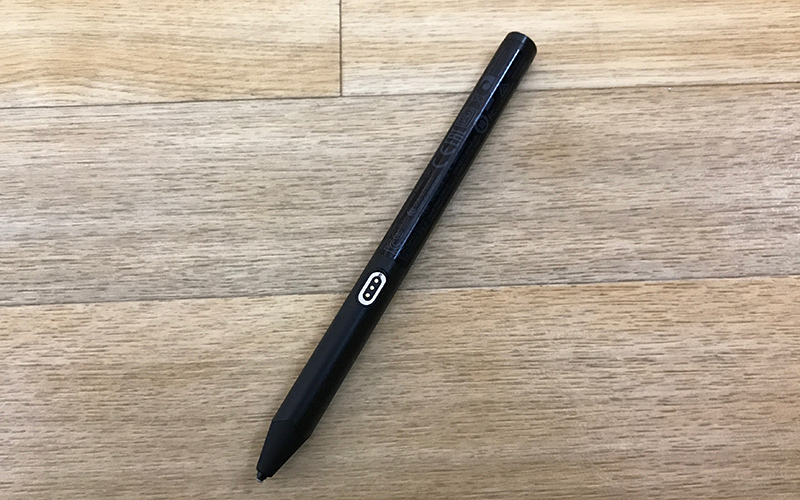
The Bamboo Sketch features a unique swappable tip, with 1.9mm firm and soft pen nibs included in the packaging for a custom feel when writing. I didn’t notice much difference between the two different tips, but mostly stuck with the soft one because it felt a bit smoother.
Wacom ships the Bamboo Sketch in a high-quality carrying case that houses the stylus, extra tips, and the USB charger. When I opened the package, I thought the case also doubled as a way to charge the Sketch, but that’s not how it works.

The Bamboo Sketch attaches magnetically to an included USB charger, which then can be plugged into a computer or a standard USB outlet. The charging dongle is tiny (about the size of a small flash drive) and feels like something I’m bound to lose at some point, so that’s a negative, but at least it can be stored in the carrying case when not in use.

Charging through the case would have been a lot more convenient because attaching a stylus to my computer is somewhat awkward, but it’s superior to a wired solution. The Bamboo Sketch’s battery should last for about 16 hours. In my experience, that was enough for about two weeks of use for approximately 30 to 45 minutes a day.
The case also includes a hole that’s used for swapping out the aforementioned interchangeable nibs. Stick the Sketch into the side of the case and tilt it to pull out the existing tip, pop a new tip out of its slot inside the case, and press it into the top of the stylus. It’s a simple, hassle-free process and I appreciate how easy Wacom made it to swap tips.
Features and Writing Experience
Wacom says the Sketch has a natural, precise feel that’s similar to a pen on paper. It doesn’t feel like writing on paper, of course, but it was smooth and comfortable to write with, and as precise as you’d expect a Bluetooth-connected stylus with a fine tip to be. It’s about as close to a pen and paper experience as you can get on a tablet or a phone screen.
The Bamboo Sketch connects to the iPad using Bluetooth. Once charged, pressing one of the buttons on the stylus activates Bluetooth, and it can be connected to an iPad or iPhone using one of Wacom’s apps, or through the Bluetooth section of the Settings app on the device.

While in use with an iPad, the Bamboo Sketch requires you to disable multitasking gestures to enable palm rejection features within apps. That means no using four and five finger gestures to do things like pinch to the Home screen or swipe between apps.
If you’re someone who often uses those gestures, turning the feature off will be a hassle because it’ll need to be toggled off every time you want to use the stylus and then on again when you’re done.

The Bamboo Sketch is able to work systemwide on the iPhone or the iPad, so it can be used as a finger replacement. Within select apps, it also has additional features like pressure sensitivity and palm rejection.
Support for the Bamboo Sketch has to be enabled through software, so the experience is simply not as good as an Apple Pencil on an iPad Pro, especially the newest iPad Pro models with ProMotion display technology.
Palm rejection worked poorly for me regardless of which app I was using and whether I was using my iPhone or my iPad. It kept detecting small movements from my hand, leaving marks on the page and interrupting what I was writing or sketching.

I much preferred to just not touch my palm to the display than to deal with the spotty palm rejection features while writing. Unfortunately, holding my palm up isn’t always comfortable.
Palm rejection with the Apple Pencil works much better because with the Pencil connected, it rejects all touch when the Apple Pencil’s tip is on the screen of the iPad Pro. It’s hard to compete with that.
On non iPad Pro devices, spotty palm rejection is about as good as it gets. Some apps do it better than others, but it’s never going to be perfect. It helps a lot to start writing before you put your palm down, but it isn’t foolproof.
As for pressure sensitivity, the Bamboo Sketch was as natural and fluid to use as the Apple Pencil. Pressure sensitivity worked well — a light press gave me a thin line, and as I pressed down harder, the line got thicker. Bamboo Sketch has 2,048 levels of pressure sensitivity.
Pressure sensitivity matched the Apple Pencil, but on iPad Pro models, the Bamboo Sketch can’t compete when it comes to latency. When you write or draw with the Apple Pencil on one of the new iPad Pro models, the line is right at the tip of the stylus and it stays there as the Apple Pencil moves. With the Bamboo Sketch, it’s offset and noticeably slower at tracking. It’s also not able to do the side of the pencil shading that’s possible with the Apple Pencil.
These features only apply to the iPad Pro — if you don’t have an iPad Pro, the Bamboo Sketch works as well or better than any other connected stylus I’ve tried (I’d say better on the whole, given its ergonomics, grip, and pressure sensitivity).
The Bamboo Sketch has one edge over the Apple Pencil — two shortcut buttons. In select apps, shortcuts can be assigned to the two buttons on the stylus. For example, in Wacom’s Bamboo Paper app, the buttons can be set to do things like erase, undo, redo, or open full screen mode.
Supported Apps and Devices
There are a good number of apps that support the Bamboo Sketch and all of its available features. ArtRage, Astropad, AutoDesk SketchBook, Bamboo Paper, Concepts, Good Notes, IbisPaint, MediBang, Notes Plus, Procreate, Sketch Club, Tayasui Sketch, Zen Brush 2, and Zoom Notes all support pressure sensitivity and shortcut functionality.
All of the above listed apps aside from ArtRage and Procreate support palm rejection.

According to Wacom, the Bamboo Sketch works with previous iPad generations that feature Bluetooth connectivity and the iPhone 6 and above. I tested it on a previous-generation 12.9-inch iPad Pro, a current-generation 10.5-inch iPad Pro, and an iPhone 7 Plus.
Bottom Line
For iPad Pro owners, the Apple Pencil is the best stylus on the market and it’s not really worth considering any alternatives, including the Bamboo Sketch. There’s no comparison, especially with iOS 11 improvements that allow the Apple Pencil to be used system-wide.
If you have the money to spend on a high-end stylus and have an iPad Pro, buy the Apple Pencil. If you don’t have an iPad Pro and need a stylus that offers enough precision for note taking and fine sketching, the Bamboo Sketch is a great option.
How to Buy
The Bamboo Sketch can be purchased from the Wacom website for $79.95.
Note: Wacom provided a Bamboo Sketch to MacRumors for the purpose of this review. No other compensation was received.
Tags: stylus, Bluetooth stylus, Wacom
Discuss this article in our forums
Sprint Launches New ‘Sprint Flex’ and ‘Sprint Deals’ Smartphone Purchase Options
Sprint today announced the launch of two new smartphone upgrade programs, Sprint Flex and Sprint Deals. Sprint Flex, as the name suggests, is designed to give users more options for upgrading their phones, including on an annual basis.
With Sprint Flex, customers can choose an iPhone for a low monthly price and begin making payments. Through Sprint’s existing iPhone Forever and Galaxy Forever programs, customers can then opt to upgrade on an annual basis, trading in their devices each year.
After 18 months, though, customers can choose to return their devices for a new one, own the device by making a single payment, or own the device by making six additional monthly payments. Sprint has a chart outlining the program:
Sprint Deals, the other new program Sprint is introducing, will let customers purchase a smartphone without a credit check. Sprint Deals is limited to older devices like the iPhone 6s, but offers $25 to $30 down and payments of $5 to $10 a month.

Customers who apply for and receive credit with Sprint, can take advantage of Sprint Flex on a postpaid plan:
– For entry-level devices, customers pay $5 per month with $25 down.
– For higher-end devices, customers pay $10 per month with $30 down.Customers who prefer to bypass a credit check with Sprint, can get an instant discount on the same “value menu” of smartphones, on a Sprint Forward prepaid plan:
– For entry-level devices, customers get 50 percent off the suggested retail price.
– For higher-end devices, customers pay 25 percent off the suggested retail price.
Sprint is also currently running a free service promotion that may make it an attractive choice for customers looking for an affordable smartphone. For customers switching from Verizon, AT&T, T-Mobile, or another postpaid carrier and bringing their own device, Sprint is offering one year of free unlimited talk, text, and 4G LTE data.
Tag: Sprint
Discuss this article in our forums
Apple Leasing Equipment to Suppliers to Make Sure Key iPhone 8 Components Get Made
Apple recently purchased expensive production equipment to produce the rigid flexible printed circuit board for the iPhone 8, reports The Korea Herald. Apple doesn’t plan to use the equipment itself, but is instead leasing it to suppliers to ensure it can get the components it needs for the iPhone 8 amid rumors of production difficulties.
The equipment cost Apple “tens of millions of dollars” and will be used to create the aforementioned circuit boards, which are a key component that connect parts like the iPhone’s display and camera. A rigid flexible printed circuit board is reportedly more difficult to produce than conventional rigid or flexible PCBs.
iPhone 7 logic board, image via iFixit
Apple made the purchase after one of three suppliers it planned to source parts from backed out of the deal. Interflex and Youngpoong Electronics, two Korean companies, are said to be producing the components going forward.
“One of the three suppliers recently decided to back out,” a source told ET News on condition of anonymity, saying that the supplier is a Taiwanese manufacturer.
The exact reason why the Taiwanese supplier withdrew from the deal with a big client Apple was not revealed. But sources say the firm may have felt a pinch on the tricky production and strict quality requirements along with low profitability.
With one supplier pulling out of the deal, Apple decided to make sure the remaining suppliers can meet capacity. “To fill the loss, Apple is supporting the other two suppliers, both Korean, to beef up production,” said The Korea Herald’s source.
Rumors have suggested Apple is struggling to produce several of the new iPhone’s components, including the 3D sensor and the display lamination process, which many analysts believe is going to lead to some delay in production ramp up.
KGI Securities analyst Ming-Chi Kuo, who often accurately predicts Apple’s plans, believes production ramp up could be delayed by a month or two, which means the iPhone 8 could be available in limited quantities with Apple unable to meet demand until late in 2017 or early in 2018.
Related Roundup: iPhone 8
Discuss this article in our forums
SHIELDON Galaxy S8 Dual Layer Case – Sunrise Series Review

The Samsung Galaxy S8 has been out for a few months now and that means there has been plenty of time to test our some cases for the device to see what offers the best balance of practicality against aesthetics.
You may have seen our other review of the SHIELDON Leather Wallet Case that is aimed at those who want to condense the number of things they carry on them. The Galaxy S8 Dual Layer Case serves a different purpose and offers a slim profile rear and side protection for your device.

The SHIELDON Galaxy S8 Sunrise Series Dual Layer Case -SAMSUNG S8 Protection Case Details:
- – The Galaxy S8 Case provides full protection, 4 thickened TPU cushion corners ensure your phone against drops and bumps; Raised edges and the 4 extra 1MM Raised Pads on the bottom of the TPU case to protect the screen, camera and the slim hard back case from scratches and dirt
- – 2 IN 1 Hybrid dual-layer design, features a soft TPU Inner Protective Case and a Hard Polycarbonate Back Frame Cover, helps enhance the protection of the phone
- – Precise laser cutouts enable easy access to all Buttons, Ports, Speaker, Fingerprint sensor, Cameras and Flash. Allows charging without removing the case
- – Keeps the natural shape of the Galaxy S8. The 3D textured internal design holds the phone steadily, reduces the force from drops and lessens the heat via improving airflow
- -4 Extra 1MM Raised Pads on the bottom. Lift the case off the ground, protect the slim back case from scratches and dirt.
- – Easy Snap On. Just snap on the case in one smooth step and enjoy super full protection
The first thing you’ll notice when unpacking the case is that it feels very solid in the hand. The Galaxy S8 fits extremely well into the case and offers sufficient access to all the necessary ports that you’d expect without any excess movement. The case has a raised lip design around the edge that aims to protect the screen should it experience a front impact, or to protect it when placed face down on a surface. There are also 4 thickened TPU cushion corners designed into the case in order to further protect the device against drops.

The case is extremely well made and will definitely protect the device from everyday knocks and bumps. The layered design to offer added protection does come at a cost, however, adding some additional bulk to the thickness profile of the device that those who prefer a minimalist design might find bulky. It’s a small price to pay for the level of protection the case offers.
The SHIELDON Galaxy S8 Dual Layer Case is an extremely good case for those who are looking for some added protection and is thoroughly recommended.
If you want to get your hands on the SHIELDON Galaxy S8 Dual Layer Case then head on over here to pick one up. Better yet, there’s a special 10% discount for AndroidGuys readers’ using the code SDCODE10.
Dark Echo: A thrilling, sound-only adventure (Review)

When you see the first games coming out for the Play Store, and compare it with the games we currently have, we can see how much more advanced they’ve become. Graphics, in particular, have come a long way if you analyze games that strive to look as realistic as possible. However, as we all know, graphics are not everything in a game. Dark Echo is aware of that; it creates a superb atmosphere with outstanding sound effects and little more than a black screen.
Developer: RAC7
Price: $1.99
Setup and Tutorial
When you first launch the game, you will not be greeted with the sign-in process for Google Play Games. You could wrongly assume that Dark Echo doesn’t support said service, but in reality, it does.
To actívate it, however, you need to head to the game’s settings and sign in manually. It’s a weird way of doing things since I believe developers have determined that the first launch of the app is the perfect place to do it. It still works though, and it lets you earn achievements through it.
Anyways, the game will welcome you instead with a very small tutorial. Since the game’s controls are absurdly easy, there’s no need for much more than this.
Overview
 The tutorial teaches you the few basic things you need to learn.
Even though Dark Echo could look like a very simple game at first, it has a lot of depth thanks to its unusual gameplay. You control a character that you actually can’t see because everything is dark. Instead, you rely on what you hear and the echoes your sounds make against objects to determine the direction you should take.
To move, just tap in that direction and your shoes will make a sound for each step you take. You will be able to see the echo bouncing through walls and hazards, making it very tense because you don’t know what is ahead of you until you move.
When there are only walls around you, the echo will be white. However, there are hazards, water, and switches that you need to take into account, and these will all have different colors to identify them. When enemies are following you, the game will display a red hazard around you.
General Impressions
The approach of not being able to see your own character in-game is unlike anything I’ve seen before, and, combined with the fact that there’s no easy way of seeing what lies ahead, the game can be very tense at times.
Regarding difficulty, at first, stages are pretty easy and straightforward. However, things can get ugly fast, and then a lot of patience and good timing is required to go through the later levels. Nevertheless, you never feel like your deaths are just because the game is being cheap, but rather a consequence of your own mistakes.
 This will make more sense once you start playing.
In a world in which game developers try to create high-quality worlds with an impressive amount of detail and enticing backstories, Dark Echo relies on you to build up its world. I imagine the world being a dungeon very similar to a jail. I’ve read that other people think about it as a mine or as a cave similar to what you would find in RPGs. It’s up to you to decide in which setting you are playing, and that’s something very few games are able to provide nowadays.
Also, the game tries to build a story through the names of the stages. Don’t expect anything mind-blowing, though, but it is nice to have some kind of story to string the stages together. There’s also a more difficult mode when you finish the game, providing added replay value.
Graphics and Sound
 There’s nothing more terrifying in this game than having red lines following you.
Because of its little reliance on graphics, Dark Echo does not feature flashy artwork or similar. Instead, a lot has been done to refine the core gameplay. This isn’t a bad thing, though. Graphics in this game help to enhance the gameplay in a significant way, and the lack of high-quality graphics does not hinder the overall experience at all.
Sound, however, is clearly one of the priorities set by the developer. This emphasis on sound effects is evident right from the beginning, where the game reminds you that your experience will be greatly enhanced if you turn up the volume of your device. Using headphones will be even better, though.
The sound effects are absolutely superb and they aid a lot in creating the tense atmosphere that Dark Echo tries to achieve. The echoes, the footsteps, the enemies, everything is done in a top-notch way. Normally sound effects are done in a game to add to it, but here, they are such a big part of the game that their execution could make or break the game. Fortunately, the dev team did a splendid job.
Conclusion
While most games try to improve graphics to create more impactful and visually impressive worlds, Dark Echo focuses on sound effects and almost no visual feedback to create an immersive experience that can get very tense but rewarding at the end. The idea of having to decide your movements based on sound only (and sometimes, intuition) makes for a very engaging gameplay and provides a pleasing experience. If you are looking for something out of the ordinary, then Dark Echo is exactly what you’re looking for.
Download and install Dark Echo from the Google Play Store.
Save on new smartphones, Bluetooth gadgets with our top 9 mobile deals
This year’s Amazon Prime Day has come and gone, but that doesn’t mean the deals have all dried up. Retailers are still chock-full of hot summer discounts on all sorts of tech, and if you’re specifically looking at a new phone (or some accessories to go with it) we’ve picked out nine great mobile deals currently available on Amazon and Newegg to save you some time and money.
Smartphone deals
Our smartphones typically go with us everywhere and tend to get put through the ringer. If your phone is looking a little worse for wear and it’s time for a new one, check out these deals on a few brand-name Android and iOS devices:
- Motorola Moto G5 Plus: After its original launch, the Motorola Moto G quickly became one of our favorites, and has continued to reign as one of the best budget Android phones on the market. The 5th-generation 64GB version just dropped earlier this year and is now on sale on Amazon for $250 after a $50 discount.
- Blu Advance 5.5 HD: The Moto G might be inexpensive, but it will still set you back a couple Benjamins. For an even cheaper ultra-budget Android phone, BLU has you covered: The Advance 5.5 HD can be yours for just $75 on Amazon after a $15 discount.
- Refurbished iPhone 5s: Discounts on Apple hardware can be scarce, and your best bet for mobile deals on iOS devices is to go the refurbished route. For a limited time, NeweggFlash has a professionally recertified iPhone 5s for a low $140.
Charging accessories
Your mobile devices are useless with a dead battery. Keep your shiny toys juiced up and ready to go with one (or all) of these charging accessories, so you’re not left hunting for an outlet or USB port when that little battery icon starts flashing.
- Jackery Bolt 6,000mAh portable charger: The Jackery Bolt power bank fits in your pocket and, unlike other chargers, features Micro USB and Lightning cables that fold into the unit when not in use. Be sure to redeem the additional promotional offer on the Amazon product page to score this power bank for $23. That’s a total savings of $47.
- Anker PowerLine Lightning cable: Newer Apple products use the company’s proprietary high-speed Lightning cables, and Anker makes some of our favorites. Amazon has 6-foot Anker PowerLine Lightning cables for $9 and 10-foot cables for $12.
- Alpatronix iPhone battery cases: Battery cases like those from Alpatronix are the perfect way to extend your iPhone’s battery life if you don’t want to carry a portable charger around. These cases are available for the iPhone 7, 7 Plus, and 6 Plus at discounts of up to $63 off.
Headphones and Bluetooth accessories
Bluetooth connectivity makes it easy to cut the cables so you’re not getting tangled up in wires constantly. These wireless audio accessories are the perfect companions for your mobile tech when you’re out and about and don’t want to be without your tunes.
- Bluedio T3 Bluetooth headphones: The Bluedio T3s are a great way to go wireless while still enjoying the sound quality that full-size headphones deliver. Score these cordless cans for $43 from Amazon and enjoy a $37 discount.
- GRDE Bluetooth earbuds: Looking for something a bit smaller than headphones? These Bluetooth earbuds from GRDE are just the ticket. A $60 discount knocks them down to just $40 on Amazon.
- Philips BT2200W/27 Bluetooth speaker: Waterproof Bluetooth speakers are the perfect tech gadgets for summer’s outdoor adventures. Newegg has the Philips BT2200W/27 for $15 off, letting you snag this rugged speaker for $35.
MORE DEALS
- Smiphee 2500mAh Portable Charging Case Deal Now 64 Percent Off
- Check Out Our Top Three Amazon Tech Deals For Friday, July 14
- 8 portable tech gadgets you shouldn’t leave home without
- 6 digital camera deals that can save you up to $400
Looking for more great mobile deals and discounts on other electronics? Check out our deals page to score some extra savings on our favorite tech.
Radiohead box set hides computer app that runs on 1980s British hardware
Why it matters to you
Radiohead have long been known for hiding cool Easter eggs for fans to discover, and this hidden computer program may be their coolest trick yet.
The latest special-edition Radiohead box set hides a computer app that only runs on a specific brand of British-made computer, fans have discovered.
The app was uncovered on the last two minutes of an audio cassette that was included in the band’s special 20th anniversary box set for their seminal OK Computer album. The box set, which we previewed when it was first announced in May, is called OKNOTOK, and includes three vinyl LPs, a picture book, a copy of frontman Thom York’s 104-page notebook from the making of the album, and the aforementioned audio cassette — which was originally describes as only containing demos from the recording session.
It’s not surprising that Radiohead fans, know for their nerdy tenacity, quickly realized that the last two minutes of the cassette, which showcased a series of odd high-end frequencies, was more than meets the ear. Users on Reddit identified the frequencies as the sound of the famed 1980s ZX Spectrum computer, a piece of British hardware with a cult following.
After running the sounds through an emulator of the vintage British computer, fans discovered scrolling text that reads, “Inside your home computer are … Thomas Yorke, Colin Greenwood, Jonathan Greenwood, Edward O’Brien, Philip Selway, Nigel Godrich & Stanley Donwood. 19th December 1996.”
The software then scrolls to another page, which slowly fills with a series of interesting colored letters while a mass of bleeps and bloops plays in the background.
A cool computer-based Easter egg isn’t totally surprising from the cult-beloved British band. Aside from leading a massive two-decade audio revolution, Radiohead and its members have long been leaders in various pairings of digital media and audio, with the band releasing an iOS app called Polyfauna alongside their 2013 album King of Limbs, and Yorke being among the first major artists to release his solo album straight to BitTorrent, among other exploits.
Those interested in picking up one of the band’s special 20th anniversary OK Computer box sets can still do so on the project’s website, with the full cassette tape-including version running fans a cool $130. The band’s latest album, A Moon Shaped Pool, came out in May.
 AIVAnet