


Microsoft made a version of Windows 10 for the Chinese government
Microsoft and the Chinese government’s relationship in the past hasn’t been the best. That rocky past makes the news that the pair have worked together on a version of Windows 10 for government computers all the more interesting. It’s based on Windows 10 Enterprise, but with a few tweaks. “The China Government Edition will use these manageability features to remove features that are not needed by Chinese government employees like OneDrive, to manage telemetry and updates, and to enable the government to use its own encryption algorithms within its computer systems,” executive vice president Terry Myerson writes on the Windows 10 Blog.
It wasn’t an easy process. “Over the last two years, we have earnestly cooperated with the Chinese government on the security review,” Myerson says. The fruits of that labor will go into place at the China Customs agency, the City of Shanghai, and Westone Information Technology. What’s more, Lenovo will be among the first OEMs to preinstall the government’s operating system on new hardware in the region.
Back in 2014, China banned Windows 8 installs on government computers because it feared major security risks. China had been pushing its forked version of Linux in the wake of that.

Source: Windows 10 Blog
Mouse semen experiment suggests humans can reproduce in space
Humans have become relatively experienced at living and working in space aboard the International Space Station. Now, we’re looking forward to the next step: reproduction.
Mouse sperm, which was freeze-dried and stored aboard the ISS for nine months, was able to produce healthy offspring back on Earth. The research study was published yesterday in the journal Proceedings of the National Academy of Sciences of the United States of America.
“Unfortunately, to bring live mice and take care [of them] in space is too difficult,” Professor Teruhiko Wakayama, one of the lead authors of the study, told The Guardian. The team instead opted to freeze-dry mouse sperm and store it on the ISS for 288 days. Upon its return to Earth, the space sperm was implanted into healthy mice.
Scientists have been unsure how space radiation might affect humans’ ability to reproduce and have healthy babies, which is a concern for long-term plans to colonize our solar system. Radiation can heavily damage cells, and it’s about 100 times stronger on the ISS than on Earth.
While the space sperm showed some DNA damage, the mice offspring were completely healthy and free of any genetic defects. It’s an encouraging sign that human reproduction in space might be viable.
This study is just a first step, though. The mice didn’t actually reproduce aboard the ISS, and the radiation humans would experience on a Mars mission is exponentially higher than the dose astronauts receive aboard the ISS, which is still protected by Earth’s magnetosphere. We also don’t know whether a space baby, raised in an environment without the pressure of gravity to shape its bones and body, would be healthy. And would zero-g and radiation affect the development of a fetus in space?
There are many unanswered questions, but scientists have given us the first clue that reproduction in space might be a closer reality than we think.
Source: The Guardian, PNAS
Duet Display for iPad Updated With New Pro Features
Duet Display, the app designed to let you turn your iPad into an extra display for your Mac, is today being updated with new Pro-level features that enhance the Apple Pencil support introduced back in October.
The Pro features are designed to turn the iPad Pro into a high-performance graphics tablet that can compete with Intuos or Wacom drawing tablets, and as of today, Pro subscribers will get more for their money. There are also some features that are available to standard users who don’t pay for the Pro subscription.
A customized pressure curve has been implemented, letting users change the way Windows or macOS receive data for a personalized drawing experience. A new Line Lead feature offers up a line preview that predicts where the Apple Pencil is before it makes contact with the iPad, a feature that Duet says will be improved over time. Pro users can also count on improved rendering quality and speed with the Pixel Perfect image refresh setting.
New gestures have been added for both Pro and standard users, designed to make drawing faster, and the Touch Bar has been updated with improved stability, speed enhancements, and support for more apps. Most of the new gestures are available for both Pro and standard users, with the exception of undo and redo, which are Pro only, and the Touch Bar update is also available to all users.

Duet Display is priced at $19.99 in the App Store, and unlocking the Pro features to turn the iPad Pro into a drawing tablet costs an additional $19.99 per year through an in-app subscription. Duet Display is available from the App Store. [Direct Link]
Tag: Duet Display
Discuss this article in our forums
Denise Young Smith Takes on New Role as VP of Diversity and Inclusion at Apple
Denise Young Smith, who served as Apple’s head of Worldwide Human Resources, has taken on a new role, according to her LinkedIn page. Going forward, Smith will tackle diversity issues at the company as Apple’s Vice President for Inclusion and Diversity.
Denise Young Smith is Apple’s vice president of Inclusion and Diversity at Apple. She reports to CEO Tim Cook.
Since joining Apple in 1997, Denise has served in several key HR roles. Most recently as Vice President of Worldwide Human Resources and Talent. For over 10 years, she sat on the leadership team that built Apple’s retail organization, which now welcomes more than one million people every day. Apple stores have redefined the retail experience and their talented employees have become the face of Apple for customers around the world. Before retail, Denise ran HR for Apple’s Worldwide Operations and Corporate Employee Relations teams.
According to an internal source that spoke to 9to5Mac, Smith has already taken on the new role at Apple, though her executive page on Apple’s leadership site has yet to be updated. With Smith moving to her new role, Apple will have no head of HR, a role that Luca Maestri, Apple CFO, will temporarily fill.
Smith, who has been with Apple for more than 20 years, will report directly to Tim Cook. As HR head, Smith has already been involved in many diversity programs at Apple and her new role suggests Apple is taking diversity and inclusion more seriously.
Apple’s previous head of diversity and inclusion, Jeffrey Siminoff, was in a director role that reported to Smith, but Smith’s position is executive level, which TechCrunch says represents a “significant upscaling of responsibility” compared to the role Siminoff previously held.
According to Apple’s latest worldwide diversity numbers, the company is 68 percent male and 32 percent female, while in the U.S., employees are 56 percent white, 19 percent Asian, 12 percent Hispanic, and nine percent black.
Note: Due to the political nature of the discussion regarding this topic, the discussion thread is located in our Politics, Religion, Social Issues forum. All forum members and site visitors are welcome to read and follow the thread, but posting is limited to forum members with at least 100 posts.
Discuss this article in our forums
Apple’s Latest Transparency Report Shows Spike in U.S. Government Data Requests
Apple last night released its latest transparency report [PDF] outlining government data requests from July 1 to December 31, 2016. According to the data, which features several new request categories, Apple is making an effort to be as clear as possible about the types of information governments around the world have asked for. Apple’s report is the most detailed report the company has produced yet.
Worldwide, Apple received 30,184 device requests, covering 151,105 devices. Apple provided data for 21,737 device requests, which equates to a 72 percent response rate. In the U.S. specifically, Apple responded to 3,335 requests out of 4,268 (78 percent). According to Apple, device-based requests cover fraud investigations as well as customers who have asked law enforcement to help locate lost or stolen devices.
Apple received 2,392 financial identifier requests worldwide, covering 21,249 devices. Apple provided information for 1,821 of the requests, which are related to cases where law enforcement officials are working on behalf of customers who have asked for help with fraudulent credit card activity.
When it comes to worldwide government account requests, Apple received 2,231, rejecting 175 of those, and providing no data for 471. Non-content data was provided for 1,350 requests, and content was offered up in 410 cases. A total of 8,880 accounts were affected.
In the United States, Apple says it received between 5750 and 5999 National Security Requests under FISA and National Security Letters, which affected 4750 to 4999 accounts. Apple is not allowed to provide specific numbers, but offers up the narrowest range permissible by law.

U.S. National Security requests increased significantly in the second half of 2016 compared to the first half of the year. In its first 2016 transparency report, Apple said it received 2750 to 2999 National Security orders affecting 2000 to 2249 accounts.
According to the data, Apple also received one “declassified” National Security Letter from the FBI. National Security Letters are traditionally kept secret via a gag order that prevents companies from sharing information about them, but following the USA Freedom Act, the rules have been loosened and tech companies are now able to publish National Security Letters when declassified. Apple is able to publish the content of the letter, but has not done so.
Apple’s data is broken down into multiple additional categories, covering government requests for emergencies such as missing children, account deletion/restriction requests, and account preservation requests, all of which can be viewed directly in the report. The company also provides more information on government account requests by legal process type, including search warrant, wiretap orders, subpoenas, pen register/trap and trace orders, and other types of court orders.
Note: Due to the political nature of the discussion regarding this topic, the discussion thread is located in our Politics, Religion, Social Issues forum. All forum members and site visitors are welcome to read and follow the thread, but posting is limited to forum members with at least 100 posts.
Tags: Apple security, transparency
Discuss this article in our forums
Kodak Ektra: Our first take
Update: Kodak and Bullitt Group are bringing the Kodak Ektra to the U.S. with a lower price tag and an improved camera. By Julian Chokkattu.
Kodak has a phone. You heard that right — everyone’s favorite old camera company is in the mobile market with the Kodak Ektra. It’s an Android phone with a giant 21-megapixel cam on the rear, and it’s built to mimic a point-and-shoot camera.
The company announced the phone in October 2016, and the phone is actually made by a tech company called Bullitt Group. Kodak assures us that the device “was a joint effort between Bullitt Group and Kodak,” and that the Kodak team was heavily involved in the Ektra’s design and development.
The Kodak Ektra has been available in Europe for a few months already, but the company is finally bringing it to the U.S. While our first impressions at CES weren’t entirely positive, Bullitt Group told Digital Trends the launch in the U.S. was delayed a little to address some concerns such as the price point and shutter lag experienced in the camera. The shutter lag fix comes via a software update, which will be issued to European devices as well, and it will also bring several other new features and improvements such as RAW file support, improved face detection performance, and enhanced low-light performance.
The other big improvement? The U.S. price will no longer be $550, but $400.
Nostalgic design
Everything about the Kodak Ektra is meant to revive nostalgia of Kodak’s “Ektra” camera from the 1940s — notably the leather finish on the back of the smartphone. On the back of the device sits a large 21-megapixel camera, reminiscent of the Nokia Lumia 1020.
Sadly, there’s no optical zoom — and while Kodak said the large size of the camera is largely an aesthetic choice, the anti-glare glass “collects more light, and therefore more data.” Kodak claims it helps improve image quality.
The design of the Ektra is unique and something different — even if it is a little thick. Kodak says it’s meant to be chunky, as it’s meant to help the device be more ergonomic for one-handed photography.
 Julian Chokkattu/Digital Trends
 Julian Chokkattu/Digital Trends
 Julian Chokkattu/Digital Trends
 Julian Chokkattu/Digital Trends
The bottom of the device curves out, acting as a grip when holding the device in landscape mode. It felt comfortable and compact, only packing a 5-inch display. What’s handy is the dedicated camera button on the right side — there is a power button above it, and volume controls at the top right edge. You can double tap the button to launch the camera.
There are no on-screen buttons — instead, you use the capacitive multi-touch navigational buttons on the bottom of the screen.
Solid specs
The Kodak Ektra features surprisingly solid specifications — notably, it comes with a USB Type-C charging port, 3GB of RAM, a 1,920 x 1,080-pixel resolution (Full HD), and a large 3,000mAh battery.
It does have a headphone jack and a MicroSD card slot that can add up to 128GB of additional storage. The latter feature is necessary if you want to take a lot of photos and videos because the phone only comes with 32GB of storage (a lot of phones do). Kodak informs us that there is an NFC sensor.
The Kodak Ektra is powered by MediaTek’s Helio X20 deca-core processor. In our brief test, the device seemed to fly without any hiccups. Apps opened quickly, and swiping through a webpage in the browser as well as through the home screen was smooth. We’ll stress test the device further when we get our review unit later this year.
Unfortunately, the camera-phone runs Android 6.0 Marshmallow, which is the 2015 version of Google’s Android operating system. Bullitt Group handles software updates for the device, but the company said it’s still waiting for MediaTek and the Android qualification program for the Helio X20 to push an update to support Android 7.0 Nougat.
Still, you get a stock Android experience with almost zero modifications by Bullitt. There are quite a number of pre-installed apps, but some of these are all a part of the experience of getting the Kodak phone. One app, for example, takes photos that mimics classic Super 8 film stocks. Snapseed is also available, and it’s directly integrated into the camera app.
Camera needs more testing
If the main highlight of the Ektra is the camera, you would think it would be the best experience of the device. Unfortunately, in our initial brief time with the device, it was the primary weak point.
The rear camera has 21 megapixels, optical image stabilization, and an aperture of f/2.0. The front camera has a 13-megapixel with an aperture of f/2.2. All of that sounds good on paper, but when we tried to take photos with the camera there was noticeable shutter lag.

Julian Chokkattu/Digital Trends
Shots were blurry, and the picture quality was merely “okay.” The user interface is meant to feel like a traditional camera — there is even a mode dial that lets you swap between different modes, such as automatic and manual. The manual mode is a great option as well as the mode dial, but simply rotating the wheel was a sluggish experience.
All of this should be fixed in version 2.0 of the camera, so we’ll have to test it further with our review unit.
Availability and price
The U.S. Kodak Ektra supports GSM networks, so it will only work on AT&T and T-Mobile networks. You can purchase it now at B&H, Amazon, Best Buy, and Kodak’s website for $400.
We’ll be testing the Ektra’s camera extensively, and we’ll check if the update to the camera does indeed greatly improve the experience.
Highs
- Stock Android
- Unique design
- No software hiccups
Lows
- Thick
- No optical zoom
- Still on Android 6.0
Microsoft Surface Pro (2017): Our first take
Microsoft’s Surface Pro (2017) doesn’t change the 2-in-1’s proven formula for success.
The launch of the first Surface Pro in 2013 struck a chord. And as Microsoft’s hardware ambitions grew with its early success, it wasn’t long before Surface become a veritable family of devices. The first three years following the Surface Pro’s debut saw the Surface Hub, a digital whiteboard for boardrooms and classroom, and the Surface Book, an ultra-thin laptop with powerful graphics and a detachable keyboard. Then came the Surface Studio, an all-in-one desktop with an adjustable hinge, and the Surface Laptop, one of the first notebooks to run Microsoft’s lightweight Windows 10 S operating system.
But to Microsoft’s credit, it never forgot about the Surface Pro that started it all. And at an event in Shanghai, China on May 23rd, it’ll announce the newest member of the Surface Pro family. The Surface Pro.
It’s the fifth device in the Surface Pro series, but Microsoft, like Apple before it, is simplifying the nomenclature. It wants Surface Pro to be seen as a branch in the growing Surface Pro family — as something of a compliment to the Surface Hub, Surface Laptop, and Surface Book. It’s fitting, then, that the new Surface Pro isn’t a leap forward in the same way that the first Surface Pro was. Instead, it’s a refinement — a minor, but welcome, iteration on a product that was nearing the end of its life cycle.
It wasn’t broken, so it’s not fixed
The new Surface Pro looks remarkably similar to the Surface Pro 4. Microsoft’s managed to shave a handful of grams and fractions of inches off the Surface’s frame and bezel — it’s 1.69 pounds and 8.5mm thin, but it won’t be mistaken for an iPad anytime soon.
The Surface Pro’s smooth magnesium metal shell is intact, as are the prongs that magnetically pair the Surface Pro to the Type Cover. No detail’s left to chance — even Surface’s sounds are carefully designed. Microsoft said everything from the”click” the Surface Pro makes when you detach it from the Type Cover, to the mechanical fan’s acoustics, are thoroughly tested, calibrated, and adjusted in the world’s quietest sound lab.
 Kyle Wiggers/Digital Trends
 Kyle Wiggers/Digital Trends
 Kyle Wiggers/Digital Trends
 Kyle Wiggers/Digital Trends
But not everything on the new Surface Pro’s is unchanged. The 12.3-inch, 2736 x 1824-pixel touchscreen (the same as the Surface Pro 4’s) boasts improved responsiveness, thanks to a combination of hardware acceleration and a thinner glass sheet above the digitizer. The signature Surface kickstand is present and accounted for, but with a rounded edge and a new hinge design that allows the Surface Pro to lie almost completely flat against a table, like an easel.
The lack of major external changes may be controversial. While the Surface Pro is light for a PC, it’s still rather heavy for a tablet. The weight gap between the Surface and iPad is large, and Microsoft’s new model doesn’t do much to change that.
While the Surface Pro is light for a PC, it’s still rather heavy for a tablet.
Some of the biggest changes are on the inside. The new Surface Pro packs Intel’s 7th Generation Core processors, which deliver up to 20 percent better performance than the Surface Pro 4. They’re more energy efficient, too. Thanks to hardware optimization and new energy-saving techniques in the Windows 10 Creator’s update, the average user can expect about 13 hours on a charge, up from the Surface Pro 4’s nine hours.
Microsoft’s also expanding the quieter, passively cooled option for the Surface Pro. Configurations with Intel’s Core i5 processor will ship without a mechanical fan, joining the Core m3 model from the previous generation. It’s a feat for which Microsoft credits the Surface Pro’s new copper heatsink.
LTE connectivity, another first for the Surface series, will ship on pricier Surface Pro models. Microsoft wasn’t willing to say which carriers it’ll support, but promised that more details will be announced at the launch event in May. Otherwise, the new Surface Pro will sport the same specs as its predecessor: 4GB of RAM standard (up to 16GB), and up to 512GB of SSD storage, or 1TB of PCIe NVMe.
The keyboard looks the same, but it’s better
The Type Cover aesthetics are virtually unchanged from last year’s model, down to the luxurious, suede-like Alcantara material bordering the outer edges. But Microsoft says it’s made small adjustments to the Type Cover’s key travel, which we were given a chance to try for ourselves. We briefly pitted the old Surface Pro Type Cover against the new model, and found the keys much less resistive, and more comfortable. It’s a measurably faster typing experience.

Kyle Wiggers/Digital Trends
Microsoft’s smooth, circular $50 Surface Dial, which debuted with the Surface Studio late last year, will work with the new Surface Pro. It’ll recognize when you stick it to the screen, and assign tactile controls — like zoom level in the Windows Maps app and volume controls in iTunes — contextually, depending on which app you’re using.
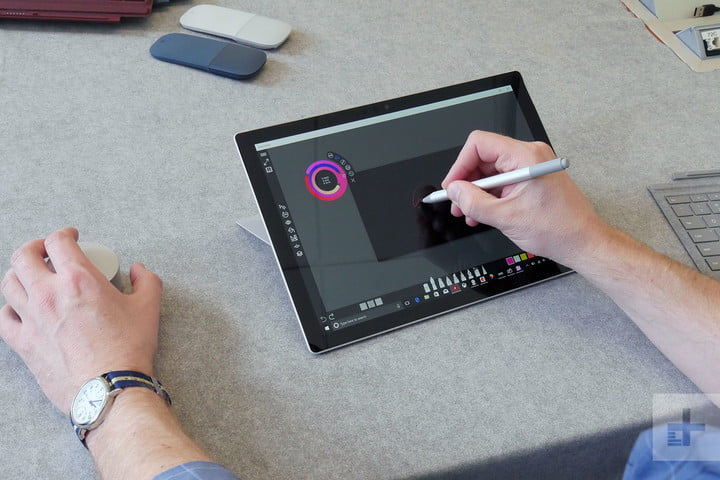
A new, upgraded Surface Pen will launch simultaneously with the new Surface Pro later this year. It has 4,096 levels of sensitivity — four times the old Surface Pen’s 1,024 levels of sensitivity. And like the stylus that ships with Samsung’s Galaxy Book, it records tilt. The new Surface Pen recognizes when it’s angled forward or backward along the Surface Pro’s axis.
Surface Pen and Office 365, kissing in a tree
The Pen’s responsiveness has been improved, too. Thanks to system-level tweaks and hardware optimizations, strokes on the Surface Pro’s touchscreen appear the moment the Pen’s tip touches glass.
In Office, the Pen’s newfound capabilities have other tangible benefits. Tilting the stylus forward and backward increases and decreases the stroke’s thickness accordingly, and varying the amount of pressure on the glass affects stroke characteristics. Office’s rainbow brush stroke, for example, cycles between colors more quickly as you apply more downward force.
Strokes on the Surface Pro’s touchscreen appear the moment the Pen’s tip touches glass.
The Pen’s also easier to use with the Ink Editor and Solver, two new quick-edit tools Microsoft announced for Office earlier this year. The stylus’s precision makes highlighting zoomed-out lines of text a lot less arduous than before, and handwritten equations in OneNote are recognized with the help of the Microsoft Graph. Thanks to a combination of optical character recognition (OCR) and machine learning, equations are solved step-by-step inline with the sketches you’ve made.
A new app, Whiteboard, expands on those ideas. Microsoft describes it as a “limiteless canvas” for Windows 10 devices — a blank page with basic tools for sketching just about anything. Microsoft’s imbued Whiteboard with Office’s machine intelligence. If you sketch a triangle, square, or any other recognizable geometric shape, Whiteboard will automatically convert it to a manipulable object that can be resized, rotated, and moved to any position on the canvas. Built-in collaboration tools let other users jump in an contribute — a shrunken-down, circular avatar indicates which scribbles and shapes they’ve added.
Whiteboard won’t launch with the new Surface Pro — it’s in private preview on the Surface Hub, right now, where it’ll remain for the next few months. But Microsoft said it plans to bring it to more devices in the future.

Kyle Wiggers/Digital Trends
The new Surface Pen also compliments the Surface Pro’s Dial integration. Ink Replay, another recent Office addition, lets you play, rewind, and make changes to a sketch in Word, Office, or Excel by twisting the Dial’s rotating wheel. Microsoft gave the example of learning to draw a Chinese character.
While the new Surface Pen is great, it’s not bundled
In a move that’s sure to generate some controversy, the new Surface Pro won’t ship with the Surface Pen included — a decision Microsoft said it based on user feedback. Only about 30 percent of Surface Pro owners regularly use a stylus, as opposed to the 70 to 75 percent who use the touchscreen, Microsoft said.
Unfortunately, Microsoft’s not passing the cost savings to buyers. The new Surface Pro starts at $800 – same as the Surface Pro 4 at debut. Right now, the base Surface Pro 4 is $700, though it too does not include a stylus.

Kyle Wiggers/Digital Trends
Omitting the stylus is at odds with the messaging. Judging by what we’ve seen, the new Surface Pen is the real story, here — and Microsoft’s new Pen-optimized Office 365 suite, inking features (i.e., Ink Rewind and Ink Editor), and Whiteboard app are a testament to its commitment in a stylus-driven Windows experience.
That’s not to suggest the new Surface Pro’s improved Type Cover, faster performance, better battery life, and optional LTE aren’t solid improvements. But ever since Microsoft bundled the stylus with the Surface Pro 3, the Surface Pen has become inexorably linked to the Surface Pro’s identity. Excluding the very best version of it from the most refined Surface Pro yet seems like a misstep.
We’ll have to see for ourselves when the Surface Pro launches in June. It’s available for pre-order in platinum, burgundy, and cobalt blue colors starting today, and launches on June 15.
Highs
- Fanless design option
- Better Type Cover
- Improved Surface Pen design
- New stylus-optimized Office suite
Lows
- Design changes are minor
- Surface Pen not included
The new Surface Pro is boring — and that’s a good thing. Here’s why
Are you bored with the newest Surface Pro, introduced today in Shanghai? Did you find the Surface Laptop, revealed a couple of weeks ago in Microsoft’s education event, a bit underwhelming?
You’re not alone.
The truth is, Microsoft has conditioned us to expect something special from its product announcements with the Surface Book and the Surface Studio. The Surface Studio announcement was so shocking and impactful that its surprisingly inspirational introduction video has garnered over 12 million views on YouTube — more than twice that of Apple’s last MacBook Pro video.
The new Surface Pro, however, is an incremental update to the Surface Pro 4. It offers nothing particularly new or innovative over its successful predecessor. It offers a bump in specifications that comes across as rather pedestrian, particularly in light of new 2-in-1 options available from Asus, Dell, HP, Samsung, and many others.
Microsoft has conditioned us to expect something special from its product announcements.
The Surface Laptop is nothing special, either. It’s thin and light, and it promises good battery life for a machine with a lovely high-resolution display, but there are many other thin and light notebooks with good battery life, and some have better connectivity or better performance.
And let’s face it — when your most notable features are a cloth-covered keyboard tray and a default operating system that reduces functionality, it’s obvious that you’re not trying to bring fresh excitement to the market. Microsoft already did that, and the new machines are proof its strategy has already worked.
Next-generation Surface or stopgap?
Consider what Panay said a couple of weeks ago in an interview with CNET, when asked about the possibility of a Surface Pro 5 arriving soon. “When it’s meaningful and the change is right, we’ll put it on market. Meaningful change isn’t necessarily a hardware change, which is what a lot of people look for. They’re like, ‘Where’s the latest processor?’ That’s not what I mean. I’m looking for an experiential change that makes a huge difference in product line.”
Panay said that major increases in battery life or significant reductions in weight would quality as that sort of “experiential change,” rather than just upgrading the processor. He added, “you’ll see that same meaningful impact when Pro 5, or Pro Next hits the market.” He also said, “there’s no such thing as a Pro 5.”
 Kyle Wiggers/Digital Trends
 Kyle Wiggers/Digital Trends
 Kyle Wiggers/Digital Trends
 Kyle Wiggers/Digital Trends
It’s possible that Panay was talking about the new Surface Pro here, but it’s hard to credit the increase from nine hours of battery life to 13 hours, or the other enhancements in the new machine, as “experiential change.” If this is what he meant, then he was engaging in some serious hyperbole.
Another way to interpret his statement, however, is that we haven’t yet witnessed a real next-generation step for the Surface Pro line. Perhaps we can conclude instead that the new Surface Pro and the Surface Laptop aren’t terribly exciting because they don’t need to be. At the same time, the Surface Book and Surface Studio were exciting – and incredibly and innovative and different — because they had to be.
With the Surface Book and Surface Studio, Microsoft saw a need to push the Windows 10 ecosystem forward in particular areas that manufacturers were neglecting. That may no longer be true for the Surface Pro.
The Surface Pro has completed its mission
The Windows PC ecosystem has never been stronger than it is today. Intel’s Ultrabook initiative and Microsoft’s Surface succeeded in pushing Windows PC makers to up their game. No matter what kind of PC you’re looking for, there’s a Windows PC in the right price range, with the right quality, and with the right performance for just about anybody’s needs.
The new Surface Pro isn’t exciting because it doesn’t need to be.
Windows notebooks are thinner and lighter, they get better battery life while performing better, and they offer build quality that rivals Apple’s MacBook — often at significantly lower price points. There’s a reason why the PC market is starting to stabilize after years of falling sales, and signs point to a return to growth with Windows 2-in-1s and premium Ultrabooks leading the way.
Are the new Surface Pro and Surface Laptop boring? Yes, they are, and that makes perfect sense. Microsoft wants to push the Windows ecosystem forward, but it’s not in the habit of putting its hardware partners out of business. Surface Pro was introduced to make the 2-in-1 a viable design, and it achieved that goal. The new model seems dull only because it’s no longer trying to win the race. Instead, it’s headed for a victory lap.
Growing Windows 10 is the end game
“At the core of the Windows ecosystem today, laptops are the category where we have the most impact on the world,” Microsoft Executive VP Terry Myerson told Time in a recent interview. “We participate in so many categories, from mixed reality to large screens to phones to laptops . . . and laptops are the biggest category. In laptops we saw an opportunity to really try and set a new bar. […] But our goals are to grow the Windows ecosystem.”
We have our own theory about the Surface Laptop, seeing it as a Trojan horse for Microsoft’s new Windows 10S. The idea of “growing the Windows ecosystem” can mean many things, including pushing developers to make more apps that run from the Windows Store.
But the bottom line is the same. The Surface Laptop — like Surface in general — is a way to once again push OEMs to move the Windows ecosystem forward.

Kyle Wiggers/Digital Trends
We have no idea when we’ll see Microsoft’s next exciting hardware product. Maybe it will be “the ultimate mobile device” that CEO Satya Nadella mentioned last year, or mythical “Surface Phone” that’s sounding more and more like an ARM device running full Windows 10.
In the meantime, we should get used to seeing incremental updates like the Surface Pro, last October’s Surface Book with Performance Base refresh, and niche products like Surface Laptop. Microsoft Surface can continue to be boring, and that’s okay – because Windows PCs have never been better.
The Surface Pro 4 takes on the brand-new Surface Pro, let’s see who comes out on top
It’s been nearly two years, but today Microsoft finally unveiled a successor to the wildly popular Surface Pro 4 — though it’s not called the Surface Pro 5, but simply “Surface Pro.” While technically the fifth Surface Pro, its of Microsoft’s latest pro-grade tablet is a pared-down naming scheme similar to Apple’s iPad, or Microsoft’s own Surface Book.
So, is the new Surface Pro worth the wait, or is it just another incremental update without any major changes? Let’s dig into the specs just to see what the new Surface Pro is capable of.
Specifications Compared
Surface Pro 4
New Surface Pro
Dimensions
11.50 x 7.93 x 0.33 (in)
11.50 x 7.9 x 0.33 (in)
Weight
1.6 – 1.73 pounds
1.69 – 1.73 pounds
Processor
Intel Core m3-6Y30, Intel Core i5-6300U, Intel Core i7-6650U
Intel Core m3-7Y30, Intel Core i5-7300U, Intel Core i7-7660U
RAM
4GB, 8GB, or 16GB
4GB, 8GB, or 16GB
Display
12.3-in PixelSense Display
12.3-in PixelSense Display
Resolution
2,736 x 1,824
2,736 x 1,824
Storage
128GB, 256Gb, 512Gb, 1TB SSD
128GB, 256GB, 512GB, 1TB SSD
Networking
802.11ac, Bluetooth 4.2
802.11ac, Bluetooth 4.2
Ports
1x USB Type-A, Surface Connect, 3.5mm headphone jack, Mini DisplayPort, microSD card reader
1x USB Type-A, Surface Connect, 3.5mm headphone jack, Mini DisplayPort, microSDXC card reader
Webcam
Windows Hello face sign-in camera, 5.0MP 1080p front-facing camera, 8.0MP 1080p rear-facing autofocus camera
Windows Hello face sign-in camera, 5.0MP 1080p front-facing camera, 8.0MP 1080p rear-facing autofocus camera
Operating System
Windows 10
Windows 10
Battery
Up to 9 hours
Up to 13.5 hours
Price
$700+
$800+
Availability
Available now
Available June 15, 2017
Review
8 out of 10
Hands-on
Not quite identical
Just looking at the specs, it’s clear that this is an incremental update rather than a radical redesign. Microsoft updated the Surface Pro’s CPU lineup to include Intel’s latest 7th-generation “Kaby Lake” processors, but there’s more to the new Surface Pro than meets the eye.
Inside, Microsoft has revamped the cooling system to make the internal fans quieter, and for one Surface Pro model, eliminate them entirely. That’s right: The Intel Core m3 and Intel Core i5 models are actually fan-less, relying only on clever thermal management to keep cool. With the Surface Pro 4, that was true only for the m3 version.
Microsoft claims even the Intel Core i7 Surface Pro model leverages advancements in thermal management to run faster and quieter, despite internal cooling fans. Battery life has also improved, up to 13.5 hours from the Pro 4’s 9 hours.
Otherwise, the new Surface Pro features the same storage and RAM options as the Surface Pro 4, and even the display is the same.
Refined and refreshed
Microsoft claims the new Surface Pro has received a complete, top-to-bottom “mechanical re-engineering.” Internally, the new Surface Pro features a few updated internal components, but the exterior remains relatively unchanged. The dimensions are the same, the weight is a little different, and visually both the Surface Pro 4 and new Surface Pro appear nearly identical.
There are a few small changes, though, such as the keyboard. While the original Surface Pro 4’s detachable keyboard cover was solid, it felt a little stiff. The new keyboard cover, while it looks almost identical to the previous model, features improved key travel, which makes the overall typing experience much less tiresome. The new keys have nice travel — sinking a little deeper than before — and provide less resistance.
Additionally, the new Surface Pro offers full support for the Surface Dial — that fancy peripheral designed for use with the Surface Studio. Anything the Studio can do with the dial, now the Surface Pro can do. It’s a welcome addition, particularly if you already own a Studio, but the Dial itself doesn’t shine quite as brightly as it does on the Surface Studio’s generous display. Placing the Dial on a 12.3-inch display ends up occluding your view significantly, so it does its best work on a desk right beside the Surface Pro.
These aren’t major changes on their own, but they contribute to an overall improvement to the Surface Pro’s user experience, as Microsoft continues to refine the Surface Pro formula.
So, which one should you buy?
That might seem like a tough question given their similarities, but the Surface Pro 4 and Surface Pro are also remarkably similar in one very important respect: Price. The Surface Pro 4 starts at $700, while the new Surface Pro starts at $800. That’s not a big margin, and while the two products are remarkably similar, the new Surface Pro has enough of a leg up on the old Surface Pro 4 that it’s definitely the one you should go with if you’re on the fence.
The Surface Pro 4 takes on the brand-new Surface Pro, let’s see who comes out on top
It’s been nearly two years, but today Microsoft finally unveiled a successor to the wildly popular Surface Pro 4 — though it’s not called the Surface Pro 5, but simply “Surface Pro.” While technically the fifth Surface Pro, its of Microsoft’s latest pro-grade tablet is a pared-down naming scheme similar to Apple’s iPad, or Microsoft’s own Surface Book.
So, is the new Surface Pro worth the wait, or is it just another incremental update without any major changes? Let’s dig into the specs just to see what the new Surface Pro is capable of.
Specifications Compared
Surface Pro 4
New Surface Pro
Dimensions
11.50 x 7.93 x 0.33 (in)
11.50 x 7.9 x 0.33 (in)
Weight
1.6 – 1.73 pounds
1.69 – 1.73 pounds
Processor
Intel Core m3-6Y30, Intel Core i5-6300U, Intel Core i7-6650U
Intel Core m3-7Y30, Intel Core i5-7300U, Intel Core i7-7660U
RAM
4GB, 8GB, or 16GB
4GB, 8GB, or 16GB
Display
12.3-in PixelSense Display
12.3-in PixelSense Display
Resolution
2,736 x 1,824
2,736 x 1,824
Storage
128GB, 256Gb, 512Gb, 1TB SSD
128GB, 256GB, 512GB, 1TB SSD
Networking
802.11ac, Bluetooth 4.2
802.11ac, Bluetooth 4.2
Ports
1x USB Type-A, Surface Connect, 3.5mm headphone jack, Mini DisplayPort, microSD card reader
1x USB Type-A, Surface Connect, 3.5mm headphone jack, Mini DisplayPort, microSDXC card reader
Webcam
Windows Hello face sign-in camera, 5.0MP 1080p front-facing camera, 8.0MP 1080p rear-facing autofocus camera
Windows Hello face sign-in camera, 5.0MP 1080p front-facing camera, 8.0MP 1080p rear-facing autofocus camera
Operating System
Windows 10
Windows 10
Battery
Up to 9 hours
Up to 13.5 hours
Price
$700+
$800+
Availability
Available now
Available June 15, 2017
Review
8 out of 10
Hands-on
Not quite identical
Just looking at the specs, it’s clear that this is an incremental update rather than a radical redesign. Microsoft updated the Surface Pro’s CPU lineup to include Intel’s latest 7th-generation “Kaby Lake” processors, but there’s more to the new Surface Pro than meets the eye.
Inside, Microsoft has revamped the cooling system to make the internal fans quieter, and for one Surface Pro model, eliminate them entirely. That’s right: The Intel Core m3 and Intel Core i5 models are actually fan-less, relying only on clever thermal management to keep cool. With the Surface Pro 4, that was true only for the m3 version.
Microsoft claims even the Intel Core i7 Surface Pro model leverages advancements in thermal management to run faster and quieter, despite internal cooling fans. Battery life has also improved, up to 13.5 hours from the Pro 4’s 9 hours.
Otherwise, the new Surface Pro features the same storage and RAM options as the Surface Pro 4, and even the display is the same.
Refined and refreshed
Microsoft claims the new Surface Pro has received a complete, top-to-bottom “mechanical re-engineering.” Internally, the new Surface Pro features a few updated internal components, but the exterior remains relatively unchanged. The dimensions are the same, the weight is a little different, and visually both the Surface Pro 4 and new Surface Pro appear nearly identical.
There are a few small changes, though, such as the keyboard. While the original Surface Pro 4’s detachable keyboard cover was solid, it felt a little stiff. The new keyboard cover, while it looks almost identical to the previous model, features improved key travel, which makes the overall typing experience much less tiresome. The new keys have nice travel — sinking a little deeper than before — and provide less resistance.
Additionally, the new Surface Pro offers full support for the Surface Dial — that fancy peripheral designed for use with the Surface Studio. Anything the Studio can do with the dial, now the Surface Pro can do. It’s a welcome addition, particularly if you already own a Studio, but the Dial itself doesn’t shine quite as brightly as it does on the Surface Studio’s generous display. Placing the Dial on a 12.3-inch display ends up occluding your view significantly, so it does its best work on a desk right beside the Surface Pro.
These aren’t major changes on their own, but they contribute to an overall improvement to the Surface Pro’s user experience, as Microsoft continues to refine the Surface Pro formula.
So, which one should you buy?
That might seem like a tough question given their similarities, but the Surface Pro 4 and Surface Pro are also remarkably similar in one very important respect: Price. The Surface Pro 4 starts at $700, while the new Surface Pro starts at $800. That’s not a big margin, and while the two products are remarkably similar, the new Surface Pro has enough of a leg up on the old Surface Pro 4 that it’s definitely the one you should go with if you’re on the fence.
 AIVAnet