


Microsoft’s Twitch competitor gets a new name and co-op streaming
While Twitch has been busy expanding the breadth of what you can watch on its platform, Microsoft has been quietly improving how you watch and broadcast with its Beam service. Just to get it out of the way, Beam will henceforth be known as “Mixer.” There’s a PR-speak reason for the change in nomenclature, but it doesn’t really matter. What does is how the service is improving. Specifically, Mixer now offers co-operative streaming and broadcasts in 4K UHD.
Trying to watch a group of friends streaming on Twitch has always been kind of a mess. You’d need four browser windows open, each with their own chat stream and, for the broadcasters themselves, setting something up was a logistical nightmare. The base functionality is available right now, and Microsoft says that soon (probably during E3) you’ll be able to invite friends to co-stream with you directly from the Xbox Guide.
“Co-streaming doesn’t require streamers to play the same game or even do the same activity, and you can join a co-stream with friends who are streaming from different types of devices,” a post on the Major Nelson blog reads. Meaning, if you want to play some Dota 2 while one of your pals is grinding in Destiny and two others are playing Portal 2’s co-operative campaign, that’s absolutely doable, with one common chat room. It’s pretty wild.
Oh, and if you want to catch Xbox’s media briefing in 4K UHD that’ll be available as well. We’ve reached out to Microsoft to see if 4K game broadcasting is in the works.
Beyond this, Mixer is playing catch-up to Twitch and going mobile. The app is in beta right now but Microsoft promises that “soon” the ability to self-broadcast your on-the-go gaming will be available for everyone and that you’ll even be able to co-stream from the app.
Curious for more? Mixer is getting its own dedicated page on the Xbox One dashboard, a curated homepage featuring all manner of broadcasts called Mixer One, Microsoft has built a live-streaming studio at its flagship store in New York and will also host a stream today dishing out more details and announcements. The latter starts at 2pm Eastern.
Twitch, the ball’s in your court — adjustable video playback speed and pre-recorded chats don’t quite stack up compared to what Microsoft is doing.
Source: Major Nelson
T-Mobile launching its flexible ‘Digits’ plan on May 31st
T-Mobile has been working on a new type of multi-number, multi-device phone service. Digits, one of the company’s UnCarrier moves, is now through beta testing and ready to launch at the end of the month.
Digits allows customers to seamlessly use their phone number for messaging and calls across a number of devices including phones, tablets, and computers. This type of service has already been available to Apple device users, but T-Mobile is taking it a step further.
Along with streamlined messaging, Digits also allows you to use more than one number on a given device. So, rather than carrying around different phones for personal and work use, you can have more than one number on the same device. You can also have the same number on different devices, meaning you can get rid of that ancient landline and have your home number on every one of your family members’ phones.
All current T-Mobile customers will have their numbers upgraded to Digits on May 31st and they’ll be able to purchase an additional Digits line for $10 per month. Customers with a T-Mobile One Plus plan will be able to get an additional Digits line for free for a limited time.
Source: T-Mobile
Lyft challenges Uber Black with its own luxury cars
Lyft passengers who prefer a black Audi or Lexus to the ubiquitous Toyota Camry can rest easy. On Thursday, Lyft launched their Lux service in New York City, San Francisco, San Jose, Los Angeles and Chicago, bringing premium black cars with drivers ranked 4.7 and above. Lyft says they want customers not only using this service for business travel, but attending weddings too — Lux SUV is for parties of six or more. The service is one tier higher than Lyft Premier, which launched last year.
Lyft’s new service competes with Uber Black, and follows a huge expansion that brought Lyft to over 50 new cities earlier this year. As Uber has a string of shady practices exposed — the latest was a New York Times report that Uber owes tens of millions of dollars to drivers in miscalculated commissions — Lyft may be capitalizing on an opportunity to steal customers. Yet while Lyft had a good 2016, it has a lot catching-up to do: Uber is still supposedly worth almost nine times its closest rival.
Everyone’s favorite useless Pokemon gets its own game
It’s pretty obvious that Pokémon Go wouldn’t have been the worldwide success without, well, Pokemon. Niantic and Nintendo tapped a phenomenally rich vein of wish fulfillment when they sent people scurrying around the real world catching monsters on their phone. The app was sadly limited to collecting, not raising the fighting beasts as the original game/manga/anime/feature films showcased. But a smartphone game has come out promising that elusive trainer experience with the greatest Pokémon of them all. Give a warm welcome to Magikarp Jump.
The game follows the typical lifespan of the derpy, majestic Magikarp: Fish one out of the water (hope for a shiny), train it with punching bags, match it against other Magikarp to compete for highest leap and finally retire it at level 20. (In the games, that’s when it can evolve into the far more powerful Gyrados, though some would call that blasphemy.) Magikarp Jump is free on iOS and Android, though it seems the game is suffering a little of the old Pokémon Go popularity curse: I wouldn’t get past the loading screen, but darn if its background music isn’t catchy. It’s all worth it for the Magikarp.
Source: The Pokemon Company
Microsoft Announces ‘Mixer Create’ iOS App for On-The-Go Live Streaming of iPhone Games
Microsoft today announced a rebranding of its game streaming service “Beam,” which will now be called “Mixer,” along with the launch of a new iOS and Android app that will debut today in beta form. Called “Mixer Create,” the app will include a handful of self-broadcasting features that let streamers keep in contact with their audience while on the go.
Additionally, down the line Microsoft will update Mixer Create to let creators stream live gameplay of iOS games directly from their iPhones and iPads, similar to how Mixer can stream games on PC and Xbox One. The mobile broadcasts will be viewable by users on any platform that Mixer is on, including the basic Mixer app for iOS [Direct Link] and Android, as well as on Xbox One and the web.
Although it hasn’t yet explained the specifics of how the feature will work, Microsoft gave examples of streamers sharing live gameplay from their iPhone, including streaming their hunt for Pokémon in Pokémon Go.
Mixer Create Beta Launches on Mobile Devices (iOS and Android) — Mixer Create is a new mobile app that enables self-broadcasting, and we’re kicking off the beta today. Soon thereafter, we’ll add the ability to stream live gameplay from your mobile device as well. The ability to broadcast gameplay on-the-go opens up entirely new social gaming possibilities.
In the future, you could imagine streaming “Pokémon Go” on your mobile device, through Mixer, and hunting with viewers! Once mobile gameplay streaming launches, you’ll be able to join a co-stream with friends who are broadcasting on PC, console or other mobile devices.
The rebranding announcement today includes multiple other feature reveals, mostly related to the service’s website and Xbox One app. Those who stream on Mixer will now be able to co-stream with up to three other people, meaning up to four creators can combine their streams into one experience for viewers to watch. The company said the feature is aimed at co-op games where four players are playing at the same time, but it also supports each streamer playing totally different games as well.
Beam originally launched in January 2016 before Microsoft acquired it in August 2016 for an undisclosed sum, and then integrated the game streaming service into Windows 10 and Xbox One earlier in 2017. In a launch video explaining the name change and detailing the new features, Mixer’s director of marketing Jenn McCoy and co-founder James Boehm said that the new name was chosen “because it represents what we love most about the platform, that it’s all about bringing people together.”
Mixer Create should begin rolling out on the iOS App Store throughout the day, and the iOS game streaming features will be “coming soon.”
Tag: Microsoft
Discuss this article in our forums
Magikarp Jump Launches as Latest Pokémon Game for iPhone and iPad
The Pokémon Company has launched a new iPhone and iPad game revolving around one of the weakest Pokémon ever: Magikarp.
Magikarp Jump, available now on the App Store [Direct Link], tasks players with raising multiple generations of Magikarp by feeding and training them to increase their Jump Power and overall level. Players can then battle—try to jump higher than—other Magikarp in six leagues to increase their personal Trainer Rank.
As a player’s Trainer Rank increases, additional food and training upgrades can be purchased from the Town with coins, which are awarded for various in-game tasks such as winning league battles. A higher Trainer Rank also allows players to fish for additional Magikarp with different designs.
Magikarp Jump is entirely free to play, but diamonds are available as optional in-app purchases for players who wish to buy pond decorations and other items that help Magikarps grow and train even faster.
Magikarp Jump is not nearly as sophisticated as Pokémon GO, but with a number of achievements to complete, it’s a decent way to pass the time on a train ride home or a lazy Sunday afternoon. You’ll also see other classic Pokémon such as Pikachu and Pidgeotto appear at times for a bit of nostalgia.

Magikarp Jump is a free download on the App Store [Direct Link] for iPhone and iPad.
Tag: Pokemon
Discuss this article in our forums
Find your phone with these helpful tracking tips
Updated on 5-25-2017 by Simon Hill to account for the fact that Google’s Android Device Manager is now know as Find My Device.
Few items are as precious as one’s phone, and losing it can be a dreadful experience. If you need to track down a cell phone, you’ve come to the right place. Whether you’re simply trying to track the location of your lost phone or you’re a secret agent who needs to gain intel on the whereabouts of a crooked diplomat, we’re here to give you the information you need to get the job done. It’ll be easier if you’re trying to track a smartphone, but there are ways to locate older phones as well, so don’t give up hope if you’re still rocking a first-gen Motorola RAZR — we’ve still got your back.
Tracking your phone before you lose it
If you’re here just to prepare for the day that you lose your phone (which for many is inevitable), then you’re ahead of the game. If you’ve got a smartphone, consider installing the apps listed below
For smartphones..
There are several app choices available for your phone, but also remember to set up any included phone-locating software that comes with your device. That includes Apple’s Find My iPhone, Google’s Find My Device, and Samsung’s Find My Mobile. Head to the next section for more details. If you’re looking for more choice, try these out:
Prey

Prey is free to use for up to three devices, there are paid plans for more, and the service can be used for both computers and phones. After you sign up for the service, you simply sync your devices with it, sit back, and relax. The day that your phone goes missing, all you’ll have to do is find a computer, log into your account, and start tracking.
Prey runs discreetly in the background and won’t track your phone’s location until you tell it to, so there’s no need to worry about your privacy while the phone is in your possession. We recommend this for any Android or iOS device, as well as any Mac, Windows, or Linux PC.
Download now for:
iOS Android
Lookout

Lookout combines security, tracking, and anti-virus/malware protection. There are several interesting features, such as the system recording a phone’s last location right before the battery dies, a chance to backup contact data before a remote erase, and it’ll even snap a photo of any would-be thief and email it to you along with location data. There’s a free two-week trial, after which it’ll cost $3 per month.
Download now for:
iOS Android
Avast Anti-Theft

This app is designed to deal with theft and has a ton of free features. You can remotely lock or wipe your smartphone, or listen remotely to find the thieves who took your device. You can also use it to activate stealth mode on your device, so that the thief doesn’t know Avast is protecting your phone. Avast provides SIM card change notifications, too, and the company offers similar services for Android, Mac, and PC.
Download now for:
Android
Cerberus anti theft

Cerberus is a feature-rich app, and one of the best anti-theft apps you can get. It’s free to try, but you’ll have to pay $6 for a lifetime license. The app offers numerous ways to track and control your smartphone via the website, and even via SMS. You can also sound an alarm, even if your device in silent mode, and lock it with a unique code. Additional features include the ability to record audio remotely and snap photos of anyone trying to use your phone. Location history is just a plus. It also comes with Android Wear support, so alerts will be pushed to your smartwatch should the paired device go out of range.
Download now for:
Android
For non-smartphones…
We recommend using a GPS tracking service. There are many different options out there, but AccuTracking is our current favorite.
AccuTracking

It costs as little as $6 per month (less if you subscribe for a year), and uses GPS to track the location of your phone — and lucky for you, it works with a wide variety of feature phones. As long as your phone is GPS-enabled, this service should do the trick. Most modern cellphones are, so as long as your phone isn’t headed to the museum due to age, you should be fine.
When the day comes that you can’t locate your phone, just log in to AccuTracking’s Web interface from any internet-connected computer and — so long as your phone isn’t dead — it’ll immediately show you its location.
Park and Diamond collapsible bicycle helmet can be stuffed in your pocket
Why it matters to you
People are less likely to wear a helmet if it’s bulky and looks awkward. The Park and Diamond helmet fixes that.
When it comes to bicycle safety, wearing a helmet can be the difference between life and death. However, getting riders to wear a helmet can be a battle of its own. Helmets are bulky, difficult to carry around, and can definitely diminish one’s cool factor.
Rather than looking like a hunk of foam, the Park and Diamond helmet is nearly as thin as a baseball cap while remaining just as protective as something more traditional. When a cyclist is done riding, the helmet can be collapsed, folded, rolled, and stuffed into a water bottle or pocket.
This stylized and portable helmet was developed by Virginia Tech students David Hall and Jordan Klein in response to a serious bike accident. Hall’s sister was riding her bike through the intersection of Park and Diamond streets near the campus when she was the victim of a hit-and-run. She wasn’t wearing a helmet, and she spent four months in a coma. Luckily, she made a full recovery.
Riding without a helmet is a common sight, especially around college towns. People don’t want to be stuck carrying it around after locking the bike up.
“We thought, ‘What does every bike and bag have? A place to store a water bottle. So, if the helmet fits in that space, the rider can always be covered,’” Klein said in a conversation with Red Bull. “Carrying a helmet becomes a seamless part of life.”
Through the Red Bull Launchpad, a collegiate start-up competition, Park and Diamond earned a paid trip to New York to show off the helmet at the TechCrunch Disrupt, one of the top tech conferences in the country. They also were able to receive feedback from Red Bull athlete Austin Horse, one of the fastest courier-style street racers in the world. He believes the helmet has a chance to grow alongside the rising popularity of bike-share programs. If it’s easy to bring along a helmet, more people are likely to grab a bike.
So far, the team has raised about $175,000 to prove out the technology and construct prototypes. They hope to raise $1 million for tooling and production thanks to the buzz they’ve created through Red Bull and TechCrunch.
Want to start saving for your dream vacation? Here are the best budgeting apps to help you
This article was update on 5-23-2017 by Will Nicol to include Mobills and Money Lover.
There’s never a better time than now to start thinking about how you manage your money. It’s hard to know where to start, though, especially if you’re young and have no idea what your Roth IRA or 401K is. Don’t worry, these days there are all sorts of ways to make smart investments and better plan your financial life — all directly on your smartphone. Below are some of our favorite apps for budgeting your money, whether you’re looking to cut back on monthly expenditures or check your balance at a glance.
Personal Capital
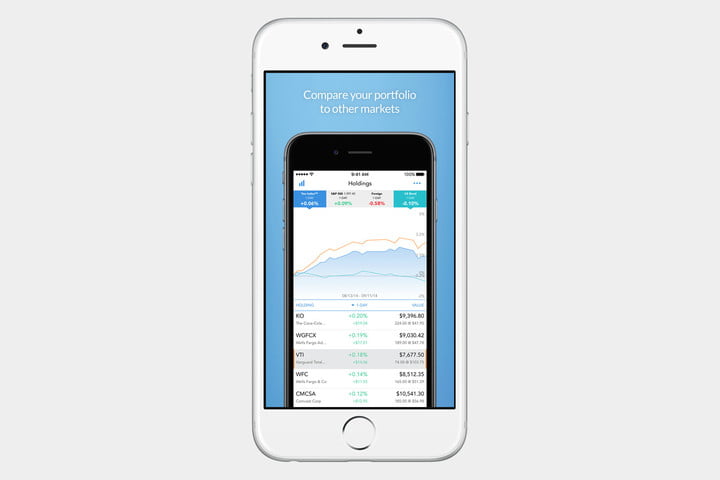
If you want to stay on top of your investments, stocks, retirement savings, and bank accounts as well as budget your spending in a single app, then Personal Capital is the multi-platform financial portal for you. It’s also available online and on wearables. Rather than passively track your net worth across various institutions like Mint, this free app actively compares your stocks’ performance to the markets in real-time, thus allowing you to keep up to speed on your financial health. The app even provides access to a team of professionals who can offer more personalized advice to further grow your nest egg, though their optional services cost extra.
Download now for:
iOS Android
Mint
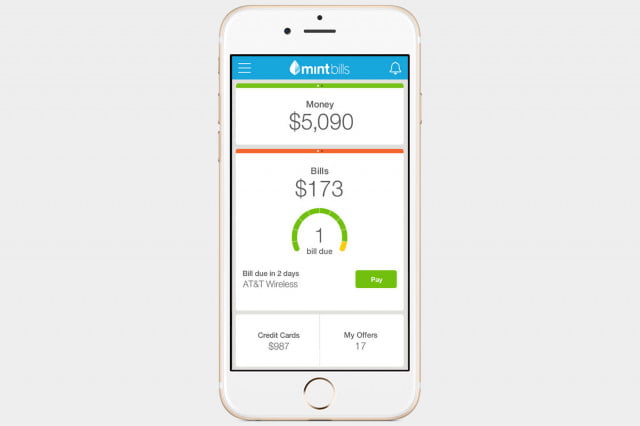
Mint, Intuit’s personal finance app, is a lifesaver for keeping tabs on your overall financial health. This budget app links up with all your different bank accounts, loan accounts, credit cards, and shows them all within a single, streamlined interface. This is especially helpful with transaction searching, so you can figure out which card or account you used to buy something at the department store. The mobile iteration of Mint also syncs with the service’s robust web interface, and offers recommendations for new loan accounts and credit cards based on your habits. These features, combined with the app’s ability to show you upcoming bills at a glance, make it a standout.
Download now for:
iOS Android
Stash
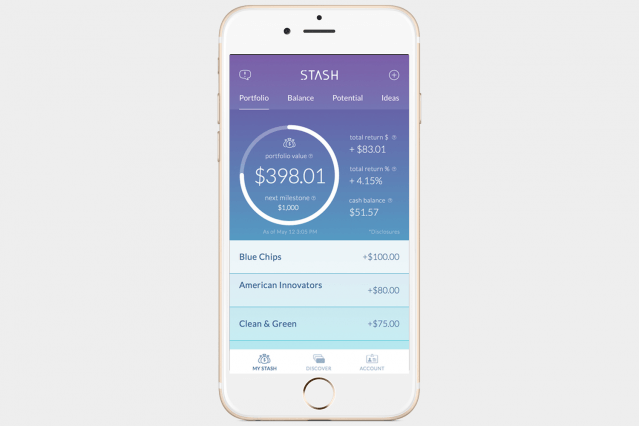
Another spare-change investment app on the horizon is Stash. You can invest in small increments — five dollars at a time, for instance — and across a variety of available portfolios, whether you prefer to do so manually or via automatic payments. The app is also built to accommodate the less-than-savvy investor, and as such, it includes educational tools that encourage you to develop smarter financial habits in the long run, so you can make sound investments and manage your money with aplomb. Stash will even help you discover companies that align with your values, so you can choose firms that are making strides in equality, ecology, and other issues.
Download now for:
iOS Android
Simple
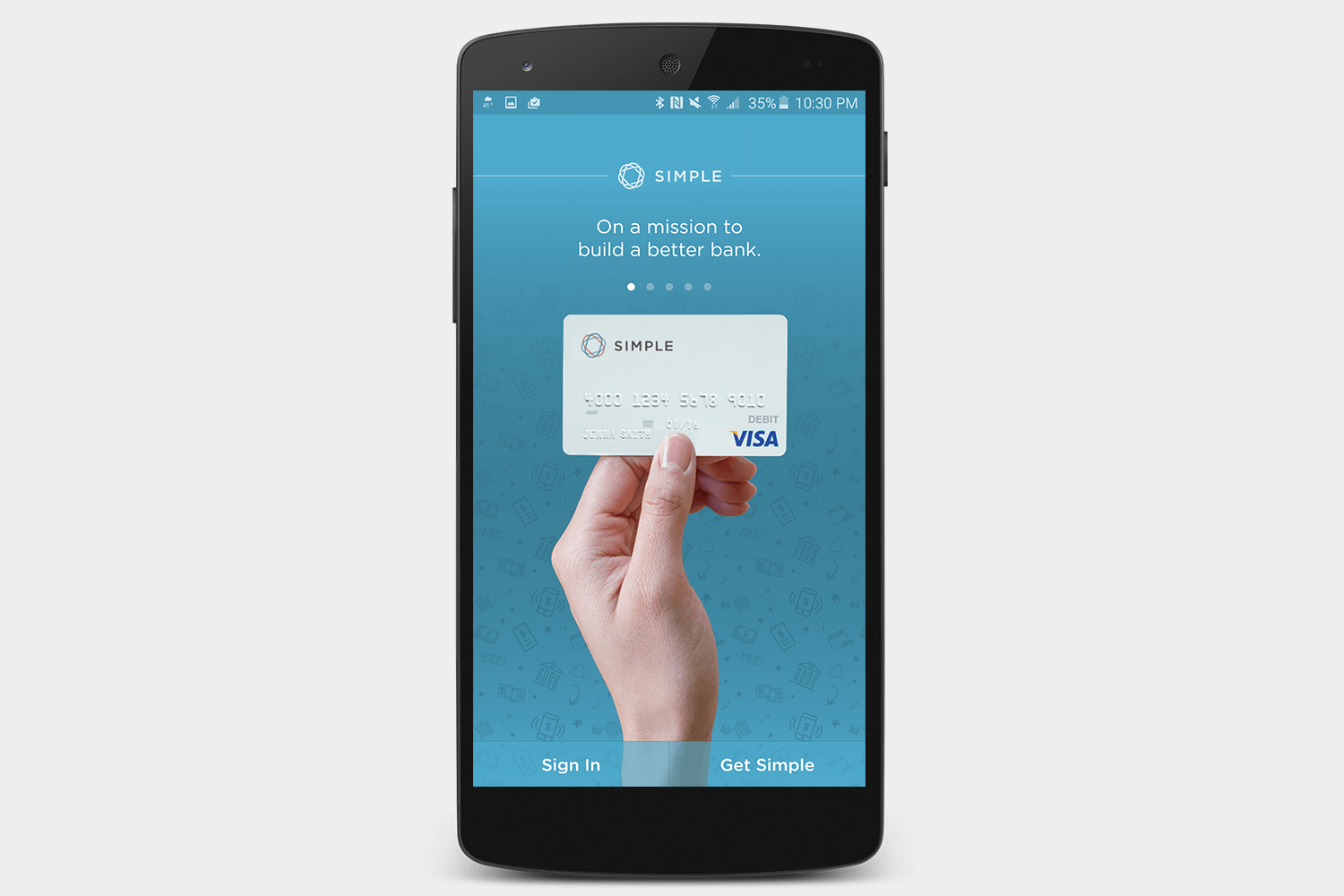
Looking for a bank that works with you to manage your money? Simple is an online bank that includes a bunch of money management tools to help you plan your spending and figure out how to keep within your means. Since it’s a fully fledged bank, you can manage your check deposits and other services directly within the app, and your debit card is free at more than 55,000 ATMs.
Download now for:
iOS Android
Money Lover
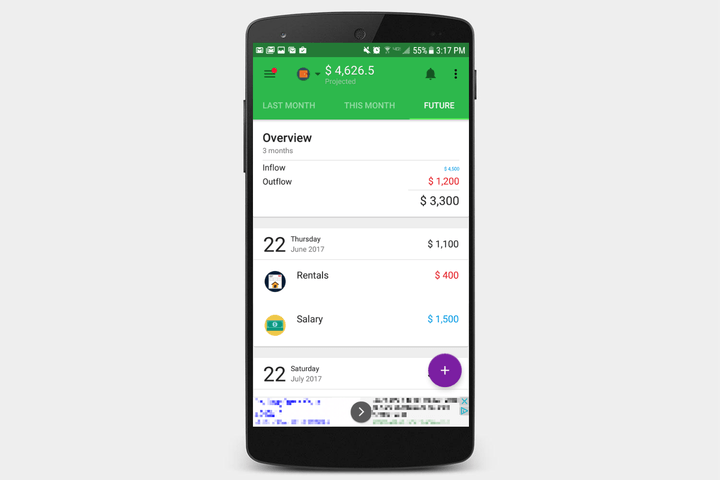
Money Lover is a free app — that comes with a string attached — that offers a clean, colorful interface and plenty of nifty features. This budgeting app allows you to get very granular with your expenses, and automatically categorizes spending on food, drinks, games, and anything else you might buy, with cute pictures to boot. The app also tracks your income and spending in the past, present, and future months, with everything displayed in an easy-to-read arrangement. The biggest problem with Money Lover is that the free version includes some annoying — and often times invasive — ads that clutter the otherwise splendid interface.
Download now for:
iOS Android
Mobills
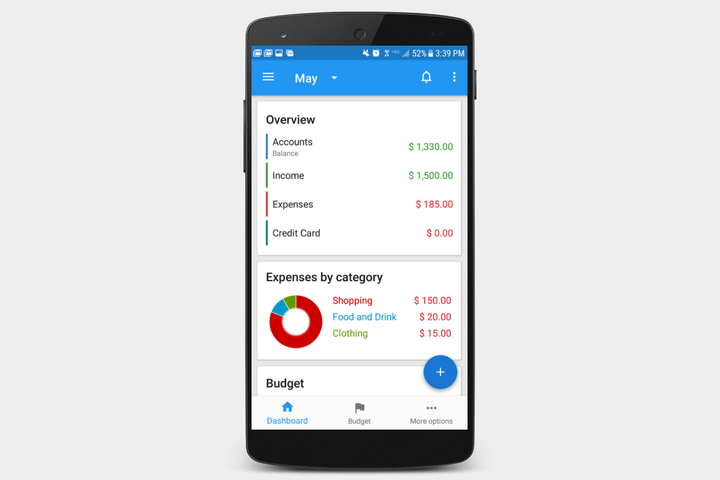
Mobills promises fewer problems, with a simple interface and vibrant display. Oh, and the charts! Did we mention the charts? Mobills offers plenty of them, whether you need a pie chart laying out all your expenses proportionally, a line graph measuring your income over time, or anything other monetary metric you may want to encapsulate in a visual way. It even has a section for you to plan out your dreams, and see how long it will take to achieve them based on the money you set aside each month. The latter is a nice feature, at least until you see how long it will take you to save up for that vintage Westfalia.
Download now for:
iOS Android
Alto Mail adds Alexa support and can now replace your calendar app
Why it matters to you
AOL’s Alto Mail email client now has a built-in calendar, meaning you can organize your day and emails in one app alone.
AOL’s Alto Mail is about to get a whole lot smarter. The company has announced that the app will now have full calendar integration — which means that you’ll now be able to use one single app to manage your emails and calendar. Using the calendar view in the app, you’ll be able to view your day, week, or month — just like you would with a standalone calendar app, but without the need for another calendar-specific app.
“You have personal appointments, business meetings, packages being delivered, emails that need responses, and a flight leaving tonight that you booked months ago,” said Alto General Manager Arlo Rose. “All of this critical information is scattered across multiple personal and business inboxes and calendars, so you’re left hopping around a bunch of apps, trying to piece together your day. Alto puts an end to all of that.”
Alto has had a history of supporting Amazon Alexa and now that Alto has a calendar feature, you’ll be able to ask Alexa on your Echo about events on your calendar. Alto is actually only the second calendar app to support Alexa — with the only other being Google Calendar.
Alto smart hacks
Alto has been adding new features every few months for a while now. Previously, it was announced that the email client will now incorporate a series of “hacks” that can help enhance the email experience for users.
Alto already scans emails for things like flight reservations and package deliveries so it can help surface that information if and when you need it. Alto surfaces that new information in two ways — through the Alto Dashboard and through what Alto is calling “Alto Stacks.” Alto is now looking into ways to incorporate that information into other apps — like Slack and AppleTV.
Already, Alto’s information shows up in the Alto Dashboard, which basically gives a single view across all inboxes, and then surfaces important information in “cards.” With the Slack “hack,” however, users could add a Slack channel as a “stack” inside of Alto, so all your conversations will be in the same place. On the Apple TV, you could bring in things like images from Alto — which would authenticate through a QR code on your Apple TV.
Last but not least is Shop/Book Again, which helps you make a repeat purchase through services like Amazon — straight from Alto. You could also check out your entire shopping history in Alto, and resurface past purchases when you need them. That’s pretty helpful for items that are bought regularly — like diapers, if you’re a parent.
The hacks themselves don’t feature in Alto just yet — but they’re the kind of thing that will start showing up in Alto in the future.
You can also ask Alexa in Amazon’s Echo or Echo Dot for information in your Alto Dashboard. Asking questions like “when is my next flight” will pull results from the Dashboard on the app. You can also ask a more general “what’s in my Dashboard,” to get an overview for the more important emails in Alto.
A few other third-party integrations Alto offers are quite neat. The app will automatically detect which ridesharing service you use, and for cards like flights, you’ll be able to request a car straight from the app. These interactions and integrations aren’t restricted to third parties — the idea is that eventually, you’ll be able to check in for a flight straight from the Dashboard itself.
The team says more third-party integrations from services like IFTTT are on the way.
“We’re looking at anything that makes sense right now,” Rose said. “A great example is receipts — what we want to do is if you need to file expenses, it would be super simple just to be able to tap that overflow menu. We’re looking at Expensify, we’re looking at Concur, and just across the board, what are all the things we can do.”
You can get Alto for yourself on iOS and Android apps now, and it’s also accessible on the web.
Updated on 05-24-2017 by Christian de Looper: Added news of Alto calendar and Alexa integration.
 AIVAnet