


Tidal burns through its third CEO in two years
Yet another Tidal CEO is out. Jeff Toig, who took over the position from interim CEO Peter Tonstad in 2016, has reportedly left the company. Which means Tidal is now looking for its fourth chief executive in two years.
This news is just more evidence that the company is severely lacking in direction and strong leadership. Last year, the music service ousted its CFO and COO over a dispute about the release of streaming numbers. And there are continued claims that the company is over-reporting streaming numbers, which, judging by their record label payments, appear to be much lower in reality.
Toig joined Tidal after two years as SoundCloud’s chief business officer. It’s not clear why exactly he’s leaving the company after such a short tenure, but a source told Billboard that he actually cut ties in March.
Along with rotating leadership, Tidal’s streaming and financial problems have been no secret. The company, which Jay-Z bought for $56 million dollars in 2015, lost $28 million dollars that year and $10.4 million the year before. And it has continued to lose ground against competitors Spotify and Apple Music, which have 50 million and 20 million paid subscribers, respectively. Tidal is still hovering around just one million at last count.
However, earlier this year, Sprint bought a third of the company for $200 million, which infused the music streaming service with some much-needed capital. And shortly thereafter, Tidal brought on two industry names — former Billboard editor Tony Gervino and past XXL Magazine editor Elliott Wilson — to its content team. Maybe the company’s next move will be to bring some stability to its helm.
Source: Billboard
MacRumors Giveaway: Win a Copy of ‘Total War: WARHAMMER’ From Feral Interactive
For this week’s giveaway, we’ve teamed up with Feral Interactive to give MacRumors readers a chance to win a copy of real-time strategy game Total War: WARHAMMER, which became available for the Mac in April.
Total War: WARHAMMER is a turn-based strategy game that allows players to build an empire and then plan and execute real-time tactical battles against enemies. Unlike other Warhammer games, Total War: WARHAMMER takes place in a high fantasy setting, pitting greenskins (orcs and goblins), vampires, dwarves, and humans against one another.

There are four playable factions that players can control, each with unique gameplay elements, play styles, abilities, and units to send into battle. The goal is to build up a city, recruit units, make alliances with other nations, and fight to protect and expand your hold over the Old World.

Aerial units like wyverns and dragons, specially trained Legendary Lords, and other powerful elements like magic must be thoughtfully wielded to turn the tide in battle. Because there are multiple factions and game paths to take, Total War: WARHAMMER is endlessly replayable.
Mac vs. Mac online multiplayer is available and supports up to eight players. There’s also a co-op mode that allows players to play through the campaign with or against a friend.

Feral Interactive, for those unfamiliar with the company, is a video game publisher that works with various companies to bring popular PC games to the Mac. Feral has brought a wide range of titles to the Mac, like the LEGO series, Rome: Total War, Tomb Raider, XCOM, and several Warhammer titles.
Total War: WARHAMMER is available from Steam, the Feral Interactive website, or the Mac App Store for $49.99-$59.99, but we have 10 Steam copies to give away to MacRumors readers.
To enter to win, use the Rafflecopter widget below and enter an email address. Email addresses will be used solely for contact purposes to reach the winner and send the prize. You can earn additional entries by subscribing to our weekly newsletter, subscribing to our YouTube channel, following us on Twitter, or visiting the MacRumors Facebook page.
Due to the complexities of international laws regarding giveaways, only U.S. residents who are 18 years of age or older are eligible to enter. To offer feedback or get more information on the giveaway restrictions, please refer to our Site Feedback section, as that is where discussion of the rules will be redirected.
a Rafflecopter giveawayThe contest will run from today (May 26) at 11:00 a.m. Pacific Time through 11:00 a.m. Pacific Time on June 2. The winners will be chosen randomly on June 2 and will be contacted by email. The winners will have 48 hours to respond and provide a shipping address before new winners are chosen.
Tags: giveaway, Feral
Discuss this article in our forums
TouchArcade iOS Gaming Roundup: Steredenn, Fidget Spinner Apps, Prison Architect, and More
In case you missed the post last week, once again this is Eli Hodapp, and I’m Editor in Chief of MacRumors’ iOS gaming sister site TouchArcade. We’re putting together these weekly roundups of the biggest news and releases in the world of iOS gaming. If you’re interested in this quick recap, there’s tons more where this came from over on TouchArcade. We post daily news, reviews, and more, covering every aspect of the world of iOS gaming.
We’ve also got a very active iOS gaming Twitch channel, a Discord server, our own forums, and a weekly podcast. All of these things are packed with other iOS gamers and developers, discussing iOS gaming around the clock! Anyway, here are the big things you don’t want to miss this week:
We kicked off Monday morning with a five star review of Steredenn. It’s an incredible horizontal space shooter that aside from just being a really fun game does a lot of incredibly innovative things when it comes to how weapon upgrades are handled, as well as how you move your ship. For instance, these games often use a relative-touch based control scheme, and that’s true here, but when the game detects your ship is obscured by your finger both a horizontal and vertical line appear on screen indicating where you are. It sounds basic, and I suppose it is, but the difference these little things make is amazing.
While I’m a little surprised that the collective internet eye-roll surrounding the Angry Birds movie didn’t cause some sort of seismic event when it was first announced, the film did incredibly well, grossing just under $350 million. (It’s actually far better than you’d expect, if you haven’t seen it.) So, it should be a surprise to absolutely no one that a sequel is on the way.
Due out on September 20th, 2019, The Angry Birds Movie 2 already has some interesting names signed on. It’ll be directed by Thurop Van Orman and John Rice (with the latter serving as co-director), who have worked on Adventure Time and Rick and Morty. No further details surrounding the plot or direction of the film have been made public, although there’s plenty of time for all sorts of tidbits to dribble out before late 2019.
We’ve spent a lot of time discussing the troubling trend of what a bad platform iOS when it comes to preserving gaming history, as iOS system updates (and other things) often render classic iOS titles totally broken. With iOS 11 likely dropping support for 32-bit apps and games, we’re on the verge of seeing the largest purge of older iOS games yet. While Apple’s response is to simply update those games to 64-bit binaries, we explore in an editorial, “just updating” is often not as simple as it sounds – particularly if the creator of a game you love is deceased.
Lightening things up a bit, we’ve been scratching our heads trying to figure out the unbelievable popularity of fidget spinner apps. It seems the whole draw of a fidget spinner is it’s a physical toy that exists, which you actively fidget with. You’d think virtualizing this would remove most of the appeal, but judging by the iTunes charts, that isn’t the case at all. After talking to various educators, we offer an alternative theory. Perhaps fidget spinner apps are becoming the next big thing because fidget spinners themselves are rapidly getting banned from classrooms, while smartphones, inexplicably, are totally allowed? Either way, if you’re interested in trying the most popular one, download Ketchapp’s Fidget Spinner.
Limbic released the original Zombie Gunship on the App Store ages ago, and the unbelievable success of a game where you shoot down swarms of zombies aboard an AC-130 put the studio on the map. Another Zombie Gunship game has been in development forever, in soft launch for even longer, and finally launched worldwide this week. While it shares a lot with its predecessor, Zombie Gunship Survival has much more meat on its bones with loads of things to unlock and other upgrades to work towards. The original Zombie Gunship was a ton of fun, so more of that, plus loads of improvements makes Survival even better.
The rivalry between the FIFA and Pro Evolution Soccer series on mobile has been heating up for years now, but with FIFA taking an odd turn to becoming more of a card collecting game, this week’s release of Pro Evolution Soccer 2017 is perfect for soccer fans looking for more action. Early impressions of the game indicate that it finally feels like iOS has the soccer simulator that it deserves with a full-featured soccer experience that is just absolutely loaded with depth. Controls are swipe based, which people seem to either love or hate, but it’s totally free to try out so if you’re at all interested in soccer, this is the game to get.
After a lengthy soft launch period, the cult-classic fighting game Skullgirls is finally available. Like many other mobile fighters, it is controlled using swipe gestures which has proven to work incredibly well for the genre. The mechanics of the game are super tight, and once you get used to the swiping system, you likely won’t find yourself missing a controller at all. Like many free to play fighters, Skullgirls is powered by a freemium random draw gacha system to unlock new characters, which again, has become totally normal for the genre (for better or for worse).
Prison Architect has been incredibly popular on Steam, and this week the mobile port hit the App Store. It’s iPad only, like many PC to mobile ports, and puts players in charge of designing and managing their own prisons. Featuring surprising levels of complexity, Prison Architect has an array of scenarios to complete which really serve as a tutorial of sorts for the full-featured sandbox mode. One strange thing is how you pay for the game: It’s free to download and try, then you can buy individual scenarios for $2.99 a piece, the sandbox mode for $4.99, or unlock everything for $14.99. It feels like they give too much away for free, but for the curious consumer I suppose that’s a good thing.

In the past, Capcom has released Street Fighter games on mobile, with the first one hitting the App Store all the way back in 2010. Aside from compatibility updates here and there, the games have largely sat dormant and over the years have only felt increasingly more outdated. This week, in true Capcom fashion, the iterative sequel Street Fighter IV Championship Edition was announced. Aside from 25 playable characters, Championship Edition will have full MFi controller support, WiFi multiplayer, and loads of other updates and refinements over the original Street Fighter mobile games. Championship Edition will be released “this summer,” and you can pre-register for the game here to get notified when it does.
Last, but not least, with the holiday weekend upon us, an absurd amount of iOS games are on sale. The whole Infinity Blade series can be had for a buck a piece, along with many, many other classic, premium iOS games. Head over to our listing to see everything worth considering downloading, along with reviews of the vast majority of games that are on sale.
That’s it for this week! For even more iOS gaming news, head over to TouchArcade – otherwise stay tuned for next week’s roundup!
Tag: TouchArcade gaming roundup
Discuss this article in our forums
Review: Apple’s Beddit Sleep Monitor Offers a Comprehensive Look at Sleep Quality
Earlier this month, Apple purchased its first company that develops health-related hardware, Beddit. Beddit makes an iPhone-connected Sleep Monitor that tracks a wide range of sleep-related metrics, from heart rate and sleep time to room temperature and respiration.
When Apple acquires a company, the company in question typically shuts down and stops selling whatever product it makes as Apple assimilates the technology into its own offerings, but that’s not the case with Beddit. Apple is still selling the Beddit Sleep Monitor in its stores, and the Beddit privacy policy has been updated to note that Apple is collecting Beddit sleep data.
That raises some interesting questions about Apple’s future plans. Will that sleep tracking data contribute to an upcoming Apple Watch with sleep tracking functionality? Does Apple have plans for some other kind of sleep tracking device? Will Beddit be one of several health-related companies Apple purchases so it can sell a range of hardware products?
Apple’s plans for the Beddit technology may be a mystery right now, but we can take a closer look at the Sleep Monitor to see just what it can do, what kind of data Apple is gathering, and whether it’s worth buying. I bought a Beddit Sleep Monitor shortly after Apple announced its acquisition, and I’ve been testing it for the past 10 days.
The Beddit Sleep Monitor belongs to a class of sleep tracking devices that aren’t wearable. It’s meant to be placed directly on the bed under the sheets rather than on the body. Design wise, it consists of a long strip of fabric that’s about 2.5 feet in length and three inches wide. One side is a soft, pliable material, while the other side, which sits on the mattress, is backed with rubber so it stays in place. It’s small enough that it’s easy to pack up when traveling.

The Sleep Monitor is meant to be placed underneath the bottom sheet of a bed, on top of the mattress near where the heart is located when you lie down. It can be placed on one side of the bed in a shared bed, or in the middle for a person who sleeps alone. While it can be used in a shared bed, Beddit is meant for one person, and because the sensor is directly underneath the body, it accurately picks up the movement of a single person even when two people are in the bed.
In my testing, the Sleep Monitor never picked up movement or measurements that weren’t mine, and it never failed to monitor me. I installed it on my side of a full-sized bed, right at the level where my heart is. Beddit says the Sleep Monitor is unnoticeable during sleep, and while it is indeed made from a thin, flexible fabric, I can feel it under my sheet. It isn’t exactly bothersome and doesn’t prevent me from sleeping, but I know it’s there.

It’s not supposed to move because of the rubber backing, but it does shift around. I don’t move much in my sleep so the movement wasn’t an issue for me, but someone who tosses and turns might need to make regular adjustments to its position. It’s also worth noting that the Beddit has a thin, unobtrusive cord that needs to be plugged in at all times, so it will need to be near an outlet.

So what does the Beddit track? As it turns out, a lot. It goes beyond wearable sleep trackers that rely solely on movement to determine sleep quality, and some of what it tracks is potentially very valuable for people with breathing-related sleep issues. Here’s everything it keeps tabs on:
- Sleep time
- The time it took to fall asleep
- Light sleep vs. deep sleep (no REM measurement)
- Number of times out of bed
- Restless sleep (lots of tossing and turning)
- Sleep efficiency (based on time spent asleep)
- Sleep score (an overall score that takes everything into account)
- Snoring (via iPhone speaker)
- Heart rate
- Respiration (breaths per minute)
- Average room temperature
- Average room humidity
With so many aspects of the sleeping experience being tracked, the Beddit Sleep Monitor gives a comprehensive overview of everything that happens while you’re asleep. Having a complete overview makes it easier to recognize patterns and problems that are interfering with sleep, especially when it’s easy to see right in the accompanying Beddit app.
So is it accurate? For the most part, yes. My heart rate measurements were in line with what I see with my Apple Watch, and the respiration measurement and temperature were spot on too. Sleep time, sleep efficiency, and the time it took to fall asleep were areas where felt like I had less of a clear picture, though.
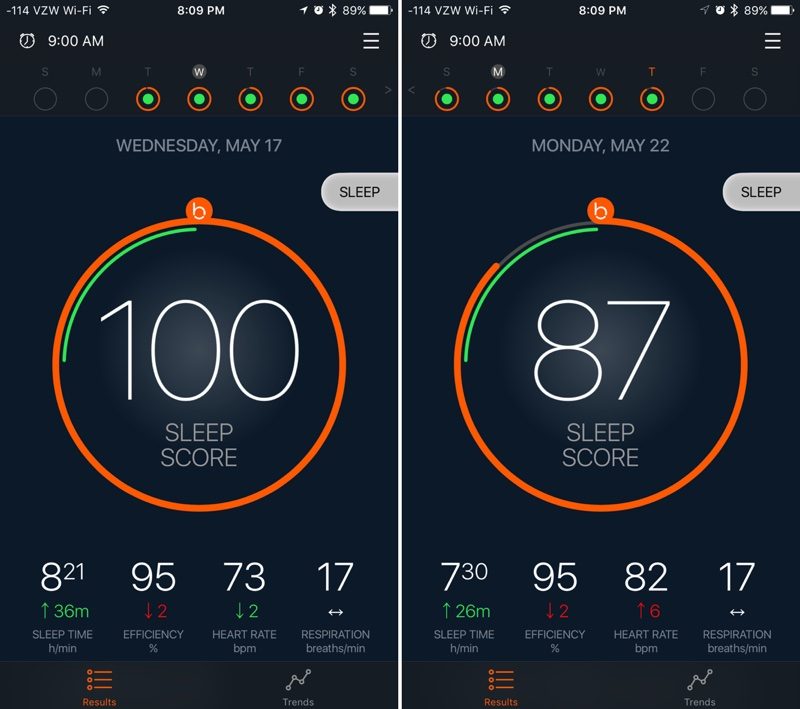 Beddit provides an overall sleep score each night
I’m a light sleeper and it often takes me a long time to fall asleep, but at the same time, I don’t move a lot. Beddit could not tell the difference between when I was awake lying in bed and when I was actually asleep, whether it was when I was falling asleep for the first time or when I woke up in the middle of the night.
That’s led to some overestimation of the amount of time I’m asleep, which in turn impacts the sleep efficiency score. It’s not wildly inaccurate every day, but it’s been off by as much as a half hour. Someone who lies awake (and still) in bed for long swaths of time may be disappointed with the accuracy of the Beddit. A more restless sleeper won’t have this problem because the Sleep Monitor will pick up the movement.
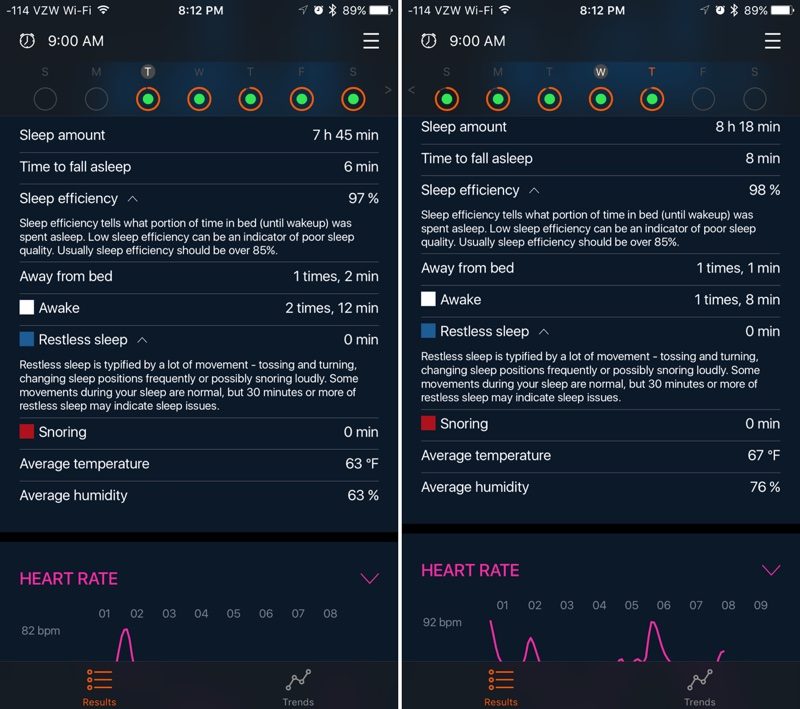 The time to fall asleep and awake measurements here are off
Though the sleep efficiency/time measurement is not entirely accurate for me, the sleep graph in the app gives me a much clearer picture of how my night went. It measures light sleep and deep sleep, and while the app tells me I was asleep when it dips down sharply, that’s actually when I was awake. The Beddit Sleep Monitor seems to be accurately interpreting my sleep/wake patterns, but then misreading some of the data when calculating sleep efficiency and sleep score.
When I want a general idea of how I slept in a given night, I check the graph before relying on the sleep time and sleep efficiency numbers. The graph, though, is only divided by hour and so the information I have is limited – this would be a lot more useful if I could drill down into more specific timeframes. As an example, it’ll tell me I got out of bed sometime near 3:00 a.m., but it won’t give me the exact time.
 Beddit says I slept roughly the same amount of time on these two nights, but the graph tells a different story. At each dip, I was awake, not in a state of light sleep.
Along with the light/deep sleep graph, the Beddit app offers up concrete numbers on all of the different tracking metrics, plus a graph for heart rate. Comparing the sleep graph and the heart rate graph has proven to be interesting because of the correlation between the two. There are often small jumps in my heart rate at the times when Beddit says I’m most deeply asleep, which seems to relate to dreams/nightmares.
 A sleep graph compared to a heart rate graph from the same night
The Beddit app measures two factors I wasn’t able to properly test — snoring and restless sleep. I don’t seem to move enough to trigger any restless sleep readings, and I don’t snore. My partner snores, though, so I can say that it’s sensitive enough to tell my breathing from his. By the way, the Beddit has been able to track my sleeping accurately regardless of position. I’m a side or stomach sleeper, but also tested sleeping on my back. There’s no difference in the data.
Beddit data is displayed on a day-by-day basis, but there are also options to see trends over 7, 30, and 90 days. Trends cover sleep score, sleep time, heart rate, bedroom temperature/humidity, and a notes feature, which is actually one of the handiest ways to measure sleep trends.

Each morning, you can rate how you feel after a night’s sleep and add notes and tags to keep track of factors that might have impacted sleep. My cat meows some mornings, so I might add a note that I was woken up by the cat. If I ate something unusual or drank caffeine late in the day, those are also things that could be noted, and over time, I might be able to notice trends. Tags are important because the app will automatically correlate tags with sleep efficiency scores.
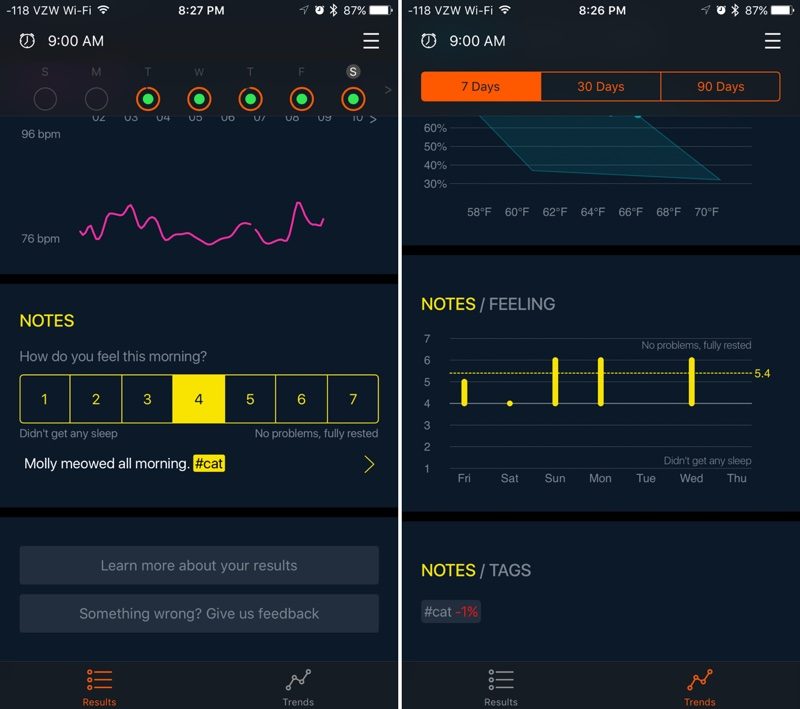 My sleep is worse on nights tagged “cat,” which means my cat was meowing in the early morning.
There’s a built-in smart alarm feature in the Beddit app, designed to go off up to 30 minutes before the set time whenever sleep is lightest. The idea is that if you’re woken up in a light sleep, you’ll be less groggy. It worked semi-well, but 30 minutes is a long window and there’s no customization option to shorten it.
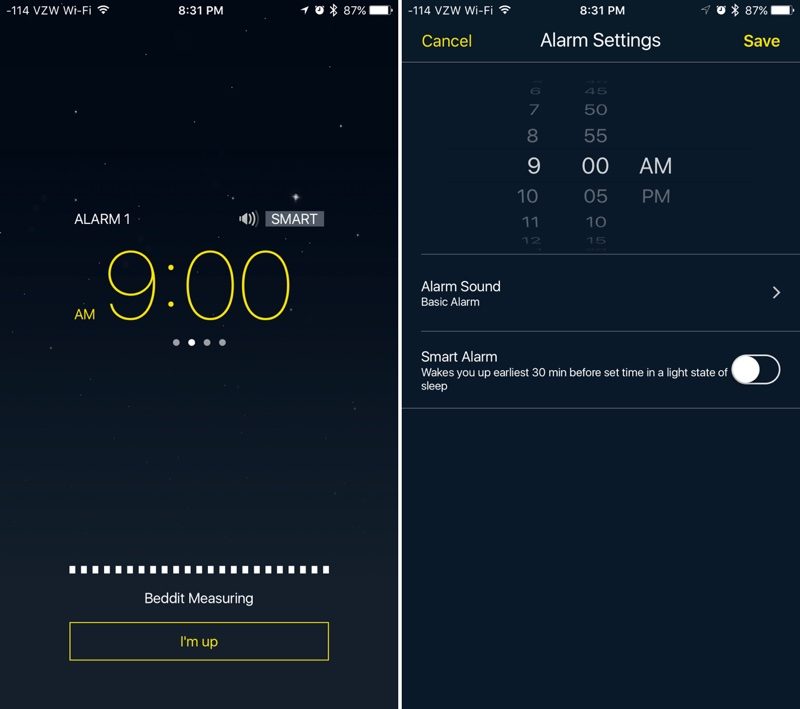
One other thing worth noting — Beddit can be set to automatically start tracking sleep as soon as you get in the bed at night, so there’s no need to open the app and turn it on. I liked the convenience of this feature, but ended up leaving manual activation on because I like to read in bed before sleeping and the Beddit thought I was asleep when I was reading.
Overall, the Beddit app is well done and it offers up a lot of info, but there are some negatives. First of all, the Beddit Sleep Monitor needs to be continually connected to the iPhone via Bluetooth when it’s in use at night, which Beddit says is necessary because of the amount of data being transferred. With a continual Bluetooth connection, the Beddit is a serious battery drain (it’ll suck up a good 30 to 40% on an iPhone 7 Plus). You’re going to want to plug your iPhone in at night when using it.
Second, snoring tracking is done on the iPhone, and there’s no way to disable it. That means Beddit is using the microphone, which happens to disable my AirPods and other Bluetooth headphones. It also prevents “Hey Siri” hands-free commands from working. There is no option to disable snoring tracking, which is a downside for people who don’t snore.
Third, given the amount of information the Sleep Monitor tracks, I think the app could offer up more detail, like a clearer picture of specific heart rate and respiration rates over time. Luckily, it connects to Apple Health, and all of this data is synced there.
In the Health app, you can see each respiration and heart rate measurement during the night, and the Beddit also syncs overall sleep data.
 Heart rate measurement in Health app on left, respiration on right
One last thing — the Beddit is compatible with nap taking. It tracks nap length just like a standard night of sleep and adds that information to the day’s overall sleep score and sleep time.
Bottom Line
In 10 days, the Beddit Sleep Monitor hasn’t taught me anything I didn’t already know, but as someone who likes to track things and collect data, I find the information it’s giving me valuable, even if some of its conclusions about my sleep aren’t 100 percent accurate. I suspect that with longer use and more attention to tags, I might be able to learn more.
I’ve had sleep problems my entire life, so I’ve already learned to stick to a rigorous sleep routine, but someone who needs help establishing good sleep habits or figuring out what’s impacting sleep could potentially benefit from the Beddit Sleep Monitor.
With its snoring, heart rate, and respiration features, Beddit will be able to pick up on sleep apnea and breathing issues, and the data combined with user notes can help suss out other sleep problems.
$150 is expensive, but if it’s able to provide a better night’s sleep for someone who’s struggling, the high price tag is worth it. People without serious sleep issues who just like to keep track of health metrics will also likely be satisfied with the Beddit given the many things it tracks.
In its current incarnation, the Beddit Sleep Monitor is a decent sleep tracker. With Apple’s tweaking, I think it could be a lot better. In my experience, it’s collecting all the data it needs, but with some fine tuning, that data could be better interpreted and more valuable.
I’ve never used a sleep tracker that can tell the difference between when I’m lying in bed and when I’m asleep, but if anyone can solve that problem and refine sleep tracking algorithms, it’ll probably be Apple. I’m interested to see what kind of improvements Apple can make to sleep tracking and what it plans to do with the data and the technology it has acquired from Beddit, so I’ll keep using my Sleep Monitor.
How to Buy
The Beddit 3 Sleep Monitor can be purchased from Apple for $149.95.
Tag: Beddit
Discuss this article in our forums
Apple Developing ‘Apple Neural Engine’ Chip to Power AI in iOS Devices
Apple is developing a dedicated processor that will be used to handle AI-related tasks like facial and speech recognition in its products, reports Bloomberg. Citing a source with knowledge of Apple’s plans, the site says the chip is known internally as the “Apple Neural Engine.”
Apple plans to use the chip, which would work alongside the standard processor and the graphics chip, to add more advanced artificial intelligence capabilities into its devices and to offload demanding AI processing tasks that can impact battery life.
An AI-enabled processor would help Cupertino, California-based Apple integrate more advanced capabilities into devices, particularly cars that drive themselves and gadgets that run augmented reality, the technology that superimposes graphics and other information onto a person’s view of the world.
The chip could potentially handle tasks like facial recognition in the photos application, parts of speech recognition, and power the predictive keyboard in the iPhone and iPad. Apple may also allow developers to access the chip to power AI-related features in third-party apps.
An AI chip would not be the first chip that handles dedicated tasks in the iPhone. Starting with the iPhone 5s in 2013, Apple devices have included a motion coprocessor used to collect and store sensor data. The motion coprocessor allows the iPhone and iPad to continually track movement and other sensor data without using significant battery. It also powers features like the always-on “Hey Siri” capability built into modern iPhones.
Apple has already tested prototypes of future iPhones with the AI chip, but it is unclear if such a chip is ready for a debut in the iPhone 8. Going forward, should development on the chip continue, Apple is said to be planning to integrate it into many of its devices.
Tags: bloomberg.com, artificial intelligence, Apple Neural Engine
Discuss this article in our forums
macOS 10.13 Wishlist: Features MacRumors Readers Hope to See in the Next Version of macOS
Apple’s Worldwide Developers Conference is set to kick off on June 5, and along with a new version of iOS, Apple is expected to introduce the next-generation version of macOS, macOS 10.13. We’ve heard no rumors on what to expect in macOS 10.13, so whatever Apple introduces will come as a total surprise.
With iOS 11 expected to get a major design overhaul, we can perhaps count on some similar design tweaks in macOS, but beyond that, there’s no word on what’s coming. As with iOS 11, our forum members have created a couple of macOS wishlists, outlining some of the features they’re hoping to see, and while macOS isn’t quite as popular as iOS, there are still some solid ideas.
– Redesigned iTunes/Apple Music – Some MacRumors readers would like to see Apple overhaul iTunes in a big way, splitting out Apple Music and turning it into its own distinct app that’s not combined with the App Store and iTunes Store.
– HomeKit – Connected home products can be controlled through Siri or a dedicated Home app on iOS devices, but on the Mac, there’s no built-in way to interface with a HomeKit setup. A Home app for the Mac would be a welcome addition, and perhaps the Mac could even serve as a HomeKit hub like the Apple TV and the iPad.
– Expanded Dark Mode – macOS Sierra included a Dark Mode that darkens the dock and the drop down menus across the operating system, but several MacRumors readers would like to see an expanded Dark Mode that darkens all interface elements like Finder and Notification Center.
– Multiple docks – When using multiple displays, it would be nice to have access to separate docks for each display.
– iPad/Apple TV second screen – This is unlikely to happen, but one reader wants to use an iPad or an Apple TV as a second screen for a Mac. This suggestion overlaps with the iOS 11 wishlist, where readers said they would like to be able to use their iPads as a secondary Mac display and as a drawing tablet.
– Combined Siri/Spotlight – Several MacRumors readers would like to see Siri and Spotlight combined on the Mac, allowing for a unified search/Siri experience. With Siri integrated into Spotlight, Mac users would be able to type Siri requests and get the same search result with voice or text. Users also want to see Siri improvements, which could happen as Apple is rumored to be working on new Siri features.
– Better full screen options – For users who like to take advantage of full screen apps, better management options would be welcome. An option to open a new window in Split View from the dock or an iPad-style drag-to-close feature would improve Split View.
– Improved window management – Windows 10-style window snapping is a request that pops up multiple times across the wishlist threads. As one reader points out, window management apps like Magnet are some of the most popular in the Mac App Store, suggesting this is something a lot of Mac users would like to see added to the operating system.
– FaceTime Picture-in-picture – macOS Sierra brought picture-in-picture support to the Mac for videos, but it doesn’t extend to FaceTime. That’s a problem that prevents FaceTime from being used with a full screen app because the FaceTime video window doesn’t stay on top.
– Messages – In macOS, there’s no support for stickers or other Messages features. Adding support in the next version of macOS would bring macOS in line with iOS.
– Apple News – The Apple News app is limited to iOS devices, but it could easily be brought over to the Mac as a native app.
What features are you hoping Apple will introduce in macOS 10.13? Join in on the discussion about the update on the MacRumors forums. Make sure to check out our iOS 11 wishlist roundup too.
Related Roundup: macOS 10.13
Discuss this article in our forums
Temple Jump – A One-touch, precision platformer full of frustration (Review)

One-touch high difficulty games have been insanely popular ever since a certain bird flapped between some famous green pipes. Flappy Bird paved the way for loads of tiny games designed to be very difficult and typically loaded with ads with the hopes of bringing in an insane amount of revenue. Some of these can actually be pretty great time wasters. Temple Jump, a simple-but-not-easy game about jumping on platforms to gather treasures, attempts to bring the fun with a bunch of unlockables and a challenge mode but doesn’t quite deliver a good fun/frustration ratio.
Developer: Nexx Studio
Price: Free/IAP
Download: Google Play
 Traps are all around you, making difficult jumps all but impossible.
Controls/Sounds
Seeing as how this is a one-touch game, the controls are rather simple. You hold the screen to make your character jump up and forward, and you release to come back down. Your character can jump just about 1/2 the high of your phone screen. Controls are responsive for the most part, but your character has weird movements. You rise slowly but will drop quickly, and it feels a little disjointed because of this. There have also been a few times when I thought I should have been able to jump but it may have been that it was already falling off a platform, so I won’t fault the controls for that. The sound is reminiscent of old Nintendo or similar retro games, with chiptune-y beeps and boops for jump sounds, traps, gem collections, etc. It fits the theme well.
Graphics
Similar to the sound, this game uses retro graphics to give it a retro game feel. Everything looks like it came right out of the late 80’s and look good for what they are. The characters look appropriate, with the zombie having green discolored skin, the Nyan Cat looking like a Cat on a PopTart, and even the Flapps character (yes, there is a bird in the game called “Flapps”) looks like a close knock off of who it’s supposed to be. Most have a jumping animation that can be pretty cute, such as the Flappy Bird flapping its wings (to no effect) and the “Retweet” Twitter bird leaving a hashtag trail. The temple is pretty aesthetically pleasing with torches lighting the way, bubbling lava below you, and shiny golden statues ready to drop and crush your treasure hunting dreams. While the retro style may have been overdone at this point, this game does this aspect pretty well.
 There’s a big gem at the end of the challenge courses if you can make it
Gameplay
Temple Jump has a steep learning curve, as most of these kinds of games do. Learning how your character moves is half the battle, as you have a slow, floaty ascension then you drop like a rock. It feels a little disjointed and makes it rather difficult to actually aim. Most of the time this is okay, since the platforms are typically twice as large as your character, and as long as you are touching the top you are generally okay. There are other platforms that are only as large as your character, and the awkward rising and fall of your jumps can make it rather difficult to land on, especially when the levels start adding in fireball traps, spinning spike blocks, falling pillars, and platforms that sink and try and tip you off. There are gems to collect, one on each platform, and these can be used to unlock new characters. These are cosmetic only, but a nice touch.
There’s also a challenge mode. The regular play mode is one long randomly generated level. The challenge mode is set stages designed to be a bit more difficult, but with large gems at the end that give you at least 10 gems. I found these levels to be more fun, because while they had a higher degree of difficulty, I was able to practice my moves, learn the precise timing of the traps, and was actually fairly successful, netting some good money and getting a bunch of characters unlocked.
Here’s where my biggest gripe with this game comes in. I’ve got the controls down since I can handle challenge mode fairly well, and I’m no stranger to difficult games since I’ve had well over 150 on Flappy Bird and a 90% completion rate on Super Meat Boy. The primary game mode with randomly generated worlds just doesn’t mesh well with the floaty controls. They work well when a level is specifically designed around them, but in the main game mode, they are just too unreliable to give you consistently good results. Frustrating games aren’t the problem because they can be fun. If you have a game that has tight controls that don’t hinder you from being precise, then you only have yourself to blame when you hit a trap, and those games can be fun. It’s a personal challenge. Games where you have trouble landing on a platform because you have to calculate how fast your character will drop from the height you are at while accounting for the falling spikes next to you because your speed of ascension and your falling speed aren’t consistent, you aren’t fighting against yourself to get better, your fighting against game design and a game engine. That’s not challenging and fun, that just frustrating.
 A few of the 33 characters available to play as
Longevity
There are 12 challenge levels and 33 characters to unlock. The challenge levels will take a while to get through but you can practice and beat them. Once those are done you will probably have enough money to buy at least half the cast. Some of the later characters end up costing upwards of 1,500 gems so they will be out of reach for a while without an in-app purchase. Honestly, the level of frustration I had playing the main game had me quitting the minute I finished the challenge levels, and even those I had to walk away from for a while.
Conclusion
Look. I’m not new to the gaming community, whether it’s PC, console, or casual mobile games. I’ve played games designed to be extremely challenging and frustrating and have had a blast playing some of them. This is not the next Flappy Bird. This is a game with strange movements that requires precision and has a randomly generated world that is completely unforgiving of this fact. This game forgets that frustration does not equal fun with it’s a highly difficult learning curve. The unlockables aren’t enough to keep you around, as everything you buy is just a cosmetic change. Unless this game gets a serious tweak, it’s best you just move along.
Cricket offers $50 in cash credit to customers who switch carriers
Why it matters to you
Offers like this are enabling budget wireless service providers to stay in the game.
If you’re in the market for a cheap, no-frills wireless plan, good news: Cricket Wireless is offering cash credit for customers who port their number to the carrier. And it’s throwing in a free smartphone to boot.
Starting Friday, May 26, Cricket will give subscribers who bring their lines from another carrier up to $50 in “switcher credit” — more than enough to cover the carrier’s $25 activation fee and $10 universal SIM card. Customers have the option to bring their own device, or choose from one of Cricket’s four free 4G LTE phones. And if they bring a family plan over, they can get up to $50 in credit plus a Group Save discount.
Cricket’s not neglecting existing Cricket customers, either. Subscribers who refer a friend get a $25 credit when that friend accepts a referral via the Crickets Rewards app, activates service, and maintains it for 60 consecutive days.
There’s some fine print to note. The promotion applies to new lines only, and AT&T customers aren’t eligible. It’s a smartphone-only affair — basic phones are excluded — and accounts must be active and in good standing for at least 45 days. Credit comes in the form of savings on your monthly bill — you can’t withdraw it like cash, and it’s not refundable or transferable — and there’s a limit to one per qualifying line.

Cricket Wireless
But it’s not all bad.
Last year, Cricket introduced a $70 per month unlimited data plan that includes talk and text. And on the low end of the pricing spectrum, it debuted a $30 per month plan with calling, texting, and 1GB of data.
In January, meanwhile, Cricket rolled out high-speed data subscriptions starting at $40 per month and $60 per month for 3GB and 12GB, respectively. Plans are throttled at 8Mbps for 4G LTE and 4Mbps for HSPA+, but come with unlimited texting and calling, and benefits like high-definition phone calls on supported phones (like the Alcatel Idol 4, LG Escape 3, Samsung Galaxy Sol 2, or ZTE Grand X 4).
Cricket’s plans compare favorably to the competition. T-Mobile offers a $30 per month prepaid option through T-Mobile.com and Walmart that includes unlimited texting and up to 5GB of high-speed 4G LTE data, but only 100 minutes of calling. H2O Wireless and Lycamobile, meanwhile, have $30 plans that net you unlimited talk and text, but limit data transfer to 500MB.
Mobile virtual network operators (MVNOs) like Cricket, which obtain cell service from larger networks and carriers, are on the upswing. Analysts at Transparency Market Research report that the global MVNO market will reach a value of $75.25 billion by 2023.
Mark Zuckerberg returns to Harvard to address the graduating class of 2017
Why it matters to you
You don’t necessarily have to go to college to achieve success — and people like Mark Zuckerberg and Bill Gates prove that.
Who says you have to go to college to get a degree? After dropping out of Harvard University 12 years ago, Mark Zuckerberg has finally received his college degree — an honorary degree that he was awarded as part of his presentation of the commencement address to Harvard’s class of 2017.
The news was first announced through a post on Harvard’s website, however it was followed by a whimsical and completely cringe-worthy video on Zuckerberg’s Facebook page — which also starred none other than Bill Gates, who gave the commencement address at Harvard back in 2007. Incidentally, Zuckerberg attended that address — at the time, his wife Priscilla Chan was graduating.
“Mark Zuckerberg’s leadership has profoundly altered the nature of social engagement worldwide. Few inventions in modern times can rival Facebook in its far-reaching impact on how people around the globe interact with one another,” said Harvard in its post. “And few individuals can rival Mark Zuckerberg in his drive to change our world through the innovative use of technology, as well as his commitment to advance science, enhance education, and expand opportunity through the pursuit of philanthropy.”
Zuckerberg is one of a growing line of tech billionaires to drop out of college and build something huge. Bill Gates also dropped out of Harvard back in 1975, and Apple founder Steve Jobs dropped out of Reed College in 1976.
But Zuckerberg has made history in his own way by becoming the youngest commencement speaker in Harvard’s 366 year history. As a millennial himself, the CEO spoke to the graduating class about purpose, noting, “I’m not here to give you the standard commencement about finding your purpose. We’re millennials. We’ll try to do that instinctively. Instead, I’m here to tell you finding your purpose isn’t enough. The challenge for our generation is creating a world where everyone has a sense of purpose.”
And while the entrepreneur hit upon plenty of lofty ideas, like thinking and acting big, giving everyone an equal opportunity to try new ideas, and strengthening our shared sense of community, he was also able to impart some humor.
“I’m honored to be with you today because, let’s face it, you accomplished something I never could,” Zuckerberg quipped in his opening. “If I get through this speech, it’ll be the first time I actually finish something at Harvard. Class of 2017, congratulations!”
You can watch the entirety of the speech below.
Article originally published in March 2017. Updated on 5-26-2017 by Lulu Chang: Added excerpts and video of Zuckerberg’s commencement speech.
Researchers discover new class of Android malware that hides its tracks
Why it matters to you
As our devices become better protected, and users become more clever, so too does the malware — so it’s important to remain vigilant.
A common permission in many apps downloaded from the Google Play Store could make it relatively easy for a malicious developer to gain complete control over your device. That’s according to researchers at the University of California and the Georgia Institute of Technology, who discovered the new type of attack and have already shared their findings with Google.
They’re calling it “Cloak and Dagger,” and it relies on the ability of apps to draw UI elements over the screen as a way of concealing from the user exactly what is being shown. In the example given, several prompts are displayed when a malicious app is opened. The user thinks they’re interacting with the app, but they’re actually enabling an accessibility service that can be used to log keystrokes, including passwords.
Then, the real magic happens. Here, the user is made to watch a video — all the while, in the background, the malware is flipping switches to grant itself a variety of other permissions, including the ability to read location, text messages, and storage.
Ironically, all apps downloaded through Google’s storefront can enable the two permissions necessary for the attack without the user’s knowledge. In other words, it’s on Google to detect the scheme before the app hits the Play Store. If it slips through, as some do from time to time, the only way the user could stop it is by digging into the apps menu and checking permissions granted.
One of the most dangerous aspects of the Cloak and Dagger scheme is that researchers say it can be used to record your PIN code to discreetly unlock your device and perform actions — without ever turning the screen on.
According to the researchers, the latest version of Android, release 7.1.2, modifies the way permissions are handled in a way that makes it slightly harder to carry out an attack like this one. However, it doesn’t fully solve the issue.
Google has since responded to the news, stating to Engadget that it has updated Google Play Protect, its security software on most Android devices, to detect the presence of harmful apps that abuse these permissions. The company also reports that changes it made in Android O will “further strengthen” the platform against Cloak and Dagger attacks.
 AIVAnet