


Fluance Fi50 speaker review, the best bluetooth speaker under $200?
We’ve reviewed a ton of Bluetooth speakers over the years here at AndroidGuys. There are thousands on the market and a search on Amazon may turn up an overwhelming amount of small, portable, inexpensive speakers that are almost disposable. But, what if you’re looking for a little bit more?
Fluance is a name you may know from its audio products. Not only does it make speakers like the Fi30, Fi50, and Fi70, but it also has a foothold in the home theater system area too. While the Fi50 isn’t a home theater system speaker, I point this out to illustrate that these guys know what they’re doing when it comes to audio equipment. They aren’t a random company that just shows up on Amazon or eBay.
The Fluance Fi50 isn’t a portable speaker. That isn’t to say it has to be stationary, but this isn’t a speaker you’re going to take with you to the beach or on a day out. It’s big, it’s meant to stay in one place and it lacks any kind of battery power. That’s not a negative. In fact, I think it’s a positive because Fluance is able to do away with a lot of the little things since they know this speaker isn’t moving.
 The Fi50 comes in three colors, Black Ash (the color of our review unit), Lucky Bamboo, and Natural Walnut. I like how Fluance changed up the color of the face to match the Lucky Bamboo color, but I really think the design of the speaker shines in the two darker shades. We have a darker entertainment center and darker furniture and it really goes well in our living room. We’ve got it in the center of our entertainment center and it doesn’t look remotely out of place.
On the front of the speaker, you’re greeted by and LCD display and dual full-range 5″ woven woofers. While the LCD doesn’t display useful information like the time, it does give you a readout of the current volume level. A dot will appear in the bottom left corner of the speaker if a device is connected and you have the option to turn the LCD off if you so please.
 The top of the device houses the touch-sensitive controls. Fluance opted for these controls instead of buttons that stick out and it was definitely the right choice as they look like they belong here. All you get are buttons to control the brightness (3 stages), an options button and volume up and down. The options button gives you the ability to increase and decrease bass and treble but those are the only two options.
The rear of the device houses ports for power along with a power button, aux in, a USB port and a pairing reset button. The USB port is a nice touch and will charge your devices at 2.1A, which is a little bit higher than you might expect to find on a speaker.
 One of the nicer things about the Fluance Fi50 is that it’s always in pairing mode. This is one of those features that Fluance was able to include since it doesn’t have to worry about battery life. I’ve had several friends or family members over that wanted to show us a video of their kid’s dance recital or a cool video they found off YouTube. I had them jump into Bluetooth settings and pair to the speaker in about four seconds.
Another advantage to having a bigger body is just how good this thing sounds. It may not be the best sounding speaker on the market but is certainly in the upper echelon of what you can get for $200 and might be the best in its price range. I’ve listened to speakers that reach up into the $400, $500, and $600 ranges and this matches them in most respects.
Frist off, this thing gets LOUD. If you have a neighbor you want to annoy, get this thing because they’ll definitely be able to hear it unless you have incredibly thick walls. We have generally kept the speaker between 10 and 20 volume and it’s more than loud enough.
Lows are truly awesome. Fluance states the Fi50 gets all the way down to 40 Hz and it shows through in bass-heavy music like EDM or Rap. Again, if you want to annoy your neighbors….
Moving on to the mids and the highs. Fluance did a great job tuning the Fi50 to have a rich midrange and a nice wide soundstage for a Bluetooth speaker. The highs aren’t as harsh as I’ve heard on other mid-tier to high-end speakers and that’s a nice change. Overall, there’s a really nice balance to the Fluance Fi50 between the lows, mids, and highs with a slight tilt towards some of the bassy lows. It’s not Beats worthy, but it does make some more bass-heavy tracks more enjoyable if you’re into that sort of thing.
 While the Fluance Fi50 won’t be perfect for everyone, it will be a very nice addition for those seeking something like this. My wife and I often like to turn off the TVs, kick on some music in the background and read Reddit or just hang out and this is perfect for that. The audio sounds fantastic and can get extremely loud if we feel like being a little rambunctious.
The Fi50 is going to sound better than almost all soundbars with Bluetooth and is an improvement over something like a Google Home, so if you care about having a persistent, excellent sounding speaker in your living room that is a snap to use, check out this out. The Fluance Fi50 is easily worth the money you’ll spend on it and beats out a lot of speakers in higher price ranges.
You can pick up the Fluance Fi50 from Fluance’s website, Amazon, and Jet.com
The Wirecutter’s best deals: Save $50 on a Breville Smart Oven
This post was done in partnership with The Wirecutter, a buyer’s guide to the best technology. When readers choose to buy The Wirecutter’s independently chosen editorial picks, they may earn affiliate commissions that support their work. Read their continuously updated list of deals here.
You may have already seen Engadget posting reviews from our friends at The Wirecutter. Now, from time to time, we’ll also be publishing their recommended deals on some of their top picks. Read on, and strike while the iron is hot — some of these sales could expire mighty soon.
Google Home + $20 Gift Card

Street price: $129; MSRP: $129; Deal price: $114
This is a new variation on the the most recent promotions for the Google Home. The $114 price reflects a sale that is pretty universal and can be found at multiple retailers. However, this deal includes a $20 Newegg promotional gift card, making it a no-brainer for regular Newegg shoppers as compared to the other deals out there. Shipping is free.
The Google Home is a voice-controlled speaker from our guide on the Google Home. Brent Butterworth and Grant Clauser write, “Google’s wireless speaker, digital assistant, and smart-home controller looks better than its biggest competition, reliably responds to most voice queries, offers solid multi-room audio, and sounds pretty good.”
Breville BOV800XL Smart Oven 1800-Watt Convection Toaster Oven
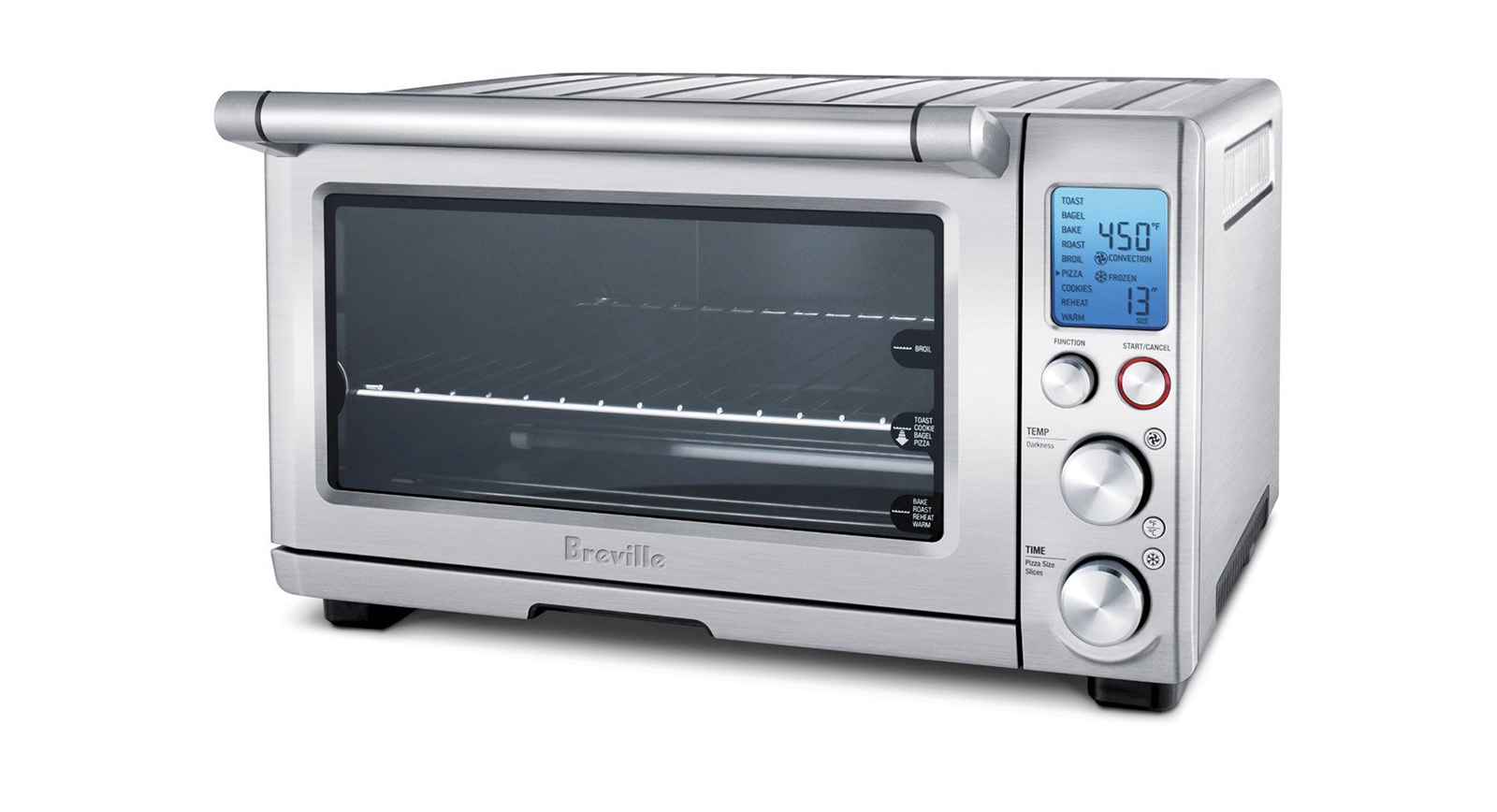
Street price: $250; MSRP: $250; Deal price: $200
We don’t see this toaster oven go on sale that often, with most several month gaps between most deals. Though previous sales have dropped it to $200 before, msot of them don’t last longer than a few days, so it’s a great time to pick this up before it bounces back to $250.
The Breville BOV800XL Smart Oven 1800-Watt Convection Toaster Oven is our runner-up pick in our guide to the best toaster oven. Brendan Nystedt wrote, “The Breville Smart Oven has a larger oven cavity than our top pick, so it can fit a 12-inch frozen pizza or six slices of bread. The Breville Smart Oven also has a more modern, intuitive interface than the Panasonic FlashXpress and an easy-to-read display. This oven is twice the price of our pick, but it turned out pizza bagels and toast that were nearly as good as the Panasonic FlashXpress and our upgrade pick, the Cuisinart TOB-260N1.”
SodaStream Source

Street price: $83; MSRP: $100; Deal price: $69 with clipped coupon
The best price we’ve seen on the SodaStream Source in a long time that wasn’t Prime-exclusive or from a members-only warehouse. Clip the on-page $15 coupon to get the black color of the SodaStream Source for $69, $14 below the recent street price. Shipping is free.
The SodaStream Source is our top pick in our guide to the best soda maker. Anna Perling wrote, “The SodaStream Source makes the best range of bubbly water, and it produces the fizziest water out of the soda makers we tested. Taste testers ranked the Source’s water as overall fizziest and best-tasting, too, and its bottle is one of the easiest to attach to the machine. For the price, the Source delivers the most bubble for your buck compared to the other models we looked at. And thanks to its simple design, the Source is also one of the easiest soda makers to clean and refill so you can keep carbonating with ease.”
BenQ BL3201PH 32-Inch 4K Monitor

Street price: $800; MSRP: $800; Deal price: $710
While we have seen this monitor for lower once before, this deal brings it within $35 or that previous low. That $675 low was during a brief sale in September, but the few other deals have been in the mid-low $700’s.
The BenQ BL3201PH 32-inch 4K monitor is our upgrade pick in our guide on the best 4K monitors guide. David Murphy wrote, “If you want a monitor that’s big enough to run 4K without scaling (which can help you avoid quality issues with third-party apps), the BenQ BL3201PH is a great option. Its gigantic, 32-inch screen offers great color accuracy—even though it isn’t factory-calibrated. This monitor comes with DisplayPort and Mini DisplayPort connections, HDMI connections (1.4), a DVI port, and five USB 3.0 ports. It also has built-in sensors that will switch the monitor into a power-saving mode when you move away from your desk.”
Because great deals don’t just happen on Thursdays, sign up for our daily deals email and we’ll send you the best deals we find every weekday. Also, deals change all the time, and some of these may have expired. To see an updated list of current deals, please go to The Wirecutter.com.
Neural networks can help animate video games
We’ve seen procedurally generated worlds and weapons in video games before, but piecing together believable animations from a pool of variables is pretty tough. Previous attempts at it have looked janky and disjointed. It’s okay in something like Ubisoft’s experimental and quirky Grow Home, but big-budget AAA blockbusters akin to Uncharted 4 carry a different set of expectations. New research out of the University of Edinburgh is a bit different, and might help video games get away from one-size-fits-most pre-scripted animations, though.
The researchers used machine learning and a neural net to pull animation info from a database, based on what you’re doing with the gamepad. “So, instead of storing all the data and selecting which clip to play with, [we] have a system which actually generates animations on the fly, given the user input,” the school’s Daniel Holden told Ars Technica.
As you can see in the video below, the results are pretty impressive. The neural net blends pre-scripted animations into incredibly lifelike locomotion over a variety of terrain. Jumping over obstructions, ducking and even the avatar putting his arms out for balance when crossing a narrow path are all calculated on an as-needed basis.
Or, in technical terms, “Our system takes as input user controls, the previous state of the character, the geometry of the scene and automatically produces high-quality motions that achieve the desired user control.”
The neural net’s training took 30 hours on a NVIDIA GeForce GTX 660 GPU, according to the paper (PDF). So, just over a day’s time. Faster training could be achieved with a higher-powered GPU, but the chances of students having access to a GTX 1080 or better are slim. Like Ars notes, the problem with that is unlike traditionally authored animation, an artist can’t go back in to clean up something that doesn’t look quite right without restarting the training process.
The other limitation is that currently, it only works for relatively simple things like running around an environment. “Like many other methods in this field, our technique cannot deal well with complex interactions with the environment — in particular if they include precise hand movements such as climbing up walls or interacting with other objects in the scene,” the paper reads.
More than that, if terrain is too steep the animations are going to look weird as well — something The Elder Scrolls V: Skyrim‘s mountain climbers should be familiar with. The researchers envision a future where that’s no longer the case, and one where avatars would react realistically not just to changes in terrain, but the terrain’s surface as well.
“Such a system may allow the character to stably walk and run over different terrains in different physical conditions such a slippery floors or unstable rope bridges.”
While the technique presented here might not make sense for every game, one where you’re not manually controlling individual jumps while running around, like, say, Assassin’s Creed, could be a perfect fit. Speaking of, Ars reports that Holden has been hired by publisher Ubisoft to do more research and development. Well then.
Via: Ars Technica
Source: The Orange Duck (PDF) (1), (2)
Mighty Cast Nex Evolution review

Research Center:
Mighty Cast Nex Evolution
Want your garage to automatically open when you get home? Or the coffee pot to turn on when your alarm goes off? You can configure these actions with various smart home appliances, or with the help of third-party services like IFTTT (If This, Then That). Mighty Cast is yet another company offering a solution, but it has a dedicated wearable that acts like a personalized remote.
The Nex Band Evolution is a Bluetooth-connected wristband that features five “mods,” the company’s name for its tappable, LED-illuminated buttons. These mods can be programmed — or “hacked” as Mighty Cast calls it — via a free mobile app for iOS and Android to execute any number of actions; from opening your garage door to controlling music playback, or kicking off an IFTTT applet (formerly recipe).
The $80 band is also a notifications ninja, using a combination of light and vibration to inform you of phone calls, Instagram likes, and just about any other notification you’d get on your phone. There’s an activity tracker too, for those interested in doubling it as a fitness band.
It’s quirky, to say the least. For tech-savvy people disappointed by the lack of customization and creativity offered by other wearable gadgets, the Nex Band Evolution is a fun, somewhat inexpensive way to exercise greater control of our increasingly connected lives. But its poor construction, lack of a display, and weak activity tracking make it tough to recommend. Let’s take a closer look.
Hack away
The Nex Band Evolution’s main attraction is the ability to assign functions to each of the band’s five mods. Mighty Cast calls these functions hacks, but there’s no coding involved. Hacks are created using the app’s “When/Do” conditions. Choose the mod you want to hack, decide if you want the function to be triggered by a double-tap or a long press (the “when”), and then pick from a generous list of preinstalled functions (the “do”).
It’s easier to just use a smartwatch where you can see the content of the notification.
If you’ve ever used the popular IFTTT service, you’ll find it instantly familiar. “If I arrive home, turn on the lights,” is an example of an applet you can configure with IFTTT. Granted, you need to have a supported smart bulb.
You can actually access all IFTTT applets via the Nex Band app, as an incentive for IFTTT users. It increases the amount of actions you can execute tenfold, because of the robust support IFTTT has garnered over the years.
But the Nex Band goes a step further and supercharges what you can configure. For every “when,” you can add additional conditions, like a location or a specific time of day. Similarly, “Dos” can be a single function like turning on a light, or multiple functions, like turning on a light and playing music. For example, if you’re home and double tap a mod, the Band can then send an email to your parents telling them you’re home safe, and it can turn on the bedroom lights at the same time.
We love that these extra layers provide such a granular level of control — it’s the expert mode that is missing from so many smart devices. Without IFTTT, you can do things like control your smartphone camera, control music playback, make a fake call, send preset messages, trigger an action when you arrive somewhere, and more through the band. Will is ever hit mainstream popularity? Likely not, as it all requires a decent amount of configuration, and you can perform a bulk of these actions on your smartphone with the IFTTT app.


Not to mention some of the quirks with the Nex Band. Figuring out what’s going on between the app and the band isn’t straightforward. Though each mod can display any color of the rainbow through its LED, all five have a fixed color. If you’re wearing the Nex on your left wrist, with the power button facing your hand, the mods are (from top to bottom) green, blue, purple, red, and orange. But when you’re in the app, not only are mods often depicted as white circles, they’re arranged horizontally, leaving you guessing which one belongs to which mod. It’s unnecessarily vague.
It’s also difficult to know if you’ve successfully initiated a hack by double-tapping or long-pressing. My finger effectively covers a mod when pressing, and it’s not easy to see the LED flash in response to your touch. A quick haptic buzz from the band’s vibration motor to confirm an activated hack would be a welcome addition. We sent our feedback to Might Cast CEO Adam Adelman, and he said these two issues will be addressed in a future firmware update.
Easy-to-use app, plenty of customization
The Nex Band app’s clean interface makes creating, editing, or deleting hacks easy, and the availability of pre-built “featured” hacks is good for new users who simply want to get their device up and running.
Setting up and pairing it with an iPhone 6 was effortless — even easier than with other Bluetooth products like the Pebble, or wireless earbuds. There’s an overwhelming number of options once you get into the hacks and notification menus, but the step-by-step process of working with these features means there’s only ever a few things on the screen at one time. Moving back and forth through the steps is simple, and intuitive.


There are almost infinite options when it comes to customizing your notifications. Every app you care about, whether it’s Snapchat, Facebook, or your native email app, can have its own vibration and/or light pattern. Want your Instagram likes to trigger an insistent set of vibrations and rainbow light show? Done. Want text messages to simply vibrate a little and show no LEDs? No problem.
Whether this is actually useful for anyone — since you’d have to remember and attribute light patterns and vibrations to an app — is up in the air. A lot of these functions are hardly new, as you can perform the same configurations for phones with LEDs with apps like Light Manager. It’s easier to use a smartwatch, or a band with a display where you can see the content of the notification.
Lackluster fitness tracking
The Nex Band Evolution includes an activity tracker too, though this is being generous. In reality, it’s just a step counter, which can be configured to a specific daily step goal, much like Nike’s original Fuelband. Fans of Fitbit, Misfit, and other trackers will be disappointed by the limited scope of this feature, but there’s reason for hope.
Mighty Cast wants to offer a full Software Development Kit (SDK) for the Nex if the company can build a strong user community. That’s a big if, so don’t expect third-party support anytime soon.
Poor build quality
The Nex Evolution comes in two color choices — an understated, all-black design, and a flashy black, white, and gold combo. Its curved body and one-size-fits-all integrated rubber band make for a comfortable fit. It’s also light at 27 grams; you could easily forget you’re wearing it at all.
At about 13mm tall, it’s a lot chunkier than a Fitbit Flex, but compared to some of the Android Wear smartwatches we’ve seen, it’s downright petite. It’s also water resistant, though the company recommends you still take it off for swims and showers.
 Simon Cohen/Digital Trends
 Simon Cohen/Digital Trends
 Simon Cohen/Digital Trends
There are two main drawbacks to Evolution’s build: First, the materials look cheap, especially the gold-tone polycarbonate housing. Worst of all, there are visible mold seams and imperfections in the build quality. This extends to the band as well as our test unit had a rough edge at the end near the clasp.
Second, because the five mods are fused together, there’s a series of small grooves that act as visual and tactile separators. They look fine at first, but they quickly turn into dirt traps — collecting grime and grit. You’ll need to constantly keep these grooves clean.
Awkward charger
Mighty Cast claims about three days for battery life, and so far that feels right, though we suspect heavier use will reduce it to two days. That’s not bad for a wearable, but we are not fans of the weird charger that comes with the Nex Band Evolution. It’s a small, claw-like chunk of plastic with two charging contacts on the top surface and a micro-USB port on the side for connecting the included USB cable.
To charge the Nex Band, you need to orient the charger so that the end with two small prongs lines up with the matching holes on the underside of the band. You then press the opposite side of the charger until it clicks into place.
Much like the Nex itself, the charger looks and feels like it was made with low cost as the primary consideration. We would have preferred if the main body of the Nex Band contained the USB port, or a magnet-based latching system for the charger, instead of the flimsy plastic claws.
Mighty Cast Nex Evolution Compared To

Polar M450

Mio Fuse

Fitbit Surge

Razer Nabu

Epson Runsense SF-810

Garmin VivoActive

FitBit Charge HR

Withings Aura Smart Sleep System

Fitbit Charge

Fitbit One

Zackees Turn-Signal Gloves

Basis B1

Nike+ Fuelband

Nike+ SportWatch GPS

Nike+iPod Sport Kit
No time display
There’s a lot of fun stuff you can do with the Nex Band Evolution. Nex Beatbox, for example, turns the band’s mods into drum pads; Camera Control assigns shutter, swap camera, and zoom options to the five mods; and hacks can make use of location data, and be configured to send emails, texts, or even phone calls.
But for all of these capabilities, the Nex Band leaves out one function we really need — the ability to see the time. For most folks, a wrist wearable will take the place of their watch. Few will want to wear a watch and a smart band like the Nex, but without a clock display, Nex users will be forced to wear both, or haul their phone out of their pocket or purse — which defeats the biggest benefit of a connected smart band.
Warranty information, and pricing
Mighty Cast offers a standard one-year warranty on the Nex Band Evolution, along with a 60-day return policy on unused products in their original packaging.
The band costs $80 and is available on the company’s website.
Our Take
While the Nex Band offers great options to automate your life, a lot of its features can be executed by just installing the IFTTT app. Its poor build quality is unfortunate, and the lack of a clock makes it a lot less useful.
The DT Accessory Pack
AmazonBasics USB 2.0 A-Male to Micro B Cable
$5.99
Wemo Switch Smart Plug
$39.99
Top Plaza Gel Rubber Bracelet Touchscreen Sportswatch
$7.48
Are there better alternatives?
Yes. Your smartphone. IFTTT, which the Nex Band also relies on a lot, is available on Android and iOS. You can make a lot of the same automation happen by just using this app, though you’ll be missing the ability to control things with physical buttons.
You can also go for a smartwatch like the Huawei Watch 2 or the Apple Watch Series 2, as they both offer far more useful notifications you can actually read interact with. There’s also the Tapdo, which lets you assign various functions to your fingerprints. It’s a little more expensive, and the Kickstarter hasn’t been fully funded yet.
How long will it last?
We have concerns about the overall quality of the Nex Band Evolution. Its plastic and rubber build are not high quality, which could indicate a shorter lifespan especially under heavy and active use.
That said, Mighty Cast seems responsive to users, and is determined to embrace third party developers. The Nex app, with its elegant, simple interface, suggests that this is not a whimsical product by a team that is about to move on to the next big idea, leaving its users high and dry. While you can expect about two years or more of software support, we’re not sure the band itself will last as long.
Should you buy it?
No. If you’re an IFTTT pro user, who has been waiting for a smart wearable that can be configured to perform even more functions from your wrist, the Nex Band Evolution may be what you’re looking for, and it’s affordable at just $80. But for most of us, IFTTT is an excellent, free alternative that can do a lot of what the Nex Band can. The poor build quality of the band, lack of a clock display, and the awkward battery charger also make it tough to recommend.
Twitter looking to bring full-screen video ads to Moments on mobile devices
Why it matters to you
You could start seeing full-screen video ads on the Twitter mobile app very soon.
Twitter’s journey to profitability has led it to a familiar place for smartphone users — full-screen video ads in its mobile app. A tweet by Samya Ayish out of the #Twitter4News event in Dubai, United Arab Emirates, revealed the company’s plans to open up its Moments feed to advertisers.
This news comes just days after Twitter unveiled an initiative to integrate video from a wealth of providers, like Bloomberg, BuzzFeed, Major League Baseball, and Live Nation, as it expands into live and original programming. Moments ads will take the form of short, vertical videos roughly 10 seconds in length, like the interstitials that play in Snapchat and Instagram Stories, according to Mashable.
If you’re not familiar with Moments, it’s Twitter’s collection of curated tweets based on trending topics. Users can create their own custom Moments feeds as well, outfitting them with any tweets they like.
If Twitter can make a dent with its exclusive video offerings, getting eyeballs on these ads shouldn’t be much of a problem. Problem is, that looks to be a pretty big “if.”
For comparison’s sake, Snapchat’s efforts to pull its 161 million daily active users into branded content have fallen somewhat flat. A survey conducted by Fluent in February found that 61 percent of roughly 3,300 American adults reported they did not subscribe to a news organization on the platform.
It could be argued, conversely, that Snapchat’s strength is in exclusive content shared among friends and Twitter has done a much better job of capitalizing on the news. However, the latter has had a tough time expanding its user base, which sat at just shy of 330 million back in February.
Twitter is also arriving somewhat late to the party. Recently, rival Facebook has made a major push toward monetizing video, implementing more mid-roll ad breaks in tandem with a greater investment in original programming and video-sharing features.
Recent Google patent reveals new gestures for closing Android apps
Why it matters to you
Your phone could soon incorporate new gestures that make controlling and closing Android apps a lot easier.
Google is looking for new ways to make using Android easier and according to a recently filed patent, it may be turning to new gestures to do so. Just a week ago, we saw a patent Google had filed for a “smart drag and drop” system, and now we have a new way for users to close apps.
All a user has to do is swipe an ‘X’ on the screen to close an app, which we assume — at least on Android — would bring the user back to home screen. The patent, however, could have implications far beyond Android. A gesture like this, for example, could be used on a smartphone, computer, augmented reality headsets, and more — meaning the user only has to learn one set of gestures that can be applied to their entire digital life. That would mean that an application would not need to tell the user how to exit.
In fact, the patent notes different use cases. Images in the patent filing show use on a smartphone, computer, and even on a surface with a projector. The filing does not specifically note augmented or virtual reality, but it seems applicable to those too.
It makes sense. As the patent notes, currently, different apps and devices have different ways to interact with apps and ultimately close them, meaning that the space on the screen can’t be as optimized as it otherwise could be.
It will be interesting to see how, or if, Google implements the patent but even if it does not, we will continue to see improved gestures implemented by Google and other companies as time goes on. Will we see a new way to close apps in Android O? Only time will tell, but the patent was first filed in October 2015, so if Google has not implemented it now, it may well do so soon.
You can see the patent filing for yourself here.
The best waterproof smartphone you can buy
 Who says electronics and water don’t mix? Smartphones that can handle the rain, a dunk in the bath, or a tumble into a puddle aren’t the rarity they once were, and we’re not only talking about underpowered, basic phones covered in chunky rubber either. Today, some of the very best smartphones you can buy aren’t afraid of the wet stuff.
Maybe you work outdoors; are tired of being afraid of having something spilt on your precious phone; or you just want to Tweet while you shower in the morning. Whatever the reason, a water-resistant smartphone is at the top of your shopping list. The question is, which one is the best for you?
Here are our top four phone picks, plus some cases if you don’t want to change your existing device, to make your search much easier.
Our pick

Julian Chokkattu/Digital Trends
Why should you buy this: It’s a curved beauty with plenty of power and an unbeatable display.
Our Score
The best
Samsung Galaxy S8
For sheer style the Galaxy S8 is the water resistant phone for you.
$750.00 from T-Mobile
$756.00 from Verizon
Who’s it for: Anyone who wants a high-powered flagship phone that’s waterproof
How much will it cost: $750
Why we picked the Samsung Galaxy S8:
You want a gorgeous smartphone with the latest tech inside, plus a super curvy screen? Then pick up the Galaxy S8. It’s a simply stunning smartphone with IP68 certification, which means that it’s capable of surviving in up to 1.5 meters of water for around 30 minutes.
The S8 boasts a Qualcomm Snapdragon 835 processor, with 4GB of RAM, and an excellent 12-megapixel camera on the rear and 8-megapixel camera on the front. On the software side, it runs Android 7.0 Nougat, with Samsung’s own TouchWiz user interface over the top, making it look a little different to Android on other phones.
That 5.8-inch Super AMOLED screen is the star of the show, with a 1,440p resolution and unbeatable vibrancy and brightness. There’s a 3,000mAh battery inside, which should be enough to see you through the day. While the IP68 rating indicates an ability to deal with liquids, the S8 has curved glass front and back, so there’s a serious risk of damage if you drop it.
If you’re willing to spend a little extra, you can get the S8 Plus, which sports a 6.2-inch screen, a bigger 3,500mAh battery, and the same IP68 certification. If your budget won’t stretch, then consider last year’s Samsung trio, the Galaxy S7, the S7 Edge, and the S7 Active — all three are IP68-rated and they’re falling in price.
Our full review
The best waterproof iPhone

Why should you buy this: Both iPhone 7 models resist water, but only the Plus has the fantastic dual-lens camera.
Our Score
The best waterproof iPhone
Apple iPhone 7 Plus
An outstanding camera, a sleek design, and the most intuitive, regularly updated software around makes the iPhone 7 Plus a superb buy.
$769.99 from T-Mobile
$769.99 from Verizon
Who’s it for: Anyone who wants a water-resistant iPhone
How much will it cost: $770+
Why we picked the iPhone 7 Plus:
Really, the question here is why we picked the iPhone 7 Plus over the slightly more compact iPhone 7. The answer is simple, and it’s not because of the higher resolution, larger display. It’s because of the camera. The iPhone 7 Plus has two lenses, one of which has a clever telephoto system for a 2x optical zoom, a feature that’s rare on a smartphone. It works really well, bringing faraway subjects closer without losing quality.
It also boasts Apple’s Portrait mode, where picture backgrounds are blurred out to give the much sought after bokeh effect. It’s easy to use, and the end result usually looks fantastic, emphasizing the subject of your photo with an effect that’s more often found only on expensive DSLR cameras.
Apple’s A10 Fusion chip, new for the iPhone 7 range, is fast and capable, keeping iOS 10 running extremely smoothly. The body, especially in either of the new black colors, is sleek and stylish, with a very minimalistic design. Apple’s TouchID fingerprint sensor, with uncanny haptic feedback to make it feel like a button, is still the best available, and the stereo speakers make the iPhone 7 Plus sound better than ever.
There is one, standout downside to the iPhone 7 and 7 Plus, and that’s the lack of a 3.5mm headphone socket. Yes, it can be a real pain, but an adaptor is included in the box so you can use your existing headphones through the Lightning connector, or do as Apple wants and get yourself a wireless Bluetooth set and not worry about cables at all.
Water resistance has been a long awaited feature on an iPhone, so what should you expect? Apple calls the iPhone 7 Plus splash, water, and dust resistant and the phone has received an IP67 rating, which makes it slightly less watertight than the Galaxy S7 family. It should survive in water up to a meter in depth for 30 minutes, but only “static” water, rather than the sea or a river.
Our full review
The best waterproof Sony phone

Why should you buy this: It’s the water-resistant Sony phone with the best specifications.
The best waterproof Sony phone
Sony XZ Premium
The fastest, highest specification water-resistant Sony smartphone you can buy.
$499.99 from Newegg
$499.99 from Best Buy
Who’s it for: Sony devotees wanting the best performance and specs from their new water-resistant phone
How much will it cost: $800
Why we picked the Sony Xperia XZ Premium:
Water resistance has long been a mainstay feature on Sony’s smartphones, and for a while, it was one of the few manufacturers offering a flagship phone that could survive a dunking. While Sony has made things awkward for buyers in the U.S. — most of its phones are only available unlocked and without a contract — the company still has its fans, and if that’s you, the Sony phone we currently recommend is the Xperia XZ Premium.
Occupying the top step in its current range of smartphones, the XZ Premium squeezes a Qualcomm Snapdragon 835 processor, 4GB of RAM, and a 19-megapixel camera into a compact metal body with a 5.5-inch screen. An incredible 3,840 x 2,160 pixel resolution offers unparalleled clarity and there’s support for HDR, too.
It has the same IP68 rating as the Galaxy S8, so it will keep water out to a depth of 1.5 meters for 30 minutes, and make sure dust isn’t a problem either. The decision to change from the Z series trademark glass body to a metal one makes the device slightly more resilient in the event of a fall too. We like the shape and feel of the Xperia XZ Premium, where symmetry and simplicity rule. The chrome finish is especially eye-catching, though it is a fingerprint magnet.
There are a few issues worth noting, though. In the U.S., the fingerprint sensor is disabled (but not in Europe), and the phone is also very expensive. The display scales down to 1080p unless you play 4K content on it. If you prefer something a little smaller, then the Xperia XZ might interest you and it also boasts IP68 certification, though it has less power under the hood and sports a standard 1080p display.
Read more here
The best rugged waterproof phone

Why should you buy this: It’s the most rugged phone you can buy with solid drop protection and water resistance.
The best rugged waterproof phone
Caterpillar CAT S60
If you have a tough job, or a challenging hobby, the Cat S60 is the phone that will keep up, almost regardless of what’s thrown at it.
$599.99 from Amazon
Who’s it for: Climbers, hikers, construction workers, and clumsy people who want to know how hot things get.
How much will it cost: $600
Why we picked the Caterpillar Cat S60:
If all you care about is a phone that will still work after it gets dropped, bashed about a bit, or spends time in quite a lot of water, then the Cat S60 is definitely the phone for you. It looks a fright, but the IP68 rating is good for 60 minutes in water down to a depth of 5 meters, plus the MIL-STD-810G rating keeps it safe from dust, radiation, and shocks. The tough body will treat a fall from 1.8 meters onto concrete like it was nothing.
By chance, if during all this abuse, the need for thermal imaging arises, the S60 will step up to this task as well. In a partnership with sensor company Flir, the S60 has an unusual thermal camera alongside its standard 13-megapixel camera. It works with a special app to show heat palettes, temperature, and hot spots.
The rest of the phone isn’t quite so high spec as the others on our list. A Qualcomm Snapdragon 617 processor and 3GB of RAM provides the power, while the 4.7-inch screen has a 1,280 x 720 pixel resolution. However, no-one will be buying the S60 for top specs or outstanding style. It’s all about survival, but the S60 is definitely more Ray Mears than Bear Grylls.
Read more here
The best waterproof case for your phone

Why should you buy this: Cheaper than getting a new phone, it’s a fast and convenient way to add protection.
The best waterproof case for your phone
LifeProof FRE SERIES Waterproof Case
Buy a waterproof case for your phone to avoid changing it, or to add even more protection.
$41.11 from Amazon.com
Who is it for: Anyone who doesn’t want to change their phone, but wants to protect it from the elements
How much will it cost: $8 to $60
Instead of hunting around for a cheap phone that provides water resistance, why not just buy the phone you want, and put it in a waterproof case? There are various options out there, but we like the following three choices.
The Lifeproof Fre promises to protect against water, dirt, snow, and from sharp impacts. It covers the whole of your phone, including the screen and all the ports, so be prepared for an increase in overall size and weight. It’s a small price to pay for such a high level of protection. The LifeProof Fre cases are available for the Galaxy S5, S6, S7, and S8 along with all iPhone models from the iPhone 5, plus for the Google Pixel phones and other models.
Catalyst are a great alternative to LifeProof’s cases, and come in versions suitable for all iPhone models since the iPhone 4, and even includes cases for the Apple Watch and the iPad range. Tested to IP68 levels and a depth of 10 meters, the cases protect against water, snow, dust, and dirt. Catalyst has paid attention to the little things, like ensuring Touch ID still works as you want it to, and the camera lens cover is of high enough quality to not ruin any pictures.
If a custom waterproof case isn’t available for your phone, or you want a really cheap, reliable system, then get a universal “dry bag” type case, which seals your phone inside a pouch and keeps all the elements out. There are plenty of choices out there, in various colors, such as this one from Mpow, and this one from Joto. Both have an IPX8 rating and will take phones with screens smaller than 6-inches inside.
Read more here
IP What? What those IP ratings actually mean
When we talk about waterproof hardware, we often refer to an IP rating. This stands for Ingress Protection, and is usually followed by a number, which refers to its ability to withstand water and dust. The first digit relates to solid particle protection and the second digit to liquid.
All the phones on our list meet IP67 or IP68 standards. IP numbers that start with a six mean the device features complete protection from dust, and will ward off particles to the extent where none can find their way in. It’s the highest rating currently available, and is considered “dust tight.”
To meet the IPx8 standard, the device must continue to function normally after being left in water “continuously,” although the exact details are usually down to the manufacturer. For example, Samsung says the Galaxy S8, “Can be immersed in 1.5 meters of water for up to 30 minutes.” Drop that down to an IP67 rating, and the depth changes to a meter, and protection is only for a short time.
Here’s a complete breakdown of what all the IP codes mean, if you want to check out other ratings. It’s worth pointing out that while we call these phones waterproof, they remain so at best for a limited amount of time, and are technically water resistant. In other words, we don’t advise you to deliberately submerge any of them, especially not for very long, but it’s still nice not to have to worry if an accident happens.
How we test
Keys, wallet, smartphone. That’s how the mantra goes when most of us leave the house, ensuring nothing essential has been left behind. Because our phones are now such an important part of our everyday life, choosing the right one requires the same degree of research as a new car, or a new computer. We know this, which is why each phone we review becomes part of our everyday life. We want to tell you what it’s like to live with, before you put down your money.
We check our emails, play games, take photos (lots of photos), browse social media, watch video, and much more besides to see how the phone performs in the situations you will most often encounter. On the technical side, we’ll check the benchmark results and dive more deeply into the software, but it’s regular use that tells us what we want to know.
From this, and similar experience with other devices on the market, we can advise you on which model to buy. If it’s not worth it, we’ll say, and let you know the reason. You’ll know if we love it too, because we’ll sing its praises repeatedly. We use our phones all the time, and form quite an attachment to them, so the decision on which one to buy isn’t to be taken lightly. It makes sense for us not to treat reviewing them lightly either.
Updated on 05-04-2017 by Simon Hill: Added Samsung Galaxy S8 and Sony Xperia XZ Premium.
Google is celebrating Star Wars Day with these Android Pay Easter eggs
Why it matters to you
Come on, you know you want to see a cute Android robot dressed in a Star Wars costume.
May the fourth be with you! Thursday is Star Wars Day and fans around the world are celebrating in their own unique ways. Google is joining in the fun too,and if you use Android Pay, you will be able to see how.
Simply pay for an item at a store with Android Pay, and when you see the notification telling you that payment was successful, you may notice a dancing Android robot dressed like various different Star Wars characters. If you don’t use Android Pay, you can see the little animation on the Android Twitter page.
Tap. Pay. #StarWarsDay. Use #AndroidPay in stores all week and discover 7 of your favorite characters. Who did you find? #MayTheFourth pic.twitter.com/a6741SzGB5
— Android (@Android) May 4, 2017
While the animation only shows the robot dressed like a Jedi knight and a Stormtrooper, we know for sure that an R2-D2 animation also exists and we would not be surprised to see Darth Vader or other animations, too. In fact, Google says there are seven characters to unlock throughout the week.
This actually is not the only thing Google is doing to celebrate Star Wars Day. You can also get six Star Wars movies from the Google Play Store at a significant discount. Instead of having to pay $120 for the original six movies, which includes the original trilogy and prequel trilogy, you pay $80. Along with that, you can get a discount on a range of different Star Wars-related games and comic books, which you can also get from the different sections in the Google Play Store.
Star Wars Day is bigger than it has ever been — largely due to the recent Star Wars movies that were released after Disney acquired the rights to the franchise. We know for sure that we will see at least a few more Star Wars films over the next few years but it is likely, with Disney behind it, that Star Wars will continue to be an important part of popular culture for decades to come.
Customized Microsoft Cortana app will support Samsung Galaxy S8, S8 Plus
Why it matters to you
If you want a highly integrated Android device with the best Microsoft Cortana support, then the Galaxy S8/S8 Plus Microsoft Edition looks like the best option.
Microsoft’s phone business has largely dried up, and the company is moving forward with its cross-platform strategy of making sure its mobile apps and productivity solutions are well-supported on Android and iOS. While Microsoft may one day produce the long-rumored Surface Phone, in the meantime it’s focusing its efforts on making sure that mobile users are using Microsoft solutions no matter the platform.
One of the company’s more surprising marketing decisions involves offering a special version of Samsung’s Galaxy S8 and S8 Plus in the Microsoft Store, preloaded with a range of Microsoft’s apps and dubbed the “Microsoft Edition.” Now, it appears to be taking another step in creating a customized Samsung experience with a targeted version of Cortana, as Neowin reports.
Microsoft’s digital personal assistant Cortana already runs well on Android, providing a number of important features expected from such software and integrating closely with Windows 10. In fact, running Cortana on an Android device makes for a solid experience when paired with a Windows 10 PC, sharing notifications and allowing reminders and other Cortana actions to carry across platforms.
The preview version of Cortana that has popped up in the Google Play store is called “Cortana for Samsung (Unreleased),” and any Android user can download and install it on any supported Android device. By all accounts, it functions the same as the standard Android version of Cortana, but it indicates that Microsoft could be planning a custom version of the app for the Samsung Galaxy S8/S8 Plus Microsoft Edition handsets.
Neowin further speculates that the custom version could provide optimized support for the dedicated hardware button that currently launches Samsung’s Bixby personal digital assistant. We won’t know until the version officially ships, of course, but adding in the ability to map the button to open Cortana instead of Bixby makes some sense.
These are definitely interesting times in Microsoft’s ongoing transition into a “mobile-first, cloud-first” productivity solutions company. Making sure that Cortana runs well on optimized Android devices is one way that Microsoft can maintain a presence in the mobile marketplace while preparing its long-term plans to get back into that space.
Customized Microsoft Cortana app will support Samsung Galaxy S8, S8 Plus
Why it matters to you
If you want a highly integrated Android device with the best Microsoft Cortana support, then the Galaxy S8/S8 Plus Microsoft Edition looks like the best option.
Microsoft’s phone business has largely dried up, and the company is moving forward with its cross-platform strategy of making sure its mobile apps and productivity solutions are well-supported on Android and iOS. While Microsoft may one day produce the long-rumored Surface Phone, in the meantime it’s focusing its efforts on making sure that mobile users are using Microsoft solutions no matter the platform.
One of the company’s more surprising marketing decisions involves offering a special version of Samsung’s Galaxy S8 and S8 Plus in the Microsoft Store, preloaded with a range of Microsoft’s apps and dubbed the “Microsoft Edition.” Now, it appears to be taking another step in creating a customized Samsung experience with a targeted version of Cortana, as Neowin reports.
Microsoft’s digital personal assistant Cortana already runs well on Android, providing a number of important features expected from such software and integrating closely with Windows 10. In fact, running Cortana on an Android device makes for a solid experience when paired with a Windows 10 PC, sharing notifications and allowing reminders and other Cortana actions to carry across platforms.
The preview version of Cortana that has popped up in the Google Play store is called “Cortana for Samsung (Unreleased),” and any Android user can download and install it on any supported Android device. By all accounts, it functions the same as the standard Android version of Cortana, but it indicates that Microsoft could be planning a custom version of the app for the Samsung Galaxy S8/S8 Plus Microsoft Edition handsets.
Neowin further speculates that the custom version could provide optimized support for the dedicated hardware button that currently launches Samsung’s Bixby personal digital assistant. We won’t know until the version officially ships, of course, but adding in the ability to map the button to open Cortana instead of Bixby makes some sense.
These are definitely interesting times in Microsoft’s ongoing transition into a “mobile-first, cloud-first” productivity solutions company. Making sure that Cortana runs well on optimized Android devices is one way that Microsoft can maintain a presence in the mobile marketplace while preparing its long-term plans to get back into that space.
 AIVAnet