


Huawei Mate 9 gets two new colors in China
New ‘Agate Red’ and ‘Topaz Blue’ hues make the Mate 9 more colorful.
Huawei’s Mate 9, now six months old, has stood the test of time well, continuing to rank among the best big-screened Android phones you can buy. Today the Chinese firm has launched two new Mate 9 colors in its home market — Agate Red and Topaz Blue. It’s not unusual for Huawei to roll out new colors to refresh a product mid-cycle, and the push towards more vibrant hues echoes what we’ve seen from the P10, which has its own broad color palette.

The new colors join six existing options: Ceramic White, Champagne Gold, Mocha Brown, Moonlight Silver, Obsidian Black and Space Gray. And both are reportedly only available in the standard 4GB + 64GB configuration, not the higher-specced 6G + 128GB.
It’s unclear whether the new colors might eventually expand their reach beyond China, however an upcoming Huawei press conference in Berlin, where we’re expecting to see new Nova 2 phones would be a natural place to introduce the refreshed Mate 9 to a wider audience.
In China, sales of the new colors kick off this Sunday, May 14.
Huawei Mate 9
- Huawei Mate 9 review
- Huawei Mate 9 specs
- Where to buy the Mate 9 in the U.S.
- Porsche Design Mate 9 unboxing
- All Huawei Mate 9 news
- Join the discussion in the forums
Jet.com
Amazon
Everything you need to know about Injustice 2 on Android
A proper fighting game befitting a powerful mobile OS!

Injustice 2, Warner Bros’ big DC Universe fighting game, is coming to both consoles and mobile. We recently got a chance to play the mobile version and interview Ray McCaffrey, Associate Producer at NetherRealm Studios, the game developer, to bring you this detailed preview!
The Injustice 2 story comes to mobile

Although the original mobile Injustice game boasted impressive visuals that closely resembled those of the console version, it didn’t retain its big brother’s impressive story mode. That changes with Injustice 2. The new game’s story will be delivered episodically over time, but we’ll eventually get the full narrative on mobile.
NetherRealm took the actual models from the console game (which look fantastic, a few strange costume designs aside) and optimized them for mobile devices.
That raises some concerns about storage space, given that Injustice 2 features a complex narrative with lots of fully voiced cinematics. The first chapter of the story (which features Batman) will simply be built into the game at launch, but future chapters could potentially eat up a lot your phone or tablet’s storage. NetherRealm is currently debated whether to make new chapters available as optional downloads or via streaming. Whatever they decide, players won’t be forced to download the full story just to play the game.
What will the story be like? Injustice 2’s expansive story mode takes place shortly after the last game. Having defeated the evil High Chancellor, Batman and his team of heroes continue fighting to rebuild the Injustice world. Meanwhile, Gorilla Grodd (an evil, super-intelligent gorilla and nemesis of The Flash) forms a team of supervillains called The Society in an attempt to take over this war-torn world.
Grodd’s Society is only the first menace our heroes face. Eventually, both sides must cease hostilities to face a greater threat: Brainiac, the extraterrestrial android bent on capturing or eliminating all life in the universe. Soon Supergirl, also an alien, becomes embroiled in the conflict. She plays a key part in the new story, NetherRealm tells us.
Characters

The mobile version of Injustice 2 will feature most of the characters from the console version at launch, with each character coming in a regular version as well as 1-2 elite versions with different outfits and stats.
NetherRealm took the actual models from the console game (which look fantastic, a few strange costume designs aside) and optimized them for mobile devices. The result is characters that feature an amazing level of detail for a mobile game. Playing the preview build on a tablet, I certainly couldn’t spot any obvious visual downgrades to the characters.
You’ll have to collect and upgrade your character list to get to where the console versions begin.
Unlike the console version, in which the full roster is unlocked from the start, here you’ll collect and upgrade characters – just like in the last mobile Injustice. Characters are broken down into shards that you’ll receive by completing fights and objectives in the various modes. Collect enough shards and you unlock the character to use in battle. Additional shards can be used to level the character up.
Characters also have classes in this version, such as Superman and Wonder Woman falling into the Might class. Some classes have advantages over others, creating a paper-rock-scissors dynamic.
Although NetherRealm hasn’t announced the full mobile lineup, the following characters were unlocked in the preview build:
- Batman
- Catwoman
- Cyborg
- Deadshot: An assassin who never misses a shot, as well as the lead character in the Suicide Squad movie.
- Flash
- Gorilla Grodd: As seen on TV’s The Flash!
- Green Lantern
- Harley Quinn
- Scarecrow: This Batman villain wields a chain-and-sickle.
- Superman
- Wonder Woman
Gameplay

Injustice 2 plays much like the first game did on mobile. Controls have been drastically simplified compared to the console game, but they still offer a decent array of options during combat.
Swiping left and right moves your fighter; up jumps and down ducks. Tap the screen to perform a punch or kick. One corner of the screen has a block button, whereas the other corner has three buttons to perform special moves. It’s quick and easy to learn.

Super moves, Injustice’s version of the X-ray moves from Mortal Kombat, return in a big way. Every character has a unique super move that can only be performed when their super meter (the button in the bottom-center of the screen) has completely filled. Catch the opponent with your super, and you’ll enjoy a cinematic beatdown on a massive scale. Witness Batman’s Batwing jet blasting Gorilla Grodd through the sky in the screenshot above.
Like the first mobile game, fights are three-on-three instead of one-on-one. You can select teammates to complement each other or simply pick your highest-level fighters. Tap a character’s face to tag them in. Tagging out a character allows him or her to regain health while not in use.
Gear and elite characters

Like the console version, Injustice 2 features a gear system. Each fighter can now equip five different pieces of gear, including items for the head, chest, arms, legs, and accessories. This equipment not only allows you to customize a character’s appearance, it also provides stat boosts. Thus gear of higher rarities will provide better bonuses than common gear.

In the mobile version, each piece of gear can be leveled up independently. If you fully level up all five pieces of a character’s gear, the character model and card art changes to the elite version of that character. Elite characters look different and are more powerful than regular fighters. A few elites we saw include Speed Force Flash, Emerald Green Lantern, and Horrific Scarecrow.
Modes

The mobile version of Injustice 2 features a variety of modes to play:
- Campaign: Play through a series of increasingly tough battles, winning gear and character shards.
- Training missions: Daily rotating mission that give class XP (Might class on Mondays, etc.).
- Operations: Send characters out on missions for a specific period of time.
- Arena: Asynchronous player-versus-player battles.
- Challenges: A series of rotating events, similar to Multiverse mode in the console versions. Challenges last for a few days and offer characters as rewards.
- Leagues: Form leagues with friends and team up to take on raids and other league-specific content.
- Story: Experience the same story as the console versions as heroes and villains are forced to team up to stop Brainiac from destroying the world.
Free to play elements

Injustice 2 is free to play on mobile. Like many free to play games, it will feature two currencies: credits (soft currency earned from battles) and gems (premium currency). All characters and gear can be earned without buying premium currency, NetherRealm tells us. But buying gems will certainly speed things along, allowing you to buy XP boosters, character shards, and other items.
The game will also use an energy system. We’re not sure whether all fights use energy or just fights you lose – hopefully energy isn’t so limited that it hurts the fun factor.
An epic superhero battle approaches

The Android version of Injustice 2 looks like it will be a fine sequel to the original Injustice. The first game’s addictive character collection element returns, this time enhanced with a gear system that lets you unlock elite characters. The controls are still fast and simple, and the graphics look better than ever. And the story mode will provide even more reason to keep playing beyond simply collecting characters.
A big part of the appeal in these games is the roster of fighters, but we only saw eleven characters in the preview build. Hopefully the final roster of characters will include more of the console version’s new characters like Swamp Thing, Firestorm, and Captain Cold. If NetherRealm squeezes in more characters and balances the energy system fairly, Injustice 2 could become one of the best mobile fighting games around.
Injustice 2 is set to arrive on Android and iOS alongside the console versions on May 16. The mobile versions will be free to play. Preregister now to get Catwoman as a playable character when the game launches!
Disclosure: Our travel to the Injustice 2 preview event was provided by Warner Bros. Studios.
T-Mobile is doing a Galaxy S8 BOGO offer for Mother’s Day
T-Mo has BOGO fever for Mother’s Day!
T-Mobile has a pretty rad offer for Mother’s Day: buy a Galaxy S8 on a T-Mobile One plan and get the second one free, or free-ish, with the start of another line. Let’s break it down.

The deal is pretty simple: if you buy a Galaxy S8 or S8+ on T-Mo’s Equipment Installment Plan (0% financing over 24 months) on the company’s Unlimited Plan (which we rated the best in the U.S. right now), you get a $750 prepaid credit card to cover the cost of a second Galaxy S8 as long as you sign up for a second line with T-Mobile One. If you buy a Galaxy S8+, you’ll need to put down an extra $100 up front.
There are a couple catches: you’ll have to put money down on the second S8 at the time of purchase, and pay taxes on the full $750 cost, and T-Mobile will issue a rebate, through a prepaid card, within eight weeks. And if you cancel service before the card is issued, you obviously don’t get the card and have to pay full price on the second phone.
Interested? Let us know in the comments!
See at T-Mobile

How to 3D Print anything created in VR
You can go from VR art to physical creation in hours.
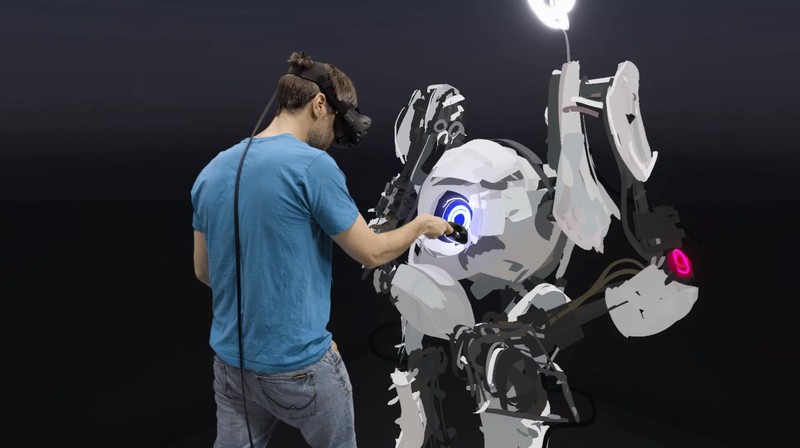
Most of the demonstrations you see for VR are games, because they’re exciting and fun and don’t require a lot of skill or understanding to jump in and out. The same can not be said for VR art software, which is being used by artists all around the world to create anything and everything in a truly unique way. When the canvas is space itself, and you can manipulate the scale of the thing you’re creating, in the hands of a creative individual the end results are often amazing.
This ability to view your creations as an almost physical thing is a big deal, and with the right software you can go the next step and actually print your designs in a 3D Printer.
Read more at VR Heads!
Subscribe to the Android Central newsletter!

Get the best of Android Central in in your inbox, every day!
You have lots of free time, right? Right?! I’m kidding — we know your time is valuable, which means that you may not be able to read everything on the Android Central homepage every day. That’s why we have a newsletter, which summarizes the most important news, editorials and how-tos and sends it to your inbox, every day!
And we respect your time, and your email, so if you decide later that you want to opt out of the newsletter, it’s super easy to do so. Want to get started? Just enter your name and email address below!
Name
Thanks for signing up to the Android Central newsletter!
Thanks! You’re now subscribed to Android Central’s newsletters.
We’re pretty sure you’ll love our daily email, but if you don’t, no harm done — just click the Unsubscribe link at the bottom of any message.
You can also follow everything Android Central on the leading social sites:
- Android Central on Twitter
- Android Central on Facebook
- Android Central on Instagram
- Android Central on YouTube
Best Car Mounts for the Samsung Galaxy S8

Drive safe and keep your eyes on the road and your hands off your phone.
We get it — the Samsung Galaxy S8 and S8+ are beautiful phones and it might be hard to keep your hands off of them. But it’s both dangerous and illegal to use your phone while driving.
Fortunately, if you get a quality car mount, you can have access to your phone to see and answer incoming calls, follow turn-by-turn directions, or control your music without taking your hands off the wheel. We’ve rounded up some of our favorite car mounts on this list, with a wireless charging option if that’s an important feature for you.
- Spigen Style Ring
- iOttie HLCRIO132 Wireless Charging Mount
- Nite Ize Steelie
- EnergyPal HC84K Car Mount
- ProClip Custom Car Mounts
Spigen Style Ring

The Spigen Style Ring is one of those accessories that might look a bit silly from afar, but once you’ve gotten up close and personal with it, you realize just how handy it is.
One of the most convenient features is the included hook mount for your car. Using an adhesive strip, the mount easily sticks to your dash and lets you quickly pop your phone onto the mount via the Style Ring, which then holds your phone firmly in place while allowing you to rotate your phone from portrait to landscape as needed. It also looks super minimalist, like your phone is just floating on your dash.
If you’re alright with sticking a Style Ring to the back of your phone — and trust us, it’s worth it — the Spigen Style Ring is one of the best car mounts you can buy for any phone. It’s also available in a number of different colors so you’re able to find one to match your phone or style.
See at Amazon
iOttie HLCRIO132 Wireless Charging Mount

iOttie’s wireless charging mount is Qi-enabled which lets you keep your Galaxy S8 charged while you’re on the go. Like the non-wireless charging iOttie mount, this mount features iOttie’s great one-touch mounting system that make it easy to mount your phone and remove it quickly.
Attaching the mount to your dash is easy with the two-step locking mechanism that is perfect for any type of dashboard —one step is for smooth surfaces and the second is for textured surfaces. Do not that this mount likely won’t work on leather or vinyl dashboards.
It has a telescopic arm so that you can adjust and orient it in any way you like, and it comes with a Micro-USB cable for supplying power to the wireless charging pad.
See at Amazon
Nite Ize Steelie

The Steelie is unlike any other car mount you’ll find. It uses magnets and a steel ball to keep your phone securely mounted to the dash while giving you the freedom to adjust the viewing angle.
Both the magnet and the ball mount sticks to the back of your phone and your dashboard respectively via 3M adhesive pads, and the magnetic attraction is strong enough to hold your phone in place while giving you the freedom to pop it off when you’ve arrived at your destination.
If you really enjoy the way the Steelie mount works, you can buy other holders and pedestals for your desk, or a car mount that uses your air vents instead if you’d rather not mount something to your dash.
See at Amazon
EnergyPal HC84K Car Mount

This particular mount serves two purposes: it holds your phone and doubles as a car charger. It mounts in your car by plugging into your cigarette lighter with two USB ports available. From the charger, EnergyPal uses an articulating arm to extend upward into a three-sided phone holder. It softly cradles your phone while leaving the bottom open for running your charging cable down to the USB ports.
This unit comes equipped with overcharge protection, so you won’t fry your phone if your car decides to short circuit on you. The gooseneck-style phone holder can be rotated to any orientation, so you can view your Google Maps directions in landscape orientation.
The only downside of this particular mount will be where your lighter plug is placed. If it’s awkwardly placed in your car, then this particular mount may not work out for you, since the neck is only about 5 inches long.
See at Amazon
ProClip Custom Car Mounts

For a completely customized car mount, you’ll want to look into a ProClip mount. They offer a two-part car mount solution that you can customize to fit your specific needs. Firstly, you select your Samsung Galaxy S8 or S8+ from the menu and indicate whether or not you want to factor in the case you use (we’ve linked to the Samsung S8 options below).
Once you’ve decided on your phone holder, you move on to the custom mounting base. Select the kind of base you want (dashboard, pedestal, and so on) and select the vehicle you drive. The base you select should be designed to snap right into the seams of your dashboard or grip the necessary panels so that no sticky pads or bolts are necessary. Eliminate the guessing by customizing every aspect of your car mount and know that it’s going to fit just the way you want it to.
See at ProClip
What car mount do you prefer?
Which style of car mount do you like most? Is there one you love that didn’t make our list here? Let us know in the comments!
Samsung Galaxy S8 and S8+
- Galaxy S8 and S8+ review!
- Galaxy S8 and S8+ specs
- Everything you need to know about the Galaxy S8’s cameras
- Get to know Samsung Bixby
- Join our Galaxy S8 forums
Verizon
AT&T
T-Mobile
Sprint
Why you should consider an unlocked Samsung Galaxy S8 or Galaxy S8+
The Samsung Galaxy S8 and Galaxy S8+ smartphones have been available through the major network providers for a couple of weeks but you can now buy either unlocked and SIM-free.
That means you can pair a shiny, new flagship Samsung phone with any carrier you fancy – even with a Pay As You Go SIM. So here are some great reasons why you should consider an unlocked Samsung Galaxy S8 or Samsung Galaxy S8+.
Freedom to choose your own price plan
When you buy a handset outright and SIM-free it means it is yours to keep whatever, and you are not restricted to a specific time period on a mobile phone contract.
Many networks offer great monthly SIM-only plans, that are able to be cancelled at any time. The next month you can sign up to another.
This is a great way of finding the best plan for you, whether it be more or less data depending on your usage or if a certain network gives you a great connection in your area.
The Samsung Galaxy S8 and Galaxy S8+ smartphones are also fantastic 4G LTE handsets, so you can try different 4G plans to suit the data speeds you want to achieve.
You can even pair them with a Pay As You Go SIM deal, spending only the amount you want to or can afford each month.
Get the latest version of Android when available
Unlocked phones often get the latest version of Android as soon as it is available. Sometimes, carrier variations mean that a new over-the-air operating system upgrade requires network approval and tweaks, which can delay the process a little. An unlocked smartphone doesn’t have such constraints and will get the super Samsung software as soon as the manufacturer can make it available.
Clean and friendly user interface
Along with the latest version of Android, unlocked Samsung Galaxy S8 and S8+ handsets come as the manufacturer intended. There are no extra software add-ons networks sometimes require.
What is the Samsung Trade-In Program?
The Samsung Trade-In Program allows customers purchasing a Samsung Galaxy S8 or Galaxy S8+ to trade in an eligible device and receive an instant trade-in credit toward the purchase of their new Galaxy Smartphone. Currently, Samsung is only accepting trade-in of the following Samsung Galaxy phones: The Galaxy S6, Galaxy S6 Edge, the Galaxy S6 Edge+, the S7 and S7 Edge+, and the Galaxy Note 5.
Pay using PayPal or PayPal Credit
You can buy either the Samsung Galaxy S8 for a one-off fee of $749.99 on Samsung.com using a credit card – all major types are accepted – or you can pay through PayPal. Alternatively, if you have a PayPal Credit account, you can spread the cost of the new phone.
The same applies to the Samsung Galaxy S8+, which is available from $824.99, also at Samsung.com.
You get an incredible phone
Whether you opt for a Samsung Galaxy S8 or Samsung Galaxy S8+ you are getting one of the very best phones around.
Both feature Samsung’s proprietary Infinity Screen, which offers an expansive display that ranges from edge to edge. The Galaxy S8 has a 5.8-inch display, while the Galaxy S8+ has a 6.2-inch equivalent.
The home button on both phones is invisible, with a dedicated sensor hidden under the bottom of the screen.
The Galaxy S8 and S8+ support Mobile HDR Premium picture technology to give amazing colours and contrast to compatible video. And Samsung’s new voice assistant, Bixby, is available on each handset.
You now need to register and sign in for BBC iPlayer: Here’s why
Back in September last year, the BBC announced that a BBC account would eventually be needed to access some of the Beeb’s online services, including iPlayer and iPlayer Radio. That day has come.
From today, Friday 12 May, you will need to sign in with a registered account when accessing BBC services online through the web or via the mobile and tablet applications.
Smart TV BBC iPlayer apps don’t yet require sign up but you’ll be missing out on some features if your TV does allow you to sign in.
Here’s everything you need to know about the new BBC iPlayer sign-in, including how to register for an account and the benefits it brings.
Why do you need to sign-in to use BBC iPlayer?
In September 2016, the BBC outlined changes to its online strategy that included mandatory BBC account registration to use some of its services. BBC iPlayer and BBC iPlayer Radio are two of the main services affected.
The BBC explained then that by getting users to sign-in it could make the iPlayer platform more personalised, offering recommendations to users based on their viewing habits, alerts about specific programming or events and even watch a programme on one device and pick it up on another at the point you left off.
These are features other video streaming services offer but they generally require a subscription fee. The BBC doesn’t require payment beyond the standard television licence fee that you need to pay to watch BBC broadcasting through TV or online. However, it does need to know who is watching the service, otherwise it cannot personalise it.
Critics suggest that it also enables the BBC to find and penalise those not paying their licence fees and while that is possible, with the Beeb itself admitting that email accounts can be cross-referenced to find those who are watching but not paying for the privilege, that isn’t the main reason.
It promises that online surveillance is not being adopted and IP addresses of those watching will not be sought. In future it might implement systems whereby those not paying the licence fee cannot access BBC iPlayer, due to a Government request, but that is still in the discussion phase.
What is a BBC account?
Formerly known as BBC iD, a BBC account has been a feature of bbc.co.uk for some time. You can register on the site and have your bbc.co.uk homepage customised to your own interests, including localised information, such as the weather.
The same account is now being used to sign into iPlayer and other online services.
Is a BBC account free?
A BBC account is totally free to sign up for. You need to pay the TV licence fee, which costs £147 a year, in order to watch BBC iPlayer or any other TV programming in the UK, but that is required to legally watch television in this country, even if you never use iPlayer.
How do I get a BBC account?
All you have to do to get a BBC account is register for one at bbc.co.uk here.
If you already have an account, which you’ve used for the Beeb’s website before, that will work. It doesn’t require all of your personal details, just your date of birth, email address, gender and a password to use when you sign in each time.
You can also flesh out your profile with your name if you like.
One other benefit to having a BBC account is that you can link a child’s profile with your own for parental controls.
Belgian scientists turn polluted air into hydrogen fuel
To save the environment, humanity needs to do two things: reduce harmful gases and produce more energy from “green” energy sources. While plenty of research projects have tried to tackle these independently, few do both at the same time. Scientists from the University of Antwerp and KU Leuven (University of Leuven) in Belgium are developing a device that cleans up the air and generates power at the same time. It relies on a process called ‘heterogeneous photocatalysis,’ which uses light and a special catalyst (typically a semiconductor) to trigger a chemical reaction.
Heterogeneous photocatalysis has been used before to siphon hydrogen from water and nullify gas-based pollutants. Rarely are the two used in combination, however. The research team has solved this with a “photoelectrochemical cell,” which uses a solar cell to produce hydrogen in a similar manner to electrolysis water-splitting. It has two “rooms,” according to Professor Sammy Vergbuggen, separated by a membrane to isolate the two processes. Air is purified on one side with a photoanode, while the hydrogen is generated from “a part of the degradation process” with a cathode tucked behind the solid electrolyte membrane.
It’s the team’s choice of catalyst that makes the machine so effective, Verbuggen says. “In the past, these cells were mostly used to extract hydrogen from water. We have now discovered that this is also possible, and even more efficient, with polluted air,” he added. The hydrogen can be easily stored and used later as fuel. It sounds like a wonder machine, although the team is quick to stress that it’s only a “proof-of-concept” with “ample room for improvement” in its research paper. The current device, for instance, is only a few square centimeters — hardly enough to counterbalance carbon emissions or power the lights in our cities.
Via: Popular Mechanics
Source: KU Leuven
 AIVAnet