


Android O adds support for the Kotlin programming language
There’s certainly a lot to take in with Android O, but one of the bigger announcements for developers concerns the first new programming language added to Android. As revealed on stage at Google I/O 2017, Android O will support the Kotlin programming language.

Google says Kotlin will be fully compatible with the Android runtime, providing a mature and production-ready experience. Google partnered with the JetBrains development team, who introduced Kotlin in 2011, to bring support to Android. Though it might not mean much to those of us who aren’t coding Android apps, Kotlin is a big deal because it’s the first language to be added to Android since its inception.
Daydream support headed to Samsung Galaxy S8, S8+, and LG’s next flagship phone
It looks like Google’s Daydream is headed to even more phones. Revealed on stage at Google I/O, Daydream is not only headed to LG’s next flagship phone, but support for the VR platform will be rolled out to the Samsung Galaxy S8 and S8+ with a software update later this year.

Considering the massive sales Samsung has already seen with the Galaxy S8, that’s good news for millions of S8 users. And yeah, the S8 and S8+ can already be used with Samsung’s Gear VR headset, but more options are never a bad thing.
The LG flagship in question is likely to be the LG V30, due later this year. Given Daydream requires an OLED screen due to its low-resistance display requirement, that virtually guarantees the V30 will sport an OLED display.
In any case, look for a Daydream software update later this summer for the Galaxy S8 and S8+. We’ll have to wait a little longer to learn more about LG’s plans.
How to use Samsung Health to train for a 5k or 10k run

Go from couch to 5k with the help of Samsung Health.
Samsung Health is all about helping you to build better habits, and become a healthier version of yourself. While there are plenty of folks out there who are already in decent shape, and just need some help to keep up those good habits, that certainly isn’t the case for everyone.
That doesn’t mean there is no hope though, and if you’re considering taking up running you can use this app to take you from couch potato to a 10k runner in a matter of weeks. We have the details for you here!
Train for a 5k run with Samsung Health

Inside of the Manage Items panel, you’ll notice all sorts of activities that Samsung Health can help you track and work with. There is one section in particular that may have piqued your interest though, Programs. Samsung Health offers four programs to help you prepare for both a 5k, and a 10k run, even if you currently spend most of your time curled up on the couch.
They have a program for those brand new to distance running, as well as for those who have done it before and want to make sure they’re ready for the next big challenge. When you tap on a program, you’ll then be able to see an overview of exactly what you are jumping into.
During the first week of workouts for Couch to 5K, you won’t even be running.
This includes the number of weeks, the total number of workouts, when the program will begin and end, and even which days of the week are set to be your workout days. If you tap view workout schedule at the bottom right of your phone screen, you can even look at what you’ll be doing on each day that you workout.
This makes it a breeze to ease into getting more active. For those checking out the Couch to 5K program, you’ll see that during your first week of workouts you won’t even be running. Instead you are getting your body used to being more active by walking briskly for about a mile.
Trying to jump into running a mile or more thrre times a week is just a bad idea.
These baby steps are handy because jumping right into trying to run a mile or more three times a week is just a bad idea. Running a 5K or a 10K is more about stamina, than it is about speed, and stamina takes time to build it. It isn’t going to happen overnight, but at the same time you’ll start to build muscle faster than you think.
Once you have added a program to Samsung Health, it will pop up at the top of the Samsung Health home screen, above your goals. This means it’s the absolute first thing that you will see when you open the app, helping to ensure that you don’t conveniently forget about which days you are supposed to be running.
How to add a program to Samsung Health
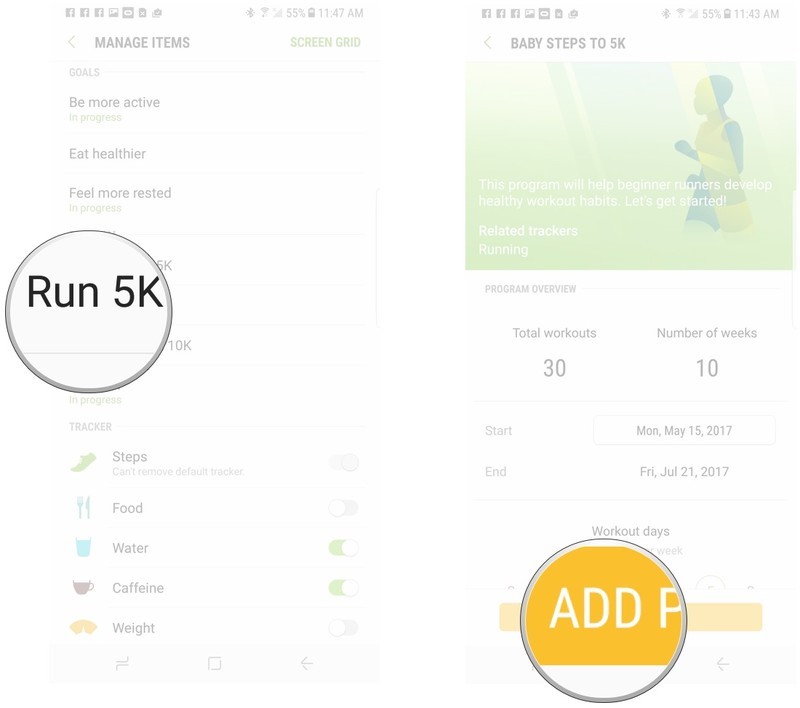
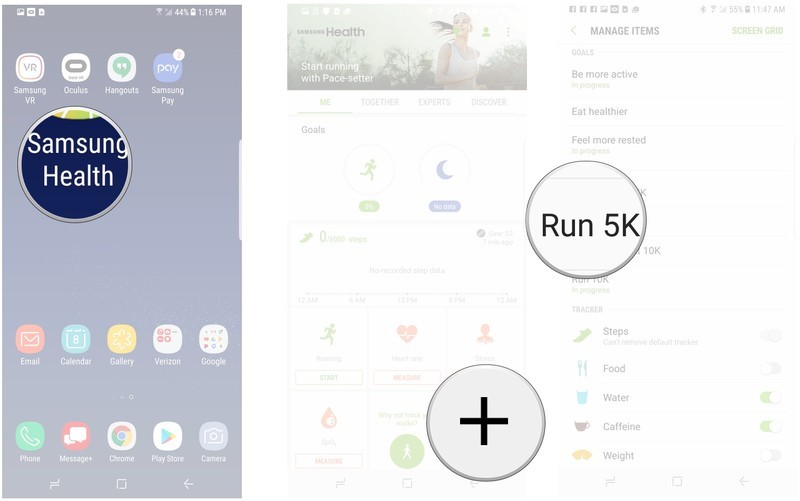
Open Samsung Health.
Tap Manage Items.

Tap the program you are interested in.
Tap Add Program at the bottom of the screen.
How to set your workout days
Open Samsung Health.
Tap Manage Items.
Tap the program you are interested in.
Tap on the three days of the week you want to train on.

How to set a start date for your workout program
Open Samsung Health.
Tap Manage Items.
Tap the program you are interested in.
Tap on the date to the right of Start
Tap to select the date you want to start your workout program.
Tap select to set a date.

How to view your workout schedule
Open Samsung Health.
Tap your workout program.

Tap the green running icon on a date.
Tap View Details at the bottom right of the screen.
Have you used Samsung Health to start training?

Samsung Health provides you a dedicated workout schedule to get ready for running your first 5K. From slowly introducing you to longer and more intensive workouts, to being able to see exactly what you are getting into before you actually jump into getting ready. Have you been considering a 5K? Are you going to be using Samsung Health to train for a 5K? Be sure to let us know about it in the comments below.
Google is taking another stab at the budget segment with Android Go
Android Go will power entry-level devices in emerging markets.
Google hasn’t fared well with its attempt to revolutionize the entry-level segment in emerging markets with Android One, and now the company is taking a different approach. At I/O 2017, Google has launched Android Go, a lightweight version of the OS that’s optimized for low-cost devices.

With Android One, Google worked directly with device partners in finalizing the hardware, while controlling the software updates. Android Go, however, is a purely software undertaking, with Google optimizing the platform to run smoothly on devices with as little as 512MB of RAM.
Currently, you can get a decent phone in India for the equivalent of $100, including at least 2GB of RAM and 16GB storage. Android Go is aimed at devices that cost half as much. The platform will offer heavily-optimized versions of Google apps — including YouTube Go — and Google is rolling out a series of best practices so that developers can optimize their own apps for the platform.
Google is also prioritizing data savings with Android Go. Data Saver mode is baked into the platform, and enabled by default. The quick settings panel has a dashboard that allows you to easily see your data quota, and you’ll also be able to purchase data packs directly from the settings. Finally, Gboard will offer multilingual language support for 22 Indian languages.
There are more Android users in India than in the U.S., which isn’t surprising given that the subcontinent has a population of over 1.3 billion. Hundreds of millions of people are making their way online for the first time, and Google wants to create a better experience for the next billion customers with Android Go.
There will be an Android Go branch of Android O, which will be available for devices with 1GB of RAM. The first batch of phones running the platform will make their debut next year.
Google working with Qualcomm, HTC, and Lenovo on standalone Daydream VR headsets
Google’s Daydream VR platform is breaking free from its phone-based confines with the standalone headsets, Google has revealed. Speaking on stage at Google I/O 2017, Google VP of Virtual Reality Clay Bavor announced it is working with partners to bring standalone Daydream headsets to market.

The standalone headsets, as you’d expect, don’t require any cables, phones, or a PC to work. You simply slip one of the standalone headsets on, and it works. The company says each headset will feature VR-optimized displays, optics, and sensors. “WorldSense” tracking will provide positional tracking to match your location, and dedicated sensors will keep track of the environment around you.
There’s no hardware to check out right now, but Google says it is working with Qualcomm on a reference device, as well as HTC and Lenovo.
Google Play Protect uses machine learning to detect and remove harmful apps
Google Play Protect will use machine learning to scan for malicious apps.
A big theme at this year’s Google I/O has been machine learning. Furthermore, we know that keeping our phones secure is more important than ever. Google uses its powerful machine learning tools within the Google Play Store to scan and verify the apps installed on your phone. If a malicious app is detected, the service will remove it before it causes harm. These services were already in placc, but will soon be more visible for users.

As explained by Stephanie Cuthbertson, Director, Product Management, Android, Google is launching Google Play Protect, a new suite of services that will help secure all your Android devices with Play Store access. Google will continue to use machine learning to scan all installed apps connected to your Google account, searching for harmful apps and remove them from your device if detected.
You will be able to see these service at work on your phone by navigating to the “My apps & games” section of the Google Play Store. This will making security more visible and accessible for all users and will be coming to all Google Play devices.
Google Play Protect is mostly a rebadged version of features that were already there, going back to Verify Apps, supported back to 4.2 — but this new feature will make the process much more visible to users.
Google’s Tango Visual Positioning Service is like an indoor GPS
Google’s Daydream VR platform got a lot of love on the Google I/O stage, but the company has some intriguing plans for augmented reality (AR) as well. That includes what Google is calling its Tango Visual Positioning Service (VPS), a sort of AR GPS for the indoors.

As Google VP of Virtual Reality Clay Bavor noted on stage, AR is most useful when tightly coupled with the real world, which is exactly what Tango VPS does. Working with Google Maps and visual data from the camera, Tango sees features in the environment to give you hyper-local directions guidance.
Where this becomes particularly useful is with something like in-store directions. For example, Google showed off Tango VPS working inside of a Lowe’s, showing how it can monitor the surrounding environment to help a user hone in on a specific product in the store. When combined with an audio interface and Google Lens, Google sees Tango VPS as something that could be incredibly handy as an accessibility feature.
The last year saw more than 82 billion Google Play app installs
Google Play sees a huge uptick in app installs in 2016.
At I/O 2017, Google’s VP of Engineering for Android, Dave Burke, revealed that over 82 billion apps have been installed from Google Play last year, a noticeable uptick from the 65 billion in 2015. Android itself now powers over 2 billion active devices, and is the largest operating system in the world.

Burke also shared details on Android wear, stating that 24 manufacturers have committed to the platform. Similarly, Android Auto is picking up momentum, and will soon be heading to Audi cars.
Google is continuing to gain ground in the education sector with Chromebooks, with over 60% of K-12 laptops sold in the U.S. powered by the platform. With 1 million new activations every month, Android TVs are also on the rise. Google launched a fourth preview for Android Things IoT earlier this week, and a full launch is slated for later this year.
Google’s educational Expeditions are expanding to augmented reality
Having already taken on VR with Google Cardboard, Google has announced that its Expeditions program is expanding to the world of augmented reality (AR). Announced on stage at Google I/O 2017, Expeditions AR will give teachers and students a new way to experience virtual field trips.

Using a Tango phone, students will be able to use expeditions AR to check out 3D models in the classroom. That opens up all kinds of possibilities for visualizing concepts and ideas that are hard to vocalize.
Expeditions VR has already been used by some 2 million students with Google Cardboard, opening up new ways to experience virtual locales and experiences around the world. AR opens up a whole new bag of worms, and it will be interesting to see what experiences come out of it.
Android O: Features, release date and everything you need to know
Following its initial announcements of updates to Photos, Home and Assistant, Google finally got around to Android O at its main I/O 2017 keynote. While there’s not a whole lot new visually in Android O, there’s plenty that will help improve it in very important ways.
- How to watch Google I/O 2017 and what to expect from the Google developer conference
Google updates its mobile operating system every year, and although we’re still a few months away from the next version rolling out to our devices, Google has already pushed out the first beta version for the public, which follows just a few weeks after the initial Developer preview release.
- How to get Android O on your phone right now
Here’s everything you need to know about Android O.
What is Android O?
Android O is the next major update to the Android. It follows the release of Android Nougat from last summer. Android O will also likely be labelled Android 8.0. After all, Android Marshmallow got the numerical designation Android 6.0, and Android Nougat got Android 7.0-7.1. However, older versions of Android, such as Ice Cream Sandwich, Jelly Bean, and KitKat, were all labelled 4.x updates.
What will Android O be called?
Google usually names its major Android OS updates after tasty treats – and in alphabetical order. So far, the company has released Cupcake, Donut, Eclair, Froyo, Gingerbread, Honeycomb, Ice Cream Sandwich, Jelly Bean, KitKat, Lollipop, Marshmallow, and Nougat. It’s safe to say that Google will release Android O in 2017 with a sweet treat-themed name that begins with the letter O.
@dcseifert ???? pic.twitter.com/u8nMzjTIO1
— Hiroshi Lockheimer (@lockheimer) February 20, 2017
Google’s Hiroshi Lockheimer tends to tease Android update names on Twitter, and most recently, he’s been suggesting Android Oreo is the likely candidate for Android O. He may be kidding, though, considering he also tweeted an image of Pocky with the caption #2018. He also teased the name “Nutella” for Android N a number of times, and was plain just trolling everyone.
What does Android O feature?
Google has released the first beta of Android O. It’s now available to download for developers and early adopters.
The key message from Google is that this update is all about “Fluid Experiences” and “Vitals”. That essentially means things overlap, and flow together better on screen, and that it’s far more efficient than Nougat.
Picture-in-picture
The first Android N developer preview from last year had a picture-in-picture mode, like you’d see in Apple’s iPads, but it was for Android TV.
Now, Google has announced this feature will be widely available in Google O for smartphones as a baked in feature. We know that picture-in-picture display – also known as PIP – is coming to phones and tablets, so you can continue watching a video while, for instance, answering a chat in another app.
Launching it is as simple as pressing the home button while a video is playing. The video then becomes a small window on the home screen and you can move it around the screen so that it’s not in the way of what you’re doing. Then continue doing whatever else you need to be doing. When you’re finished, swipe it away, off the screen.
Notification Dots
Google billed Notification Dots as “a new for app developers to indicate that there’s activity in their app”. On the surface, it looks similar to the app badges we’ve seen on the iPhone’s operating system for years. It’s essentially a little dot that appears on the app icons when there’s a notification.
To interact with it, you can long-press on the app icon and a pop-up bubble appears showing the notification, right above where the app icon is on the screen. That means – while you still can – you don’t have to drop down the notification shade from the top of the screen to see your alerts.
And, thankfully, the dots disappear as soon as you dismiss the notifications from the drop-down shade.
Autofill with Google
We use Autofill every day in the Chrome browser, and now Google is bringing a system-wide iteration to Android. If you’ve ever told Google Chrome to save details in browser, you’ll be able to use that information to automatically fill in fields in Android O.
As an example, you can log in to the Twitter account on your phone using the suggested account name and password that Google remembered from your Chrome browsing. It will work for most applications, presuming you opt-in to the feature.
Smart Text Selection
Smart Text Selection is another new feature that’s designed to make daily interactions with your phone less tedious. For instance, if an email contains the name of a restaurant or cafe with more than one word, you can double tap any of the words, and it’ll select the whole name.
More importantly, it can detect entire addresses; so double tapping any part of an address will automatically select the entire thing. What’s more, when it is selected, the system knows it’s an address and offers you the option to navigate there using Maps, along with the usual cut, copy and format options. It’s the same for phone numbers or email addresses, automatically giving you the relevant functions for those.
Google Play Protect
Google has decided with Android O that it wants to make its efforts to keep your phone secure more visible. With O, in the apps and games screen, a small card appears to let you know that it’s scanning all your apps to make sure they don’t contain anything harmful.
OS Optimisations
With Android O, Google has done some serious work on the backend to improve speed. That means, booting up your phone will take far less time than it does currently. With the Pixel, Google claims it boots up more than twice as fast. It will also mean that apps load faster and smoother by default, without any work needed by the developers.
Background limits
To improve the battery life of Android devices, Google plans to reduce the background activity of apps in Android O. Android can now limit how apps function in the background, thus improving a user’s battery life and the device’s interactive performance.
Keyboard navigation
Google added a “reliable, predictable model” for “arrow” and “tab” navigation that helps both developers and users, the company said.
Connectivity
Android O supports Bluetooth audio codecs like the LDAC codec. There’s also a new “Wi-Fi Aware”, which was previously known as Neighbor Awareness Networking. On supported devices, apps and nearby devices can communicate over Wi-Fi without an internet access point.
Support for wider colour gamuts
Android O will make it possible for app developers to take advantage of support for a wide-colour gamut displays. There’s a growing trend for improving displays by making them HDR compatible (both on Android TV, but also in smartphones and tablets). A large component of HDR is supporting wider colour gamuts, which goes hand-in-hand with this aspect of Android O. Google says it’s aimed at imaging apps, however, with support for profiles like AdobeRGB, Pro Photo RGB or DCI-P3 to get the most out of the display.
Are there any Android O rumours?
Thanks to Venture Beat and a few other reports, we know Google has been developing new “assistive features” for Android, and some of those features might make it to the final version of Android O that releases later this year. Here’s a look at what’s rumoured:
Copy Less
The first feature is called Copy Less, and it’s designed to “cut down on the annoyance of copying text from one app and pasting it in another”. It works like this: imagine you and a friend are having a conversation in a chat app and you open Yelp to find a restaurant. When you go back to your conversation and type “it’s at,” the address of the restaurant will appear. You can then add it to the text box.
The feature may end up in Google’s standard-issue Gboard virtual keyboard app or the Android OS itself. Google is also working on ways to enhance certain types of text in messaging apps. So, if someone sends you a message containing an address, Copy Less will allow Android (or maybe Android’s stock Message app) to recognise the text is an address, and tapping on it will open it up Google Maps.
Gesture triggers
Google has reportedly found a way to let people use finger gestures to trigger actions in Android. For instance, when you draw the letter C onscreen, Android will show a short list of recent contacts. Gesture triggers could get delayed or might not ever ship, VentureBeat said.
Can you try Android O beta?
The short answer is yes. If you have a compatible device, you can install the public beta. It’s as simple as enrolling your device in the public beta program and waiting for the OTA update to hit your phone.
- How to get Android O on your phone right now
Google surprised everyone in 2016 by announcing a Developer Preview of Android Nougat in advance of Google I/O 2016. It didn’t roll out the final release to consumers until August 2016. Google had previously announced a new Android OS with new hardware, but that was no longer the case last year, as Android Nougat didn’t land for new hardware until Google released its own Pixel flagships in late 2016.
Just like last year, the Android O Developer Preview was announced ahead of Google I/O, which kicked off on 17 May, and true to form. Since then, the second preview and the first public beta have been released.
For developers, the preview includes an SDK with system images for testing on the Android Emulator, as well as Nexus 5X, Nexus 6P, Nexus Player, Pixel, Pixel XL, and Pixel C devices. Developers building for wearables can now use an emulator for testing Android Wear 2.0 on Android O.
Google offers instructions on how to install the preview on its developer website. It said the developer is in “early days” and cautioned the early developer preview should only be downloaded by developers. Google said it will release updated developer previews in the coming months, and will be “doing a deep dive on all things Android at Google I/O in May,” Google wrote in a blog post.
When is Android O coming to my phone?
The final release of Android O should be available in late summer 2017 – prior to any new hardware releases from Google. At least, if the company follows the same strategy as 2016. Google phones and tablets are the first to get new operating system updates, and security updates are provided for three years following the device’s release.
In other words, Nexus 5X and Nexus 6P will be supported by Google until September 2017. That means they get Android O. Last year’s Pixel and Pixel XL are also on the list of phones to be updated to Android O. If you have a recent flagship phone or tablet, you’ll likely see the update rolled out within the first few months of 2018.
In its marketing of the Moto G4 Plus, Motorola teased that it will receive both Android Nougat and Android O.
 AIVAnet