


Find your phone with these helpful tracking tips
Updated on 5-25-2017 by Simon Hill to account for the fact that Google’s Android Device Manager is now know as Find My Device.
Few items are as precious as one’s phone, and losing it can be a dreadful experience. If you need to track down a cell phone, you’ve come to the right place. Whether you’re simply trying to track the location of your lost phone or you’re a secret agent who needs to gain intel on the whereabouts of a crooked diplomat, we’re here to give you the information you need to get the job done. It’ll be easier if you’re trying to track a smartphone, but there are ways to locate older phones as well, so don’t give up hope if you’re still rocking a first-gen Motorola RAZR — we’ve still got your back.
Tracking your phone before you lose it
If you’re here just to prepare for the day that you lose your phone (which for many is inevitable), then you’re ahead of the game. If you’ve got a smartphone, consider installing the apps listed below
For smartphones..
There are several app choices available for your phone, but also remember to set up any included phone-locating software that comes with your device. That includes Apple’s Find My iPhone, Google’s Find My Device, and Samsung’s Find My Mobile. Head to the next section for more details. If you’re looking for more choice, try these out:
Prey

Prey is free to use for up to three devices, there are paid plans for more, and the service can be used for both computers and phones. After you sign up for the service, you simply sync your devices with it, sit back, and relax. The day that your phone goes missing, all you’ll have to do is find a computer, log into your account, and start tracking.
Prey runs discreetly in the background and won’t track your phone’s location until you tell it to, so there’s no need to worry about your privacy while the phone is in your possession. We recommend this for any Android or iOS device, as well as any Mac, Windows, or Linux PC.
Download now for:
iOS Android
Lookout

Lookout combines security, tracking, and anti-virus/malware protection. There are several interesting features, such as the system recording a phone’s last location right before the battery dies, a chance to backup contact data before a remote erase, and it’ll even snap a photo of any would-be thief and email it to you along with location data. There’s a free two-week trial, after which it’ll cost $3 per month.
Download now for:
iOS Android
Avast Anti-Theft

This app is designed to deal with theft and has a ton of free features. You can remotely lock or wipe your smartphone, or listen remotely to find the thieves who took your device. You can also use it to activate stealth mode on your device, so that the thief doesn’t know Avast is protecting your phone. Avast provides SIM card change notifications, too, and the company offers similar services for Android, Mac, and PC.
Download now for:
Android
Cerberus anti theft

Cerberus is a feature-rich app, and one of the best anti-theft apps you can get. It’s free to try, but you’ll have to pay $6 for a lifetime license. The app offers numerous ways to track and control your smartphone via the website, and even via SMS. You can also sound an alarm, even if your device in silent mode, and lock it with a unique code. Additional features include the ability to record audio remotely and snap photos of anyone trying to use your phone. Location history is just a plus. It also comes with Android Wear support, so alerts will be pushed to your smartwatch should the paired device go out of range.
Download now for:
Android
For non-smartphones…
We recommend using a GPS tracking service. There are many different options out there, but AccuTracking is our current favorite.
AccuTracking

It costs as little as $6 per month (less if you subscribe for a year), and uses GPS to track the location of your phone — and lucky for you, it works with a wide variety of feature phones. As long as your phone is GPS-enabled, this service should do the trick. Most modern cellphones are, so as long as your phone isn’t headed to the museum due to age, you should be fine.
When the day comes that you can’t locate your phone, just log in to AccuTracking’s Web interface from any internet-connected computer and — so long as your phone isn’t dead — it’ll immediately show you its location.
Park and Diamond collapsible bicycle helmet can be stuffed in your pocket
Why it matters to you
People are less likely to wear a helmet if it’s bulky and looks awkward. The Park and Diamond helmet fixes that.
When it comes to bicycle safety, wearing a helmet can be the difference between life and death. However, getting riders to wear a helmet can be a battle of its own. Helmets are bulky, difficult to carry around, and can definitely diminish one’s cool factor.
Rather than looking like a hunk of foam, the Park and Diamond helmet is nearly as thin as a baseball cap while remaining just as protective as something more traditional. When a cyclist is done riding, the helmet can be collapsed, folded, rolled, and stuffed into a water bottle or pocket.
This stylized and portable helmet was developed by Virginia Tech students David Hall and Jordan Klein in response to a serious bike accident. Hall’s sister was riding her bike through the intersection of Park and Diamond streets near the campus when she was the victim of a hit-and-run. She wasn’t wearing a helmet, and she spent four months in a coma. Luckily, she made a full recovery.
Riding without a helmet is a common sight, especially around college towns. People don’t want to be stuck carrying it around after locking the bike up.
“We thought, ‘What does every bike and bag have? A place to store a water bottle. So, if the helmet fits in that space, the rider can always be covered,’” Klein said in a conversation with Red Bull. “Carrying a helmet becomes a seamless part of life.”
Through the Red Bull Launchpad, a collegiate start-up competition, Park and Diamond earned a paid trip to New York to show off the helmet at the TechCrunch Disrupt, one of the top tech conferences in the country. They also were able to receive feedback from Red Bull athlete Austin Horse, one of the fastest courier-style street racers in the world. He believes the helmet has a chance to grow alongside the rising popularity of bike-share programs. If it’s easy to bring along a helmet, more people are likely to grab a bike.
So far, the team has raised about $175,000 to prove out the technology and construct prototypes. They hope to raise $1 million for tooling and production thanks to the buzz they’ve created through Red Bull and TechCrunch.
Want to start saving for your dream vacation? Here are the best budgeting apps to help you
This article was update on 5-23-2017 by Will Nicol to include Mobills and Money Lover.
There’s never a better time than now to start thinking about how you manage your money. It’s hard to know where to start, though, especially if you’re young and have no idea what your Roth IRA or 401K is. Don’t worry, these days there are all sorts of ways to make smart investments and better plan your financial life — all directly on your smartphone. Below are some of our favorite apps for budgeting your money, whether you’re looking to cut back on monthly expenditures or check your balance at a glance.
Personal Capital
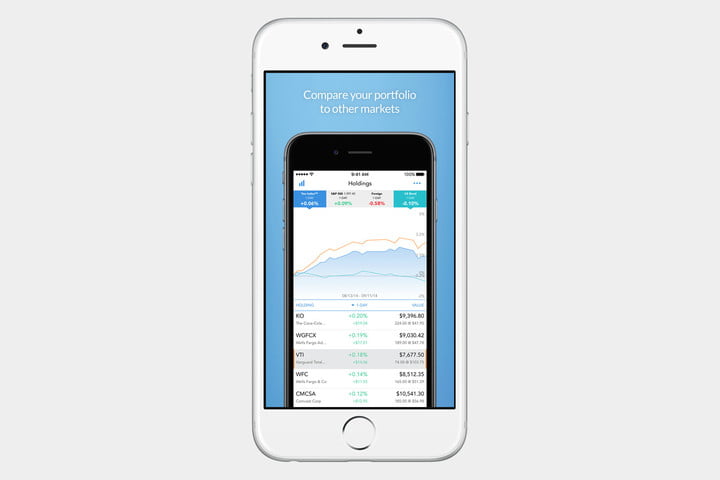
If you want to stay on top of your investments, stocks, retirement savings, and bank accounts as well as budget your spending in a single app, then Personal Capital is the multi-platform financial portal for you. It’s also available online and on wearables. Rather than passively track your net worth across various institutions like Mint, this free app actively compares your stocks’ performance to the markets in real-time, thus allowing you to keep up to speed on your financial health. The app even provides access to a team of professionals who can offer more personalized advice to further grow your nest egg, though their optional services cost extra.
Download now for:
iOS Android
Mint
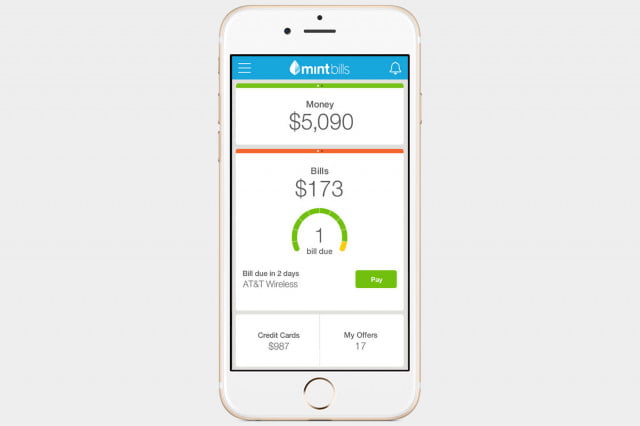
Mint, Intuit’s personal finance app, is a lifesaver for keeping tabs on your overall financial health. This budget app links up with all your different bank accounts, loan accounts, credit cards, and shows them all within a single, streamlined interface. This is especially helpful with transaction searching, so you can figure out which card or account you used to buy something at the department store. The mobile iteration of Mint also syncs with the service’s robust web interface, and offers recommendations for new loan accounts and credit cards based on your habits. These features, combined with the app’s ability to show you upcoming bills at a glance, make it a standout.
Download now for:
iOS Android
Stash
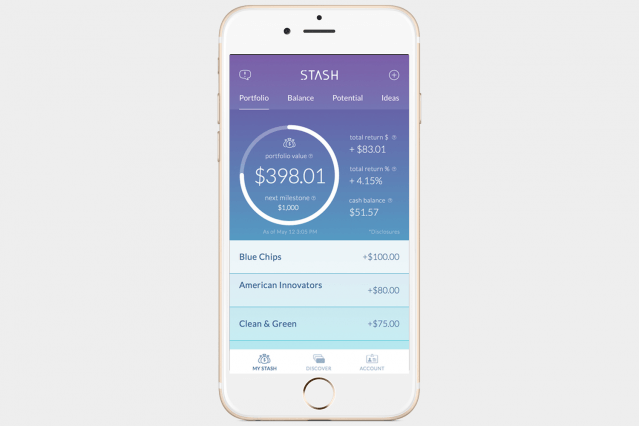
Another spare-change investment app on the horizon is Stash. You can invest in small increments — five dollars at a time, for instance — and across a variety of available portfolios, whether you prefer to do so manually or via automatic payments. The app is also built to accommodate the less-than-savvy investor, and as such, it includes educational tools that encourage you to develop smarter financial habits in the long run, so you can make sound investments and manage your money with aplomb. Stash will even help you discover companies that align with your values, so you can choose firms that are making strides in equality, ecology, and other issues.
Download now for:
iOS Android
Simple
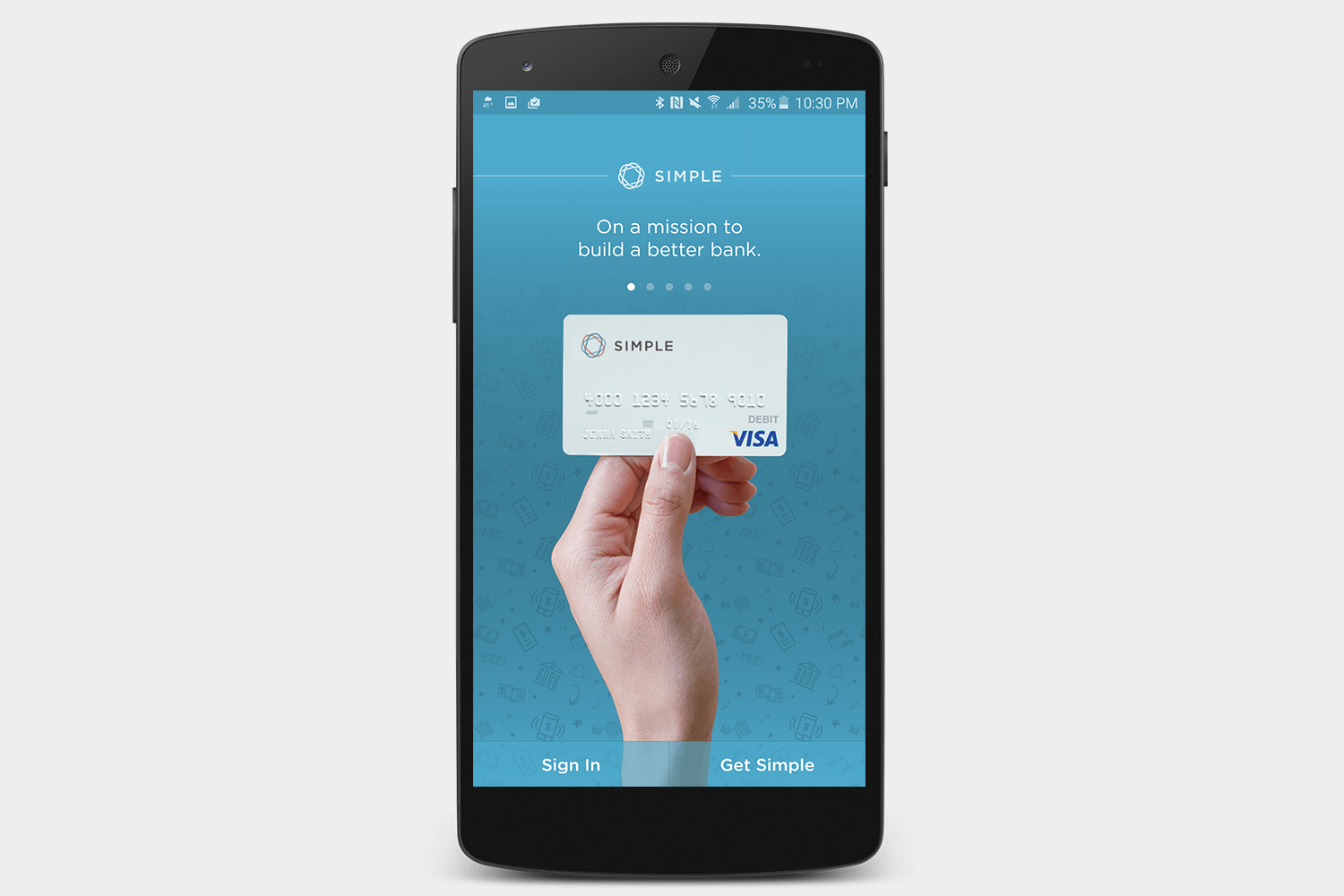
Looking for a bank that works with you to manage your money? Simple is an online bank that includes a bunch of money management tools to help you plan your spending and figure out how to keep within your means. Since it’s a fully fledged bank, you can manage your check deposits and other services directly within the app, and your debit card is free at more than 55,000 ATMs.
Download now for:
iOS Android
Money Lover
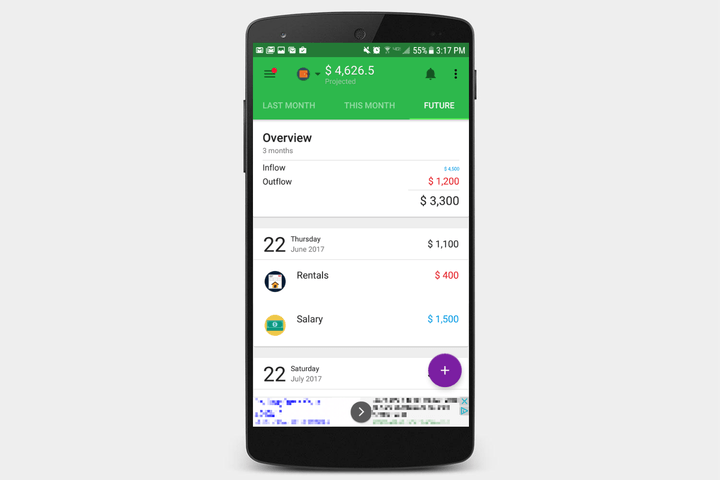
Money Lover is a free app — that comes with a string attached — that offers a clean, colorful interface and plenty of nifty features. This budgeting app allows you to get very granular with your expenses, and automatically categorizes spending on food, drinks, games, and anything else you might buy, with cute pictures to boot. The app also tracks your income and spending in the past, present, and future months, with everything displayed in an easy-to-read arrangement. The biggest problem with Money Lover is that the free version includes some annoying — and often times invasive — ads that clutter the otherwise splendid interface.
Download now for:
iOS Android
Mobills
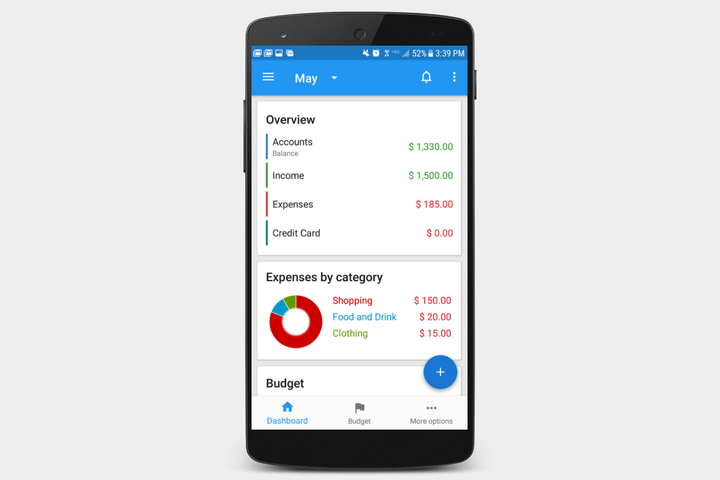
Mobills promises fewer problems, with a simple interface and vibrant display. Oh, and the charts! Did we mention the charts? Mobills offers plenty of them, whether you need a pie chart laying out all your expenses proportionally, a line graph measuring your income over time, or anything other monetary metric you may want to encapsulate in a visual way. It even has a section for you to plan out your dreams, and see how long it will take to achieve them based on the money you set aside each month. The latter is a nice feature, at least until you see how long it will take you to save up for that vintage Westfalia.
Download now for:
iOS Android
Alto Mail adds Alexa support and can now replace your calendar app
Why it matters to you
AOL’s Alto Mail email client now has a built-in calendar, meaning you can organize your day and emails in one app alone.
AOL’s Alto Mail is about to get a whole lot smarter. The company has announced that the app will now have full calendar integration — which means that you’ll now be able to use one single app to manage your emails and calendar. Using the calendar view in the app, you’ll be able to view your day, week, or month — just like you would with a standalone calendar app, but without the need for another calendar-specific app.
“You have personal appointments, business meetings, packages being delivered, emails that need responses, and a flight leaving tonight that you booked months ago,” said Alto General Manager Arlo Rose. “All of this critical information is scattered across multiple personal and business inboxes and calendars, so you’re left hopping around a bunch of apps, trying to piece together your day. Alto puts an end to all of that.”
Alto has had a history of supporting Amazon Alexa and now that Alto has a calendar feature, you’ll be able to ask Alexa on your Echo about events on your calendar. Alto is actually only the second calendar app to support Alexa — with the only other being Google Calendar.
Alto smart hacks
Alto has been adding new features every few months for a while now. Previously, it was announced that the email client will now incorporate a series of “hacks” that can help enhance the email experience for users.
Alto already scans emails for things like flight reservations and package deliveries so it can help surface that information if and when you need it. Alto surfaces that new information in two ways — through the Alto Dashboard and through what Alto is calling “Alto Stacks.” Alto is now looking into ways to incorporate that information into other apps — like Slack and AppleTV.
Already, Alto’s information shows up in the Alto Dashboard, which basically gives a single view across all inboxes, and then surfaces important information in “cards.” With the Slack “hack,” however, users could add a Slack channel as a “stack” inside of Alto, so all your conversations will be in the same place. On the Apple TV, you could bring in things like images from Alto — which would authenticate through a QR code on your Apple TV.
Last but not least is Shop/Book Again, which helps you make a repeat purchase through services like Amazon — straight from Alto. You could also check out your entire shopping history in Alto, and resurface past purchases when you need them. That’s pretty helpful for items that are bought regularly — like diapers, if you’re a parent.
The hacks themselves don’t feature in Alto just yet — but they’re the kind of thing that will start showing up in Alto in the future.
You can also ask Alexa in Amazon’s Echo or Echo Dot for information in your Alto Dashboard. Asking questions like “when is my next flight” will pull results from the Dashboard on the app. You can also ask a more general “what’s in my Dashboard,” to get an overview for the more important emails in Alto.
A few other third-party integrations Alto offers are quite neat. The app will automatically detect which ridesharing service you use, and for cards like flights, you’ll be able to request a car straight from the app. These interactions and integrations aren’t restricted to third parties — the idea is that eventually, you’ll be able to check in for a flight straight from the Dashboard itself.
The team says more third-party integrations from services like IFTTT are on the way.
“We’re looking at anything that makes sense right now,” Rose said. “A great example is receipts — what we want to do is if you need to file expenses, it would be super simple just to be able to tap that overflow menu. We’re looking at Expensify, we’re looking at Concur, and just across the board, what are all the things we can do.”
You can get Alto for yourself on iOS and Android apps now, and it’s also accessible on the web.
Updated on 05-24-2017 by Christian de Looper: Added news of Alto calendar and Alexa integration.
Sony’s massive new E Ink tablet aims to save the planet at your wallet’s expense
Why it matters to you
Looking to save the planet? You could start by cutting down your paper use, especially now that Sony has a new, enormous E Ink tablet on the market.
Replacing paper comes at a high cost — at least initially. Sony has been trying to get you off of tree pulp for quite some time now, but unless you have money to blow, you may not be so enticed by the latest epaper tablet. It’s called the DPT-RP1, and while it promises tons of high-tech features (and yes, the ability to help save the planet), it comes with a high price tag, too — $700.
In many ways, the new tablet is similar to Sony’s DPT-S1 reader, which was first introduced back in April of 2014. That device was Sony’s first foray into the E Ink space, which has been popularized by devices like the Kindle. But Sony allowed users to do much more than read off their original tablets — rather, this was a digital notebook with 4 GB of memory. But plenty has changed in the last three years, and Sony’s new product is capable of a lot more.
The E Ink tablet has a sizable screen to come with its sizable price. At 13.3 inches, you’re basically carrying around a laptop — even if it an extremely thin one. Moreover, the resolution of the tablet is much improved over the last tablet Sony released at 1650 x 2200 pixels (the last one was just 1200 x 1600). And because the screen of the DPT-RP1 is “non-slip,” you ought to be able to write more easily, or at least, more as you would on actual paper.
The tablet is about as thick as 30 sheets of paper, and it weighs less than an ounce. If you hold the new device horizontally, you’ll be able to see two pages side by side, and the tablet also comes with seven preset functions to help you format your note-taking. That means whether you prefer to write on college-ruled paper, in a daily planner, or on a spreadsheet grid, you’ll be able to do so all from one tablet.


Thanks to the stylus that comes with the DPT-RP1, you can seamlessly switch between writing, highlighting, and erasing. And you can write quite a bit — the tablet has an internal memory of 16 GB, which Sony says is the equivalent of up to 10,000 files. If you ever need to share your content (and you probably will), you can do so via a USB cable, Wi-Fi, or Bluetooth. Oh, and there’s also NFC functionality built into the tablet, which is to say you can unlock the device using your smartphone or any other NFC card.
The DPT-RP1 is expected to hit markets in Japan on June 5, and it’s available for pre-order in the U.S. from Amazon and B&H. It could be a game changer for students looking to cut down on the number of notebooks and binders they’re lugging around school. Because really, who needs folders and tabs when you can organize all your notes in a single digital tablet?
Article originally published in April 2017. Updated on 05-24-2017 by Kyle Wiggers: Added information about pre-order availability in the U.S.
Innovative tool teaches braille to students without instructors
Why it matters to you
If successfully funded, the Read Read could bring literacy to a multitude of visually impaired people.
Visually impaired students can now learn to read braille on their own thanks to a new educational tool. Developed by researchers at the Harvard Innovation Lab, the Read Read uses a combination of tactile and audio feedback to teach the braille alphabet topeople who don’t have access to teachers.
Over the last half century, the use of braille has seen a decrease due in part to limited resources, to the point that most blind students in the United States are illiterate. In fact, only about 8.5 percent of blind students get enough focused instruction to learn braille, according to experts. Realizing this, master’s student Alex Tavares looked for a new method and tool for teaching braille that would allow students to do so autonomously.
The Read Read is relatively simple and easy to use, featuring large tiles with braille letters, which students can arrange in slots to form words. When a student places a tile in a slot, an audio file plays the phonetic sound of the letter. When a word is formed, the audio files sound out the word.
A twelve-week trial was recently help at the Perkins School for the Blind where students were given the opportunity to test the device.
“Students were extremely engaged with the Read Read,” Tavares told Digital Trends. “One student, who is blind and on the Autism spectrum, had struggled to learn the first ten letters of the alphabet all year long. Being on the Autism spectrum meant that taking traditional direct instruction was extremely challenging, and left the student unable to learn braille. The immediate audio feedback and exploratory platform provided by the Read Read allowed the student to practice braille with minimal guidance, and learn the first ten letters of the alphabet after only two days, practicing less than twenty minutes each day.”
Tavares and his team are now seeking support and funding for the Read Read on Kickstarter. They hope to raise $273,000 to give the tool to 400 students. Individual devices can also be purchased for $495.
Drones and phones let scientists track — and hopefully save — big cats
Why it matters to you
With just a smartphone, you can help scientists protect some of the world’s most endangered animals.
Drones and smartphones are being used to monitor — and hopefully save — endangered species. Through a project called ConservationFIT, a team of wildlife conservationists from Duke University and the nonprofit WildTrack, are developing algorithms and utilizing drones to analyze footprints and monitor animal movements from the air.
“Species are disappearing at around one-thousand times background rates and if we are to avert a complete catastrophe we must do more to protect those that remain,” Zoe Jewell, told Digital Trends. “However, to do this we need data on the numbers of species — who they are and where they range.”
The FIT in ConservationFIT stands for footprint identification technique, and it enables researchers to identify individuals by their footprints, which have specific details much like a human fingerprint. From these prints, the researchers can discern things like age and sex, while non-invasively tracking and studying an individual over distances.
At launch ConservationFIT will be geared towards cheetahs in Africa, jaguars in the Americas, and snow leopards in Asia.
“These three species were chosen for their iconic status and wide geographical spread,” Jewell said. The team at WildTrack has already honed an algorithm to identify fifteen different species on five continents. “As we progress with algorithms for these species we will be extending the remit of ConservationFIT for other species.”
Though the software will be best utilized by field biologists, the WildTrack team hope to engage citizen scientists as well. “Armed with a smartphone it is possible for anyone who sees a footprint to collect an image of it and upload it to ConservationFIT,” Jewell said. They can do so at iNaturalist.
“Citizen scientists might be amateur naturalists, or tourists, or just ramblers on the weekend,” she added. “They will probably ‘stumble upon’ footprints and collect them opportunistically. This can lead to unexpected discoveries of species in places that biologists might not look. Trackers, on the other hand, are usually expert at finding and identifying footprints.”
Jewell and her team also have plans to use drones to monitor footprint trails from the air, which can offer insight into the movement and patterns of an individual animal. Although following a trail is relatively easy, it’s difficult to detect the exact species that left the print without having a high-resolution camera.
“At the moment we are using small off-the-shelf drones for local reconnaissance missions to detect trails,” she said. “Our aim is to partner with a drone company that can provide hardware capable of carrying high-resolution cameras to focus specifically on the identification of species from trails, and then individuals from footprints.”
Samsung patent application reveals plans for a camera-equipped smartwatch
Why it matters to you
Samsung’s next smartwatch could help you take selfies on the go.
Samsung’s next wearable might have a flexible display built into the wristband — and a camera. A new patent application filed by the Seoul, South Korea-based company shows a smartwatch with an edge-to-edge display that wraps around your wrist.
The patent, filed with the United States Patent and Trademark Office (USPTO) this month, shows a prototypical watch design with wristband screen that shows shortcuts to the watch’s apps — there appear to be icons for an email client, a music player, a photo gallery, and settings.
SamMobile notes that it’s a little like the Edge feature on Samsung’s Galaxy S8, which uses smartphone screen’s curved edges to show notifications, shortcuts, and other content. If the proposed display’s anything like Edge, it would be highly customizable — presumably, you’d be able to swap between incoming messages, favorite contacts, widgets, recent apps, and more.
It’s a different tact than aftermarket accessories like the Rifft CT Band, which feature secondary displays built into the wristband. But the technology’s not unfeasible — Samsung’s Gear S has a curved screen, as does Microsoft’s discontinued Band 2.

Samsung’s prototypical smartwatch has another surprise: A camera. Like the company’s first-generation Gear smartwatch, which had a 2MP camera for wrist-level shots, Samsung’s proposed design features watchband-mounted sensor. But unlike the original Galaxy Gear, it’s described as sporting an optical zoom for higher-quality shots.
This month’s smartwatch patent follows on the heels of Samsung’s April design, which showed a smartwatch with a flexible secondary display on a rotary dial around the outer edge. It, like the wristband display, would show information like the current weather and recently played songs.
Samsung isn’t the only one exploring the idea of a camera-equipped smartwatch. In June, Apple filed a patent for watch with a camera “oriented to allow a users to capture images of nearby objects in the environment, such as a bar code or QR code.” And startup company Arrow’s proposed smartwatch featured a rotating bezel with an 8MP camera, replete with autofocus and HD video recording.
And Apple’s working on electronic watchbands of its own. Rumor has it that the Apple Watch Series 3 — expected to launch this fall — will feature interchangeable “smart bands” with sensors and other components.
But in curved-screen display tech, Samsung might have a leg up on the competition. In February, it filed a patent for a device with a mechanical hinge in the middle and a flexible screen that folds inwards. And at a conference last year in San Francisco the company demonstrated a flexible 5.7-inch, 1080p display that could roll up like a scroll.
Google swings its banhammer at hundreds of profit-seeking Pixel resellers
Why it matters to you
If you purchased or resold a Pixel device originally bought through Project Fi, this may explain some headaches.
Last year, Google banned the accounts of resellers who purchased the Pixel and Pixel XL through Project Fi and tried to flip their phones for a quick profit. Now, current owners of those devices are finding that their IMEIs are getting blacklisted, essentially rendering their phones useless.
A user by the name of Kyle from the site HardOCP shared his story this week, reporting that he woke up one morning to find his Pixel XL was showing no network connectivity and only the ability to make emergency calls. He reached out to his carrier, T-Mobile, which confirmed that his phone had been blacklisted and reported as stolen.
Kyle then got in touch with Swappa, the phone-trading website where he purchased the Pixel, to find out more. A representative responded that “a great number” of Pixel devices had been suffering from similar issues over the previous two days, and directed the customer to contact Google and work with the seller to get to the bottom of things.
So Kyle contacted Google, and while the first individual he chatted with disputed the fact that his Pixel had been blacklisted, he provided the second representative with a screenshot of Swappa’s IMEI check, which showed the device as lost or stolen.
The issue was escalated to the Project Fi team, where it was confirmed that his phone had originally been purchased through the carrier and later resold — but Google was not responsible for the blacklisting.
The IMEI is a phone’s unique identification number, and when a device is reported as lost or stolen to law enforcement, the wireless carrier has the ability to block it, preventing it from ever being used on any network again. At this point, it is still unclear who was responsible for the blacklisting, and whether or not this is related to Google’s attempts to punish resellers who broke its terms of service last fall.
Back in November, The Guardian reported a number of forum members took to money-saving website Dan’s Deals to complain about their Google accounts having been suspended. As such, anything linked to the accounts, such as documents, photos, and emails, became inaccessible. Some users noticed that they lost photos that were saved in Google Photos, with others locked out of other accounts linked to their now-suspended Gmail that have the password reset functionality.
The common thread is that all of these users bought the Pixel and Pixel XL through Project Fi, with the phones then shipped to a reseller in New Hampshire. The reseller paid the users a profit on each phone, with the phones then resold to others. Since there is no sales tax in New Hampshire, it made things that much more enticing.
Unfortunately for the customers, this practice runs afoul of Google’s terms of service, which states, “You may only purchase Devices for your personal use. You may not commercially resell any Device, but you may give the Device as a gift.”
According to Daniel Eleff, who runs Dan’s Deals and originally broke the story, the reseller has been doing this since the original Nexus was released, with this being the first time it has encountered a problem. Google sniffed out the issue and canceled around 500 orders, though other orders still made their way to the reseller.
Google did not respond to a request for comment, though the company sent Eleff a statement on the matter. In short, all of the suspended accounts were reactivated.
“We identified a scheme in which consumers were asked to purchase Pixel devices on behalf of a reseller, who then marked-up the cost of those devices in order to resell them to other customers,” the statement reads. “We prohibit the commercial resale of devices purchased through Project Fi or the Google Store so everyone has an equal opportunity to purchase devices at a fair price. Many of the accounts suspended were created for the sole purpose of this scheme.”
“After investigating the situation, we are restoring access to genuine accounts for customers who are locked out of many Google services the rely on.”
We’ll continue to update this story as more information becomes available, or if any other Pixel owners report similar problems.
Article originally published on 11-18-2016 by Williams Pelegrin. Updated on 05-25-2017 by Adam Ismail: Added new story about IMEI blacklisting.
Verizon’s SmartHub packs 4G LTE and support for smart home devices
Why it matters to you
Have trouble getting Verizon 4G LTE in your house? The carrier’s new SmartHub router might be able to help.
Verizon wants to manage your smart home devices, and it’s rolling out a new hub to seal the deal. On Wednesday, May 25, the carrier announced SmartHub, a new combination Wi-Fi hot spot and smart home controller designed for businesses, homes, and other private places.
Verizon’s cylindrical SmartHub, which comes with a backup battery and a touchscreen that shows data stats and Wi-Fi passwords, isn’t the most sophisticated router on the block, but it strengthens Verizon’s high-speed 4G LTE — including HD Voice and your existing Verizon phone numbers — in any room. And just like Samsung’s SmartThings and Wink, it lets you monitor, program, and control smart home devices from your phone, tablet, or compatible PC.
SmartHub can do more if you subscribe to Verizon Home, Verizon’s new home automation platform. Home customers can unlock internet-connected deadbolts, adjust the brightness and color of smart bulbs, view and record security camera footage, and switch on and off your home’s cooling system. And they can create routines using the SmartHub companion app — you could trigger a Nest thermostat when you’re heading home from work, for example, or have a Kwikset lock unlock the front door when you pull into the driveway.

Verizon’s SmartHub goes on sale on May 26 for $200, or $100 if you agree to a two-year contract. There’s no word on subscription pricing — we’ve reached out to Verizon for clarification, and we’ll update the post when we hear back.
The new hub and service are in some ways Verizon’s second attempt at home automation. Home Monitoring and Control, which Verizon retired in 2014, offered wireline FiOS customers security cameras, connected lighting, door locks, and thermostats for a $90 installation fee and $10 per month on top of their existing bills. Subscribers could use their FiOS TV remotes to control appliances, and set up automation from the Home Monitoring and Control app for smartphones.
But Verizon’s not the only carrier dipping a toe in smart home automation. AT&T’s Digital Life service, which starts at $30 a month, includes a suite of solutions for smartphones, wearables, tablets, computers, and more. Customers can add connected indoor and outdoor cameras, appliances and thermostats, automated locks, and garage door openers for a monthly fee.
And it’s certainly not the only internet provider offering home automation. Time Warner Cable — now Spectrum — offers a remote monitoring and control service in the form of IntelligentHome, which supports wireless door locks, smart lightbulbs, in-wall light switches, and more. Setup fees started at $100, and a monthly subscription cost $40 a month.
 AIVAnet