


Travelex’s fee-free travel Supercard is shutting down
Travellers looking to eliminate exchange fees on purchases abroad will soon have to find another provider after Travelex confirmed its Supercard program is to shut down. The company has written to customers explaining that the service, which allows customers to link up to five credit or debit cards to a standalone Mastercard to avoid currency charges, will close on July 24th.
On its website, Travelex explains that the costs of running the service were “much higher than anticipated.” The company doesn’t elaborate but the statement might suggest that customers weren’t making enough international payments to make the service viable. Customers will be able to access the Supercard app up until October 24th, after which past transactions will no longer be viewable.
Supercard customers have taken to Twitter to lament the closure of the service. During the beta, travellers spent over £1 million in foreign climates before it was suspended on 14 months after its March 2015 launch. After a brief period of downtime, the card returned and the company opened the doors to everyone.
Travelex says that once the cut-off date passes, card holders will need to destroy their Supercard. There are three options: de-magnetise the magnetic strip by running a magnet along it, cut through the electronic chip or simply cut the card so that the details are hard decipher.
Source: Travelex Supercard
Apple Launches App Development Curriculum for U.S. High School and College Students
Apple today announced a new app development curriculum designed for students who want to pursue careers in the fast-growing app economy. The curriculum comes as a free download from the iBooks Store.
Called “App Development with Swift”, the full-year course aims to teach students the elements of app design using Swift, Apple’s increasingly popular programming languages. Apple said students who undertake the course will learn to code and design fully functioning apps, gaining critical job skills in software development and information technology in the process.
Beginning in the fall, six community college systems serving nearly 500,000 students across the United States will be among the first to offer the curriculum, according to Apple. Participating colleges include the Alabama Community College System, Columbus State Community College, Harrisburg Area Community College, Houston Community College, Mesa Community College, and San Mateo Community College District.
“We’ve seen firsthand the impact that coding has on individuals and the US economy as a whole. The app economy and software development are among the fastest-growing job sectors in America and we’re thrilled to be providing educators and students with the tools to learn coding,” said Tim Cook, Apple’s CEO. “Community colleges play a critical role in helping students achieve their dreams, and we hope these courses will open doors for people of all ages and backgrounds to pursue what they love.”
Since its launch in 2014, Swift has been consistently promoted by Apple as ideal for kids who are keen to code, with its gentle learning curve demonstrated in Swift Playgrounds, an app that teaches children how to use the language. The new curriculum includes a comprehensive student guide with playground exercises, mini projects and quizzes, as well as a teachers guide with grading rubrics, solutions code and Keynote presentations.
Swift has become one of the most sought-after skills for freelance developers, experiencing more than 200 percent year-on-year growth, according to one study.
Earlier this month, Apple announced the creation of a $1 billion Advanced Manufacturing Fund focused on creating jobs in the US throughout its supply chain. Apple said the new Swift coding curriculum is another example of its commitment to economic development and will help create even more career opportunities for students across the country.
Tags: education, Swift
Discuss this article in our forums
Google Adds New Family Sharing Features to Calendar, Keep, and Photos
Google expanded the range of family sharing features across a handful of its digital services on Tuesday. The new additions rolled out to Google Calendar, Google Keep, and Google Photos.
Setting up a family group in Google Calendar now automatically generates a “Family Calendar” for users to keep track of group activities like picnics, movie nights, and reunions, all in one place.
The new feature in Google Keep works similarly. Users add a family group as a collaborator for any note, which allows everyone to edit and make changes to shopping lists, to-dos, and the like. A family group icon (a house with a heart at its center) appears next to any note that is shared in this way.
Lastly, in Google Photos, a new “Family Group” option in the Share menu lets users share selected photos with family members.
To use the new family sharing features, a Google Play Family Library needs to be set up. This can be done in the Play Store app: tap the top-left menu icon and select Account -> Family -> Sign up for Family Library.
Users can share apps, games, movies, TV shows, and books purchased from Google Play with up to 5 family members using Google Play Family Library. Each member of the family has to follow the same steps to activate their membership in the group.
Tag: Google Play
Discuss this article in our forums
Nokia 3310 (2017) review: Beyond the hype, what’s this phone like?
For the most part we stick to reviewing smartphones here at Pocket-lint, but when the new 3310 was released, we couldn’t turn down the opportunity to sink our teeth into a phone which plays on the old nostalgia bone. For many of us, the original 3310 was the one phone to get us excited about mobile phones. In its day, it was unmatched for its portability, build quality, battery life and fun. It was irresistible.
Now, 17 years after the first one was released, the phone landscape is very different. Everyone looks to expensive smartphones now, which are essentially portable computers. This begs the question – nostalgia aside – is there any real reason for the new 3310 to exist?
Nokia 3310 (2017) review: Design
- 115.6 x 51 x 12.88mm
- 3310-esque frame around display
- Red, blue, yellow and grey options
From the front, the new 3310 does look something like the old model. Its individual light grey oval buttons are similar, and the colour-matched frame around the screen is the same shape as the original. It even comes in some of the same popular colours: red, navy and yellow. But that’s pretty much where the aesthetic similarities end.
- Nokia 3310 vs Nokia 3310: What’s the difference 17 years on?
A new operating system has meant a new button layout on the front. Below the screen there’s a central square select button surrounded by thin frame which acts as the four-directional pad. That’s flanked by two dual purpose buttons. The right is the power off/hang up button on the bottom, and a button to select which ever option is displayed on the right side of the display. The left is the calling button, and the button to select whatever option is on the left of the display.
Pocket-lint
Compare that to the original, which had one central button, a “C” (back/cancel) button on the left, and the up/down navigation button on the right.
With 17 years of development in the industry, components have become much smaller than they were in 2000 when the first 3310 was launched. That means Nokia has been able to slim down the phone. A lot. The new 3310 is about half the thickness of the original, meaning, it’s about the same thickness as the detachable back cover of the first model.
Perhaps disappointingly, the back cover is nowhere near as easy to remove as the old one. While you’re supposed to be able to just pull it off from the bottom, we couldn’t, and had to resort to sticking a plectrum in where you’re supposed to pull from, and levering it up, away from the back that way. It’s a far cry from being able to just push up from the bottom with a single thumb.
That’s not the biggest change on the back, however. There’s a camera there now, complete with LED flash, right above the Nokia logo in the top third. It’s worth noting, it’s only a 2-megapixel camera and it’s fixed focus, so image quality is poor and it can’t focus on anything close up. Not that it’s a major down point – after all, it’s not likely you’ll be uploading it anywhere. The only way to share the photos is using Bluetooth or MMS.
Perhaps more disappointing however is the lack of internal storage in the phone. We took six photos with the camera and then the phone was completely full. That means, on top of paying £50 for a basic phone, you’ll need to go out and buy a memory card too to save your photos and music to.
Nokia 3310 (2017) review: T9 texting
- Traditional phone number pad
- Predictive T9 texting
- Backlit keys
One thing we’ve all become accustomed to in the era of smartphones is typing on software QWERTY keyboard. The fact is, software keys are more versatile, and predictive text is actually helpful. Swapping back to a T9 keyboard is something of a learning curve.
Pocket-lint
Just like old Nokias, you switch between typing modes using the hash key (yes, it had a function before Twitter – it also had a function before mobile phones, but that’s unimportant). Press it to switch between predictive and non-predictive, upper and lower case typing.
For those who never had to endure the T9 keyboard, the buttons are laid out like a regular phone keyboard, with three letters assigned to nearly all of them. Only 7 and 9 have more; they have four each. In predictive mode, you only need to press each key once for each letter of the word. For instance, type “Pocket” by tapping 7, 6, 2, 5, 3, 8. Providing that “Pocket” is the most used combination of letters from those keys, tapped in that order, it would come up.
If your desired word isn’t the first up, you can cycle through the available options by repeatedly tapping the asterisk key until the one you want appears.
Pocket-lint
We were surprised how quickly we picked up the typing again, although, we were just as frustrated by trying to figure out punctuation as we were back at the turn of the millennium when predictive T9 typing took off. We didn’t quite get back to our early 2000s touch-typing skills, but it wasn’t really much slower than typing away on an iPhone keyboard.
Nokia 3310 (2017) review: Display, software and performance
- 2.4-inch colour display
- 240 x 320 resolution
Those hoping for a monochrome, list-based menu system with basic animations for each section will disappointed by the operating system on the new Nokia 3310. There’s a basic menu of options and apps, and it’s grid based, and colour. It’s shown off on 2.4-inch screen with a 240 x 320 resolution, 167 pixel per inch density panel. That means it has fewer pixels than most modern smartwatches, that’s to say, it’s quite pixellated.
The list of apps includes the usual basic collection. There’s Messaging, Contacts, Photos, Call Log, Camera and – of course – Snake (among others). As a side note: don’t get your hopes up that this version of Snake is the same as the old version. In fact, it’s not really like Snake or Snake II (which was on the original 3310).
There’s also an Opera-based mobile browser, which loads very basic versions of web pages over GPRS. That’s right, no 3G and definitely no 4G LTE here. Still, the chances are that if you wanted to browse the web, you’d probably be looking for a smartphone.
There’s a radio which, like the olden days, requires you to plug in the headset to use as the FM antenna. There’s also music, and the ability to download and install basic apps and games, but those require you to make use of the microSD card slot.
Pocket-lint
Using the phone over a weekend, it soon dawned on us that so many friends and family use either iMessage, Facebook Messenger or WhatsApp for communication, that even a basic phone for basic communication is limited, because, in the modern day, finding people who still use SMS is getting harder.
Still, whatever you use the phone for, you never have to worry that you’ll push it hard enough to drain the battery in a day. There’s no Wi-Fi or high speed mobile internet of any kind, and there’s no large, pixel dense display or powerful processor to drain the battery. That means the 1,200mAh is good for up to 22 hours of solid talktime, and a standby up to 744 hours. That’s one month of pure standby time.
Verdict
For most people, the 3310 isn’t going to be a phone you buy as a primary mobile device. Its functions are way too limited, and considering how cheap smartphones are getting these days, the £50 price point won’t feel cheap enough to make the cost savings tempting either. Even as basic, no-frills device, it feels limited and expensive. You could buy a Nokia 150 – as an example – and save yourself £30.
However, there are those for whom a smartphone does too much. Or perhaps those who like the idea that they can unplug from social media, get away from time-consuming apps and just stick to plain old text and phone calls, even if just for the weekend.
For those people, presuming they have a fond memory of the old model, the new 3310 might be ideal. But those people are few and far between we suspect, and those who do end up buying one will likely do it as a completely impulsive purchase, and the phone will end up disused in a sock drawer for months at a time, or just passed off to a less tech savvy friend or relative.
It’s hard to see the 3310 as anything other than marketing for Nokia, who would love you to know it’s making phones again. People who want a simple, basic phone, can get one much cheaper than this rebooted classic. People who like the nostalgia feels won’t really get those from this phone, and those who really want a 3310 can buy a refurbished original one off eBay for at least half the price of the 2017 model.
We enjoyed unplugging for a few days and only being able to call and text a select few people, but it’s not a perfect phone.
We have opted not to give the Nokia 3310 a score, because in the context of smartphones, allocating a score makes no sense at all. You’ll have to read the words instead.
Meet Stan, a robot that can pick up your car and park it for you
Why it matters to you
If you hate wasting time looking for a place to park — especially at airports — then here’s a potential solution.
Stan is a robot that makes the process of parking your car a whole lot easier. Because it does it for you.
Built by French firm Stanley Robotics, the clever wheel-based contraption takes your vehicle off you at the parking lot entrance before transporting it to an available space.
You can hold on to your car keys, too, because electric-powered Stan carefully lifts your vehicle a short distance off the ground before tootling off to set it down again in the appropriate spot.
A smartphone app lets you book ahead and also notify Stan of when you’ll be coming to collect your car, so when you return you’ll be able to drive off straight from the entrance. To maximize efficiency and ensure no one is ever kept waiting, multiple Stans could operate at a single parking lot.
Stanley Robotics was founded in 2015 and recently received a multi-million-dollar cash injection to further refine its autonomous parking valet, though the system is already up and running at Charles de Gaulle airport in Paris.
Indeed, airport parking is perfect for Stan, and can help to reduce stress for drivers not only when they’re rushing to catch a flight, but also when they return from their trip and want to get home as quickly as possible.
Apart from taking away the hassle of trying to find somewhere to park, another of the system’s notable advantages is that it can save huge amounts of space by double-parking vehicles because it knows exactly when the owner is going to return.
Check out the video above to see how Stan could utterly transform existing airport parking lots, using the available space much more efficiently while offering a quick and easy service for arriving and departing drivers. We just hope airports don’t use Stan as an excuse to start charging the same as they do for regular valet parking.
You can now use Google Opinion Rewards to score Play Store credit in India, Singapore, and Turkey
Get Play Store credit by taking part in surveys.
Google Opinion Rewards is now live in India, Singapore, and Turkey, allowing customers from these markets to participate in surveys to get Play Store credit.
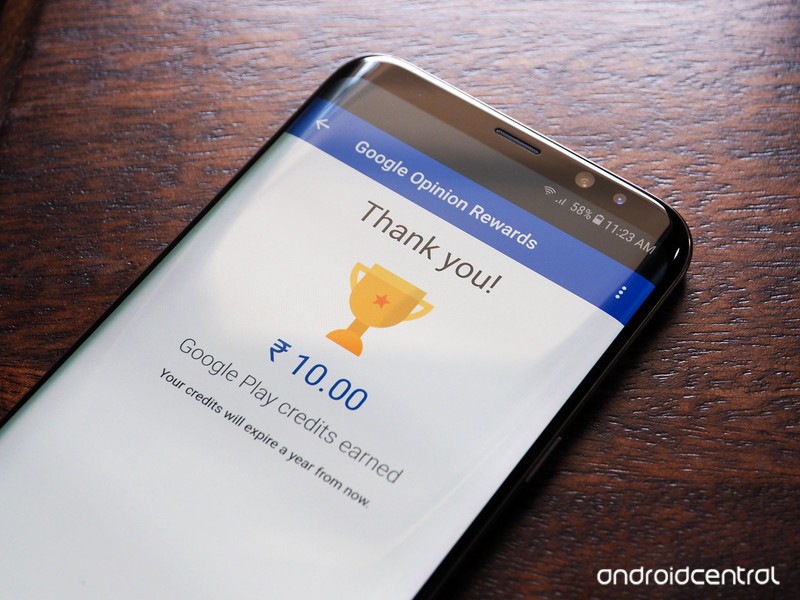
In the U.S., customers get up to $1 in credit for a survey, and in India the payout starts from ₹10. That’s what I received for the survey I completed, but the figure should change based on the survey.
The launch is a win-win as it gives customers the ability to pay for digital content they normally wouldn’t (piracy is rampant in India). The platform is cost-effective for advertisers as well, and gives them valuable feedback from millions of users from various socioeconomic backgrounds.
Eager to get started? Download the app from the Play Store, select your Google account, and answer a few basic questions about yourself.
Let us know how you’re liking Google Opinion Rewards in the comments.
Xiaomi Mi Max 2 may land in India on July 23
Xiaomi’s supersized Mi Max 2 could make its debut in India on July 23.
The Mi Max turned out to be one of Xiaomi’s best phones of 2016, and the company is launching its successor in China tomorrow. According to a tweet sent out by Xiaomi India head Manu Kumar Jain, the Mi Max 2 is coming to India on July 23:
23 Jan: 250K+ #RedmiNote4. 23 Mar: 250K+ #Redmi4A. 23 May: 250K+ #Redmi4 🤘Any suggestions on what we should do on 23rd July? 🤔😎@XiaomiIndia
— Manu Kumar Jain (@manukumarjain) May 24, 2017
Jain doesn’t reference the Mi Max 2 by name, but the launch window lines up with what we’ve seen in the past. The latest rumors suggest the Mi Max 2 will retain a 6.44-inch Full HD display, with the phone powered by a Snapdragon 626 SoC paired with 4GB of RAM, 64GB storage, 12MP camera, 5MP front camera, and a 5000mAh battery. Xiaomi is also rumored to launch a variant powered by the Snapdragon 660.
We’ll have all the details on the Mi Max 2 tomorrow. As for the Mi 6, there’s no word on when the device will be making its debut in India, but we’ll let you know once we hear more.
Moto G5 review: If price is everything, this is the budget phone to buy
The Moto G has long been the king of affordable phones. But things have changed in recent years, with a wider array of choice and price points available. To combat the shifting market, the fifth-generation G-series comes in G5 or larger G5 Plus flavours, slightly bending the established affordable pricing in the case of the latter.
Key to the G5’s appeal is that it’s not bumped up its price point since the previous G4, settling at £169 (an increasing rarity in pending-Brexit UK). What it has done, however, is seriously bump up the build quality, with a removable metal rear now part of the phone’s make-up, giving it a teaser taste of a higher-quality handset. How chic.
Which, ultimately, positions the Moto G5 in a strong position; a spot in the market that’s now barely touched by the competition – such as OnePlus, among others – which have spent the last few years creeping into the mid-range space.
Does that set the stage for the Moto G5 to sweep the board in the budget phone ranks? Well, yes and no. It’s an impressive phone considering the price, but one that its G5 Plus bigger brother inadvertently gives a back hander.
Moto G5 review: Design
- Removable metal rear shell
- 2,800mAh battery
- 144.3 x 73 x 9.5; 144.5g
The design language used in the G5 is more sophisticated than earlier G-series models. The new model does away with fussy vent-like speaker grilles of the G3/G4 models and mimics much of the top-end Moto Z’s style, including its circular-enclosed camera on the rear (thankfully it does so without the litany of various sensor openings in that higher-end model).
Pocket-lint
Then there’s that metal-clad removable back, which actually feels more like plastic but, hey, that’s a box ticked nonetheless. The physical buttons, on the other hand, do feel entirely metal under the fingers – which is something you wouldn’t expect to find on a phone at this budget level.
Size-wise we think Motorola has found the sweet spot too. The later-gen G3 was 5-inches, the G4 expanded to 5.5-inches, with the G5 shrinking back down to a more manageable 5-inch scale again (the G5 Plus is an in-between 5.2-inches). That screen is Full HD resolution too, so no worries in terms of visible quality.
Visually speaking the G5 is a far more accomplished product than previous Moto G products. It’s killed off the G-series’ cutesy image for a more grown-up look overall.
Pocket-lint
The problem, however, comes from the G5 Plus: the larger-scale model doesn’t have a removable back, so it feels more solid and genuinely metal by comparison; and the way everything joins together is simply more elegant. But, of course, you’ll need to find an extra £80 for the Plus – which is almost half the cost of the standard G5 alone.
Lenovo Moto G5 review: Display
- 5-inch IPS LCD screen
- Full HD (1920 x 1080) resolution
When it comes to the display, we think Moto has found the G5’s calling at the 5.0-inch mark. Sure, the G5 Plus is 5.2-inches, but with both phones side-by-side the difference isn’t hugely significant to look at, nor in the hand.
Pocket-lint
The panel’s Full HD (1920 x 1080) resolution is ample for this size, not that it could be called flagship. But there’s no need for any greater number of pixels at this scale, not with the limited processing power and battery capacity that’s available.
As the G5 has an IPS LCD panel the screen delivers decent viewing angles, so there’s none of that contrast fall-off you might have seen on cheaper devices – the kind that would otherwise leave you cocking your head from side to side. We’re yet to see the new Moto C handset and how well that will hold up for its £90 asking price.
As we said of the G5 Plus: compare the G5’s screen to a flagship’s panel and you’ll clearly spot differences, as it’s not as vibrant or punchy. But if you’re buying a £169 phone then you won’t have a cupboard full of comparisons, so you’ll never notice any shortcoming because there’s ample auto-brightness here to cater for all your needs, without things looking dismally drab by any means.
Pocket-lint
Overall, then, the G5’s screen is as good as you could expect at this price point – and we’re particularly pleased it’s not lower-resolution than its bigger brother G5 Plus. There’s enough resolution to watch Netflix HD-quality flicks close-up to your face and, well, that’s one of the great pleasures of life unlocked right there.
Moto G5 review: Fingerprint scanner & One-touch Nav
- Front-faced fingerprint scanner (no NFC)
- Home key can be used to swipe to control device
- Traditional Android home/back/apps soft keys also available
- No NFC for payments (only available in Plus model)
One thing the G5 gets really right is its fingerprint scanner design. The awkward square-shaped one of the G4 has seen its last, with the new pill-shaped format not only great for quick fingerprint-based login, but also for a brand new trick: gesture control (or One-touch Nav as Moto calls it).
This mode takes the usual trio of Android soft keys off the screen – home, back and recent apps – and instead uses gesture input. Swipe to the left of the key to go back; swipe right to open current apps screen; press to return to home screen (or to lock the screen); press-and-hold to activate Google Now launcher.
When first firing-up the G5, fingerprint registration is prompted, but the gesture-control isn’t – you’ll need to dig into the pre-installed Moto app to switch this on. It’s activated along with a mini tutorial to help ease you into its operation, which is certainly helpful and, after a bit of practice, we think it’s among the better gesture-based Android systems that we’ve used.
The only problem, as such, is that gesture controls don’t speed up navigation. We feel that it’s marginally quicker to use the phone with the Android soft keys instead. That said, removing the need to touch the screen as often keeps it cleaner – both in terms of more real estate for content and fewer smeary fingerprints.
Pocket-lint
The fingerprint scanner’s shortcoming is the lack of an associated feature: there’s no NFC (near field communication). That’s a shame, as it’d be handy for mobile payments and data transfer. Its absence is all the more apparent as the UK version of the G5 Plus does have NFC (few other regions offer it), so you’ll need to fork out the extra cash if it’s an essential to your daily life demands.
Moto G5 review: Performance, software and battery
- Qualcomm Snapdragon 430 octa-core processor
- 2GB RAM, 16GB storage (plus microSD card slot)
- Removable 2,800mAh battery
- Android 7.0 operating system
Phone processors are getting oh so powerful these days that you don’t necessarily need to have the best-of-best at the heart of your handset. And if budget is your goal then you’re not likely to expect one for under £170 either.
Pocket-lint
The G5 opts for Qualcomm’s Snapdragon 430 octa-core processor, delivering up to 1.4Ghz from its main four cores, while running other less intensive tasks on its remaining four cores. It’s less powerful than the G5 Plus model and that shows in use: it’s not nearly as snappy, load times are quite a lot longer and games don’t run with the same degree of fluidity. Everything works, however, so it’s not as if the G5 is incapable – again, it’s just knocked back a step by the Plus model.
Perhaps the biggest issue we had was the lack of on-board storage. A 16GB phone just isn’t ample for our needs nowadays, so it’s good to see an easy-access microSD card slot (found behind that rear cover, above the battery). We added 32GB, which Android 7.0 is able to assimilate as if it’s on-board storage – but beware slow card speeds, which the device will forewarn you about.
Speaking of Android 7.0 – which is Google’s almost-latest iteration of its operating system – it acts as a decent base for the G5. Lenovo/Moto don’t muck about too much with the software experience either, leaving it in familiar form without excess pre-installs and gimmicky apps.
Indeed, the Moto app – the very same access point for the aforementioned One-touch Nav control – also includes control for a variety of action-based gestures, which will further help you avoid touching and smearing that screen. There’s double karate chop to activate the torch; twist for a quick camera capture; swipe across the screen to shrink the interface; pick up the device to stop it ringing; or flip the phone over to auto-activate Do Not Disturb. Each of these actions can be switched on or off independently as you choose.
The other thing that Android 7.0 does is let the phone “go to sleep” when it’s not in use. Known as Google Doze, when the phone detects it hasn’t been moved for a given period of time, it will reduce strain on the battery. This will happen overnight, or when the phone’s set down for a couple of hours while you’re busy.
That helps to ensure battery life remains strong – an essential here, given the so-so 2800mAh battery capacity (given the scale of the phone, we’d have thought there’s space for a greater capacity) – and we’ve been seeing a full charge dip to around 20 per cent over 14-hours of use. Fairly good innings, helped along by the limited on-board processor not draining the battery as hard as in a flagship model.
Pocket-lint
Charging is handled via Micro-USB, with the 10W charger meaning fast top-up times. Not quite as quick as the G5 Plus’s 15W TurboCharger, but ample. Avoid low power sockets, though, like those on planes, as it takes many hours to even tickle a little extra juice into the phone.
Lenovo Moto G5 review: Cameras
- 13-megapixel rear camera, f/2.0 lens
- Lacks the G5 Plus’s Dual Autofocus Pixels
- No optical stabilisation present
- 5-megapixel front-facing camera
- Professional mode
Cameras in phones are an increasingly big deal and, well, the G-series has never been all that great. In the G5 there’s a 13-megapixel rear camera, complete with an f/2.0 aperture lens.
Pocket-lint
It all works pretty well – but it’s not as high-performance as the camera in the G5 Plus. The reason for this is fairly simple: the sensor in the G5 lacks Dual Autofocus Pixels, which means when in Pro camera mode you won’t get the light-up autofocus areas quickly snapping subjects into focus.
That’s not the say the G5 camera is a write-off, though, it could just do with a few software nips and tucks to give it some extra oomph. The app is straightforward, so easy to tap-to-focus, and while the touchscreen is responsive enough the focus point isn’t always pinpoint accurate – in particular, it struggles with close-up subjects.
Get the right shot in reasonable to good light and the G5 shows it’s a step ahead of where the earlier G4 left off, however, but it over-sharpensshots so they don’t look great when looking at them in greater detail. And when the light really dips the results aren’t great, becoming smeary and lacking in detail.
Pocket-lint
However, for £169 you couldn’t buy a decent standalone camera – and in the G5 you’re getting a perfectly serviceable one, along with a decent all-round phone, for the one price.
Verdict
With other manufacturers pushing into pricier brackets, the Moto G5 sticks to its £169 guns and delivers a fairly knock-out performance for the price point. It’s more sophisticated to look at than its G4 predecessor, will handle all manner of tasks easily, and has a nifty fingerprint scanner too.
In the same breath, the G5’s issue is that the bigger brother G5 Plus model knocks it down from being the budget king, given the larger handset’s more fluid performance, addition of NFC (in the UK), greater memory (3GB RAM) and storage (32GB), larger battery, better camera and more refined build quality. Sure, it’s £80 more – but if you can scratch together that extra cash then we’d thoroughly recommend you go with the Plus.
If price is everything to you, however, then for a quid shy of £170 there’s nothing else on the market that will offer such a breadth of features and performance. Don’t expect a flagship phone by any means, but the G5 is still royalty among affordable phones.
Alternatives to consider
Pocket-lint
Moto G5 Plus
- £249
For the extra £80 the G5 Plus might not look dramatically different to its smaller brother, but it adds a bunch of small but important features and runs far better too.
Read the full article: Moto G5 Plus review
Pocket-lint
Lenovo P2
- £199
Another from Lenovo’s stable, but also well worth the look. It’s only £30 more than the G5 and comes with a much beefier battery that will last on and on and on. It’s chunkier, too, but the design otherwise isn’t a million miles from the G5’s new sophisticated image.
Read the full article: Lenovo P2 review
Nokia 3310 vs Nokia 3310: What’s the difference 17 years on?
The Nokia 3310 is back from the dead, 17 years later. The iconic phone that was originally launched in 2000 has now been updated. As Nokia looks to launch a new range of Android smartphones, the only phone that people are talking about is this retro wonder, the Nokia 3310.
But how does the new 3310 compare to the old?
Nokia 3310 vs 3310: Design and build
- 2000: 113 x 48 x 22mm, 133g
- 2017: 115.6 x 51 x 12.8mm, 79.6g
Thin is definitely in as the 3310 has been on a crash diet. Nearly half the weight and thickness, but slightly taller and wider. But it’s not just about the weight: the new Nokia 3310 isn’t the chunky monkey that the original version was.
Gone are the squared corners, giving way to softer curves that makes the Nokia 3310 all the more comfortable to hold. At the same time, the profile of the new phone lacks the crude muscularity of the 2000 version. In the year 2000 Putin was elected; in 2017 Trump was elected. Go figure.
The Nokia 3310 is still plastic, but it’s now glossy in red or yellow, or matte in blue or grey. The original was usually blue, but often seen in that grey colour like a bowl of gruel. The 2017 Nokia 3310 has a removable back cover, so you can change it, or to access the battery. The 2000 3310 had Xpress-On covers, sold on every street corner (mostly fake and ill-fitting), meaning limitless customisation.
On a serious note, the button layout across the middle of the new 3310 is entirely different, less linear, but still rather basic.
- Nokia 3310 review: Overpriced nostalgia hit?
Nokia 3310 vs 3310: Display
- 2000: 1.5-inch, 84 x 48 pixels, 65ppi, monochrome LCD
- 2017: 2.4-inch, 240 x 320 pixels, 167ppi, colour LCD
The original Nokia 3310 had a glorious 1.5-inch display that was monochrome. It was just about enough to read SMS messages, make out the numbers you tapped and play Snake. It was flat, offering great contrast, simple and to the point.
The new Nokia 3310 has a huge (by comparison) display at 2.4-inches, stretching over the top half of the phone and curving away to the top. It’s also now colour, so the experience is rather different. The new Nokia 3310 is more like feature phones of the mid-2000s, rather than the pure monochrome glory of the original.
The new display also has polarising layer to aid sunlight visibility.
Nokia 3310 vs 3310: Connectivity
- 2000: Dual band GSM 900/1800MHz
- 2017: Dual band GMS 900/1800MHz, Micro-USB, Bluetooth, 3.5mm jack, microSD, FM radio
In 2000 there were few connections. On the base of the phone was the DC input to charge the phone, but there was no Bluetooth, no Wi-Fi, no nothing.
Fortunately the new Nokia 3310 has moved with the times a bit more. There’s Bluetooth to connect to a headset or your car, there’s Micro-USB for charging – so no need for that bulky charger – the option for microSD to expand the storage, 3.5mm headphone socket to listen to music or the FM radio.
Neither phone offers 3G though, this is strictly 2G all the way, so it’s a phone for talking and texting.
Nokia 3310 vs 3310: Camera
- 2000: Why would you need a camera on a phone?
- 2017: 2-megapixel with LED flash
In 2000 the notion of having a camera on a phone was slightly alien. Why would you need one? There were no social networks, the selfie didn’t exist and you’d never have been able to share it anyway. Ok, so Friends Reunited launched in June 2000, but really?
In 2017, most phones are judged by their cameras. It’s the central feature for many, replacing the cheap compact camera segment with social networks killing the notion of printing photos and making albums.
The new 3310 has a 2MP camera, but the experience is not really worth it. Stick to your iPhone.
Nokia 3310 vs 3310: Battery
- 2000: 900mAh removable battery, 55 hours standby, 2.5 hours talk time
- 2017: 1200mAh removable battery, 31 days standby time, 22 hours talk time
The thing that the original 3310 was known for was battery life. In those days, of course, you weren’t playing Pokemon Go, snapping Insta selfies, hailing Ubers and streaming Spotify music. You just got the occasional message from a friend, or placed a few calls to arrange a night out. But the battery didn’t last forever, it just lasted days.
The new Nokia 3310 battery does almost last forever. With 31 days of standby, you’ll be hard pushed to drain this battery. This is a phone you can probably go away with for a week and not need to worry about the charger.
- Mobile World Congress 2017: Nokia, Sony, Huawei, smartphones and more
Nokia 3310 vs 3310: Snake
- 2000: It was awesome
- 2017: It really isn’t
Snake II was the iconic game of the 3310 and other Nokia phones. Eating apples while sitting on the toilet was about as much fun as anyone had in those days. And fun it was. Snake didn’t need to be any better, it was basic, but it worked.
The 2017 version of Snake isn’t the same thing. It’s been reworked by Gameloft, it’s full colour, smoothly animated and it seems, well, boring. It lack the retro charm of the original, that simple throwback wonderment of that old Snake game.
Nokia 3310 vs 3310: Price
- 2000: £129.99
- 2017: £49
Phones used to be a lot more expensive. The Nokia 3310 was one of the more affordable at £129.99, and for many it was the first mobile phone they had, bringing freedom of communication away from landlines.
In 2017 you get a lot of phone for £129.99. You can get a full-featured entry-level smartphone for that money, so it’s no surprise that the new 3310 is only £49. That’s almost disposable, it’s probably less that you’ll spend on a night out, but it’s still a lot more than you’d pay for the Nokia 105.
The old Nokia 3310 is available on eBay for around £20 refurbished, the new model will be widely available.
Blockstack’s decentralized internet browser uses bitcoin tech
Blockchains used to be exclusively associated with bitcoins until other industries saw how useful the digital distributed ledger can be. Walmart used it to identify expired food that needed to be pulled from its shelves, and at least one shipping company used it to track cargo as it made its way across the ocean. Now a startup called Blockstack is relying on the technology to power its decentralized browser that runs without existing infrastructure. It’s similar to Bittorrent’s Project Maelstrom browser in that it loads websites from peers instead of from servers, which can protect your privacy and safety online.
To note, Blockstack is actually a browser add-on, not a standalone browser: after you install it, you can load it on Chrome (like what I did in the image above), Firefox or Safari. Its current iteration is pretty empty, and unless you’re a hardcore fan of decentralized internet or Silicon Valley, it might not appeal to you just yet. The version you can download today was created with developers in mind, so they can easily make applications for the browser that you can use later.
Co-founder Ryan Shea told Forbes:
“I can’t think of any browser that’s come out that does all these things and allows the developer to just be plugged in and build an application without having to worry about any servers, worry about any databases, worry about building any identity management system. Just 400 lines of code — boom — you have a decentralized Twitter.”
Blockstack plans to release a version for users in six months, though it’ll probably be hard to convince most people that they need an add-on browser on top of their usual browser. If this is something you’d use, though, you can test it out by downloading the Mac or the Linux version from Github — a Windows version will be available in the future.
Source: Blockstack
 AIVAnet