


Razer will sell themed ‘Destiny 2’ versions of four gaming peripherals
Why it matters to you
PC gamers waiting impatiently for Destiny 2 have even more to look forward to this September.
Bungie’s Destiny 2 is right around the corner and the company recently teamed up with Razer to celebrate the franchise’s debut on PC in the form of themed gaming peripherals. These will consist of Destiny 2 versions of the DeathAdder Elite mouse ($70), the Ornata Chroma mechanical keyboard ($100), and the ManO’War Tournament Edition headset ($110). Rounding out this package will be themed Goliathus Speed gaming mouse mats ($15 to $35) in four sizes.
Destiny 2 and Razer’s themed peripherals are slated to arrive on September 8. The hardware specs for the PC version are unknown for the moment, but it will be an exclusive title to Battle.net. That is surprising given the Battle.net platform was built for Blizzard’s PC games like Overwatch, Diablo III, StarCraft II, and World of Warcraft. Then again, Blizzard is a part of Activision which, in turn, is publishing Destiny 2 on the Xbox One, PlayStation 4, and Windows PC.
“Blizzard has an established and successful global internet infrastructure we’ve used for years to support our own games,” Blizzard recently said. “Creating a new network client for Destiny 2 would needlessly extend the development period for the game, so we offered to share our PC platform with our sister companies for this release.”

As for the themed peripherals, the DeathAdder Elite optical mouse has a sensitivity of up to 16,000 dots per inch, an acceleration of up to 450 inches per second, seven programmable buttons, and Razer Chroma lighting supporting 16.8 million colors. It sports an ergonomic right-handed design and textured rubber side grips so that PC gamers don’t lose control during intense action.
Meanwhile, the Ornata Chroma keyboard fuses membrane with mechanical. It provides mid-height keys for faster travel/actuation time, meaning the keys are lower than the typical PC gaming mechanical keyboard but higher than the keys used on chiclet “membrane” keyboards. They are powered by Razer’s Mecha-Membrane switches built to support the soft cushioned touch of a membrane rubber dome mixed with the tactile click of a mechanical switch.
The Tournament Edition of Razer’s ManO’War headset is compatible with all devices with a built-in analog 3.5mm jack. Weighing a mere 0.73 pounds, it is optimized for extended wear and includes a fully retractable microphone and in-line volume controls. The headset is powered by extra-large 50mm custom-tuned drivers residing behind closed ear cups sporting plush “circumaural” padding.
Finally, the Goliathus Speed is a soft gaming mouse mat sold in four sizes: small, medium, large, and extended. They consist of a slick, taut surface designed and optimized for fast but precise mouse movements. They have a cloth-based design backed by an anti-fraying stitched frame and an anti-slip rubber base. The extended version is huge, measuring 36.22 inches across and 11.57 inches deep.
“The team has come up with some cool ways to pair Destiny‘s art and designs with Razer’s high-performance hardware, providing players with new ways to customize their Destiny 2 experience,” said Jim McQuillan, Creative Director, Brand and Marketing at Bungie.
Razer currently doesn’t provide any pricing information about the Destiny 2-themed products. However, there may be a slight price increase to cover licensing.
AMD Radeon Crimson Relive Edition update speeds up ‘Prey’ on the RX 580
Why it matters to you
Go download the latest drivers to get the most out of your Radeon RX 580 8GB investment.
AMD has been making waves lately with their next generation of CPUs and GPUs. The Ryzen CPUs based on the Zen architecture are lauded for their price-performance propositions versus Intel’s Core processors and the next-generation GPU Vega architecture is slowly making its way to the market.
In addition, AMD has pushed some new GPUs based on its older Polaris architecture, including the RX 570 and 580, which offer their own value propositions. The latest Radeon Crimson Relive Edition software is aimed at making sure that the latest GPUs offer the best possible performance.
Specifically, AMD has improved the performance of the popular new first-person shooter Prey in Radeon Crimson Relive Edition version 17.5.2, with a focus on the Radeon RX 580 8GB GPU. That combination should perform up to 4.5 percent better compared to the previous driver version, 17.5.1.
AMD also fixed some issues from previous driver versions. Here is the complete list directly from AMDs release notes:
- Nier: Automata may experience a random hang or application crash after short periods of gameplay.
- Forza Horizon 3 may experience very long map/launch load times.
- The primary display adapter may sometimes appear disabled in Radeon Settings while driving a display from the linked adapter in Multi GPU system configurations.
- Radeon RX 550 series graphics products may experience a system hang when entering sleep or hibernate modes.
No driver update would be complete without some known issues, and this version is no different. Here are the known issues for version 17.5.2 from AMD’s release notes:
- Virtual Super Resolution may fail to enable on some Radeon RX 400 and Radeon RX 500 series graphics products.
- The Display feature in Radeon Settings “GPU Scaling” may not function for some games.
- A few apps may still experience issues with Borderless Fullscreen mode and AMD FreeSync technology if other applications or game launchers are running on the primary screen in the background.
- Counter-Strike: Global Offensive and World of Warcraft may experience flickering or performance issues the first time the game is launched on a system boot with AMD FreeSync technology enabled. Workarounds include exiting and restarting the application or task switching (alt+tab) in and out of the game to fix the issue.
If you’re a Radeon Relive users, then you will want to check out some known issues for that feature as well. As always, you can grab the drivers from AMD’s support site.
Android O’s security features use machine learning to combat malware
Why it matters to you
Android O implements more protections against viruses and malware than any version before it.

The new version of Android O puts security first and foremost. At an I/O developer session on Google’s California campus on Thursday, the search giant detailed the ways the operating system protects against malicious files, viruses, malware, and other threats.
Google’s unifying its security efforts under a new brand — Google Play Security — going forward.
Find My Device, a redesigned and upgraded version of Google’s Android Device Manager, is a part of it. It tracks phones, tablets, and Android Wear devices associated with your Google account and shows stats like battery capacity, Wi-Fi status, and last known location.
Google’s other changes affect the core of Android’s operating system. “Verify Apps,” which scans apps installed from the web and third-party app stores, is enabled by default in Android O.

Android O also packs rollback protection — supported devices won’t boot older, potentially compromised operating systems. And encryption, which has seen a significant uptick in adoption — from 25 percent of devices on Android Marshmallow to 80 percent of devices on Android Nougat, Google said — has been improved.
Google’s implemented “tamper-resistant” hardware with Android O — similar to the chip embedded in credit cards, Android devices support hardware-based security. And Google’s revamped permissions, the systems which allow you to allow or deny apps access to your device’s sensors or personal data.
In Android O, permissions are less abusable by harmful apps. Ransomware apps can no longer obscure the phone’s lock screen or status bay, for example, and cannot use the admin permission to prevent deletion or to change your password.
Project Treble, a framework that makes it easier for hardware manufacturers to update devices quickly, isolates bugs from core parts of the operating system. Exploits are now more difficult for malicious apps to reach, Google said, and the Media Server — the software component of Android N that handles audio and video playback — has been split into individual components with “much tighter” control over permissions.

More than 20 percent of security bugs from the beginning of this year are no longer an issue, Google said.
Google has worked to improve overall app security, too. The Webview renderer, which apps use to put webpages in a readable format, is now isolated from other parts of the app. And Google brought Safe Browsing, the Chrome browser feature which uses machine learning to alert you of potentially harmful web content, to Web View.
Finally, Android O supports FIDO U2F security keys, the hardware-based fobs used to authenticate social media accounts and web logins.
The new security features build on Google’s efforts to harden Android against attackers. Google’s SafetyNet, which rolled out alongside Android Marshmallow last year, verifies that devices are what they claim to be. And Google is using machine learning and statistical analysis to pinpoint potentially harmful apps.
Google’s real-time, cloud-based security platform, consists of more than 20,000 processors, the company said and scans more than 50 billion devices every day.
Asus unveils the ZenFone AR, the world’s slimmest Tango smartphone

Project Tango, Google’s mobile augmented reality platform, made a big splash earlier this year with the Lenovo Phab 2 Pro. The 6-inch leviathan boasted cutting-edge depth-sensing and motion-tracking tech, but it wasn’t perfect. Lenovo’s handset suffered from a subpar camera, middling display, and occasional tracking problems — issues Asus aims to rectify with its first Project Tango attempt, the ZenFone AR.
Pricing and availability
The Asus ZenFone AR will launch on Verizon in the coming months. That news comes courtesy of Google, which confirmed the phone’s release window at its annual I/O developer conference in Mountain View, California.
Unfortunately, Asus has yet to share pricing and availability details — Asus CEO Jerry Chen previously said the ZenFone AR would launch “at a competitive price.” But we’re expecting to learn more this summer.
Powerful hardware
The ZenFone AR’s depth-tracking sensors react to forward, backward, and strafing motions — if you take a step forward in a Tango game, digital objects on the screen stay in perspective as you circle around or duck under them. Project Tango can identify objects in the real world, like a desk in a living room and the walls of a home office. And even more usefully, it can calculate the dimensions of those objects. Want to get a bed’s length? The ZenFone will provide the measurements in your metric of choice.
The ZenFone AR — the latest addition to Asus’ ZenFone line of smartphones — is the “thinnest” and “lightest” device to support Tango, a feat made possible by Asus’s proprietary TriCam system: A 23-megapixel PixelMaster 3.0 primary camera, a motion-tracking camera, and an infrared camera in a configuration that “reduces their footprint within the phone.”

Some of those same sensors enable support for Daydream, Google’s virtual reality environment. It’s the spiritual successor to Google’s debut VR effort, Google Cardboard, but far more holistic in scope: it consists of three components; a headset, a motion controller, and a suite of virtual reality apps including HBO, YouTube, Hulu, Gunjack, Hunters Gate, and more.
It’s worth noting that not all of those components come in the box. Prospective buyers will need to shell out for a Daydream-compatible virtual reality headset like Google’s Daydream View. Rumor has it that the company’s working on an self-contained augmented reality headset with Tango-like tracking technology, but it’s unclear whether it’ll interface with the ZenFone AR.
The rest of the ZenFone AR’s hardware isn’t anything to scoff at. It packs Qualcomm’s Tango-optimized Snapdragon 821 and Adreno 530 graphics card — not the silicon behemoth’s latest processor, granted (that’s the Snapdragon 835), but one that Qualcomm guarantees delivers “VR with high-resolution display, ultra-smooth graphics and high-fidelity sensors for precise head tracking.” And it sports a massive 8GB of RAM (a world’s first), a 5.7-inch WQHD (2,560 x 1,440 pixels) Super AMOLED screen, and a powerful five-magnet speaker system.
Cooling all that hardware is a vapor-cooling system which Asus says enables the CPU and GPU to work “more efficiently,” and delivers “enhanced performance to prevent overheating.”
New Tango apps
The ZenFone AR is launching alongside new augmented reality experiences from Asus.
The smartphone maker partnered with Gap to develop Dressing Room, an augmented reality experience that lets users “try on” the clothing retailer’s latest fashions. And it teamed up with BMW to develop the i Visualizer, a Tango-enabled app that allows users to configure, customize, and walk around BMW’s i3 and i8 cars in a digital environment.
The BMW app is launching in select BMW dealerships in the U.S., U.K., Germany, Norway, Spain, Italy, Poland, Belgium, Netherlands, China, and Japan in the coming weeks. Later this year, it will become more broadly available from the Google Play store.
“In our initial tests, as people entered the car virtually in the app, we saw them ducking down, as if there were really a roof there for them to bang their heads on. It’s a level of detail which means this technology offers the customers real added value,” BMW’s group vice president of sales strategy and future retail said in a press release. “You can list out a car’s features on a sheet of paper or a webpage, but this doesn’t help customers with the emotional connection […] Videos can help, but Tango gives people a much more immersive experience.”
Article originally published in January. Updated on 05-18-2017: Added info about Verizon exclusivity.
Microsoft makes OneNote more consistent across platforms, easier to access
Why it matters to you
You will no longer struggle to remember how to use Microsoft OneNote when you switch devices.
Microsoft OneNote is one of the best note-taking apps around, offering the ability to type, speak, or ink notes across a variety of platforms. Whether you’re running Windows 10, MacOS, iOS, or Android, there is a solid OneNote app available that will leverage the strengths of each device.
So far, however, while OneNote has been quite functional on each platform, it has suffered from a distinct look and feel that can make switching devices a bit jarring. Microsoft is fixing that discrepancy, meaning that if you use the app on different platforms then you should feel more at home on each.
The first big change in the latest versions, at least those for Windows 10, MacOS, iOS, and Android, is a much more consistent user interface that provides the same basic notebook, section, and page layout. Navigating through a notebook will now become second nature on most devices, with the desktop version of OneNote included with Office 2016 being the primary outlier.

The navigation is not only more consistent across devices, it has also been simplified. Namely, all navigation controls are now located on the left-hand side of the app, which makes it easier to move between notes and helps with assistive technologies.

Speaking of enhanced usability for people who need assistance, Microsoft has focused on that aspect of OneNote as well. As Microsoft CEO Satya Nadella put it, “We will focus on designing and building products that our customers love and that are accessible to everyone and built for each of us.” Microsoft shared a video highlighting the ability for users with disabilities be able to navigate through OneNote using only keyboard shortcuts.
You can get the app for Windows 10, MacOS, iOS, and Android. If you have any suggestions for Microsoft, then visit the OneNote UserVoice, and you can get help at Answers.Microsoft.com.
Microsoft makes OneNote more consistent across platforms, easier to access
Why it matters to you
You will no longer struggle to remember how to use Microsoft OneNote when you switch devices.
Microsoft OneNote is one of the best note-taking apps around, offering the ability to type, speak, or ink notes across a variety of platforms. Whether you’re running Windows 10, MacOS, iOS, or Android, there is a solid OneNote app available that will leverage the strengths of each device.
So far, however, while OneNote has been quite functional on each platform, it has suffered from a distinct look and feel that can make switching devices a bit jarring. Microsoft is fixing that discrepancy, meaning that if you use the app on different platforms then you should feel more at home on each.
The first big change in the latest versions, at least those for Windows 10, MacOS, iOS, and Android, is a much more consistent user interface that provides the same basic notebook, section, and page layout. Navigating through a notebook will now become second nature on most devices, with the desktop version of OneNote included with Office 2016 being the primary outlier.

The navigation is not only more consistent across devices, it has also been simplified. Namely, all navigation controls are now located on the left-hand side of the app, which makes it easier to move between notes and helps with assistive technologies.

Speaking of enhanced usability for people who need assistance, Microsoft has focused on that aspect of OneNote as well. As Microsoft CEO Satya Nadella put it, “We will focus on designing and building products that our customers love and that are accessible to everyone and built for each of us.” Microsoft shared a video highlighting the ability for users with disabilities be able to navigate through OneNote using only keyboard shortcuts.
You can get the app for Windows 10, MacOS, iOS, and Android. If you have any suggestions for Microsoft, then visit the OneNote UserVoice, and you can get help at Answers.Microsoft.com.
How Google Assistant on Google Home is outclassing Amazon’s Alexa

When Google launched Assistant, its artificially intelligent Amazon Alexa competitor, it had hardly any third-party support. Amazon had a yearlong head start, but Google Assistant on Google Home has been superior in offering up results to search queries, as well as following up with contextual searches.
You can ask it, “When does Logan come out,” and follow up with, “Give me showtimes,” and Assistant can understand, without needing you to repeat anything about the film Logan.
Now — about six months after Google Home’s debut — Amazon may still have more third-party skills, but Google Assistant is matching and outclassing Alexa in all its other features. Here’s how.
You can type to Google Assistant on Android — and iOS
Google’s big advantage over Amazon lies in the mobile market — one that Amazon is slowly creeping into with Alexa integration in phones like the HTC U11 and the Huawei Mate 9.
Android phones running version 6.0 (Marshmallow) or higher that have the Google app installed can use Google Assistant (as long as they have a 720-pixel or higher resolution screen, and more than 1.5GB of RAM). Around 40 percent of active Android devices run Marshmallow and Nougat, and while not all pass those requirements, it’s safe to say that Assistant is on a lot of devices.

Google just brought Assistant to iOS, which now poses a threat not just for Alexa, but for Apple’s Siri as well. Owners of iPhones now have the chance to use Google’s platform — there’s still a barrier because you can’t use it natively like you can use Siri, but it’s still an option.
You can type to Assistant in the iOS app — which so far has been a prime feature of Google’s Allo messaging app. Say you don’t want to announce a reminder you want to set publicly — you can now just type it up like in Allo. Until now, I’ve defaulted to going to Google Search when I didn’t want to speak out to Assistant, but the ability to type to the Assistant allows me to use it more, improving accessibility. It’s a feature Alexa or Siri have yet to incorporate.
Home calling
Just last week, Amazon introduced the ability to call and text people through Alexa. The catch? You can only call and message people with Echo devices (or through the Amazon Alexa app). Google just trumped it with free hands-free calling to any number in the U.S.
Google said the new home calling feature with Google Home will use a private number, but you can add your own number via the Home app. It uses your Google Contacts to place calls, and what’s neat is that its recently implemented multi-user functionality means if your wife says “call my mother,” Google Home will know she means her mother, and not your mother.
Google Home has officially replaced the landline, in a non-clunky way.
Proactive Assistance
Amazon also recently unveiled the ability to get notifications on your phone from Alexa — but these are just opt-in notifications that aren’t contextual. It can’t tell you traffic’s getting bad before you head to work, for example. Google Assistant on Google Home can.
Google has already been doing this for a long time via Google Now, but the new “Proactive Assistance” features mean Home will light up in a certain pattern — you can then ask Assistant “what’s up,” and it can tell you about a pressing issue like traffic alerts, flight status updates, and reminders.
Scott Hoffman, Google’s vice president of engineering for Assistant, told Digital Trends that the company didn’t want to offer up audible notifications yet, because it didn’t want Google Home to speak if no one was home (which Alexa will do if you opt in). He also said features like Reminders have been a long time coming because Google wanted to figure out a better way to reach the user. Audible notifications will likely come soon, but Google is wary of overloading users with notifications.
Visual responses with Chromecast
Who needs to buy an Amazon Echo Show, when you can get better features with a Google Home and a Chromecast for less money? One of the new updates announced for Google Home is the ability to receive visual responses from Google Assistant — the catch is you need a cast-enabled TV (via a Chromecast or Android TV). This means you can ask Google Assistant to show your calendar, and it will pop up on the TV.
Google will still need to make sure developers jump on this feature to maximize its potential. Amazon’s Echo Show is comparable, and its video calling feature has merits — but you can only video call other Echo Show owners, meaning you have a limited pool of users to engage with in that way.
Shortcuts
One of the more underrated announcements at I/O was how you can easily make voice shortcuts straight from the Google Home app. Feeling down? You can ask Google Assistant on Google Home to cheer you up by playing videos of corgis on your TV. Alexa can only do this with third-party integration from IFTTT. With Google, it’s already live in the Google Home app.
There are a variety of shortcuts you can say to trigger actions with the Google Home, and it’s something Amazon really needs to implement natively.
Within six months, Google has caught up and surpassed Amazon’s Alexa with these new features (some of which haven’t rolled out yet). But this is the beauty of competition — Amazon still has far more Echo owners than Google has Google Home owners, Amazon has a growing user base of Prime Video subscribers;, Amazon is unmatched in its online marketplace, and the company is continually improving its machine-learning capabilities.
The competition is only going to increase as rumors suggest Apple will release an Echo-competitor, and perhaps Microsoft will follow suit with Cortana.
Any car can rock Android Auto or CarPlay with Pioneer’s latest in-dash receivers
Why it matters to you
With the increasing availability of aftermarket receivers, you don’t need a new car with the latest tech to maintain connectivity with your mobile devices.
Pioneer has announced five new in-dash receivers starting at unprecedentedly low prices, making Apple’s CarPlay and Android Auto attainable for a wider array of car owners. The entry-level $400 deck sports CarPlay and upgraded sound, as well as a new single-DIN option for those with classic cars and exotic sports cars. Now virtually any driver who needs to stay connected to their smartphones can do so safely and, more importantly, legally.
15 states in the U.S. currently consider it illegal to so much as touch a smartphone while driving, and 37 states will ban teen drivers from using their smartphones while behind the wheel. And with more widespread legislation on the way, Apple’s CarPlay and Android Auto are becoming increasingly valuable tools for staying connected while on the road.
Until now, unless you purchased a new car with one or both of the technologies already built into the dash, expensive aftermarket in-dash receivers were the only way to retrofit a vehicle into the modern age of smartphone connectivity. Pioneer changed that today with the introduction of the AVH-1330NEX and AVH-1300NEX receivers at $400, along with the step-up AVH-2330NEX and AVH-2300NEX at $500, and the all-new single-DIN AVH-3300NEX with pop-out touchscreen for $600

Pioneer AVH-1330NEX

Pioneer AVH-2330NEX

Pioneer AVH-4201NEX

Pioneer AVH-2330NEX
The AVH-1300NEX with CarPlay only and the AVH-1330NEX with both CarPlay and Android auto are currently the least expensive way to put the two most popular smartphone platforms right into a car’s dashboard. Drivers can use CarPlay to make and receive phone calls, compose and respond to text messages, and access Apple maps for navigation, all using voice control with Siri. You can also access Apple Music, iTunes Radio, Spotify, Pandora, and SiriusXM satellite radio for music playback.
Android Auto provides access to Google Maps, Google Play Music, and all the aforementioned music apps as well, with the promise of direct Waze access coming in the near future. For those who wish to use Waze now, Pioneer makes the popular traffic-based maps app available through its Apps+ feature, putting the app right up on the touchscreen for easy viewing and integrated audio directional instructions.
All of these new receivers will also let drivers create new Pandora stations on the spot based on the song being played, and store up to six stations as presets, much like standard FM Radio. All decks also play CDs and DVDs, and support high-res FLAC file playback up encoded at up to 192kHz/24-bit, though resolution will be scaled down to CD quality.
While the cheaper receivers sport a 6.2-inch display, the step-up AVH-2300NEX and AVH-2330NEX, at $500 each, offer a larger 7-inch display. All this is still packed into a standard double-DIN slot. Sleeker controls and smaller bezels on these receivers also make for a slightly more attractive option.
Finally, the AVH-3300NEX makes a single-DIN installation for those with older cars, classic cars, sports cars and exotic cars a possibility, thanks to a flip-out 7-inch touchscreen. This model, along with the 2330 and 1330, also supports dual cameras, while the rest of the line supports a single back-up camera with boundary lines overlaid on the image.

Pioneer AVH-3300NEX
Drivers will also enjoy an upgrade in sound quality in most cases thanks to Pioneer’s 50-watt X 4 built-in amplifiers, graphic EQ, and fine-tuned balance and fade controls.
For those concerned about replacing the existing system in their car due to its heavy integration with such features as environmental controls and on-screen instrument clusters, Pioneer offers support for a system called iDatalink Maestro, which allows all those features to be uploaded to the new in-dash receivers and displayed on the touchscreen at the touch of a tab. In many cases, this upgrade will allow even more interaction with vehicle controls and informational displays than what was available on the stock display.
Pioneer told Digital Trends the new receivers will be available for purchase July 2017.
Google I/O 2017: Assistant and its AI is what’s next for all the things
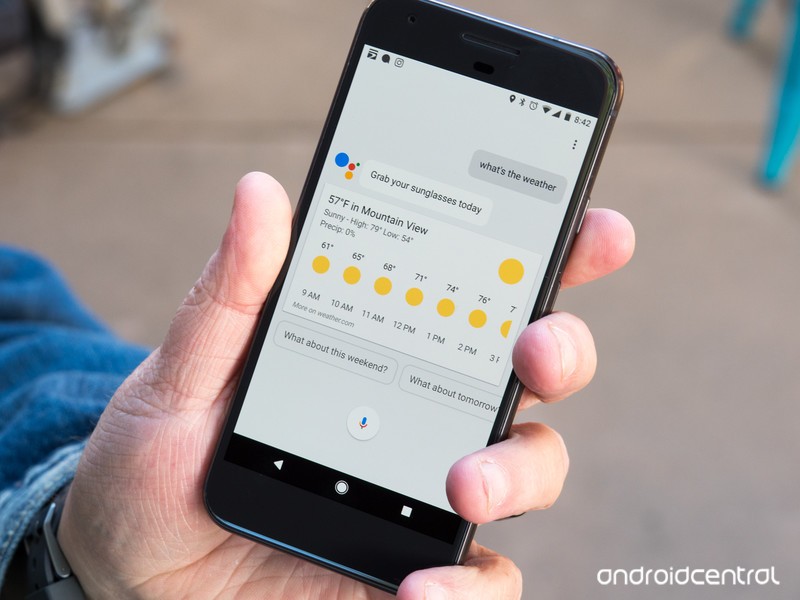
Android O and 2 Billion users is big news, but the real story from I/O 2017 is how everything will become a vessel for Google Assistant and the artificial intelligence that powers it.
Google Assistant looks and feels like the natural successor to Google Now. In a way it is, but it’s also so much more. At Google I/O 2017 we saw that Google Assistant is it’s own platform, and one that might be bigger than anything else Google has built.
The front end for Assistant can be in your phone, or your TV or and appliance on your coffee table or in a cardboard box from an electronic hobbyist magazine. While that might be the way to interact with Assistant, the service itself lives and breathes in the cloud running on Google’s crazy new TensorFlow-powered Google Cloud TPUs.
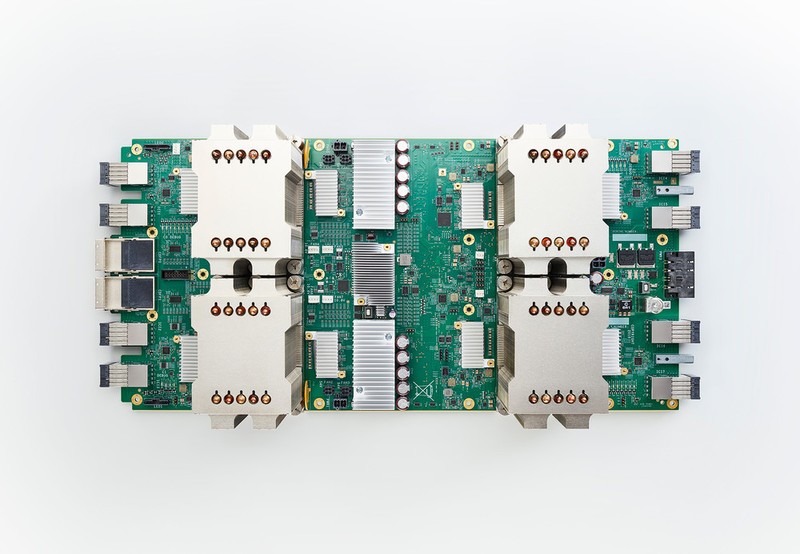 Photo courtesy Google
Assistant first came to our phones inside the Allo app. We had seen the demo ot Google I/O 2016, but at first it was a little disappointing. That’s changed, and here we are a year later with a very smart Assistant that can run anywhere with an internet connection and a Python (development language) interpreter. It’s also branched out into Google Lens, Google Photos, Google Job Search and Tango and Google Play Protect and just about anywhere that a computer’s special blend of logic can work out how, why or where. All of this is tied together into an AI, and it’s Google’s newest platform.
It also has the chance to be Google’s most important and biggest platform, and eventually encompass and devour everything else the company has to offer. We already heard how Google’s neural network was programmed so that it could build it’s own and better neural network, so the functions and features are all there. Everything Google does could benefit from some smarter machinery, and the machinery is ready. Soon we’ll have assistant in our Gmail.
Google literally announced the end of the world. Neural nets that build better neural nets. #IO17 pic.twitter.com/R4V0A85FM1
— Jerry @ I/O 🛴 (@gbhil) May 17, 2017
The most visual, and therefore most exciting, news is in Google Lens. It’s definitely the sleeper hit from I/O 2017, and something that will continue to develop until it becomes part of the everyday experience. The service that can use the power of the cloud to log you onto a Wi-Fi network or tell you about the flower that you’re seeing. We’re looking forwards to seeing Google Lens, but we’re also looking forwards to what Google Lens learns for the next thing.
And that’s what we really saw at I/O 17; the future. Google I/O has slowly moved away from announcements of shiny things and become more about what those things can do, and how it makes a difference. The things we buy that use it will come and go, but what we saw at Google I/O is the start of what’s next.
Google I/O 2017: In pictures
Take a photo tour with us through Google’s spectacular, outdoor developer conference.
Google I/O isn’t all developer talks and coding sessions. Well, the majority of it certainly is, but it’s also a festival speckled with things to see and photograph-worthy shrubbery.
The conference takes place at an outdoor venue in the heart of the Silicon Valley, where it’s cool in the mornings and blazing hot in the afternoon. But this year, Google moved most of what’s worth seeing inside into air conditioned tents. The result makes it a tiny bit harder to find some of the technologies on display, but the pay off is a cooled room where you can easily relax while bonding over what’s new with Google.

Welcome to Google I/O 2017.
The Shoreline Amphitheater, where Google I/O is now held annually, is next-door to Google headquarters and a wildlife reserve. Typically just barren festival grounds, this year Google seems to have added more common areas for people to sit and congregate.

Google is offering a fun scavenger hunt around the I/O fairgrounds. Tap your phone to an NFC terminal four times throughout the week and you can take home one of these Android Pay figurines.


There are two tents devoted just to Android Experiments. The one on the right is called Home Screen Arcade, which lets you play a game of Space Invaders (left) on your Home screen. The one on the right is called Giorgio Cam, and it lets you make a melody by snapping different pictures. It uses Machine Learning to figure out what the object it and then turns those labels into lyrics of a song.


Feel like sending a postcard? You can from Google I/O! Grab one of these and drop it in the mailbox to send to a friend.

There are plenty of areas to sit and relax and grab a beverage — water, Coke, or other — under the shade of a tree or an awning in between sessions or just to escape the oppressive mid-afternoon sun. In case you didn’t realize, it’s very hot in Mountain View.

And then when you’re about to go back to work, you can grab a beverage at the Google Assistant-powered Mocktail kiosk, which will whip up a flavorful fruit drink for you.
There are more photos to come! We’ll be updating this throughout the week.
 AIVAnet