


TP-Link Deco M5 review

Research Center:
TP-Link Deco M5
Mesh networking seemingly emerged in the retail space in the middle of 2016. It ignores the tried-and-true “bubble” wireless coverage offered by a single router, instead incorporating two or more units that can create a web of connectivity. That means there are no dead spots in the home, and since the tech’s debut, we’ve seen many solutions hit the market such as the Luma, Eero, and Google WiFi. Now TP-Link enters the arena with its Deco M5 kit.
Someone is a fan of Star Trek
The Deco M5 kit is a plug-and-play mesh-based networking kit aimed at customers looking for a simple solution that provides Wireless AC coverage in every corner of the house. The system is currently sold as a three-unit kit for $300, and each unit resembles the saucer section of the U.S.S. Enterprise, complete with a small light on top. There’s a raised area on the “back” of each unit that hosts two gigabit Ethernet ports and a Type-C power connector. A vent to dissipate the heat resides across the bottom surface.
Each unit resembles the saucer sections of the U.S.S. Enterprise.
Each unit also comprises of a quad-core processor and four internal antennas, promising throughput speeds of up to 400 megabits per second (Mbps) on the 2.4GHz band and up to 867Mbps on the 5GHz band. That roughly translates into two 200Mbps spatial streams (2.4GHz) and two 433Mbps spatial streams (5GHz).
One small LED on top provides a visual indication of the Deco unit’s status. A solid green means everything is just peachy, red means trouble, orange shows the unit is in the boot process, blinking blue indicates Bluetooth setup readiness, and solid blue confirms a Bluetooth connection. Any of the three Deco units can be used as the wireless network hub, which in turns feeds all data to the remaining two “satellite” units.
What’s the obsession with Bluetooth setups?
Unfortunately, setting up the Deco M5 system was a nightmare. As it turns out, creating a network using Bluetooth is a bad idea, and it’s not the first time we’ve encountered weird Bluetooth setup issues. TP-Link and its competitors should give customers a secondary option of connecting a PC directly to the hub or satellite for manual setup of the network environment, and our experience with the Deco M5 kit serves as a good example.


At the start of the setup process, the LED located on top of the Deco M5 unit pulsed blue, indicating its readiness. We opened the app, tapped on the “Add” button, and swiped through a trio of instruction screens until we reached the “Deco’s LED is Pulsing Blue” stage. We tapped on that and our Android device connected to the Deco M5 unit using Bluetooth. Maybe.
That’s where the fun began. With the mobile device seated next to the Deco M5 unit, the process would stop at any time, such as during the “Found it,” “Testing connection,” or “Optimizing your network” screens. At some point, the app would even suddenly say that the mobile device’s Bluetooth component wasn’t on, when that wasn’t the case at all. Instead, the Deco M5 unit suddenly rebooted itself for some reason as indicated by the orange LED.
Eventually, when all three units created a stable networking environment, the app moved on to the process of creating a network name (SSID) and password. After that, we were greeted with a home screen displaying all three Deco devices, the download and upload speeds, and the number of devices connected to the new network. Yay.
TP-Link Deco M5 Compared To

Zmodo Beam Alert

Netgear Orbi

Synology RT2600AC

Linksys WRT3200ACM

Starry Station

D-Link DIR-869 EXO AC1750

Portal Wi-Fi router

Ubiquiti Amplifi HD

HooToo TripMate Titan

TP-Link AC3150

Linksys EA9500 Max-Stream AC5400

Zyxel NBG6815 AC2200

Netgear Nighthawk X4S

Netgear Nighthawk X8

Google & TP-Link OnHub
Simplicity arrives as a trio
On the home screen, users will see an orange-yellow button in the bottom right corner that leads to a second window packing seven categories: Wi-Fi Settings, Parental Controls, Antivirus, QoS, Advanced, Update Deco, and Managers. Located on the top-left of the home screen is a menu button showing the account name, the available Deco-based networks (if you create more than one), an option to create a new network, a “help” section, and info about the app.
Overall, TP-Link focuses on simplicity with the Deco M5 kit. The only “advanced” options provided to users are changing the internet connection type to match the ISP’s service (dynamic, static, and PPoE), turning the LED off at night, and toggling notifications for monthly reports, new device detection, and firmware updates.
Setting up the Deco M5 system was a nightmare. Network creation over Bluetooth is a bad idea.
On the QoS front, this section enables the user to enforce five pre-set modes: Standard, Gaming, Streaming, Surfing, and Chatting. There’s also a “custom” button, providing users with a second page and five sliders with Low, Normal, and High levels. Each slider addresses Gaming, Streaming, Surfing, Chatting, and Downloading.
Built-in anti-virus functionality is provided in partnership with TrendMicro, enabling the Deco M5 system to scan incoming and outgoing traffic to filter malicious content, prevent intrusions, and prevent infected devices from transmitting sensitive information or “security threats” to other devices outside the network. These three features can be enabled/disabled together with a simple tap, or enabled/disabled individually using a toggle for each.
As for parental controls, this section requires users to create a profile, assign a category to that profile (Child, Pre-Teen, Teen, and Adult), assign a connected device to the profile, and then choose what the Deco network should block. For instance, the Pre-Teen profile automatically blocks adult content, gambling, and social networking. Parents can even block specific media, downloads, games, and so on. There’s means for throttling device access to the network in one, two, and four-hour durations as well.
Moving the load from a shuttle craft to a Galaxy-glass ship
One of the Deco kit’s unique “secret” features is that users can move its Deco-to-Deco communication to a wired Ethernet connection. Kits like the Deco M5 and Eero are meant for whole-house coverage, but they share the same 5GHz connection as their client wireless devices, thus creating more congestion. That can put a damper on performance due to congested radio airspace.
Theoretically, pushing the unit-to-unit communication to wired Ethernet provides a private backroad at up to 1Gbps, leaving more 5GHz space for wireless client devices to breathe. It speeds up the data transmissions passed from the wireless client device to the internet because the Deco-to-modem highway is wide open.
What we learned by moving the backend to Ethernet is that owners can use the Deco M5 kit in several ways. First, users can daisy-chain the hub and satellite units together for Deco-to-Deco communication using the two gigabit Ethernet ports mounted on the back. Meanwhile, the wireless client devices connected to the network fight for attention on the mule-infested 5GHz space.
While this might be a technical advantage, it also has a problem. No one wants to drape Ethernet cables throughout their house. A network of powerline Ethernet adapters might solve that. However, such work-arounds increase the complexity of the setup, and defeat the point of a simple mesh network.
And there’s another annoyance. Deco M5 units must be completely reconfigured to use a 5GHz or Ethernet-based backend. They don’t automatically switch to 5GHz when users disconnect the Ethernet cord. That means if you’re moving to Ethernet, each unit must be reset by pressing the embedded button on the bottom with a paper clip. After that, you must endure the whole Bluetooth process again.
Someone broke the warp drive
At the time of this review, the Android-based Samsung Galaxy S7 Edge saw a maximum throughput speed of 433Mbps. Again, we know each Deco M5 unit is capable of two 2.4GHz streams at 200Mbps each and two 5GHz streams at 433Mbps each. Given the 433Mbps cap we experienced with this phone, we suspect the Deco M5 units were sending and receiving data through a single 433Mbps spatial stream. For the record, the Samsung Galaxy S7 Edge is a 2×2 device, and can currently reach throughput speeds of around 750Mbps when connected to the competing Eero mesh networking kit, using two spatial streams.
That said, here are the performance numbers for Windows 10 Creator’s Update using the default settings of iperf (85KB TCP window size), the default settings of the Deco M5, an AMD desktop with a gigabit LAN card (server), and a recent build of the Alienware 17 R4 laptop (client) with a Killer Wireless 1535 component using Qualcomm’s v12.0.0.296 driver (2/2017).
Interval
Bandwidth (Deco M5)
Bandwidth (Eero)
0.0- 1.0 sec
64.8Mbps
125Mbps
1.0- 2.0 sec
81.2Mbps
139Mbps
2.0- 3.0 sec
68.2Mbps
141Mbps
3.0- 4.0 sec
81.1Mbps
134Mbps
4.0- 5.0 sec
76.7Mbps
131Mbps
5.0- 6.0 sec
87.0Mbps
130Mbps
6.0- 7.0 sec
77.5Mbps
129Mbps
7.0- 8.0 sec
86.4Mbps
126Mbps
8.0- 9.0 sec
73.3Mbps
135Mbps
9.0- 10.0 sec
71.5Mbps
141Mbps
The numbers are clear. Compared to Eero, which is one of our favorite recent routers, the Deco falls short. It never reaches bandwidth remotely close to the Eero.
We made one additional attempt to see throughput speeds on Windows 10 higher than 130Mbps, by pulling out an older Lenovo laptop with a dual-band Wireless N USB adapter from Trendnet (TEW-804UB). This excludes the possibility of a limitation in the Alienware laptop used for the test above. In a 10-second test, the Lenovo laptop saw even slower speeds between 26.7Mbps and 32.4Mbps.
We also have Android to consider, which tells a similar tale. As previously stated, the Samsung Galaxy S7 Edge only achieved 5GHz band speeds of up to 433Mbps on the Deco M5 network, even though it almost hits the theoretical maximum speed when connected to Eero. That said, there’s no sense of even testing older Android devices if a new smartphone with a Wireless AC 2×2 component can’t move beyond the 433Mbps limit.
Warranty
Customers must dig deep into TP-Link’s website to uncover the company’s Warranty & RMA Policy here. The warranty lasts for two years after purchase, and covers “failures due to defects in material or workmanship on devices, antennas and accessories.” As always, a proof of purchase and a serial number is required to receive any services under the warranty.
Our Take
TP-Link’s entry into the mesh networking industry may need more time to bake. We saw a portion of this before the product went live, but now that it’s in the hands of consumers, there appears to be plenty of kinks that still need to be ironed out. While the Wireless AC performance falls within the bottom half of the normal range, it falls short of what we saw with the Eero system. Don’t even get us started with the Bluetooth setup process.
Is there a better alternative?
The DT Accessory Pack
TP-Link AV1200 Powerline Adapter
$59.99
TP-Link 5-Port Gigabit Ethernet Switch
$19.11
TP-Link AV1200 Powerline Adapter w/ Power Outlet Pass-through
$74.99
TP-Link AC1200 Wireless Dual Band USB Adapter
$28.50
In our most recent testing, the Eero setup is a performance champ when it comes to Wireless AC connectivity. It’s stellar on Android, and its numbers are in the higher range on Windows 10 PCs with a 2×2 Wireless AC component. Netgrear’s Orbi did rather well too although technically it’s not a mesh-based networking kit. Our overall favorite remains the Securifi Almond 3, which blends reasonable performance with strong smart home functionality.
How long will it last?
Mesh networking is here to stay for now, but hopefully companies will see that using Bluetooth to setup a network is just a horrible idea. What happened to the days of connecting directly to a router/hub wirelessly to set up the system? Why must mobile devices be the primary client for establishing a network? Customers who purchase the Deco M5 kit may wonder the same thing.
Should you buy it?
At this point, we can’t recommend this product. There are better performing, less aggravating, more robust solutions on the market today. Sure, the built-in anti-virus aspect is cool, but it’s outshined by the setup woes and performance issues. Perhaps TP-Link can clean up the outstanding issues with firmware and app updates.
Fiat Chrysler software error leads to a massive truck recall
Fiat Chrysler is currently in the midst of notifying over a million people that they need to turn in the trucks they bought from the company due to a potentially dangerous software error. The automaker has announced a massive recall affecting 1.02 million 2013 to 2016 Ram 1500 and 2500, as well as 2014 to 2016 Ram 3500 pickups in the US. Chrysler’s problem goes beyond the US: it’s also recalling 216,007 vehicles in Canada, 21,668 in Mexico and 21,530 outside North America altogether. In the notification published on its website, the company admitted that it’s “aware of one fatality, two injuries and two accidents that may be related” to its software troubles.
According to the details the automaker released, the US National Highway Traffic Safety Administration began looking into its vehicles after hearing of a lawsuit wherein the air bags of one of its trucks failed to deploy in the midst of a rollover crash. Upon conducting its own investigation, Chrysler found that some of its models might generate an erroneous code when it rolls over after suffering a significant underbody impact, such as hitting large pieces of debris. That code could temporarily disable the side air bag and the mechanism that locks the seat belt in place, putting people’s lives in danger.
The company says owners can reset the seatbelt system if the warning sign lights up by turning the vehicle on and off. However, it encourages everyone to follow the instructions on the retail notices they’re sending out to be absolutely safe. Back in 2015, Fiat Chrysler also had to recall 1.4 million vehicles after it was revealed that people could hack into some of its models’ systems to kill the engine and disable the brakes. It’s far from the only automaker that’s had to issue a recall over software issues, though. General Motors had to take back 4.3 million vehicles last year because of a software defect in its airbag system, while Toyota recalled 1.9 million Prius hybrids in 2014 due to a glitch that causes overheating.
Source: Reuters, Fiat Chrysler Automobiles
Amazon, get ready for all the scrutiny you never wanted

It’s easy to see every mistake now, Amazon.
Welcome to the big leagues, Amazon. After just three days of people being able to use Alexa Calling and Messaging on the Echos we already have, you’ve met the first of many public rebukings when it comes to user privacy. And there will probably be plenty more.
The internet loves it when the big guy makes a mistake.
Amazon has always been one of those companies that collects gigantic mountains of user data anywhere and everywhere it can; It was never really that much different from the Facebooks and Googles of the world in that regard. But because most people only think of Amazon as that place where you can buy the thing you really need and have it overnighted to the front door, it has escaped much of the outrage over how it treats that data. Most people never noticed how you would see fine-tuned recommendations from Amazon all over the web if you had an account, or if we did we didn’t much care because seeing things you like is better than seeing ads for things you don’t. But now things will be very different.
When you move from a device that’s always listening to every word but is there to tell you the whether to buy a box of Tide to a full-fledged communication platform, the things you do get scrutinized much more closely. Things like not being able to block incoming calls made on your new platform seem more important than building a customer profile that tells Amazon when your kid’s birthday is because that’s information you let Amazon have. In 15 years, when our kids have their own Amazon accounts and there’s a full history of all the things they liked since they were babies, we might freak out a little bit, but right here and right now we can see that Amazon lets “anyone into our living room” through Alexa Calling. When the Echo Show finds its way into everyone’s house and a face gets attached to those calls, there will be more freakouts. Promise.

I’m not discounting the attention this is getting. Yes, this is no different than when we used to have real paper phone books with our names and addresses in them, but Ma Bell gave us an opt out. Amazon needs to do the same and add a “block unknown caller” setting. I’ll bet it is doing it right now and we’ll see it soon. And to be perfectly honest, having any company get more attention when it comes to privacy is a good thing because it makes everyone pay closer attention. Facebook, Google, Microsoft and every other company that routinely collects copious amounts of data and offers services that use it are paying attention. They don’t want to be the next Twitter target.
Editor’s note: An Amazon spokesperson confirmed via email that a block feature “will be available in the coming weeks. We know this is important to customers, and we’re working on it.
We need to look at everything Amazon does and make our own decisions before we call Mom on her new Echo Show.
On our side, we need to take a look at everything about Alexa Calling instead of just focusing on the new parts. It undoubtedly is connected to the other data Amazon has always collected, and we need to make an informed decision about trusting Amazon with our voices and faces. It’s not that what it is doing is inherently bad; data collection can make a good service better. The value of what it’s offering may very well be worth the information we have to give them. But that’s something we should have already been doing when we asked Alexa to turn on our lights and remind us to buy a Mother’s Day gift.
Amazon Echo

- Amazon Echo review
- Echo Dot review
- Top Echo Tips & Tricks
- Tap, Echo or Dot: The ultimate Alexa question
- Amazon Echo vs. Google Home
- Get the latest Alexa news
Amazon
Old-school tank shooter ‘Battlezone’ comes to Oculus and Vive
If you grew up in the age of arcades, you probably played Atari’s seminal first-person tank game, Battlezone. In the arcade version, you’d play the game with your face stuck into a set of faux goggles that helped you feel like you were in the sweaty confines of an actual tank. It felt like stepping into a virtual world. When developer Rebellion rebooted the classic for PSVR, that 1980 promise of actual virtual reality was fulfilled. Battlezone is now making the leap from PlayStation to the PC via the VR goggles of the Oculus Rift and the HTC Vive.
Literally looking around your cockpit and the surrounding battle environments is pretty exciting, but this new version of Battlezone also has a co-op mode. You can cruise around each retro battlefield, blasting away at enemy targets with up to three of your buddies. While the visuals on this new VR Battlezone are rather simplistic, they do follow nicely from the original game’s green vector graphics. Rebellion’s Tim Jones called the PSVR iteration “a love letter to our roots really.” Cramming your head into a set of VR goggles might even mimic that heady arcade feeling of the original. It’s only available for VR, however, so you won’t be able to play this new Battlezone in 2D.
The new title is on sale for 15 percent off, and you can grab it for $33.99 at the Rebellion game store, on Steam or directly from Oculus.
Via: Rock Paper Shotgun
Source: Rebellion
Mastercard aims to speed up your chip-and-PIN payments
Chip cards are ultimately faster than paying with a magnetic stripe and a signature (or worse, a check), but they’re sometimes slow — and it’s bad enough that Mastercard wants to do something. The company is partnering with Verifone and Global Payments to build its speedy M/Chip Fast technology into EMV card reading systems destined for the US. The focus is on fast food, grocery stores, mass transit and anywhere else that waiting even a few seconds might cause frustration (especially for the people behind you).
As for a timetable? Unfortunately, there isn’t any — that’s partly dependent on retailers upgrading their gear. However, there’s certainly an incentive to offer improvements relatively soon. Although the US was very late to chip-and-PIN payments, it’s already the largest market. Even a modest speed-up could drastically reduce checkout times, helping businesses handle more customers. And of course, it’d encourage the use of chip cards — you might be more likely to lean on yours if it helps you return home that much sooner.
Source: BusinessWire
Galaxy S8 vs LG G6: Which is right for YOU?
When it comes to buying a new phone, it’s safe to say that reviews play a large part. Without early reviews – delivered just after a phone is announced or before it goes on sale – it’s difficult to judge whether a phone is truly worth pre-ordering or buying, but there is a problem with those reviews: time.
In all forms of technology, time plays a large factor in the experience and, specifically, how a handset performs after weeks, months or even years of use can be radically different to how it was at the start. We all know that warm feeling of joy we get when we unbox a new piece of tech, but what about after the buzz has died down and it no longer feels new?
When all is said and done, which phone will you be happier to have a month, six months or even a year down the line? In the case of the Galaxy S8 and LG G6, we can’t answer the questions for six or twelve months’ time, but having spent a month using each of these as my daily driver, let’s see which I recommend, and why!
The post below is written by myself, Nirave Gondhia, while in the video above, Joshua Vergara has provided his opinion on which phone is better. Together, we hope they’ll provide different viewpoints on the same discussion to allow you to make a truly informed decision.
Galaxy S8 vs LG G6: Sex Appeal vs Practicality
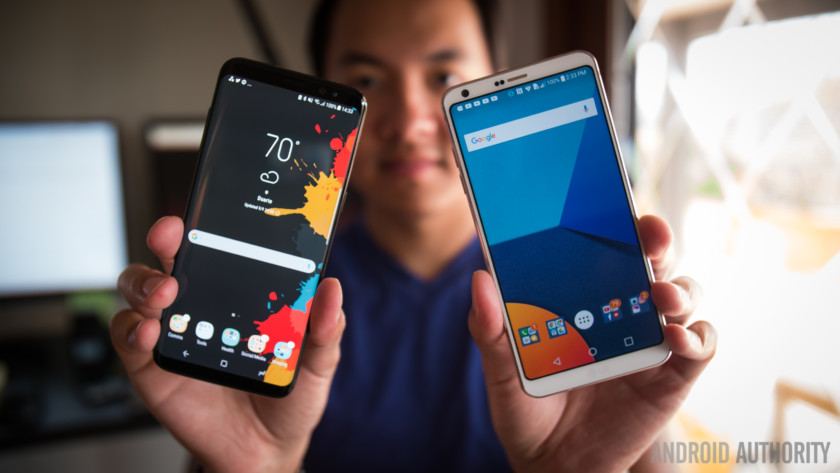
Here’s the first thing you should know – one of these designs is shiny and the other is more practical. It may not seem like it at first glance, but spend a month with either of these phones and there’s a few things that become immediately apparent.
No, I’m not talking about the fact the Galaxy S8 is a fingerprint magnet or the LG G6 doesn’t feel as premium, these are things that were covered in the respective reviews. What I’m talking about is the overall design choices by Samsung, and LG, respectively.
On the one hand, Samsung has gone all-out to make a phone with luscious curves that stands out from the crowd thanks to its incredible sex appeal. On the other, LG has made a design that’s arguably a lot more practical. The curves of the Galaxy S8 do make the phone feel better in the hand, but the fingerprint sensor is the biggest sticking point for me. Not only is it rectangular which poses challenges given the curved tips on your fingers but it’s also in a ridiculous position that makes it near useless.
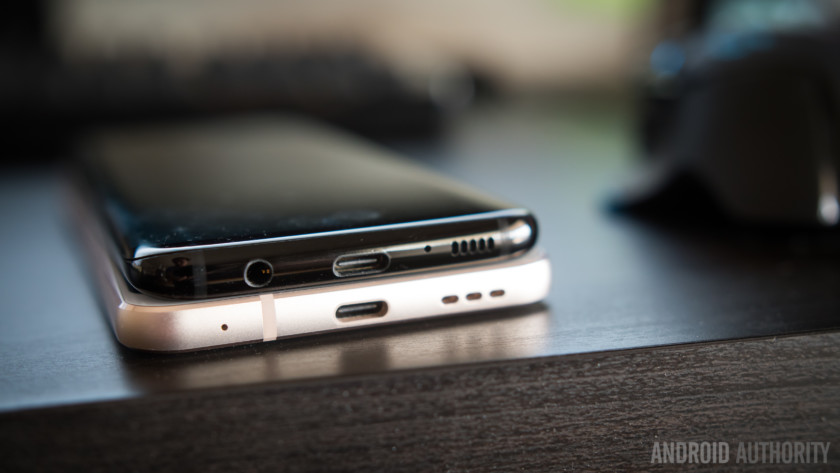
The LG G6 on the other hand, takes a more traditional approach and has all the subtlety of a slab of concrete, at least when compared to the Galaxy S8. Yet, this works exceptionally well for the G6, as it feels more solid in the hand and the central fingerprint sensor on the rear proves to be a much better implementation than the sensor on the Galaxy S8. The lack of the curved dropped edge on the G6 also means it feels more grippy, and less likely to slip out of your hand.
And herein lies the crux of the problem for both manufacturers; neither symbolises the perfect design. The Galaxy S8 is arguably a little too fragile and has the odd fingerprint sensor, but the LG G6 is a little on the thicker side. The ideal would be to have the Galaxy S8 with a slightly thicker edge, like on the Galaxy Note 7. Alas, you are left to choose between the two imperfect approaches to a taller display (and the design changes it necessitates), so the question is, which do you prefer?
Galaxy S8 vs LG G6: Shiny, shiny, shiny
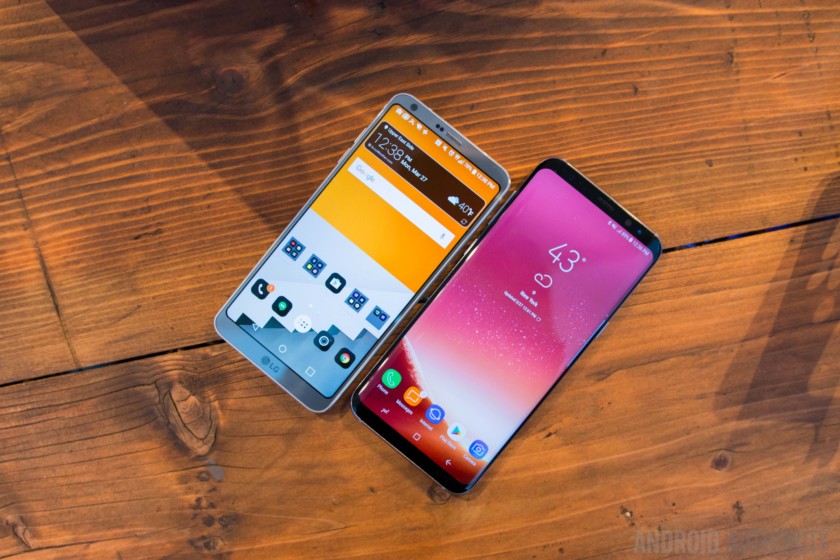
Moving onto that taller display and this part of the comparison is straight forward; the LG G6 has the best display that LG has ever put on a smartphone and it is a joy to use. The only problem is, Samsung makes the best smartphone displays. Its Super AMOLED panels are punchy and offer deep blacks and vibrant colors, in a way that no LCD can replicate. Yes, the LG G6 comes close and looks great, but put them side by side and the Galaxy S8 wins comfortably.
Both are rated as being HDR-ready and LG is working with Netflix to offer HDR content – with v5.0 of the Netflix app now available, the LG G6 is the first phone to officially support HDR. Samsung on the other hand has a Mobile HDR Premium-rated display from the UHD Alliance and supports HDR10 content. The Galaxy S8 will presumably also be added to Netflix’s supported device list.
Galaxy S8 vs LG G6: Under the hood
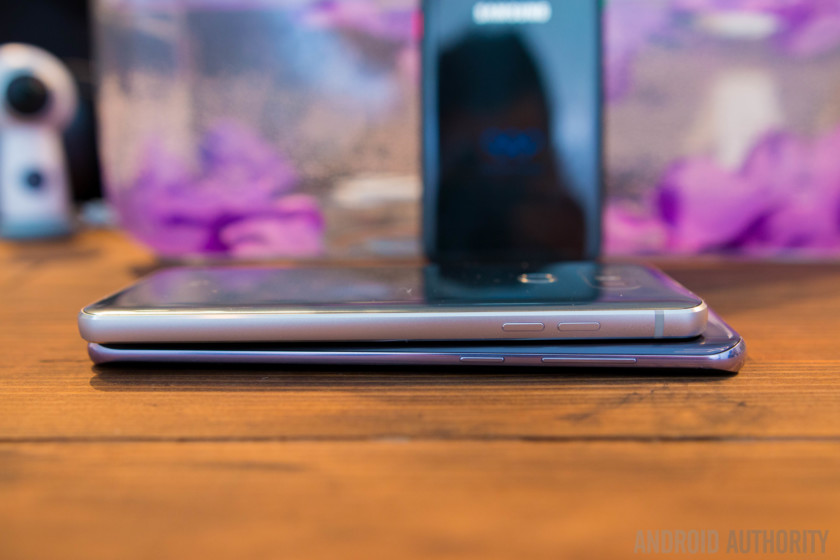
What a difference a month in technology can make: while LG announced the G6 at MWC at the end of February, Samsung unveiled the Galaxy S8 a month later at simultaneous events held in New York and London. Why is this important we hear you ask? The devil, as they say, is all in the details.
The LG G6 is powered by late last year’s Snapdragon 821 processor with 4 GB of RAM and an Adreno 530 GPU. Prior to launch, we heard that LG opted to go for the Snapdragon 821 because the Snapdragon 835 was delayed, meaning no phones would launch with Qualcomm’s latest chipset until May or June. Well, that was not quite accurate: rather than delaying the launch of the G6 until the next batch of Snapragon 835 chipsets were ready, the company decided to stick with its pre-S8 launch window and use the already proven Snapdragon 821. Samsung, as you know, is rumored to have had first dibs on the initial batches of Snapdragon 835 chipsets as part of its manufacturing agreement with Qualcomm.

Does it make a huge difference? Not particularly and our testing shows that the difference in performance is between 15 and 20 percent, depending on the test. Take for example, performance benchmark AnTuTu where the LG G6 scored 136,814 and the Galaxy S8 Plus (with the Snapdragon 835) scored 164,626. One area that seems to be largely improved is the GPU, with the Adreno 530 inside the LG G6 scoring 2,097 on 3DMark’s Slingshot Extreme, while the Adreno 540 inside the Galaxy S8 scores 3,512 on the same test.
The latest chipset – or “platform” as they are now known – can also make a difference to the battery life of each phone and while we’re still conducting our full range of battery tests on both phones, we’ve noticed that battery life is pretty comparable on both devices. Granted, this is between the regular Exynos-powered Galaxy S8 with its 3,000 mAh battery, and the LG G6 with its 3,300 mAh battery, so there will be differences when using the Galaxy S8 Plus with its larger 3,500 mAh battery, or a Snapdragon-powered Galaxy S8.

During my time with the LG G6, I was impressed by its ability to seemingly always survive a full day of usage. Even as I filled the memory of the phone and put it under an ever-increasing load, it almost always lasted a full day, which averages around 18 to 20 hours of usage with around 5 to 7 hours of screen on time.
The Galaxy S8 has also proved to be similarly impressive, and lasts a full day of usage, albeit with an average screen on time of 4 to 6 hours. There’s not a lot in the battery difference – at least in terms of real world usage – and both smartphones will be able to survive most use cases, but for any specific differences, you’ll need to wait for our battery review results.
Galaxy S8 vs LG G6: Snap, snap and snap away
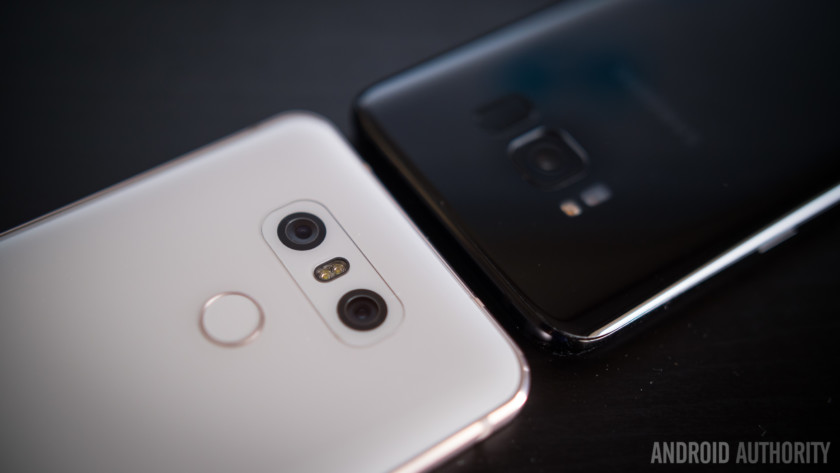
As important as the display, design and tech specs are, the camera on a smartphone is often the deciding factor for many would-be buyers. In the Galaxy S8 and the LG G6, we have two companies taking very different approaches to the camera, with interesting results.
The Galaxy S8 has one camera on the rear, which can capture 12 MP images supported by Optical Image Stabilisation, f/1.7 aperture, phase detection autofocus and f/1.4µm pixel size for better low light photos. By comparison, the LG G6 has dual 13 MP cameras, one with f/1.8 aperture, 3-axis stabilisation and phase detection autofocus and the other with f/2.4 aperture and a super-wide 125° field of view.
Two very different approaches mean two cameras capable of very different things. The Galaxy S8 camera follows previous Samsung flagships by offering good amounts of detail, punchy, vibrant colors and an image that is, overall, more pleasing to the eye. It’s a slight improvement over the Galaxy S7, but if you liked that camera, you’ll also like the one in the S8. The LG G6, however, produces images that are more lifelike and with a seamless transition between the wide angle and regular lenses, allowing you to capture both “normal” images and cool wide-angle ones.
LG G6 review camera samples:

The wide-angle lens in particular on the LG G6 allows you to take the same scene and capture it from the same position but with a much wider view, giving it an almost fisheye look that doesn’t look like it was captured on a smartphone.
Galaxy S8 review camera samples:

The Galaxy S8 can take great photos in most conditions but we can’t help but feel that Samsung missed a trick by focusing on the display and arguably neglecting the camera a bit. To the average eye, the Galaxy S8 takes stunning photos and often captures a scene how we would wish it to look, rather than how it actually looks in real life.
Which is better though? It’s difficult to compare apples and oranges, so as part of our latest flagship camera shootout, we decided to put these two side by side (alongside four other latest flagship devices) in a blind test.






Which of these do you think is the better photo? We left the results up to our readers to decide and in the poll of all six phones, the Galaxy S8 came second with 21% of votes, while the LG G6 came third with 16% of votes. For those interested, check out the full best Android smartphone camera shootout, including the images captured by the Google Pixel XL, which came first with 41% of votes.
Galaxy S8 Camera Samples:
 LG G6 camera samples:

Personally, I find the Galaxy S8 takes photos that look more pleasing to the eye, whether it’s on the stunning display or on a bigger computer screen. Yet, in direct low light comparisons (and other conditions), we found the Galaxy S8 added a slight yellow-ish hue to images, while the LG G6 kept the conditions as natural as possible.
It’s a difficult decision to pick between two very capable smartphones camera, but thanks to the additional wide-angle lens, I’d have to say the LG G6 has the better overall camera. The second camera can be so much fun to use, providing a whole new world of photographic opportunities. The Galaxy S8 is also a very capable camera though so which is better for you basically depends on whether you want images that look amazing, or an additional camera with images that are less saturated and more life-like. That, only you can decide.
Galaxy S8 vs LG G6: Two very different skins
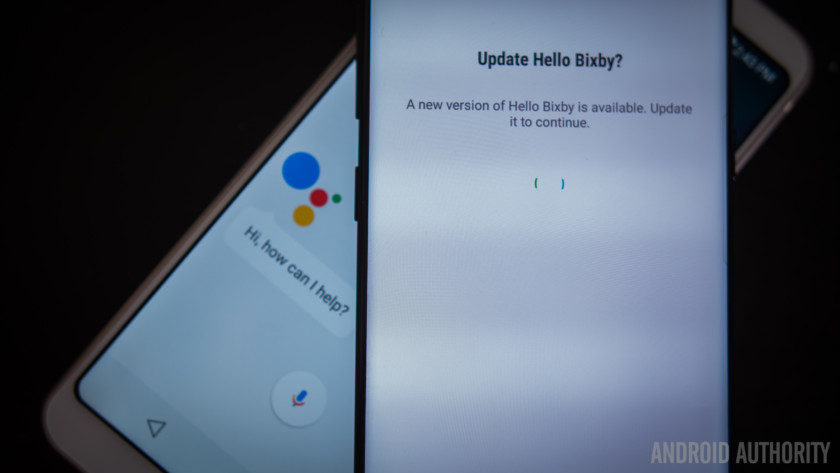
Something we all love about Android is the ability to take the default out of the box experience and customise it to your heart’s content. For most advanced users, using a custom ROM or rooting your phone to unlock additional functionality is second-nature, but for more average users, you might often stick with the features included on your phone.
LG and Samsung both take similar yet differing approaches to the custom interface they apply atop the default Android interface. Both interfaces are considerably tidier and lighter (meaning less bloatware and heavy skinning) than in previous years, but this is where the similarities end.
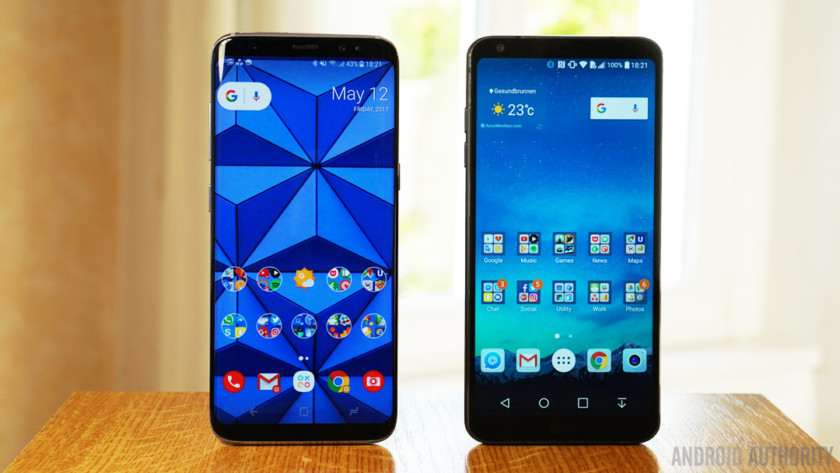
On the one hand, LG has taken the practical approach of adding small amounts of functionality to Android in a bid to create the perfect balance of stock Android with a few choice additions. The company uses frames around the icons on its displays to provide symmetry across the interface, but does employ an interface design that’s atypically-LG.
The experience is mostly smooth, with very little in the way of performance issues, and it’s the lightest and most efficient skin that LG have put on their phones. The issue for LG is that it has a very recent history of having flagships that develop bootloop issues rendering them useless and the concern – whether valid or not – is that the G6 will follow this trend.
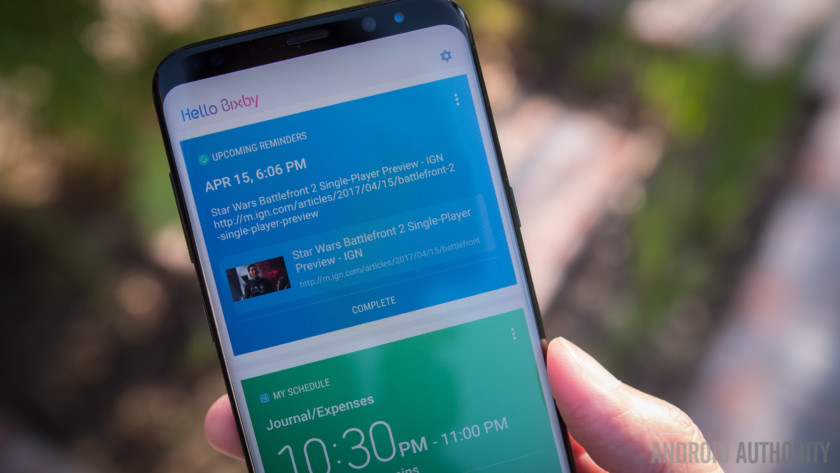
Meanwhile, Samsung has taken a different approach, one that is also atypically-Samsung. Before that however, you’ve got the Samsung Experience – which was previously known as the fabled TouchWiz – and while I’ve already shared our Samsung Experience review, I will say that it’s the best skin that Samsung have put on a phone.
It’s light, has a fresh white-and-blue feel and feels very refreshing, especially as the new color icons pop on the Galaxy S8 screen. At the same time, Samsung has repeated some of its old mistakes of duplicating Google apps (such as Assistant with Bixby) but, for the most part at least, its duplications offer up better experiences than Google’s own apps. This is certainly true for the calendar, dialer and contacts but not for Bixby, which is half-hearted at best in its current form, but will hopefully be much better with future updates that bring Bixby Voice.
Recommended:
Is TouchWiz on the Galaxy S8 the best Android skin?
4 days ago
The LG G6 takes the Google approach of a light skin with a handful of features and adds to core Android experience in a few very useful ways. Meanwhile, the Galaxy S8 proves to be the must-have phone for anyone who really wants to customise their smartphone, as the sheer number of customisation options is simply mind-boggling.
Which do I recommend? It’s difficult to say as it does depend on what you want from your phone but having used both, Samsung’s implementation does seem to be more refined. There are parts that LG arguably does a little better but the Samsung Experience offers a better overall experience on the Galaxy S8.
Galaxy S8 vs LG G6: Which is right, for YOU?
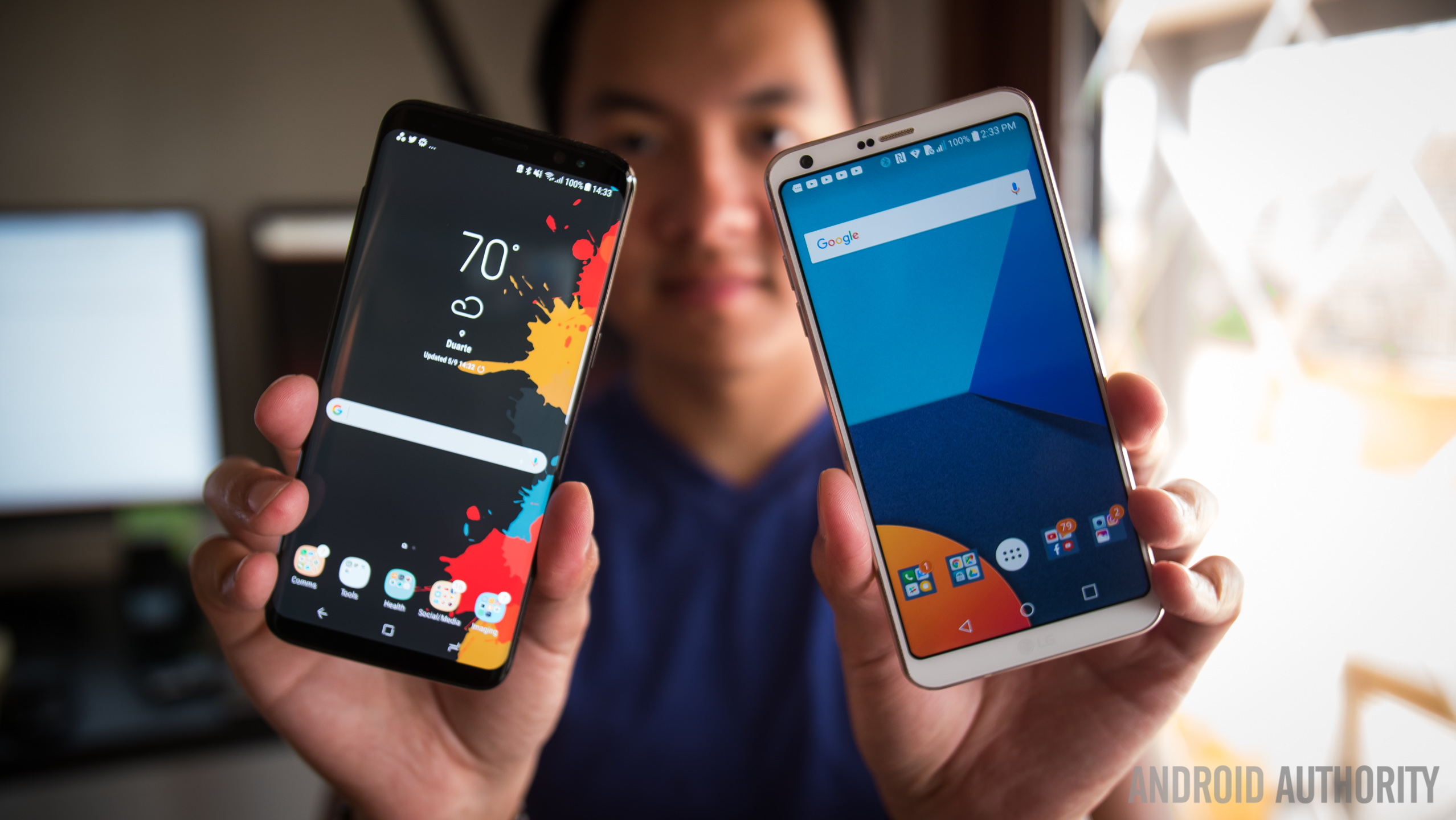
For anyone who’s been a long-time Android Authority fan, you’ll have noticed already that this comparison is very different to the ones we’ve traditionally conducted. Here, instead of repeating the review, we’ve focused on the experience and how it feels to use the phone which, combined with the reviews, will help you make an informed decision.
After a month with both phones, it’s safe to say that the LG G6 ‘new phone feeling’ wears off a little faster than the Galaxy S8, mainly as the latter has incredible sex appeal which incites warm feelings of emotion. That said however, there are parts of the G6 which I prefer, such as the camera and making a firm call between these two devices is probably the toughest choice I’ve had to make in recent memory.
Overall, the sex appeal, better refined software and latest processing package mean I’ve got to give this one to Samsung, but the LG G6 is mostly on-par with Samsung’s flagship. I do miss the dual camera of the LG G6 and everything that it is capable of, and it’s the main feature that tempts me away from Samsung’s flagship.
Which is right for you solely depends on your needs, and we hope that this unusual comparison goes a long way to help you make your decision. Don’t forget to check out the full Galaxy S8 review and LG G6 review for more on each phone and let us know which of these you’d buy by voting in our poll and shouting in the comments below!
Note: There is a poll embedded within this post, please visit the site to participate in this post’s poll.
Designed for speed and space, superyacht builder Baglietto took a chance with Lucky Me
Why it matters to you
Forward-leaning design choices in this vessel should be helpful when you’re ready to order your own superyacht.
Building on speculation is risky. The easiest way to cut the risk is to build what everyone else is selling and compete on features, prices, and service. Italian superyacht builder Baglietto didn’t hedge any bets when it built the house-named Baglietto 46m Fast on speculation. What some may see as a gamble paid off when a European buyer bought the yacht in February and didn’t ask for any layout changes. The owner re-named the yacht Lucky Me, which is a story itself.
Lucky Me is a fast displacement 46.3-meter yacht (just under 152 feet). She has a 26-knot maximum speed and 20-knot cruising speed with two MTU 4,615 horsepower diesel engines. Maximum cruising range is 1,000 nautical miles with a full 20,605-gallon fuel load. That works out to almost 21 gallons per nautical mile.
Fast displacement vessels have hulls that split the water as they move forward, whereas regular displacement hulls push the water. The 27 Wallyace, for example, is a displacement yacht. Another factor in Lucky Me’s relatively high speed is the hull has a draft under 7 feet, which means there’s less boat to drag through the water — the shallow draft also gives her access to shallow waters where other large yachts can’t go.
Each hull type has its advantages — it depends on what you want. Fast hulls are, you guessed it, faster than full displacement hulls. A full displacement yacht gives a more stable ride and provides more living and play space because the hull doesn’t come to a point at the bow. Lucky Me has stabilizer systems that work while underway and at anchor.
But her hull design isn’t why the Lucky Me was a risky build. First, ask what color a typical yacht should be, and most people would probably say “white.” Baglietto chose a lead gray shade for the hull. The hull is highly streamlined and quite narrow for such a large yacht. Atypical trapeze-shaped hull windows alternate with rectangular ones to emphasize the yacht’s narrow shape.
Most superyachts are built high, with multiple decks and elaborate superstructures. The Lucky Me’s superstructure, however, was designed to enhance performance with its compact shape. So not only does the boat’s hull have less water resistance than displacement hull designs, but the upper decks don’t have as much air resistance as typical superyachts. The Lucky Me has an aluminum hull and superstructure.
Lucky Me has four decks with room for 12 guests and 10 crew members. The top sundeck is for lounging and catching the sun. That’s also where the ship’s tender is stored. The upper deck has the wheelhouse and captain’s cabin, a pantry, passenger lounging areas, and outdoor dining.
Lucky Me’s main deck has a beam-to-beam owner’s suite forward with a huge master bathroom, sleeping and lounging areas, and a private owner’s office. The ship’s galley is on on the same level, along with indoor guest dining and lounge areas
The lower deck has the crew’s quarters forward with four twin cabins, a single for the ship’s engineer, and a dinette. Four guest staterooms include two doubles and two rooms with twin beds and pullmans for a third person. All guest staterooms are en suite. The same level also houses the yacht’s engines, generators, and other mechanicals.
While the Lucky Me’s selling price is withheld, the new owner is a three-time Baglietto customer. His previous superyacht, a 136-foot Baglietto also named Lucky Me, is currently for sale for $10,823,670.
What to expect and how to watch Google I/O 2017

Google has numerous events throughout the year, but I/O — an acronym for the computing phrase “input/output” — is by far the biggest. It’s a three-day affair of keynote presentations, developer workshops, and product announcements, and it’s where Google has unveiled a range of innovations, including Project Jacquard, Google Home, and Daydream.
We’re expecting Google I/O 2017 to be no less newsworthy. The festivities at the Shoreline Amphitheater in Mountain View, California don’t begin until May 17 at 10 a.m. PT — the day and time of the conference’s first keynote address — but rumors have already begun to circulate about what Google has up its sleeve. Here’s how to watch the conference, and what to expect.
How to watch Google I/O
Can’t make it to I/O? Not to worry — Digital Trends will have boots on the ground covering I/O. If you want to stream video directly from the show floor, Google has made it easy. Like last year, the official I/O website and corresponding app (iOS, Android) offer an interactive schedule that allows you to keep track of upcoming developer sessions — you can add sessions you’re interested in straight to your Google Calendar to get notifications before they start. The sessions with the black video camera icon mean they will be available for live-streaming on YouTube via the Google Developers channel.
What to expect at Google I/O
Android O

In the past, Google has teased forthcoming iterations of Android, its smartphone operating system, at I/O, and this year’s conference won’t be an exception. Android O, the successor to Android 7.1.2 Nougat, launched quietly in March as an unfinished, buggy Developer Preview. We’re expecting new developments at this year’s conference.
Specifically, we’re likely to hear more about Android O’s revamped notification system, which lets you snooze alerts and schedule them to reappear at a later time, and Notification Channels, which allow developers to aggregate multiple notifications into a single bundle. Google will also likely talk about Android O’s battery life management,which puts strict limits on apps running in the background, and the company could spend time detailing Android O’s high-quality Bluetooth audio capabilities.
At the very least, we wouldn’t be surprised to see a second, more polished Android O Developer Preview for Nexus (Nexus 5X, Nexus 6P, and Nexus Player) and Pixel (Pixel and Pixel XL) devices. Google could announce an Android O update for the Android Beta program, which would make it easy for those interested to download onto supported devices. If we’re lucky, we might learn what “O” stands for, but that announcement usually comes later in the year.
Fuchsia

What is Fuchsia? It’s a mysterious new operating system, and we’re really hoping Google will spill the beans at I/O 2017.
Fuchsia, also known as Armadillo, is a little different from Google’s other operating systems in that it’s not based on Linux. Instead, it’s built around a kernel called Magenta, which the company describes as “[coded for] modern phones and modern personal computers.” It sports a re-imagined user interface with a home screen that showcases your profile picture and the current day and time, along with a list of cards that show recent apps and Google Now-like contextual suggestions.
It’s unclear if Fuchsia’s meant to be an alternative to Android. Hopefully, I/O 2017 will bring answers.
Andromeda and Chrome OS

At I/O 2016, Google announced that Android apps were coming to select Chromebooks. Some reports — including one from the Wall Street Journal in 2016 — suggested it was a harbinger of tighter integration between the two operating systems to come. At I/O 2017, we’ll see once and for all if that’s true.
Late last year, reports suggested that at least two major hardware manufacturers were in the process of creating devices that would run Andromeda, the code name of a unified OS made from bits and pieces of Android and Chrome OS. The hardware is rumored to launch in the second half of 2017. More recent leaks point to a bigger event later this year, potentially headlined by Android O, a Huawei-made tablet, and a long-rumored successor to Google’s last Pixel-branded Chromebook. There have yet to be any official reports.
Chromebooks, such as Samsung’s new Chromebook Plus and Chromebook Pro, can run Android apps — though the feature has been in beta for months with little improvement. Google may make an announcement regarding this at I/O 2017.
Google Home

Google Home, Google’s smart speaker, is flying off the shelves. Some analysts estimate that the company’s on track to sell a million units by the middle of 2017. It’s no surprise that Google is reportedly at work on a successor — and one it could announce at I/O 2017.
Rumors suggest Google is looking to add mesh Wi-Fi networking features to Home — basically a combination of Google Wifi and Google Home. If true, the new Google Home will have to impress to beat back competition. Amazon’s forthcoming Echo Show speaker touts a touchscreen and a camera, allowing it to serve up news briefings from CNN, video-conferencing apps, and more. Apple is reportedly working on a smart home assistant, too — one powered by Siri — with a powerful speaker and support for HomeKit, its home automation platform.
We wouldn’t be surprised to see a new Google Home announcement at I/O 2017, considering Google unveiled the first iteration of the device at last year’s conference. Don’t expect it to launch any time soon, though.
Google Assistant

Julian Chokkattu/Digital Trends
The Google Assistant, Google’s umbrella brand for the virtual assistant on newer Android devices, Google Home, Android TV, and Android Wear, launched at I/O 2016. Back then, it could schedule reminders and pull up nearby movie showtimes, among other tasks. Thankfully, it’s gotten way better in the time since.
Google has kept the Assistant up to date. In April, Google Home gained the ability to distinguish between up to six different voices, and more recently, a recipe feature that recommends dishes and guides you through the cooking process. Google Assistant on the Pixel also received an update to control smart home devices.
We’re not expecting earth-shattering Google Assistant news from I/O 2017, but integrations with new services are pretty much a guarantee.
Daydream

There hasn’t been much news about Daydream, Google’s answer to Samsung’s Gear VR, since its launch last fall.
The Daydream platform, which consists of the Daydream View headset and a motion controller, is available on select Android smartphones such as the Google Pixel, ZTE’s Axon 7, Asus’ Zenfone 3 Deluxe, and Lenovo’s Moto Z and Moto Z Force. There’s an augmented reality and virtual reality keynote on May 18, the second day of I/O, so it’s safe to say we can expect a lot of updates to the Daydream platform.
There’s also a slim chance that Google could take the wraps off a new VR device at I/O 2017. Last year, the search giant was said to be developing a standalone VR headset that is “less powerful” than products such as the HTC Vive and Oculus Rift, but with the necessary chips, lenses, sensors, and motion-sensing cameras to deliver a self-contained VR experience. We’ll have to wait and see if the rumor pans out.
Project Jacquard and ATAP

Android, AI, VR, and TV may form the bulk of Google’s business, but some of the more interesting announcements come from its experimental pursuits from the Advanced Technology and Projects division.
Project Jacquard, one of ATAP’s most impressive projects, is a capacitive platform for textiles. It can turn ordinary shirt sleeves into touch-sensitive surfaces, or pant legs into gesture-sensing shortcut buttons. Google partnered with Levi’s for Jacquard’s first implementation, the Commuter jacket, which has a touch-sensitive cuff strap (the Jacquard Tag). It performs actions on your smartphone when you swipe across it or tap it. It’s early, but we might hear about new Jacquard partners and apparel at I/O 2017.
Project Soli, another ATAP project, is a tiny radar that detects hand gestures on smart clothing, smartwatches, and other devices. Google’s gotten it in the hands of about 60 developers so far, and shipped the first developer kits last year. So far, Soli tech has made its way to prototype smartwatches — Soli-equipped watches can adjust the volume when you move your hand closer and further away, and open messages with the flick of a finger — but we’ve yet to see any consumer devices hit the market. Here’s hoping that changes at I/O 2017.
We also wouldn’t be surprised to see new experiments from ATAP as well.
Android Wear

Julian Chokkattu/Digital Trends
It’s been almost three years since Google launched Android Wear, its smartwatch OS. Since then, Swiss watchmakers and electronics makers alike have adopted it earnestly — and aggressively. These days, it’s easy to find an Android Wear watch from LG, Fossil, Tag Heuer, Nixon, Polar, Michael Kors, New Balance, Huawei, and a host of other manufacturers.
Earlier this year, Google launched a reimagined version of the OS — Android Wear 2.0 — following an unveiling at Google I/O 2016. It features a revamped, vertically-oriented user interface, watch face Complications (small sub dials that act as notification-centric widgets), the Google Assistant, and a Wear Google Play Store. Most of the year’s biggest Android Wear watch launches took place at Baselworld 2017, the luxury trade show in Switzerland, but there’s a chance Google might announce minor tweaks at I/O 2017.
Allo and Duo

Google announced two new communication apps, Allo and Duo, at Google I/O 2016. Allo, a text-based messenger that was the first to tap into the Google Assistant, has seen a steady stream of updates since. However, Allo still lacks a desktop app. In February, Googl’s Vice President of communications products, tweeted a screenshot of an in-development Allo web app, which we expect to hear more about at I/O 2017.
Duo, a video messenger, hasn’t gotten as much attention, but it recently hit 50 million downloads on the Play Store. We could hear more about the Duo team’s connectivity efforts at I/O 2017.
Chromecast and Android TV

I/O 2017 may bring news about Chromecast, Google’s HDMI streaming dongle that turns your TV into a big-screen receiver. It was at I/O 2014, after all, that Google launched Backdrop, a Chromecast feature that lets you beam artwork and photos from a smartphone to a Chromecast. And the year before at I/O 2015, Google rolled out Chromecast tools aimed at game developers.
Last fall, Google launched a 4K-enabled Chromecast — the Chromecast Ultra — which supports Ultra HD content and high dynamic range (HDR), a more colorful and high-contrast video encoding standard. Google has also been partnering with manufacturers to build the Google Cast technology into various devices. You can cast directly to speakers and TVs from Vizio, Sony, LG, Philips, Polk, and Bang and Olufsen, so far, with more OEMs joining the fray every year. We wouldn’t be surprised if Google announced new hardware partners at I/O 2017.
Android TV hasn’t received as much attention from Google as, say Android Wear, but it’s gotten its fair share of updates. We’re not sure what to expect about the platform, but there could be a Google Assistant integration in the works — similar to what Amazon has done with the Fire TV Stick and Alexa.
Project Loon

Google’s Project Loon, which aims to bring internet to underdeveloped regions of the world with the help of transceiver-equipped hot air balloons, could get a mention or two at I/O 2017.
Google’s engineers have managed impressive feats so far. Thanks to a self-powered, self-contained system of solar panels and a predictive weather model, Project Loon balloons can now remain airborne for 190 days. During a test in South Africa last year, the team sent a balloon from Puerto Rico to Peru — a trip it completed after 12 days and more than 20,000 altitude adjustments.
We expect to hear more about Project Loon’s advancements — and plans for the future — at an I/O 2017 session next week.
Android Auto

Android Auto, Google’s infotainment platform for vehicles, could see fresh announcements. Not too long ago, the platform got an upgrade in the form of Android Auto 2.0, which added support for hands-free voice commands, improved apps, real-time traffic, and weather alerts.
Last year, Hyundai brought Android Auto support to its Blue Link system, allowing drivers to use the Google Assistant to start their car, lock the doors, and carry out a slew of other useful actions. Kia recently deployed Android Auto as a free software update on cars spanning model years 2014 through 2017. Google said more than 200 new car models from 50 brands now support Android Auto. Expect that number to grow at I/O 2017.
Project Tango and AR

We could see more news about Google’s Project Tango, a self-contained augmented reality platform, at I/O 2017.
The impressive software-sensor combo can track objects, walls, and table surfaces in three-dimensional space. The best Project Tango apps and games enable computer-generated characters to bounce on top of nearby tables, virtual drapes to draw closed over real-world windows, and digital dominoes to topple onto physical floorboards.
But hardware partners haven’t been quick on the uptake. The first consumer-oriented Tango phone, Lenovo’s Tango-equipped Phab 2 Pro launched last year, and the Asus ZenFone AR Tango Phone, doesn’t have a release date. It’s been pretty quiet on the Tango front, but we’re hoping to hear more about Tango hardware — and related software — at I/O 2017.
What to expect and how to watch Google I/O 2017

Google has numerous events throughout the year, but I/O — an acronym for the computing phrase “input/output” — is by far the biggest. It’s a three-day affair of keynote presentations, developer workshops, and product announcements, and it’s where Google has unveiled a range of innovations, including Project Jacquard, Google Home, and Daydream.
We’re expecting Google I/O 2017 to be no less newsworthy. The festivities at the Shoreline Amphitheater in Mountain View, California don’t begin until May 17 at 10 a.m. PT — the day and time of the conference’s first keynote address — but rumors have already begun to circulate about what Google has up its sleeve. Here’s how to watch the conference, and what to expect.
How to watch Google I/O
Can’t make it to I/O? Not to worry — Digital Trends will have boots on the ground covering I/O. If you want to stream video directly from the show floor, Google has made it easy. Like last year, the official I/O website and corresponding app (iOS, Android) offer an interactive schedule that allows you to keep track of upcoming developer sessions — you can add sessions you’re interested in straight to your Google Calendar to get notifications before they start. The sessions with the black video camera icon mean they will be available for live-streaming on YouTube via the Google Developers channel.
What to expect at Google I/O
Android O
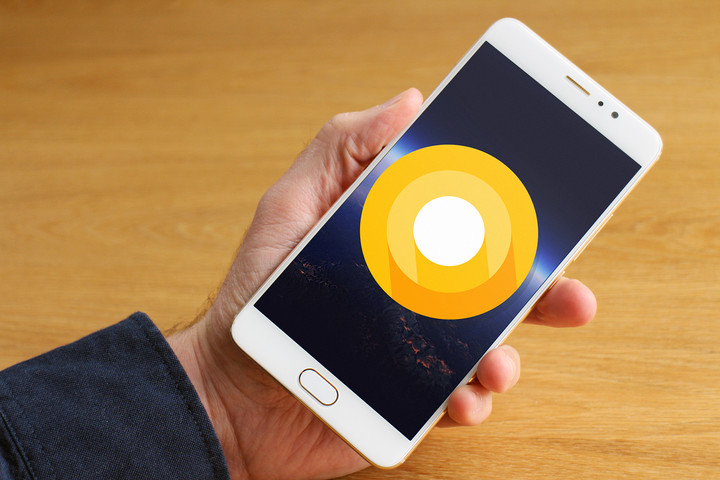
In the past, Google has teased forthcoming iterations of Android, its smartphone operating system, at I/O, and this year’s conference won’t be an exception. Android O, the successor to Android 7.1.2 Nougat, launched quietly in March as an unfinished, buggy Developer Preview. We’re expecting new developments at this year’s conference.
Specifically, we’re likely to hear more about Android O’s revamped notification system, which lets you snooze alerts and schedule them to reappear at a later time, and Notification Channels, which allow developers to aggregate multiple notifications into a single bundle. Google will also likely talk about Android O’s battery life management,which puts strict limits on apps running in the background, and the company could spend time detailing Android O’s high-quality Bluetooth audio capabilities.
At the very least, we wouldn’t be surprised to see a second, more polished Android O Developer Preview for Nexus (Nexus 5X, Nexus 6P, and Nexus Player) and Pixel (Pixel and Pixel XL) devices. Google could announce an Android O update for the Android Beta program, which would make it easy for those interested to download onto supported devices. If we’re lucky, we might learn what “O” stands for, but that announcement usually comes later in the year.
Fuchsia

What is Fuchsia? It’s a mysterious new operating system, and we’re really hoping Google will spill the beans at I/O 2017.
Fuchsia, also known as Armadillo, is a little different from Google’s other operating systems in that it’s not based on Linux. Instead, it’s built around a kernel called Magenta, which the company describes as “[coded for] modern phones and modern personal computers.” It sports a re-imagined user interface with a home screen that showcases your profile picture and the current day and time, along with a list of cards that show recent apps and Google Now-like contextual suggestions.
It’s unclear if Fuchsia’s meant to be an alternative to Android. Hopefully, I/O 2017 will bring answers.
Andromeda and Chrome OS

At I/O 2016, Google announced that Android apps were coming to select Chromebooks. Some reports — including one from the Wall Street Journal in 2016 — suggested it was a harbinger of tighter integration between the two operating systems to come. At I/O 2017, we’ll see once and for all if that’s true.
Late last year, reports suggested that at least two major hardware manufacturers were in the process of creating devices that would run Andromeda, the code name of a unified OS made from bits and pieces of Android and Chrome OS. The hardware is rumored to launch in the second half of 2017. More recent leaks point to a bigger event later this year, potentially headlined by Android O, a Huawei-made tablet, and a long-rumored successor to Google’s last Pixel-branded Chromebook. There have yet to be any official reports.
Chromebooks, such as Samsung’s new Chromebook Plus and Chromebook Pro, can run Android apps — though the feature has been in beta for months with little improvement. Google may make an announcement regarding this at I/O 2017.
Google Home

Google Home, Google’s smart speaker, is flying off the shelves. Some analysts estimate that the company’s on track to sell a million units by the middle of 2017. It’s no surprise that Google is reportedly at work on a successor — and one it could announce at I/O 2017.
Rumors suggest Google is looking to add mesh Wi-Fi networking features to Home — basically a combination of Google Wifi and Google Home. If true, the new Google Home will have to impress to beat back competition. Amazon’s forthcoming Echo Show speaker touts a touchscreen and a camera, allowing it to serve up news briefings from CNN, video-conferencing apps, and more. Apple is reportedly working on a smart home assistant, too — one powered by Siri — with a powerful speaker and support for HomeKit, its home automation platform.
We wouldn’t be surprised to see a new Google Home announcement at I/O 2017, considering Google unveiled the first iteration of the device at last year’s conference. Don’t expect it to launch any time soon, though.
Google Assistant
Julian Chokkattu/Digital Trends
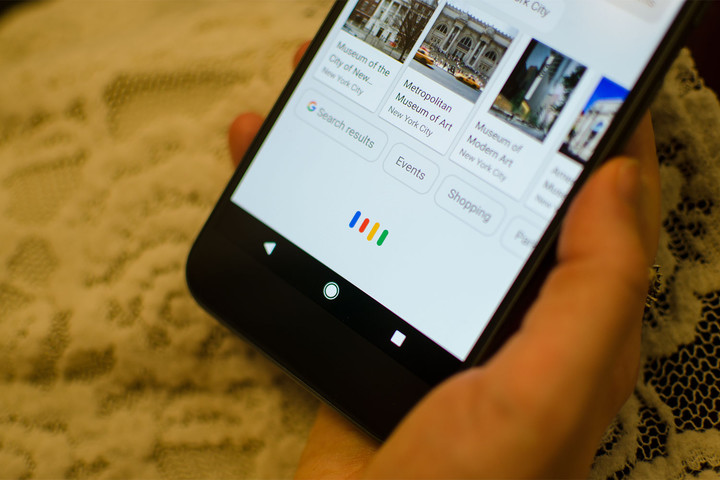
The Google Assistant, Google’s umbrella brand for the virtual assistant on newer Android devices, Google Home, Android TV, and Android Wear, launched at I/O 2016. Back then, it could schedule reminders and pull up nearby movie showtimes, among other tasks. Thankfully, it’s gotten way better in the time since.
Google has kept the Assistant up to date. In April, Google Home gained the ability to distinguish between up to six different voices, and more recently, a recipe feature that recommends dishes and guides you through the cooking process. Google Assistant on the Pixel also received an update to control smart home devices.
We’re not expecting earth-shattering Google Assistant news from I/O 2017, but integrations with new services are pretty much a guarantee.
Daydream
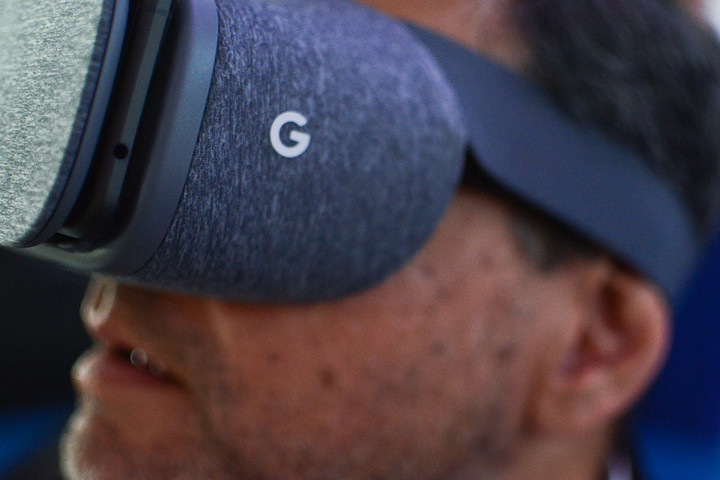
There hasn’t been much news about Daydream, Google’s answer to Samsung’s Gear VR, since its launch last fall.
The Daydream platform, which consists of the Daydream View headset and a motion controller, is available on select Android smartphones such as the Google Pixel, ZTE’s Axon 7, Asus’ Zenfone 3 Deluxe, and Lenovo’s Moto Z and Moto Z Force. There’s an augmented reality and virtual reality keynote on May 18, the second day of I/O, so it’s safe to say we can expect a lot of updates to the Daydream platform.
There’s also a slim chance that Google could take the wraps off a new VR device at I/O 2017. Last year, the search giant was said to be developing a standalone VR headset that is “less powerful” than products such as the HTC Vive and Oculus Rift, but with the necessary chips, lenses, sensors, and motion-sensing cameras to deliver a self-contained VR experience. We’ll have to wait and see if the rumor pans out.
Project Jacquard and ATAP

Android, AI, VR, and TV may form the bulk of Google’s business, but some of the more interesting announcements come from its experimental pursuits from the Advanced Technology and Projects division.
Project Jacquard, one of ATAP’s most impressive projects, is a capacitive platform for textiles. It can turn ordinary shirt sleeves into touch-sensitive surfaces, or pant legs into gesture-sensing shortcut buttons. Google partnered with Levi’s for Jacquard’s first implementation, the Commuter jacket, which has a touch-sensitive cuff strap (the Jacquard Tag). It performs actions on your smartphone when you swipe across it or tap it. It’s early, but we might hear about new Jacquard partners and apparel at I/O 2017.
Project Soli, another ATAP project, is a tiny radar that detects hand gestures on smart clothing, smartwatches, and other devices. Google’s gotten it in the hands of about 60 developers so far, and shipped the first developer kits last year. So far, Soli tech has made its way to prototype smartwatches — Soli-equipped watches can adjust the volume when you move your hand closer and further away, and open messages with the flick of a finger — but we’ve yet to see any consumer devices hit the market. Here’s hoping that changes at I/O 2017.
We also wouldn’t be surprised to see new experiments from ATAP as well.
Android Wear
Julian Chokkattu/Digital Trends
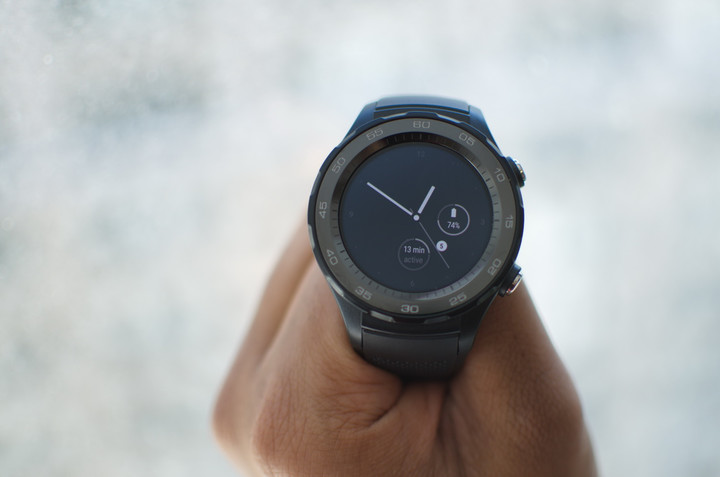
It’s been almost three years since Google launched Android Wear, its smartwatch OS. Since then, Swiss watchmakers and electronics makers alike have adopted it earnestly — and aggressively. These days, it’s easy to find an Android Wear watch from LG, Fossil, Tag Heuer, Nixon, Polar, Michael Kors, New Balance, Huawei, and a host of other manufacturers.
Earlier this year, Google launched a reimagined version of the OS — Android Wear 2.0 — following an unveiling at Google I/O 2016. It features a revamped, vertically-oriented user interface, watch face Complications (small sub dials that act as notification-centric widgets), the Google Assistant, and a Wear Google Play Store. Most of the year’s biggest Android Wear watch launches took place at Baselworld 2017, the luxury trade show in Switzerland, but there’s a chance Google might announce minor tweaks at I/O 2017.
Allo and Duo
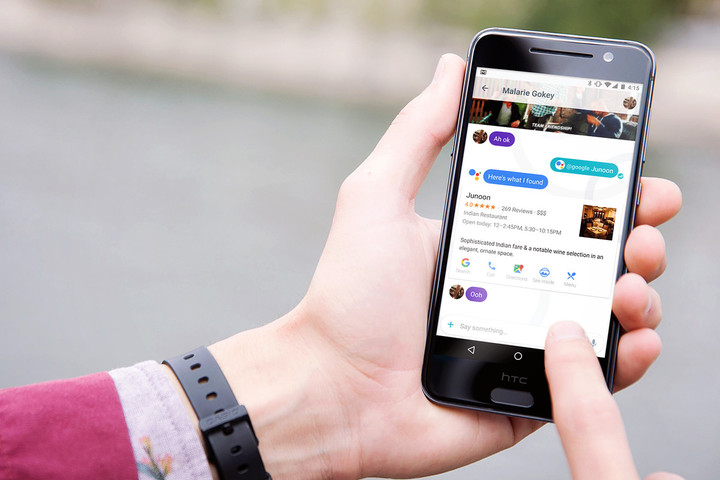
Google announced two new communication apps, Allo and Duo, at Google I/O 2016. Allo, a text-based messenger that was the first to tap into the Google Assistant, has seen a steady stream of updates since. However, Allo still lacks a desktop app. In February, Googl’s Vice President of communications products, tweeted a screenshot of an in-development Allo web app, which we expect to hear more about at I/O 2017.
Duo, a video messenger, hasn’t gotten as much attention, but it recently hit 50 million downloads on the Play Store. We could hear more about the Duo team’s connectivity efforts at I/O 2017.
Chromecast and Android TV
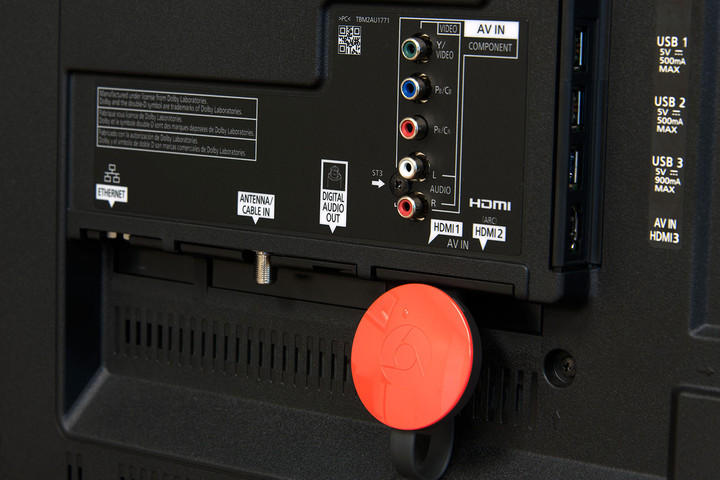
I/O 2017 may bring news about Chromecast, Google’s HDMI streaming dongle that turns your TV into a big-screen receiver. It was at I/O 2014, after all, that Google launched Backdrop, a Chromecast feature that lets you beam artwork and photos from a smartphone to a Chromecast. And the year before at I/O 2015, Google rolled out Chromecast tools aimed at game developers.
Last fall, Google launched a 4K-enabled Chromecast — the Chromecast Ultra — which supports Ultra HD content and high dynamic range (HDR), a more colorful and high-contrast video encoding standard. Google has also been partnering with manufacturers to build the Google Cast technology into various devices. You can cast directly to speakers and TVs from Vizio, Sony, LG, Philips, Polk, and Bang and Olufsen, so far, with more OEMs joining the fray every year. We wouldn’t be surprised if Google announced new hardware partners at I/O 2017.
Android TV hasn’t received as much attention from Google as, say Android Wear, but it’s gotten its fair share of updates. We’re not sure what to expect about the platform, but there could be a Google Assistant integration in the works — similar to what Amazon has done with the Fire TV Stick and Alexa.
Project Loon

Google’s Project Loon, which aims to bring internet to underdeveloped regions of the world with the help of transceiver-equipped hot air balloons, could get a mention or two at I/O 2017.
Google’s engineers have managed impressive feats so far. Thanks to a self-powered, self-contained system of solar panels and a predictive weather model, Project Loon balloons can now remain airborne for 190 days. During a test in South Africa last year, the team sent a balloon from Puerto Rico to Peru — a trip it completed after 12 days and more than 20,000 altitude adjustments.
We expect to hear more about Project Loon’s advancements — and plans for the future — at an I/O 2017 session next week.
Android Auto
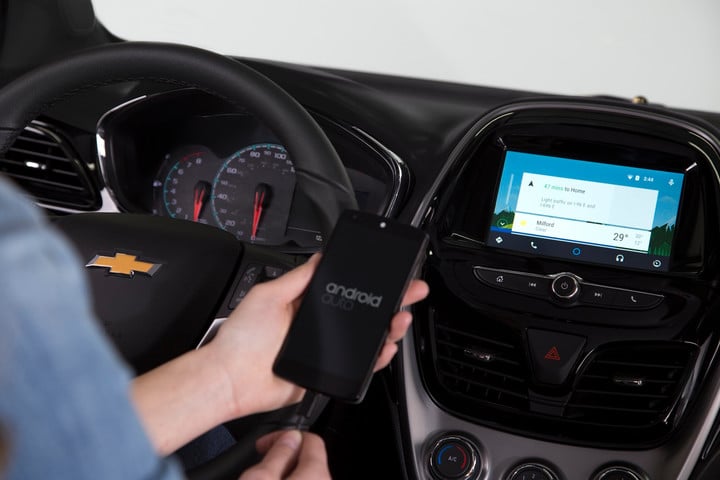
Android Auto, Google’s infotainment platform for vehicles, could see fresh announcements. Not too long ago, the platform got an upgrade in the form of Android Auto 2.0, which added support for hands-free voice commands, improved apps, real-time traffic, and weather alerts.
Last year, Hyundai brought Android Auto support to its Blue Link system, allowing drivers to use the Google Assistant to start their car, lock the doors, and carry out a slew of other useful actions. Kia recently deployed Android Auto as a free software update on cars spanning model years 2014 through 2017. Google said more than 200 new car models from 50 brands now support Android Auto. Expect that number to grow at I/O 2017.
Project Tango and AR

We could see more news about Google’s Project Tango, a self-contained augmented reality platform, at I/O 2017.
The impressive software-sensor combo can track objects, walls, and table surfaces in three-dimensional space. The best Project Tango apps and games enable computer-generated characters to bounce on top of nearby tables, virtual drapes to draw closed over real-world windows, and digital dominoes to topple onto physical floorboards.
But hardware partners haven’t been quick on the uptake. The first consumer-oriented Tango phone, Lenovo’s Tango-equipped Phab 2 Pro launched last year, and the Asus ZenFone AR Tango Phone, doesn’t have a release date. It’s been pretty quiet on the Tango front, but we’re hoping to hear more about Tango hardware — and related software — at I/O 2017.
Don’t have a solid state drive? These five SSDs will help you get with the times, on any budget
Are you looking for a massive upgrade to your computer storage? We probably don’t have to tell you about the lightning-fast speeds that solid state drives provide: The best SSD options are now bigger, more affordable, and more compatible than ever, which makes this a good time to buy. If you’re looking for a storage option that also comes with a significant speed boost, we have the top options in several different price ranges for you to consider.
Note on hard drive capacity: Some companies quote capacity after overhead, and others before. This leads to uneven rounding practices, and explains why you see some drives at 256GB and some at 250GB. Even then, it’s rare for a drive to have exactly its stated capacity, though variance is generally less than 10GB.
Under $150: Samsung 850 EVO 250GB ($108)

This 2.5-inch SSD gets a lot of attention as a broadly excellent upgrade choice for a variety of needs. Samsung has plenty of experience creating solid state drives, and the 850 EVO is one of the best SSD products yet, combining both simplicity and quality performance.
The interface for this drive is SATA 6Gb/s, with a sequential read speed of 540 megabytes per second and a write speed of 520 MB/s. Reviews have shown it to be one of the quickest SATA drives available.
Like most of the SSDs on our list, the Evo comes in several different size options ranging from 120GB to 2TB of storage, with costs varying accordingly. We picked the 250GB version for a couple reasons. It’s a good size for an all-purpose SSD designed for the general user, and it provides a widely-shared base storage number to help you compare it with other models.
While MSRP says the drives cost $100 and $150, don’t worry — this model is frequently available just under $100, making it the best option for an SSD under $100.
Buy it now from:
Amazon Best Buy Walmart
Under $200: Samsung 850 Pro 256GB ($150)

Get used to the Samsung models, because they keep getting top marks in multiple price ranges. The 850 Pro gets praise as an ideal upgrade for a performance-focused computer made for games or entertainment. It utilizes Samsung’s 3D V-NAND memory — it’s the first in Samsung’s library of SSDs to use it — interfaces via SATA III, and has a sequential read speed up to 550 MB/s and a write speed up to 520 MB/s.
Except for a few data format differences, you may think this model isn’t much different from the Evo we just talked about. But those data differences add up to a generally faster, slightly more capacious model that’s a better fit for high-end computers – and very attractive in light of falling prices that help make the Pro and Evo more direct competitors.
The 850 Pro comes with options ranging from 128GB to 2TB. Again, the 256GB model, which can be found between $150 and $160, stood out as a well-rounded option.
Buy it now from:
Amazon Best Buy Walmart
Under $300: Western Digital Blue 1TB SSD ($280)

This is another great SSD model that gets frequent recommendations for upgraders and has our full support. Note that we picked the 1TB for more robust storage options, but there are three different sizes available depending on your needs. It’s available in SATA or M.2 configurations, and two smaller sizes — 256GB and 512GB.
The Western Digital Blue 1TB SATA version offers sequential read speeds up to 488 MB/s and write speeds up to 520 MB/s. It’s not exactly the fastest drive on the market, but it’s quick enough to keep up with most users, especially for such a killer price.
Read our full review
Buy it now from:
Amazon
Under $400: Samsung 950 Pro 512GB ($324)

If you need more space than a few hundred GBs and are interested in a high-quality, forward-looking SSD, we highly recommend the 950 Pro 512GB from Samsung. Some of the specs are indeed similar to the 850 Pro model, including 3D V-NAND, but the differences are stark. The 950 gets sequential read speeds up to 2,500 megabytes per second and write speeds up to 1,500 MB/s, making it one of the best SSD options in terms of speed. Samsung also claims that it is 1.5 times more power efficient than the 850 model.
Why such a big difference between the two models? This is the first M.2 PCI Express-only model on our list. Replacing SATA with this newer interface allows for a bundle of new tricks, including better performance for certain types of data and greater compatibility with cutting edge protocols designed to increase efficiency. Of course, you should make sure that your computer can handle M.2 PCI Express attachments before jumping on the 950. Support will be dependent on your motherboard.
Buy it now from:
Amazon B&H Adorama
Any Price: Intel 750 Series 1.2TB ($900)

While we mentioned PCI Express, we haven’t yet talked about NVMe, or Non-Volatile Memory Express. It’s a very similar connection standard that uses the same physical interface, but also adds additional features specifically for storage purposes. The Intel 750 SSD shows off the advantages of this approach with its flexible installation options and high speeds.
This is obviously going to make the drive extra fast — in ideal scenarios, it can exceed transfer speeds of two gigabytes per second — but the high-end SSD has other advantages, too. One of the most interesting is the choice between add-in card and 2.5-inch form factors, which allow you to pick a design that fits your upgrade plans and current drive standards. The lightning speeds and compatibility of the card put it on the top of our list, but you’ll have to pay at least $1,000 for the 1TB model. Just make sure you really want it!
Read our full review
Buy it now from:
Amazon
 AIVAnet