


Microsoft’s day one Build keynote focuses on Cortana, Visual Studio, and intelligent cloud
Why it matters to you
This is the Microsoft technology that is most likely to make your devices smarter and better connected than ever before.

Microsoft wrapped up its first keynote address of Build 2017, and it was a long one. Spanning almost three full hours, the keynote touched on all of the major points highlighting how developers can build solutions around Microsoft products and services.
Some of the topics covered were detailed, highly technical, and of interest exclusively to developers. Some topics, however, did have more universal appeal, and here’s a roundup of what Microsoft covered that will have the greatest impact on the typical PC user.
Cortana

Microsoft is in a race against Amazon Alexa, Google Home, and Apple Siri when it comes to personal digital and home assistants. The company has made its Cortana Skills Kit available in preview, meaning that developers can start building skills into Cortana to make her more useful to a wider range of users. So far, out of 300 million people using Windows 10 on roughly 500 million devices, only 145 million are actually using Cortana — and that’s a number that Microsoft needs to improve if it wants to compete in this increasingly important space.
The company also spent some time on new Cortana-powered hardware. Not only was the Harman Kardon Invoke speaker highlighted throughout the event, but Microsoft also announced additional partnerships with HP and Intel on Cortana-powered devices to come.
One of the keynote’s more impressive demonstrations was given by senior product manager Laura Jones, who showed off some Cortana Skills that moved from the home to the car to the office. Cortana was able to recognize the context and respond appropriately, including providing a solid hands-off experience that should make driving while working a little less dangerous.
Read more
Visual Studio 2017 – Now available for the Mac

Microsoft’s most important developer toolset, Visual Studio 2017, was released for Windows in March 2017. As such, it was a central focus of the first keynote address and was featured in numerous demonstrations. Clearly, Microsoft sees Visual Studio 2017 as central to its commitment to helping developers create powerful — and lucrative — solutions around Microsoft’s most important products and services.
The most important announcement was likely the availability of Visual Studio 2017 for the Mac. Now, there’s one seamless development environment that can span the most important platforms. The new Mac version is just as feature-complete and powerful as its Windows counterpart, meaning that developers can now build apps on their Macs that utilize C#, F#, .Net Core, Asp.Net Core, Xamarin, and Unity. Even better, a developer who buys a license to one platform automatically receives a license for the other as well.
Read more
Cognitive services and the new Presentation Translator

Artificial intelligence (AI), machine learning, and bots are some of the most important technologies — and buzzwords — in the industry today. Everyone is investing heavily in making our machines smarter, and Microsoft is no exception. It should come as no surprise, then, that the company spent some serious time on outlining how all of its products and services make use of the Microsoft Bot Framework and Cognitive Services suite.
The Microsoft Bot Framework has been expanded, adding in “Adaptive Cards” that are available across apps and platforms. Skype for Business, Bing, and Cortana are just a few of the channels that can be leveraged, and more than 130,000 developers have signed on to use the technology.
A real-world application of Microsoft’s machine intelligence functionality was demonstrated in the new Presentation Translator. This new Office 365 feature uses Microsoft AI to translate in presentation captions between multiple languages in real-time. Anyone who’s attending a meeting can click on a link that will provide translated captions via the new AI-powered Presentation Generator.
Read more
Azure intelligent cloud

Microsoft’s Azure cloud computing platform is one of its fastest-growing businesses, and it’s a vital component of the company’s “cloud-first, mobile-first” productivity solutions strategy. As such, it received a fair amount of attention during the first keynote address. The company focused largely on explaining how Azure can interact with Internet of Things (IoT) devices to create a cloud that extends intelligence all the way to the cloud’s edge.
One demonstration showed how Swedish company Sandvik uses Azure and edge IoT devices to provide unparalleled insight into how well its various industrial devices are functioning. The demonstration showed just how powerful the combination of massive computing power, IoT devices, and powerful logic can be in allowing organizations to manage large numbers of remote devices.
Read more
AI for workplace safety

The second half of the keynote focused on Microsoft’s vision for artificial intelligence. Sataya Nadella once again took the stage, discussing broad concepts about how man will work with machines, not against them. Cortana, remote presence via Hololens, social bots, and Skype translate were listed as various examples of how Microsoft is making that vision a reality.
A demo showed how AI can be combined with mundane tools like video cameras to see and react to the world in remarkable ways. The specific context of the demonstration was improving workplace safety, by combining Azure Stack, Azure Functions, Cognitive Services, and cameras, to achieve 27 million image recognitions per second.
In the context of workplace safety, the system was impressive. Adding new employees was easy, given that the system was constantly photographing people who were detected on-site. An administrator needed only to select and identify a person and then fill out additional details.
Read more
Scientists predict AI will allow us to translate dolphin language by 2021
Why it matters to you
Using AI to translate dolphin chatter shows just how quickly natural language processing tech is advancing, and how many languages it can be applied to.
AI-driven natural language processing is getting better and better at understanding languages spoken in every country around the world. It doesn’t have to stop at land-based languages, however — as Swedish-based language startup Gavagai AB is keen to prove.
Working with researchers from the KTH Royal Institute of Technology, Gavagai AB is currently involved in a four-year project, designed to gather as much “dolphin language data” as possible, and to use this to decode the chatter of everyone’s favorite aquatic mammals.
In theory, learning what a dolphin is saying is no different to understanding other languages. Research has suggested that dolphins communicate in a language not entirely dissimilar to our own, relying on sentences composed of individual words in which the order dictates meaning. They even pause to let one another speak. Decoding this conversation relies on the same ability to draw links between sounds and meaning as would be the case with any other language — only with what one imagines includes a higher propensity to talk about tasty types of fish.
Such a system could even conceivably be used to reverse-engineer software allowing humans to communicate with dolphins by translating messages into the appropriate lines of Flipper chat. How far this will get by 2021, when the project ends, remains to be seen, but this promises to be of interest to both AI practitioners and zoologists alike.
Gavagai AB CEO Lars Hamberg stressed to Digital Trends that there are no obvious commercial applications for dolphin translation, although it’s certainly interesting to think of possible use-cases. The U.S. Navy, for instance, has previously used military dolphins for tasks including rescuing lost swimmers and locating underwater mines. This training could presumably be made easier, and other tasks added, if a more direct line of communication between man and dolphin is made possible.
But Hamberg stressed that understanding dolphins is far from the only thing Gavagai AB is working on. Right now, he is in Silicon Valley speaking with investors about raising additional capital to continue developing the Gavagai AB technology.
“The dolphin research has gone haywire in terms of publicity, but the truth is that it’s one of many, many projects that we’re doing,” Hamberg told us. “Over the last seven years, we’ve spent about $9 million working on implementing this research into an industrial scale implementation that can understand 45 different languages. On a lot of benchmark measures, we outperform all of our rivals. We’re now gaining a lot of interest, having toiled away under the radar for a long time.”
In other words, click click whistle click whistle. (That’s dolphin speak for “keep watching this space.”)
Robot eye surgeon is 10x more precise than the most steady-handed human
Why it matters to you
Robotic eye surgery sounds terrifying, but this robot is a whole lot more precise than even the most skilled of human surgeons.
From clumsy machines that couldn’t navigate down a hallway in a straight line, robots sure have come a long way in the past several decades.
So why not reward them by teaching them a new, slightly more complex task — like carrying out an operation inside the human eye?
That’s exactly what a hospital in the United Kingdom did in a recent trial, in which robots competed against human surgeons to carry out a delicate surgery involving membrane-removal on the retina. A group of 12 patients was divided into two groups, with half undergoing the traditional human surgeon-led procedure and the other half undergoing the operation as carried out by robot.
“This is the first time robot-assisted surgery has been performed in the eye,” Marco Bellini, research coordinator of the Medical Sciences Division of Nuffield Department of Clinical Neurosciences, which carried out the project, told Digital Trends. “The robotic device is able to perform surgical procedures through the conventional surgical portholes used for retinal ‘keyhole’ surgery.”
The robotic surgical device itself was built by Preceyes, a Dutch engineering company. The advantage of the remotely-controlled robot is that it is able to more accurately perform extremely delicate operations, which even prove challenging for a trained surgeon to do by hand. The robot itself only has up/down, left/right, and toward the head/toward the feet directions, but within these parameters can operate with incredible accuracy; making movements as precise as 1 micron. In the eye, the robot operates through a single hole in the lens less than 1 millimeter in diameter, which it enters and exits several times during the procedure. The robot is controlled using a joystick and touchscreen by the human surgeon.
The combination of human and robot means carrying out the task with approximately 10x more precision than a human surgeon operating on their own. In the study, the patients in the robot group experienced significantly fewer hemorrhages, and less damage to the retina.
“Based on feedback from this pilot study, the Preceyes team is currently optimizing the prototype in order to increase its versatility and reliability,” Bellini said. “Once the device has been tested in more surgical procedures and is ready for market, an application will be made for a CE mark.” (Read: the mandatory marking found for certain products within the European Economic Area, similar to the FCC mark used on particular electronic devices in the United States.)
HP EliteBook X360 G2 review

Research Center:
HP EliteBook X360 G2
Intel’s Ultrabook initiative and Microsoft’s Surface have raised people’s expectations of what qualifies as an acceptable high-end Windows 10 PC. Nowhere is this truer than with business-class notebooks, where employees expect the same qualities in employer-provided machines as they do in the consumer devices they would buy for themselves.
Simply put, it’s no longer acceptable for a company to buy cheap, bulky notebooks to distribute to employees. Rather, today’s workers appreciate thin and elegant designs, quality displays, and other features just as much as anyone else. At least, that’s HP’s position — and judging by its most recent business-oriented 2-in-1, the EliteBook x360 G2, the company is taking it seriously.
Of course, the combination of quality and business chops make for an expensive machine. We looked at an EliteBook x360 G2 equipped with a seventh-generation Intel Core i7-7600U CPU with Intel vPro technology, 16GB of DDR-2133MHz RAM, and a 512GB NVMe SSD, for $1,979. Has HP managed to produce a premium business machine that’s worth its premium pricing?
Built both beautiful and robust
HP has incorporated just enough similarity between its high-end machines to maintain the brand, but included just enough differentiation to please different target markets. The EliteBook x360 G2 is no different.
The machine has the same diamond-chiseled lines found in the company’s Spectre machines, and many of the same general design cues. Nevertheless, it retains its own understated professional look, with a silver chassis that offers an attractive mix of class, elegance, and business demeanor.
 Mark Coppock/Digital Trends
 Mark Coppock/Digital Trends
 Mark Coppock/Digital Trends
 Mark Coppock/Digital Trends
Build quality is excellent, as is the case with many Windows 10 PCs lately. The chassis is constructed from machined aluminum, the 360-degree hinge is smooth and reliable throughout its entire range, and the machine feels supremely solid. It’s clearly in the same class as the best-built notebooks being produced today.
The EliteBook x360 G2 is in the same class as the best-built notebooks produced today.
Proving that beauty isn’t only skin deep, HP also designed the EliteBook 360 G2 to pass the MIL-STD-810G suite of tests for things like drop, vibration, and temperature resistance. That doesn’t mean that HP is selling the machine for use in military duty, exactly. Rather, it means that HP took pains to ensure that the machine will stand up to any abuse that business professionals are likely to dish out.
That’s not to say the EliteBook 360 G2’s design is perfect. HP missed out a bit on thermal management, specifically in terms of how hot air is vented. The input vent is on the bottom and towards the front, which isn’t that unusual, but it does mean that the machine needs some clearance to make sure sufficient air can be sucked in.
However, the exhaust vent is more problematic. It lines the rear edge underneath the display, and points downward. The machine was never more than very warm during testing, and fan noise was at a minimum. Nevertheless, what heat the EliteBook x360 G2 does produce is exhausted down onto a user’s legs when used in a lap, which made things a bit uncomfortable.
Just enough connectivity
For such a thin machine, at just 0.59 inches thick, the EliteBook x360 G2 has a decent selection of ports. There’s a USB Type-A connection for legacy support, a 3.5mm headset jack, and a smart card reader along the left side. The right side offers up a second USB Type-A connection for even better legacy support, a full-size HDMI port, a USB Type-C with Thunderbolt 3 for future support, and a microSD card reader. A Kensington lock slot is also provided for anyone who wants to keep the machine secure, another business-oriented bonus.

Mark Coppock/Digital Trends
Interestingly, HP went with an old-school power adapter rather than adding a second USB Type-C port, which was a disappointment, but might make IT departments happy if they have compatible AC adapters in their inventories. We plugged in a USB Type-C adapter from another machine and it charged the EliteBook, although a warning popped up recommending an HP power supply.
Wireless connectivity is provided by Intel dual-band 8265 Wi-Fi and Bluetooth 4.2. WWAN connectivity is also an option, though it wasn’t provided on our review unit. A near-field communications (NFC) chip was included in our configuration, and located to the upper right of the touchpad.
A plethora of input options
HP’s designers paid serious attention to the keyboard, and it shows. The EliteBook x360’s Premium Collaboration Keyboard is indeed excellent, maintaining the theme of strong attention to detail that pervades the machine’s overall design. The keys are a bit shallow at 1.3mm, which is slightly less than the 1.5mm travel we usually prefer. However, HP uses a mechanism that activates at just the right amount of force. It’s crisp, without any hint of bottoming out.
We thought the keyboard on HP’s Spectre x360 15 one of the best available, but this one beats it by a country mile. Not only do the keys feel great individually, but HP also took pains to make sure that keystroke is uniform throughout the entire keyboard. The keyboard is also quiet, and even spill-resistant.
We don’t usually gush over a keyboard, but HP knocked this one out of the park.
We don’t usually gush over a keyboard, but HP has knocked this one out of the park. If you type thousands of words a day, then you should consider the EliteBook x360 G2 for its keyboard alone.
The touchpad felt equally excellent. It’s large enough to be comfortable, fits well into the available space, and has a smooth glass surface that provides just the right amount of friction. In addition, the physical buttons have a nice click, but aren’t unnecessarily loud. HP used an Alps touchpad, and in an interesting twist built in two modes, Windows Precision Touchpad mode, which works just as well as all touchpads supporting that protocol,
In another nod to flexibility, Microsoft supports Windows Hello via infrared camera, and facial recognition via a built-in fingerprint scanner. Both work reliably, so it’s a matter of user or organization preference. For companies that are still using the older smart card technology, HP has built in that security option as well.
HP EliteBook X360 G2 Compared To

Dell Latitude 13 7370

Asus Zenbook UX305UA

Lenovo ThinkPad P50 20EN-001RUS

Lenovo Thinkpad X1 Carbon (3rd Gen)

Lenovo Z40

Acer TravelMate TMP645-MG-9419

Lenovo ThinkPad T440s

Toshiba Tecra Z40

Lenovo ThinkPad Edge E431

Lenovo ThinkPad T431s

HP EliteBook 8560p

Toshiba Satellite M300-S1002X

Lenovo ThinkPad T60p

Gateway NX570

Lenovo 3000 V100
As a Windows 10 2-in-1, the EliteBook x360 G2 has a 10-point multitouch touchscreen that’s just as responsive as expected. HP also bundles its Active Pen, which provides 2048 levels of pressure sensitivity, and full support for Windows 10 Ink. It worked as well as any other active pen we’ve tried lately.
A strong but not exceptional 1080p display
Our review unit was equipped with a Full HD (1,920 x 1,080) display that was just sharp enough given its 13.3-inch 16:9 dimensions. A 4K UHD option is available. HP also offers a unique SureView privacy screen technology, which can be turned on or off with a button. We saw it at CES, but it was not on our review unit.
According to our colorimeter, the EliteBook x360 G2’s screen is good, but not great. Contrast came in at 790:1, which is well below our comparison group and particularly poor compared to the Surface Book and MacBook Pro 13 with Touch Bar. AdobeRGB color gamut was also below average, whereas sRGB color gamut was a bit stronger. Color accuracy was 1.66, where anything less than 1.0 is excellent, and gamma was 2.3, a little off the 2.2 standard. Finally, brightness was a real weakness, at 251 nits.
HP will be offering other displays with the EliteBook x360 G2, including a 4K UHD option. It’s been a pattern lately that manufacturers offer better high-resoluton screens, so that might be the case with the EliteBook as well.

Mark Coppock/Digital Trends
In use, our review unit’s screen was fine for general productivity work, but its glossy coating was a distraction, and it had to be cranked up to 100 percent brightness in some scenarios. In a dark room the display looked strong, with vibrant color and reasonable contrast. It’s no match for Apple’s MacBook Pro or Microsoft’s Surface line, however.
Simple speakers that get down to business
The EliteBook x360 G2 benefits from HP’s partnership with Bang & Olufsen, much like its consumer-oriented siblings. In this case, there are two speakers with HP Audio Boost. Subsequently, sound quality is very good for music and movies in each of the machine’s four modes.
Of course, this is a business-oriented machine that’s optimized for communications. Accordingly, Bang & Olufsen has focused on making sure that voice quality was above par, and HP has implemented its Noise Cancellation technology, to make sure that everyone in a teleconference can hear everyone else. We felt the call quality was indeed good, but we were not able to test it under every possible meeting scenario. User beware – Skyping from the airport still isn’t the best idea.
Solid productivity performance
The HP EliteBook x360 G2 that we reviewed was equipped with a seventh-generation Intel Core i7-7600U, which should put it at the top in terms of performance for dual-core notebooks. And indeed, the HP performed as well as expected. It also stayed remarkably cool with very quiet fans, though as mentioned earlier, the downward-facing venting is unfortunate.
In terms of objective benchmarks, the EliteBook x360 G2 performed as expected on the popular Geekbench 4 tests. It beat out each our comparison machines, including the similarly equipped Lenovo Yoga X1 Carbon, and it was significantly faster than 13.3-inch notebooks with Intel Core i7-7500U processors.
The EliteBook x360 G2 also performed as expected in our more taxing Handbrake test that converts a 420MB file to H.265. Its score of 1,109 seconds was just behind the Lenovo ThinkPad X1 Carbon, and ahead of the machines with slightly slower CPUs.
In the end, the Core i7-7600U, which is the fastest Intel dual-core processor available, gave the EliteBook x360 G2 superior performance.
A speedy SSD, but not the fastest around
HP is offering several storage options with the EliteBook x360 G2, including a choice between SATA and NVMe M.2 SSDs. Our review unit was equipped with a fast Toshiba NVMe M.2 SSD that was quick, but not quite at the top of the performance heap.
The EliteBook x360 G2 was a bit slower than some other similarly equipped machines, scoring 1,118 megabytes per second in the CrystalDiskMark read test. The 942MB/s write score was much more competitive. However, HP opted not to use today’s fastest M.2 drive, the Samsung’s SM961, that Lenovo used in its ThinkPad X1 Carbon, and that’s disappointing given the machine’s premium nature.
In real-world use, the EliteBook x360 G2’s results are still good, and the machine was plenty fast. No matter what you’re doing, you won’t find that accessing or saving files or applications unnecessarily slows things down.
Truly a business, not gaming, notebook
The EliteBook x360 G2 is a business laptop. Buying it to game would never make sense. Still, we like to be through, so we gave it a pass through a few of the games we normally test.
As you can tell from the 3DMark results, the EliteBooks x360 G2’s Intel HD 620 graphics perform exactly as expected. It’s competitive with the comparison systems, but that’s not saying much. If you’re looking to game on a notebook, then you don’t want to choose any laptop that uses Intel HD 620 integrated graphics.
The story is the same in real-world testing. We use Civilization VI, Battlefield 1, Deus Ex: Mankind Divided, and For Honor to test how modern games run on our review machines, and really, there’s no reason to even report any scores here. Suffice it to say, these games are essentially slideshows at 1080p resolution and medium detail.
You can play some Solitaire if you want to pass the time while working on spreadsheets, but you’d be better off playing most games on your smartphone than on the EliteBook x360 G2.
Portability
The EliteBook x360 G2 is a small and light machine, measuring 12.48 x 8.6 x 0.59 inches, and weighing in at 2.82 pounds. It’s easy to carry around, and feels solid while doing so. The machine packs in a 57 watt-hour battery, which promises at least decent battery life.
Our battery tests lived up to the machine’s promise. It didn’t last as long as HP estimated, which was 16.5 hours, but as always that’s an estimate that’s not based on real-world use. In our most aggressive Peacekeeper test, the EliteBook x360 G2 lasted six hours and 36 minutes. That’s a solid score, though it can’t keep up with the long-lasting Lenovo ThinkPad X1 Carbon.
On our moderate macro looping test, that more closely mimics general web browsing and productivity use, the EliteBook x360 G2 lasted eight hours and 31 minutes. The Lenovo X1 Carbon and HP Spectre x360 both had better endurance in this test, but the HP’s score is nevertheless a solid result.
Finally, we ran our video loop test, which repeats a movie trailer playing from storage. Here, the EliteBook x360 G2 lasted a more competitive 11 hours and 56 minutes. Again, that’s less than the Lenovo X1 Carbon, but longer than other comparison machines.
Overall, then, the EliteBook x360 G2 provides solid battery life that should last for a full workday before you need to plug back in. And when you do, you’ll benefit from HP’s quick charge technology, which we verified will charge the battery to 50 percent in just 30 minutes.
Loaded with software that’s a plus for business and IT professionals
HP loads this machine with a lot of software. Some is the usual mixture of casual games and Microsoft Windows 10 first-party apps like Mail & Calendar, Groove Music, and Music & TV. The rest are HP’s various support apps, which are generally useful, and its HP Orbit app, for connecting to a smartphone and transferring images, video, and notes.
Warranty information
The EliteBook x360 G2 is a part of HP’s business line, and as such comes with a strong three-year warranty. That’s an excellent benefit that anyone can appreciate. Most laptops have a one-year warranty, and upgrading it usually isn’t cheap.
Our Take
The HP EliteBook x360 G2 is a solid business-class notebook that offers compelling value for professional users and enterprise IT managers. It offers superior security and manageability to go along with an attractive design and robust build. The machine is a little expensive for its specifications, and doesn’t have the best display around.
Is there a better alternative?
There aren’t that many business-class Windows 10 2-in-1 machines to choose from that compete directly with the HP EliteBook x360 G2. Probably the most obvious alternative is the Lenovo X1 Carbon, which in its most recent iteration is an excellent business-class machine. It’s also $2,123 when equipped like our review EliteBook, which runs $1,979.
The DT Accessory Pack
HP Dock for USB-A/C Laptops
$199.99
HP Active Pen
$47.25
Anker USB-C Aluminum Portable Gigabit Ethernet Port
$22.99
The Lenovo had a faster SSD, a somewhat better display, and better battery life. However, it doesn’t offer nearly the same security and manageability of HP’s EliteBook x360 G2. Choosing between them will come down to your priorities.
You could also consider one of the excellent mainstream Windows 10 2-in-1 devices in the same size class, such as HP’s own Spectre x360 13, and Lenovo’s Yoga 910. Both of those are great machines, and you’ll spend a little less picking one up. These machines lack the business-focused software suite, however, and aren’t MIL-SPEC tested for durability.
How long will it last?
The EliteBook x360 G2 uses the most up-to-date components, including seventh-generation Intel Core processors and fast SSD storage. Connectivity options give a nod to legacy devices and IT department needs while looking forward with a USB Type-C connection. Given the 4K UHD display option, the machine can keep up with the latest developments in video, as well.
Should you buy it?
If you’re looking for a secure, manageable, and good-looking productivity workhorse, then the HP EliteBook x360 G2 is an excellent option. You’ll pay just a bit more than for a mainstream 13.3-inch 2-in-1 machine, but you’ll get more than enough value to justify the extra investment.
In record-breaking weekend, Germany got 85% of its electricity from renewables
Why it matters to you
Germany is showing the world what’s possible with a sufficient investment in renewable energy.
Germany is kicking all kinds of sustainable butt when it comes to its use of renewable energy sources. According to recently released figures, for the last weekend of April, the country established a jaw-dropping new national record in this department — with 85 percent of all electricity consumed in Germany being produced through wind, solar, biomass, and hydroelectric power.
Aided by a seasonal combination of windy but sunny weather, during that weekend the majority of Germany’s coal-fired power stations weren’t even operating, while nuclear power stations (which the country plans to phase out by the year 2022) were massively reduced in output.
To be clear, this is impressive even by Germany’s progressive standards. By comparison, in March just over 40 percent of all electricity consumed in the country came from renewable sources. (According to the most recent figures we could find, in 2015 just 16.9 percent of the electrical generation in the United States came from renewable sources.)
However, while the end-of-April weekend was an aberration, the hope is that it won’t be for too much longer. According to Patrick Graichen of the country’s sustainability-focused Agora Energiewende Initiative, German renewable energy percentages in the mid-80s should be “completely normal” by the year 2030.
This is all thanks to an aggressive focus on investing in renewable energy resources, which have seen a massive boost since 2010. Despite criticism from some parts of the media, the push to embrace sustainable energy sources has received strong support from the German public, as well as from chancellor Angela Merkel.
In all, it’s a timely reminder of what renewable energy sources are able to deliver if given the chance. While private companies like Apple in the U.S. have made their pro-sustainability stance clear, for the most part this is still an area the United States is lagging behind other parts of the world — particularly Germany.
Microsoft is laying the foundation for a sci-fi future at Build 2017

Microsoft Build is a developer’s conference. Frank Shaw, Microsoft’s VP of Corporate Communications, made light of that fact at a press preview the day before Build began. “It’s a developer conference,” he warned with a dead-pan tone. “There will be coding.”
This can make Build seem arcane and, well, a bit boring – if you’re not a developer or engineer. The terminology goes over our heads. Yet that doesn’t mean it’s unimportant. In fact, Build 2017 put forth a cohesive vision for not just Microsoft’s future, but also for how everyone will interact with technology in the coming years.
Faster, smarter
Microsoft CEO Satya Nadella was first to take the stage at Build, as usual, and he set the tone for what was to come. He said that Microsoft is not just “cloud-first,” as has been stated in the past. The company is pushing forward, moving to what it calls the era of “intelligent cloud” and “intelligent edge.”
Microsoft is moving on to what it calls the era of “intelligent cloud” and “intelligent edge.”
“Intelligent cloud,” is the easier of these buzz words to figure out. It refers to various techniques designed to improve data use in the cloud. The data is not just stored, but also processed, analyzed, and manipulated to power new services and applications. Microsoft’s Azure Cosmos DB, announced at Build, is the conference’s leading example. It lets developers deploy and replicate data across the globe. If an application is seeing more demand in Asia, for instance, Cosmos lets developers easily shift resources there, so users see lower latency and improved reliability.
None of this will be visible to you, the user. The app will just work. You’ve likely already come to expect that, but it’s solutions like Cosmos that make seamless performance a reality.
Living on the Edge
It’s the second buzz word, “intelligent edge,” that requires more explanation. What is the edge, anyway? Home users might first think of Microsoft’s new web browser, but in fact the two aren’t related. Microsoft is instead referring to “edge devices,” which provide an entry point into the network. An edge device can be many things; a security camera, a thermometer, even a smartphone.
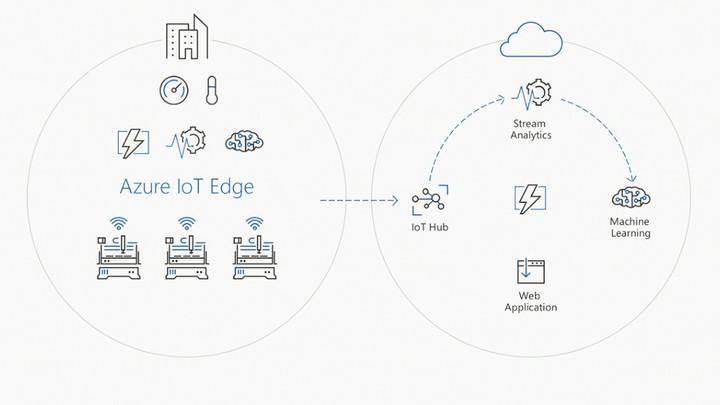
The cloud has bestowed these devices with new power. They can now be accessed from anywhere a data connection is available, providing use to people thousands of miles away. This new power comes with a problem, however. If the cloud becomes unavailable, the devices become useless.
Microsoft provided a Carnival cruise ship as one example. Normally, the ship has a constant internet connection through a satellite uplink, but a storm can disrupt that and, in turn, mess with onboard systems. Problems can even arise in normal conditions, due to the latency between the edge devices and the cloud.
Developers can push code that runs in the cloud to edge devices, so they’ll continue to work if the cloud is unavailable.
Azure IoT Edge provides a solution for that. It gives developers the capability to push code that runs in the cloud to edge devices, as well, so they’ll continue to work properly if the cloud is unavailable. When the cloud returns, they can link back up, as if an interruption had never happened. This is Microsoft’s “intelligent edge.” The devices are capable of exercising functionality on their own, even when disconnected from the cloud.
That’s a big deal. Imagine, for instance, a security system that uses facial recognition to detect who is and isn’t authorized to be in an area. A system that relies on the cloud would normally have a hard time if the internet went down. It’d stop functioning altogether. With Microsoft’s Azure IoT Edge, however, the system can continue to work with interruption.
In theory, at least. It’s worth noting that Azure IoT Edge is in preview, so it’s not ready for widespread deployment. If history’s any guide, we’ll likely hear more about it at next year’s Build, after it’s had time to prepare for release.
Coding for safety
It’s easy for Microsoft to say it has a vision for an “intelligent cloud, intelligent edge” future. The harder task is showing how buzz words translate to the real world. Fortunately, the company came prepared.
An early demo used a fictional construction site to show how the company’s combined services can interact in real time with a real workplace. The site was, of course, littered with tools, one of which was a jackhammer. Microsoft’s image recognition service recognized the tool as such, and could tell workers the tool’s location when asked through a smartphone app.
That’s impressive, but also just the start. Microsoft’s services were also able to determine the orientation of the tool, which was balanced precariously against a workbench, and flag it as a safety issue. Better still, facial recognition services identified the workers at the worksite, and flagged a violation when an unauthorized person came into the demo area to pose with the jackhammer for a ridiculous selfie.
“This technology will change the world.” That quote, or something like it, eventually slips from the mouth of every CEO in the tech sector. It’s rare, however, to see a demo that provides reason to think it’s true. Microsoft’s worksite demo was one such rarity. It showed how AI, edge devices, and cloud connectivity might come together to do things that seemed like science-fiction even a half-decade ago.
Building for Cortana, everywhere
Another demo brought similar innovations even closer to home using Microsoft’s digital assistant, Cortana.
While the demo itself was about Cortana, the real stars are Microsoft’s platforms.
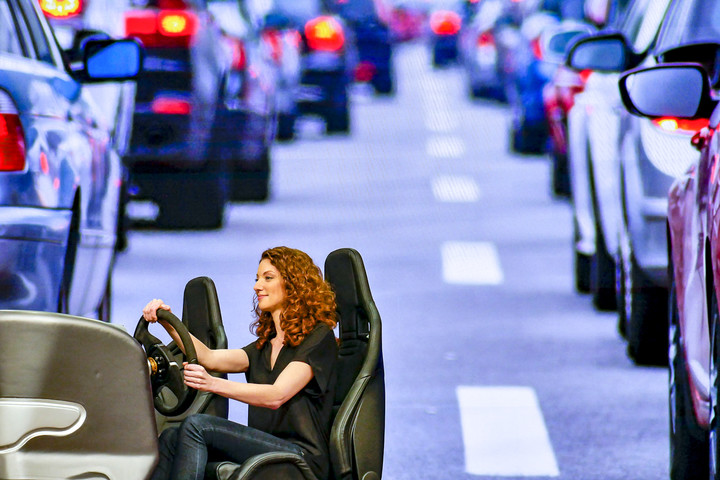
The demo showed a fictional morning routine. It started with a Cortana-enabled speaker at home, continued to a Cortana-enabled car, and ended with a Cortana-assisted meeting. Through the demo, Cortana changed how it worked based on the device through which the user interacted with it.
In a car, it relied on voice, and worked largely to provide schedule, map, and traffic information. While at work, Cortana connected to Skype, and could create action items based on what happened in the meeting.
Admittedly, this presentation felt a bit more fanciful than the preceding workplace demo, perhaps because Cortana is already a real product we can use. Cortana can’t do everything that was shown, and it isn’t as reliable in the real world as the demo wants us to think.
Still, the demo provided another example of how Microsoft’s geeky advancements could change everyday life. While the demo itself was about Cortana, the real stars are Microsoft’s platforms. The company wants developers to understand they can be used to improve almost anything. What works to make an industrial machine safer can also make scheduling a meeting easier.
Over your head, yet down to Earth
Passing Build off as “just a developer conference,” is easy to do. Most people find the announcement of a new Surface laptop, or new Windows 10 update, far more exciting.
What happens at Build shouldn’t be discounted. In fact, it’s more relevant than ever. Microsoft has evolved from an operating system company into a far-reaching company that shapes the framework of how tomorrow’s technology is used. Remember that when a few years from now, you find yourself clocking into work simply by showing up at the office.
Owlchemy Labs is now part of Google’s VR family
It’s not a Job Simulation: The VR magicians at Owlchemy Labs are now part of Google.
Google and Owlchemy Labs have announced that they are joining forces and that means awesome things for fans of VR.

Owlchemy Labs are the folks who brought us Job Simulator and Rick and Morty: Virtual Rick-ality to the HTC Vive and Oculus Rift, two great VR experiences that blend all things fun (and funny) into some seriously good times through your headset. Google has picked up this team and that means we can expect more of the same.
Today, we’re thrilled to welcome Owlchemy Labs to Google. They’ve created award-winning games like Job Simulator and Rick and Morty: Virtual Rick-ality which have really thoughtful interactive experiences that are responsive, intuitive, and feel natural. They’ve helped set a high bar for what engagement can be like in virtual worlds, and do it all with a great sense of humor!
Together, we’ll be working to create engaging, immersive games and developing new interaction models across many different platforms to continue bringing the best VR experiences to life. There is so much more to build and learn, so stay tuned!
We’re especially excited to see talk about different platforms, as products like Google Daydream and Samsung’s Gear VR make VR and AR more accessible and easier. Restraints like heat and power drain make building VR for mobile a real challenge and knowing that some great talent will now be working in-house at Google we anticipate things to get even better. While this news is good for Owlchemy Labs and Google, it’s even better for fans of VR at any level.
We expect to see great and silly things in the future!
Tesla Solar Roof: Everything you need to know
Tesla has begun letting customers pre-order its Solar Roof.
Six months after announcing the eco-friendly product, the car-maker has finally shared all the details about Solar Roof, including how the roof’s solar tiles work, how much they cost, and what the “Solar Roof experience” includes. So, we’ve gathered all this information and explained it below, with the hopes of helping you decide whether this is the perfect home solar setup for you.
- Tesla Solar Roof will power your home and look good in the process
- Elon Musk’s SolarCity will sell roofs made of solar panels
- Tesla: Everything you need to know
Tesla
What is a Tesla Solar Roof?
Popping a solar panel on your roof is a great way to generate free, sustainable energy for your home, but there’s one major drawback: It is often unsightly. However, Tesla’s latest product, Solar Roof, would be approved of by anyone and everyone. It covers the entire top of a house, and yet you wouldn’t notice because each tile is a smaller solar panel. They’re made of tempered glass with a solar cell contained inside.
Tesla Solar Roof was announced during a special Tesla event last October. Keep in mind Tesla acquired Solar City last year. It’s a San Mateo, CA-based company that provides energy services, such as the designing, financing, and installing of solar power systems. Musk co-founded SolarCity. You can read more about SolarCity and why Tesla acquired the company in Pocket-lint’s guide here.
Tesla
How does Tesla Solar Roof work?
Integrated Powerwall
Solar Roof turns sunlight into electricity, obviously. But with an integrated Tesla Powerwall battery, the energy collected during the day can be stored and made available any time, “effectively turning your home into a personal utility”, Tesla said. That also means you can have access to uninterrupted electricity during grid outages. To learn more about the Powerwall 2, check out Pocket-lint’s guide here.
Tesla’s Solar Roof only connects to the Powerwall 2, the second-generation of its home battery, and it’s capable of storing 14kWh of energy, with a 5kW continuous power draw, and 7kW peak.
Solar tiles and non-solar tiles
Tesla actually offers two types of glass tile, solar tile and non-solar tile, and both appear the same from street level. You can customise the amount of solar tiles you need, and every solar tile is warrantied for the lifetime of your house. During a conference, Musk said that in some cases, depending on the roofs, customers will be able to have up to 70 per cent solar tiles, but in most cases, it will be about 40 per cent.
Tesla offers a calculator directly on its website so you can get an estimate of what you need. All the solar tiles are made with tempered glass and are supposed to be more than three times stronger than standard roofing tiles. They’re also printed in a way so that they aren’t visible from the road and should look opaque or even be mistaken for regular roofing tiles (unless you’re looking down on them from above).
Tesla said the tiles will not degrade over time, like regular asphalt or concrete tiles do. Here’s a video of a “hail cannonball” shattering into pieces when chucked against a solar tile in slow-motion:
Slo-mo hail cannonball impacting Tesla solar roof tile
A post shared by Elon Musk (@elonmusk) on May 10, 2017 at 12:32pm PDT
Tile styles
Although there are two types of tiles being offered by Tesla, solar and non-solar, there are actually four different style types: tuscan, slate, textured, and smooth. The first two tiles, smooth and textured, are going into production this summer. Tesla said it decided to go with those two styles first because they received the highest number of inquiries after being announced last autumn.
You can learn more about the different styles from Tesla’s website.
Solar Roof experience
Tesla said that every customer who orders a Solar Roof will get the entire “Solar Roof experience – from the removal of your existing roof through design, permitting, installation, operations and maintenance of the new Solar Roof.” The company estimated that the installation should take approximately the same time to install as a regular roof installation. In other words, about five to seven days.
Tesla
How much does Tesla Solar Roof cost?
Here’s what Tesla says on its website:
“The estimated cost of your Solar Roof includes materials, installation, and the removal of your old roof. Taxes, permit fees and additional construction costs such as significant structural upgrades, gutter replacement, or skylight replacements are not included. The Solar Roof cost is based on estimated roof square footage for your home, provided by Google Project Sunroof where available, and the portion of your roof covered with solar tiles.”
According Tesla’s calculator, the average US customer can expect to pay $21.85 per square foot of solar panels. A Tesla Solar Roof for a two-story, 2,000-square-foot home in New York state should be around $50,000 to install after federal tax cuts. But it would generate $64,000 in energy savings over three decades, so Tesla said the upfront cost is “more than offset by the value of energy the tiles produce”.
Tesla includes an installed 14kWh Powerwall 2 in every quote. It can be removed, but Tesla thinks that most people will want to have the home battery pack for backup energy. Tesla also estimated that its non-solar tiles are cheaper than regular tiles.
Does Tesla offer financing?
Yes. Tesla will offer financing for Solar Roofs in the US in late 2017.
Tesla
When will Tesla Solar Roof be available?
Tesla has started taking pre-orders for its Solar Roof. A $1,000 deposit is required when ordering online from Tesla. Homeowners outside of the US can also order, but apparently, they shouldn’t expect installation until 2018. We’ll keep you posted when learn the specifics of UK pricing.
Want to know more?
Check out the Tesla Solar Roof FAQ page.
PBS made an adorable Chromecast-like TV streaming stick for kids
PBS thinks your kid may want to be a cord-cutter too.
There are a dozens of ways you can access your favourite TV shows and movies, whether you own a streaming set-top box, such as Apple TV or Roku, or even a streaming stick/HDMI dongle such as Google Chromecast. Although some of these devices do offer parental controls, they’re all geared toward teens and adults. However, PBS has just introduced its own HDMI dongle – and it’s specifically meant for kids.
The PBS Kids Plug & Play is apparently the first streaming stick for children – and it even looks like a toy car. It promises kid-friendly content and doesn’t even need a Wi-Fi connection. It comes with 100 hours of content stored locally on its 16GB of storage, as well as offline games that kids can play with using the included remote. If you do connect it to Wi-Fi, it offers access to the 24/7 PBS Kids live stream.
- Chromecast 2 review: Make any TV smart, effortlessly
- What is Google Cast for Audio?
- Chromecast now has a guest mode: Here’s how to turn on the feature
- What is Google Chromecast and why should you care?
Children will be able to watch additional PBS Kids on-demand content developed in partnership with local PBS stations as well. The device is powered by microUSB, has 1GB of RAM, features an SD card slot, and is available online now for $49.99. The Plug & Play will also be available at Walmart stores in the US from 24 May. Other retailers are expected to sell the device later this year.
PBS is an American public broadcaster and distributor, while PBS Kids is the brand that airs most of PBS’ programming for children.
- Roku Streaming Stick vs Google Chromecast
- Amazon Fire TV Stick vs Google Chromecast vs Roku Streaming Stick
- What is Google Chromecast and why should you care?
EU will push Apple, Google to treat app developers fairly
Spotify and other services aren’t happy with being at the mercy of internet giants like Apple and Google. If those behemoths want to stifle competition, they only have to impose strict app rules or promote their own products over others. Well, the smaller outfits may get some government help with loosening that grip. In the wake of a complaint letter from companies like Spotify and Deezer, the European Commission has announced that it’s readying “legislative instruments” to tackle the possibility of unfair contracts and trade practices. Just what those entail isn’t certain, but the Commission has already offered some clues through the initial results of an investigation.
The regulator pointed to instances where companies pulled products with little warning, limited access to your data or didn’t offer enough transparency with their search rankings. Accordingly, any laws would both set conditions for fair practice, create a system to resolve squabbles and boost transparency. If Spotify thinks an app store operator is holding it back, it might not have to choose between a grin-and-bear-it attitude or a messy court battle.
Whether or not legislation is a good idea depends on who you ask. Independent music labels tell Reuters that they’re in favor of the idea — they believe the power imbalance “distorts competition.” Not surprisingly, the groups representing Apple and Google have other ideas. EDiMA sees the proposed legislation as a step backward from “progressive” ideas that didn’t treat companies as “gatekeepers,” while the lobbyists at CCIA Europe would rather see the Commission rely on case-by-case uses of competition law instead of more rules.
We wouldn’t count on the EC changing its mind. Although there’s no certainty that there will be laws, it already has both evidence and an idea of what it wants. The real question is whether or not any future rule set would do enough to promote fair competition without seriously hurting larger firms.
Via: Reuters, 9to5Mac
Source: European Commission
 AIVAnet