


Suunto Spartan Sport Wrist HR review: Great multi-sport watch misses a beat
The biggest claim with the Spartan Sport Wrist HR is that it’s the first watch with heart-rate that Suunto has produced. While it joins a family of capable devices, that removes the need for a chest strap, making it appealing to a wider range of athletes.
That’s a general trend across the industry and although heart-rate chest straps are more accurate, the convenience of a wrist-based tracking system seems to be winning. Cases in point: Polar is also shifting heart-rate reading to the wrist, as is Garmin.
That sees the Spartan Sport Wrist HR multi-sport watch up against some serious opposition from those established rivals, as Suunto looks to make a bigger impression. Does it succeed?
Suunto Sport Wrist HR review: Spartan design
- 50 x 50 x 16.8mm
- 100m waterproofing
- Available in black, blue, pink colours
Suunto’s history lies in navigation, from conventional compasses evolving to the wrist-worn compass favoured by divers. There’s still a hint of the compass in the design of the Spartan watches, with the bezel having four nubbins around the dial that remind us of compass points.
Pocket-lint
We’ll come to the actual digital compass functions later, but from a design point of view, it’s worth noting that this is a large watch, about 16.8mm thick and with a diameter across the body of about 50mm. There’s a chunky but comfortable strap and despite the size, the watch only weighs 74g.
In sports watch terms that’s large, but it’s not alone in that sense: the Garmin Forerunner 920 XT is similarly large, while the incoming replacement for that watch, the Forerunner 935 is only a few millimetres smaller in all directions.
We found the Suunto felt good to wear and have been happily wearing it for a month without the size worrying us. If you like smaller watches or have smaller wrists, then you might want to look elsewhere.
But the size brings an advantage: it’s easy to press the three right-hand buttons on the move, so the Spartan avoids being too fiddly. It’s touch-enabled too, but there’s a lean towards the buttons for stopping and starting activities, as well as confirming selections.
That bezel is stainless steel for protection, sitting atop a polyamide body with a mineral glass display. Available in a number of colours, we suspect the Blue or Sakura versions will fare better than the black in this regard.
Pocket-lint
The only downside we’ve found is of the silicone strap: it likes to collect dust and debris, so we’ve found ourselves rinsing it off regularly, or it always looks messy. Not that rinsing or, indeed, submerging is an issue: the Spartan is waterproof to 100m, so is suitable for divers and generally happy in all conditions.
Suunto Sport Wrist HR review: Display and visibility
- Round 360 x 360 pixel display
- Custom watch faces and colour modes
- Touch-enabled; plus three-button control
Having a big display means you can easily see a lot of information, which is generally what athletes want. You don’t want to have to swipe through a lot of screens to see the important stuff, most of which is presented on the main sports screen.
Pocket-lint
For running, that means time, distance, pace and heart rate are displayed, with the option to swipe through to further different information. For swimming there’s distance and time, for example, to keep things simpler while in the water. Tapping the display will pop-up battery and current time, the latter a metric we always like – “is it time to go home yet?” “No, keep running”.
There are multiple additional screens, too, including routing, averages rather than current stats, plus things like a heart-rate graph that long distance users might find useful (but it’s fairly difficult to interpret when you’re on the move and tired out).
You can also lock the display and buttons, so that if you’re doing something where buttons might get pushed or the screen swiped by accident, you can lock it to a single display with a long press of the bottom button. When that’s done, any button press will then illuminate the display so you can see your data.
One option we particularity like is being able to choose light or dark themes. Not only does this cater for personal preference, it means you can pick the setting that gives you the best visibility for the conditions you’re exercising in. We find the light theme suits us better during activities, returning to a dark theme when not actually training.
There’s a backlight, too, which will dim leaving an “always on” state, waking up when you press a button. If the watch is off your wrist and doesn’t move, the screen will turn off completely, which no doubt helps that 10-day casual battery life.
Pocket-lint
The display is colour, but it doesn’t make a huge use of the available palette. Some colours are used for highlights here and there, with the main use of colour to present graphs of your workout, or in big red or green banners to indicate which button is for pause and which is for stopping a workout.
The screen’s 360 x 360 pixel resolution is fairly high as these devices go, but the Suunto Spartan Sport display doesn’t attempt to give you the sort of visuals the Apple Watch will, preferring to keep things simple. There’s a choice of watch faces, but nothing hugely exciting, giving you the option of analogue-style hands or digital number readout, plus a steps count should you wish.
Suunto Sport Wrist HR review: A watch for all sports and your recovery
- Pre-loaded sports profiles
- Estimates for VO2 max and EPOC
- Recovery times suggested
- Supports intervals
Many of the watches we look at are designed primarily for running first, perhaps adapting that for cycling and walking, along with giving you a selection of other activities. The Suunto Spartan watches position themselves as devices for the multi-sport athlete and come with a comprehensive list of pre-installed activities.
When setting up your profile you can add or remove the activities that you do regularly, so that the watch only contains what you need, and you don’t have to flick past martial arts, frisbee or cross-country skiing to get to what you’re actually going to do. Also on the list is orienteering, adventure racing, obstacle racing and triathlon – meaning you’re well covered, no matter what your sport of choice.
We like that there are different types of running and swimming, different options for indoor cycling or running, and the unusual stuff you can add when you’re on holiday – like stand-up paddle boarding, for example.
Pocket-lint
For some, the Suunto will basically be bought as a heart-rate tracking device, just to keep track of what happens to your heart during a session, but at least when you look back at your stats you’ll know that your weight training session is tagged as such, so the data is valid, and you don’t have to put in a hike as a run and skew all your data.
As has been the trend across a lot of devices recently, the Spartan Sport will give you VO2 max and EPOC figures in the summary of your workout, plus your estimated recovery time. This last of these is useful (Polar gives you similar feedback in Polar Flow) because it serves as a reminder about the impact that the workout is having on your body, helping beginners pick the right intensity and more experienced users avoid over training. Recovery is based on averages, so those who are super-fit might find that they recover faster than the watch recommends.
Within all the different activities it’s possible to set intervals (where distance is being measured) and these are easy to set from the start of a new activity.
Suunto Sport Wrist HR review: Heart-rate tracking, but not the best
- Optical heart-rate sensor on wrist
- Lifestyle heart rate tracking through the day
The Spartan Sport Wrist HR’s big focus is that heart-rate sensor on the rear. This means there’s a small bump on the inside to press the optical sensors against the skin. That might sound uncomfortable, but it’s standard practise now and perfectly comfortable to wear.
Pocket-lint
Generally speaking, optical heart-rate sensors on the wrist aren’t as accurate as those you wear as a chest strap – the latter being what the sister model, the Spartan Sport, uses. Typically, there can be some extraneous results or a response time that’s slower than chest straps.
In the case of the Suunto Spartan Sport Wrist HR we got quick heart-rate detection, but some fairly inconsistent results, including occasional extreme highs, like running at over 180bpm at the start of a run (and sometimes peaking into the 190s, which suggests that the sensor can get a little confused – we definitely weren’t running that hard). Through our testing this trend of peaking at the start and then taking time to settle back down to expected averages became the norm.
Looking across results from the past runs, the Suunto certainly looks higher than our average. To verify this, we set it against a chest strap Garmin and the traditional method of taking our pulse against the clock and found that the Spartan was running high. The average is 10bpm higher, but there are peaks at the beginning that are anomalous (Suunto top, Garmin bottom in the graphs below over the same run).
Pocket-lint
That’s the biggest weakness of this device: if the heart-rate reading won’t settle, then it’s not great for those who want to run in particular zones or are focusing on heart-rate training. It also means that things like your recovery time estimate and other stats will be out too.
In addition to tracking your heart rate during exercise, the Sport Wrist HR will also trace your heart rate during the rest of the day. This is a move – along with step-tracking – to add a lifestyle element to the device. You can wear it all day and it’s doing more than just providing the time. This regular heart-rate tracking will give you a means to examine your resting heart rate and see how active you are during the day.
You can also pair the watch with a chest strap if you prefer. While some won’t see the benefit of a strap, one thing that it will give you is sensor memory if you use the Suunto Smart Sensor – i.e. the strap can remember and transfer your heart-rate data for your session, so if it gets disconnected it still records – but the point of this type of device is to avoid having to wear that strap around your chest in the first place.
Suunto Sport Wrist HR review: GPS tracking, digital compass and navigation
- GPS & GLONASS, GPS altitude, digital compass
- GPS accuracy modes to extend battery life
With GPS onboard, the Spartan Sport Wrist HR is poised and ready to track your activity. Like heart-rate detection, the GPS is fairly quick to locate the watch and we found that hopping from UK to Spain didn’t cause it much of a problem: it found the new location in about a minute after a big move and then locked on in about 15 seconds thereafter. You can also start running/timing before the device locks on, if you really can’t wait, although your route will only be traced once it picks up the location.
Pocket-lint
One of the interesting details is that you can change the GPS accuracy – the trio of options are OK, Good, Best – and switch GLONASS on or off. This gives you some choice over how important GPS is to your workout – do you need the exact route, or is a general idea of the distance ok? At the Best setting data is captured every second and the GPS stays at full power. At Good it still logs every second, but is in low power mode between logging. At OK level, GPS is only captured every minute, so is probably best for walking.
This all has a big impact on battery life, with Best giving you eight hours of tracking, dropping to 12 hours at Good and 30 hours at OK. As there’s no altimeter, that information also has to come from GPS, and if accurate height changes are needed, then you’re best off sticking to the Best setting.
We chose that Best setting and found that the performance was good in open areas, being accurate enough to reflect things like crossing to the other side of the road. As you approach built-up areas some of that keen accuracy is lost for the precise route, but that’s normal. We also found the distance readouts to be as expected, which for many is the important thing. Lap notifications can be given every kilometre, with a brief summary of your performance.
Under the navigation section you can also access the compass for directional guidance, but perhaps more useful is the ability to find your location (coordinates) and save that as a POI (point of interest). These can be named with things like home, hotel, camp, big game and a lot more, meaning you can find your way back to something, which is useful if you’re exploring a strange location.
Pocket-lint
Aside from POIs, you can also add and create routes using the Movescount companion website. These can be evolved from your own runs, community sourced, meaning you can search in an area and adopt someone else’s route, or you can upload GPX files for particular routes – like long walks, for example.
The great thing about using your own routes is that you can add them to the route planner and change them on the map, perhaps to make it up to a distance you want to hit. All of this is relatively easy to do through the website, adding some skills that other watches don’t offer. In addition, there’s breadcrumb route tracking – which gives a detailed view and an overview, so you can find your way back to familiar ground by simply swiping to the navigation screen during an activity – so if you head out into the wilds you can find your way back.
Overall, the GPS tracking and route functions are a highlight of the Suunto Spartan Sport Wrist HR.
Suunto Sport Wrist HR review: Movescount and a lacking app experience
- Movescount desktop and app experience
- Smartphone syncing and notifications
- Can link to Strava and other services
With it being 2017, any device is part of a connected experience. That’s true of the Suunto Spartan Sport Wrist HR, which will sync to your phone, letting you view your results in the Movescount app. This app reflects some of the desktop experience visually, which makes the app rather fiddly. It’s a poor cousin to the likes of Polar Flow or Garmin Connect, with Suunto’s opening page showing you a loose barchart of activity.
The information is all in this app, from the details of your workouts to maps of your routes, but the app is really serving two purposes: it’s a home for your data; and a smartphone app for tracking more workouts, should you be carrying your phone rather than using a dedicated watch.
Pocket-lint
Examining what you’ve done is ok – although the watch will give you that information too – but the maps section of the app seems wasteful. It will show you where you are as well as give you a heat map for other Suunto users’ activity. You can’t do anything with that information. On the website you can look at the map and find a route that someone else has logged and run it, but in the app you can’t. That seems like a missed trick: what better than arrive in a new city and be able to instantly find a route, send it to your watch and start running?
We’ve also had some syncing problems with the app. We can’t tell if these are platform related (is it an Android problem?) or related to particular devices (a Samsung Galaxy S7 edge and Galaxy S8+ were slow, a Pixel XL was fine), or just a general issue with establishing connections. We’ve had some phones that would take 10 minutes before anything would appear – in most cases we’d give up. More recently we’ve found it getting faster – so perhaps this is a problem that’s been fixed?
You can connect Movecount to other services, such as Strava, and we’ve found that you can also connect to Movescount with other services, although it’s not as immediately willing to share as something like Garmin Connect.
Finally there are smartphone notifications as an option, which are accompanied by a little buzz. This will let you know if you have incoming messages and alerts, with the ability (on Android) to turn off those you don’t want. Sounds great, but we found it to be very inconsistent, often going for days without anything, then hitting us with a whole load. Again, this sounds like some sort of connectivity problem between the watch and phone.
Verdict
The Suunto Spartan Sport Wrist HR has a lot going for it. It’s a fully-feature activity watch, covering a lot of sports and giving you lots of sensible options to track your activities. The Spartan also gives you some of the strongest route tracking and management options around, making this a device that’s perhaps more appealing to the outdoorsman than the out-and-out runner.
That’s compounded by the fact that the new wrist-based heart-rate sensor can be inconsistent in its tracking and, in our experience, more so than many rivals. Devices like the TomTom Adventurer, while not as all-encompassing, will deliver a better experience. So if heart rate is important to your training, you might be better with the Suunto Spartan Sport along with a chest strap – but there’s still a chance that the the Wrist HR’s performance can be bettered through software refinement.
The Suunto app is also a little lacking compared to Garmin and Polar rivals and could easily be evolved to give you more.
At its core, the Suunto Spartan Sport Wrist HR is a great device. It has good battery life, lots of sensible options and is comfortable and enjoyable to use. However, that heart-rate tracking needs to be more consistent to take on the established rivals, especially at this price level.
The alternatives to consider…
Pocket-lint
TomTom Adventurer
The TomTom Adventurer is similarly pitched at a wide range of activities, but with the great outdoors in mind. It offers many similar functions to the Spartan Sport Wrist HR and while it’s less well equipped for some of the navigation options, it delivers much better on heart rate and also offers a barometer for more accurate altitude readings.
The Adventurer also supports on-board music and can be connected to Bluetooth headphones, making it a slightly better choice for those who want it mainly for running. Like the Spartan, the app isn’t the most sophisticated and it doesn’t offer smartphone notifications. It is cheaper at around £210.
Read the full article: TomTom Adventurer review
Pocket-lint
Garmin Fenix 5
Garmin goes after the great outdoors with the Fenix 5 and while the companies forthcoming Forerunner 935 will suit the sports set better, the Fenix is designed for those wanting rugged outdoor protection, solidity of build and great battery life. This is paired with great performance from the GPS and heart rate sensor and all pooling into the Garmin Connect app.
The downside is that the Fenix 5 is probably the most costly of sports devices you’ll find, but it does manage to have an air of elegance about it, looking good with its premium design whether you’re up a mountain or pointing at a flip chart.
Read the full article: Garmin Fenix 5 review
Teams are abandoning ‘Overwatch’ before its official league debuts
Yesterday, Blizzard announced that it had formed a dedicated eSports division within the company. It will operate under the name Major League Gaming, the organization bought by the studio in 2015, and run the official Overwatch League (OWL) and World Cup. But several major eSports teams have started abandoning the game ahead of the competitive league’s launch. Some of which did, reportedly, because it costs $20 million to franchise an official team.
That’s the figure sources told ESPN, which might even be higher in large markets like New York City or Los Angeles. Compare that to a spot in the League Championship Series for Riot’s League of Legends, one of which sold for $1.8 million last December. Five esports organizations announced they will stop fielding teams for Overwatch in the last week; a statement from one player on Team SoloMid’s roster for the game admitted that the cost of entering OWL was a factor in disbanding its team.
CompLexity Gaming’s statement outright stated that the game’s competitive scene was in too much of a “transitional phase” for them to keep a live roster. They also noted a “narrow field” of events limited competition, which was also a factor in professional gaming organization Splyce giving up their Overwatch team. Denial Esports has apparently also released their squad, as has Red Reserve.
Blizzard originally planned to launch OWL at its annual BlizzCon event in late 2017. The league is set up like the NFL or NBA, with teams centered in large cities. We’ve reached out to Blizzard and will update when we hear back.
Source: ESPN
Russian blogger found guilty of playing ‘Pokémon Go’ in church
A Russian judge has found a Russian YouTuber guilty of inciting hatred for posting antireligious videos after he filmed himself playing Pokémon Go in a church. Ruslan Sokolovsky, a 22-year-old man from the Ural mountain city of Yekaterinburg (around 1,000 miles east of Moscow), has yet to be sentenced — a ruling is expected later today — but he could face up to five years in jail for “offending religious sensibilities.”
Sokolovsky posted footage of him catching Pokémon in the Yekaterinburg’s Church of All Saints back in August 2016. The video was posted in response to the government imposing tougher penalties on people judged to have purposely insulted the feelings of believers in places of religious worship.
“Who can ever be offended by you walking around a church with your smartphone?” he asked at the start of his video. “Why the f*ck would they lock you up for that?” A few weeks after it went live on YouTube, Sokolovsky was awoken by police who had accessed his apartment using keys from his landlord and arrested. He was then placed under house arrest until his court appearance.
Prosecutors have lobbied for at least a three-year sentence for Sokolovsky under the new religious laws, but it could stretch to five. It is thought to be the same Article 282 of the Russian Criminal Code that helped prosecute Russian punk band Pussy Riot.
Human rights organization Amnesty International has lobbied for Sokolovsky’s release, arguing that the punishment and the law is a restriction on free speech. In September 2016 alone, over 14,000 people had contacted the Russian authorities demanding he be set free.
Source: BBC News
EA Announces ‘The Sims Mobile’ Coming Soon to iOS
EA has announced a new free-to-play version of The Sims is coming to iPhone and iPad, six years after The Sims Freeplay – a simplified version of the original – launched on the mobile platform.
Called The Sims Mobile, the game looks like it will be the closest mobile approximation yet of the hit franchise, being based on The Sims 4 “legacy challenge” mode, in which players build and maintain a family across generations according to a set of self-imposed rules.
Like other games in the franchise, players will guide sims through life, establishing relationships, building homes, advancing through careers, and conquering goals.
Not much else has been revealed about the title beyond the fact that it will feature social elements, allowing players to become “virtual” best friends with their real-life friends. But the trailer for the game does show that it will include classic Sims mechanics, allowing players to design their characters and customize their home.
The Sims 4 on Mac and PC continues to have a healthy fanbase. Yesterday EA revealed that the game’s number of monthly active users jumped 33 percent year on year.
The Sims Mobile for both iOS and Android launches in Brazil today and should start rolling out globally soon after.
(via The Verge.)
Discuss this article in our forums
Netflix adds HDR support on Android, but only for the LG G6
Why it matters to you
High Dynamic Range (HDR) offers a significant improvement in color depth, ideal when watching video on any screen.
Included within version 5.0 of the Netflix app for Android, the streaming video company has enabled the ability to watch HDR-enabled video on a specific Android smartphone. Currently, the only smartphone that supports HDR playback is the Dolby Vision compatible LG G6. Support on additional phones will be announced at a later date.
Interestingly, this is the first smartphone that will have access to HDR content. Samsung announced HDR Premium certification by the UHD alliance for the Galaxy S8, but Netflix hasn’t enabled HDR content for that smartphone yet. Of course, it’s likely that Netflix will move quickly to expand access within the upcoming months depending on compatibility.
Detailed on Netflix’s FAQ page, one hefty requirement for streaming Netflix with HDR enabled is an internet connection speed of 25 megabits per second or faster. It’s likely that attempting to stream HDR content via a mobile LTE connection on a commute will fail due to a download speed less than 25 megabits per second.
In addition, customers will need a subscription to the 4-screen-at-a-time plan for $11.99 a month. That plan includes access to Ultra HD content while the 2-screen, $9.99 plan is limited to standard HD video. Finally, playback settings should be set at “high” within the app in order to stream HDR quality by default.
Finding HDR content on Netflix isn’t difficult, but it’s not at simple as locating a pre-created category within the user interface. Using the Netflix app, perform a search for “HDR” and multiple options will appear in the listings. The majority of the search returns include Netflix-created content like all the live-action Marvel shows, Marco Polo, Santa Clarita Diet and House of Cards as well as the Adam Sandler original movies Sandy Wexler, The Do-Over and The Ridiculous 6.
Linksys debuts a blazing-fast router and its very first modem/router combo
Why it matters to you
Linksys continues to raise the bar in networking by providing its very own modem/router hybrid device, and a new Wireless AC router promising blazing-fast speeds.
Linksys on Wednesday introduced two new networking products: the EA9300 Wireless AC router and its very first cable modem/router combo, the CG7500. The former EA9300 stand-alone router is a tri-band solution, meaning it broadcasts two 5GHz connections and one 2.4GHz connection. The CG7500 combo unit only offers two connections and serves as a replacement for your ISP’s supplied modem.
According to Linksys, the stand-alone router is capable of speeds of up to 750Mbps on the 2.4GHz band and up to 1,625Mbps on each 5GHz band. However, to see those maximum speeds, the connecting wireless devices must include three internal antennas to capture the three streams broadcast by the router.
While those numbers sound uncommonly high, consider that the router broadcasts three streams per 2.4GHz/5GHz/5GHz connection (3x3x3). In turn, each stream has a maximum channel width and waveform (modulation). On the 2.4GHz front, a stream with a channel width of 40MHz and a 256-QAM modulation can achieve 200Mbps per second. However, the new router uses a 1024-QAM modulation, increasing the speed to 250Mbps. The 5GHz bands also use a 1024-QAM modulation to hit 541.67Mbps per stream.
Typically, we see devices packing only two internal antennas getting a maximum 2.4GHz speed of 400Mbps and a maximum 5GHz speed of 867Mbps. However, all of these speeds are theoretical anyway, and devices won’t hit those maximum numbers unless the user is in a sterile, interference-free environment. Here’s a more detailed diagram:
2.4GHz @ 750Mbps = 250Mbps + 250Mbps + 250Mbps
Modulation
Channel Width
Max Speed
64-QAM (5/6)
40MHz
150Mbps
256-QAM (5/6)
40MHz
200Mbps
1024-QAM (5/6)
40MHz
250Mbps
5GHz @ 1,625Mbps = 541.67Mbps + 541.67Mbps + 541.67Mbps
Modulation
Channel Width
Max Speed
64-QAM (5/6)
80MHz
325Mbps
256-QAM (5/6)
80MHz
433.3Mbps
1024-QAM (5/6)
80MHz
541.67Mbps
As for other features, the new router features a quad-core processor clocked at 1.8GHz, 512MB of system memory, 256MB of internal storage, four gigabit Ethernet ports for wired devices, one gigabit Ethernet port for the modem connection, two USB 3.1 Gen1 Type-A ports, and six external antennas.

The CG7500 modem/router hybrid is compatible with Comcast Xfinity and Charter Spectrum broadband services up to 300Mbps. On the wireless front, it’s also a three-stream device, although its speeds aren’t quite as robust. On the 2.4GHz end, the CG7500 reaches up to 600Mbps (3 x 200Mbps), while the 5GHz band reaches up to 1,300Mbps (3 x 433.3Mbps).
The new modem/router combo is based on Intel’s Puma 6 processor built specifically for version 3.0 of the Data Over Cable Service Interface Specification, which is what enables cable TV and broadband data transfers. The chip is “flexible and high-performing,” enabling download speeds of up to 960Mbps even though the modem/router hybrid is locked to 300Mbps broadband plans.
The CG7500 includes four gigabit Ethernet ports, one F-Type female cable connection, and one USB 2.0 port. The device is available now for a one-time purchase price of $200, which eliminates the rental fees associated with using a broadband provider’s modem. The stand-alone EA9300 router is also available for a heftier $300.
Linksys debuts a blazing-fast router and its very first modem/router combo
Why it matters to you
Linksys continues to raise the bar in networking by providing its very own modem/router hybrid device, and a new Wireless AC router promising blazing-fast speeds.
Linksys on Wednesday introduced two new networking products: the EA9300 Wireless AC router and its very first cable modem/router combo, the CG7500. The former EA9300 stand-alone router is a tri-band solution, meaning it broadcasts two 5GHz connections and one 2.4GHz connection. The CG7500 combo unit only offers two connections and serves as a replacement for your ISP’s supplied modem.
According to Linksys, the stand-alone router is capable of speeds of up to 750Mbps on the 2.4GHz band and up to 1,625Mbps on each 5GHz band. However, to see those maximum speeds, the connecting wireless devices must include three internal antennas to capture the three streams broadcast by the router.
While those numbers sound uncommonly high, consider that the router broadcasts three streams per 2.4GHz/5GHz/5GHz connection (3x3x3). In turn, each stream has a maximum channel width and waveform (modulation). On the 2.4GHz front, a stream with a channel width of 40MHz and a 256-QAM modulation can achieve 200Mbps per second. However, the new router uses a 1024-QAM modulation, increasing the speed to 250Mbps. The 5GHz bands also use a 1024-QAM modulation to hit 541.67Mbps per stream.
Typically, we see devices packing only two internal antennas getting a maximum 2.4GHz speed of 400Mbps and a maximum 5GHz speed of 867Mbps. However, all of these speeds are theoretical anyway, and devices won’t hit those maximum numbers unless the user is in a sterile, interference-free environment. Here’s a more detailed diagram:
2.4GHz @ 750Mbps = 250Mbps + 250Mbps + 250Mbps
Modulation
Channel Width
Max Speed
64-QAM (5/6)
40MHz
150Mbps
256-QAM (5/6)
40MHz
200Mbps
1024-QAM (5/6)
40MHz
250Mbps
5GHz @ 1,625Mbps = 541.67Mbps + 541.67Mbps + 541.67Mbps
Modulation
Channel Width
Max Speed
64-QAM (5/6)
80MHz
325Mbps
256-QAM (5/6)
80MHz
433.3Mbps
1024-QAM (5/6)
80MHz
541.67Mbps
As for other features, the new router features a quad-core processor clocked at 1.8GHz, 512MB of system memory, 256MB of internal storage, four gigabit Ethernet ports for wired devices, one gigabit Ethernet port for the modem connection, two USB 3.1 Gen1 Type-A ports, and six external antennas.

The CG7500 modem/router hybrid is compatible with Comcast Xfinity and Charter Spectrum broadband services up to 300Mbps. On the wireless front, it’s also a three-stream device, although its speeds aren’t quite as robust. On the 2.4GHz end, the CG7500 reaches up to 600Mbps (3 x 200Mbps), while the 5GHz band reaches up to 1,300Mbps (3 x 433.3Mbps).
The new modem/router combo is based on Intel’s Puma 6 processor built specifically for version 3.0 of the Data Over Cable Service Interface Specification, which is what enables cable TV and broadband data transfers. The chip is “flexible and high-performing,” enabling download speeds of up to 960Mbps even though the modem/router hybrid is locked to 300Mbps broadband plans.
The CG7500 includes four gigabit Ethernet ports, one F-Type female cable connection, and one USB 2.0 port. The device is available now for a one-time purchase price of $200, which eliminates the rental fees associated with using a broadband provider’s modem. The stand-alone EA9300 router is also available for a heftier $300.
Luxury fashion brands slowly embrace internet shopping
Luxury fashion brands have been notoriously reluctant to embrace the internet. While you can find their wares on third-party stores, you typically have to visit an old-fashioned retail store if you want to buy straight from the source. However, that’s all set to change. LVMH, the owner of many of the world’s biggest luxury brands (including Bulgari, Givenchy and Louis Vuitton), is launching its own online store in June. The upcoming 24 Sèvres will initially carry only women’s apparel, but it’ll be a decidedly modern affair: you can expect a mobile app, chatbots, fast checkouts and international shipping.
The store will “only” carry 20 to 30 of LVMH’s own 70-plus brands at first (there will be 150 in total). When you shop one of the in-house labels, though, 24 Sèvres can source goods from physical stores.
This is relatively uncharted territory for the high-end fashion world. It’s not certain if the new store will squeeze out third-party rivals or merely serve as yet another portal for buying expensive coats and handbags. However, it was unlikely that big luxury vendors could resist forever — there are only so many people willing to make the pilgrimage to an upscale boutique or department store just to get the official experience. As it is, LVMH has already signaled an intent to court online shoppers through the launch of the TAG Heuer Connected Modular 45 — you don’t have to track down a watch store to get one. In that sense, an internet shop like 24 Sèvres was more of an inevitability.
Source: New York Times
Switch players won’t have to pay more for ‘Rime’ after all
Back in March, fans of Nintendo’s latest console and open-world puzzle adventure games got some tough news: Tequila Works’ highly anticipated indie title Rime would cost extra and arrive later on the Switch. Luckily for cash-strapped players who want to explore Rime’s island environments on the go, a digital copy of the Switch port will now carry the same $29.99 price tag as the PS4 and Xbox One editions.
According to a blog post from publisher Grey Box, “additional development, manufacturing, and publishing costs” drove up the price on the Switch version, but they’re hoping to make a bargain to keep prices in line across all platforms. Physical copies of the Nintendo version will still cost a cool $10 more due to the realities of putting out a packaged product, but Grey Box will also include a free code for David García’s complete original soundtrack — something that will also be sold separately online as a $10 download.
Now for the bad news: although Rime will arrive on PS4, Xbox One and PC later this month on May 26th, there’s still no official release date for either the physical or digital Switch versions. For that, Grey Box says they hope to make another Switch-related announcement “shortly.”
Source: Grey Box
Verizon reportedly outbids AT&T for key 5G wireless spectrum
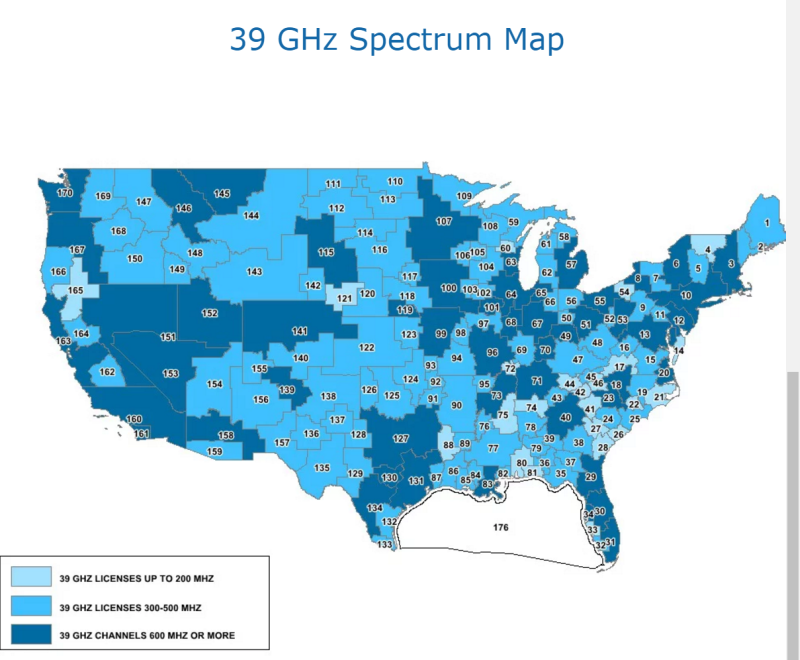
A month ago, AT&T announced it would acquire Straight Path Communications for $1.6 billion, specifically because Straight Path owns licenses to use high-frequency radio waves that will be crucial for the next generation of wireless technology. However, after that agreement, an unnamed Multi-National Telecommunications Company (that is reportedly Verizon, the owner of this website) stepped up with a bid of $3.1 billion in stock, and tonight the Wall Street Journal reports that AT&T has declined to match it.
Verizon and Straight Path have not commented yet, however, last month AT&T said it was planning to use the company’s millimeter-wave (mmWave) spectrum to “accelerate the delivery of new experiences for consumers and businesses like virtual and augmented reality, telemedicine, autonomous cars, smart cities and more.” At the time it said “AT&T will acquire 735 mmWave licenses in the 39 GHz band and 133 licenses in the 28 GHz band. These licenses cover the entire United States, including all of the top 40 markets.”
Source: Wall Street Journal
 AIVAnet