


Linksys Debuts Its First 2-in-1 Cable Modem and Wi-Fi Router
Linksys today introduced its first 2-in-1 wireless router and cable modem. The emphasis should be on “cable” in that sentence, as Linksys already sells a handful of routers with built-in DSL modems for internet over a telephone line.
The Linksys CG7500 supports many of the latest wireless technologies, including 802.11ac Wi-Fi, IPv6, and beamforming technology. The AC1900-speed router has 3X3 internal dual-band 2.4 GHz and 5 GHz antennas, 24×8 channels, four Gigabit Ethernet ports for high-speed wired connections, and one USB 2.0 port.
The modem is DOCSIS 3.0 certified, meaning it is compatible with Comcast Xfinity and Charter Spectrum in the United States, and many other major cable providers, for internet plans with theoretical speeds of up to 300 Mbps. It can be used with 12+ devices at once, including Macs, PCs, iPhones, and iPads.
2-in-1 modems and routers are often considered worse than a separate router and modem combination, but the CG7500 is worth considering for anyone that wants to stop renting a modem from their cable company. For most people, it’ll likely provide good enough Wi-Fi in a medium-sized house or apartment.
Linksys is accepting pre-orders for the CG7500 on its website for $199.97 in the United States. It’ll be available from Amazon, Best Buy, B&H, Micro Center, New Egg, Office Depot, Target, Walmart, Fry’s, and Meijer on May 15.
Competing 2-in-1 options include the NETGEAR AC1900 Nighthawk for around the same price of $198.99, and the Arris SURFboard SBG6900-AC with a reduced 16×4 channels for a current sale price of $167.99 (regular $199.99).
Tags: wi-fi, Linksys
Discuss this article in our forums
Apple to Start Offering iTunes on the Windows Store
Apple plans to bring its iTunes app to the Windows 10 Store, Microsoft announced today at its Build developer event. iTunes, is, of course, already available on the Windows platform, but adding it to the Windows Store will make it easier for Windows users to find the software.
Gaining iTunes for the Windows Store is a win for Microsoft, as the Windows store is currently lacking many key apps like Google’s Chrome browser and Spotify. Microsoft has strict app requirements that some companies aren’t able to work with.
iTunes is coming to the Windows Store by the end of this year. #MSBuild pic.twitter.com/WHM533S7Sv
— Windows (@Windows) May 11, 2017
The addition of iTunes could potentially drive more customers to use the Windows 10 Store, with iTunes said to be one of the apps that Windows users search for most often.
According to Microsoft, iTunes will be added to the Windows Store by the end of this year.
Tags: Windows 10, iTunes
Discuss this article in our forums
ZTE’s 6-inch Blade X Max smartphone costs just $150 on Cricket Wireless
Why it matters to you
On Cricket Wireless? There’s a new budget smartphone that offers solid specs and the latest version of Android — all for $150.
ZTE is launching yet another budget smartphone in the U.S., but this time it’s from its international Blade series. The new Blade X Max is a 6-inch smartphone running Android 7.1.1, the latest version from Google, and it will cost $150 exclusively at Cricket Wireless for existing subscribers.
If you’re looking to switch to Cricket Wireless, new customers can grab the phone for a mere $100 — the same promotional price point for other ZTE budget devices, such as the Max XL on Boost Mobile and the ZMax Pro on MetroPCS. The ZMax Pro was later picked up by MetroPCS’ parent carrier, T-Mobile, so the same could happen with AT&T, which owns Cricket Wireless.

The Blade X Max’s specifications are quite similar to the recently announced ZTE Max XL — it runs the same Qualcomm Snapdragon 435 processor with 2GB of RAM, and you’ll find the 6-inch display has the same 1,920 x 1,080-pixel resolution. It comes packed with 32GB of internal storage, more than the 16GB on the Max XL, and there’s a MicroSD card slot in case you need more space. The Blade X Max also has the same 13-megapixel rear camera and 5-megapixel front-facing camera setup as the Max XL.
It (thankfully) has a headphone jack, and a USB Type-C port, which is superior to the long-running MicroUSB port. You’ll be able to charge faster with Type C, especially thanks to the phone’s support for Qualcomm’s Quick Charge 2.0 technology. The 3,400mAh battery capacity certainly is a lot larger than that of more expensive phones, and it means the Blade X Max should last a full day.
There’s a fingerprint reader on the back of the phone — a staple in most smartphones these days, though ZTE goes a step further and allows you to use five fingerprints to access different apps.
The Blade X Max is ZTE’s second Blade smartphone available in the U.S., after the higher-priced Blade V8 Pro. It goes on sale on May 12 on Cricket Wireless for $150, but if you’re a thinking about switching to the carrier, you can get it for a cool $100.
Change your voice during a call with these five wacky apps
If you enjoy pranking your friends and family, but you’re no good at disguising your voice, then you need a voice changing app. We’ve already talked about how to block calls and how to record calls on your iPhone or Android phone, so today we’re looking at prank calls with the best apps to change your voice. Unfortunately, it’s very difficult to find voice-changing apps that work as expected. There are more apps available for Android than there are for iOS, but many in the Google Play Store are either packed with ads or don’t do what they promise.
We have sifted through both Apple’s and Google’s app stores, and found five of the best voice changing apps, so you can channel your inner Bart Simpson and sound like everyone from Darth Vader to a chipmunk.
Call Voice Changer

Call Voice Changer is one of those apps that delivers in every way. This app allows you to change the pitch of your voice during a call and offers lots of sound effects. Before you commit to a purchase, you can use it in demo mode, which allows you to listen to yourself and find out what other people will hear. On top of that, you get two minutes free so that you can try the app out on someone before you commit to purchasing more minutes. The prices go from $1 for 3 minutes to $40 for 170 minutes. This app is available for both iOS and Android.
Download now for:
Android iOS
Funny Call / Minion Prank Call

Funny Call is also known as Minion Prank Call on Android. It’s strange the same app has different names on each platform, but it is the same app by the same developer. The interface is a little more confusing than Call Voice Changer, but once you get the hang of it, it’s easy to use. It won’t let you make a demo call, but it does let you record your voice to test the voice effects. It comes with half of the effects for free, but you will have to pay for the rest. Sadly, the app has the most intrusive kind of ads, which take up the entire screen and force you to play a game before you can close them. They don’t come up too frequently, so it isn’t too bad. You get 30 seconds for free, and then it’s $1 for 3 minutes up to $20 for 160 minutes and all premium voices forever.
Download now for:
Android iOS
FunCall

If you have an Android phone, then FunCall could be worth a look for changing your voice during calls. Like Call Voice Changer, FunCall does what it promises, and it has a very easy to use interface. This app also has a demo call feature so that you can hear what it will sound like for the other person. It doesn’t have the same number of effects that Funny Call has, but it still covers the basics with five voice effects: Helium, Woman, Man, Scary, and Regular. You can also add sound effects during the call like gun shots, a dog barking, a werewolf, and others. The calls are made using Wi-Fi, not your cellular network.
Download now for:
Android
Voice Changer Calling

This Android voice changing app is as simple as they come. When you open the app, you will see a dialer and the voice effects are in the top right corner. The app uses Wi-Fi to make the calls, and you can buy credits through the app, which cost $5, $10, and $20. The voice effects are very limited with just five to choose from. You can change your voice to deep, scary, normal, funny, and chipmunk.
Download now for:
Android
Call Voice Changer Allogag

Call Voice Changer Allogag is an interesting app. It works as an app to make calls and change your voice, and it’s very easy to use. The interface is very simple and consists of three tabs: Voice Changer, Background, and Effects. This app won’t let you make a demo call, but you can record your voice to test out the voice changer and the effects. The bad side is that it only has three settings for your voice: Lower, Normal, and Higher. You get one minute free, and then you can buy extra minutes at $1 for 4 minutes to $23 for 120 minutes.
Download now for:
Android
Xbox Live Creators Program makes Windows features available on Xbox One
Why it matters to you
The lines between console and gaming PC are becoming increasingly blurred, as this update could allow developers to implement keyboard and mouse support on the Xbox One.

At GDC 2017, Microsoft announced the Xbox Live Creators Program, an initiative designed to make it easier for developers to release games with Xbox Live functionality across Windows 10 and the Xbox One. At Build 2017, the company offered up some more details regarding what kind of Windows features can be enabled on the Xbox One as a result of the program.
Andrew Parsons, Microsoft’s senior program manager for game developers, took to the stage on day one of the Build conference for a session titled “State of play: Modern game development.” He noted that the Xbox Live Creators Program will give developers the ability to enable all Windows features on the Xbox One, including full keyboard support.
Parsons noted that “at least two” developers had asked him about the possibility of implementing keyboard support via the program in the past week, which is why he made sure to include this information in his presentation. This functionality could offer huge benefits to certain sectors of the development community, especially studios that specialize in genres that tend to rely on keyboard control schemes, like real-time strategy games.
The debate as to whether keyboard and mouse or a dedicated controller provides a better gaming experience has raged on among players for decades. Historically, it hasn’t been easy to give console gamers a method of opting for keyboard and mouse control schemes, so the Xbox Live Creators Program could prove to be an effective and efficient method of giving gamers and developers alike the best of both worlds.
However, there is one major obstacle that could complicate the process of offering keyboard and mouse support on the Xbox One. Microsoft engineer James Yarrow, who also took part in yesterday’s session, noted that support for mice “probably won’t work.”
Digital Trends clarified this comment with Parsons following the presentation, and he stated that initially, most models of mice won’t be compatible. However, a handful of mice will be, and Microsoft hopes to add support for all mice over time.
Logitech packs Romer G switches in its new mechanical keyboard
Why it matters to you
If you ever wanted to convince your boss to buy you a decent mechanical keyboard for work, the K840 could be your best bet for that.
Logitech is continuing to tout its own brand of mechanical switches, the Romer G, in its new K840 keyboard. While that’s hardly surprising, what is a bit of a surprise is the understated look of the board, giving it a much more professional look than the gamer styling which is so common in contemporary mechanical keyboards.
Eschewing those gamer looks and marketing, the K840 is said to offer an “elevated typing experience,” making it a perfect fit for a “productive environment at home or in the office.” To that end, the board sports the highly efficient and tactile Romer G switches with their slated 70 million-plus keystroke lifespan, alongside an aluminium frame which looks clean and durable.
Some features that do transfer over from more gaming-orientated keyboards, though, are media controls and a few remappable keys. The F1-F4 keys can all be reprogrammed using Logitech’s Options software, which acts as a catchall toolkit for its more enterprise-focused peripherals.
The board also supports 26-key rollover, so you can press up to 26 different keys at once without them interrupting one another. It seems unlikely that any command would ever require so many keypresses, but at least you know you can do some two-player hotseat gaming while the boss isn’t looking.
As the final selling point for this board, Logitech touts the 1.8m cable and the fact that it has a strain-relief plug at its base. That should prevent the cable from shearing off over time. There’s no pass-thru USB port, so it ends in a single connector.
Without RGB backlighting, dedicated macro switches and other features that are more commonplace on mechanical gaming keyboards, Logitech has been able to keep the price of this board relatively low. It can be pre-ordered now directly from Logitech for $80. Orders should start shipping out shortly.
Google’s new mobile app feature will help you find something fun to do
Why it matters to you
If you’re constantly stuck at home wondering what to do with your free time, Google can now help you find ways to keep busy.
Stop staring listlessly into space when someone asks you if you have any weekend plans. Instead, just stare at Google. On Wednesday, the search giant unveiled something new for you to search: Your plans.
Google’s newest feature on both the Google app and mobile web in the United States allows you to see a “clear summary of activities from sites from across the web like Eventbrite, Meetup, and more, that might be just what you’re looking for.” So when you search for a comedy show in New York, you’ll be able not only to see what venues you might want to check out, but also discover upcoming shows and even buy tickets immediately through the Google app.
Cutting out all the intermediary steps that might otherwise accompany searching for your Friday night plans, Google instead allows you to check out details about various activities with a single tap of the search button. You can see an event’s title, date and time, and location, or check out “more events” to see similar options. If you find something that tickles your fancy, just tap on it to purchase tickets.
Moreover, you can search for events happening in a specific time frame, so if you know that you’re taking a trip to Austin next week, you can filter your results to see what your best options may be. Or if you’re staying more local but need some inspiration for how to spend your time, just type “events near me” to see what’s happening in your neighborhood.
Google is also opening up this new feature to event creators, who are invited to explore the company’s developer guidelines to see how you to boost their listings, ensuring that eager event seekers will find their offerings. “We hope this update helps you make FOMO a thing of the past,” Google concluded, “You’ve got plans to make!”
Best app deals of the day! 6 paid iPhone apps for free for a limited time
Everyone likes apps, but sometimes the best ones are a bit expensive. Now and then, developers make paid apps free for a limited time, but you have to snatch them up while you have the chance. Here are the latest and greatest apps on sale in the iOS App Store.
These apps normally cost money, and this sale lasts for a limited time only. If you go to the App Store and it says the app costs money, that means the deal has expired and you will be charged.
More: 200 Awesome iPhone Apps | The best Android apps for almost any occasion
Alarm Clock

Alarm Clock turns your iPhone into a beautiful nightstand clock. Don’t fiddle around with the default alarm app — use this elegant version instead.
Available on:
iOS
Smile More

Feeling down and a bit lost? Sometimes all we need is a little reminder that there are things to smile about. Whether it’s the thought that everything will get better, or to be reminded that you are both lovely and loved, Smile More is here to help brighten your day.
Available on:
iOS
Recapify

Recapify is a mobile collaboration app that allows users to elegantly recap, communicate, organize, save, and measure high value meeting results, all in two minutes or less.
Available on:
iOS
Adrian James Bootcamp

Adrian James Bootcamp has been named the toughest 15-minute bootcamp on the planet. Download the chart-topping app to increase strength, burn fat and boost your energy levels.
Available on:
iOS
Blend

Blend is a simple, global, interactive group messaging app for groups of friends that share common interests. Get the latest updates on Beyonce, The Warriors, NYT, and many other topics, all through Genies.
Available on:
iOS
Write for iPhone

This app features automatic Dropbox syncing so you can jot down whatever is on your mind, and rest assured it’ll be safely stored for later use.
Available on:
iOS
Apple iPad 2017: News and rumors
Why it matters to you
Apple may still be planning a new iPad range, which could include a brand-new screen size, in 2017.
You’re forgiven if the Apple iPad has slipped your mind. Apple hasn’t treated its tablet line with the same excitement as the iPhone for a while, and those who already own an iPad are usually pretty happy to continue using the one they have, without upgrading it regularly.
Rumors Apple would release new iPad models in 2017 have spread for a while, and although one arrived in March, it didn’t get its own event celebrating it. Does that mean Apple’s finished with the iPad for 2017? Not necessarily. There’s still talk of one with a new screen size coming, and a new Apple Pencil stylus.
Here’s everything we think we know about Apple’s 2017 iPad range so far:
Apple iPad Pro 2 10.5-inch
Now the 9.7-inch iPad has become the entry point into the iPad range, there’s speculation Apple may replace the 9.7-inch iPad Pro with a new 10.5-inch iPad Pro. Although it would have a larger screen, the device may have a bezel-less design, and therefore, a very similar body size to the 9.7-inch Pro. The screen size isn’t fixed in stone, and rumors state it may be as small as 10.1-inches, or as large as 10.9-inches, with the 10.5-inch size being most often discussed.
Despite initially being rumored for a March 2017 launch and never appearing, there’s still talk of the tablet coming soon. The latest rumored release date is June, following an update to an Apple Authorized Retailer’s stock system, obtained by 9to5Mac. The site lists an Urban Armor Gear Metropolis Folio Case for a 10.5-inch iPad. Crucially, it only mentions iPad — no “Pro.” However, the 12.9-inch Metropolis case supports Apple’s Smart Keyboard and Pencil, so it’s reasonable to assume this one would as well.
Still, accessory companies have a habit of planning products based on new devices that haven’t been announced yet, and it’s very possible that’s what we could be looking at here.
Back in March, an IHS Markit analyst told Forbes the 10.5-inch tablet would arrive in April, and that production was slated to begin soon. She also mentioned initial supply would be limited, and reiterated the screen would have a thin bezel to reduce the overall size of the device.
The existence of a 10.5-inch iPad Pro has been discussed plenty of times. In a tweet, a case manufacturer leaked documents showing one of its early designs for the tablet. While strong evidence, it’s not quite confirmation of the new iPad, as the company could simply be working on the product to ensure it can be produced in a timely fashion should the device become a reality.
Although a 10.5-inch screen size is mentioned most, we have heard other rumors. One published by MacOtakara initially went with 10.9-inches, adding the body will measure 7.5mm, but the screen won’t have a bezel, and a home button won’t be on the front. A bezel at the top of the tablet will remain to house a front facing camera and other sensors. Touch ID and the speaker may be built into the space behind the screen.
The same site published another rumor in late February, stating a 10.5-inch iPad would be the featured product during a March launch event. It referred to the tablet as the 10.5-inch iPad Pro 2. It also mentioned a 9.7-inch iPad Pro in the lineup, going against rumors the 10.5-inch model would replace it.
The sometimes unreliable Digitimes publication says Apple’s new 10.5-inch iPad will use the new A10X processor and will take over from the 9.7-inch iPad Pro in the range. Analysts from Barclays also agree Apple is planning to launch a mid-size iPad and reiterated the bezel-free screen rumor, though they also expected it to launch alongside Apple’s new 9.7-inch iPad back in March.
Apple iPad Pro 2 9.7-inch
There’s some debate as to the fate of the 9.7-inch iPad Pro, and while some rumors suggest that it will be replaced with a slightly larger device, fresh ones indicate that’s not the case. These new rumors suggest that the device will be updated when Apple refreshes the iPad range, however the update will be minor. The report comes from Mac Otakara, and says that the new device will get an A10X chip with boosted graphics and CPU performance.
Apple iPad Pro 2 12.9-inch

The iPad Pro 12.9-inch tablet may receive an update in 2017, if rumors are correct. The screen size is expected to stay the same, but the True Tone technology used on the smaller iPad models — where contrast and color are automatically adjusted depending on what’s being shown on screen — may be added to it.
Like rumors surrounding the 10.5-inch iPad Pro, the 12.9-inch version may get a new Apple A10X processor, and also a camera upgrade to bring it in line with other iPad models. The body may get 3mm added to its thickness, making it almost 10mm thick, but that would be an odd move unless the device has an even bigger battery inside.
A report from MacOtakara published in February 2017 said the new 12.9-inch iPad Pro 2 would launch at an event in March, but this didn’t come true.
Apple Pencil 2
Malarie Gokey/Digital Trends
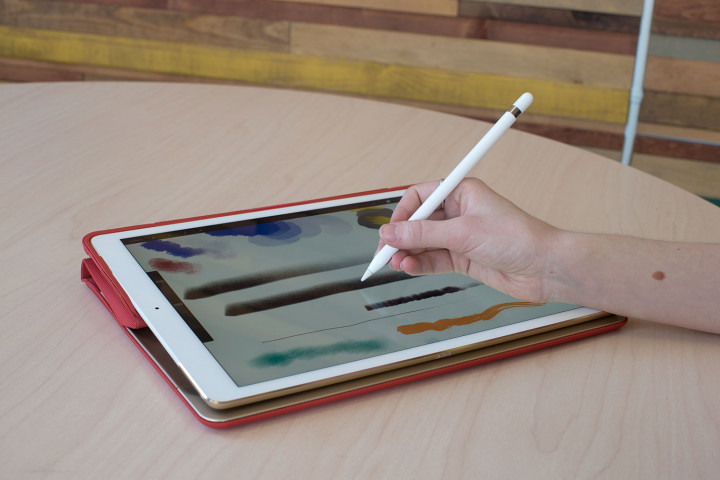
Rumors say a new Pencil stylus will accompany the new iPad Pro models upon announcement in 2017. Reports dating back to mid-2016 talk about a Pencil 2, with new annotation features that work across more iOS apps, including Mail, Messages, and Safari.
No other rumors regarding features are circulating, but several patents filed by Apple over the past year hint it may bring interchangeable virtual nibs to the Pencil 2, an eraser function on the opposite end of the stylus, and possibly Touch ID support. However, patents don’t always turn into real products or features, so don’t treat this as confirmation.
A rumor originating from the supply chain in China stated the Pencil 2 would be announced in March 2017, at the same event where the new iPad Pro models will be revealed. This failed to come true. It’s possible, if talk of a thicker iPad Pro 2 12.9-inch are correct, Apple will build a Pencil storage system into the new version of the tablet.
Apple iPad Mini 5/iPad Pro Mini
The iPad Mini 4 was revealed in September 2015, and like the iPad Air 2, it’s ready for an update. However, if an iPad Mini 5 is coming, very little is being said. There has been talk of a Pro version refresh, but it’s questionable whether there is any value in making such a device. For now, the silence may mean Apple will only refresh its larger iPad tablets in 2017, and let the Mini 4 live on for another year.
However, a February report from MacOtakara mentions a 7.9-inch iPad Pro, indicating Apple may update the tablet to fit in with an expanded Pro model lineup. The specifications, or what will define it as a Pro model, aren’t discussed.
Release date
Apple announced the new 9.7-inch iPad on March 21 2017, and confirmed the new low-cost model would replace the iPad Air 2. The tablet was revealed in a press release without a full-scale launch event. Rumors had all concentrated on a launch event happening in March or early April for the new iPad range, but such a gathering never occurred.
The only rumors outside of these concentrated on shipping dates for new iPad tablets, including the rumored 10.5-inch model. For example, a report from Digitimes indicates that the new 10.5-inch and the 12.9-inch iPads would ship in May or June. It also speculates Apple will hold an event at its newly built Apple Campus in April, where the tablet may be launched.
That’s all the news and rumors regarding the 2017 Apple iPad range so far, but we’ll be updating regularly, so check back often.
Article originally published on 01-19-2017. Updated on 05-11-2017 by Adam Ismail: Added Apple Authorized Reseller stock leak about UAG’s 10.5-inch iPad Pro case.
Artifice mimics nature as expert rock-climbing route re-created via 3D modeling
Why it matters to you
By replicating sites in detail, this technique could help make exclusive experiences more accessible for the masses.
An expert rock-climbing wall has been re-created within a gym thanks to a team of computer scientists and engineers. The gym wall isn’t exactly the same as the one found in nature but instead focuses on the rock’s key climbing features that a skilled climber would use.
“We were excited by the idea of essentially being able to transport famous routes from around the world into our own local climbing gyms,” Emily Whiting, lead author of the study and rock climbing enthusiast, told Digital Trends.
The team reconstructed the most difficult sections (“cruxes”) of two popular climbing sites: “Things As They Are Now” (TATAN) in New Hampshire and “Pilgrimage” in Utah.

Emily Whiting, et al.
The team began by taking photos of the wall to generate a 3D digital reconstruction. They then watched sample video of a climber making his ascent. By analyzing how he positioned his body, the team was able to pinpoint where the climber placed his hands and feet, while estimating the direction of his hold to determine contact regions.
By comparing the digital reconstruction with where the climber grabbed, the team was able to develop 3D models that accurately resemble the most important holds.
“The key idea is that we only replicate critical portions of the rock face that are needed for grasping or as foot holds by the climber,” Whiting explained. “We call this ‘strategic fabrication,’ as it takes advantage of the way climbers interact with the rock.”
Rock climbing is fun of course, but the technology that made the project possible may find more serious applications as well. For example, it may be used to reconstruct difficult or dangerous areas to bring archaeological sites to life. “Our system could be applied to sites that are difficult or dangerous to access, but it’s important to experience the space,” Whiting said.
The researchers are also keen to move into virtual reality to match the visual aspect to these tactile experiences.
 AIVAnet