


Corsair Tenkeyless K63 review

Research Center:
Corsair Tenkeyless K63
If there’s one thing PC gamers demand, it’s a high-quality input device loaded with features and performance for an affordable price. They want a high-quality peripheral with customizable options to not only make the PC gaming experience better, but give their desktop a dash of visual flare.
There’s also a growing demand for compact solutions to free up desktop space, and that’s where Corsair’s $80 new K63 mechanical keyboard comes in. However, it faces stiff competition from the likes of Razer, Logitech, Cooler Master, and more, who are gradually filling up the compact keyboard space with great products. That said, do customers get their bang for the buck when investing in Corsair’s K63 solution? Let’s find out.
It’s compact, but not necessarily portable
Corsair’s K63 compact mechanical gaming keyboard sports a “tenkeyless” form factor, meaning its shorter in width due to the removal of the numeric keypad. That also means the peripheral is highly portable, although we’re not sure why Corsair doesn’t provide a removable USB cable. It’s permanent, and could lead to connectivity problems after users continually wrap the cord around the keyboard during transportation.
 Kevin Parrish/Digital Trends
 Kevin Parrish/Digital Trends
 Kevin Parrish/Digital Trends
 Kevin Parrish/Digital Trends
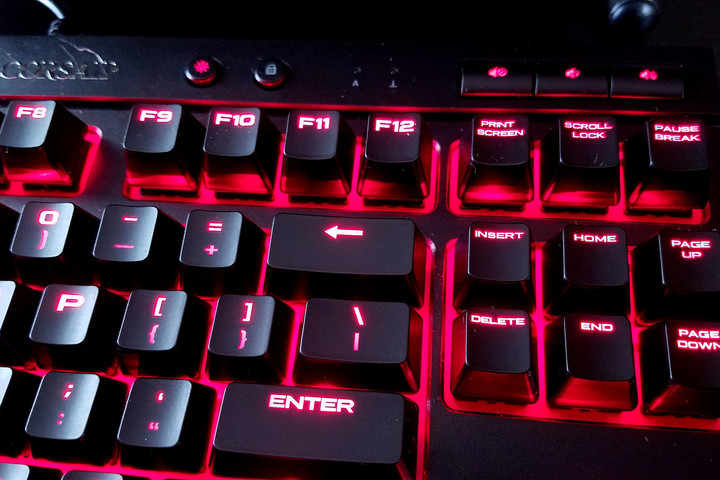
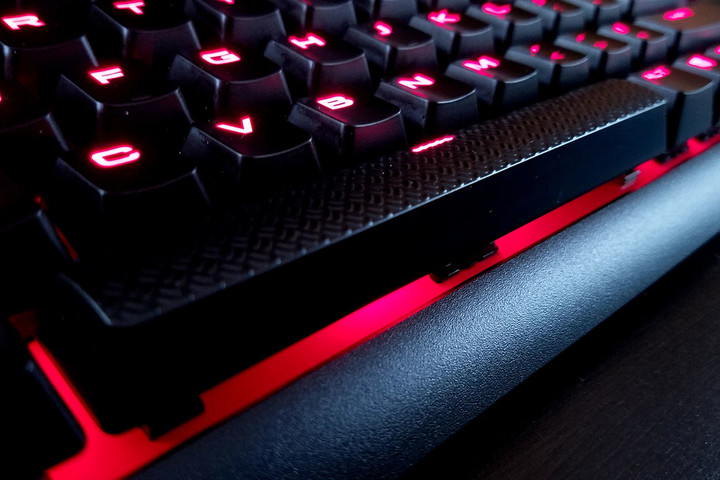
The K63 measures 14.37 x 6.73 x 1.61 inches, and weighs 2.46 pounds. There are no dedicated macro keys, or a Function key, but it does include four media keys along the top-left (stop, backward, play/pause, forward), one button for switching through four brightness levels, a Windows Key lock button, and three dedicated audio buttons in the top-right corner (mute, volume down, volume up). The only other notable attribute is the spacebar, which has a unique textured surface.
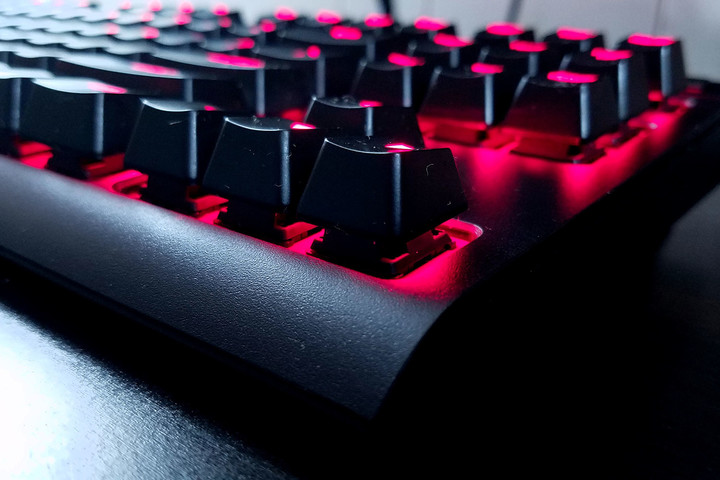
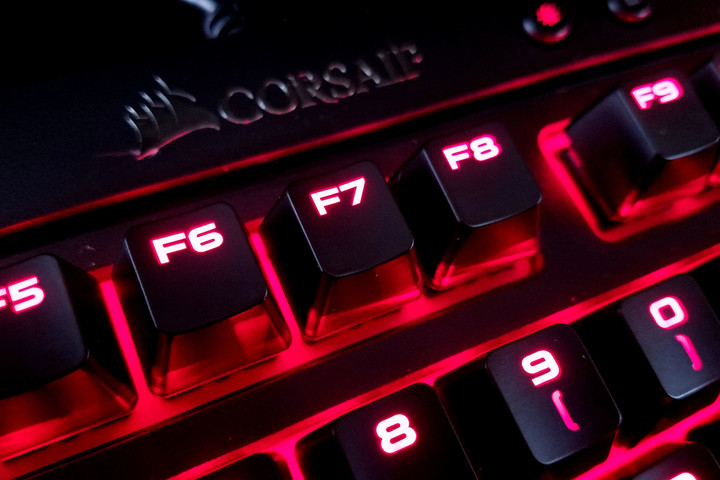
On the illumination front, the K63 provides red per-key illumination. There’s nothing wrong with that, but users wanting a rainbow of flavors dazzling their desktop will need to look elsewhere. Corsair is targeting PC gamers looking for a high-quality, feature-packed compact mechanical keyboard with an affordable, competitive price. Corsair delivers just – and only – that.
Solid as a…. very hard cherry
The keyboard relies on Cherry MX Red switches, which have an audible “ding” instead of the annoying “click” heard with mechanical switches used in old mainstream keyboards. In fact, Cherry MX Blue switches provide that sharp audible clicky feedback, although Red switches still aren’t exactly ideal for midnight stealth PC gaming when your significant other is asleep.
Cherry MX Red switches are typically sold in game-focused mechanical keyboards. They have an actuation force of 45g, meaning that’s how much force the finger needs to press the keycap to the point of hardware-based keystroke registration. This is due to a soft spring that doesn’t provide any tactile feedback until the switch is pressed all the way down, providing a smooth descent between keypress and actuation.
Cherry MX Red switch specifications
Durability: 50 million actuations
Actuator travel: 4.0mm (-0.4mm)
Pre-travel: 2mm (± 0.6mm)
Initial force: 30 cN minimum
Actuation force: 45 ± 15 cN
Bounce time: < 5 milliseconds
Spring: Stainless steel
Contacts: High-quality gold alloy
That “cN” symbol is short for centinewton, which is another way to measure the amount of force required to press a key. The lower the number, the less force is required to actuate the keystroke. PC gamers want their commands to respond quickly, but don’t want the method to feel mushy, semi-quiet, and too fast. Typically, the number is associated to gram-force (g), but the use of “cN” and “g” largely depends on the switch manufacturer.
Thus, because Corsair’s new keyboard uses Cherry MX Red switches, typing and PC gaming feels extremely solid. The audible aspect really depends on the end-user. Some may love the super-loud typewriter-style clicking, and some may prefer a semi-soft ding to serve as an audible acknowledgement for each keystroke. The keys provide enough “bounce,” for a firm feeling that seemingly resets instantly.
The magic is in the CUE
The company’s Corsair Utility Engine (CUE) software is where the customization magic takes place. Users can create custom profiles that will load with a specific game, setting up pre-determined key illumination, lighting effects, event assignments, key remapping, and more. The software also falls back on a “default” profile users can modify to make everyday tasks much easier too.
Corsair’s K63 is great for PC gamers who want performance, but not a whole lot of flair.
As an example, we created a custom profile for DOOM (2016). This is done by clicking on the “+” button next to the “Default” configuration listing. User can assign a name to the profile, link it to a specific executable (DOOMx64.exe in the case of DOOM), assign a custom profile icon, and assign a background image. The transparency of the tabs can even be lowered so the cool backdrop becomes more visually dominant.
Every profile has an “Actions,” “Lighting Effects,” and “Performance” subcategory. That latter section focuses on the Win Lock button, enabling users to disable additional keys when the button is active. For instance, users can choose to also disable ALT + Tab, ALT + F4, and SHIFT + Tab. There’s even an option to disable the Win Lock button LED, or to set its brightness from completely off (0) to completely on (255).
The Lighting Effects section is where the fun stuff can be found. For the DOOM profile, we created nine separate lighting effects, because we couldn’t figure out how to assign multiple keys across the keyboard in one specific effect. For instance, we created a “Movement” lighting effect that only illuminated the arrow keys, while another “Rocket” effect lit up the assigned key. We even created a “Background” lighting effect to illuminate the remaining keys not deemed important.

Kevin Parrish/Digital Trends
The keyboard supports seven visual effects: Visor (think Cylon), Rain, Pulse (think breathing), Wave, Type Lighting (Key), Type Lighting (Ripple), and Static. For our DOOM profile, all lighting effects used a static color save for the “Background” lighting effect. This used the Rain effect, which lights up keys in a rain-like descending, random order. Users can “customize” this effect by reducing or increasing its opacity, and changing the speed between slow, medium, and fast.
As for the Type Lighting (Key) effect, the keys will light up at each press, and then extinguish between one to five seconds later, depending on the duration setting. The Type Lighting (Ripple) effect is rather neat, which causes a red ripple effect emitting out from the pressed key. Like the previous effect, this one provides slow/medium/fast speed settings, and a slider for opacity.
Users can also mix and match lighting effects, too. For instance, we set two lighting effects for the default profile to create a wild mixture. The “Visor” effect moves back and forth horizontally, but we lowered the opacity to the halfway mark and at a medium speed. The “Rain” effect dropped full red illumination in droplets between the visor scans, with the opacity set to full, and the speed set to medium.
It’s just a shame red is the only color available.
Games can hijack your custom profiles
What’s interesting about Corsair’s K63 mechanical keyboard is that game developers can take control of the keyboard’s illumination — if you let them, of course. For instance, Epic Games’ Unreal Tournament 4 “Pre-Alpha” has a setting in the System Settings list labeled “Enable Keyboard Lighting.” A note says this feature is only supported by Razer Chrome and Corsair RGB keyboards, but the game has no problems managing the red illumination of Corsair’s new K63 keyboard.
Keystrokes feel crisp, responsive, and each press of a button isn’t annoying on an audible level.
Once users launch the game, the red illumination goes dark for a moment, then lights up the keyboard in full red brightness, bypassing the user’s default profile. When a match begins, the lighting will go dark for a split second, and then illuminate only the WASD keys and whatever weapon is currently in use. Upon death, the lighting blacks out again until the player spawns back into the current match. The user’s default profile then reloads after exiting the game.
For the life of us, we couldn’t figure out how to edit the keyboard illumination on the game side, and Epic Games didn’t respond to our questions. To get around the automatic lighting configuration, users must toggle off the in-game keyboard lighting support and create a profile in the CUE software. If you create a profile and leave the in-game keyboard illumination support, Unreal Tournament 4 will override your custom profile.
Plenty of performance for the price
As we previously stated, we love the “feel” of each key in and outside of gaming. The actuations feel crisp, responsive, and each press of a button isn’t overly annoying on an audible level. We’re not exactly use how many keys users can press simultaneously, but our 10-finger test showed that the keyboard registered each pressed key correctly. That backs the company’s 100-percent anti-ghosting claim, which means customers won’t see “ghost” keystrokes inserted into their multi-key commands.

Kevin Parrish/Digital Trends
The keycaps provided with the K63 model have a nice shape that doesn’t grip the fingertip, but don’t have an edgeless, feel either. All keycaps are super smooth save for the space bar, and sport a thick, squished font like the sans-serif Microgramma Bold Extended type face. The keycaps do not appear to be removable — at least, the puller we used couldn’t remove them.
Finally, Corsair states that the keyboard has a report rate of up to one millisecond, which could also be stated as a polling rate of 1,000Hz. That essentially means the keyboard can provide updated data to the host PC every millisecond. The typical non-gaming keyboard provides input info to the host PC every 10 milliseconds.
Corsair Tenkeyless K63 Compared To

Logitech K780

Logitech G Pro Mechanical Gaming…

Microsoft Universal Foldable…

Logitech G213 Prodigy

Steelseries Apex M500

Razer Turret

Razer Blackwidow X Chroma

Cougar Attack X3 gaming keyboard

Razer Deathstalker Chroma

Logitech K400

Microsoft Wireless Desktop 5000

Cooler Master Storm QuickFire

Logitech iPad 2 Keyboard Case by…

Cherry JK-0300

Logitech K750 Wireless Solar…
Input lag appeared nonexistent, although it’s admittingly been a long time since we tried to game on a standard mechanical keyboard. All this input lag talk was a major selling point for a similar tenkeyless keyboard provided by Logitech, which also felt tight. If anything, customers can walk away from this info knowing that Corsair’s K63 mechanical keyboard will perform even though it’s not a flashy RGB solution.
Warranty
Corsair provides warranty information on its website. Corsair will cover the keyboard for up to two years after purchase regarding defects in the material and workmanship. In other words, if it doesn’t work as advertised, then Corsair will repair or replace the keyboard, or refund the customer’s money. But don’t wait too long: Corsair will keep 10 percent of that money as a “usage” fee for each year since the date of purchase.
Our Take
Corsair’s new K63 compact mechanical keyboard is a great solution for PC gamers who want performance but not a whole lot of flair. It not only saves space on the desktop, but it seemingly focuses on providing the tools PC gamers need to win. Its compact size also indicates portability, but the keyboard doesn’t ship with a detachable USB cable. If anything, that’s the only real flaw we found.
The DT Accessory Pack
M65 PRO RGB FPS Gaming Mouse
$59.99
VOID Wireless Dolby 7.1 RGB Gaming Headset
$99.99
MM800 RGB POLARIS Gaming Mouse Pad
$59.99
Lapdog Gaming Control Center
$79.99
Is there a better alternative?
We loved the Logitech G Pro mechanical keyboard sporting the same compact “tenkeyless” size, but it costs $130. Logitech sells its comparable G410 Atlas Spectrum RGB for the same price, but it has a bulkier form factor. The Razer BlackWidow Tournament Edition Stealth ($67) is quite popular, as is the CM Storm QuickFire Rapid ($72). However, these do not quite as many backlighting options.
How long will it last?
The “tenkeyless” form factor is rather popular its small and portable. This isn’t the only compact keyboard Corsair provides, as the company offers the Vengeance K65 unit with Cherry MX Red switches, no backlighting, and a detachable USB cable. Customers who purchase the K63 likely won’t need to grab another mechanical keyboard for a long time.
Should you buy it?
Customers on the market for an excellent compact mechanical keyboard at $80 should look no further than the K63. It has plenty of customization and performance without the flair, making it a great choice for gamers who prefer go over show.
Corsair Tenkeyless K63 review

Research Center:
Corsair Tenkeyless K63
If there’s one thing PC gamers demand, it’s a high-quality input device loaded with features and performance for an affordable price. They want a high-quality peripheral with customizable options to not only make the PC gaming experience better, but give their desktop a dash of visual flare.
There’s also a growing demand for compact solutions to free up desktop space, and that’s where Corsair’s $80 new K63 mechanical keyboard comes in. However, it faces stiff competition from the likes of Razer, Logitech, Cooler Master, and more, who are gradually filling up the compact keyboard space with great products. That said, do customers get their bang for the buck when investing in Corsair’s K63 solution? Let’s find out.
It’s compact, but not necessarily portable
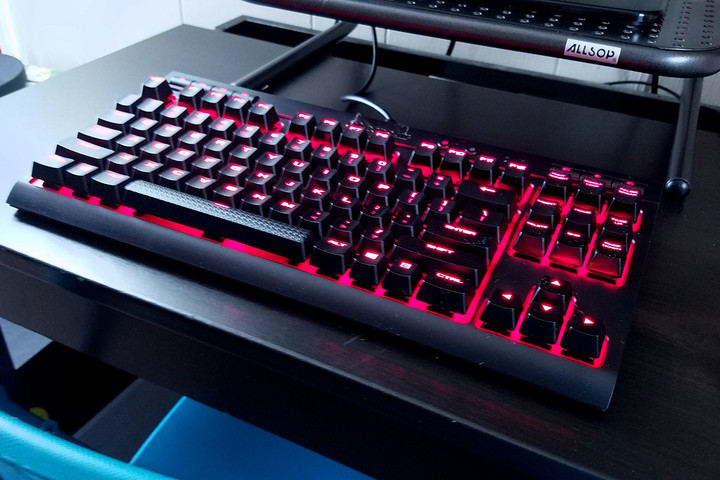
Corsair’s K63 compact mechanical gaming keyboard sports a “tenkeyless” form factor, meaning its shorter in width due to the removal of the numeric keypad. That also means the peripheral is highly portable, although we’re not sure why Corsair doesn’t provide a removable USB cable. It’s permanent, and could lead to connectivity problems after users continually wrap the cord around the keyboard during transportation.
 Kevin Parrish/Digital Trends
 Kevin Parrish/Digital Trends
 Kevin Parrish/Digital Trends
 Kevin Parrish/Digital Trends
The K63 measures 14.37 x 6.73 x 1.61 inches, and weighs 2.46 pounds. There are no dedicated macro keys, or a Function key, but it does include four media keys along the top-left (stop, backward, play/pause, forward), one button for switching through four brightness levels, a Windows Key lock button, and three dedicated audio buttons in the top-right corner (mute, volume down, volume up). The only other notable attribute is the spacebar, which has a unique textured surface.
On the illumination front, the K63 provides red per-key illumination. There’s nothing wrong with that, but users wanting a rainbow of flavors dazzling their desktop will need to look elsewhere. Corsair is targeting PC gamers looking for a high-quality, feature-packed compact mechanical keyboard with an affordable, competitive price. Corsair delivers just – and only – that.
Solid as a…. very hard cherry
The keyboard relies on Cherry MX Red switches, which have an audible “ding” instead of the annoying “click” heard with mechanical switches used in old mainstream keyboards. In fact, Cherry MX Blue switches provide that sharp audible clicky feedback, although Red switches still aren’t exactly ideal for midnight stealth PC gaming when your significant other is asleep.
Cherry MX Red switches are typically sold in game-focused mechanical keyboards. They have an actuation force of 45g, meaning that’s how much force the finger needs to press the keycap to the point of hardware-based keystroke registration. This is due to a soft spring that doesn’t provide any tactile feedback until the switch is pressed all the way down, providing a smooth descent between keypress and actuation.
Cherry MX Red switch specifications
Durability: 50 million actuations
Actuator travel: 4.0mm (-0.4mm)
Pre-travel: 2mm (± 0.6mm)
Initial force: 30 cN minimum
Actuation force: 45 ± 15 cN
Bounce time: < 5 milliseconds
Spring: Stainless steel
Contacts: High-quality gold alloy
That “cN” symbol is short for centinewton, which is another way to measure the amount of force required to press a key. The lower the number, the less force is required to actuate the keystroke. PC gamers want their commands to respond quickly, but don’t want the method to feel mushy, semi-quiet, and too fast. Typically, the number is associated to gram-force (g), but the use of “cN” and “g” largely depends on the switch manufacturer.
Thus, because Corsair’s new keyboard uses Cherry MX Red switches, typing and PC gaming feels extremely solid. The audible aspect really depends on the end-user. Some may love the super-loud typewriter-style clicking, and some may prefer a semi-soft ding to serve as an audible acknowledgement for each keystroke. The keys provide enough “bounce,” for a firm feeling that seemingly resets instantly.
The magic is in the CUE
The company’s Corsair Utility Engine (CUE) software is where the customization magic takes place. Users can create custom profiles that will load with a specific game, setting up pre-determined key illumination, lighting effects, event assignments, key remapping, and more. The software also falls back on a “default” profile users can modify to make everyday tasks much easier too.
Corsair’s K63 is great for PC gamers who want performance, but not a whole lot of flair.
As an example, we created a custom profile for DOOM (2016). This is done by clicking on the “+” button next to the “Default” configuration listing. User can assign a name to the profile, link it to a specific executable (DOOMx64.exe in the case of DOOM), assign a custom profile icon, and assign a background image. The transparency of the tabs can even be lowered so the cool backdrop becomes more visually dominant.
Every profile has an “Actions,” “Lighting Effects,” and “Performance” subcategory. That latter section focuses on the Win Lock button, enabling users to disable additional keys when the button is active. For instance, users can choose to also disable ALT + Tab, ALT + F4, and SHIFT + Tab. There’s even an option to disable the Win Lock button LED, or to set its brightness from completely off (0) to completely on (255).
The Lighting Effects section is where the fun stuff can be found. For the DOOM profile, we created nine separate lighting effects, because we couldn’t figure out how to assign multiple keys across the keyboard in one specific effect. For instance, we created a “Movement” lighting effect that only illuminated the arrow keys, while another “Rocket” effect lit up the assigned key. We even created a “Background” lighting effect to illuminate the remaining keys not deemed important.
Kevin Parrish/Digital Trends
The keyboard supports seven visual effects: Visor (think Cylon), Rain, Pulse (think breathing), Wave, Type Lighting (Key), Type Lighting (Ripple), and Static. For our DOOM profile, all lighting effects used a static color save for the “Background” lighting effect. This used the Rain effect, which lights up keys in a rain-like descending, random order. Users can “customize” this effect by reducing or increasing its opacity, and changing the speed between slow, medium, and fast.
As for the Type Lighting (Key) effect, the keys will light up at each press, and then extinguish between one to five seconds later, depending on the duration setting. The Type Lighting (Ripple) effect is rather neat, which causes a red ripple effect emitting out from the pressed key. Like the previous effect, this one provides slow/medium/fast speed settings, and a slider for opacity.
Users can also mix and match lighting effects, too. For instance, we set two lighting effects for the default profile to create a wild mixture. The “Visor” effect moves back and forth horizontally, but we lowered the opacity to the halfway mark and at a medium speed. The “Rain” effect dropped full red illumination in droplets between the visor scans, with the opacity set to full, and the speed set to medium.
It’s just a shame red is the only color available.
Games can hijack your custom profiles
What’s interesting about Corsair’s K63 mechanical keyboard is that game developers can take control of the keyboard’s illumination — if you let them, of course. For instance, Epic Games’ Unreal Tournament 4 “Pre-Alpha” has a setting in the System Settings list labeled “Enable Keyboard Lighting.” A note says this feature is only supported by Razer Chrome and Corsair RGB keyboards, but the game has no problems managing the red illumination of Corsair’s new K63 keyboard.
Keystrokes feel crisp, responsive, and each press of a button isn’t annoying on an audible level.
Once users launch the game, the red illumination goes dark for a moment, then lights up the keyboard in full red brightness, bypassing the user’s default profile. When a match begins, the lighting will go dark for a split second, and then illuminate only the WASD keys and whatever weapon is currently in use. Upon death, the lighting blacks out again until the player spawns back into the current match. The user’s default profile then reloads after exiting the game.
For the life of us, we couldn’t figure out how to edit the keyboard illumination on the game side, and Epic Games didn’t respond to our questions. To get around the automatic lighting configuration, users must toggle off the in-game keyboard lighting support and create a profile in the CUE software. If you create a profile and leave the in-game keyboard illumination support, Unreal Tournament 4 will override your custom profile.
Plenty of performance for the price
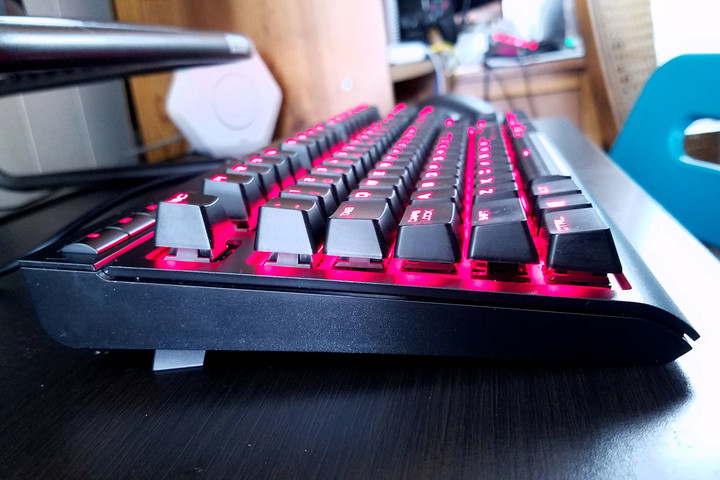
As we previously stated, we love the “feel” of each key in and outside of gaming. The actuations feel crisp, responsive, and each press of a button isn’t overly annoying on an audible level. We’re not exactly use how many keys users can press simultaneously, but our 10-finger test showed that the keyboard registered each pressed key correctly. That backs the company’s 100-percent anti-ghosting claim, which means customers won’t see “ghost” keystrokes inserted into their multi-key commands.
Kevin Parrish/Digital Trends
The keycaps provided with the K63 model have a nice shape that doesn’t grip the fingertip, but don’t have an edgeless, feel either. All keycaps are super smooth save for the space bar, and sport a thick, squished font like the sans-serif Microgramma Bold Extended type face. The keycaps do not appear to be removable — at least, the puller we used couldn’t remove them.
Finally, Corsair states that the keyboard has a report rate of up to one millisecond, which could also be stated as a polling rate of 1,000Hz. That essentially means the keyboard can provide updated data to the host PC every millisecond. The typical non-gaming keyboard provides input info to the host PC every 10 milliseconds.
Corsair Tenkeyless K63 Compared To
Logitech K780
Logitech G Pro Mechanical Gaming…
Microsoft Universal Foldable…

Logitech G213 Prodigy
Steelseries Apex M500
Razer Turret

Razer Blackwidow X Chroma
Cougar Attack X3 gaming keyboard
Razer Deathstalker Chroma
Logitech K400

Microsoft Wireless Desktop 5000
Cooler Master Storm QuickFire
Logitech iPad 2 Keyboard Case by…
Cherry JK-0300
Logitech K750 Wireless Solar…
Input lag appeared nonexistent, although it’s admittingly been a long time since we tried to game on a standard mechanical keyboard. All this input lag talk was a major selling point for a similar tenkeyless keyboard provided by Logitech, which also felt tight. If anything, customers can walk away from this info knowing that Corsair’s K63 mechanical keyboard will perform even though it’s not a flashy RGB solution.
Warranty
Corsair provides warranty information on its website. Corsair will cover the keyboard for up to two years after purchase regarding defects in the material and workmanship. In other words, if it doesn’t work as advertised, then Corsair will repair or replace the keyboard, or refund the customer’s money. But don’t wait too long: Corsair will keep 10 percent of that money as a “usage” fee for each year since the date of purchase.
Our Take
Corsair’s new K63 compact mechanical keyboard is a great solution for PC gamers who want performance but not a whole lot of flair. It not only saves space on the desktop, but it seemingly focuses on providing the tools PC gamers need to win. Its compact size also indicates portability, but the keyboard doesn’t ship with a detachable USB cable. If anything, that’s the only real flaw we found.
The DT Accessory Pack
M65 PRO RGB FPS Gaming Mouse
$59.99
VOID Wireless Dolby 7.1 RGB Gaming Headset
$99.99
MM800 RGB POLARIS Gaming Mouse Pad
$59.99
Lapdog Gaming Control Center
$79.99
Is there a better alternative?
We loved the Logitech G Pro mechanical keyboard sporting the same compact “tenkeyless” size, but it costs $130. Logitech sells its comparable G410 Atlas Spectrum RGB for the same price, but it has a bulkier form factor. The Razer BlackWidow Tournament Edition Stealth ($67) is quite popular, as is the CM Storm QuickFire Rapid ($72). However, these do not quite as many backlighting options.
How long will it last?
The “tenkeyless” form factor is rather popular its small and portable. This isn’t the only compact keyboard Corsair provides, as the company offers the Vengeance K65 unit with Cherry MX Red switches, no backlighting, and a detachable USB cable. Customers who purchase the K63 likely won’t need to grab another mechanical keyboard for a long time.
Should you buy it?
Customers on the market for an excellent compact mechanical keyboard at $80 should look no further than the K63. It has plenty of customization and performance without the flair, making it a great choice for gamers who prefer go over show.
WaveClock gives ocean data an analog appeal for surfers and beachgoers
Why it matters to you
The WaveClock gives ocean lovers an analog perspective on the waves and tides.
Former Fox News host Bill O’Reilly once puzzled an atheist guest with a riddle. “Tide goes in, tide goes out,” he said. “You can’t explain that.”
Tides are actually no mystery: It’s about gravity. Thousands of years ago, an old Greek astronomer figured that the moon played a big part. Now, kids learn about it in elementary school.
But O’Reilly’s awe is not lost on us. We get it, the ocean is massive and magnificent. We know less about its depths than we do about the lunar surface and things like rogue waves still have scientists knocking their heads together. But tides? Well, tides are like magnets — blamed on magic by people who did not do their homework.
Craig Jones knows a thing or two about the ocean. He spent his childhood sailing with his dad, an engineer with a fondness for nautical gadgets. Now, as an environmental engineer himself, Jones has decided to combine his love of the sea with the maritime themes of his childhood. He designed the WaveClock, an analog display for real-time ocean data, and recently launched a campaign for its support on Kickstarter.
“As a kid … I was fascinated by the brass weather stations showing barometric pressure, temperature, and humidity,” Jones told Digital Trends. “A few years back, I realized we ocean enthusiasts really need similar information on the ocean waves and tides. The birth of the WaveClock soon followed.”
The WaveClock’s three faces depict wave height, wave period, and the rising or falling of the tide. The device — which accesses the database of the National Oceanic Administration Association (NOAA) to display data from any NOAA station — updates every half an hour and is quickly configured with a smartphone app using BlinkUp.

Jones says the display is fairly accurate — within half a foot and half a second — but that he and his team are trying to improve. “While the actual [NOAA] data is much more accurate, the setup of the device leaves very small errors in hand position,” he said. “In this Kickstarter we are going to find a better way to calibrate the stepper motors to display the most accurate data.” So the WaveClock isn’t yet pinpoint accurate — it’s more decorative than purely functional.
Jones has teamed up with Santa Cruz, California, creatives to give the WaveClock a bit more flare as well with scenic photos on the face. But the WaveClock isn’t cheap. Backers can claim one now for between $169 and $250.
Sensor-filled Guardian S snakebot can even slither vertically up walls
Why it matters to you
Sarcos’ Guardian S snakebot can be deployed in situations in which it’s not safe — or even possible — to send a human to investigate.
Have a reconnaissance job that’s too dangerous or difficult to access to send in a person? Maybe it’s time to deploy a snake robot!
That’s what Utah-based robotics company Sarcos has developed with Guardian S, a rugged, waterproof snakebot that’s capable of shimmying across virtually any type of terrain, through thin pipes, and up stairs. Heck, it can even rear up like a cobra, or crawl directly up walls, courtesy of its magnetized body.
“Most current ground-based mobile robots have limited mobility over challenging terrain, substantially more limited range, shorter battery life, and significantly more weight,” Sarcos chairman and CEO Ben Wolff told Digital Trends. “The Guardian S represents not just an improvement, but a quantum leap forward, in unmanned ground vehicle platforms. [It’s] designed for mobility and is adept at traversing difficult terrain, fitting into confined spaces with openings 5 inches or more, that are inaccessible by humans and other ground-based robots, and climbing vertically or up stairs.”
The Guardian S snakebot is able to do this thanks to its unique design. While many previous robotics solutions have been designed with a two-track, tank-like configuration, the Guardian S utilizes forward and rear tracks and an articulated center section that provides much greater mobility. It can run for up to 18 hours, and is controlled using a video game-style controller.
As it travels, Guardian S gathers data using its various sensors, which include infrared, radiation, gas and vibration detection, GPS, accelerometer, 3D mapping, and 360-degree video with low-light capabilities.
But while it sounds like the greatest robot toy ever, Wolff noted that the Guardian S is really designed for serious purposes. Those might be applications including SWAT, explosive ordinance disposal, HAZMAT, fire, or disaster recovery — basically any scenario in which it’s not safe or desirable to deploy a human being.
In essence, it’s the ultimate robot of its kind — although don’t expect it to be cheap. Sarcos is currently taking pre-orders, with the base price coming in at $60,000, and further customization costing extra. The company is additionally considering a $2,000 per month price tier, which would include upgrades, training, and the like. The Guardian S will commence shipping (or should we say “slithering”) in August.
That’s not the only astonishing robot Sarcos has developed, though. It has also created an amazing Guardian GT robot, a human-controlled, force-multiplying robotic dual-armed system that allows users to lift payloads of up to 1,000 pounds at a time. Another project in development is a full bodysuit exoskeleton, designed to improve human strength and endurance.
Needless to say, we probably haven’t heard the last of this innovative company.
Weekly rewind: Hydrofoil boogie boards, a 100-year-old hybrid, AI explained

A lot can happen in a week when it comes to tech. The constant onslaught of news makes it nigh impossible for mere mortals with real lives to keep track of everything. That’s why we’ve compiled a quick and dirty list of this week’s top 10 tech stories, from what else to watch on Hulu (other than The Handmaid’s Tale) to everything you need to know about artificial intelligence — it’s all here.
5 tech trends that will change the world in 2017

2016 had its share of important technological breakthroughs that changed how we live, work, and play. Virtual reality made a big comeback in 2016, and is sure to get even hotter this year. Virtual assistants moved out of our cell phones and into our homes, while smart home technologies may have finally broken through to the mainstream.
So what do we expect in the new year? There’s a myriad of tech trends we’re watching that will change the world once again in 2017; here’s the top five you should keep an eye on.
Read the full story here.
Your wireless carriers are doing better, and we have the numbers to prove it

We constantly complain about our wireless carriers, yet we put up with them anyway. Alongside death, taxes, and the Star Wars prequels, wireless carriers are something we must accept.
While they’re trying to repent with new plans, deals, and enticing features, carriers in America are still capable of displeasing their customers. But if you look at wireless companies in other countries, and the actions of our carriers from a few years ago, you start to realize something: U.S. carriers are charging less than they were before, and they’re more in line with their European and Asian counterparts.
Read the full story here.
Demystifying artificial intelligence: Here’s everything you need to know about AI

Crazy singularities, robot rebellions, falling in love with computers … artificial intelligence conjures up a multitude of wild what-ifs. But in the real world, AI involves machine learning, deep learning, and many other programmable capabilities that we’re just beginning to explore. Let’s put the fantasy stuff on hold (at least for now) and talk about legitimate AI. Here’s how it works, and where it’s going.
Read the full story here.
Guess who Mitsubishi hired to turn its first production car into a plug-in hybrid

Mitsubishi is celebrating 100 years in the car business this year, and instead of a cake, it’s cooked up a rather unusual custom car idea. The Japanese automaker commissioned West Coast Customs — the shop made famous on Pimp My Ride — to customize its first production car, the 1917 Model A. While Xzibit probably won’t be involved with this one, the century-old ride will get some unusual modifications.
Read the full story here.
When you run out of TV shows to binge, check out these great movies on Hulu

The streaming wars seem destined to rage on forever, which is great news for cinephiles eager to expand their horizons. Hulu, once an upstart among a swath of veteran broadcasters, now features a particularly robust library of films to choose from.
As with any catalog, however, Sturgeon’s law still applies, and it might seem difficult to find the real gems housed within Hulu’s massive library. That said, our strictly curated list is a one-stop guide to the smartest, most intriguing, and simply best films currently streaming on the platform.
Read the full story here.
Canned food-opening robot wants to feed your pets in your absence

Do you trust a robot arm to be able to exhibit the kind of fine-grain precision movement needed to not only open a can and pop its lid, but also place its contents neatly into a bowl and eject it? What better way to test such cutting-edge innovation than by placing it in control of keeping your beloved pet alive while you’re away on vacation? PawBot boasts a touchscreen LCD display for selecting the times to feed your furry friend.
Read the full story here.
Apple vs. Qualcomm: Everything you need to know

Qualcomm is back on the offensive after Apple decided to suspend royalty payments to the chip manufacturer. Bloomberg reports the company will soon make a request to the International Trade Commission to prevent the importation of iPhones into the U.S. The news agency also notes that the American market comprises 40 percent of Apple’s total sales, and the iPhone is responsible for 60 percent of its global revenue. Here’s everything you need to know about the lawsuit battle so far.
Read the full story here.
How 8K cams and torpedo tech made ‘Guardians Vol. 2’ a big-screen blast

This week, the galaxy’s eccentric saviors return in Guardians of the Galaxy Vol. 2, which promises another spectacular story from director James Gunn set in the corners of Marvel’s cinematic universe. However, in order to make it more than just spectacle, Gunn and Marvel Studios recruited veteran cinematographer Henry Braham as the film’s director of photography. Digital Trends spoke to Braham about his approach to Guardians of the Galaxy Vol. 2 and the experience of making his first foray into Marvel Studios’ blockbuster movie-verse.
Read the full story here.
Surfer Kai Lenny reinvents the boogie board by adding a hydrofoil to it

Water and Kai Lenny go hand in hand, so when the 24-year-old surfer injures his ankle, he finds a way to keep going. Since surfing could worsen the injury, Lenny has turned to the good old-fashioned boogie board. To spice it up a little, his version happens to have a hydrofoil attached to it. Lenny injured his ankle while windsurfing a few weeks ago. Itching to get back in the water, he used his down time to create what he is calling the Boogie Foil.
Read the full story here.
It’s official: Next OnePlus flagship will be OnePlus 5, due this summer
You can expect the OnePlus 5 to arrive in a couple months, apparently.
According to The Verge, OnePlus has confirmed that its next flagship smartphone – the successor to the OnePlus 3T, which followed the OnePlus 3 – will launch sometime this summer and will be called the OnePlus 5. Keep in mind just two days ago OnePlus’ CEO posted a teaser image of cartoon workers putting together a phone, and there have been several leaks about the phone popping up in recent weeks.
It’s thought to have a dual-camera setup and high-end specs, but because OnePlus has made a name for itself as a flagship killer, the OnePlus 5 will likely have an affordable price tag. As for the name, the number four is considered unlucky in China, where OnePlus is headquartered, so OnePlus 4 is a no-go. Also, the OnePlus 5 will technically be the fifth phone produced by the company.
- Dual lens cameras: The history running up to iPhone 7 Plus
- OnePlus 3 review: The flagship killer we’ve been waiting for
Strangely, OnePlus said its employees are fans of NBA player Robert Horry and even have paintings of him hanging in their Shenzhen offices, so his number five jersey also inspired the phone’s name.
Check out Pocket-lint’s rumour round-up for more details on what to expect from OnePlus’ next high-performing flagship.
HTC U 11 design fully revealed in leaked video render – see it here
Want to know what HTC’s next flagship will look like?
HTC may be struggling when compared to Samsung, but that’s not stopping it from releasing more handsets this year; it will soon expand its HTC U lineup with a new flagship called HTC U 11. Website 91 Mobiles has posted what it described as 3D renders of the upcoming device that it seems to have obtained from a reliable leaker known as Onleaks. The photos and videos show the HTC U 11 from all angles.
The HTC U 11 will be the third HTC U-branded handset in a year, following the the HTC U Play and HTC U Ultra. Last week, an almost-complete list of features taken from a promo image revealed almost everything the phone will feature, such as a 5.5-inch Quad HD display and Snapdragon 835 processor. It will likely also feature 6GB RAM, a 12-megapixel rear camera, and 16-megapixel front camera.
- HTC U 11 vs Samsung Galaxy S8: What’s the rumoured difference?
- HTC Ocean will be known as HTC U 11
- Best upcoming smartphones: The phones to look forward to in 2017
The flagship will notably include a “squeezable display,” which will allow you to interact with the phone by swiping from the edge. It’ll also have a tapered thickness from top to bottom of 9.2mm and 8mm, respectively. The fingerprint scanner will be on the front, and the bottom edge will house a USB C socket, mic, and speaker grille. And finally, it’ll have a 3,000mAh battery with Quick Charge 3.0 support.
Check out Pocket-lint’s rumour round-up to see what else the phone is expected to feature. Keep in mind we’ll know for sure soon. The HTC U 11 is set to be officially announced on 16 May 2017.
Moto Z2 Play might be thinner but will have a smaller battery, leak says
Lenovo-owned Motorola is working on a follow-up to the Moto Z Play, but it might not be as awesome as the original.
Motorola introduced the Moto Z Play, an Android modular smartphone, last August. It’s a mid-range version of the Moto Z, which debuted a couple months before the Moto Z Play. It’s mostly known for having a larger battery and a headphone jack, though it’s also thicker and heavier than the Moto Z. And like most of the other Moto Z-branded modular devices, it has a relatively affordable price tag.
According to VentureBeat’s Evan Blass, who has a reliable track record when it comes to leaking mobile news, the follow-up to the Moto Z Play will be called Moto Z2 Play, and it’ll be thinner and underpowered when compared to its predecessor. While the original Moto Z Play had a 3510mAh battery, the Moto Z2 Play will likely come with a 3000mAh battery and be 1mm thinner and 20g lighter.
The Android 7.1.1 Nougat-powered Moto Z2 Play will therefore be 6mm thick and weigh 145g. It also reportedly feature a Snapdragon 626 chip with eight cores at 2.2GHz. It will keep the same graphical processing chip, an Adreno 506, and have 4GB of RAM and 64GB of storage. As for the display, it will also remain the same. And the main camera could be reduced to a 12-megapixel, f/1.7 sensor.
It therefore seems like the Moto Z2 Play will get a few upgrades and maybe even a couple downgrades. We don’t yet know anything about pricing or a release date, so we’ll keep you posted as we learn more, official information.
Moto focused on slimming down for the Z2 Play
If you liked the original Z Play for its low price and compatibility with Moto Mods, you’ll probably dig the pending follow up, Motorola’s Z2 Play. They pretty much look the same, minus the shape of one of the buttons. If you expected the original’s long battery life, however, the sequel might disappoint you. According to a review of some marketing material by VentureBeat’s Evan Blass, the new Moto Z2 Play might be thinner than its predecessor yet more underpowered when it comes to battery life. The original Z Play has a 3510mAh battery in it, while the Z2 could come with a lowly 3000mAh pack, according to VentureBeat.
Still, if thinness is what you want, then this new handset might convince you to upgrade. Blass notes that the Android 7.1.1 Nougat-powered Z2 is set to be 6mm thick and 145 grams, a full millimeter thinner and 20 grams thinner and smaller than the Z Play. It also reportedly has a faster Snapdragon 626 chip with eight cores running at a 2.2GHz clock speed. The graphical processing chip, however, will be the same Adreno 506 unit. The new Z2 Play will have an extra gigabyte of RAM and double the storage capacity as its older sibling, coming in at 4GB and 64GB respectively.
The display itself will remain unchanged, most likely to make sure that all the add ons for Z-series devices will stay useful. In addition to a smaller battery, the camera may actually get a resolution downgrade, even though it may also see a higher image quality with a new 12-megapixel, f/1.7 component. The original Z Play has a 16MP, f/2.0 ratio.
Ultimately, the Moto Z2 Play remains fairly similar to the original device, with a few upgrades. None of this is official information, either, so things could change before the phone releases, perhaps later this summer.
Source: VentureBeat
Scan Spotify Codes to play songs instantly
Sharing songs with your buddies while on the go has typically been a hassle, with weird Shazam-style workarounds to get a song from one phone to another. It looks like Spotify knows this, too, as it’s rolling out a new feature to use Snapchat-style codes that will let you grab a photo of your friend’s screen to grab the song they want to share with you. We’ve confirmed the new feature in the Spotify app, though there’s been no official word yet.

To pull up a Spotify Code, you just toggle the Share function with a tap on the three dots to the right of your screen when playing a song. Hit Share and you’ll see the code (which looks like an audio waveform) just under the album image at the top of your screen. To grab the track, your friend just needs to tap the camera icon to the right of the Search bar in their Spotify app and aim their phone at your screen. The captured song will start playing right away.
Snapchat, of course, has a similar system that lets potential chatters grab each other’s contact details with a simple photo of their Snapcode, which looks more like an old-school QR code than the Spotify one does. We can’t wait to start using the new Spotify codes, though: we love anything that makes sharing obscure indie songs and deep house tracks simpler.
Via: TechCrunch
 AIVAnet