


Google says Uber created a fake company to steal its secrets
Uber is having a bad year, for sure. In February, Google’s parent company Alphabet sued Uber, claiming that it stole proprietary self-driving car technology from Google’s Waymo project. The plaintiff’s lawyers also claim that the original LLC, Ottomotto, was created as a diversionary tactic and that Uber and Otto executives planned to acquire the company all along. In a court hearing today, Waymo lawyers referenced stock awards, timelines and emails to support their claims. The current details revolve around Anthony Levandowski, the former Waymo executive who founded Otto and is now working at Google.
“We’ve learned that Uber and Levandowski together created a cover-up scheme for what they were doing,” Charles Verhoeven, a lawyer for Waymo, told BuzzFeed. “They concocted a story for public consumption. The story was that Mr. Levandowski left Waymo for his own company.”
Waymo’s lawyers noted an Uber stock agreement that gave Levandowski more than $250 million worth of vesting stock the day after the executive left Google. They also pointed to state records showing that Ottomotto had been acquired in July of 2016, only months after the company had even been founded. For its part, Uber explained to reporters that the stock had been given to Levandowski when his company had been acquired, but then was back dated to account for his time at Otto. According to BuzzFeed, Uber’s lawyers haven’t dealt with the agreement in court as of yet.
Obviously, nothing in the suit has been proven, but the current allegations sure do point a picture of some shady dealings on the part of Uber, Levandowski and other executives. Alphabet is also seeking an injunction against Waymo to halt its self-driving car program until a trial can be held. We’ve reached out to both Google and Uber for statements on the lawsuit.
Source: Buzzfeed
Beware phishing emails posing as Google Docs invites
If you received an out-of-the-blue email purporting to share a Google Docs file, you’re not alone — and whatever you do, don’t click the link inside. Many people online, including more than a few journalists, have been bombarded with phishing email (currently from a mailinator.com account) that tries to trick you into opening a fake Google Docs link. If you click through and grant a bogus “Google Docs” app access to your Google account, the perpetrators get into your email. And of course, havoc follows after that — the app spams email to everyone you’ve ever messaged, and bypasses Google’s usual login alerts (including for two-factor authentication).
There have also been reports of Google Drive struggling at the same time, although it’s not certain the two are related. Drive was up and running as we wrote this.
It’s not certain who’s behind the phishing attempt, or just what the fake Google Docs app is doing. We’ve reached out to Google for more. However, the company already says it’s investigating the scam. The one thing that’s for certain is the sheer scale and effectiveness of the attack. Both the email and the web pages look very legitimate, so it’s all too easy for even seasoned internet users to fall prey to the attack. It could be a while before the phishing campaign goes away, let alone before we know the full extent of the damage.
We are investigating a phishing email that appears as Google Docs. We encourage you to not click through & report as phishing within Gmail.
— Google Docs (@googledocs) May 3, 2017
Can you pick out the malicious login page? pic.twitter.com/RCcJ3g0N50
— Brandon Frohs ❄ (@0b10011) May 3, 2017
ATTENTION: DO NOT CLICK ON A GOOGLE DOCS LINK IF YOU GOT AN EMAIL FROM ME
— Joe Bernstein (@Bernstein) May 3, 2017
Via: Motherboard
Source: Reddit, Google Docs (Twitter)
Apple Updates ‘Clips’ Video App With Live Title Improvements
Apple today updated its Clips social video creation app for the first time, introducing some minor feature tweaks and improvements.
When using Live Titles, which is designed to allow users to add captions to videos via voice transcription, there’s now an option to edit the title by tapping on it.
Clips has also gained a new feature that makes it easier to share content with people who have multiple messaging addresses, suggesting the most frequently used address from the list. A full list of changes is below:
What’s New
– Tap on Live Title text while playing or paused to edit it
– When sharing to a contact with multiple messaging addresses, Clips suggests the address used most frequently
– Improved stability and reliability when recording video clips and sharing videos that contain certain posters
Introduced back in early April, Clips is an app that aims to make it easy to create short videos that can be shared via Messages and social networking apps like Facebook, Instagram, and Twitter.
Subscribe to the MacRumors YouTube channel for more videos.
Clips lets users combine several video clips and photos with voice-based titles, music filters, and graphics to create enhanced videos that are up to an hour in length.
Clips can be downloaded from the App Store for free. [Direct Link]
Tag: Clips
Discuss this article in our forums
Train Conductor World takes you on a globetrotting train tour (Review)

Overview:
Train Conductor World is a fast-paced puzzle game that tasks you with navigating trains to their destination while avoiding crashes. It is a simple concept that can get very challenging in later levels with increasing speed and complexity.
Developer: The Voxel Agents
Cost: Free (With ads and microtransactions)
Impressions:
1 of 10


Train Conductor World is a simple concept, guiding trains from one track to the next while keeping them from crashing. You simply drag them to their corresponding track, and away they go. It’s not especially deep in the gameplay department, but it is very addicting and fun to pick up and play. It starts out a bit too heavy on the tutorials, but once you get into the game proper it picks up and gets really fun. The main game is the train organizing, but there’s also some puzzle-like track placement that allows you to unlock new locations and expand the map, which is based on real locations (mostly European locations).
The game looks great and runs smoothly, with great train models and crash physics that most phones should have no problem running. The developers have thoughtfully put a framerate and performance limiter in the options menu to help it run better on older or less powerful hardware. The game volume tends to be on the high side by default, but thankfully there’s a slider to adjust. The music is fun as well, but nothing special to listen to.
Train Conductor World does contain ads and microtransactions, of course. The ads are usually not intrusive, but occasionally will pop up and interrupt gameplay. You can also view an ad to get a free redo if you crash the trains. The microtransactions are also not intrusive, and everything in the game can be unlocked by playing, except for cosmetic train skins. They seem reasonable, for the most part, but the value still isn’t excellent as the options are just for more tracks and boxes, no additional game content or levels.
Conclusion:
I really like Train Conductor World a lot. Usually, games on mobile aren’t my favorite time killer but Train Conductor World is just the kind of challenging, pick up and play style game that great mobile games have. It’s addicting and fun, simple with some depth, and has great replayability. Definitely a recommended game for fans of trains or challenges.
Download Train Conductor World on the Google Play Store
Microsoft CEO says the company’s next smartphone might not look like one
Why it matters to you
Microsoft’s next smartphone may surprise you with its original design.
Microsoft’s next phone may not look like a phone. That is according to company CEO Satya Nadella, who sat down with Marketplace’s “Make Me Smart” for a lengthy interview about Microsoft’s new education platforms.
“We make phones today, we have OEMs like HP making phones and others and we picked a very specific area to focus on which is management, security, and this one particular feature that we have called Continuum, which is a phone that can even be a desktop,” Nadella explained. “So when you say, ‘When will we make more phones,’ I’m sure we’ll make more phones. But they may not look like phones that are there today.”
Despite Microsoft’s best efforts to prop up its sagging Windows Phone business, it has not had much success. In 2014, the firm acquired Finnish company Nokia for $9.5 billion but was forced to lay off 18,000 employees when phone sales failed to turn around.
Things worsened from there. In 2015, phone development costs exceeded revenue by $4 billion during the first fiscal quarter — a loss of about 12 cents per phone. Microsoft subsequently wrote down $7.6 billion in costs and slashed 7,800 jobs.
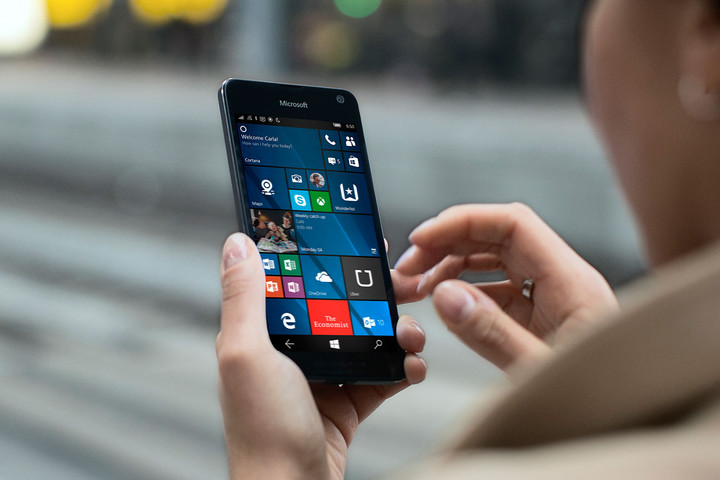
Microsoft Lumia 650
It then tried a two-tier approach to the market: Budget and high-end devices. It launched affordable phones like the Lumia 215 ($29) alongside premium handsets like the Cityman, which boasted a QHD (2,560 x 1,440 pixels) screen, a 20-megapixel camera, and a triple-LED flash.
Despite the new strategy, Microsoft’s hardware still struggled to gain a foothold against competitors like Google, Samsung, and Apple. Its global share of the smartphone market hovered around two percent and analysts at IDC report that Microsoft sold a mere 4.5 million Nokia Lumia devices in the fourth quarter of 2015 — a 57 percent dip between 2011 and 2015.
In May 2016, Microsoft effectively washed its hands of Nokia’s hardware business, signing its manufacturing facilities, brand, and digital services to holding company HMD Global.
But rumors of a new phone persist. The so-called Surface Phone is said to come in three models — a consumer model, a business model, and an “enthusiast” model — and ship running Redstone 3, an upcoming version of Windows Phone with native support for Win32 apps like Google’s Chrome browser and Adobe Photoshop.
“We need more breakthrough work … with Surface we had a bunch of early misfires, but that notion of a tablet that could replace your laptop — that notion of saying, ‘Hey, Apple wants to sell you an iPad and they want to sell you a Mac,’ we think there’s one device that exploits the seam between those two devices — we need some sort of spiritual equivalent on the phone side that doesn’t just feel like a phone for people who love Windows,” Microsoft’s Chief Marketing Officer Chris Capossela said on This Week in Tech’s Windows Weekly podcast in December 2015.
“It has got to be a phone that’s sort of like, ‘Wow, that’s a shocker,” or, ‘That’s a real breakthrough,’ and has got to make me pause before I buy my 17th iPhone, and we need time to actually go through that.”
Google Wallpapers adds tons of new high-res photos to spice up your phone
Why it matters to you
Who doesn’t need a fresh background every now and then? Google’s app is one of the best out there, and new choices are always welcome.
Google’s Wallpapers app is one of the best destinations for Android users to find amazing looking backgrounds, and it just got better. Google pushed out an update Wednesday adding a slew of new high-resolution images to its database between a number of categories, from landscapes to cityscapes, as well as the iconic “Earth view” photography the company popularized on Android.
There’s no changelog attached to the update, but for users who frequent Google’s app and regularly like to switch out their background for something fresh and new, the changes will be apparent. Wallpapers also packs a daily feature, which automatically swaps the phone’s background every day for another in a given category.
Users are able to set different wallpapers for home and lock screens as well — but only if they’re running Android 7.0 Nougat, according to the app’s page on Google Play.
There are plenty of Android apps available that feature high-quality photos as wallpapers, but there is also a glut of bad options as well, with incessant ads and backgrounds that aren’t properly cropped or sized to your device’s screen resolution. The best ones, like Backdrops and Pixels, for example, have curated collections — but many cost money, and are quite limited. Google’s Wallpapers is unique, because it offers an excellent selection of photos sourced from Google Earth and Google+ for free.
The update also brings bug fixes and interface improvements to Wallpapers, including the ability to force a wallpaper change with the refresh button if you have the daily wallpaper feature turned on.
You can download Wallpapers here, although in typical Google fashion it may take time for the updated version to reach your device as it rolls out to all users. The app is compatible with Android devices running 4.1 Jelly Bean and higher.
This Pokémon Go-style app lets you find virtual statues of historic women
Why it matters to you
Less than one in ten public sculptures depicts a woman, but this app is aiming to empower women with virtual statues (and donations for the real thing).
Out of the 5,193 historic statues decorating street corners in the United States, only about 7.5 percent depict women, and excluding fictional characters, New York’s Central Park has zero ladies in bronze, or in any other physical material for that matter. But, one company is working to change that — in a virtual world anyway. On Monday, May 1, communications firm Y&R New York announced The Whole Story Project, an augmented reality app aiming to bridge the gender gap with virtual statues in select cities. Think Pokémon Go, but instead of catching Pikachu, you’re viewing Amelia Earhart and Elizabeth Cady Stanton statues guided by a map.
The app allows users to find statues of real women using the smartphone’s camera, augmented reality, and GPS in Central Park, Dante Park in New York City, Washington D.C. and Mount Rushmore, as well as outside the U.S. in London, Prague, Milan, and Rome. Mixing the real scene with computer-generated statues using the smartphone’s camera view, the app allows users to visualize a more diverse set of historical figures in public art, including sharing the images on Facebook, Twitter, and Instagram.
Y&R started developing the app in support of the United Nation’s Sustainable Development Goal a year ago. The first virtual statue was placed last month in Dante Park before the Women of the World Summit, while Y&R and Girl Scout Troop 3484 added several in Central Park, including Amelia Earhart, Nina Simone, Edith Wharton, Shirley Chisholm, and Elizabeth Cady Stanton.
The Whole Story Project is also aiming to make those virtual statues a physical reality by supporting efforts from organizations such as the Monumental Women campaign to place statues of Elizabeth Cady Stanton and Susan B. Anthony in New York City. The group is also working with the National Collaborative for Women’s History Sites to add statues of key players in the suffragist movement, set to be part of the 100th-anniversary celebration of the 19th amendment in 2020.
“It is no surprise that everywhere you turn, in almost every city, most of the statues in public spaces are men, and the few women are usually drawn from fiction,” said Leslie Sims, Chief Creative Officer of Y&R North America. “Many groups, including the UN and Girls Scouts, are working hard to redress this gender imbalance but, realistically it’s going to take millions of dollars and many years before we see even a handful of women taking their place in the public landscape. The Whole Story Project offers a way to create immediate awareness and access to the amazing history women have made around the world. We hope that in telling the whole story right now, far and wide, the app will not only be enlightening but also empowering.”
The Whole Story Project is inviting developers to add their own virtual statues using their own software, with hackathons scheduled to support that goal.
According to a Washington Post article in 2011, the latest data widely available, just 394 historic U.S. monuments depict real women — excluding fictional characters such as the Statue of Liberty.
Designer says Microsoft decided against using Type-C ports in the Surface
Why it matters to you
This answers the question as to why Microsoft chose to use the full-size USB Type-A port instead of the smaller, slimmer Type-C connection.
Microsoft introduced the Surface Laptop with a starting price of $999 during its education-themed press event on Tuesday, which also served as a launch pad for Windows 10 S. However, during the reveal and shortly thereafter, there were questions about the lack of USB Type-C ports. Funny thing is, there were two Type-C ports present on the prototype.
Just to be perfectly clear, the size of a USB port has nothing to do with the speed of data transfer but rather defines the physical connection. We have come to know and love the rectangular Type-A port over the decades, which relies on a one-side-up-only connection. Type-C uses a smaller rectangular port and a two-sided, fully-reversible connector so that there is no one-side-must-be-up connection.
While Type-C is more convenient for the user and takes up less space, manufacturers have muddied the Type-C waters with the talk of speed. Based on advertisement and a lack of information in hardware specs, customers are sometimes led to believe that Type-C is the fastest USB tech on the market and that is necessarily not the case.
After USB 2.0 dominated our devices for some time, USB 3.0 arrived sporting a blue Type-A port and a faster 5Gbps speed compared to 2.0’s 480Mbps. The color coding was meant to distinguish the USB 3.0 port from the USB 2.0 port so that users would know which one to use for peripherals that required faster transfer speeds.
But when the conglomerate that manages the USB standard revised the USB 3.0 spec to support 10Gbps transfers, it changed the name of the older 5Gbps connection to USB 3.1 Gen1 and the newer, faster connection to USB 3.1 Gen2. On the visual end, blue still defines the older 5Gbps connection (formerly USB 3.0) while the new tech uses red.
But then the Type-C port began appearing on notebooks partially due to Apple. The company used this connection on its super-thin laptops and iPhones primarily for power delivery and eventually Thunderbolt connectivity. On a whole, the fully reversible Type-C port makes total sense and manufacturers ran with the idea of implementing it into non-Apple products.
So when Microsoft revealed the Surface Laptop without a Type-C port, many began to question why. But look at the specs: It provides only one Type-A USB port (Gen1). Microsoft wanted to make sure that users, especially students given that the Surface Laptop is an education-themed device, did not run into compatibility issues with standard peripherals.
According to one Microsoft designer, the Type-C port has not fully matured, as there are reportedly still issues regarding power and cabling. Plus, the port has yet to fully saturate the non-Apple laptop market. Thus by using Type-A, students can plug in their existing mouse or other peripheral and continue without having to worry about getting a new peripheral or a Type-A to Type-C adapter.
The Surface Laptop will ship on June 15 in four configurations, as shown below:
Price:
$999
$1,299
$1,599
$2,199
Intel CPU:
Core i5-7200U
Core i5-7200U
Core i7-7660U
Core i7-7660U
Intel graphics:
HD 620
HD 620
Iris Plus 640
Iris Plus 640
Memory:
4GB
8GB
8GB
16GB
Storage:
128GB
256GB
256GB
512GB
Designer says Microsoft decided against using Type-C ports in the Surface
Why it matters to you
This answers the question as to why Microsoft chose to use the full-size USB Type-A port instead of the smaller, slimmer Type-C connection.
Microsoft introduced the Surface Laptop with a starting price of $999 during its education-themed press event on Tuesday, which also served as a launch pad for Windows 10 S. However, during the reveal and shortly thereafter, there were questions about the lack of USB Type-C ports. Funny thing is, there were two Type-C ports present on the prototype.
Just to be perfectly clear, the size of a USB port has nothing to do with the speed of data transfer but rather defines the physical connection. We have come to know and love the rectangular Type-A port over the decades, which relies on a one-side-up-only connection. Type-C uses a smaller rectangular port and a two-sided, fully-reversible connector so that there is no one-side-must-be-up connection.
While Type-C is more convenient for the user and takes up less space, manufacturers have muddied the Type-C waters with the talk of speed. Based on advertisement and a lack of information in hardware specs, customers are sometimes led to believe that Type-C is the fastest USB tech on the market and that is necessarily not the case.
After USB 2.0 dominated our devices for some time, USB 3.0 arrived sporting a blue Type-A port and a faster 5Gbps speed compared to 2.0’s 480Mbps. The color coding was meant to distinguish the USB 3.0 port from the USB 2.0 port so that users would know which one to use for peripherals that required faster transfer speeds.
But when the conglomerate that manages the USB standard revised the USB 3.0 spec to support 10Gbps transfers, it changed the name of the older 5Gbps connection to USB 3.1 Gen1 and the newer, faster connection to USB 3.1 Gen2. On the visual end, blue still defines the older 5Gbps connection (formerly USB 3.0) while the new tech uses red.
But then the Type-C port began appearing on notebooks partially due to Apple. The company used this connection on its super-thin laptops and iPhones primarily for power delivery and eventually Thunderbolt connectivity. On a whole, the fully reversible Type-C port makes total sense and manufacturers ran with the idea of implementing it into non-Apple products.
So when Microsoft revealed the Surface Laptop without a Type-C port, many began to question why. But look at the specs: It provides only one Type-A USB port (Gen1). Microsoft wanted to make sure that users, especially students given that the Surface Laptop is an education-themed device, did not run into compatibility issues with standard peripherals.
According to one Microsoft designer, the Type-C port has not fully matured, as there are reportedly still issues regarding power and cabling. Plus, the port has yet to fully saturate the non-Apple laptop market. Thus by using Type-A, students can plug in their existing mouse or other peripheral and continue without having to worry about getting a new peripheral or a Type-A to Type-C adapter.
The Surface Laptop will ship on June 15 in four configurations, as shown below:
Price:
$999
$1,299
$1,599
$2,199
Intel CPU:
Core i5-7200U
Core i5-7200U
Core i7-7660U
Core i7-7660U
Intel graphics:
HD 620
HD 620
Iris Plus 640
Iris Plus 640
Memory:
4GB
8GB
8GB
16GB
Storage:
128GB
256GB
256GB
512GB
Scientists discover a massive wave rolling through nearby galaxy cluster
Why it matters to you
The space tsunami may help scientists uncover secrets about the origins of the biggest structures in the universe.
There is a big wave in outer space that is nearly twice the size of the Milky Way. (All right, it’s massive, let’s call it a tsunami.) A team of scientists recently discovered the formation in the nearby Perseus cluster after combining data from the Chandra X-ray Observatory, radio observations, and computer simulations. It may not be safe to surf but it is truly a sight to behold.
The tsunami likely formed billions of years ago when a much smaller galaxy cluster passed through Perseus, which is one one of the biggest objects in the known universe. The collisions between the two objects created what is called a Kelvin-Helmholtz wave, which is essentially the same sort of wave we see on Earth when the wind hits water. The difference is this wave is huge — galaxy clusters are already the largest gravity-bound structures we know of. At 11 million light years across, Perseus is one of the biggest of them all.

NASA’s Goddard Space Flight Center/Stephen Walker et al.
“Perseus is one of the most massive nearby clusters and the brightest one in X-rays, so Chandra data provide us with unparalleled detail,” Stephen Walker, lead scientist at NASA, said in a statement. “The wave we’ve identified is associated with the flyby of a smaller cluster, which shows that the merger activity that produced these giant structures is still ongoing.”
Perseus is not only massive, it is immensely hot. Most of the cluster’s detectable matter is gas that burns at tens of millions of degrees. This particular wave, which the researchers think is the largest ever discovered, was spotted in a “bay” of the cluster near the bottom left corner of the image above. A computer simulation demonstrated that a passing galaxy cluster could have disrupted Perseus in such a way to create this striking formation billions of years ago. The wave itself may spend hundreds of millions of years rolling along the edge of the cluster.
The discovery will help scientists better understand the origin and formation of these structures, which offer hints into the history of the universe itself. A paper detailing the study was published in the journal Monthly Notices of the Royal Astronomical Society.
 AIVAnet