


EVGA’s liquid-cooled GeForce GTX 1080 Ti graphics card carries hefty price
Why it matters to you
EVGA’s new solution should catch the eye of high-end PC gamers not wanting to dump $1,200 into a card but want exceptional performance.
During all the hoopla surrounding Microsoft’s new Surface Laptop and Windows 10 S, EVGA dished out a new graphics card on Tuesday based on Nvidia’s GeForce GTX 1080 Ti graphics chip. It is called the SC2 Gaming Hybrid and uses the company’s proprietary iCX technology to keep the card chilled under heavy, high-definition PC gaming.
“iCX is the very definition of Interactive Cooling,” the company said on Tuesday. “With EVGA’s iCX Technology, users will have a better understanding of their graphics card’s operation. This includes temperature monitoring on key components (not just GPU) and targeted cooling, which provides better overclocking capabilities.”

EVGA’s iCX system consists of three memory-focused thermal sensors on the face of the card, four power-focused thermal sensors on the bottom along with a sensor dedicated to the graphics chip. All this information is fed into EVGA’s free Precision XOC software for precise monitoring and temperature management.
Adding to these sensors is an included closed-loop water-cooled solution consisting of a 120mm radiator and fan. There is no maintenance involved other than the initial installation of the radiator/fan component. Backing this closed loop is a copper base for the GPU chip and a dedicated memory plate that makes direct contact with the on-board water cooling block. There is even a dedicated heatsink/fan that covers the voltage regulator module area.
Here are the SC2 Gaming Hybrid specs:
Graphics chip:
GP102
Graphics architecture:
Pascal
CUDA cores:
3,584
Base speed:
1,556MHz (up from 1,480MHz)
Boost speed:
1,670MHz (up from 1,582MHz)
Memory amount:
12GB GDDR5X
Memory interface:
352-bit
Memory clock:
11Gbps
Memory bandwidth:
484GB per second
Ports:
1x HDMI 2.0b
3x DisplayPort 1.4
1x DL-DVI
Power connections:
1x 8-pin
1x 6-pin
Power consumption:
250 watts
Recommended system power:
600 watts
Bus type:
PCI Express 3.0
Max supported refresh rate:
240Hz
Max digital resolution:
7,680 x 4,320
Dimensions:
4.376 (H) x 10.5 (L) inches
Card height:
Dual-slot
As the specs show, the card is overclocked compared to Nvidia’s reference design, with the base speed increased from 1,480MHz to 1,556MHz and the boost speed increased from 1,582MHz to 1,670MHz. Nvidia’s base GTX 1080 Ti design is a beast of a card on its own, but EVGA is cranking the animal up a notch for savage performance in PC gaming.

According to EVGA, those monster speeds are kept in check by the water cooling system. EVGA says the design provides “significantly” lower temperatures than the reference design — nearly twice as cool on the GPU front and around 30 percent cooler on the memory end.
But because the card includes closed-loop water cooling, customers may be curious as to what EVGA covers on the warranty front. According to the product page, the card has a three-year warranty covering parts and labor, and customers can get an extension within 90 days after purchase and registration. However, there does not appear to be anything covering damage to PC components caused by a possible faulty liquid cooling system.
So how much is EVGA’s new GTX 1080 Ti card? Try $810 over on Newegg. EVGA’s GTX 1080 Ti SC2 Gaming Hybrid does not appear to be available just yet, so keep checking back.
Slack’s new search feature is powered by artificial intelligence
Why it matters to you
Slack is getting smarter and smarter, so it should also be getting easier and easier to use.
Slack is about to get a whole lot smarter. The work chat service is launching a new search function that basically uses machine learning to find more relevant information, and find it faster. The new feature was built by the Slack search learning and intelligence group, and shows Slack is following the lead of other major tech companies in adopting artificial intelligence.
The new feature is called Slack Search, and it will initially only be available for paid accounts, although we wouldn’t be surprised to see parts of it trickle down to free users at some point, too. To explain how it works, if you search the term “hiring process,” for example, Slack will find the person who talks about that the most, at which point you can connect with them to talk.
The feature could be very useful for large teams, where not everyone knows everyone else. Instead of having to ask around to find the right person to talk to, you could just use the search feature to see who discusses the issue at hand the most. Or, you could use it to search through messages and see if the question has already been answered.
According to Slack, the feature will only use public messages, and it won’t use any messages provided by bots — so you don’t have to worry about your private messages with your colleague being on display. The new feature is also currently only available on desktop, although it will likely make its way to mobile at some point in the future.
Slack plans on launching a number of new features to improve its chat app in the future. Included in other upcoming features are channel highlights, prioritized reading, and daily briefings, according to a report from VentureBeat. We don’t yet know if there’s any kind of timeline for those features, but the firm has been routinely updating its apps, so we shouldn’t have to wait too long. For example, the company recently launched in-message menu options.
Slack’s new search feature is powered by artificial intelligence
Why it matters to you
Slack is getting smarter and smarter, so it should also be getting easier and easier to use.
Slack is about to get a whole lot smarter. The work chat service is launching a new search function that basically uses machine learning to find more relevant information, and find it faster. The new feature was built by the Slack search learning and intelligence group, and shows Slack is following the lead of other major tech companies in adopting artificial intelligence.
The new feature is called Slack Search, and it will initially only be available for paid accounts, although we wouldn’t be surprised to see parts of it trickle down to free users at some point, too. To explain how it works, if you search the term “hiring process,” for example, Slack will find the person who talks about that the most, at which point you can connect with them to talk.
The feature could be very useful for large teams, where not everyone knows everyone else. Instead of having to ask around to find the right person to talk to, you could just use the search feature to see who discusses the issue at hand the most. Or, you could use it to search through messages and see if the question has already been answered.
According to Slack, the feature will only use public messages, and it won’t use any messages provided by bots — so you don’t have to worry about your private messages with your colleague being on display. The new feature is also currently only available on desktop, although it will likely make its way to mobile at some point in the future.
Slack plans on launching a number of new features to improve its chat app in the future. Included in other upcoming features are channel highlights, prioritized reading, and daily briefings, according to a report from VentureBeat. We don’t yet know if there’s any kind of timeline for those features, but the firm has been routinely updating its apps, so we shouldn’t have to wait too long. For example, the company recently launched in-message menu options.
This single motor, ostrich-inspired robot can outlast you on the treadmill
Why it matters to you
Florida’s Institute for Human and Machine Cognition has built a self-balancing robot that can run on a treadmill at an impressive 12 mph.
Chances are that at some point you’ve used an elliptical trainer, or cross-trainer, in the gym. A piece of equipment designed to simulate stair climbing, walking or running, for most of us the cross-trainer is simply a way to break a sweat without putting excessive pressure on our joints. For the team at Florida’s Institute for Human and Machine Cognition, however, its mechanism presents another possibility: the model for an innovative running robot.
“We wanted to use something that would be familiar to everyone, so we took a bicycle-like mechanism that you’ll see in almost any gym in the form of an elliptical trainer,” research associate Johnny Godowski — who has been working on developing efficient dynamic high-speed legged robotic systems since 1981 — told Digital Trends. “What we did was to adopt that mechanism, take the place where you would usually put your feet, and put that on the control point below the knee so that the mechanism drives the legs.”
The result is a clever, self-balancing two-legged robot called the Planar Elliptical Runner. Rather than using sensors and a computer for to stay balanced, the ostrich-inspired robot boasts just one motor and a nifty design that lets its run on a treadmill at 12 mph — seemingly without too much difficulty. All it needs to control the amount of power given to the motor is an RC car radio controller, which slows it down or speeds it up according to what its dealing with.
The advantage isn’t just that it can outrun us over long periods of time, either. Godowski explained that the biology-inspired design also makes it responsive to terrain.
“It’s emulating what you see in nature,” he continued. “Birds are able to run over holes and obstacles half their leg height, and they don’t even break stride. Our robot mechanism is designed to do the same thing.”
The mechanism, he added, could be applied to a wide variety of robots, ranging from two-legged runners to four-legged sprinters — or even underwater creations. As such, he described it as a less a new form factor than as a new “class of form factors.” It’s yet another exciting example of the flexibility of modern robots.
“Large parts of the land surface of the planet are not accessible to wheeled or tracked vehicles in any meaningful way,” Godowski said. “This work is about opening up new possibilities.”
The Asus ROG Maximus IX Extreme Z270 motherboard is available for $630
Why it matters to you
If you want a liquid-cooled gaming PC but don’t want to design one yourself or buy a pre-built option, Asus has a great new motherboard option for you.
Not everyone has the time and expertise to design and build the perfect gaming PC. That doesn’t mean they should break down and buy a preconfigured and possibly more expensive PC from a system builder. Therefore, the more that components are able to integrate advanced features the better.
Asus has taken that idea to heart and has released a new gaming motherboard that includes one relatively advanced gaming feature — water cooling — built into the board itself. The Asus ROG Maximus IX Extreme Z270 isn’t the least expensive option, but it builds in some convenient technology, Hexus reports.
Asus dubs the solution the “Water Cooling Master,” and it’s a monoblock that Asus designed along with Bitspower specifically for the new motherboard. It cools the CPU, VRM module, and M.2 slot, and integrates eight fan connections and a number of sensors that provide flow-rate, water-leak, and temperature data to the ROG Fan Xpert 4 software. It’s also Asus ROG-themed and is designed to reduce some of the complexity of the typical liquid cooling system.In addition, the Maximus IX Extreme Z270 includes all of the usual high-end gaming motherboard features. There’s an extensive array of connections with support for all of the latest technology, including dual M.2 PCI3 3.0 x4 with NVMe SSD RAID support, 2X2 802.11AC Wi-Fi with MU-MIMO, Bluetooth 4.1, and Thunderbolt 3.
There is a host of PCIe expansion slots including two PCIE 3.0 x16 slots supporting x16/x8/x8, a PCIe 3.0 x16 supporting x4 mode, and another PCIe 3.0 x4 slot. The board supports both Nvidia two-way SLI and AMD 3-way CrossFireX multi-GPU setups.
High-end audio is supported via a SupremeFX S1220 codec and ESS Sabre Hi-Fi ES9023P digital-to-analog converter. A Texas Instruments RC 4580 op-amp pushes heavy volumes with low distortion. Sonic Radar III, Sonic Studio III, and LED-lighted 3.5mm jacks round out the audio support.
The Asus ROG Maximus IX Extreme Z270 uses an Intel Z270 chipset and supports all of the latest seventh- and sixth-generation Core, Pentium, and Celeron processors. Turbo Boost 2.0 I is on hand, as well as full support for Intel 14nm CPUs.
If you’re still on the Intel bandwagon and want to save yourself some hassle in setting up a liquid cooling system, then Asus’ newest gaming motherboard might be for you. Just know that you’re going to pay for it. Asus released the ROG Maximus IX Extreme Z270 in the U.S. for $630 and it’s available if you’re ready to pull the trigger.
Amazon
Article originally published in March 2017. Updated on 05-03-2017 by Mark Coppock: Indicated that the motherboard is now available.
Google Assistant now available on PCs via AutoVoice Chrome extension
Why it matters to you
This unofficial project spreads the reach of Google Assistant, allowing users to direct voice commands directly at a PC running Google Chrome.
Last week, Google released its Google Assistant software development kit, allowing anyone with the necessary skills to create their own intelligent, voice-controlled device. Now, a talented Android developer has used the SDK to make Google Assistant functionality available via Google Chrome, even on a PC running Windows 10.
Joao Dias is well known to Android users thanks to his AutoApps plugins for the popular automation app Tasker. He’s also responsible for a Chrome extension called AutoVoice, which allows users to send voice commands to an app on their phone directly from their PC.
Dias has demonstrated a swathe of different things that users can control with their voice once they have access to Google Assistant. These applications include queuing up a particular song, getting a summary of news headlines, and receiving a briefing on their daily schedule from a calendar app, according to a report from Android Authority.
Unfortunately, there is something of a catch, as setting up access to Google Assistant functionality via Chrome isn’t the most straightforward process. Users first need to install the personal assistant software on their system, then run a few prompts via the Command Line to link it up to the AutoVoice extension.
Of course, this isn’t an official release of Google Assistant for the PC, so it’s to be expected that there will be certain hoops to jump through, but there are certainly some major benefits to carrying out the process. A detailed guide on how to get things set up is available from XDA Developers.
It will be interesting to see whether Dias’ implementation of Google Assistant proves popular among users. If this project amasses a large audience, it seems likely that Google would consider releasing its own official method for making similar functionality available, as its competitors in the field of personal assistant software seem eager to spread their offerings across as many devices as possible.
Google Assistant now available on PCs via AutoVoice Chrome extension
Why it matters to you
This unofficial project spreads the reach of Google Assistant, allowing users to direct voice commands directly at a PC running Google Chrome.
Last week, Google released its Google Assistant software development kit, allowing anyone with the necessary skills to create their own intelligent, voice-controlled device. Now, a talented Android developer has used the SDK to make Google Assistant functionality available via Google Chrome, even on a PC running Windows 10.
Joao Dias is well known to Android users thanks to his AutoApps plugins for the popular automation app Tasker. He’s also responsible for a Chrome extension called AutoVoice, which allows users to send voice commands to an app on their phone directly from their PC.
Dias has demonstrated a swathe of different things that users can control with their voice once they have access to Google Assistant. These applications include queuing up a particular song, getting a summary of news headlines, and receiving a briefing on their daily schedule from a calendar app, according to a report from Android Authority.
Unfortunately, there is something of a catch, as setting up access to Google Assistant functionality via Chrome isn’t the most straightforward process. Users first need to install the personal assistant software on their system, then run a few prompts via the Command Line to link it up to the AutoVoice extension.
Of course, this isn’t an official release of Google Assistant for the PC, so it’s to be expected that there will be certain hoops to jump through, but there are certainly some major benefits to carrying out the process. A detailed guide on how to get things set up is available from XDA Developers.
It will be interesting to see whether Dias’ implementation of Google Assistant proves popular among users. If this project amasses a large audience, it seems likely that Google would consider releasing its own official method for making similar functionality available, as its competitors in the field of personal assistant software seem eager to spread their offerings across as many devices as possible.
100 awesome Android apps that will turn your phone into a jack-of-all-trades
We’ve once again overhauled our picks for the best Android apps, whittling our robust selection down to a paltry 100. Some are new, and others have been standbys on this list for years. Regardless, we’re certain that any and all of these apps will make your life easier, and help you get the most out of your Android device. The apps are listed by categories like Music, Travel, and so on. Just try to keep in mind that, like the best venue in town, space is limited. After all, 32GB will only get you so far…
Movies and videos | Music and audio
Netflix

Netflix is one of the best video streaming services. There’s a huge selection of movies and TV shows for subscribers and the performance is silky smooth. This is as entertained as you can get for $8 a month.
Google Play Amazon Apps
Hulu

Hulu offers thousands of Movies and TV shows — many which are updated with the latest episodes after they air. Hulu offers various subscription models, including one that opens up the entire streaming library for $8 a month, and another that removes mid-stream ads for $12 a month.
Google Play Amazon Apps
YouTube

YouTube’s mobile app is sleek and intuitive, bringing the entirety of the Video sharing site to the palm of your hand. For those subscribed to YouTube Red, you’ll have access to all the premium content, as well as special features like audio playback while the screen if off.
Google Play
YouTube TV

YouTube may be best known as the upload-your-own-video service, but it recently expanded into TV too, taking on the likes of Sling. The service is currently only available in a few major cities, but it’s expected to expand in the near future. Through the app, you can stream channels like ABC, CBS, Fox, NBC, and the CW — all for $35 a month.
Google Play
HBO Now/HBO GO

Both HBO Now (HBO’s standalone service for $15/month) and HBO Go (a streaming app available to HBO cable subscribers) have apps that allow you to watch all of HBO’s streaming content directly on your phone.
HBO Now HBO GO Amazon Apps
Music and audio
Spotify

Spotify is the best full-featured streaming service. With this app, you can stream any music from any type of device, make your own playlists, follow artists, and sync tracks for offline listening.
Google Play
Soundcloud
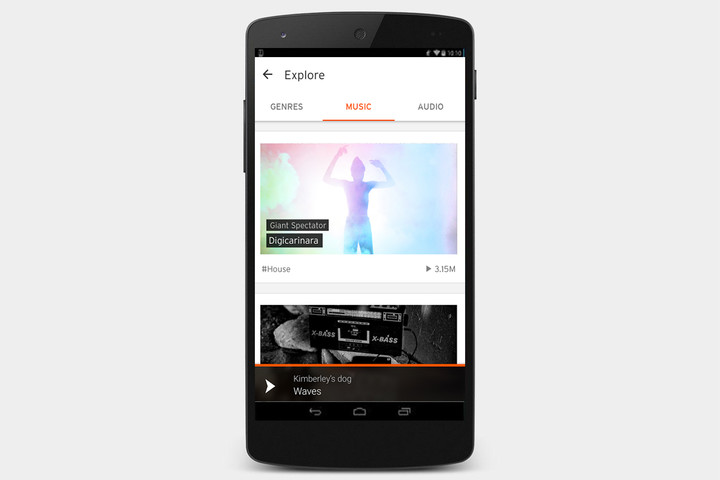
If you’re looking for an all-you-can-eat buffet of sound with no ads and no subscription fees, you’ve found it. Discover new music and stream it from the cloud. But this is no Spotify replacement.
Google Play Amazon Apps
PocketCasts ($4)
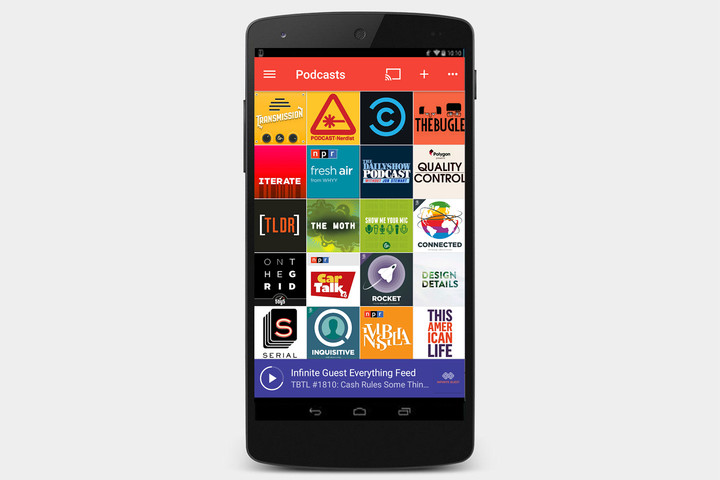
This has everything one could want in a podcast player. It has a huge library and the clean interface makes it easy to manage your subscriptions. It also lets you sync between devices and works with iOS.
Google Play
Bandcamp

Bandcamp’s mobile apps allows you to stream music from your collection, as well as the music offered by the thousands of artists who sell and stream their music on Bandcamp. It’s one of the easiest and fastest ways to buy music directly from the artists and labels you follow.
Google Play
Google Play Music
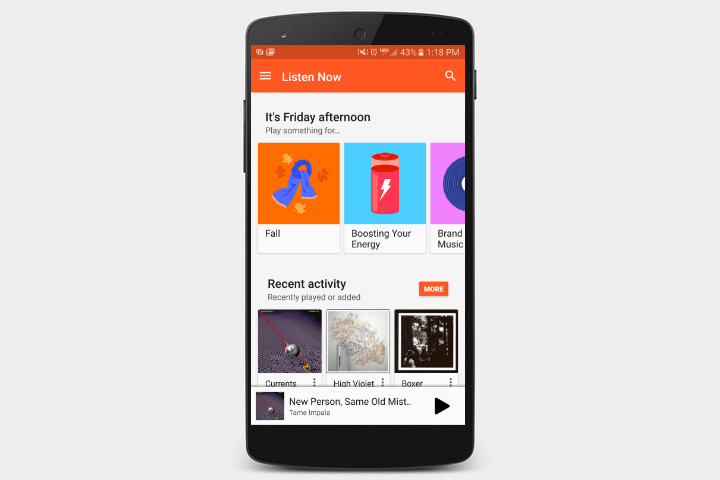
Google’s official streaming service is a worthy competitor to Spotify. Not only does the app provide a vast library of content, but it also allows users to upload up to 50,000 songs for online storage. This means you can download and stream your music on any Android device, at any time.
Google Play
Apple Music

If you use a Mac or iPad on top of your Android phone, you may be better served with Apple Music over Google Play Music or Spotify. Apple Music offers access to Apple’s massive library of music, as well as Apple’s Beats 1 radio station, which plays both current hits and up-and-coming music. The celebrity DJs and exclusive album streams are just a plus.
Google Play
Microsoft’s Surface Laptop is a Trojan horse to sneak Windows 10 S into your life
Until now, Microsoft has made it perfectly clear what each one of its Surface machines is meant to accomplish. The Surface Pro is the tablet that can replace your notebook. The Surface Book is the notebook that can replace your tablet. And the Surface Studio is the desktop PC that can turn your office into a creative studio.
Today’s introduction of the Surface Laptop isn’t so clear. While the machine is obviously Microsoft’s newest halo product, this time for the traditional notebook market, the company has raised more questions than answers by introducing it along with the education-focused Windows 10 S.
Windows 10 S and the Surface Laptop – For education, or not?
At first glance, Windows 10 S serves an obvious and timely purpose. It’s a version of Windows 10 that Microsoft can position as the educational alternative to Google’s lightweight Chromebook platform. Working with its partner OEMs, Microsoft can now offer solutions that combine extremely low-cost hardware with a version of Windows 10 that’s easier to manage, starts up faster, and comes bundled with other software like Minecraft: Education Edition, and Office 365 for Education.
Sounds great, right?
Yet the Surface Laptop flies in the face of that strategy. It’s certainly not an inexpensive machine, with a starting price of $999, that tops out at $2,199. That’s high-end notebook territory. In fact, it looks like a direct competitor to the Apple MacBook and MacBook Pro, not to mention Microsoft’s own Surface Book.
In short, the Surface Laptop is not a machine that schools are going to purchase in bulk to build into computers-on-wheels (COWs) and cart from classroom to classroom. School IT administrators aren’t likely to hand them over to students, who won’t care about staining the Alcantara fabric lining the keyboard deck, or cracking the 13.5-inch PixelSense 3:2 display.
And yet, according to Microsoft, the Surface Laptop was “Designed for Windows 10 S,” an operating system that by the company’s own admission is intended to offer less functionality in the name of better security and easier administration – not enhanced productivity and power.
Laptop, or Trojan horse?
A skeptical geek might look at Windows 10 S and assume that it’s the beginning of an effort to compel people to download all their apps from the Windows Store. Office 365 is making its way there right now, and it’s possible that the standalone version of Office could eventually disappear. Toss in the fact that Windows 10 S doesn’t allow users to change the default browser from Edge, and the future doesn’t look bright.
In fact, Windows 10 S starts to look like a Trojan horse. Its focus on education makes its limitations excusable, glossing over fundamental changes to how the operating system works. Yet the operating system is bundled into a high-end laptop that many people will desire. The hope, it seems, is that users will give Microsoft’s vision of a Store-centric, Edge-centric, Bing-centric Windows a second chance.

The company knows that it can’t simply pivot Windows all at once, so it’s instead sneaking in Windows 10 S under the pretense of a purpose-built Windows incarnation. Then, if Microsoft decides to shift other versions of Windows in the same direction, then the company can say it’s because people loved the Surface Laptop.
Of course, Microsoft could easily shift to Windows 10 Pro on the Surface Laptop without any fanfare, and write the change off to customer preference. It could also offer new configurations with an upcharge to Windows 10 Pro, leaving Windows 10 S as a budget option. These escape strategies would allow Microsoft to smooth over poor reception as nothing more than a misstep.
Even if that happens, however, it would be foolish to pass Windows 10 S off as a blip, an experiment, or a merely niche branch of mainstream Windows. While Microsoft talks about education in this light, it seems to be forming a shadowy plan to transition Windows into a tighter, more locked-down operating system — one where browser choice, search engine choice, and application choice are no longer up to user preference.
It’s a plan that would indeed make the operating system more secure and easier to use, but it’s also one that would have many howling “the sky is falling!” – and, perhaps, for good reason. Whatever its fate, Windows 10 S and the Surface Laptop have shown us Microsoft’s darkest desires.
A newly developed chemical could ‘reprogram’ your body to be more fit
Why it matters to you
Time will tell if this exercise pill can be adaptable for human consumption.
As anyone who has been inspired to hit the gym after watching the Olympics will know, building stamina and endurance is not the easiest of things. A new research project carried out by scientists at Salk Institute for Biological Studies in La Jolla, California suggests that it could be a whole lot easier, however.
Well, if you’re a mouse, at least!
In the study, scientists gave regular mice an eight-week course of a chemical called GW1516. Usually abbreviated as ‘GW,’ this compound directly activates a protein in the body called PPARD, which is naturally activated by exercise training. After their dose of GW, the mice were able to run on an exercise wheel for 270 minutes before showing signs of fatigue. Mice that did not receive the drug were able to run on the wheel for just 160 minutes.
The research is described in the new issue of the journal Cell Metabolism.
“There are two main points in our study that make it very interesting,” Weiwei Fan, a molecular biologist at Salk Institute, told Digital Trends. “First is the discovery of a new mechanism that explains how exercise training remodels muscle and increases endurance. Secondly, we can introduce such exercise-mimicking effects in animals solely with a chemical compound.”
The research builds on previous investigations involving GW1516 that Salk scientists have carried out. One demonstrated that a four-week course of GW helped mice control their weight and insulin response, making them less likely to become diabetic. This new experiment adds another “superpower” for the GW compound.
Before you get too excited, though, it is worth noting that the chemical is not yet ready to cross over to human test subjects. There is still plenty more to be explored before this option is even put on the table.
“Our next step is to develop the next-generation PPARD activators with a better safety profile, and explore their therapeutic potentials against common health problems such as obesity, diabetes, fatty liver disease, and muscular dystrophy,” Fan continued.
Maybe we will hold off on our new gym membership until then!
 AIVAnet