


Streaming video from Chrome to Chromecast is about to get a lot better
Why it matters to you
If you’re having trouble casting tabs from Chrome to your Chromecast, you’re not the only one. Luckily, there’s a fix.
Chromecast, Google’s affordable entertainment dongle, is one of the most versatile gizmos out there. It has Netflix and YouTube, of course, but also hundreds of apps, games, and integrations. Another nifty Chromecast trick is the ability to mirror videos from a Chrome browser tab, but historically, that feature hasn’t worked all that consistently — mirrored videos often lag and sometimes crash. Thankfully, though, a fix appears to be on the way.
On Wednesday, Google’s Francois Beaufort drew attention to a cast-related Chrome feature that vastly improves Chromecast tab stability. Before, videos mirrored from tabs had to pass through several encoding steps before they reached the target Chromecast — they had to be rendered, re-encoded, and then beamed over the network. The new system sends video to the Chromecast directly, trimming the overhead and improving performance.
You can test the improved tab casting now, if you aren’t afraid of a little elbow grease. Download and install the Chrome Developer channel, then type “chrome://flags/#media-remoting” (without quotes) in the address bar and hit enter. Hit the Enable button, and you’re golden.
Test it by navigating to any website with a built-in video player, like Vimeo, Ustream, Livestream, or Facebook. Play a video, and then click the Cast button in the Chrome Settings menu.
The new feature’s a boon for low-powered laptops and desktops, which often struggle to encode videos efficiently. And it’s good news for folks who use services unsupported by Chromecast, like Amazon’s Instant Video.
This move is all the more relevant in light of Chromecast’s continued expansion. This week, Nvidia’s Shield TV set-top box gained support for 4K casting from select apps. And last year, Google launched Chromecast built-in, an effort that saw casting capabilities being built natively into devices from Vizio, Sharp, Sony, Toshiba, Philips, Polaroid, and Skyworth.
The experimental casting feature remains under development, and Beaufort didn’t provide a timeline. But here’s hoping it hits public airwaves sooner rather than later.
Microsoft is changing how you buy and use its Office productivity suite
Why it matters to you
If you want to keep things simple and make sure you can always connect your Microsoft Office apps to the company’s cloud, then Office 365 is your best bet.
For most of its lifetime, Microsoft’s Office productivity suite was like most other applications in how you purchased it. You’d buy an Office license for each machine you wanted to run the suite, and that would be it. The advent of the Office 365 cloud productivity service changed things, however.
Now, you can either buy a license for Office or subscribe to Office 365. Either way, you get access to the Office suite of applications and you can connect those applications to Microsoft’s various cloud services. Exactly how this process works is changing, however, and Microsoft watcher Paul Thurrott provided an explanation of the changes.
To begin with, Microsoft uses the term “Office perpetual” to describe the licensed purchase of the productivity suite. This is the usual one-time cost that applies to a specific version of Office, which right now is Office 2016. The Office 365 subscription means that you pay an annual fee, for example, $99 for Office 365 Home, that allows you to install whatever version of Office is introduced while you’re subscribed.
You can connect to Microsoft’s cloud services, such as OneDrive, from Office via either method. And, there’s a version of Office 365, called Office 365 ProPlus, which is a version that installs on PCs, Macs, and mobile devices but that doesn’t provide any other Office cloud services. It’s a subscription, which means that you can fully use Office only while you’re subscribed; otherwise, Office reverts to a lower-functionality mode.
Where Microsoft is changing things up is in how Office perpetual can connect to Microsoft’s cloud services. Simply put, Microsoft has now limited to five years the length of time during which a version of Office purchased with a perpetual license can connect to those services. Put another way, Office perpetual can connect to the company’s cloud services for as long as it remains in mainstream support, which is five years.
That means that Office 2016, when purchased under a perpetual license, will no longer be able to access Microsoft’s cloud services after October 13, 2020. At that point, an Office perpetual user will need to buy a license for the current version of Office. As Thurrott points out, Office 2016 won’t stop working at that point, but it simply will no longer connect to Microsoft cloud services.
Furthermore, as Microsoft pundit Mary Jo Foley explains, the only version of Office that will be fully functional after the October 13, 2020 date will be Office 365 ProPlus, along with the other Office 365 subscriptions. As she puts it, “Microsoft also is letting its Office customer base know that as of October 13, 2020, Office 365 ProPlus will be the only fully featured, most up-to-date client that will connect to Office 365 services. Anyone using perpetual Office apps and clients may not get all the features at the time they are available to Office 365 ProPlus users.”
The bottom line is that Microsoft clearly wants you to buy an Office 365 subscription in order to use its productivity applications. In addition to no longer needing to concern yourself with such licensing subtleties, you can install Office on multiple machines with some subscriptions and rest assured that you’ll never have to worry about whether or not you can connect to the Microsoft cloud.
It’s now easier than ever to find your Uber rating
Why it matters to you
It has previously been easy for you as a passenger to see your driver’s rating, but not your own. Today, that changes.
Admit it. You spend all day judging people, and if we’re honest, they probably spend all day judging you, too. Now, we can see exactly how those judgments manifest themselves in numerical form. At least the judgments made by Uber drivers.
Your days of embarking upon a wild goose chase to track down what your drivers think of you are finally behind you. Uber announced two updates to its rating system, both of which are rolling out across the world today, in order to “make [its] rating system fairer.”
Whereas you previously had to navigate through a number of different panels to find your Uber rating, you can now easily access this score (given on a scale of one to five stars). Starting today, your rating can be found directly underneath your name in Uber’s menu. “We hope this update will remind riders that mutual respect is an important part of our Community Guidelines,” Uber wrote in a blog post.
The decision to make ratings more visible, Uber suggests, is actually to help drivers. After all, if you see that your rating is slipping, maybe you’ll be a bit more gracious the next time you get in someone else’s car, and won’t slam the door, spill your takeout, or otherwise be an sub-optimal passenger.
In fact, both of Uber’s updates to the rating system are to the benefit of its contractors. The second update has to do with Uber Pool trips. Given that many of the issues with these sorts of rides are often “outside a driver’s control,” according to Uber, the rating system is being adjusted to allow for more passenger feedback. If you indicate that you had a bad Pool because of the route or co-rider behavior, the driver won’t be impacted.
“Ratings are a two-way street at Uber, and our 5-star rating system helps to create a positive experience for everyone,” Uber said. And hopefully, these updates will do just that.
TrussFab software lets people build boats and bridges using plastic bottles
Why it matters to you
TrussFab is software that lets you design and build anything from functional chairs to a real rowboat using 3D printing and recycled plastic bottles.
Whether you’re good at remembering to recycle or not, chances are that you’ve noticed the massive amount of plastic bottles you accumulate on a regular basis.
A cutting-edge, eco-friendly research project being carried out at Germany’s Hasso Plattner Institute aims to put those bottles to good use — by using them as building blocks for everything from chairs to a rowboat to an impressively large plastic dome structure.
“Our original motivation came from a desire to increase the capabilities of desktop 3D printers,” Róbert Kovacs, a PhD researcher at Hasso Plattner Institute’s Human Computer Interaction Lab, told Digital Trends. “In particular, we wanted to work out how to create large objects using these machines that normally print much smaller objects. We thought we could do this by creating connectors for joining larger pre-existing objects — and soda bottles seemed to be the perfect choice for that.”
With that in mind, the team developed software called TrussFab. TrussFab is an integrated end-to-end system that allows users to design their object of choice, and then works out the correct distribution of plastic bottles to create a structurally sound end product.
As it turns out, while plastic bottles are thought of as being pretty flimsy, they’re actually extremely strong when pushed or pulled along their main axis. Using 3D printing, TrussFab lets makers print the connecting pieces between the bottles to link them together in a honeycomb-type formation.
“Our other intention with the project was to encourage recycling,” Kovacs continued. “We wanted to make people more aware that the bottles they throw away can be a great source of material, and aren’t just trash. Even the 3D-printed connectors can be produced from recycled materials, which means that the entire structures can be made from plastic bottles in some way.”
So far, the team has used TrussFab to build an 8-foot bridge strong enough to carry a human, a table and chair set, a functional boat that seats two, and a 16.5-feet dome consisting of 512 bottles.
The team next plans to make TrussFab freely available over the next several weeks, which will no doubt result in a whole new wave of creations. Keep watching this space — and drink an extra bottle of Coke here and there to start building up your supplies!
Huawei Honor 8 Pro review

Research Center:
Huawei Honor 8 Pro
The Honor 6X is a phone we should talk about more. It’s good looking, has a good camera, and doesn’t cost much at $250. It embodies what Honor, a brand that shares technology with Huawei, does best. But what happens when Honor goes all-out and creates a phone with high-end specifications, ready to take on Huawei Mate 9, and other big-screen phones like the LG G6, and Samsung’s new Galaxy S8?
The Honor 8 Pro — technically adept, while still reasonably priced. It does almost everything well, though the phone’s camera is a little lackluster compared to competitors, and it’s not eye-catching like the Galaxy S8.
We’ve spent a week with it, and this is what we found.
Uninspired design
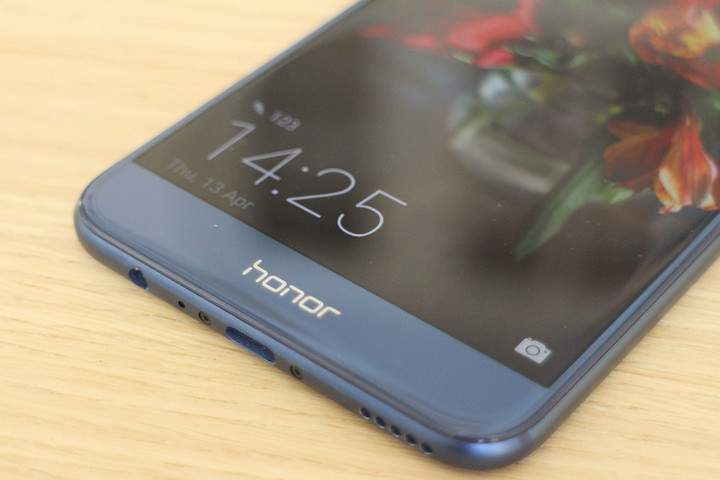
While immediate comparisons will be drawn with the iPhone 7 Plus, the Honor 8 Pro is closer to the new Huawei P10 Plus in design, right down to the placement of the buttons and the microphone, to the shape and curvature of the body. Meet them going down the street, and you’d think they were twins.
 Andy Boxall/Digital Trends
 Andy Boxall/Digital Trends
 Andy Boxall/Digital Trends
 Andy Boxall/Digital Trends
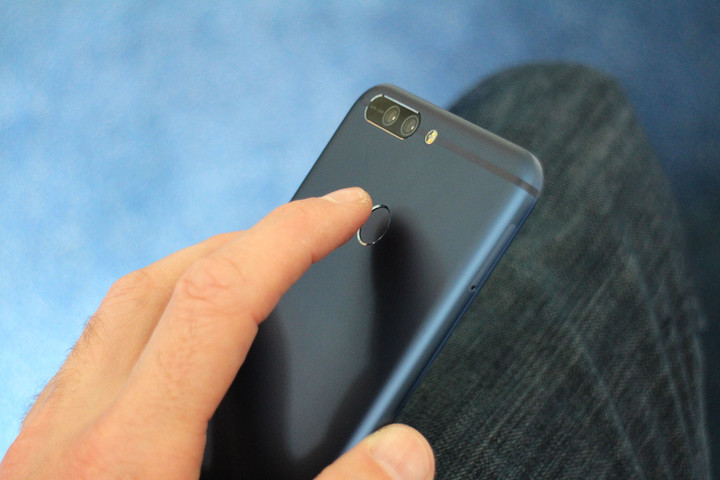
The body is made from aluminum, which has a very pleasant soft textured touch to it, and the large 5.7-inch screen is covered by a 2.5D curved Gorilla Glass 3. The fingerprint sensor is on the back — its main deviation from the Huawei P10 Plus — because it uses on-screen Android navigation buttons. It’s comfortable to hold, but it’s slippery. The rear also attracts nasty smudges if your hands are anything other than squeaky clean.
This is a large phone. It’s essentially the same overall size as the iPhone 7 Plus, and comes close to matching the Mate 9. It’s almost impossible to stretch your thumb across the display, so you’ll regularly use two hands, or resort to Honor’s software and fingerprint sensor tricks to make the phone usable with one hand. But the phone’s size doesn’t affect its placement of the rear fingerprint sensor — unlike the Galaxy S8 Plus. The Honor 8 Pro rarely required me to shift my finger around to reach the sensor immediately. What helps is how the phone is unbelievably thin at less than 7mm.
The phone is unbelievably thin at less than 7mm.
While the Pro will come in black or gold, we love the blue variant. It’s great to see a colorful alternative to the usual black, white, and golds we usually get to choose from. It’s not “dazzling,” like the blue Huawei uses on the P10, but is considerably more matte and extends all over the phone, so you don’t have a white or a black bezel around the screen.
The Honor 8 Pro isn’t a heart-pounding beauty, but it offers strong build quality, premium materials, and if you choose the blue, it nicely separates itself from other more generic smartphones.
Slick interface, too many pre-installed apps
The Honor 8 Pro isn’t exciting to look at, but the same can’t be said for its software experience. It runs Android 7.0 Nougat with the EMUI 5.1 user interface on top, which will be familiar to anyone who has used, or followed our coverage of, the Huawei Mate 9 and P10.
What was once a messy, often unpleasant piece of software, has become a coherent, slick, and attractive user interface over Android. Yes, some people will prefer regular Android, and for them, phones like the Pixel or Moto G5 exist. Everyone else — those who buy Samsung, LG, HTC, or any other Android phone — will have no problem with EMUI 5.1. There’s even an option to add an app drawer, if spreading app icons across multiple home screens isn’t your thing.


Honor’s software brings a few extra features with it, including Knuckle Sense, where using a knuckle rather than a finger to draw shapes on the screen activates certain features. These include taking screenshots, or opening the music app. Honor also has a few ways to make the large phone easier to use with one hand. Minimizing Android to one corner is activated with a swipe across the menu, back, and home buttons, for example. The fingerprint sensor also has multiple uses — a swipe down drops the notification shade, and a left or right swipe in the gallery scrolls through your pictures.
There are too many pre-installed apps — Tripadvisor, Opera, booking.com, Asphalt Nitro, Huawei’s Vmall to name just a few — and SwiftKey is the default keyboard, which I find frustrating to use. Thankfully, the third-party apps can be uninstalled, and Gboard can be used instead of SwiftKey if you prefer.
Great performance, two-day battery
Considering the Honor 8 Pro is internally very similar to the Mate 9 and P10, both of which are solid, reliable phones, it’s no surprise to find it’s just as competent.
We played a variety of games, and all ran without a problem. We did find the phone got quite warm to the touch. Never too hot, but you certainly know when the octa-core Kirin 960 processor is working hard. It’s the same chip found in the Huawei Mate 9 and P10, but in the Honor phone it’s backed up by 6GB of RAM, rather than 4GB. There’s 64GB of internal storage space, and a MicroSD card will fit in the tray alongside the SIM.
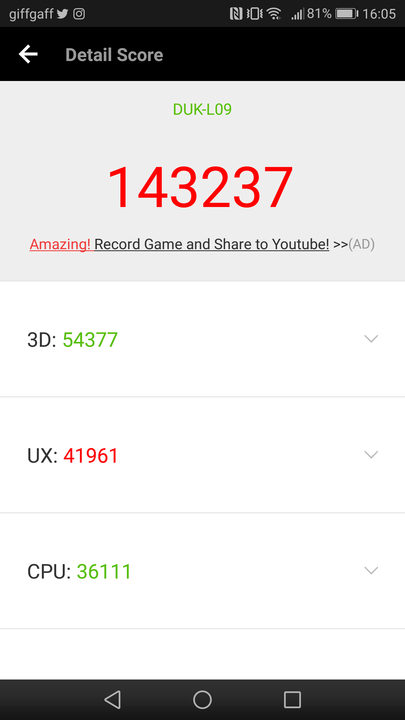
Putting the Honor 8 Pro through the AnTuTu 3D benchmark test returned a 143,237 score, slightly higher than the number achieved by the Mate 9 and the P10. Gaming performance using SlingShot Extreme on 3DMark returned a 1943 score, lower than the Mate 9 and the OnePlus 3T. Don’t read too much into these results though.
Inside the Honor 8 Pro is an almost unfeasibly massive battery for such a slim phone — 4,000mAh. We only had the phone for a week, but during that time a recharge was needed every two days, and that’s with comprehensive use. We got the similar results from the Huawei Mate 9, but we’re disappointed that Huawei’s effective SuperCharge fast-charging system is missing on the Honor 8 Pro. Recharging stretched beyond 90 minutes and towards 120 minutes.
Fun bokeh effects
Any modern smartphone, flagship or not, needs a respectable camera. The big trend at the moment is for dual-lens cameras, and the Honor 8 Pro jumps aboard with a pair of 12-megapixel sensors. One shoots in color and the other in monochrome, and used together the phone can create a cool blurred background bokeh effect. This can be manipulated in the gallery after you take the shot.
If that sounds similar to the P10 Plus and Mate 9, then it should, but there are one or two key differences — Leica isn’t involved with the Honor phone, the aperture is smaller at f/2.2, and it doesn’t have the excellent Portrait mode introduced on the P10. The results are middling. In the right environment, the camera takes good pictures, but it tends to overexpose, and overcast skies get washed out. Colors don’t always pop the way we expected either.
It’s the same story in monochrome mode, and no amount of forcing the camera to adjust the aperture produced pictures we really adored. It’s close, and all the pictures were filled with detail; but we’d regularly turn to editing the images to get them just right — something many people won’t want to do. Low-light suffered too, especially without optical image stabilization.






The bokeh mode, or wide aperture as it’s called here, saves the day and is way more successful. It’s effortless to take the shot — just activate the mode with a single button — and it’s just as easy to change the focal point afterwards. The effect looks amazing, and generates something we always look for in cameras: creative inspiration. Once you get the hang of what looks good, you’ll be looking for opportunities to use the wide aperture mode more.
The camera app is intuitive, and easy to use. Swipe to the left or right to access menus, which have large, clearly labeled icons to guide you through the different modes. There’s a pro manual mode for stills and video — which can shoot up to 4K resolution — and modes for HDR, taking pictures at night, and shooting videos in slow motion. Swap to the front camera and you’ll take 8-megapixel selfies, and get to use the subtle beauty mode. Results are satisfactory, and improved when you play around with the solid image editing tools.
The small aperture lets the Honor 8 Pro’s camera down, which is unfortunate when elsewhere, it’s a strong performer producing pictures we want to share.
Vibrant screen, gimmicky VR
The 5.7-inch LCD screen has a 2,560 x 1,440 pixel resolution, and it looks superb. It’s bright, colorful, and the details are pin sharp. But because it’s not an AMOLED panel, Google won’t certify the Honor 8 Pro for Daydream VR use. Not to worry, because the box that packs the Honor 8 Pro’s box actually turns into a VR viewer! Is it good? No, not really.
The Honor 8 Pro is hard to beat for the price.
The Honor 8 Pro comes with Jaunt VR’s app, which has some great content, and the viewer is pretty similar to other Google Cardboard viewers out there. But it doesn’t have a manual control button, so it won’t work with the Cardboard app, and bugs in the Jaunt VR app made life extra difficult. The only way to exit a movie was to remove the phone, reset the app, and start again.
Get the Jaunt VR app working and the experience will improve, and when we did get videos playing it looked fantastic on the high resolution screen. It’s a fun introduction to 360-degree video. It’s not a reason to buy the Honor 8 Pro, and you’d probably get more benefit from grabbing one of the many Cardboard headsets with an actual button on it.
Price, warranty, and availability
The Honor 8 Pro hasn’t been announced for the U.S. at the time of writing, but is on sale in the U.K. and parts of Europe. In China, the 8 Pro is known as the Honor V9. It’s priced at 480 British pounds or 550 euros through the Vmall online store, which is about $590 depending on the exact exchange rate. This is more expensive than the majority of phones we see from Honor — the 6X is $250, for example. It also puts it right in-between some highly desirable hardware. It’s more expensive than the OnePlus 3T, but less than the Huawei Mate 9, and the Huawei P10 Plus.
Huawei Honor 8 Pro Compared To

LG G6

HTC U Ultra

Meizu Pro 6 Plus

Xiaomi Mi5S Plus

Xiaomi Mi Mix

Huawei Mate 9

ASUS Zenfone 3 Deluxe Special…

Samsung Galaxy Note 7

LG V20

Samsung Galaxy Note 5

Huawei Nexus 6P

LG V10

Motorola Moto X Style Pure Edition

Samsung Galaxy Note 4

Samsung Galaxy Note 3
For the specification and its performance, the Honor 9 Pro is superb value for money. It has genuine flagship phone performance and features, for considerably less money than you’d expect. Honor would have to drastically adjust the price if the phone launches in the U.S., because the Huawei Mate 9 can be yours for $600 — and the camera’s ability makes it the better buy.
Without a U.S. release date, we’ll have to quote the U.K. warranty details, which covers the phone for 24-months, the battery and charger for six months, and the included headphones for three months. If there is a problem you have to visit a registered Honor/Huawei service center, and you won’t be covered if the phone has taken a bath or damaged through misuse.
Our Take
For once, spending less doesn’t mean making a compromise. The Honor 8 Pro’s dual-lens camera makes it trendy, the fast processor makes it usable, the massive screen looks great, and the battery is long-lasting. Give it a U.S. release date, and we’ll be very happy.
Is there a better alternative?
The Honor 8 Pro is hard to beat for the price in the U.K., where our three favourite dual-lens big-screen phones — the LG G6, the Huawei P10, and Huawei Mate 9 — both cost more than 600 British pounds. They’re better phones, but you’ll spend at least 150 British pounds more to get one in your hand. It’s toughest challenger is the OnePlus 3T. It has a smaller, lower resolution screen at 5.5-inches, but is a great looking phone with at least as much (if not more) power and performance. However, you’ll miss out on the dual-lens camera.
If you’re eyeing Huawei and are in the U.S., we’d recommend buying the Huawei Mate 9 instead given the outstanding price it’s available for, plus it comes with a U.S. warranty unlike an imported device.
The DT Accessory Pack
Official Google Cardboard
$15.00
Huawei Watch 2
$299.99
Samsung 128GB 80MB/s EVO Select Micro SDXC memory card
$109.99
How long will it last?
The Honor 8 Pro isn’t water resistant, but the metal body is arguably more durable than a completely glass smartphone in the event of a fall. The device is very thin though, so we’d be careful about accidentally putting too much pressure on it in a pocket.
Honor, like Huawei, doesn’t have the best track record with Android updates. Our review model runs Android 7.0 Nougat and has the March 1, 2017 security patch installed, so it’s relatively close. How long that will remain the case isn’t certain. The only way to be sure of the latest Android software and patches is to buy a Google Pixel phone.
Otherwise, the Honor 8 Pro can be considered a flagship phone, and has more than enough power and ability to last for several years.
Should you buy it?
Yes. If you have a maximum budget of 500 British pounds (~$590), the Honor 8 Pro represents astonishing value, with better features than you’ll find on phones at or around the same price. Its build quality as well as the software experience are also excellent. We don’t suggest importing one to the U.S.. Instead, wait to see if Honor announces a U.S. version, or just opt for the Huawei Mate 9.
Western Digital crammed 12TB of storage into a helium-filled hard drive
Why it matters to you
Western Digital is pushing the hard drive limits with the release of a new helium-drive drive for data centers packing 12TB of storage and very low power consumption.
Western Digital released a new hard drive for the enterprise market under its HGST umbrella: the Ultrastar He12. The drive packs 12TB of storage capacity using the company’s helium-based HelioSeal technology. This tech not only enables higher capacities than standard air-filled drives, but reduces power consumption in the process.
As a brief explanation, hard drives resemble enclosed record players where a needle/head reads the information from a spinning disc. In this case, data is stored on a magnetic disc, which typically has a physical limit to its storage amount. To increase the overall capacity of a hard drive, manufacturers stuff more spinning discs and readers into the drive. But all that high-speed spinning causes friction due to the “weight” of air, limiting the number of discs used in a 3.5-inch form factor.
But because helium is a lightweight gas (1/7 the density of air), there is less resistance as hard drive platters spin round and round like a record (baby). So not only can hard-drive makers cram in more magnetic platters, the motors spinning those platters meet less resistance, consuming less energy than the standard air-filled hard drive. The arms holding the read/write heads suffer less turbulence, too.
That said, Western Digital managed to cram eight platters into its new helium-filled hard drive, up from seven used in previous Ultrastar models. It’s a “world’s first,” indicating that each spinning magnetic platter can hold approximately 1.5GB of data. The platters are thinner than what’s found in air-filled drives, too, while “maintaining a stable recording interface.”
Here are the hardware specs of the new Ultrastar He12 drives:
Form factor:
3.5 inch
Number of platters:
8
Maximum areal density:
864Gbits per square inch
Sector sizes (SATA):
4Kn – 4,096
512e – 512
Sector sizes (SAS):
4Kn – 4096, 4112, 4160, 4224
512e – 512, 520, 528
Data buffer:
256MB
Rotational speed:
7,200RPM
Latency average:
4.16ms
Interface transfer rate:
600MB/s (SATA)
1,200MB/s (SAS)
Sustained transfer rate:
255MB/s (typical)
Seek time:
8.0ms read, 8.6ms write
Power rating (SATA):
5.3 watts idle, 7.2 watts operating
Power rating (SAS):
6.1 watts idle, 9.8 watts operating
MTBF:
2.5 million
Dimensions:
1.02 (H) x 4  x 5.78 (D) inches
Weight:
1.45 pounds
Now here are the differences between all four variants:
Model
Interface Type
HUH721212ALE60y
512e SATA 3 (6Gbps)
HUH721212ALN60y
4Kn SATA 3 (6Gbps)
HUH721212AL420y
4Kn SAS (12Gbps)
HUH721212AL520y
512e SAS (12Gbps)
Outside the 12GB storage capacity, some of the highlights include Instant Secure Erase (ISE) and Self-Encrypting Drive (SED) options, 24×7 continuous availability, and an annual fail rate of 0.35 percent. All four models ship with a five-year limited warranty.
“It encompasses a low-power design without compromising performance, which helps reduce overall cost of ownership,” the company said on Wednesday. “The Ultrastar He12 HDD is perfect for any application that requires massive amounts of cost-effective storage.”
Unfortunately, Western Digital did not release any pricing information, as the helium-filled drives are shipping to distributors now. Eventually they will make their way onto Amazon, Newegg, and other online retails and sit alongside Western Digital’s other Ultrastar products.
New FCC ruling would eliminate net neutrality regulations for ISPs
Why it matters to you
If you’re an advocate of net neutrality rules, then you won’t be happy about a possible upcoming FCC rule change.
Net neutrality is one of the more contentious issues in technology today. The idea that all data should be treated the same regardless of user, content, platform or other factors has its proponents and detractors throughout the political spectrum. Given some recent developments, it is not going to become any less controversial anytime soon.
With the Donald Trump presidency came a new Federal Communications Commission (FCC) chairman, Ajit Pai, and he has been hinting at changing how the FCC regulates the industry in ways that will impact net neutrality regulations. Now, Pai has made his plans more official, Ars Technica reports.
First up, as Pai announced to the other FCC commissioners in a speech on Wednesday, will be an effort to “reverse the mistakes of Title II and return to the light-touch regulatory framework that served our nation so well during the Clinton administration, Bush administration, and the first six years of the Obama administration.” Pai referred here to Title II of the Communications Act, which in 2015 brought fixed and mobile internet service providers (ISPs) under the classification of common carriers.
Title II, therefore, extended the FCC’s full regulatory authority to ISPs, authority that it then used to impose net neutrality rules. The FCC’s previous attempts to do so were denied by a court decision that essentially said the FCC’s rules applied to common carriers but not to broadband providers.
The FCC will vote on May 18 to enact a Policy of Proposed Rulemaking that will further submit the proposed rule changes for a vote later in 2017. If Title II is reversed, as some net neutrality opponents would like to see Pai accomplish immediately through a “declaratory ruling,” then the FCCs ability to impose net neutrality rules on ISPs will be revoked.
Title II’s revocation will have other effects beyond net neutrality. For example, the ability for ISP customers and competitors to file complaints will no longer be in effect, and disputes between network operators and content providers over payments to ISPs could take longer to resolve.
Unsurprisingly, the proposed rule changes are unpopular among net neutrality proponents and Democrats, who have started planning how they will oppose the elimination of Title II and the subsequent rollback of net neutrality rules as applied to ISPs. Such opposition will come in a number of forms, such as letters from startups, investors and others to Chairman Pai and activism by the Internet Association made up of companies like Amazon, Facebook, Google, and Microsoft.
In any event, if the new FCC has its way, then net neutrality will no longer be in effect for the data that is carried by ISPs. Whether that is a good or a bad thing is a complicated question involving many factors, but its controversial nature will likely remain intact for the foreseeable future.
Ultra-thin electronic labels could warn you when your milk goes bad
Why it matters to you
Printed transistors could be used to develop tech like paper-thin displays, or smart labels that text you when your food goes bad.
A team of scientists at Trinity College Dublin has created the world’s first printed transistors composed exclusively of 2D nanomaterials. They are pretty excited about it and with good reason.
“You could imagine the possibility of one day having printed circuitry on food packaging, so that rather than having a barcode, you have a circuit that can communicate information to the user,” Professor Jonathan Coleman, a materials scientist who worked on the project, told Digital Trends. “That could mean a carton of milk that sends you a text message when your milk is about to go off.”
Another possible usage, Coleman said, is the concept of paper-thin displays, which could be embedded into newspapers or magazines, or slung up on the wall like a moving poster.
He is quick to point out that these are future concepts, rather than anything the lab has developed just yet, but it is a future the team’s work is helping create. While researchers have explored printed electronics for decades, and it’s a relatively mature field, what this new work does is to improve on it by adding “wonder material” graphene to the mix — resulting in two-dimensional circuits only a few billionths of a meter thick.
Graphene has a number of desirable qualities, such as a strength and conductivity, but it’s also cheap — which is exactly what these applications would call for. After all, nobody is going to pay $15 for a pint of milk just because it can text you.
The team’s work is published this month in the journal Science. The technique of producing 2D nanomaterials has been licensed to Samsung and chemical company Thomas Swan. It was funded as part of the billion euro Graphene Flagship initiative, referring to a European Union program designed to explore innovative use-cases for graphene.
“What we created in this project wasn’t state of the art by transistor standards, but using these materials printed transistors do have the potential to get to that point,” Coleman continued. “At the end of the day, that’s what’s so exciting about his work — it’s not what we’ve done today, it’s what it gives people the potential to do tomorrow.”
Everything you need to know about Waymo’s self-driving car project
Although many of us believed we would have our own personal flying cars by the year 2017, that certainly hasn’t turned out to be the case. However, in the next couple of years, autonomous cars will become a regular part of our day-to-day experience. Instead of taking the wheels ourselves, fleets of self-driving cars will soon shuffle us around while we tend to more pressing issues, such as texting, napping, catching up on emails, or flipping through Tinder. What a time to be alive.
One of the most promising players in this market is the newly revamped Waymo. There has been a wave of Waymo announcements over the past few months as the company inches closer to releasing its first commercially available autonomous vehicle. Here’s everything you need to know.
What is Waymo?
For most of the past decade, Google has poured a war chest of cash into its self-driving technology. The company notoriously pioneered robotic car laws nationwide, and built a massive fleet of driverless pods that eventually roamed around Silicon Valley. Nonetheless, Alphabet, Google’s parent company, eventually decided to overhaul the entire program. In 2016, Alphabet announced that Waymo would spearhead this autonomous driving project from that point forward. Rather than building the vehicles itself, Waymo would collaborate with auto manufacturers.
This was a big first and a major pivot for the project as a whole. With the announcement, Waymo signaled a shift from further developing its pod vehicles. Investments in autonomous vehicle technologies have boomed in recent years. Major automakers like Ford and General Motors recently topped a Navigant Research study ranking the top 18 companies and their ability to develop self-driving cars. For perspective’s sake, Waymo was ranked seventh on the same list (the highest-ranked non-automaker). We elaborate more on this ravenous autonomous driving competition here.
Streamlining production
In January, at the North American Auto Show’s Automobili-D conference, Waymo CEO John Krafcik announced that Waymo built the entire sensor suite used by its self-driving Chrysler Pacifica Hybrid test vehicles. This was a huge step for the company for multiple reasons. First and foremost, this meant Waymo was no longer at the behest of multiple, third-party suppliers to create a single vehicle.
Moving the production process in-house has enabled more efficient integration of the various components (sensor hardware, sensor fusion software, image recognition). For example, when the company first started testing its self-driving cars, the cost of a single high-end lidar system was $75,000; that number has since dropped by 90 percent.
Who is Waymo working with?
Chrysler

Chrysler Pacifica Hybrid
Again, with the Waymo transition and the demise of the Google pod cars, the company made one thing very clear: It had no intention of attempting to manufacture entire cars. In 2016, Waymo partnered with Fiat Chrysler Automobiles to better commercialize its self-driving vehicle technologies. The initial deal called for the conversion of 100 Chrysler Pacifica Hybrid minivans into prototype autonomous vehicles.
To allow for the incorporation of the self-driving hardware, the minivans’ electrical systems, powertrains, and chassis were slightly modified. These prototypes have already been tested on location at Fiat Chrysler facilities in Chelsea, Michigan, Yucca, Arizona, and also at the Waymo facility in California.
Honda could be next

Acura RLX Sport Hybrid
While the company has already partnered with Fiat Chrysler, Honda may be the next collaboration for Waymo. In December 2016, Honda announced that it was “entering into formal discussions” with Waymo to integrate the company’s autonomous tech with its cars. If this collaboration comes to fruition, we imagine it would be rather similar to the Fiat Chrysler partnership, with Honda providing a series of vehicles to be modified with the Waymo hardware.
Honda has recently been dabbling with its own self-driving car tests, so a joint venture with Waymo would be a logical next step. The company has been testing prototype autonomous vehicles based on the RLX Sport Hybrid at the GoMentum Station in San Francisco. Honda hopes to manufacture vehicles with advanced autonomous capabilities around 2020.
Public offerings
In Arizona, Waymo is already offering the general public rides in their fleet of converted Pacifica Hybrids. Waymo also announced the delivery of 500 more prototype self-driving vehicles, many of which are headed to The Copper State. As part of this trial program, Waymo will grant certain Phoenix residents round-the-clock access to its autonomous offerings, per a report by Medium.
What are Waymo’s ambitions with this project? The company hopes to use feedback from these trial riders to better understand how these vehicles hold-up in real-world scenarios, outside of the cozy confines of its test facilities. But why Arizona of all places? Chiefly because the state is one of a few areas in the country where it is legal to test autonomous vehicles on public roads. For this reason, both Uber and the General Motors self-driving vehicle subsidiary, Cruise Automation, also test their self-driving cars in Scottsdale.
Competition
As noted previously, Waymo is certainly not the only player in the burgeoning autonomous vehicle market. Ford has announced plans to launch its own self-driving vehicles for ride-sharing services by 2021. The Renault-Nissan Alliance, Daimler, and Volkswagen Group, among others, are also working to implement these technologies into commercial vehicles in the coming years.
Uber has recently deployed a a fleet of self-driving cars in San Francisco, and General Motors recently divulged plans to test a series of self-driving cars in Michigan. It is important to note that Waymo recently filed a lawsuit against Uber, claiming that a former Waymo employee stole more than 14,000 files from the company. These files were then used to create a new autonomous driving startup called Otto. This company was later acquired by Uber for $680 million.
Uber has since denied Waymo’s charges, dubbing them nothing more than “a baseless attempt to slow down a competitor.” You can read more about measures Waymo is taking to protect its secrets from Uber here.
Your unlimited plan is probably ripping you off: How much data Americans actually use

The numbers are in and you probably don’t need an expensive unlimited data plan.
Unlimited data plans are back. Here’s some insight into why that happened as well as a look at how much data we really use every month.
We’ve recently seen all four major U.S. carriers introduce or revamp their unlimited LTE data plans. Multiple times. For some of us, this is great news: The folks who use upwards of 10GB of data on a line they pay for themselves found plenty of creative ways to hold on to older unlimited data plans, and sometimes that could be a hassle. Now they are available with a click of the mouse.
Unlimited plans coming back to AT&T and Verizon are a direct result of tough competition in the industry.
This wasn’t unexpected, really. Companies like T-Mobile and StraightTalk made people notice the cost vs. value proposition of a cell phone data plan. AT&T and Verizon enjoyed a consumer mindset that they offered something superior when for many, alternatives could be just as good. When people started to take notice of that, it was time for a small shake-up.
People who will utilize an unlimited data plan and get their money’s worth are outliers. Everyone can have a month where they are traveling or otherwise away from Wi-Fi and use a good chunk of data, but when you look at the numbers telling how much data is used per person on average, you see that most people would be better served with a cheaper plan that offers a capped data allotment.

Advertisement
The numbers back this up. According to NPD Connected Intelligence, one of the groups that your carrier and the people who made your phone use for insight into growth and planning, in 2015 the average amount of data used per person per month was about 3.5GB. During the same time period, customers on T-Mobile used an average of 5GB per month and Sprint customers used about 4GB per month; and both carriers offered unlimited data plans to any post-paid customer.
Why this is important

These are average numbers. That means that some people will be wildly outside the average on both ends: You might use 100GB of data per month but someone who uses 0.1GB per month offsets your input towards the average. An average can’t predict the highest amounts of data being used (or the lowest) but it is a great way to determine how much data the average person uses each month. There’s a lot of ways this data can be used and of course multiple ways it can be interpreted. For example, the average data a customer with access to an unlimited data plan uses isn’t dramatically different from the amount someone without access to unlimited data is using.
People talking about new unlimited data plans means that they are doing what they were meant to do: Hype.
This means that the average person, regardless of network, doesn’t need to pay for an expensive unlimited data plan. Unlimited plans are hypefests that get everyone talking about something as mundane and boring as a cellular provider. The hope is that you’ll decide you need to sign up for one even though you don’t need one. Sure, you might use a little more each month knowing that you have an unlimited plan, but generally, people who weren’t using a large amount of data before aren’t going to be using a lot of data after they switch. Old habits and all that.
None of this matters to the phone company. It has one goal: to make money. That’s how business work. Every decision, every promotion, every marketing campaign and everything else is a way to try and make more money. A company won’t be around for long if they aren’t trying to bank a profit. And sometimes, how that profit can be shown on a quarterly earnings report matters as much as the amount that goes into the bank.
The ARPU

ARPU (Average Revenue Per Unit or User) is the total revenue coming in from the service divided by the number of subscribers. It’s also a pretty big deal in shareholder’s reports and earning’s calls.
Advertisement
ARPU is a number that translates into the amount of money a single line of service brings in over a set time. There can be a monthly ARPU or quarterly or yearly. This number includes all the money you pay to your carrier minus tax and regulatory fees. That means things like extras you may be paying for (international calling or live TV for mobile devices) are included as well as your normal contract or monthly price. The ARPU is an easy way for a company to track its income and growth over time, and each customer who pays for an expensive unlimited data plan brings this average up in a way that’s statistically significant.
There is more than one way to count money.
Your carrier wants you to be excited about, and ultimately sign up for, an unlimited data plan because of how it affects the bottom line as well as how much.
Another way your phone company looks at their finances is with an eye towards profit instead of just income. The profit from a customer can be more important than the overall income generated from one. A company can be healthy and profitable even with a low customer count, or vice versa. We see this in action when companies give earnings results.
Income and profit are always two different numbers.
Consider a hypothetical that’s not too far removed from actuality. T-Mobile keeps pulling more and more customers away from Verizon. But Verizon is making more money and has a higher value. That means Verizon is making more profit per customer than T-Mobile.
Calculating profit is pretty simple. The service an account uses is tallied then compared to the amount of income that account generates each month. If you sign up for an unlimited data plan and still only use 3-5GB of data per month, you help improve profit margins. All accounts are profitable, but some will be more profitable than others.
Don’t hate the players

We’re not trying to say your carrier is bad or unethical here. This is just how business works when it comes to a service provider.
Your phone company is supposed to make money if everyone is doing their job.
They need to offer you something that you feel is worth the monthly cost. If that means an unlimited data plan sounds like a good idea to you, one is available for you. With the U.S. telco market becoming more and more competitive it was a given that all companies would offer a fixed service that included unlimited data for a fixed cost. Users who needed such a plan would sign on and help improve that income per customer metric and users who didn’t need an unlimited plan but signed up for other reasons helped improve the profit per user metric. This is how smart business works and the people in charge at your carrier are smart business persons.
The one thing to take away here is asking yourself how much data you need every month. No one answer fits everyone, but there is an answer that fits you. Compare how much you need to how much you’re paying for, and then check out what’s available. A final metric that’s harder to measure is how happy a customer is because happy customers are loyal customers. Make sure you’re using a service that works best for you and makes you be that happy customer.

 AIVAnet