


Ionic liquid melts old clothes so they can be spun into new ones
Why it matters to you
Plenty of old clothes end up in landfills. A new recycling technique which literally melts old clothes shows how we can change that.
It’s one thing if you haven’t changed up your wardrobe much in the past few decades, but if you’re one of those trendy folks who keep abreast of the latest fashions, chances are that the old clothes you throw out end up in a landfill somewhere.
That’s something that scientists from Aalto University in Finland want to change with an innovative technique for melting down old clothes to create new material.
“My work is part of an E.U. Horizon 2020 project called Trash-2-Cash that aims to reduce environmental pollution by trying to find adequate recycling strategies for cotton and polyester-based waste textiles,” Haslinger Simone, a doctoral candidate in Department of Bioproducts and Biosystems, told Digital Trends.
More: This machine pulverizes glass bottles, turns them into fine-grain sand in just 5 seconds
In a proof-of-concept demonstration, Simone and colleagues showed how an ionic liquid salt called 1,5-diazabicyclo[4.3.0]non-5-ene acetate (try saying that three times quickly!) could be used to dissolve the cotton in a fabric blended from cotton and polyester. Once the cotton was separated from the polyester, it could then be spun into fibers — thereby becoming the basis for new materials.
Simone said that other researchers have attempted similar things before, but often without following it through to its conclusion. “There is, for example, the lyocell process using NMMO as solvent,” Simone said. “Similar claims as our research have been made so far, but most of the time the proof of concept is missing. Moreover, ionic liquids are thought to be less hazardous and toxic due to their low vapor pressure.”
This week, the team is presenting their work in San Francisco, at the 253rd National Meeting & Exposition of the American Chemical Society. After that, there’s still more work to be done, however.
“Another project for the future is to retain dyes throughout the process, and improve the recycling process of the ionic liquid we use,” Simone concluded. “For commercialization we need to solve the recycling issue of the ionic liquid. We are planning to upscale but this is dependent on whether we manage to recycle the ionic liquid or not. Moreover, industry and policymakers need to make recycling more efficient by developing proper sorting systems for textile waste, and should start using materials that are easier to recycle than elastane, for example.”
Apple Music for Android gets a major upgrade to keep pace with iOS version
Why it matters to you
Version 2.0 of Apple Music for Android achieves parity with its iOS counterpart.
The new version of Apple Music for Android is here and it’s a doozy. Version 2.0 of the app for Google’s smartphone operating system includes a number of the features released on iOS 10 for the iPhone and iPad last September, most notably support for song lyrics and a streamlined music library.
A new design brings the app in line with its iOS counterpart. Apple Music has been simplified to four main categories — Library, For You, Browse, and Radio — denoted by large headers that bring “greater clarity.” The Now Playing screen takes a cue from the iOS version’s card-like interface and includes the ability to read song lyrics integration.
More: Apple Music now has 20 million paying subscribers, half that of Spotify
Apple Music’s other sections have been consolidated. Playlists now live in Library and New is located under the Browse tab. It is easier to see Downloaded Music stored for offline playback and there is less scrolling and fewer menus. Additionally, performance has improved.
But it is a little rough around the edges. As TechCrunch points out, a sign-in bug on select devices is preventing some subscribers from logging in. Affected Apple Music users are asked to enter an Apple ID verification code but there does not appear to be a place to enter the code provided.
Despite the occasional bug, though, Apple Music is on the upswing. Apple announced that the service reached 20 million paying customers in December and some analysts estimate that the total number of users sits somewhere north of 40 million.
More: Spotify vs. Apple Music: Which service is the streaming king
That is despite fierce competition from Spotify, which cleared 40 million paying users in September. Amazon recently launched Music Unlimited, and in December, Pandora rolled out Pandora Premium.
But Apple Music has the benefit of reach. It’s available in more than 100 countries, with more than half of its subscribers based outside of the U.S. in markets such as Japan, China, Russia, and Brazil.
Apple executive Eddy Cue told Billboard in December that 2016 had been “quite a year” for Apple Music. But Cue said the company had grander ambitions. “We can’t forget that, as an industry, we still have very few music subscribers,” he said. “There are billions of people listening to music and we haven’t even hit 100 million subscribers. There’s a lot of growth opportunity.”
More: Apple Music’s iOS 10 update includes new personalized playlists to compete with Spotify
To that end, rumor has it that Apple’s looking to spur Apple Music sign-ups by reducing the cost of its individual plan from $10 to $8 and its family plan from $15 to $13. The discounts, if true, could go a long way to heading off rivals.
Microsoft improves high-DPI display support in Windows 10 Creators Update
Why it matters to you
Your high-resolution display is going to work much better once you’ve upgraded your Windows 10 machine to Creators Update.
One of the significant and most legitimate complaints about Windows versus MacOS is that the latter does a much better job with high-resolution screens than the former. Windows 10 has alleviated some of that discrepancy but it is still not nearly as good as MacOS at properly scaling applications based on display resolution.
Microsoft worked hard on improving this so-called “high-dots-per-inch” performance in last year’s Anniversary Update, but it did not stop there. It put a bunch of work into improving high-DPI support in the upcoming Windows 10 Creators Update as well and it took to its blog on Tuesday to give an idea of what is coming.
More: Windows 10 users will reportedly receive the Creators Update on April 11
Simply put, Windows wasn’t designed in a time when we had access to high resolutions like 4K UHD (3,840 x 1,920) that pack a lot of pixels into the same physical square inch. And, unfortunately, Microsoft didn’t design into the operating system the ability to adjust how applications display text and user interface elements all the way up to the DPI.
In the past, Windows has required each developer to specifically adjust every application element for every possible DPI. For example, a developer would have to make icons that are nice and sharp for the Surface Pro 4’s 192DPI as well as ones for legacy displays running at 96DPI.
That is an expensive proposition given how many different Windows devices are available, and while Microsoft made some improvements in Anniversary Edition, there are still scenarios such as multiple monitor configurations that cause serious issues for how applications are displayed. The following image is an example of all of the things that can go wrong when screen elements are not adjusted for different DPI.
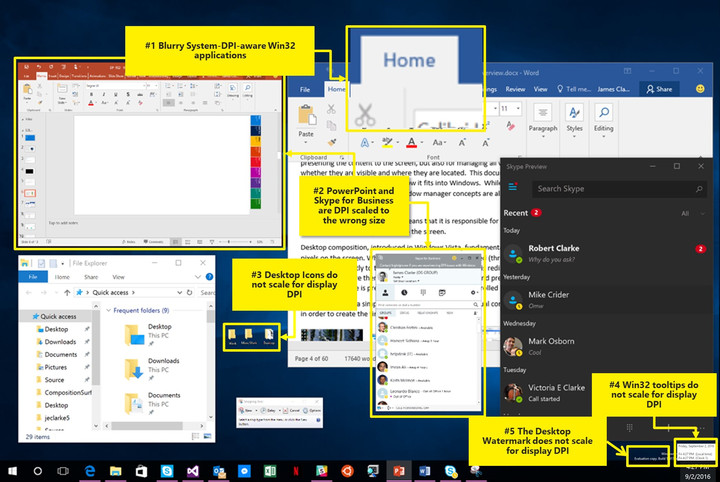
Creators Update should help with that, with improvements for two constituencies, developers and end users. For developers, Microsoft is implementing a number of changes, from continued improvement to how Windows 10 handles multiple monitors with different DPI and how it automatically scales DPI for dialogs.
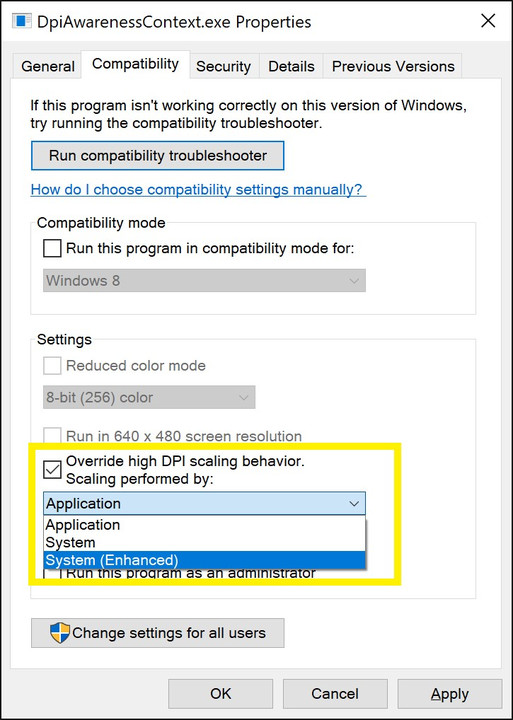
End users should benefit from Microsoft’s work in Creators Update as well. First, they will be able to override default DPI scaling and select how scaling should be performed. Second, Microsoft is building in new enhanced system DPI scaling that should help with those applications that will likely never be updated to work with high-DPI displays. Finally, desktop icons are getting some work to make sure they scale correctly.
There is a host of new and highly technical details that are at the heart of how Microsoft is working to improve how Windows 10 handles high-DPI displays. There is also plenty of work remaining. If you are a developer or just technically inclined, then you will find some fascinating reading in Microsoft’s blog post. Otherwise, just rest easy knowing that your high-DPI machine will likely look better once you install Creators Update in a week or so.
Huawei P10 and P10 Plus review

Research Center:
Huawei P10
Unfortunately, in terms of the attention it will get, the Huawei P10 is likely to play second fiddle to the likes of Samsung’s Galaxy S8, the next iPhone, and Google’s new Pixel phones. This is a crime, because both the P10 and P10 Plus are phones that should put Huawei on everyone’s radar.
While both devices have it all, though, how do they stack up in the real world? We’ve been using them over the past few weeks to see.
The P10 and P10 Plus offer a mesmerizing camera experience that will leave your friends thinking you’re a pro. They also offer uncompromising performance and stellar battery life, all in attractive, colorful frames. It’s a shame importing one to the U.S. is so expensive.
Design
Huawei hasn’t stepped too far away from the design it introduced with the P9, an already deliciously attractive phone. The fingerprint sensor has been moved to the front of the phone, below the screen, into what Huawei describes as a seamless sensor. It’s still recessed to make finding it easy in the dark, but otherwise the glass over the top is all one piece.
The glass over the rear cameras is broken only by the dual-flash unit, and blends in perfectly with the aluminum body. The antenna bands are wrapped around the glass panel at the top, and curved around the bottom of the body, so they’re barely noticeable. Huawei also paints them in a contrasting color to the phone itself, obscuring them even further.
 Andy Boxall/Digital Trends
 Andy Boxall/Digital Trends
 Andy Boxall/Digital Trends
 Andy Boxall/Digital Trends
Color plays a big part in differentiating the P10 from other Huawei phones, and those from other manufacturers too. Black, white, and gold are all available, but it’s the special blue and green models that really catch the eye. These have been developed in partnership with color experts Pantone. Green may be 2017’s color of the year, but it’ll split opinion on the P10, with some loving it and others disliking its soft grassy hue. We prefer “dazzling blue,” which offers a textured, reflective rear that seems to change the phone’s shape in certain light.
As usual, parallels can be drawn between the P10’s shape and the iPhone, right down to the way the body curves and the speaker grill placement; but there are some attractive stylistic touches that make it different. We love the red flash of color around the sleep/wake key and its textured surface to make it easy to find, for example.
Both phones are lightweight, and the P10 especially is easy to hold due to its compact size and 6.9mm thickness. If you don’t like big phones, then you’ll love the P10.
What the P10 doesn’t do is break any new design ground. It’s very much an enhanced P9, and is extremely reminiscent of the iPhone 6S. We wouldn’t call this a reason not to buy it, but it’s definitely one of the reasons you may overlook the phone. Huawei needs to draw your eye away from great looking new phones like the LG G6 and the Galaxy S8, and the P10 may not cut it.
Screen
The Huawei P10 has a 5.1-inch IPS LCD screen with a 1920 x 1080 pixel resolution. The P10 Plus is the bigger of the two, with a 5.5-inch IPS LCD, and a 2560 x 1440 pixel resolution. The pixel-per-inch ratio of each, respectively, is 432 and 534ppi.
Color plays a big part in differentiating the P10
The P10 Plus’ screen is a beauty, and it’s a shame the same resolution hasn’t been used on the smaller P10. Under normal circumstances you won’t notice a huge difference, and looking at the P10’s display isn’t like staring into a muddy puddle; but the extra pixels let you see so much more detail when looking at photos. The brightness can also be cranked up without ruining the look of any content or images, making its outdoor performance exceptional.
What the Huawei P10 and P10 Plus don’t have is an oleophobic coating over the screen. This invisible layer prevents the buildup of fingerprints and smudges, and has been standard on most phones — regardless of price — for several years. Omitting it from the P10 is unfortunate, and one that Huawei excuses by fitting a standard screen protector to the phone. Sadly, this is just as smudgy and ugly as the screen will get without it fitted at all. If you buy the P10, you may want to invest in a better screen protector.
Software
Huawei made great strides forward with its own user interface it places over Android 7.0 Nougat when it released the Mate 9. EMUI 5.0 moved away from the extreme customization we were used to, and closer to the standard look and crucially, the feel of stock Android. No, it wasn’t Android as seen on the Pixel phones, but it was inching closer. For the P10, Huawei has introduced EMUI 5.1, which incorporates all the power saving, performance enhancing, lifetime-lengthening tweaks, then adds a few more for good measure.
Most of the changes are ones we’ll never actively see, because they work behind the scenes, but there are a few which impact daily use. For example, the Huawei has seen fit to replace Android’s on-screen navigation buttons with the multifunction fingerprint sensor.


A quick press goes back a screen, a long press takes you back to the home screen, and a slide to the left or right opens up the recent apps screen. There’s genuinely no reason for this feature to exist. It’s not more intuitive, it’s not faster, and it doesn’t do anything better than the old, button-based system. It’s not worse — except when it doesn’t react quick enough — but using it takes some getting used to, and for seemingly no real benefit. The only thing it does is slightly de-clutter the on-screen interface. Thankfully, Huawei gives you the chance to use the regular on-screen Android buttons, which makes us wonder if it was really worth the time and effort to introduce an alternative that even it can’t wholeheartedly commit to.
The Android operating system came with a February 1 security patch installed, and both phones have had software updates during our review time. Huawei isn’t always the quickest to update Android to a new version, but don’t let this put you off the phone though. The company has dramatically improved its software recently, and it’s a pleasure to use.
Cameras
The P9 introduced us to the joy of a Leica co-branded camera on a smartphone, a feature refined for the Mate 9, and then refined again for the P10 and P10 Plus. There’s little to separate the two in terms of technology. The cameras have a 12-megapixel color sensor and a 20-megapixel monochrome sensor, but the lenses and aperture differ depending on the phone. The P10 has a pair of Leica Summarit-H lenses and an f/2.2 aperture, while the P10 Plus has Summilux-H lenses and a larger f/1.8 aperture. What does this mean? The P10 Plus should take better pictures in lower light.
If you’re a photo-freak, or a budding one, the P10 is the smartphone for you
Testing the two cameras back-to-back did show the P10 Plus as the better low-light performer, but the differences are minimal, particularly because the P10 is so good. Shooting across a river at night, with bridge and building lights illuminating the scene, the P10 Plus showed more detail in the sky, and in other shots, the color of buildings had a more realistic tone. It’s important to stress the difference is marginal, and the photos taken with the P10 are still excellent.
The two camera lenses add two special features to the P10 models. The first being the chance to take pictures in pure monochrome, and the other to produce the blurred background bokeh effect. We adore monochrome mode on the P10. It has the power to add atmosphere to otherwise mundane pictures, or produce gorgeous portrait pictures. This is a major feature of the P10, and the front and rear cameras detect faces, adjust the image according to light sources, and add special effects to improve the image.
We tested it extensively with the help of a professional photographer, and you can read about his tips here, and see the results of the training session. We think they’re great, and are genuinely impressed with the P10’s ability to take amazing pictures of people. It made us want to take, and perhaps more importantly, share more selfies. That’s real evidence of how happy we were with the results.
Equally as impressive is the bokeh mode, which is easy to use, and simple to adjust after the photo has been taken. Zoom in on the final image and you can see where the software blurs edges it shouldn’t, but it’s minimal and not noticeable at all under normal circumstances.
Leica has also assisted with the camera software, and the P10 has one of the best camera user interfaces on a smartphone we’ve ever seen. Swipe left or right to access clear, concise menus, tap obvious buttons to change settings, and swipe up the screen to enter into a comprehensive manual mode.
Beautiful pictures, an atmospheric monochrome mode, brilliant bokeh, and a great camera app. If you’re a photo-freak, or a budding one, the P10 is the smartphone for you. It’s so good, the shots you take will make people think you’re a pro.
Performance and battery
Both phones use the Kirin 960 octa-core processor, the same as the Mate 9. The P10 has 4GB of memory. The P10 Plus differs — if you buy a version with 64GB of internal memory, it’ll have 4GB of RAM, but the 128GB models have 6GB of RAM.
Huawei has dramatically improved its software recently, and it’s a pleasure to use
The P10 Plus with 6GB of RAM returned an AnTuTu 3D benchmark score of 138311, while the P10 with 4GB of RAM oddly scored 142884. Contrast that against the LG G6’s score of 135,032, you’ll find the both the P10 and P10 Plus to offer more than competitive performance against current flagships.
We had no issues with performance on either phone. All games we tried worked perfectly, the phone never got too hot, and we didn’t have any slowdown due to many apps being open.
The P10 has a 3,200mAh battery inside, and the P10 Plus has a 3,750mAh cell. Because of the screen size and resolution differences between the two, there’s little benefit left on the P10 Plus, and the two are comparable in terms of use and standby time. The P10 Plus accompanied us to Baselworld 2017, a four day event where the phone dealt with email, social networking, video recording, photos, calendar use, music, and a whole lot more. It usually finished a full day — 7 a.m. to midnight, approximately — with around 15 percent remaining. That’s a solid result, and it easily beat the iPhone 7 Plus along for the ride.
Huawei’s Supercharge fast charging system needs the included charger and USB Type-C cable to be used, and it charges up both phones in about 90 minutes from zero. You can gets at least 60 percent in a third of that time, and that’s a major benefit.
Cost, availability, and warranty
Let’s get this out of the way first. Huawei hasn’t announced the P10 or P10 Plus for the United States, and it’s a massive shame. The good news is they both have wide 4G LTE support, and should happily connect to T-Mobile and AT&T’s GSM networks, so importing a European one is a possible option.
Huawei P10 Compared To

Lenovo Moto G5 Plus

HTC U Ultra

LG G6

Xiaomi Mi Mix

Huawei Mate 9

OnePlus 3T

HTC Bolt

Google Pixel

Google Pixel XL

Samsung Galaxy S7

Samsung Galaxy S7 Active

Samsung Galaxy S6 Edge

Samsung Galaxy S5 Sport

Samsung Galaxy S5 Active

Samsung Galaxy S5
Huawei provides the price in euros. The P10 starts at 650 euros, and the P10 Plus at 700 euros. That’s about $700 for the P10 and $750 for the P10 Plus, based on currency rates at the time of writing. Huawei has signed deals with all four major U.K. networks to sell the P10, where it’s available with a low initial cost on a contract. Working on a $700 cost for the P10, it’s squarely in-between the LG G6 and the Samsung Galaxy S8.
Because the P10 isn’t officially available in the U.S., we’ll talk about the U.K. warranty. The phone is covered for two years, and the battery and charger for six months. Normal wear and tear isn’t covered, and nor is water damage, or if it goes wrong because you took it apart. To claim under the warranty, you’ll need to visit a Huawei service center or send it back to Huawei.
Our Take
A photographer’s dream smartphone, the Huawei P10 takes astonishing pictures that’ll make your friends think you’re a pro. Go for the P10 if you prefer a compact phone, and the P10 Plus will satisfy big-screen lovers.
Is there a better alternative?
There are two alternatives to the Huawei P10 worth considering. The Google Pixel is similarly priced to the P10, and the Google Pixel XL costs around the same as the Huawei P10 Plus. They come with stock Android 7.1.2 Nougat installed, and will receive more regular updates. The camera is also superb, but doesn’t have a monochrome mode.
The LG G6 has a dual-lens camera for incredible wide-angle shots, and a wide-angle selfie camera. The screen is also larger, with an unusual 18:9 ratio that means the body is very compact. We love both it and the Pixel. We haven’t tested the new Galaxy S8 extensively yet, and although it’s more expensive than the Huawei P10 and doesn’t have the same specification camera, is sure to be an excellent phone.
The final alternative to consider is the Huawei Mate 9. It’s bigger than the P10 and P10 Plus, but it offers a similar camera experience, plus it’s actually for sale in the United States for a reasonable $600 unlocked without a contract.
How long will it last?
Huawei hasn’t added water resistance to the P10, putting it a step behind the LG G6, the Samsung Galaxy S8, and the Apple iPhone 7. The body is made from metal and glass, therefore providing only the basic durability in the event of a fall. Wrap the P10 in a case, if you buy one.
Software updates have always been sporadic for Huawei, and major Android version changes often lag well behind Google’s phones, and even other manufacturers like Samsung and LG. The only way to ensure timely updates is to buy a Pixel phone.
The phone has masses of power, excellent camera capabilities, and a large battery, which means it will likely keep chugging along past two years. It’s going to be a smudge-ridden mess a lot of the time though, unless you pay out for a decent screen protector.
Should you buy it?
Yes, if Huawei is selling the P10 and P10 Plus in your country, you should. Importing the phones to the U.S. is a different story as it may ramp up the cost of the phone — you may want to look at some of the alternatives mentioned above.
The P10 has a versatile, and creatively exciting camera. It’s also fast, responsive, has good battery life, and is attractive in an unsurprising way. Poor water-resistance and the lack of an oleophobic coating is frustrating, but it’s not a deal-breaker.
If Huawei gets the phone on sale in the U.S., we think it’s an excellent choice, especially if you’re into photography.
How to download Netflix movies and TV shows to your phone, tablet, or PC
Netflix is a great service when you want to spend a night on the couch, but what if you have a long plane ride ahead of you? For years, Netflix subscribers have dreamed of the ability to download movies or episodes of their favorite TV shows to accompany them on a long trip off the grid. Now that dream has finally arrived, and we’re here to help you make that transition offline go as smoothly as possible so you can simply sit back and enjoy.
For now, downloading titles for offline playback is limited to the Netflix app on iOS and Android mobile devices, or the Windows 10 Netflix app on PCs (Windows 10 Mobile devices aren’t supported for now). Follow us below to figure out how to get downloading so you can get off the grid, and take your Netflix along for the ride.
Getting your download on
Step 1: Get up to date
First things first, you’ll need to make sure your Netflix app has been updated to be ready for downloading. If you don’t have your device set to auto update, for iOS devices you can simply click on the app in the app store to get version 9.0.1 or later, while on Android devices you can do the same at the Google Play store where the version varies by device. For Windows 10, select Store from the taskbar or start menu, then click your user icon, and select Downloads or Updates. From here, select Check for Updates and your Netflix app will be updated.
Step 2: Choose your download quality

Netflix offers two different quality levels for downloads: Standard and “Higher,” the latter of which is seemingly high definition (720-1080p resolution), though Netflix doesn’t specify there. Standard uses less space on your device and downloads faster, while Higher takes a bit more space. Which one you’ll want to use will depend on how much free space you have on your device, and what kind of device you’re using — a Standard title may look fine on a phone, while Higher may be necessary for your tablet of laptop. To choose, select the menu icon on the left, then scroll down to App Settings. From here, under the Downloads heading, click or tap Video Quality and select your preference. We’ll get into more details on how much space Netflix downloads take up later in this article.
Step 3: Pick your poison

Not everything on Netflix is available for download, but the company has made downloadable titles easy to find by arranging them in a special section called simply “Available for Download.” To get there, click or tap the menu button in the upper left and it’s the first option below the Home section. If you’re searching for specific titles simply look for the download icon, which looks like an arrow pointing down to a line.
Step 4: Get downloading

To begin downloading, simply select the download icon on the show or movie you want to watch. There is one thing Android users will need to be aware of here: Netflix can only download titles to the same storage space in which the Netflix app is stored, so if you want to download to an SD card, you’ll need to make sure to download the Netflix app there as well.
Step 5: Watch your downloaded titles


Once titles are downloaded, they are stored in the “My Downloads” section, found by selecting the menu button in the app’s upper left hand corner. The My Downloads folder is located just above the Home section. A title’s running time as well as how much space it uses is listed next to the title. To play a downloaded episode, simply click or tap on the video thumbnail.
Asus has a new AsusPro B9440 Windows 10 notebook available for delivery
Why it matters to you
If you want a thin-and-light notebook that appeals to your consumer side but is built to last, then the AsusPro B9440 might be for you.
The Windows 10 PC ecosystem continues to amaze. It sometimes seems that not a day goes by without a PC being introduced that somehow leverages Windows 10’s functionality and it is often something truly new and different.
Asus has been as busy as anyone with its newest machines, offering a host of form factors that both fit nicely within existing categories and somehow push the envelope. Its latest machine, the AsusPro B9440, falls into the latter category and it is available for sale, Tom’s Hardware reports.
More: The AsusPro B9440 is working from two playbooks, but still manages to score
We took a first look at the AsusPro B9440 and found that it managed to pack a larger 14-inch notebook into a 13-inch footprint. That is not unusual since Dell introduced the idea with its thin-bezel XPS 13 notebook but Asus takes an interesting route to get there. Specifically, it uses the same idea of thin bezels but takes it to an extreme by using them on all sides and dropping the webcam altogether.
Shipping a notebook without a webcam is a bold choice, which Asus positions as a security benefit — there is literally no way anyone can hack into the system and capture video. That is not the only area where the machine is for serious use. Asus also designed and manufactured the AsusPro B9440 to meet military specifications for durability and keyboard spill resistance.
The machine utilizes a unique keyboard design with a hinge that forms a seven-degree angle, providing a more comfortable typing experience. Windows Hello support is provided by a fingerprint scanner and a TPM 2.0 module enables enhanced security.
In terms of specifications, the AsusPro B9440 uses a seventh-generation Intel Core i5 and i7 processors with optional vPro support, up to 16GB of LPDDR3 RAM, and a 512GB M.2 PCIe or SATA SSD. Battery life should be moderately good with the included 48 watt-hour battery, and a pair USB Type-C supports provides for limited but future-looking connectivity.
If the AsusPro B9440 has been on your short list of interesting Windows 10 notebooks, then you can pick it up now from Amazon or the Asus web store for $999. That price will net you a Core i5-7200U, 8GB RAM, and a 512GB SSD. It’s available as of Tuesday and so you can get it delivered as soon as tomorrow if you’re willing to pay for extra-fast shipping.
Amazon
Apple Music for Android now looks way more like iOS
Who else just remembered that Apple Music for Android was a thing?

Apple Music for Android just received its first major update since its debut in the Play Store last summer. Version 2.0 brings with it on-screen lyrics and better navigation. The menu has also been reorganized into four major sections. Here’s the full changelog for Apple Music:
- An all-new design brings greater clarity and simplicity to Apple Music
- Now Playing. Read lyrics for songs as you listen.
- Library. Navigate your music easily and see the Downloaded Music you can play offline.
- For You. Get recommendations for playlists, albums, and more—based on music you love.
- Browse. Listen to new music first, plus playlists for any mood or activity.
- Radio. Tune in to Beats 1 shows or listen to stations for any genre.

One major feature update to the Apple Music for Android app that wasn’t mentioned in the change log was the adoption of a decidedly iOS-like aesthetic. There is virtually no Material Design display in the app, unless you count the three-pronged menu button to the left.
If you’re intrigued, or you live a dual platform kind of life, you can download Apple Music in the Google Play Store. A subscription to the service costs $10 a month.
Are you a streaming music customer? Let us know in the comments!
The best streaming music services
Pinterest for Android now works with Nougat’s app shortcuts
The social collaging app takes advantage of a new feature introduced in Android 7.1.

As Android users, we can appreciate when an app maker attempts to take advantage of some of Android native abilities. The app action shortcuts introduced in Android 7.1, for instance, are a worthy feature to add to marquee apps. Pinterest has certainly caught on.

The latest update to the Android app adds the aforementioned app action shortcuts. You can tap and hold on an icon from the Home screen for quick access to many oft-used tasks. There’s even a shortcut for the new Lens feature, which uses your camera to find pins relevant to what you’re seeing in real life. If you start to see you’re using one particular feature more often than the others, you can drag it down and out to sequester it into its own shortcut icon.
The update is slowly rolling out to compatible Android devices with the Pinterest app installed. The company says the feature will come to the iPhone in the near future.
Microsoft’s new camera app uses AI to offer up Snapchat-style effects
Microsoft quietly released a new app on April Fools’ Day, and no, it isn’t a prank app. You can download and use it.
It’s actually just a “fun camera app” for iOS devices, the company says, and it’s currently featured in the the “New apps we love” section of the Apple App Store, as noted by TechCrunch. Called Sprinkles, it’s aimed at self-loving teens of the Snapchat era. It offers a variety of editing tools like stickers, emoji, and captions, but it also leverages Microsoft’s machine learning and artificial intelligence capabilities.
With such technology working behind the scenes, Sprinkles can do things like detect faces, suggest captions and stickers, and determine your age, emotion, and even celebrity look-a-like. This isn’t the first time Microsoft has experimented with selfie apps; last year, it introduced an app, called Selfie, naturally, which essentially auto-airbrushes your photos while taking into account factors like age, gender, and skin tone.
- So, this is a thing now: Microsoft Selfie app
Sprinkles is a little different, however, in that it goes after the Snapchat crowd. Once it generates suggestions, you just swipe, like you can do with Snapchat filters, to enable them, or you can add custom text with emojis. If you’re sad, Sprinkles may suggest a scowling face with the caption “turn that frown upside down”, or if it’s a Monday, it may include some joke about it being a Monday.
Microsoft Sprinkles is a free download on the App Store.
Microsoft to reveal specs for its next Xbox, Project Scorpio, this week
We’ll soon hear more about Microsoft’s vision for the future of Xbox, which presumably includes 4K gaming.
There’s been a lot of talk about Microsoft’s mid-generation successor to the Xbox One. It’s rumored to be a far more powerful than Sony’s new, fully 4K-capable PS4 Pro. But, so far, nothing has been confirmed. However, Microsoft plans to make things official by revealing its next console’s innards ahead of a full unveiling at E3 2017. On 4 April at 9am ET, Microsoft is detailing the console’s specs to Digital Foundry.
Project Scorpio is the codename for Microsoft’s next Xbox. It was teased at E3 2016, but we expected to hear far more about it at this year’s event in June – including its actual name. The main crux of Project Scorpio is delivering uncompromised 4K gaming. That’s a different position to the already available Xbox One S, which supports 4K Ultra HD sources like Netflix, but it cannot play games in 4K.
- Project Scorpio and Xbox One to get Mixed Reality headsets in 2018
Previous reports have claimed that Project Scorpio will run at six teraflops, where as the PS4 Pro has 4.2 teraflops of graphical power. Microsoft might also boost the 8GB of DDR3 RAM / 32MB of ESRAM with 12GB of GDDR5 memory. Scorpio could even have a more “compact” design. We should know more on Thursday, and by this June, everything about this new system should be confirmed.
See Pocket-lint’s Project Scorpio guide to see what else it might feature.
 AIVAnet