


Tylt Energi Pro backpack review: Would you like a bag with your battery?

Tylt’s excellent Energi Pro backpack comes with a 20,100mAh portable battery, 12 zippers, and one of the most comfortable set of straps I’ve ever worn.
I have a bag problem. It started years ago when I was looking for a decent messenger back to sling across my shoulders while talking through the city, but since then it’s extended to backpacks, too.
I am constantly searching for the perfect combination of design, comfort, space and features, and with the Tylt Energi Pro I think I’ve found it.
See at Tylt
The hardware

First, let’s get this out of the way: this is a big bag. At 19.5 inches tall by 13.5 inches across and 13 inches deep, the Energi Pro is not going to disappear behind you. It may even have trouble fitting underneath some airplane seats.
But with those dimensions you get two huge compartments, including a main horizontal area that is perfect for camera equipment or other large items that you don’t need access to at all times. The laptop compartment is more traditional, and can hold a 15-inch laptop in its padded, secure sleeve, as well as a tablet and other accessories in a mesh capture.
12 compartments in which to lose your keys, or realize they were in your hand this whole time.
In all, there are 12 compartments, from a small top reinforced sunglasses case to a few secret areas that can hide change and other small niceties. Many of the zippers themselves are water resistant, as is the bag’s external Polyester material itself (though not waterproof).
The gray color scheme isn’t particularly to my liking — I prefer the blue-and-black combination of the cheaper Energi bag) — but everything else, from the comfortable straps and lumbar-reinforced padded backrest to the many thoughtful design touches, suits me just fine.
The battery

One of the main draws of such a bag is the inclusion of a battery, and the cable routing that is built into the design. The former is fine — it’s a high-quality 20,100mAh cell that has two USB-A ports and a USB-C port (as well as a Micro-USB input for charging the battery itself) — and holes up in a side pocket.
I don’t endorse buying a bag for its included battery, however high quality, since it just adds unnecessary cost, but Tylt’s integration is top-notch. The battery supports Quick Charge 3.0 from one of the USB-A ports, and the Type-C port can do USB-PD, which is a nice bonus.

A bag for your cables, water bottle, or anything else you want to hide.
And if you’re into overzealous cord management, the Energi Pro has a network of openings that allow you to snake cables from any of the three ports, when the battery is stowed in the side pocket, to number of compartments within the bag.
I’ll admit to only doing this for a short time, since when I’m traveling I generally only have a couple cables with me and don’t like the idea of them being confined to a particular place in my bag, but it’s there if you want it.
The convenience factor

When I look for a bag, I want it to have places to put all my things, but separated in such a way that makes sense to my brain. The Energi Pro is such a bag: its zippers are logically placed, and despite the lack of a separate side water bottle pouch (the included cable pouch doubles as an optional water bottle holder) I have few complaints about it. I have now taken the Energi Pro on four overseas trips, and have been thankful for its spaciousness and comfort each time.
A big bag with great design, lots of storage, and an enormous battery.
That said, someone who wants a more traditional top-zipper main compartment will be disappointed here: the design is more akin to a camera bag than a typical tech. And at $149, it’s not cheap, especially if you already have a nice, big portable battery and don’t need the included one.
But if that same person is looking for a versatile, well-designed and high-quality travel backpack with a few neat features and some charming quirks — the back’s laptop compartment gingerly swings open in TSA-approved style, and there’s an RFID-protection area for cards and other personals — this will be perfect.
See at Tylt
Have you put a case on your Galaxy S8?
To cover or not to cover your Galaxy S8…
 Samsung’s Alcantara suede case.
The question of whether you should put a case on your phone comes down to individual preference, but the Galaxy S8 may be causing more angst in this area than usual. That’s because, as good looking as the phone is — in either black, silver or Orchid Gray — it’s very slippery, and the sliver of an aluminum frame makes it pretty difficult to grip.
There’s also the issue of easily finding the back fingerprint sensor, which is largely flush with the glass back and difficult to press sight unseen. Finally, there’s the glass itself, which, while not easy to scratch, is still glass.
So, are you using a case on the Galaxy S8? If so, which one? A cursory look at our forums reveals two buzzing threads, one for the Galaxy S8 and the other for the S8+, each full of recommendations.
sublimegolf
04-06-2017 01:36 AM“
I’m excited about the original cases. The silicone and especially the alcantara one.255999
Reply
Some people are opting for the official Samsung cases, such as the Alcantara suede model which, at a cool $49.99, is not cheap.
VW Maverick
04-03-2017 08:19 PM“
Got my first of many.
The $4 Ringke Onyx.Mav. :cool:https://uploads.tapatalk-cdn.com/20170404/b97914dd5cafcdd68c10de491b54361c.jpg
Reply
Others are going super cheap, like the $9 Ringke Onyx and $10 Spigen Liquid Air Armor, which has become my case of choice.
More: Spigen’s Galaxy S8 cases, reviewed

jcp007
04-21-2017 04:08 PM“
I was pleasantly surprised by how much more slim the GS8 Otterbox Defender case is compared to the one on my GS7. At it’s thickest point on the top and bottom of the GS8 case, it’s thinner than the Defender of the GS7. The cutout on the back provides a perfect visual reference for those making such a big deal about the placement of the fingerprint sensor. I have medium sized hands and have no…
Reply
Those looking for a bit more protection, and are willing to put up with some bulk, are turning to the tried-and-true Otterbox Defender, which is reportedly slimmed down in this year’s model.
What’s your Galaxy S8 case of choice? Sound off in the forums!
Samsung Galaxy S8 and S8+
- Galaxy S8 and S8+ review!
- Galaxy S8 and S8+ specs
- Everything you need to know about the Galaxy S8’s cameras
- Get to know Samsung Bixby
- Join our Galaxy S8 forums
Verizon
AT&T
T-Mobile
Sprint
How to customize the Galaxy S8’s Always On Display
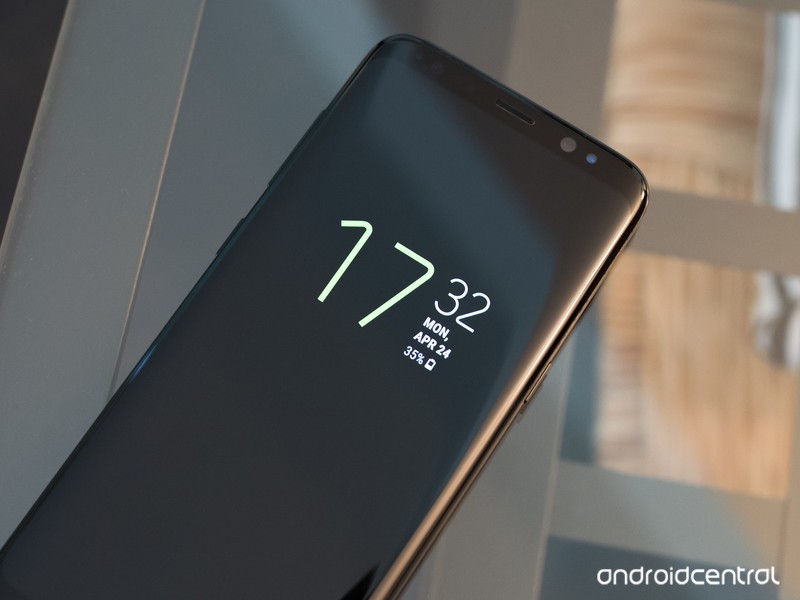
Samsung has slowly improved its Always On Display — here’s how to get started with it.
Even when your Galaxy S8’s display is “off,” it isn’t really off. Always On Display triggers right away, and continues to show you useful information that’s available at a glance so you don’t always have to turn on the whole display just to check the time or see if you have notifications. It’s a neat tool that works well right out of the box, but is even better once you get into the settings and customize things a bit.
How to customize Always On Display
To get started with customizing the Always On Display, head to Settings, Lock screen and security then Always On Display. Now let’s see what’s in there and what you can do with it.You have six different main clock styles to choose from: digital clock, analog clock, world clock, calendar, image and edge clock. They’re all pretty self-explanatory and have small previews of what they look like generally.
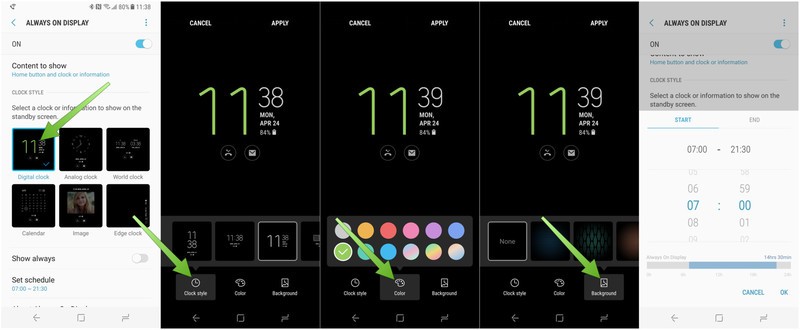
Tap the Always On Display style you want to use, and you’ll launch into a customization screen where you can tweak different aspects of the screen.
- The customization options differ based on which of the styles you’re working from, but basically come down to the clock style, color and background.
- With a few of the styles you’ll also be able to tap on blank spots on the screen to add more information like a second clock or an image.
To change different aspects of the screen, tap the buttons at the bottom of the editor to see the different options — swipe to the left to see extra options, if available.
Once you’re all tuned up just how you like it, tap Apply at the top of the screen.
Now stay put in the Always On Display settings, because there are a few more changes you can make aside from the design.
- By default, the phone is set to always show the Always On Display (I mean, it’s right in the name!) but you don’t have to keep it that way — you can set a schedule for when it is turned on.
Tap the Show always toggle to turn it off, then tap Set schedule to choose when Always On Display is enabled.
- For example you can only have it on during the working day, and off at night, to save battery.
Scroll to the correct start time, then tap End and scroll to the correct end time and tap OK to set the schedule.
After a little back-and-forth tweaking things, you’ll find a combination of styles and settings that work for you. It’s a great way to customize the look and functionality of your Galaxy S8.
Samsung Galaxy S8 and S8+
- Galaxy S8 and S8+ review!
- Galaxy S8 and S8+ specs
- Everything you need to know about the Galaxy S8’s cameras
- Get to know Samsung Bixby
- Join our Galaxy S8 forums
Verizon
AT&T
T-Mobile
Sprint
LG’s mobile sales up 10%, nearly returns to profitability thanks to the G6
LG isn’t out of the woods yet, but this quarter was a good start.
LG’s financial shortcomings in its “Mobile Communications” division are well known, but its Q1 2017 earnings report paints an improved picture. LG sold 14.8 million phones in the quarter, which was a solid 10% jump from this time last year. For the first three months of the year, LG’s mobile division had revenues of $2.61 billion, which was up 4% quarter-over-quarter and 2% year-over-year — LG says the improvement was driven by strong sales in the Americas of the new LG G6 and many mass-market models.

Though the small bump in revenues is good, the important change has been on the backside where structural changes have cut costs and nearly returned the division to profitability. The Mobile Communications business lost money overall, but it was basically a rounding error — meanwhile its operating margin improved to 0%, which is a heck of a lot nicer than the -10% it has been hovering around for the last year.
LG’s other divisions are much larger, but Mobile Communications still has to be profitable.
While LG’s other divisions — like home entertainment and home appliances — are much larger and more profitable than the mobile division, it has been a point of emphasis for LG to return its mobile division to profitability after several weak quarters. Looking at the results in Q2 will paint an even clearer picture of where LG’s mobile business stands, as it will include a full three months of LG G6 sales, and presumably another month of streamlining the business into profitability.
Despite annoying regional differences and a long delay before launch, the LG G6 has been received much better than the LG V20 or LG G5 of 2016 — something LG will hopefully be riding for both sales but also some brand awareness going through 2017. Whether you care for LG’s current lineup of phones or not, I think we can agree it’s important to have another strong competitor to Samsung at the top end of the Android market, if not in other lower-end market segments as well.
LG G6
- LG G6 review!
- LG G6 specs
- LG G6 vs. Google Pixel: The two best cameras right now
- Everything you need to know about the G6’s cameras
- LG forums
Verizon
Sprint
T-Mobile
AT&T
B&H
New Google Assistant SDK will bring intelligence to just about any hardware
Creating interesting hardware gets a lot easier when a complex voice interface is provided to you.
Google Assistant is making another expansion, but this time it’s important from a hardware developer perspective. Google has just announced a developer preview of the Google Assistant SDK, which will allow hardware developers to use the intelligence of the Assistant for their projects.
Google is clearly positioning this as more of an intelligent back-end to be used with a variety of hardware projects, more so than simply releasing products that exactly replicate what the Google Home already does. With this SDK, developers can make hardware that can take in voice commands and then perform actions using Google Assistant as the back-end rather than having to create their own voice control system. Google points out projects like a robot that responds to commands or a cocktail mixer that can make your favorite drink by voice.
This isn’t designed to just make Google Home clones.
It’s a powerful tool because Google Assistant voice control goes well beyond simply taking in a few words and performing a simple action. Assistant can parse full phrases or sentences and give the developer a full read out of the text as well as infer different insights based on the structure of what was said. It’s the sort of natural language processing we’re all getting used to when using Assistant on phones and Google Home, but it’s something that developers are now getting for free rather than having to build something themselves.
Google says this is very much an early release of the Google Assistant SDK, and there are several features currently in development including hotword support and companion app integration. Developers can get to know the Google Assistant SDK from the Google Developers website and get started.
Google Hardware

- Google Wifi review
- Google Home review
- Everything you need to know about the Chromecast Ultra
- Chromecast vs Chromecast Ultra: Which should you buy?
Google Wifi:
Google
Amazon
Google Home:
Google
Best Buy
Chromecast Ultra:
Google
Best Buy
Cyberbullying nets ’13 Reasons Why’ mature rating in New Zealand
New Zealand has come out hard in its opposition to Netflix’s series 13 Reasons Why. The high-school-focused show centering on a girl’s suicide and its aftermath already has content warnings ahead of certain episodes, but a recent edict by New Zealand’s Office of Film & Literature Classification rules that Netflix “will now be required to display a clear warning in respect to the series, as well as in respect to each episode.” This comes after the country’s 2015 ruling that makes cyberbullying a punishable offense. Furthermore, the series has received the region’s first-ever RP18 rating, which means unless viewers are 18 or older, they should watch the show with an adult.
“We have considered whether an RP16 or R16 could be an appropriate classification, but these classifications would not address the harm cased to 16-and-17 year-olds (who are at statistically greater risk of suicide).”
Two years ago, New Zealand made cyberbullying a crime, specifically targeting folks who incited suicide. Punishment for the act is a three-year jail sentence, which would mean the recipients of Hannah’s tapes (essentially suicide notes sent to those responsible for her self harm) would all face time behind bars if the show took place in real-world New Zealand.
“Hannah’s suicide is presented fatalistically. Her death is represented at times as not only a logical, but an unavoidable outcome to the events that follow,” the Office writes. “Suicide should not be presented to anyone as being the result of clear-headed thinking. Suicide is preventable, and most people who experience suicidal thoughts are not thinking rationally and therefore cannot make logical decisions.”
While the post starts out positive, praising the show for addressing youth suicide, sexual violence, bullying and slut-shaming, it quickly takes a turn and gives a point-by-point breakdown of what the series does poorly. Namely, it doesn’t provide solutions to the aforementioned problems.
“This is a nuanced show that asks a lot of questions, and raises a lot of issues, but often fails to answer or fully address them,” the post reads. “Therefore discussion needs to occur outside the series itself, and guidance needs to be offered to young people viewing this series by a trusted and appropriate adult.”
The Office says that the show doesn’t adhere to international guidelines for depicting suicide, either, calling the scene where protagonist Hannah kills herself “graphic and explicit,” and detailed to the point where it could be viewed as instructional.
New Zealand’s concern here isn’t an overreaction. According to the Office, the country has one of the highest rates of youth suicide in the OECD (Organization for Economic Cooperation and Development) which counts 35 member countries including Australia, Canada, Germany, Norway, the United Kingdom and the United States. There’s worry that, should teens watch the show without an adult nearby to ask any questions that may arise, copycat suicides (something depicted in the show itself) could result. “It is vital that this issue is taken seriously at all levels,” the Office says.
The Office consulted with the Sexual Abuse Prevention Network and Mental Health Foundation New Zealand in addition to members of the target audience (teens) who’d watched the show, to inform this ruling.
“All the teens we spoke to felt the show addressed issues that were relevant to them, and that the series overall had positive messages relating to social awareness: treating others with respect and compassion, and raising awareness about suicide, sexual violence, bullying, and other issues,” New Zealand’s deputy chief censor Jared Mullen told Stuff NZ.
Netflix declined to comment for this piece.
Via: TechCrunch
Source: Office of Film & Literature Classification
Acer Leap Ware fitness watch offers plenty of features and sensors for a reasonable €139
Acer has announced a smart fitness watch that is packed with tracking sensors yet looks more like a standard wristwatch.
The Acer Leap Ware has a circular 1.6-inch screen covered in Corning Gorilla Glass SR+. It is also IPX7 water resistant, which will keep it running even in a “torrential downpour”.
The processing is handled by a MediaTek MT2523 chipset and MT2511 bio-sensing chip. It has sensors to measure heart rate, stamina, stress/fatigue levels and exposure to UV rays.
Acer claims the battery will last three to five days of general use.
It also doubles as a basic smartwatch, with calls and texts showing up on the screen. The display is also touch-enabled so users can interact with the fitness systems.
A partner smartphone application, Liquid Life, is available for iOS and Android and it enables users to set daily fitness goals and notifications to aid coaching. Power Coins can be won in the app for achieving goals by completing activities and they can be redeemed for different virtual items, rewards and even real-world discounts on the Liquid Life Market.
The Acer Leap Ware smartwatch will be available from the third quarter of this year for €139. We’re still waiting to hear about a UK price tag.
Acer Predator Triton 700 is an ultrathin gaming laptop beast
Gaming laptops have been growing in popularity at a healthy rate in the last couple of years and Acer’s Predator range has been a major driver.
Not one to rest on its laurels though, the company has announced a flagship machine that is a beast under the hood, yet manageable on the outside.
The Acer Predator Triton 700 has a 15.6-inch Full HD IPS LCD display, 7th Gen Intel Core processor, Nvidia GeForce GTX 10-series GPU, two solid state drives and Intel Thunderbolt 3 connectivity.
It also sports Acer’s proprietary AeroBlade 3D fan technology, with two fans providing advanced thermal cooling while retaining a thin form factor. The chassis is made of aluminium and the keyboard is mechanical.
The Triton 700 weighs 2.6kg, which is light when the amount of game-class tech is considered. It is 18.9mm thick and, as a cool design feature, there is a Corning Gorilla Glass panel above the keyboard that gives you a view of the cooling system. It also doubles as a touchpad.
There are two USB 3.0 ports, one USB 2.0 port and a HDMI 2.0 output. There are also DisplayPort and Gigabit Ethernet sockets.
The Acer Predator Triton 700 will be available from August starting at €3,399. We’re currently waiting for UK pricing.
Acer also announced two gaming notebooks in the Predator Helios 300 line. One has a 15.6-inch display, the other a 17.3-inch. Both are Full HD.
They will come with either Nvidia GeForce GTX 1050i or 1060 graphics, depending on your chosen spec and will start at €1,199. You will be able to get your hands on one come August.
Acer debuts new 2-in-1s in Switch 3 and 5, and all-new Swift notebooks
At a press event in New York City, Acer took the wraps off its latest portable computing solutions. There’s the new Switch 3 and Switch 5 2-in-1 crossovers, and the more traditional, run of the mill Swift 1 and Swift 3 notebooks.
Acer Switch 5 and Switch 3
Starting with the Switch 5, the company’s latest 2-in-1 tablet crossover. Acer’s big reveal here is the fanless LiquidLoop cooling system, which ensures you get all the performance possible from the 7th generation Core i7 or i5 processor, without overheating, and without fan noise.
The fanless cooling has other benefits too, in that it doesn’t require any ventilation, so no risk of those pesky dust bunnies getting in and clogging up the internals. Keeping the processor cool efficiently also means the battery is capable of going 10.5 hours of use before needing to be charged up again.
The Switch 5 also features the company’s auto-retracting kickstand, which enables users to adjust the the screen with one hand, easily.
Acer
This kickstand is built on to a solid anodized aluminium chassis which measures just 12mm thin and weighs under 1.3kg with the keyboard attached. On the front, it boasts a 2160 x 1440 wide-view IPS 12-inch touchscreen display which also supports the Acer Active Pen stylus.
While the Switch 5 is easily the flagship of the 2-in-1 range, the Switch 3 seeks to offer good performance at a lower cost.
Switch 3 comes with Intel Pentium and Celeron inside, which offer up to 8 hours of battery life from a fanless device that features a 12.2-inch 1920 x 1200 resolution display. It also has front facing speakers and a metallic cover, etched at the edges to give it that extra bit of flair.
As you’d expect from a 2-in-1, both Switch models come with an attachable keyboard that snaps on using magnets, and is adjustable to suit the user’s preference. It’s backlit, measures just 5.85mm thin and features 1.4mm of travel.
Acer
The Switch 5 and Switch 3 will be available in Europe from June, with prices starting at €1,099 and €499 respectively. Switch 5 will be configurable with either 256GB or 512GB of SSD storage and up to 8GB RAM. Switch 3 will be sold with 32GB, 64GB or 128GB storage and up to 4GB RAM.
Acer Swift 1 and Swift 3
Joining the Switch series 2-in-1 is a range of affordable ultrabooks. The Swift 1 and Swift 3 are thin, lightweight and don’t cost the earth.
Starting with the budget-friendly Swift 1, is a slim laptop featuring a 13.3-inch full HD IPS display, 802.1ac wireless with 2×2 MIMO technology for fast, reliable connectivity. Acer claims it can work for 10 hours straight, and comes with either Pentium or Celeron processing power and 4GB RAM.
The 0.7-inch metallic chassis weighs just 1.3kg and comes in a choice of three different colours: pink, gold and silver.
Acer
The Swift 3 is more high-end and features more powerful 7th gen Intel Core processors, NVIDIA GeForce or Intel HD graphics and up to 10 hour of battery life.
More importantly, the Swift 3 comes in a 14-inch or 15.6-inch full HD model with IPS anti-glare displays, USB 3.1 Type C port and an HD webcam.
Both support Windows Hello through fingerprint sensors, and will be available in June. The Swift 1 will be configurable with 64GB, 128GB or 256GB storage with prices starting at €399.
Swift 3 comes with the option of 256GB SSD storage or 1TB HDD, and even a special edition version with Corning Gorilla Glass on the top cover. Prices start at €649 in June, when the laptop is due to hit the EU.
Acer’s all-new Aspire laptop line is affordable and suits everyday needs
Acer has unveiled its refreshed Aspire notebook line while at a press event in New York.
These are Windows 10 laptops called Aspire 1, Aspire 3, Aspire 5, and Aspire 7, the latter of which (pictured above) is at the top of the line. It features up to 7th-generation Intel Core i7 processors and NVIDIA GeForce GTX 1060 graphics. Acer called it a “powerhouse performance” laptop for creatives. It has 32GB DDR4 2400 MHz memory, up to 2TB HDD or 512GB M.2 SSD storage, and a HDR camera.
- Acer debuts new 2-in-1s in Switch 3 and 5, and all-new Swift notebooks
- Acer Predator Triton 700 is an ultrathin gaming laptop beast
- Acer Leap Ware fitness watch offers plenty of features and sensors for €139
It also has Dolby Audio Premium, network connectivity with 2×2 MIMO 802.11ac wireless technology and Gigabit Ethernet, and a “sleekly designed shell with a premium aluminium cover that features a highly stylized texture”. As for the display, it comes in either 15 or 17 inches. The next laptop in the line, the Aspire 5, has a 15.6-inch HD or Full HD display with IPS technology. Acer called it a dependable workhouse.
Acer
The Aspire 5 can handle photo editing and a media-heavy lifestyle, according to Acer, as it’s powered by a 7th-generation Intel Core processors, latest NVIDIA GeForce graphics, and a maximum of 20GB DDR4 2400 MHz memory. It offers 2TB HDD or up to 256GB M.2 SSD storage, Acer TrueHarmony audio, two digital microphones with Acer Purified, and a Skype for Business Certification.
Acer
And finally, Acer said the Aspire 1 and Aspire 3 are built for everyday tasks and include 802.11ac wireless technology. The Aspire 1 comes with a one-year subscription of Office 365 Personal, 1TB of OneDrive storage, a 14-inch display, an Intel Celeron or Pentium processors, 32GB or 64GB eMMC storage, 4GB DDR3L memory, Intel HD Graphics, a 9-hour of battery life, and a chassis that’s 18mm in height.
Acer
The Aspire 3 has a bit more than the Aspire 1, as it also comes with either a 14-inch HD, 15.6-inch HD, or 15.6-inch Full HD display, processor options like Intel Core and Celeron Pentium, up to 12GB of memory, Acer’s BlueLightShield blue-light reducing technology
Acer’s Aspire 1, Aspire 3, and Aspire 5 will all be available from June starting at £279, £329, and £899, respectively, while the Aspire 7 will be available from July starting at €899.
 AIVAnet
