


YouTube TV needs more channels, but it gets the basics right
YouTube TV launched earlier this week, bringing another option to the quickly growing online TV subscription space. It’s basically the cord-cutting dream; being able to watch shows, news or sports as they happen instead of waiting for your favorite sitcom to show up on Hulu the next day. Of course, YouTube TV and its competitors (which include Sony’s PlayStation Vue, Sling TV and DirecTV Now) all have their flaws. There isn’t a perfect option out there yet, but after spending the better part of the week watching YouTube TV I can say it definitely has some things going for it over the competition — but it’s also pretty clearly a service in its infancy.
Probably the most important question when looking at a streaming TV service is whether it has the channels you need. Unfortunately, it’s getting harder and harder to do a true comparison between these four streaming services, as all of them besides YouTube offer multiple package at different price points. YouTube TV’s offering gets you a total of 39 channels plus access to YouTube Red original series for $35 a month. 10 more channels are coming soon, and you can add Showtime or Fox Soccer Plus for $11 or $15 a month, respectively. Users can add up to five additional family members to their plan, too. Here’s the complete channel lineup:
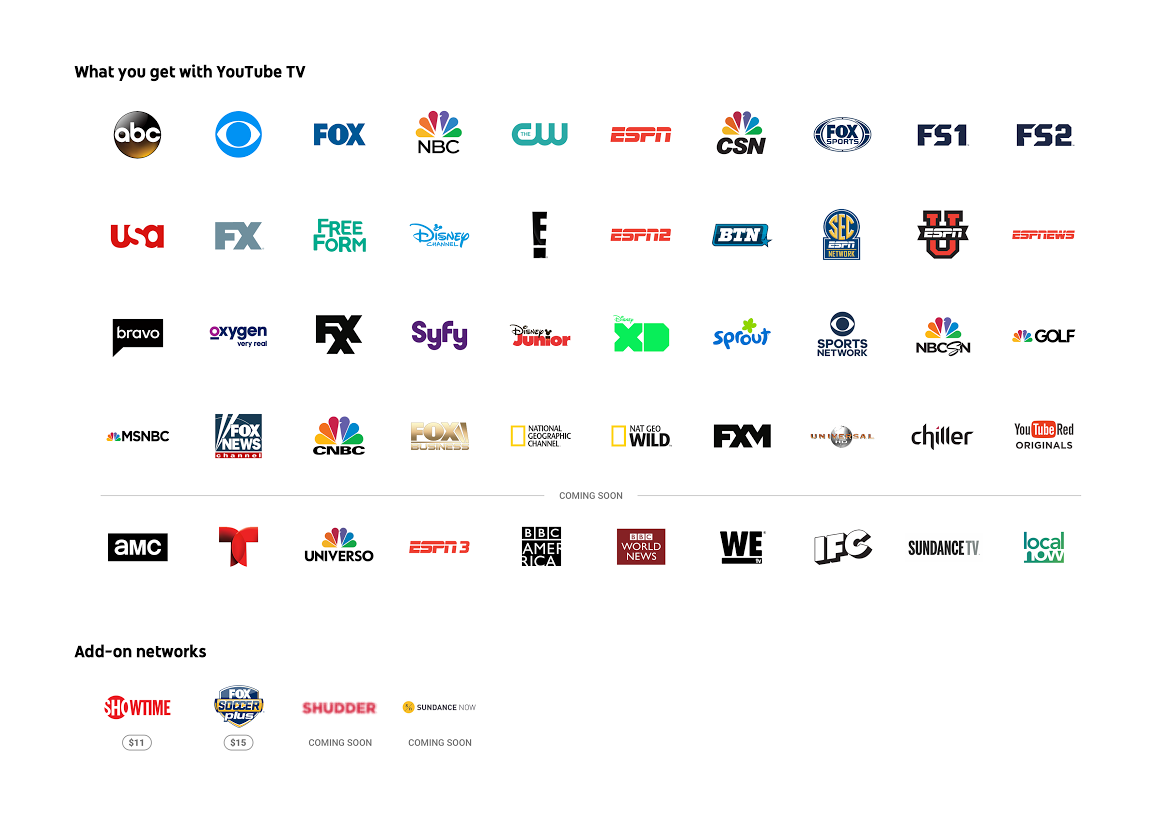
Highlights include local and national programming from all four major networks, sports from ESPN and Fox Sports, plus major cable news networks MSNBC, CNBC and Fox News. YouTube is also adding AMC and BBC America soon, though there’s no timeframe yet. Big omissions compared to the competition include TNT, TBS, Cartoon Network, Comedy Central, MTV, CNN, Lifetime, Animal Planet, Nickelodeon and many others. While the simplicity of YouTube TV’s plan is appreciated compared to the complex options the most over-the-top providers offer, there’s no doubt that YouTube TV trails the competition in sheer channel numbers.
Assuming the current channel lineup works for you, there are still a few things to know before you try and sign up. For starters, YouTube TV is only available in New York, Los Angeles, San Francisco, Chicago and Philadelphia — if you’re not in or around one of those metropolitan areas, you’ll have to wait. I imagine YouTube will move quickly to roll the service out in more cities, but you might have to look elsewhere if you want to cut the cord immediately.
At launch, YouTube TV is only available on Android and iOS devices or via the web. That’ll cover just about everyone, but right now the only way to get the service on a big screen is with a Chromecast. (TVs that have Casting functionality built-in will also work). Google promises to add support for other set-top boxes and consoles going forward, but for now YouTube TV is primarily a phone-first affair.
Provided that all works for you, the next big question is what the experience of using YouTube TV is like. Services like this often have complicated and confusing UI, whether we’re talking about your standard Xfinity cable box or PlayStation Vue. For my money, Google’s done about as good a job as it can with YouTube TV’s interface, managing to tie together four main sections — a DVR-style video library, live content, search and recommendations — in a way that’s not too complicated.

Everything starts from the home screen, which includes recommendations for shows to record, popular live programming, a “resume watching” section with things you’ve started but didn’t finish and a list of various categories to browse. That list includes things like “drama on now,” movie recommendations, YouTube Red originals, and a longer “try something new” area that serves up shows you might like based on your history.
It doesn’t take long for these sections to populate with things that were at least somewhat in my wheelhouse. After I started watching a few episode of Parks and Recreation, The Goldbergs and NCIS (I swear it was just for testing purposes), YouTube TV suggested I check out Brooklyn Nine-Nine, The Mindy Project and NCIS: Los Angeles, all reasonable suggestions given what I had checked out at that point.
Every show has its own landing page, similar to what you might find on Hulu or Netflix. It’ll show you all episodes that are coming up, and you’ll also see what’s available on-demand. It’s not clear exactly why certain shows have large catalogs available while others only have episodes you can watch after “recording” their live airings — and that’s one of the trickier things about YouTube TV. It would definitely be helpful if you could see all programs available on-demand, all in one place.

If you add a show to your library from this landing page, YouTube TV will “record” all future episodes and add them to your library as they air.With unlimited storage, there’s no reason to be picky about adding things to your collection. Everything you save will live in the “library” tab, organized into various categories. At the top is a list of everything being recorded or scheduled to be recorded in the near future, followed by your most-watched and most recently recorded shows and movies. Below that you’ll find everything you ever added to your library. Since this can get packed pretty fast, YouTube TV gives you a number of options to sort it. There are filters for movies, shows, sports and events (in the app, those filters are right at the top of the library page). You can also sort either alphabetically or by what’s most popular.
Speaking of sports, YouTube TV handles them in a unique way. You can follow teams across the four major US sports leagues; every time a team you follow plays a game, it’ll be recorded. That’s assuming that team’s game is broadcast on a channel YouTube TV has access to, which may often not be the case. You can also follow the Premier League, Formula One, the PGA tour and a number of others — for sports that aren’t team-based, you can choose to follow everything and have all the live events recorded. It’s one of the better parts of YouTube TV, even if you won’t always find games from the team you’re interested in.

The last major parts of the service you’ll want to know about are live feed and search. When you click on the “live” tab, you get a vertically scrolling list of every channel available to you and what’s currently playing. That list looks great on mobile — the top-most channel takes up about a third of the screen and starts a video preview almost instantly. As you scroll through the list, other channels pop into that slot. If you just want to “see what’s on” and get watching, this is an excellent way to do so. If you want to see what else is on a given network, they’re all listed out in the search tab; you can find what shows are coming up next there.
Unsurprisingly, search is more than just a simple box to type in. By default it shows you a list of genres, networks, trending programs, sports leagues and then types of shows as you scroll. Even if you don’t start typing into search, this page will let you narrow down what you’re looking for and provide you with plenty of things to start watching. When searching, you can obviously look by title, but you can also use natural language to find things like “police dramas” or “sci-fi movies.”

A good video service needs all of these myriad ways of finding and keeping track of your content — but it also needs to be fast and get out of your way when it’s time to watch. Fortunately, YouTube TV succeeds on that count. Live preview and recorded content start up almost instantly; there’s usually a few seconds of buffering before the stream hits peak quality, but from there it’s all good. You can adjust the quality of the stream all the way up to 1080p, just like the normal YouTube app. For now, there’s no 4K content available or any word on when that might happen.
Once you’re actually watching something, the service works just like YouTube’s standard app — just turn your phone on its side to get into full-screen video. Sending YouTube TV to my Chromecast also worked like a charm, making this a viable living room solution if you shell out the cash for Google’s little streaming puck. Streaming live TV looked nearly as good as Netflix or Hulu through my Apple TV. It felt comparable to PlayStation Vue, the live TV streaming service I’ve used the most thus far.
Ultimately, YouTube TV is a solid new option in the growing live streaming TV space. To me, the UI is a lot better than some of the competition, but the channel selection does lag behind some of the packages you can find on Sling TV, PlayStation Vue or DirecTV Now. Fortunately, none of these service make you sign a contract, and YouTube TV is giving a free month to new users. You’ll also get a free Chromecast when you pay for your first month of YouTube TV, which is pretty much essential unless you watch everything on your computer or phone. For my part, I’m sticking with Hulu and Netflix for now — I don’t place that high a premium on live content. If you do, though, a free month of YouTube TV is worth a shot.
Two Marines punished for online misconduct under new policy
Two Marines have been disciplined for posting disrespectful comments about a female soldier on social media, The Washington Post reports. It’s the first time the Marine Corps has officially punished someone for online misconduct since last month’s nude photo scandal.
The two active-duty Marines are from the 2nd Battalion, 4th Marine Regiment, stationed in California. They allegedly made demeaning comments about one of their enlisted leaders and a female Marine who had completed infantry training, a military official told The Washington Post. They were reduced in rank and lost pay.
“The Marines and Sailors of 2nd Battalion, 4th Marines do not tolerate personal attacks on their Marines, online or elsewhere,” said the unit’s commander, Lt. Col. Warren Cook, in a statement. “This kind of behavior flies in the face of our service’s core values and this organization refuses to condone it.”
The Marine Corps faced intense scrutiny and criticism last month when it was revealed that the US Naval Criminal Investigative Service was looking into a Facebook group that shared nude photos of female servicewomen. It promptly started to crack down on soldiers’ social media habits, publishing updated guidelines that expressly forbid various forms of online sexual harassment.
Source: The Washington Post
Gboard studies your behavior without sending details to Google
Last June, Apple started testing differential privacy, a method to gather behavior data while anonymizing user identities. The company expected it would improve QuickType predictions. Google has just begun trying out a similar method with Gboard to improve its automatic suggestions, but has taken a different approach to ensuring privacy: Keeping data on the device, not uploading it to the cloud.
It does this by downloading the latest text prediction model to your device, improves it by learning from behavior data on your phone and then sending a summary of the changes to the cloud. This is combined with all the other single-device updates and a new shared prediction model is created to download and start the process all over. Google’s research scientists are calling this method ‘Federated Learning.’
Keeping the learning process local on your device by uploading small summaries to servers instead of large data batches reduces both power drain and bandwidth required. That might make it less of a strain on devices and cloud services than Apple’s technique, which adds “mathematical noise” to user data in order to protect identities. Google’s testing Federated Learning out first on Android’s keyboard, Gboard, to improve its word suggestions. In the future, it might be used to improve each user’s own personal language models on Gboard, as well as adjust photo rankings based on which types people look at, share and/or delete.
Via: VentureBeat
Source: Google Research Blog
Dept. of Labor claims Google’s pay disparities are ‘systemic’
After suing Google for not releasing employment data, the US Department of Labor now claims pay disparities between men and women are widespread throughout the company. Although Google claims it has successfully closed its gender pay gap, Labor department officials testified in court in San Francisco today that Google may have violated federal employment laws, the Guardian reports. According to regional director Janette Wipper, the department found “systemic compensation disparities against women pretty much across the entire workforce.”
Today’s hearing was part of the Department of Labor’s lawsuit against the search giant that started in January. As a federal contractor, Google is required to hand over employment records to the government, but the company has repeatedly refused, claiming that the records request were too broad and invaded their employee’s privacy.
The labor department got their data from a 2015 snapshot of salaries, the Guardian notes, but Wipper used the information to argue in court that Google should be compelled to release more information. Wipper says the department needs to be able to review earlier data and conduct confidential employee interviews in order to “understand what’s causing the disparity.” If Google continues to withhold employment data, the department’s lawyers have asked the court to sever the company’s contracts with the federal government and bar Google from doing business with the government in the future.
Google’s lawyers, on the other hand, called it a “fishing expedition” and argued again that the information was irrelevant to a compliance review. Google attorneys also claimed the Department of Labor’s request was an unreasonable search that violated the company’s fourth amendment rights. In a statement, Google “vehemently” disagreed with the accusations and called the government’s data into question. “Every year, we do a comprehensive and robust analysis of pay across genders and we have found no gender pay gap,” the statement said. “Other than making an unfounded statement which we heard for the first time in court, the DoL hasn’t provided any data, or shared its methodology.”
While Google has been slowly inching towards diversity and many tech giants have pledged to close the gender pay gap, the Department of Labor has been cracking down on discrimination of all sorts in the industry. Earlier this year the department sued Oracle for allegedly conducting discriminatory employment practices.
Jay Z’s albums are disappearing from Apple Music and Spotify
If you were hoping to make Jay Z’s “Lucifer” part of your “getting ready to go out” playlist tonight that could be tricky depending on the streaming service you use. That’s because as MacRumors and 9to5Mac noticed, Beyoncé’s husband has started pulling his solo catalog from the likes of Apple Music and Spotify in favor of his Tidal service. As of press time, Spotify still had singles and his collaboration with R. Kelly Unfinished Business on offer, but a bulk of Shawn Carter’s albums are missing. A Spotify spokesperson confirmed the move, saying that “some of his catalog has been removed at the request of the artist.”
Over on Apple Music in the UK, Carter’s catalog is a little sparse. Reasonable Doubt, Hard Knock Life, In My Lifetime, Collision Course (his 2004 collaboration with Linkin Park), Watch the Throne with Kanye West and the American Gangster soundtrack remain, but The Black Album and The Blueprint are missing in action. Domestically, though, all we’re seeing are singles and collaborations like “Big Pimpin’” featuring Pimp C and Bun B. When we reached out to Apple for more information, a spokesperson told us to check with Universal — signaling that this could be the start of a bigger trend.
Oddly enough, Google Play Music subscribers shouldn’t see a difference. Carter’s catalog on the search giant’s streaming service doesn’t seem to have suffered any casualties in what’s seemingly an attempt to bolster Tidal’s exclusive offerings. Which raises the following question: Does Jay Z not know Play Music exists either? SoundCloud Go hasn’t been too affected either, aside from Reasonable Doubt’s absence.
In 2015, we saw Prince pull his music from every streaming service aside from Tidal, only for it to return to the likes of Apple Music and Spotify this past February. As we enter this brave new world of streaming this is sadly becoming more and more common. There’s no word if this decision will be temporary, but given the timing of Spotify’s deal with Universal (this week) it could be that blackout is part of Carte renegotiating for a bigger cut of streaming profits. He has way more control over the business side of his music than other artists do, and he also has his own streaming service.
When Engadget’s Billy Steele wrote about Tidal and its business of exclusives back in 2015, he said that it’d be possible that fans — the folks paying for the music, legally — could end up losing out thanks to corporate suits deciding what was best for everyone:
“Fair compensation shouldn’t be consumers’ burden; it’s between the artists and the labels that handle licensing deals. Right now, though, it seems possible the streaming-music sandbox mentality could triumph over consumer choice.”
Consumer choice seems to be on the losing side today.
Via: 9to5Mac
Source: MacRumors
Nvidia Shield is the ultimate Android TV device (Review)

Nvidia is known for their desktop GPUs but they also have their line of Shield-branded Android devices such as the Shield Tablet and the Shield portable gaming device. One device, the Shield TV set-top box, was recently added to the roster as an Android TV device that you can stream your media on as well as do some light gaming. The latest Nvidia Shield TV is a new model for 2017. It’s similar to the older model, but refined and enhanced for 4K and gaming in the living room with cloud-based streaming and more powerful internals.The new Nvidia Shield TV features an excellent redesigned controller as well, which is a dream to use for all game types.
The Shield TV is an Android TV set-top box, running the latest version of the OS. Nvidia touts this Shield TV as the “Ultimate Streamer for Gamers” and the most powerful streaming device available. The specs certainly support that claim, with the powerful Tegra X1 chip, the same that powers the Nintendo Switch. Does the day-to-day experience prove this claim to be true?
Setup
Setup for the Shield TV is easy, just plug it in, set it up with your internet and log into your Google Account when prompted. The controller and remote come pre-paired out of the box, so once you’re all logged in and set up with the internet, just enjoy.
Design and Specs
The specs for the Sheild TV are pretty robust for a set-top streaming box:
Specs:
- Nvidia Tegra X1 Processor
- 3GB RAM
- 16 GB storage (expandable)
- Ports: 2 USB, HDMI 2.0b, Gigabit Ethernet, proprietary power
- Connectivity: 2×2 802.11 AC MU-MIMO Wifi, Bluetooth 4.1, IR blaster
- OS: Android TV 7.0
Nvidia has made this new Shield TV smaller by a significant margin, reducing the size closer to a Roku or Apple TV. They also added the remote and redesigned controller to the bundle. The controller itself now feels much better in the hand and isn’t as awkward to use for long gaming sessions.
The remote and controller both feature voice search functionality, and the Shield is compatible with smart home devices like Samsung SmartThings as well. Notable hardware additions include an IR emitter for control over your TV and home theater. The Shield only has 16GB of internal storage but supports USB external storage and can connect to your NAS as well. The biggest new hardware features are 4K and HDR support, Dolby Atmos support, as well as the 4K compatible Chromecast built in.
1 of 7


Nvidia’s new Shield controller next to a Xbox and PS4 controller


The original Shield controller next to the new slimmer design.


Features and Performance
The Shield TV runs Android TV out of the box, which is either good or bad depending on who you talk to. It’s a perfectly functional set-top box software and has some excellent features like Google Assistant built in, and support for Amazon Video out of the box, a first for Android TV devices. Navigation on Android TV can be a bit wonky, and there is a limited selection of apps. The big players are all available, however, such as Netflix, Sling, YouTube, Hulu, and Plex.
Unfortunately, I don’t have access to a 4K HDR screen at home yet, so I wasn’t able to test out the feature at home. I did, however, get to experience the 4K capabilities during the playtest at GDC I participated in and I found them to be excellent.
Streaming movies and TV aren’t the only things that the Shield can do, however, and if you’re buying this to only use it for that you may want to consider another device. The Shield TV is made by Nvidia, the makers of the most powerful PC GPU on the planet, so of course the Shield is going to be a powerful gaming machine as well. With the Tegra X1 processor powering the Shield it can handle even the most demanding Android games with ease, even better than your phone or tablet. Graphically demanding ported games like Resident Evil 5 on Android run well, but not as well as on dedicated gaming hardware of course.
The killer feature of the Shield is the inclusion of Nvidia GameStream and GeForce Now. GeForce Now is a monthly subscription service similar to the one offered on the Shield Tablet. Essentially a streaming game platform, GeForce Now lets you stream games from the cloud in high quality since the rendering is done by the cloud computing system. You get access to a select number of games for free, and other games are available for purchase as well. There are a ton of great new AAA titles like TitanFall 2 available as well as classics from years ago like Batman: Arkham Asylum.
The library for GeForce now is always expanding, and it allows you to play games as if you had a high-end gaming PC without needing to spend the money. Nvidia GameStream allows you to stream from your local PC with a Nvidia GPU inside to the Shield for couch gaming of your PC library up to 4K if your TV supports it. It works extremely well and supports a large library of games from all genres. The Shield is advertised as the ultimate streaming box for gamers, and it’s clear that they achieved that claim with these gamer-centric features.
Conclusion
Despite all of the niggles with Android TV as an OS, there is very little I had complaints about with the Shield TV. It is small, quiet and powerful with all the features and more that I look for in a set-top box.
The Nvidia Shield is a monster of a streaming device. The 4K HDR support, flexible control options, and powerful processor make it an excellent device for consuming media. Its wheelhouse is definitely gaming and offers great features for even the most demanding gamer appetite. It has done enough for me to replace my Xbox One as my dedicated media machine in the living room. If you’re looking for a robust, powerful streaming box with 4K HDR support and don’t mind the $199 price tag, then definitely have a look at the Shield.
Good luck finding a safe VPN
If you’re most people, you just found out about the FCC’s internet privacy rules by way of their untimely demise. Thanks to the FCC’s new chief, Congress, and Donald Trump, ISPs are now free to track you like crazy and sell your data to the four directions. As a result, interest in VPNs exploded overnight.
Before the Obama-era FCC’s privacy and security safeguards could go into effect, new FCC chairman Ajit Pai readied the hearse by suspending them indefinitely as his first big act. This ensured they’d never see the light of day, even if Congress didn’t come in for the kill with their anti-privacy-rules bill. Which they did. This was immediately followed by Trump signing that bill lickety-split, ensuring no one gets any of the protections they were promised.
When the attacker is your ISP
So, as you probably know from reading headlines over the past week, ISP’s are free to track you and sell your data to third parties. Less reported, yet equally disastrous to have taken away, is the part in the protections that gave consumers power to hold internet and cable providers accountable for data breaches.
Consumer security, the new FCC chief told Congress, isn’t the FCC’s area of interest anymore.

Ajit Pai – FCC Chairman
The headlines quickly went from Trump signs bill rolling back FCC privacy rules for ISPs, to “hey everyone protect your privacy from ISP’s with a VPN (Virtual Private Network).”
Using a VPN for cloaking your activity from your ISP is a practical solution — especially if you combine it with tracker blocking browser plug-ins like uBlock Origin, because ads are trackers too.
With a VPN the user’s internet connection travels encrypted from computer to VPN server; from there the user’s connection travels unencrypted to their final destination (a website). This way, websites only see the VPN’s IP address and not the user’s, and your ISP only sees you visiting the VPN. The ability of any attacker to spy, intercept, attack or steal information stops at the VPN. That’s why they’re essential for personal security when you use public wi-fi.
Once the idea took hold that VPNs were the magic solution to ISP spying, tracking, and data sales, suddenly everyone and their dog was publishing an article about it. Lots of these articles tell you to use a VPN service with “the hallmarks of a trustworthy service” but few explain what that means, exactly.
Many of these explainery-think pieces, not surprisingly, are profit-seeking endorsements for affiliate VPN services. Not all of which are VPN’s you can trust, even if they come from a trusted blog or source.
And fake VPN services rolled out in waves to cash in.
Trust issues
Selecting a VPN you can trust was already an issue that took research and consideration, weighing connection speeds and pricing, learning about who keeps records and for how long, and more. VPN services are also like any other in that they change their record-keeping policies and privacy practices over time, so that’s another thing to keep up with.
In addition, these services are easy to misconfigure. Just over a year ago, VPN provider Perfect Privacy found a massive security hole in many services called “Port Fail.” It was a bug that de-anonymized users, and most VPN services ignored the problem until the press made noise about it. Many took weeks to put in a fix. One of those was a service endorsed by Lifehacker, which just shows that anyone can have problems finding a reputable VPN.
It can be overwhelming. It’s not as simple as using whatever VPN the security cool kids say is “the one,” because even popular services have been behaving badly. For example, popular service Hola VPN recently got caught selling user traffic to a botnet.
Fortunately like most infosec topics, VPNs are a bit of a fetish unto themselves for people who are into them. Just take a look at this exhaustive comparison chart at “That One Privacy Site.”
If you want to know what the hallmarks of a trustworthy VPN service are, I have a controversial suggestion for you: Torrent Freak. Every year the site asks Which VPN Services Take Your Anonymity Seriously?
In these extensive posts, TF talks to dozens of top VPN services and asks them what their record keeping policies are, as well as “various other privacy related issues.” If a VPN gets a great review one year, has a less great review the next, and then drops off the list completely (like TigerVPN did), then definitely take that as a “buyer beware.”
So if a VPN is recommended somewhere, do a little homework before you fork over your data (and your cash). Names that come up as trusted include Perfect Privacy, Freedome, TorGuard, Tunnelbear, Black VPN, and others.

Should you have one for your phone? Absolutely, and most VPNs have mobile apps — though look out for the bad ones. Google’s Project Fi (the company’s phone service provider) automatically secures users on a Google VPN in every public wi-fi situation.
The drawbacks? They can slow your connection down, and they may not work with services like Netflix that want to know where you’re physically located. Some public places block the use of VPNs, which should be your sign that the network isn’t safe to use anyway.
Once you’re set up, use the steps in this post to test your VPN to make sure the outside world can only see your VPN’s IP address, and make sure you’re not leaking your actual IP.
When the trend is people turning to VPNs for protection from their own internet service providers — in their own homes — it’s safe to say the privacy and security situation for most Americans has gotten pretty bad.
It’s not all terrible, at least insofar as general security literacy goes. But the trade off is probably not worth it.
The murder of the FCC’s privacy rules are a sign that any war for the soul of consumer protection in the era of the internet is lost. I just hope that someday we can find our way home from here, before it’s really too late.
Images: Pau Barrena/Bloomberg via Getty Images (Ajit Pai); Prykhodov via Getty Images (VPN)
Epson SureColor P400 review

Research Center:
Epson SureColor SC-P400
With more and more reasonably priced DSLR and mirrorless (and even some smartphone) cameras capable of capturing high-resolution images these days, it opens up the opportunity for high-quality outputs. Why buy art when you can print your masterpieces yourself, and hang them on the wall?
Of course, you’ll need an inkjet printer that can handle more than letter or legal-sized paper. What you want is a wide-format photo printer that’s designed for such a task (think, multiple color ink tanks). But many of these units are on the pricier side.
More: Epson SureColor P600 review
The Epson SureColor P400 ($600) is the company’s latest entry-level wide-format photo printer that brings down the price barrier to entry. With seven ink colors – including two blacks – and a Gloss Optimizer that smoothes out the flat spots in the print, you can produce near-gallery-quality photo prints with excellent color accuracy and saturation, and without completely breaking the bank
Features and design
From the low-end consumer all-in-ones to industrial machines, Epson makes a lot of photo printers or printers that are capable of printing photos. The SureColor series is where you’ll find Epson’s high-quality photo printers, ranging from models that can output advertisement posters to smaller 8 x 10s.
The P400 is at the very low end of the SureColor series, but that doesn’t mean it’s inferior.
The P400 is at the very low end, but that placement on the totem pole doesn’t mean it’s inferior. Think of it as the baby brother to the P600, one of our favorite photo printers. In fact, the two are very similar, except the P400 is less expensive because, mainly, it has one fewer ink tank.
And like the P600 (or any wide-format photo printer, really), the P400 is large. It weighs 27 pounds – not so heavy that you can’t unpack it from its ginormous box, but it is bulky.
The printer itself is rather nondescript: With the top-rear paper feed and the front output tray folded, it’s simply a large, black rectangular box measuring 31.4 x 24.5 x 16.5 inches. It will not fit on a desk, especially when the paper input and output trays are extended, so consider getting a small table or stand for it.
Physically, it looks almost identical to its P600 big brother, but the P400 lacks a color touchscreen. The SC controls run along a strip across the top of the front panel, and include (from left to right) a network status indicator, power button, Wi-Fi connect button, paper feed/cancel button, ink button (which moves the printhead to the “replace ink cartridge” position), and roll paper button for loading and unloading roll paper. There are also indicator lights for power and ink status.
 Ted Needleman/Digital Trends
 Ted Needleman/Digital Trends
 Ted Needleman/Digital Trends
 Ted Needleman/Digital Trends
The P400’s paper handling is also similar to the P600’s. The paper feed has a capacity for 120 sheets of plain paper, or 30 sheets of photo paper. It can accommodate paper up to 13 inches wide and 19 inches long. Another feed located on the printer’s rear panel can support 13-inch-wide roll paper. Also located at the rear panel is a place to attach the manual feed tray, used for fine art papers that are too heavy for the standard feed.
Finally, another feed is behind a pull-down panel on the front of the printer, located over the output tray. This input is used for feeding poster board or very heavy fine-art paper. This is also where you feed the tray used to print on printable optical disc media.
More: Home printer buying guide: How to choose the best printer
Similar to the other printers in the SureColor family, the P400 uses Epson’s pigment-based UltraChrome HD inks. The seven colors and Gloss Optimizer cartridges (Epson describes the P400 as an eight-color printer, although that includes the Gloss Optimizer) have a bit less capacity than the more expensive SureColor models – 17ml versus 25.9ml in the P600, for example.
Ink colors consist of two blacks (Matte and Photo Black), Cyan, Magenta, Yellow, Red, and Orange. These provide the P400 with a wide color gamut. Pricing on the ink cartridges runs about $18 each. Epson does not provide yields for the cartridges, and the rating would be useless in most cases anyway since yields are completely dependent on what you print and what colors appear in most of your print. Depending on the size and quality of the prints you generate, figure at least several dollars per print – $1-2 for a 8 x 10 print, $3 and up for a 13 x 17 print – when the cost of the paper is figured in. This is true with just about every prosumer-class wide-format photo printer, not just Epson’s.
Setup and performance
Setup is easy: Plug it in, power it on, and load the ink cartridges. Before you can use it, the P400 goes through a priming process that takes 6-10 minutes. While this is going on you can download the print driver from Epson’s website, as well as any additional software or firmware updates.
When it comes to connecting the printer, you have several options: USB 2.0, Wi-Fi (with WPS support), or wired Ethernet. You can also print to the P400 using a mobile device and Epson’s iPrint Mobile software. Unlike the P600, the P400 does not support Apple AirPrint or Google Cloud Print.
One word of caution: If you are using USB to connect the printer, be sure the cable you use is rated for USB 2.0 or 3.0, and pay attention to the cable length. Initially, we had a problem with some of our test prints freezing halfway through. With extensive troubleshooting and support from Epson, we finally discovered the problem was the 15-foot cable we were using. We didn’t have a problem with this cable in the past, but 15 feet is very close to the length limit for a USB cable (16.5 feet), and when we switched to a 10-foot cable, the problem disappeared.
You can produce near-gallery-quality photo prints with excellent color accuracy and saturation.
As with most wide-format photo printers, it takes a while. Printing an 8 x 10 photo can take a minute or two, and a Super B (13 x 19 inch) can take several minutes more. Print settings in the driver have a large influence on both print speed and quality, too. Furthermore, if the printer needs to switch back and forth between the two blacks, it can add considerable more time.
The P400 uses Epson’s Professional Print Driver, which has extensive settings for different aspects of the print process and comes with ICC Print Profiles for many of Epson’s Fine Art papers. Most paper vendors provide ICC profiles for their particular papers, but you’ll need to look those up – not difficult with a quick Google search. If there’s anything tricky about photo printing, it’s probably picking the right settings for the job.
We used Epson’s Cold Press photo paper for our testing and were very impressed with the output. Colors were very accurate, and saturation was excellent. If you want a bit more pop, you can choose the “Vivid” selection in the print driver, though our testing was performed with the default print driver settings for the paper type.
More: Canon Pixma Pro-10 review
Like in all our photo printer reviews, we didn’t bother with printing on regular paper. Why? Because this type of printer isn’t designed for homework, drafts, or any text documents. Not only would it be overkill, it would also be slow; you will, however, get some amazing-looking text documents. Stick to fine-art or photo papers.
What you get
The box contains eight 14ml “starter” ink cartridges (standard cartridges contain 17ml); mounting brackets to accommodate 13-inch-wide roll paper; a large plastic single-sheet guide that clips onto the rear of the printer (for fine-art media when using manual feed mode); a tray for printing onto compatible optical media (CDs and DVDs); and instructional guides. (A comprehensive 173-page user’s guide can be downloaded from Epson’s website).
Not included is a disc containing drivers and software; you will have to download them from Epson’s support site. This is common with many printer vendors these days, but it assures that you have the newest versions of drivers and firmware.
Epson SureColor SC-P400 Compared To

HP DeskJet 3755

Canon Maxify MB5420

Brother MFC-J885DW

Canon Pixma MX492

Epson WorkForce WF-2660

Brother MFC-J4420DW

Brother MFC-J870DW

Epson WorkForce WF-7510

Samsung Printer Xpress C410W

Dell C1765

HP OfficeJet 7410

HP PhotoSmart 8050

HP Photosmart 7760

HP 1100D

HP DeskJet 9670
Other than the power cord, the box contains no USB or Ethernet cables.
Our Take
As an introduction to “prosumer” wide-format photo printing, the P400 has a lot going for it. The seven color inks give a wide color gamut and excellent definition in shaded areas. The Gloss Optimizer smoothes out the finish so there are no flat spots in the output. And the ability of the P400 to handle pretty much any media type up to 13 x 19 inches, including printable optical media and roll paper, is a definite plus – although, given the fixed position of the roll paper brackets, if you’re using roll paper it’s 13 inches or nothing. Whatever cons we have with the P400, they aren’t deal-breakers.
Should you buy it?
Yes, the P400 is an excellent photo printer with a good balance of price, features, and performance. More importantly, it produces great-looking photos. When it comes to wide-format art photo printers, both Canon and Epson offer excellent models. It won’t produce gallery-quality prints, but it comes close, and you’ll be happy with the output.
Are there better alternatives?
The DT Accessory Pack
Epson Professional Media Premium photo paper
$44
Epson Premium glossy photo paper
$36.37
AmazonBasics USB 2.0 cable
$5
There are Canon printers that offer similar features – multiple inks and 13 x 19-inch media handling. The Pixma Pro-10 and Pixma Pro-100 are two of Canon’s prosumer printers. The Pro-10 is about $100 more expensive than the P400, offering 10 ink colors and a wider color gamut; the Pixma Pro-100 uses eight colors of ink and priced about $200 less than the Epson. However, neither of these Canon printers offer the ability to use roll paper, which may be a minus, if you anticipate doing a lot of 13 x 19-inch prints.
Of course, there’s also Epson’s P600 to consider. At $200 (MSRP) more than the P400, it comes with a few extras, like a touchscreen and support for mobile printing protocols. More enticing is the extra ink tank. But we think the P400’s output is damn good, and would be hard for many people to differentiate from the P600 unless pointed out. Doing without the other extras could yield significant savings.
You can certainly spend more money on a prosumer wide-format printer. But if you are dipping your toes in the water, the P400 is good step to take.
How long will it last?
While it’s difficult to predict this, we can use historical references. Keep in mind that the two competing Canon printers mentioned were introduced several years ago (we are still using our Pixma Pro-10), and the SureColor series was only introduced last year (the P400 was introduced just this year). Expect to have a useful life of at least four-to-five years of moderate use; add one-two more years for occasional use, but anticipate approximately three years for heavy-duty usage.
As for the ink, again, this depends on your usage. But it will cost you $18 to replace each color.
Warranty is the basic one-year. Epson does offer an extended warranty that adds another year, which covers replacement or repair, for $56.
South Korea is getting the Galaxy S8 Plus with 6GB of RAM and 128GB of storage
Why it matters to you
Samsung is dipping its toes into 6GB of RAM — so we can expect future Samsung flagships to push into new RAM territory.

The Samsung Galaxy S8 and S8 Plus are some of the most powerful phones out there right now, boasting the new Qualcomm Snapdragon 835 processor and 4GB of RAM. Our friends in Korea, however, are getting an even more powerful version of the device.
Samsung announced a new variant of the Samsung Galaxy S8 Plus with 6GB of RAM and 128GB of storage for sale solely in South Korea. Those specs are only available on the Galaxy S8 Plus — so those that want the extra RAM and storage will have to be fine with paying for a larger device.
More: Master your Samsung Galaxy S8 with these tips and tricks
Of course, the price alone might be enough to dissuade many people from buying the device — it will cost 1,155,000 won, which equates to around $1,017. That is no small price for a phone.
The 6GB of RAM is a figure we will likely start seeing more often. A number of phones have been released over the past year with that much RAM, including the OnePlus 3T. Some expected the standard Galaxy S8 to come with 6GB of RAM, however, in the end, Samsung opted for a more modest 4GB.
The storage option is a little less uncommon. There are plenty of phones out there with the option for 128GB of storage, including the Google Pixel and Pixel XL. An important thing to consider, however, is the fact that the Google Pixel doesn’t have a microSD card slot, while the Samsung Galaxy S8 and S8 Plus do — allowing users to add to the storage they have in their phone without having to shell out for the device with more storage in the first place.
There is no word on a release of the new Galaxy S8 Plus variant outside of South Korea, but we are assuming that it will not come to the U.S. anytime soon.
High-tech standing desk comes with a light bar to help make you more productive
Why it matters to you
Kiss your boring, old work desk goodbye. The high-tech, feature-packed Aerodesk boasts hydraulic legs, plug sockets, USB ports, a bluetooth speaker and a Qi charger.
People will frequently justify spending some cash on a nice bed or mattress because it’s where we spend such a significant part of our lives. But what about desks? After all, with the average working week being somewhere around the 40-hour mark, this equates to about 2,000 hours per year that we spend at our workstations.
That’s where British designer John Tomalin-Reeves comes in. As the designer of the First Class lounge at London’s Heathrow Airport Terminal 5 (trust us, it’s nice!), Tomalin-Reeves recently turned his attention to reimagining the desk — with the resulting Aerodesk being both impressively high-tech and pleasingly minimalist.
More: Don’t just sit there, check out the best standing desks you can buy
“You’ve got to try and appeal to the Apple part of people’s brains,” he told Digital Trends. “When people buy an Apple product, it’s not a totally rational decision; they just really respond to the product. There’s a seduction to it. The automotive industry also does this really well. If you’re sitting in the cockpit of a high-end car, it’s glossy and slick. We want to be the Tesla of the desk world. When you’re designing a product, I think your goal should be to make people drool like a dog looking at a steak.”
Aong the highlights are the desk’s hydraulic legs, which allow it to raise and lower with the touch of a button, so it works equally well as a sitting or standing desk. According to Tomalin-Reeves, standing for just three hours each day is equivalent to running 10 marathons per year in terms of calories burned.
Another nifty selling point is the aptly named LightBar that runs the length of the back of the desk, and can re-create the entire spectrum of color to suit every mood. It can produce daylight frequencies, which have been shown to increase levels of energy and productivity.
Finally, there are plug sockets, USB ports, a Bluetooth speaker and a Qi charger, which combine to make Aerodesk a connected desk for the digital age.
“We’re now looking to further improve the product by adding things like inductive surfaces so you don’t need wires,” Tomalin-Reeves said. “We’re even interested in de-ionizing the air around your desk, a bit like an air purifier. The goal is to create a desk that doesn’t feel like a boring work desk. It’s not anonymous; you can really own it.”
For a starting price of around $1,850, that is.
 AIVAnet