


How to use Amazon’s Alexa on the Huawei Mate 9
Alexa, Amazon’s artificially intelligent assistant, is spreading like wildfire. It’s in robots, vacuum cleaners, and apps coded by the more than 10,000 developers with Alexa Voice Services. More conveniently, though, it’s on a smartphone — the Huawei Mate 9.
More: Need a doctor? Just talk to Alexa and its new HealthTap integration
The Mate 9 is the first to ship with native Alexa support, thanks to close collaboration between the two companies. A March over-the-air update installs the app that puts the AI assistant at your fingertips. In many ways, it’s just like Alexa on the Echo, but the Mate 9’s flavor of Alexa has peculiarities worth mentioning. Here’s everything you need to know.
How to set up Alexa on the Mate 9

Setting up Alexa on the Mate 9’s a cinch once you have the update (to check, go to Settings > System Update > and the software update version is MHA-L29C567B183). Open the new Huawei Alexa app on your phone and you’ll be prompted to enter your Amazon account credentials (set up an account if don’t have one). Next, you’ll need to read and accept the Terms of Service agreement to continue.
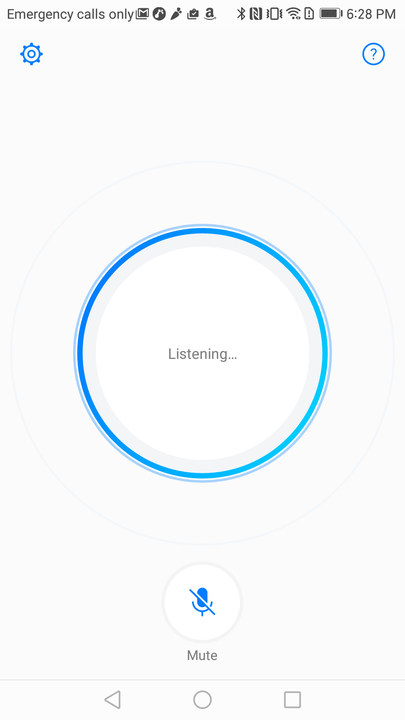
The Huawei Alexa app does not offer much in the way of customization, but it is not completely devoid of options. A Quick Start setting lets you launch Alexa by making a gesture with your knuckle on any screen, though you may have some trouble triggering this. A language selector lets you switch between one of three languages: German, British English, and English. There’s also a link to the official, separate Amazon Alexa phone companion app, which lets you control Alexa’s settings. On the main screen of the app, you’ll see a giant mic to trigger Alexa, and an icon below to mute Alexa when you are not using the assistant.
How to use Alexa on the Mate 9

Personalizing Alexa on the Mate 9 requires installing Amazon’s dedicated Alexa app via the Google Play Store. It lets you enter a home and work address (for traffic updates and directions), and you can link your calendar, check your search history, manage your shopping list, and more.
Every time you want to use Alexa, you have to open the Mate 9’s Alexa app. Unlike Apple’s Siri on iOS devices and Google Assistant on Android devices, there isn’t a hands-free way to interact with Amazon’s assistant — you have to open the app and tap on the bright blue microphone icon. That may not sound like a big deal, but when you’re used to lazily lobbing commands at the Google Assistant and Amazon’s own Echo speakers, it feels like a step backward.
More: BMW set to make Amazon’s Alexa your backseat driver this fall
Carrying on a conversation with Alexa on the Mate 9 seems a little harder than it should be, too. The Huawei Alexa app does not prevent the screen from dimming — when your phone switches off automatically, you have to unlock if you want to feed Alexa a follow-up command. You can set the auto-dim time to the maximum (10 minutes) by heading to Settings > Display > Sleep > 10 minutes. Keep in mind that this will drain your battery faster.
A Huawei spokesperson told Digital Trends that the company’s working closely with Amazon on solutions. They weren’t willing to provide a timeline, but it’s good to know they’re coming.
What you can — and can’t — do with Alexa on the Mate 9

In many ways, Alexa on the Mate 9 feels like a natural extension of the assistant’s other manifestations. The Huawei Alexa app, just like the Echo, can tell the time in any country, supply a weather report, or provide a customized daily sports and news summary from NPR, CNN, the Associated Press, and more.
Here are a few of the commands Alexa supports:
- “Alexa, what’s the time?”
- “Alexa, flip a coin.”
- “Alexa, 10 dollars to pounds.”
- “Alexa, 15 times 32.”
- “Alexa, how’s the weather outside today?”
- “Alexa, set a timer [X] minutes.”
- “Alexa, add milk to my shopping list.”
- “Alexa, what’s on my calendar?”
- “Alexa, start a 7-minute workout.”
- “Alexa, tell a bedtime story to [your child’s name here].”
Alexa on the Mate 9 is fully compatible with Amazon’s Kindle and Audible services. If you ask it, “Alexa, read my Kindle book,” it will read the most recent addition to your library using text-to-speech technology. Asking, “Alexa, read my audiobook” prompts it to start or resume any audiobook you’ve purchased from Audible. You can play different titles, skip chapters, restart chapters, or go back to a specific chapter.
You can also control smart home devices and connected cars. If you have a Philips Hue or Samsung SmartThings devices, for example, you can use Alexa on the Mate 9 to toggle the lights, switch TV channels, and more. Hyundai’s Blue Link platform lets you remotely start vehicles, change the interior temperature, and turn on the horn and lights. Here’s a list of all the supported Internet of Things devices for Alexa — some of these may not work with the Huawei Alexa app.
Unsurprisingly, the Huawei Alexa app is tightly integrated with Amazon’s shopping platform. You can place an order for anything on Amazon Prime, including Amazon Fresh groceries, Amazon Prime Pantry non perishables, and Amazon Prime Now 2-hour delivery items. You can say, “Alexa where’s my stuff?” to get tracking information on packages, and you can take advantage of Alexa-exclusive deals that run regularly throughout the year.
More: Yamaha announces it is bringing Alexa voice control to its MusicCast products
With the Huawei Alexa app, you get access to Amazon’s collection of more than 10,000 skills, or apps, that tap the assistant’s voice recognition. Particularly useful ones include the My Chef app, which can read recipes, send shopping lists, and track expiration dates. Uber and Lyft’s apps can summon rides to your approximate location; Fitbit’s app can tell you how many steps you’ve taken; the Capital One app details your bank balance; and apps from Dominos, Pizza Hut, and Grubhub can place your favorite delivery orders.
Alexa on the Mate 9 isn’t quite on par with Amazon’s Echo speakers, though. It cannot add reminders to the Mate 9’s note-taking app, instead tossing them to Amazon’s web-based To-Do list. Alarms are a no-go, too. Most surprisingly, the Huawei Alexa app doesn’t support Prime Music, Amazon’s catalog of millions of songs, albums, playlists, and radio stations. Considering Amazon sells a paid subscription exclusively for Alexa-enabled Echo speakers (Amazon Music Unlimited), it is a bizarre omission.
Not to fret, though. Huawei said future versions of the app will add new features and integrations. Here’s hoping music is one of them.
The best use of 3D printing? Custom made hermit crab shells, obviously!
Why it matters to you
When it comes to original use-cases for 3D printing, very little beats these city-inspired 3D-printed shelters by Japanese artist Aki Inomata.
When you think about exciting uses for 3D printing, what is the first thing that pops into your mind? 3D-printed houses for hermit crabs, created to resemble famous cityscapes around the world, right? I mean, obviously.
If you do indeed think this way, you will likely find an ally in Japanese artist Aki Inomata. Inspired by an exhibition she participated in almost a decade ago, Inomata has spent much of her time since then creating a unique series of 3D-printed “shells” for hermit crabs: The family of crustaceans which protect themselves from protectors using scavenged gastropod shells.
More: This 3D-printed map of London is one of the coolest things you could ever hang on your wall
“This work was inspired by the fact that the land of the former French Embassy in Japan had been French until October 2009, and then became Japanese for the following 50 years, after which it will be returned to France,” she notes on her website. “I was surprised to hear this story and associated this image with the way that hermit crabs exchange shelters … The hermit crabs in my piece, who exchange shelters representing cities of the world, seem to be crossing over national borders. It also brings to mind migrants and refugees changing their nationalities and the places where they live.”
Inomata started by creating spherical shaped shelters for the crabs but found that they were ignored.
“Using CT scans, I studied the natural shapes of hermit crab shells, and by printing out the 3DCG data using 3D printers, I was able to create ‘shelters’ that the hermit crabs would move into,” she continued. Since then, she created a number of 3D-printed hermit crab shells in a broad range of architectural styles — from New York City skyscrapers to tiny windmills reflecting the Zaanse Schans neighborhood in the Netherlands.
While the digital files are not, as far as we can tell, available online, you can order prints from Inomata’s website.
Humanity’s last stand? AlphaGo to battle world’s best Go player in China
Why it matters to you
AlphaGo defeating the world’s top go player will solidify artificial intelligence’s impressive victory over one of humanities’ oldest pastimes.
DeepMind’s AlphaGo, the groundbreaking artificial intelligence that has been trouncing the best human Go players for the last year, will face off against the world’s top-ranked player Ke Jie in a three-game match on May 23 at the Future of Go Summit in Wuzhen, China.
While this will be the first time that the two play in meatspace, Ke Jie was among the players that lost to AlphaGo in January when it secretly won 50 out of 51 online games against some of the world’s best (one game was a draw due to lost internet connection). The odds don’t seem good for Ke Jie, who ran into fellow professional player Ali Jabarin after his loss in January, shell-shocked and muttering “it’s too strong …”
More: As AI gets smarter, humans need to stop being sore losers
The summit will feature presentations by AI experts from Google and China in addition to show matches with AlphaGo and presumably other Go-playing AIs. In one particularly gruesome spectacle, reminiscent of the Roman Colosseum, AlphaGo will face off against a team of five human players working together. There will also be matches featuring human players paired up with their own instance of AlphaGo, competing as teams. In the post-Kasparov world of chess, this sort of human-AI symbiote has proven to be more effective than either humans or AIs alone, combining the best of AI’s brute-force computational strength with human intuition.
AlphaGo made waves by defeating a succession of world-class players in public matches, first taking down former European champion Fan Hui in January 2016, then South Korea’s Lee Se-Dol in March. Much to their credit, the Go community’s luminaries are handling their impending obsolescence with much more grace than Russian chess grandmaster Garry Kasparov did his defeat at the hands of IBM’s Deep Blue.
DeepMind co-founder Demis Hassabis quoted Chinese player Gu Li as saying: “Together, humans and AI will soon uncover the deeper mysteries of Go,“as well as fellow Chinese pro Zhou Ruiyang saying: “AlphaGo’s play makes us feel free, that no move is impossible. Now everyone is trying to play in a style that hasn’t been tried before.” Part of AlphaGo’s strength is that it makes moves which feel fundamentally foreign to human players steeped in Go’s millennia of tradition and strategy, allowing for players to discover new approaches to an ancient game.
AlphaGo is just the latest game-playing AI to defeat the best human players earlier than it was thought possible, following Chinook in checkers and Deep Blue in chess. With analog games falling left and right, scientists have set their sights on video games like StarCraft, which is orders of magnitude more complicated to solve due to of hidden information, asymmetry, and real-time play. While it currently feels inconceivable for an AI to take on a human StarCraft pro, the same was said about Go just a few years back, so top players like Flash or Mvp may need to start saving room for a piece of humble pie.
Lenovo takes first place in most recent notebook comparison guide, Apple is 6th
Why it matters to you
If you’re buying a new notebook, be sure to check out this comparison before making your decision.
If you’re in the market for a new notebook, then you’re likely spending considerable time researching the multitude of options available to you. With so many choices available between the vast array of Windows machines and Apple’s MacBook and MacBook Pro lines, you have your work cut out for you.
That’s why any attempt to evaluate machines across a range of criteria is valuable as an addition to the usual review circuit. One such comparison study is conducted by Laptop Mag, and it just released the 2017 edition.
More: Microsoft Surface owners are the most satisfied tablet owners, says J.D. Power
Laptop Mag takes a look at a number of different criteria and assigns points to each one’s importance in arriving at its overall ratings. There are six criteria in total:
- Reviews – 35 points maximum
- Design – 15 points maximum
- Support – 20 points maximum
- Innovation – 10 points maximum
- Value & Selection – 15 points maximum
- Warranty – 5 points maximum
One of the more interesting stories over the last few years has been the continued improvement of the Windows 10 ecosystem. There are more high-quality Windows portable machines available than ever, and that’s reflected in Laptop Mag’s comparison. Apple has fallen dramatically from its yearslong place at the top of the rankings and dropped all the way down to sixth place.

Now, the top five places are held by Lenovo, Asus, Dell, HP, and Acer. These standings are impacted by a general improvement in the overall quality, innovation, and support provided by Windows PC manufacturers. Add in a relative drop in many of these same areas by Apple, and you have a significant change in the top-rated notebooks overall.

Laptop Mag
Somewhat surprisingly, Microsoft comes in dead last in its first year in the comparison. The company’s machines have been generally well-reviewed, and the company’s support is also well received, which aligns with a recent J.D. Power report on tablet customer satisfaction that had Surface Pro beating out the iPad.
However, Microsoft appears to be perceived — somewhat surprisingly, given the nature of its Surface machines — as not being terribly innovative and not offering very good selection and value. According to Laptop Mag, Microsoft’s results are likely tainted by the dearth of new products announced during the test period, and refreshes to the Surface Book and Surface Pro machines could perhaps improve Microsoft’s standings in next year’s report.
If you check out our reviews, you’ll find that we generally concur with these results. Some of our highest ratings have been reserved for various Lenovo, Asus, Dell, and HP machines, and we also were relatively underwhelmed with Apple’s latest notebook offerings.
Try this new tool to see just what a computer thinks of your best shot
Why it matters to you
Artificial intelligence can now judge your photos or at least give them a probability of whether or not it’s an awesome photo.
Just how good is that photo you just snapped? Everypixel Aesthetics thinks it may have the answer. The new neural network algorithm is designed to both auto tag and generate a probability that the photo is a good one.
The tool comes from Everypixel, a startup that is looking to change the stock photography market by creating a search tool that browses multiple platforms at once, giving the little guy just as much exposure as the stock photo giants.
More: Think your photo is unique? PicsArt’s new AI shows you similar images
The Aesthetics tool, still in beta testing, allows users to upload a photo and get an auto-generated list of tags, as well as a percentage rate on the “chance that this image is awesome.” According to developers, the neural network was trained to view an image much in the same way a human photo editor would, looking at factors such as color, sharpness, and subject. The system was generated by allowing computers to watch and learn from a training dataset with 946,894 images.
The system is designed to help curate the best images — but just how accurate is it? As early users report, the system seems to be fairly good at recognizing factors like whether or not the image is sharp and if the composition is interesting, but it is certainly far from a pair of human eyes. One user doodled a black brushstroke on a white canvas in Photoshop and still got a rating over 70 percent. The program is not the first of its kind either — Dreamstime recently started using artificial intelligence to help photo editors speed up the approval process.
While the results of just how “awesome” a photo is may not be accurate for every image, the auto-tagging tool could prove useful, generating a list of keywords from object recognition as well as less concrete terms, like love, happiness, and teamwork. Clicking on a keyword will bring up an Everypixel search for other images with that same tag, or users can copy and paste the list of keywords.
The tool may have some bugs to work out but it’s free to upload a photo and see just what a robot thinks of your work.
More people are buying the Galaxy S8+ than the smaller Galaxy S8
Samsung is coming out ahead of the Galaxy S8 launch claiming that it is more popular than the S7.
Samsung is coming out ahead of its first-week sales numbers, opting to highlight lofty pre-order support for its new Galaxy S8 and Galaxy S8+ smartphones.
The U.S. branch of the company has released a statement saying that early pre-order numbers are “outpacing” the Galaxy S7 and Galaxy S7 edge, “with strong double digit growth,” which corroborates earlier news that South Korean pre-orders were also ahead of their predecessors.

Samsung also says that “the majority of consumers have been selecting the Galaxy S8+,” and that most people are opting for the Midnight Black color over the fetching but not-quite-as-universal Orchid Gray.
Which color Galaxy S8 should you buy?
Though we know that larger phones are becoming more commonplace in North America and have become the fastest-growing segment of the smartphone market in recent years, it’s interesting to see more people opting for the Galaxy S8+ over the Galaxy S8, given that the smaller phone still has a sizeable 5.8-inch display. It could be that the early adopters tend to be the ones who gravitate towards the “better” phone, which in this case has that larger 6.2-inch display and 3,500mAh battery, but it could also indicate a more significant change in consumers’ buying habits.
More: The Orchid Gray Galaxy S8 is a sign of more beautiful things to come
Samsung Galaxy S8 and S8+
- Galaxy S8 and S8+ hands-on preview!
- Galaxy S8 and S8+ specs
- Everything you need to know about the Galaxy S8’s cameras
- Get to know Samsung Bixby
- Join our Galaxy S8 forums
Verizon
AT&T
T-Mobile
Sprint
Save on Bluetooth headphones, charging accessories and more with Anker’s Easter Sale
Our friends at Thrifter are back again, this time with some great deals on Anker accessories!
Anker, one of our favorite accessory makers, is currently discounting a bunch of its accessories ahead of Easter. Whether you are looking for some new headphones or a wireless charger, there is a solid variety of discounts here. These discounts are 15% or more off the regular price of the items, so you’ll want to look through them and see what you need for yourself or as a gift for someone else.

The best deals include:
- SoudBuds Slim Bluetooth Earbuds – $21.99 with coupon BEST3235 (normally $25.99)
- Classic Portable Bluetooth Speaker – $26.99 with coupon BEST7908 (normally $33.99)
- 5-port Quick Charge 3.0 Wall Charger – $24.99 no coupon needed (normally $31.99)
- Wireless Charger with PowerTouch 5 – $12.49 with coupon BEST2516 (normally $16.99)
- Fast Wireless Charger with PowerTouch 10 – $17.99 with coupon BEST2512 (normally $25.99)
- Extendable Selfie Stick – $7.99 with coupon BEST7160 (normally $9.99)
These deals are set to run from now through April 17, while supply lasts. To be sure you don’t miss out on the lower prices, be sure to grab what you are interested in now!
For more great deals be sure to check out our friends at Thrifter now!
A decent Pixel XL leather case — with a fatal flaw

It looks good. It feels good. It’s got a handy little pocket. But this leather case from Mugen also has a fatal flaw.
A quality leather case for a Pixel phone can be a little hard to come by. I spent a good long while with this one on mine, but it’s starting to show signs of age. (Hey, you get what you pay for, right?) So it’s time for something new.
I snagged this leather deal from Mugen ($30 at Amazon) and at first glance it’s not too bad. Looks good … Feels good … Has that little pocket with just enough room for a credit card or some cash, if you’re still into paper money. (You can stick a business card in there, but it’s going to get torn up pretty quickly.)
There’s just one problem, though.
It’s almost like they weren’t even trying … pic.twitter.com/A00mXsREPf
— Phil Nickinson (@mdrndad) April 3, 2017
Those cutouts. The areas for the power button and volume rocker. What happened there? That’s certainly not the “perfect fit” the product’s Amazon description promises.
I’d hoped that it was just a manufacturing error. That happens. And so I brought it up when Mugen did that thing Amazon retailers do, where the follow up after a sale to make sure everything’s OK.
I replied back, asking if the buttons were supposed to be that far out of alignment with the holes. Mugen’s reply:
Thanks for your feedback! From your picture we seen that the phone buttons are covered by the case. Being the leather case is handmade as there maybe some [tolerance]. We sold a lot of pieces of leather case and this is the rare case for us.
So they sent me a new one. And nothing has changed. That’s a shame, really. Half-decent leather cases aren’t as prevalent as you’d think for Android phones. And I’m digging the little pocket on the back. The whole thing makes an already big phone feel a little bit bigger, but it also makes it feel better. Until you need to adjust the volume, anyway.
That said, if you don’t mind the buttons being shoved up against the side of the cutout to the point that they’re very difficult to press — have at it.
See at Amazon
Modern Dad
- Subscribe on YouTube
- Snapchat
- See the gear
Google wants its next Pixel phone to feature LG’s flexible OLED displays
Google is already working on its next Pixel, and as part of that process, it’s talking to LG’s display division.
The company has reportedly offered to invest around $880 million in LG Display, in an effort to make sure the next Pixel has an adequate supply of displays. As noted by the Electronic Times (via Reuters), Google’s original Pixel flagship is suffering from a lack of available OLED panels. Google has subsequently faced a lot of criticism over its insufficient supply of and inability to ship the original Pixel.
Google’s investment wouldn’t just be a purchase order for LG screens, but rather, a formation of a “strategic relationship” that would give LG Display the resources it needs to manufacturer enough flexible OLED panels in general, ET said. But it leads us to believe the investment is also a guarantee that Google will get all the supplies it needs for the next Pixel (dubbed Pixel 2), as part of the deal.
- Google Pixel 2 flagship and Pixel 2B budget phone details leak out
- Best smartphones 2017: The best phones available to buy today
Now, here’s the thing: Google specifically wants “flexible” OLED displays for Pixel 2. Samsung uses flexible screens on the current Galaxy flagships, and Apple’s iPhone 8 is rumoured to feature them as well. With a flexible screen, the Pixel 2 could have a display that bends around the body of the phone. So, does that mean the next Pixel will have an interactive edge display? Who knows.
Check out Pocket-lint’s round-up of Pixel 2 features we’d like to see:
- Google Pixel 2: What do we want to see?
VW teams with Mobvoi to make in-car AI less terrible
As a general rule, in-car voice assistants are… lackluster. Unless you rely on a smartphone tie-in like Android Auto or Apple CarPlay, you’re left with stiff voice commands and limited features. Volkswagen wants to do better. It’s forming a joint venture with Mobvoi (yes, the smartwatch maker) that will push toward greater use of AI in cars. The two are planning to develop and sell technology that makes use of Mobvoi’s voice recognition and search tech to streamline your driving experience. This includes products that are already on the market — it’s as much about reaching a wider audience as it is VW’s long-term future.
One of the first products is Mobvoi’s current smart rearview mirror. The concept of a tech-laden mirror is nothing new, but Mobvoi’s entry is fairly sophisticated. You can use voice to control navigation, media playback and even instant messaging through the mirror.
The partnership is initially focused on China, but VW says there’s a possibility that it’ll spread worldwide. Also, at least some of these products aren’t limited to VW group cars, as the venture will serve “other brands.” No matter how far this reaches, it’s clear that the German automaker isn’t about to let up on its tech investment streak. It wants to be ready for an era where a car’s intelligence matters as much as its performance, and it’s willing to spend a lot ($180 million in Mobvoi’s case) to make that happen.
Via: China Money Network
Source: Volkswagen
 AIVAnet