


Siri Voice Actress Susan Bennett Reveals More Details About the Origins of Apple’s Virtual Assistant
It’s been over three years since voice actress Susan Bennett came forward and revealed that she was the original female voice of Siri on iOS, which first debuted on the iPhone 4s in 2011. In a recent interview with Typeform, Bennett delved even deeper into her history with Apple and the early days of its virtual assistant.
In the interview, which is dotted with audio playback of Bennett’s voice so readers can compare her normal voice to that of Siri, the voice actress remembers recording a new project in July of 2005 for a text-to-speech company called ScanSoft. The project was said to be for a phone-messaging system, but it turns out it was the basis for what would become Siri, two years before the original iPhone even came out.
Bennett’s job during that summer was to recite “nonsense phrases” that made little to no sense. A few years ago, the voice actor behind the Siri male voice, Daniel, described the same work process when he was employed by ScanSoft. ScanSoft eventually merged with Nuance, which powers the voices and speech recognition abilities of Siri.
A few of Bennett’s lines included:
“Malitia oi hallucinate, buckry ockra ooze, Cathexis fefatelly sexual ease stump, Say the shrodding again, say the shroding again, say the shreeding again, say the shriding again, say the shrading again, say the shrudding again.”
“We were recording for a text-to-speech company. And this was brand new to us. We had no real idea of what we were doing. We thought we were doing new scripts for phone systems.”
Bennett said she was paid an hourly wage, and refused a five-year contract that was eventually offered to her when the job was done, mentioning that constantly using a monotone voice day-in and day-out was “the complete opposite of creative.” Only later did she realize that all of the odd phrases provided Apple with “all of the sounds of the English language,” allowing the company to go in and “reform them into new phrases and sentences,” and eventually craft what would become known today as Siri.
The origin of Siri’s name is also explained, with Bennett stating that Dag Kittlaus — a co-creator of Siri who has now left Apple to found Viv — had originally planned to name his daughter Siri. His wife eventually ended up having a boy, so Kittlaus used the girl’s name for Apple’s smartphone assistant instead.
“In Norwegian the word Siri means “beautiful woman who guides you to victory.” Of course we know better, she’s the feisty chick who tells you where to go, right. But, Dag and his wife were expecting a child, they thought it was going to be a girl, and they planned to name her Siri. But when the baby arrived it was a boy. So they gave the name to the app instead. And that’s where Siri got her name.”
Eventually, Bennett discovered that she was the voice of the ever-present voice assistant in the iPhone beginning in October 2011, and admitted that “it was a little creepy.” She decided to stay quiet about her role for two years, finally revealing herself in a CNN interview in 2013. That same year, Apple ended up removing all of Bennett’s voice work from Siri and replacing her with someone else within the completely redesigned iOS 7 update.
 The original Siri in iOS 5
Bennett said that everything has worked out for the best, because her work as the original Siri has opened up aspects of her career that she never imagined, including introducing Steve Wozniak at the 2013 Dallas Digital Summit and even giving a TED Talk in 2016. Because of this, she harbors no ill will towards Apple and the secretive methods the company used when creating Siri.
“I kind of got the best of both worlds because I was the original, and I do get to promote myself, and when Siri starts leading us all into the sea it won’t be my voice.”
The full interview on Typeform is well worth a read, as it goes back to detail Bennett’s career beginnings as the voice of an ATM named Tillie in the 1970s, and delves into how Apple’s programmers created Siri’s personality from Bennett’s original voice work. The article also looks to the future of virtual assistants and what the AI helpers might look like in next-generation smartphones.
Tag: Siri
Discuss this article in our forums
ICYMI: The story of Microsoft’s Solitaire and volleyball-blocking robots

Way back in 1988, Wes Cherry was a Microsoft intern and during his time at the company he created the biggest time waster the world has ever known: The Solitaire computer game. Cherry built the game out of boredom instead of being directed by his superiors. But he bosses — including CEO and founder Bill Gates — liked the game so much they added it to Windows in 1990. Since then, Cherry has made exactly zero dollars on his creation. And you thought your internship was bad.
Meanwhile in Japan, the national volleyball team is using a robot to block its spikes. Called the “blocking machine,” three-torsos with arms move back a forth on a rail and “leap” up to block the ball. The system is meant to help the team test out their spike shots against different types of defender formations. Currently the team coaches are looking to add motion sensors for more lifelike and unpredictable training sessions.
As always, please share any interesting tech or science videos you find by using the #ICYMI hashtag on Twitter for @strngwys.
Facebook buys newspaper space to combat fake news
Facebook has splashed out on a bevy of full-page newspaper ads explaining how readers can better identify fake news. As Bloomberg reports, the marketing materials appeared in Bild, Sueddeutsche Zeitung and Die Welt — among other dailies in Germany — on Thursday, pushing 10 “tips” for parsing information online. They’re timely, given the German government is currently debating a new law that would fine social networks which fail to act on the problem. Specifically, platform holders would be penalized up to 50 million euros (roughly $53 million) if they don’t offer proper reporting tools, or refuse to remove illegal content.
The law, if passed, will be one of the toughest crackdowns on fake news to date. Germany is holding a federal election in September, and wishes to avoid the misinformation and political quagmire that consumed the US elections last year. That’s easier said than done, given the breadth of publishers who are now sharing news-like content on Facebook. The company has attempted to mitigate the problem by teaming up with Correctiv, a nonprofit investigative newsroom in Germany. The pair are testing a “disputed” tag which appears next to news stories flagged by users and, following investigation, debunked by Correctiv’s team.
Facebook and Google have both been criticized for their role in the spread of fake news. A UK parliamentary inquiry is looking into the broader issue, and British newspapers have called for a deeper examination, including a thorough look at Google and Facebook’s role. In response, Facebook has started linking to fake news tips at the top of the News Feed, and Google is showing fact-check summaries prominently in search results. The issue prevails, however. A recent report by The Outline, for instance, highlights how often Google search result snippets are hijacked by fake news.
While Google and Facebook work on the technology side — how to build better reporting tools, fact-checker partnerships and news-filtering algorithms — it makes sense to promote a more media-savvy user base. Newspaper adverts are a small, but welcome gesture if they encourage even a few to be more critical of the news and where it’s coming from.
Source: Bloomberg
Nest Earth Day Discounts Include $30 Off Learning Thermostat, $50 Off Combo Purchase With Google Home
Nest recently announced a new discount has launched for customers looking to purchase the company’s Nest Learning Thermostat, allowing them to buy the IoT temperature-controlling device for $219 on its website, totaling $30 in savings. Nest founder and chief product officer Matt Rogers announced the temporary deal in a blog post this week, which he said is tied into upcoming celebrations surrounding Earth Day.
As such, Nest Learning Thermostat’s $219 price tag will only remain available to customers until Earth Day, on Saturday, April 22. In the post, Rogers mentioned that since the Nest Learning Thermostat’s launch in 2011, the device has “saved over 12 billion kWh of energy,” which equates to “enough to power New York City for 81 days.”
For us, home isn’t just an address where we raise our families. It’s the world we inhabit, and it’s our only one. As the late Carl Sagan noted in his book Pale Blue Dot, “On it everyone you love, everyone you know, everyone you ever heard of, every human being who ever was, lived out their lives.” So it’s up to us to take care of Earth, for all the generations to come.
In honor of Earth Day, we want to help more people save energy with a Nest Thermostat. Reversing decades of global warming is a huge challenge. But we believe that together, we can change climate change.
Customers also interested in Google Home have a chance to save a little more as well, as Nest also announced a combo deal where purchasing both the Nest Learning Thermostat and Google Home at the same time will earn users $50 in savings. Instead of paying $378 for both devices, customers taking advantage of the Earth Day deal will pay $328. On their own, Google Home costs $129 while Nest Learning Thermostat costs $249.
For those unaware, Google Home is Google’s smart home hub, which includes voice controls for numerous home automation tasks like controlling temperature by connecting to Nest.
Last month it was rumored that Nest is working on a cheaper version of its Learning Thermostat that would cost somewhere under $200 in a bid to gain “a bigger share of the connected home market.” Cost-cutting measures might include a Nest Learning Thermostat made with less expensive components and potentially one that would lack the current version’s metal edges. Also reported to be in the works by Nest are sensors that would let users control temperature room-by-room, an alarm system, digital doorbell, and updated indoor camera.
Tags: Nest, Google Home
Discuss this article in our forums
Onewheel Plus: Our first take
Thanks to its unique design and powerful guts, the Onewheel Plus can handle virtually any type of terrain, which makes it ideal for short commutes.
A couple years ago, at CES 2015, I was lucky enough to get a demo of a device known as the Onewheel. At the time, it was a rare breed — a personal transportation device that wasn’t an ebike, scooter, or electric skateboard. It was utterly unlike anything I had ever seen or ridden.
Fast forward two years, and the world is now full of these oddball ridable technologies. We have self-balancing unicycles, electric skates, and even hoverboards that may or may not burn down your house while you sleep. The category has exploded both literally and figuratively, so to keep pace with the rest of the pack, Future Motion went back to the drawing board. Now, after two years of intensive development and testing, the Onewheel Plus is finally out in the wild, and we got our hands on one for an extended test. Here’s how it went!
Getting Started
I got a chance to demo the Plus at CES 2017, so between that and my harrowing introduction to the first generation, I already had a bit of riding experience under my belt that I could fall back on for this review — so my “first impressions” were a little tainted for this extended test.
Even for people with no prior riding experience, the Plus is pretty damn easy to pick up
Still, even for people with no prior riding experience, the Plus is pretty damn easy to pick up. I let nearly a dozen different friends and coworkers take it for a spin, and even the ones with no surfing, snowboarding, or skateboarding experience managed to figure it out in 10 minutes or less.
It definitely helps if you have other board sport skills to fall back on (snowboarders and skaters were almost immediately proficient, despite being a little wobbly at first) but it’s certainly not a requirement. The learning curve on this thing is about the same as the first generation Onewheel — somewhere between outrageously mild to nearly nonexistent.
The Difference
In the new generation, Future Motion basically just improved all the fundamental tech inside the original Onewheel. It has a bigger battery that charges faster, a more powerful hub motor, and a handful of little design improvements that boost overall rideability.
For example, whereas the original board featured a flat standing platform, the new board’s wooden deck features a slight upturn in the tip and tail, which makes standing with a wide stance a bit more comfortable. On top of that, the board’s front foot sensor pad now covers the entire platform, which makes mounting and dismounting less of a chore.
 Bill Roberson/Digital Trends
 Bill Roberson/Digital Trends
 Bill Roberson/Digital Trends
 Bill Roberson/Digital Trends
Furthermore, in addition to new state-of-the-art lithium iron phosphate batteries, the Plus also ships with a redesigned “supercharger” that allows the batteries to fully recharge — from empty to 100 percent — in just 20 minutes. Each full charge will get you about 6-8 miles of range.
The biggest feature though is, without a doubt, the Onewheel Plus’s new Hypercore brushless motor. It’s a dramatic improvement over the original — it’s more efficient (extends range), has more torque (goes faster, climbs hills better), and it’s ridiculously smooth. Whereas the first-gen Onewheel would groan and kick a little bit under your feet, the Hypercore-equipped Plus rides smoother than Barry White’s greatest hits on vinyl. Acceleration and deceleration aren’t jarring in the least, and the motor makes barely any noise while you ride.
On the outside, it might not look like much has changed, but nothing could be further from the truth. The Plus is a huge improvement over the original — so much so that I’d recommend resisting the temptation to buy the original, which now sells for $200 less than the Plus. Trust me, if you’re going to spring for a Onewheel, you want the new one.
Fun? Hell yes — but is it practical?
There’s no two ways about it: this thing is an absolute riot to whip around town. I dare say it’s my favorite ridable yet. In terms of feel, the Onewheel Plus is a near perfect hybrid of snowboarding and longboarding — with just a pinch of jet-ski thrown into the mix (because you need throttle to turn). If riding it doesn’t unlock the chest where you keep your joy, you might need to lube up the dial a little bit.
There’s no two ways about it: this thing is an absolute riot to whip around town
But let’s be real here — there was never really any doubt that the Onewheel Plus would be fun to ride. Before I even set foot on the thing in Vegas, I knew it was going to be a blast. Riding it around at CES confirmed those suspicions, but after a couple hours of zipping it around the smooth, level sidewalks of the Las Vegas strip, I couldn’t help but wonder how the Plus would hold up in less-than-ideal conditions. So when Future Motion shipped one to Digital Trends HQ in Portland, I finally got a chance to give it a true test.
Portland (and the Pacific Northwest in general) is a rough place for rideable tech — particularly electric skateboards. We’ve got big hills, light rail tracks that run through downtown, gravelly uneven pavement, and a ridiculous amount of rain — which means puddles and slippery sidewalks. Most boards can’t handle that stuff very well, which is why you don’t see a lot of people riding skateboards to work around here. Sure, they’re great for sunny summer days, but commuting on a drizzly October morning? I’ll take my bike.
To put the Onewheel Plus to the test, I decided to use it as my main means of transportation for a week. No car, no bike, no skateboard. If I needed to go somewhere, I would rely on the Onewheel and public transportation, rain or shine. If it could handle that, it could handle anything.
The Verdict
So, how’d it go? On the whole, it was a great experience. Traveling via Onewheel definitely injected a high dose of fun into my morning and evening commutes. But it was also quite practical in many situations.

Bill Roberson/Digital Trends
The first thing I discovered was that the Onewheel Plus has absolutely no problem with rougher terrain. Its big go-kart wheel allows it to tromp over just about anything — gravel driveways, small potholes, and even muddy patches of grass. This makes it far more free and dynamic than a traditional longboard, since you don’t have to hop off and hoof it when the going gets tough — you can just bend your knees and charge through.
It also handles moisture quite well. Five of the seven days I rode it were rainy ones, but wet pavement isn’t an issue for the Onewheel. Its fat tire provides plenty of traction on even the most drenched sidewalks, and the machine’s relatively high clearance means shallow puddles aren’t a problem either. Just make sure you put a fender on top — otherwise you’ll show up to work with a wet crotch.
It’s a dramatic improvement over the original — it’s more efficient, goes faster, climbs hills better, and it’s ridiculously smooth
The machine’s speed, size, and controls are also well suited for urban environments. You can zip around quickly when sidewalks are clear, or slow down and travel at pedestrian speeds when you get caught in a crowd. When you need to go further than just a mile or two, Onewheel is small enough to pick up and carry onto a bus or train. I found it to be much more convenient than a bicycle in that respect, since I didn’t have to worry about putting it on a rack wherever I went.
After a week of riding the OneWheel Plus around Portland, I’m convinced: This thing isn’t just a fun toy, it’s a legit commuter vehicle that can handle any kind of terrain. In terms of practicality, I’d put Onewheel Plus right up there with ebikes and scooters.
The fact that it’s also way more fun is just a bonus.
Highs
- Mild learning curve
- Highly intuitive controls
- Powerful motor
- All terrain
- Quick charging
Lows
- Expensive
- Somewhat heavy to carry
Complete List of Sprint MVNOs

If you like Sprint’s coverage but not its prices, check out an MVNO.
Sprint’s network is used by a wide variety of MVNOs, many of which allow you to bring your old Sprint device onto one of their cheaper, no-contract plans.
Sprint’s network offers a combination of CDMA-based 3G and modern LTE which only supports devices with specific frequencies. That means your phone will need to support CDMA service on 3G in order to make calls and texts, and most likely to register on the network entirely. If you’ve previously owned a Sprint device, you should be able to use it on any of the MVNOs listed below, but just because your phone appears to supports Sprint’s LTE bands, it won’t necessarily be able to connect to Sprint’s core network.
To use a phone on an alternative carrier that connects to the Sprint network, your phone needs to support the following frequencies:
- 3G: 800Mhz (BC10), 1900Mhz (BC1) 1
- LTE: 850Mhz (Band 26), 1900Mhz (Band 25), 2500Mhz (Band 41)
1 Phone must support bands on CDMA.
Without further ado, here are the MVNOs that are powered by Sprint:
- Boom Mobile
- Boost Mobile
- CellNUVO
- Charge Mobile
- Chit Chat Mobile
- EcoMobile
- Expo Mobile
- good2GO Mobile
- Infinium Wireless
- Kajeet
- Net10 Wireless
- NetZero
- Project Fi
- Ready Mobile
- Red Pocket Mobile
- Republic Wireless
- Straight Talk
- Telcel America
- Tello US
- Tempo Telecom
- TextNow
- The People’s Operator USA
- Ting
- Twigby
- Virgin Mobile USA
- ZingPCS
Boom Mobile
Boom Mobile is all about providing transparent pricing and expedient customer service. It offers no-contract plans across all the four major carrier networks. Whether you’re looking for an individual plan, a family plan, or mobile solutions for your business, Boom Mobile has a plan for you.
Boom Mobile offers a range of prepaid plans on “Network S” (Sprint), which start as low as $19.99/month for an individual unlimited talk and text plan with minimal data, or $39.99/month for unlimited talk and text and 5 GB of monthly data. There are even plans for using your own RingPlus Sprint SIM card. You get to decide how data overage is handled, so you’re never surprised by additional charges. Your options are:
- Pay $15 per additional GB of data
- Reduced speeds for overage data (no additional charges)
- Data cuts off once limit has been reached (no additional charges)
Family sharing plans start at $89.99 for two lines, with the option to add have up to 10 phone lines on a single plan ($25 for each additional line).
Learn More
Boost Mobile
Boost Mobile offers affordable no-contract mobile plans on Sprint’s nationwide network. In fact, it’s owned by Sprint. It offers single line unlimited talk, text and 2 GB of 4G LTE data, starting at $30 a month with auto-renewal and additional data available at $5 per GB which you can add yourself by logging into your account. There’s also an unlimited data plan that starts at $50 a month and delivers mobile-optimized streaming video, games and music.
Family plans are available starting at and allow for up to 5 lines.
All Boost plans include mobile hotspot, unlimited music streaming from Spotify, Pandora and more. Optional add-ons include international calling and boostTV.
Boost offers a selection of budget phones online and in-store, but you may be able to bring your unlocked phone to Boost. Enter your phone’s info online to see if it’s eligible then visit a Boost Mobile store to get your SIM card, choose your plan, and reactivate your phone.
Learn More
CellNUVO
CellNUVO is a truly unique mobile carrier that not only doesn’t require you to sign annual contracts — you sometimes don’t even have to pay. Everything happens through the CellNUVO app using credits. For $19 a month, you get 18,000 Silver credits and you can earn more by watching ads, completing surveys, giving your opinions to marketers — or spend $10 for 9000. Credits are spent using your phone to use on your phone service:
Voice: 20 Silver per minute
Text: 3 Silver per SMS message
Data: 20 Silver per MB of 4G LTE data
Many MVNOs offer cheap discounts, but CellNUVO is the only alternative carrier that offers a plan that starts at $0 a month. To do so, you need to watch enough ads and participate in enough surveys to earn Silver, and must maintain a balance over 500 Silver at the end of each month
If you think watching ads and doing surveys in your spare time is worth paying virtually nothing for your cell service, CellNUVO might be right for you.
Learn More
Charge
Charge only offers plans for data, betting on the fact that more and more people rely on apps that use data to communicate rather than traditional calls or SMS text messaging. If this sounds like you, why pay for cell phone services you no longer use?
You pay $3 per month for each active device on your account and you simply add data to your account at $13 per GB. The data you buy is yours to use — it will never expire. There are no contracts, no activation fees, and no overages, so you only pay for the data you think you’ll need.
Charge is an entirely BYOD network operator. To find out if your Sprint-compatible device will work with their service you must first create a free account. Sprint-compatible phones, tablets, modems, and hotspots should all work, although GSM devices are not currently supported.
Learn More
Chit Chat Mobile
Chit Chat Mobile offers no contract cell phone plans that will appeal to people who use their phones as phones. Plans start as low as $9.99 a month for 250 minutes of talk and unlimited texting, with data or additional minutes added as needed.
Chit Chat does offer plans with unlimited talk and text and 3 GB of data which start at $39.99 — plus an additional $5 for LTE. Therefore, Chit Chat isn’t ideal for data-heavy users but if you’re looking for a plan custom fit to your talk and data needs, Chit Chat will let you pay for the features you use with no hidden fees.
You have the option of bringing your own Sprint-compatible device or buy a budget phone through Chit Chat and can get your account set up through their website.
Learn More
EcoMobile
Eco’s a great carrier if you’re looking for great rates on international calling, with unlimited international calling available for free on plans of $30/month and up.
Plans start at $20 for unlimited talk, text, and 100MB of data. 2 GB of data, unlimited talk, text, 2G data, and international calling is $30/month. All plans get voicemail, caller ID, call waiting, three-way calling, MMS (picture and video messaging), and domestic calling.
EcoMobile offers service on three of the major carrier’s networks, Sprint included, and you’re able to bring your own Sprint device. Smartphones, tablets and data hotspots are all supported.
Learn More
Expo Mobile
BYOD to Expo and get a no-contract mobile plan.
Expo offers 30-day plans that require no contracts, as well as pay as you go plans which range from 90 days to 365 days. You pay between $10 and $100, depending on your term, and then pay 2 cents per minute or message and 5 cents per MB of data on the 120-day plan or longer.
30-day data plans start at $35/month for unlimited talk and text and 500 MB of 4G LTE. After your allotment, you’re throttled to 64kbps, which is slower than 2G.
Learn More
good2GO Mobile
Good2Go Mobile offers flexible choice plans that start as low as $25 a month with autopay enabled, offering unlimited talk and text plans with data options ranging between 500MB and 3 GB. Good2Go also offers pay-as-you-go plans for short-term service which start at $25 for 15-days of unlimited talk and text, and 4G LTE data. For $20 a month, you can get a pure pay as you go plan and pay $.05 per minute, text and MB of data.
Good2Go Mobile lets you bring your own unlocked Sprint device. Click here to determine if your Sprint phone is compatible.
Learn More
Infinium Wireless
Infinium Wireless offers wireless and data services aimed at the enterprise and business. It uses the Sprint Nationwide PCS Network and offers prepaid mobile programs at 30-45% discounts and corporate multi-user management for 5 to 500,000 users — virtually any size business.
If you’re a business owner looking to provide wireless and data service for your employees on Sprint’s network, Infinium might be able to accommodate you. You’ll need to contact Infinium for a quote.
Learn More
Kajeet
Kajeet offers mobile plans specifically designed for kids by parents. The key here is the unlimited parental controls, which give parents the ability to block unwanted calls and texts, decide when the phone can and can’t be used, prevent access to specific websites (even on smartphones!) and more.
Kajeet allows you to bring your own Sprint device to start a plan, and you’re able to go in and change your plan at any time with no hassles or extra charges.
Plans start as low as just $4.99 a month, with unlimited talk and text options available for older teens looking for more freedom to communicate.
Learn More
Net10 Wireless
Net10 Supports BYOD for compatible Sprint LTE devices. Click here to check if your phone is compatible for the switch.
All smartphone plans come with unlimited talk, text, and 2G data. $35/month gets you 500MB of 4G LTE, but an extra $5/month gets you 3 GB, and you can save $4/month if you sign up for Auto-Refill.
Learn More .cta large
NetZero
NetZero offers mobile data plans for phones and tablets along with mobile Wi-Fi plans which start at $14.95 a month. Its BYOD plans support most used Sprint devices, but you’ll want to check for eligibility first.
A monthly access fee of $3.95 is applied to all plans except for the “free” plan, which is only available when purchasing a NetZero Mobile Broadband device. If you think you can get by with data only on your phone or are looking for an affordable data plan for a tablet on Sprint’s network, NetZero might have the solution for you.
Learn More
Project Fi
Project Fi is Google’s own alternative carrier option, which works by combining access to T-Mobile, Sprint, and U.S. Cellular’s networks with a SIM card that can actively switch between the three networks without any user intervention.
Plans star with the Fi Basics for just $20 per month which includes unlimited domestic talk and text. Data is bought at $10 per GB, and you’re credited for any data you don’t use at the end of each month making Project Fi one of the most flexible data plans in the country. Group plans are also available for up to five lines, where you’d share the same pool of data.
If you’re coming over from Sprint and want to bring your own device, it would have to be a Nexus 6P or Pixel as Google only supports a limited number of Google devices. You’re also able to buy or finance a new phone through Google if needed.
Learn More
Ready Mobile
Ready Mobile offers pretty basic plans that you can put together to fit your specific needs. Everything is billed on 30-day cycles, with talk and text plans starting as low as $15 for 200 minutes and/or texts. Data is offered separately, starting at $5 for 100MB up to “unlimited” for $30 — capped at 2.5 GB before overage charges occur.
You’re able to bring your used, inactive Sprint device which can be activated over the phone.
Check if Ready Mobile is available in your area and then determine if your Sprint device is compatible.
Learn More
Red Pocket Mobile
Red Pocket uses all of the big carriers’ networks, advertising that virtually every phone in America works with their services. That means if you’ve got a Sprint-compatible device, you should have no problems bringing it over to Red Pocket Moble.
Red Pocket has two basic plans to choose from and you can add to the second. The first plan is $10/month and gets you 500 minutes, 500 texts, and 100MB of 4G LTE. You can then buy extra texts, minutes, and LTE. The second plan is $19/month and gets you unlimited talk and text, with 100MB of 4G LTE. You can upgrade to unlimited 2G data with 500MB, 1 GB, 3 GB, or 5 GB of 4G LTE for $6 to $41/month.
Learn More
Republic Wireless
Low-cost plans starting at just $15 a month. For that, you get unlimited talk and text, but you will have to rely on Wi-Fi for data. Plans with cell data start at $20 a month with 1GB at LTE speeds. Shop their plans and find the one that’s right for you. You remain in control of everything via the Republic Wireless app, which lets you see how you’re doing on your monthly limits and lets you adjust your plan to suit your needs.
Republic may let you bring your own device if it falls on their list of compatible phones. You may also by a new Android device from them when starting a new account.
Learn More
Straight Talk
Straight Talk is owned by TracFone and is that cell phone section sold at Walmart. It features the latest phones and lets you bring your own Sprint device — or really any device since it uses all four of the big networks for coverage.
Plans start at $30/month for 1500 minutes, unlimited texts, and 100MB of data. $45/month gets you 5 GB of 4G LTE and unlimited talk and text, as well as unlimited 2G data.
Learn More
Telcel América
TelCel is a Mexican wireless telecommunications company that offers affordable plans that work in the U.S.A. and Mexico.
Plans start as low as $25 a month for call and text only, but your best deal is the $60 a month deal that comes with unlimited 4G LTE data. All plans come with unlimited calls and text messages. It also offers a $20 travel plan that gives you 2 GB of data in Mexico over a 7 day period.
If you want to bring your own device to TelCel you can buy a SIM card as long as your phone is compatible with their network. This carrier is especially convenient for anyone who frequently visits Mexico.
Learn More
Tello US
Tello US lets you build your own customizable no-contract plan, which uses Sprint’s nationwide network. Everything Tello offers is prepaid, so you’ll never get hit with any hidden fees.
You build your plans based on what you need for talk, text and data. If you only think you’ll use your phone for texting and data, you can build your plan to reflect that and save on your monthly bill. You’re able to add up to 5 GB of 4G LTE data to your plan. Tello also offers predefined plans that are popular.
Tello allows you to bring your own Sprint phone. You can check your phone’s compatibility on the Tello website.
Learn More
Tempo Telecom
Tempo Telecom offers no-contract plans with no credit checks or hidden fees. All plans include talk, text and data, albeit at different tiers to accommodate all budgets.
Monthly pre-paid plans start as low as $9.95 a month for 50 minutes which are spent on calls, texts and data collectively. Top-ups are available throughout the month as needed, and all of Tempo’s plans carry over your unused minutes to the next month. Pay-As-You-Go plans are even more flexible, letting you top up your phone with minutes as you need them. If you don’t want to worry about counting minutes and texts, unlimited plans are available with set data limits of 250 MB, 1 GB, and 2.5 GB.
Tempo sells a range of Blu Android devices, but you should also have the option to bring your own Sprint device to Tempo Telecom — although some Sprint services might not be supported. Find a dealer near you for more information.
Learn More
TextNow
TextNow offers unlimited talk, text and data plans which start at only $13.99 a month. Depending on your data needs, you should be able to find a very affordable monthly plan which all include unlimited talk and text to the U.S. and Canada.
TextNow has a meager offering of Android devices, but fortunately you also have the option to bring your own Sprint device.
Learn More
The People’s Operator USA
The People’s Operator USA (TPO) separates itself from other alternative carriers by donating a portion of your monthly bill to a cause of your choice.
Plans run as low as $10 a month (with autopay enabled) with plans $26 a month and over including unlimited talk and text. Whichever plan you choose, TPO will send 10% of your bill to your choice of over 30 different charity causes including ASPCA, American Lung Association, and Habitat for Humanity to name a few.
Since TPO uses Sprint’s network, you’re able to use your own Sprint device on TPO. Check to see if TPO service is available in your area.
Learn More
Ting
Ting says it offers mobile that makes sense, so it only wants you to pay for the stuff that you use. With pretty affordable rates for talk, text, and data, you’ll be able to create a plan that’s entirely customizable to your needs without locking you into a contract.
Mostly use data and rarely make calls? Create a data-heavy plan that works for you. Lines start at $6 with affordable options for adding monthly minutes, texts and data allotments. Voicemail, picture, and video messaging, 3-way calling, caller ID, tethering, hotspot and more are included for no additional fee. You can have as many devices on your account, which all use the same pool of shared talk time, texts and data.
Ting knows your phone usage changes from month to month, so they tally up your usage at the end of the month and only charge you for what you used. If transparent pricing and billing is all that you crave, Ting might be the right carrier for you.
Ting allows you to bring your own device. Check your phone’s compatibility here.
Learn More
Twigby
Twigby offers customizable low-cost mobile plans that aim to save you money on your cell phone bill.
Twigby offers mobile plans for smartphones that start out at $9 a month for 200 minutes of talk time and unlimited texting. You have options to scale up the talk time as needed, then simply add the right amount of data for you and you’re off. There are no contracts or activation fees here, and you have the option to bring your own Sprint device.
Learn More
Virgin Mobile USA
Virgin Mobile USA is an ideal alternative carrier for anyone looking for good deals on 4G LTE data.
The three promo deals all include unlimited talk, text, and data, along with unlimited streaming music from Spotify, Pandora and more:
- $35 a month for 5GB of 4G LTE
- $45 a month for 10GB of 4G LTE
- $60 a month for unlimited 4G LTE
Should you go with the $35 plan and go over your data allotment, you’re able to add extra 4G data for $5 per GB.
Virgin Mobile allows you to bring your own device and since they use Sprint’s network in the U.S. if your phone works on Sprint, it should work on Virgin Mobile, too.
Learn More
ZingPCS
Zing PCS or Zing wireless is an MVNO with decent prices and a website that looks like it was made in 1999. Data plans start at $28.99/month for 1 GB of 4G LTE, unlimited talk and text, unlimited international text (picture and video messaging not included), and unlimited 2G data.
Zing also supports and provides service for Lifeline, the FCC program that helps make communication services more affordable to low-income individuals and families.
Learn More
Alternative carriers (MVNOS)

- What is an alternative mobile carrier?
- What are the advantages of going with an alternative carrier?
- How to make sure your phone works on a prepaid alternative carrier
- 8 Important Considerations When Switching To An MVNO
- These are the cheapest data plans you can buy in the U.S.
- Mint SIM vs. Cricket Wireless: Which is better for you?

HTC One X10 is official with 4,000mAh battery and metal body
Coming to Russia for the equivalent of $355.
HTC has announced the latest in its mid-tier “One X” family, the HTC One X10. Drawing from both old and new HTC design elements, the X10 packs a 5.5-inch 1080p display into a metal body, with an enormous 4,000mAh battery which the company claims can deliver up to two-day longevity.

Style-wise, it’s reminiscent of the old “One M” series phones, with the addition of a fingerprint scanner around the back, while the front looks more like an HTC 10 with its fingerprint sensor lopped off.
On the inside, it’s powered by a MediaTek Helio P10 processor, with 3GB of RAM and 32GB of storage, plus microSD. There’s also dual SIM support, with both slots supporting 4G LTE. You’ve also got a pretty run-of-the-mill camera setup, with a 16-megapixel sensor on the back, behind an f/2.0 lens, and an 8-megapixel f/2.2 selfie camera.

HTC’s Sense software is running the show, along with its Boost+ feature, that’s supposed to help speed up performance. HTC neglects to mention which version of Android this is though, which is cause for concern because the company is shipping MediaTek-based phones elsewhere still running the ancient 6.0 Marshmallow. (The HTC U Play, for example.)
The HTC One X10 will go on sale in Russia later this month in black and silver color options, priced at 19,990 rubles ($355).
There’s no word on any release outside of Russia just yet, nor is this is the kind of phone that’s likely to see a widespread Western launch. In any case, my main takeaway is this: If HTC can cram such a large battery into a phone of this size, what was it thinking when it stuck the larger, flagship-tier U Ultra with a cell 25% smaller?
With its 600MHz win, T-Mobile has no more excuses for gimmicks
T-Mobile was a big winner during this year’s 600MHz spectrum auction, but now it needs to use it to win.
Sometimes it seems that T-Mobile’s put-on brand bravado, its showy marketing and breathless self-promotion, is all done to make up for the fact that its core product — the network — is not very good.
Specifically, compared to AT&T and Verizon, the company’s network is full of gaps in areas outside major cities — and often just outside — because it doesn’t own a sufficient amount of the proper spectrum needed to close those gaps. Well, not anymore.
This week, the company announced that it has spent $7.99 billion on 31MHz of low-band 600MHz spectrum after the U.S. regulator closed its complicated reverse auction for legacy digital TV signals last month. That 31MHz amounts to 45% of the available licensed spectrum being auctioned off, which sounds like a lot but for the fact that the FCC put aside 30MHz(PDF) for carriers that didn’t already have sizeable low-band spectrum holdings. In other words, T-Mobile and Sprint were the only companies able to pony up the cash to pay for the holdings, and Sprint wanted nothing to do with this auction.
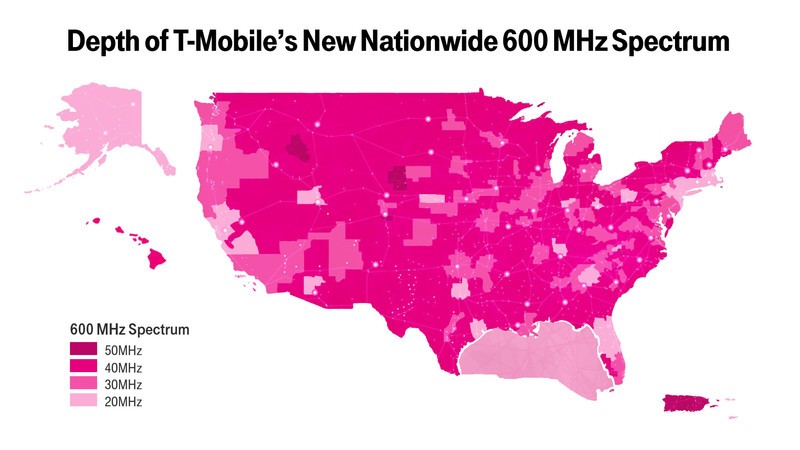
T-Mobile’s new coverage map with 600MHz.
With its win, T-Mobile now has the low-band spectrum to properly compete with AT&T and Verizon across the entire country. In a statement, the company effusively said that it is now in its best-ever competitive position against the two biggest mobile providers in the U.S.:
T-Mobile now owns premium low-band spectrum that can cover every single American. And, most importantly, while the Duopoly’s existing low-band spectrum is already crowded and congested, T-Mobile’s new low-band spectrum will be clear and wide-open for customers, meaning a better, faster experience. With this purchase, T-Mobile now has significantly more low-band spectrum per customer than any other major provider and nearly TRIPLE the low-band spectrum per customer than Verizon.
Of course, the comparison to Verizon is not particularly fair, since Big Red has nearly twice the mobile customers as T-Mobile, but the facts are true: T-Mobile is finally in a position to get rid of its gimmicks and hacky promotions and start beating AT&T and Verizon in tangible ways: in speed, in coverage, and in reliability. If it manages to keep costs down, and passes those savings along to consumers as it does today, then it should accelerate its growth faster than it is doing today.
Low-band frequencies, like this 600Mhz spectrum and the 700Mhz spectrum that was auctioned off in 2008, are considered the “beachfront” property of LTE, since it carries high-speed signals further distances, with better penetration of thick walls and basements than mid-high frequencies, which is where T-Mobile currently deploys the fast majority of its LTE network. The company has plenty of AWS-1 and AWS-3 airwaves, but Verizon and AT&T have most of the 700Mhz band locked up and deployed.
Low-band spectrum is prized for its ability to go through walls and reach people in remote areas. Now T-Mobile has plenty of it.
T-Mobile says that it will begin rolling out 600MHz service later this year, sharing some of it with its subsidiary MetroPCS. Equipment from Nokia and Ericsson is already available on the tower side, and Qualcomm is finalizing its baseband chips to support the new band plan. But that brings up a very important point: no current in-market phones support 600MHz, and devices with such support won’t likely roll out until the end of 2017. T-Mobile is contending with a similar problem on the AWS-3 side, which also began hitting handsets last year with the LG V20 and, more recently, the LG G6 and Samsung Galaxy S8, but it’s going to take three years or so for the full effect of 600MHz’s potential to show itself. By then, though, T-Mobile will be deploying the first stage of its 5G strategy.
Dish and Comcast also spent some money for licenses in the 600MHz auction, but it’s unclear what they plan to do with it. The former already owns plenty of unused spectrum, while the latter just partnered with Verizon on its own MVNO-based mobile network, and doesn’t have enough 600MHz spectrum to augment it. That’s why the real winner here was T-Mobile, and it’s time for the company to focus on the fundamentals.

Galaxy S8 and S8+ will be making their debut in India on April 19
Samsung is bringing its 2017 flagships to India next week.
Samsung is all set to launch the Galaxy S8 and S8+ in India on April 19. The phones are up for pre-registration, and the brand confirmed the launch date in a now-deleted tweet. For now, Samsung is just stating that the phones will debut sometime next week, but it’s looking very likely that we’ll see the manufacturer’s 2017 flagships make their debut next Wednesday.
India, get ready to #UnboxYourPhone! Samsung #GalaxyS8 #GalaxyS8Plus, #IndiaLaunch. Stay tuned for details. https://t.co/CE3aFcrvL9 pic.twitter.com/14Z56BOa2k
— Samsung Mobile India (@SamsungMobileIN) April 14, 2017
The phones are set to go on sale starting April 21 in South Korea, the United States, and Canada, and we’ll hear about availability in India in a few days’ time. Unlike the U.S. variants, the Galaxy S8 and S8+ models will be powered by Samsung’s Exynos 8895 SoC. The highlight with this year’s phones is the extra-tall QHD screen, with the Galaxy S8 sporting a 5.8-inch display and the larger model offering a 6.2-inch panel. By cutting down on the bezels, Samsung was able to increase the screen size without making the devices unwieldy to use.
Other specs include 4GB of RAM, 64GB storage, microSD slot, dust and water resistance, 12MP camera with f/1.7 lens, 8MP front shooter, 3000mAh battery (3500mAh on the GS8+), and a fingerprint sensor located at the back.
We’ll know about pricing on the day of the launch, but it’s unlikely Samsung will sell the Galaxy S8 or S8+ for under ₹60,000. Based on the promotional material on its website, it looks like the company will launch the new Gear 360 and Gear VR in the country. We should know more next week, and in the meantime, what do you guys think will be the retail price of the Galaxy S8 and S8+ in India?
Register for the Galaxy S8/S8+
Samsung Galaxy S8 and S8+
- Galaxy S8 and S8+ hands-on preview!
- Galaxy S8 and S8+ specs
- Everything you need to know about the Galaxy S8’s cameras
- Get to know Samsung Bixby
- Join our Galaxy S8 forums
Verizon
AT&T
T-Mobile
Sprint
Garmin Fenix 5 review: Smart sports watches don’t come better than this
If you’re an avid runner or cyclist, there’s a good chance that either you or someone you know well is sporting a Garmin watch. Over the past few years, the company’s reputation for building the best sports-tracking wearables has grown.
With the Fenix 5 – reviewed here in its Sapphire Edition configuration for an ultra-tough screen, not the larger maps-on-board 5X or smaller-form 5S versions – we’re seeing the culmination of all that experience in a watch which looks good and seemingly lasts forever with each charge.
With its build quality, durability and long feature list, the Fenix 5 promises a lot. Is it the best sports watch on the market today?
Garmin Fenix 5 review: Design
- Fiber-reinforced polymer body
- Stainless steel bass and bezel
- QuickFit watch bands (22mm)
- 47 x 47 x 15.5mm dimensions
There are three sizes of Fenix 5: The Fenix 5S is the 42mm case option with a chrome bezel around the face; the regular Fenix 5 is a 47mm case with angled, brushed metal frame around the display; and the Fenix 5X is the beast of the bunch with a 51mm case.
As you’d expect, the Fenix 5 is incredibly durable. The fiber-reinforced polymer body may be a really fancy plastic, but it’s strong enough that it almost convinces you it’s made of metal. Underneath, the bottom panel is made from stainless steel with an attractive brushed finish, which is matched by the round bezel around the lens.
To give it that industrial, rugged look the screws holding the casing together are exposed on the top and bottom and feature a hexa-lobe head to dissuade users from trying to pull the watch apart.
One part that is designed to pull off easily, however, is the strap – which holds tightly using a unique clip mechanism, but then pulls off by simply sliding down the “lock”. We’ve found in testing that it holds well regardless of what you put it through, and is among the easiest straps to swap out for another watch band when you need to. The only downside – despite being a 22mm strap – is that it seems to only be compatible with Garmin’s QuickFit watch bands.
The default silicone strap is a soft, flexible material with lots of closely positioned rectangle holes for the clasp to fit into. It also happens to have a tab protruding from the underside of the second loop to hold the strap in place and stop the loops from sliding up and down.
Returning to the watch case and, like many sports-focused wrist gadgets, there are multiple buttons. Pressing these buttons gives an indicator of the watch’s build quality, offering a proper “click” and reassuring tactile feedback.
Most of the buttons have primary and secondary features, depending on whether you press once, or press-and-hold them. On the left side: the top left button activates the light or the feature list; the middle left scrolls upwards through lists and widgets, or launches the main watch menu; the last button the left is used to scroll downwards or dismisses notifications. Switching to the right edge: the top button launches the activity tracking function from the main watch face or acts as the select/enter button within menus; the bottom button is the back/lap button.
Adding to all of this, the Fenix 5 is also rated for underwater use. With its 10ATM certification, you can take it swimming virtually anywhere, even deep sea diving – providing you don’t dive to depths below 100 metres.
Garmin Fenix 5 review: Screen
- 240 x 240 resolution colour panel
- Transflective and LED backlight
- No touchscreen control, buttons only
It’s only when looking at the display that the Fenix 5 may seem a step below the smartwatches from the likes of Apple or Samsung. But the transflective screen technology does have massive benefits, mainly when it comes to battery performance.
Similar to classic sports watches of the past few decades and – more recently – Pebble smartwatches, the Fenix 5’s screen isn’t a miniature version of the same technology used in smartphones. Rather, it’s a basic, unlit LCD panel with a relatively low resolution and refresh rate.
The benefits of this technology are clear. Firstly, it’s on all the time, as a watch face should be, without consuming bucket loads of battery. Secondly, it’s easy to see in any light. Indeed, when light catches it at the right angle it becomes more visible rather than less. It is a colour screen, so some widgets have the odd splash of colour here and there, but for the most part the watchfaces and widgets make use of monochrome themes.
The downside to this, of course, is that with this low resolution and refresh rate, you don’t get high definition graphics and animation. This means finer graphics and text, especially with curves, look a little jagged and unrefined. Still, when you’re looking at arm’s length, that hardly matters.
What really matters is that you can easily and clearly see the time. Even when it’s dark you can just press the light button and illuminate the watch face, as many of us will have been accustomed for decades.
Garmin Fenix 5 review: Software
- Compatible with iPhone, Android and Windows
- Share data with Strava, MyFitnessPal and more
Because there’s no touchscreen, Garmin’s wearable software is controlled entirely by the physical buttons on the side. Don’t let that fool you into thinking it’s limited, however, as there are plenty of layers to the interface running on the latest high-powered watch.
Pressing-and-holding the top right button launches the activity function, where you can quickly start tracking a run, walk, or virtually any other kind of exercise, whether it be indoor cycling, open water swimming or strength training. There are all kinds of sports available within the watch’s software and you can decide which of them to have as your favourites.
That means if you happen to be an avid skier, you can choose to have that at the top of the list of activities to track when you press the button. As well as bespoke sports tracking, there’s a basic “track me” option which doesn’t designate a sport, and an HRV stress tracker for measuring your health/heart condition.
Pressing-and-holding the top left button launches functions specific to the connectivity with your phone. That means you have a “Find my phone” option that gets your phone to play an alert sound until you find it and access the associated Garmin Connect app. There’s also music control, which allows you to play, pause, skip and adjust volume of any music app running on your phone. As well as those, there are options for manually syncing the Fenix 5 with your phone, switching on “Do not Disturb”, saving your location, locking the buttons and switching off the watch.
The user interface you’re most likely to use is the set of full-screen widgets accessed by tapping the up or down buttons on the right side. Here you can scroll through widgets for weather, notifications, calendar events, compass, altimeter, intensity minutes overview and many more. All of which give you a quick snippet of information for any key metrics you choose to have on there.
Garmin Fenix 5 review: Connect app
- Informative daily snapshots
- Intensity minutes goal based on exercise strain
- Calendar mode for in-depth daily insight
The Garmin Connect app is essentially a central hub for all of the masses of data collected by your Fenix watch. Here you’ll be able to see a simple overview showing your daily steps, sleep, calories burned and other snippets, but you can dive way deeper into your stats than what’s available on the brief overview screens.
Pocket-lint
You can arrange your Snapshot views to include breakdowns of a few of the metrics you want to keep track of easily. For instance, Steps shows you your current daily tally on top, with a chart beneath showing your progress over the past 30 days. It’s a similar story with the Sleep Snapshot, except that goes back over seven days.
Intensity Minutes is potentially one of the most useful for keeping fit. Using the heart rate/steps/pace data collected during your exercises it calculates how many minutes of vigourous intensity exercise you’re doing and how many moderate intensity minutes. Your weekly target is initially set based on your size, age and weight, and your task is to meet that target.
For example, one 25 minute run counted as 50 intensity minutes, and so three of those runs per week would fill our target. Add in all of the other activities we tested the watch during and we surpassed that goal – hopefully increasing our fitness in the long run (if we keep it up).
There’s a calendar view within the app, too, which shows different colour tabs on each of the days. Tapping on one day gives you a detailed overview of all your activities from that particular day, with a chart showing your heart rate at the top, and a list of metrics and achievements below it.
Pocket-lint
The “more” section of the app lets you dive down deeper into many of the tracked metrics, allowing you to view your performance and insights in more detail, while the news feed shows any tracked exercise by you or your Garmin Connect contacts.
What makes all of this even more useful is that you can connect the app and your account to several other popular services. MyFitnessPal, for example, can read and write data to the app, just as exercise sessions can sync automatically with Strava.
However, with all that good stuff said, it was with this software where we experienced our only real problems with the Fenix 5. Mainly, the link with Strava means all of our exercises were pushed to the community, even our indoor kettlebell sessions. Given that Strava is predominantly walking, running and cycling focused (in other words – exercises where you actually move some distance), it seems odd that the Garmin app doesn’t distinguish between types of exercise. It’s a minor issue, easily solved by deleting the activity, but smarter automation would be better.
Garmin Fenix 5 review: Performance
- Advanced GPS and GLONASS reception
- Heart rate/VO2 Max monitoring
All elements of the Garmin’s hardware performed as well as we would expect for a top-of-the-range sports watch. The GPS tracked reliably every time we used it, and hooked onto our location after just a few seconds of activating the activity tracking feature.
The one time it took a little longer than usual to successfully pick up a GPS signal was in the Snowdonian hills, where it seemed to take 20-30 seconds to lock in our location before starting the hike tracking. This was just a blip in an otherwise overall reliable experience. And once it found the signal, it accurately tracked our route up one of mountains.
Every interaction we had was relatively quick, and only limited by the refresh rate of the screen, rather than any lag or performance issues. Pressing buttons would usually result in an almost instant response from the content on screen.
Heart-rate monitoring happens almost without you knowing it and, again, seems to be as accurate as a wrist worn device can be. No results seemed to be anything outside the ordinary, and were in line with what we’ve seen with multiple other devices in the past. It was the same story with sleep tracking.
Garmin Fenix 5 review: Battery
- Up to two weeks in “smartwatch mode”
- Up to 24 hours GPS/HR tracking
- Charges using bespoke cable
As we mentioned referring to the display, the one major benefit of this type of display tech is that the battery lasts a very long time. Compared to Android Wear or Watch OS wearables, the Fenix 5 feels like it goes on forever.
Garmin claims the Fenix 5 can last up to two weeks between charges in smartwatch mode, or up to 24 hours of constant GPS tracking, and our testing showed it should be capable of meeting this promises.
Pocket-lint
After 10 full days of wearing the watch, our test unit was down to 18 per cent. Breaking it down, that’s around eight per cent lost per day, or around 12 days of charge. This may seem to come up short against Garmin’s quoted results, but when you consider we used it to track three 25 minute runs using GPS, a couple of indoor strength and cardio sessions, plus an hour-long walk and two shorter treks, the battery held up really well in real life. We also wore it all night, every night to track our sleeping.
Short version: the Fenix 5 has a two week battery, for moderately active users. Possibly less for the more active among you.
Charging is a little different to other wearables. While it has the usual four contact points, it doesn’t charge on a magnetic cradle. Instead, you have to push in the cable until it clicks in place. It’s a little less convenient than some others, but it ensures a reliable, constant connection and means it’s virtually impossible to accidentally knock the Fenix 5 off charge.
Verdict
If money is no object and you have no issue dropping £500 upward on a great, modern, connected sports watch, then the Fenix 5 will surely leave you satisfied.
It’s got enough smartphone connected-ness about it without hogging your attention, but really excels when it comes to sports tracking – of any kind you care to throw its way.
There are some tiny software kinks to sort out – we had one issue with sleep-tracking thinking our TV-watching was sleep when it wasn’t, plus the push-all to Strava is irksome – but as a piece of hardware it’s sublime.
The Fenix 5 is the clear king among its sports watch competition. Garmin’s reputation as the best sport-focused smartwatch maker is clear to see.
But the Fenix 5 now from Amazon.co.uk or Amazon.com.
The alternatives to consider…
Pocket-lint
Polar M600
If what you’re after is a regular smartwatch with a heavy focus on sports, the Polar M600 might just do the trick. It’s Android Wear, but with Polar’s fitness tracking expertise built in too. If you’re an Android user, it’s worth serious consideration, although it will only give you two days of battery.
Read the full article: Polar M600 review
Samsung Gear S3 Frontier
As smartwatches go, the Gear S3 Frontier’s Tizen based software is easily among the best out there for easy of use. It’s not as finely tuned for sports tracking as the Garmin, but does, sort of cross the line between traditional smart watch and sports watch. It’s not quite as sturdy, or resistant to outdoor conditions, and lacks some of the depth in health tracking available from the Fenix.
Read the full article: Samsung Gear S3 review
Suunto
Suunto Sport Wrist HR
Suunto is often seen as a direct competitor to Garmin in the wearable field, and its latest watch, the Spartan Sport Wrist HR promises to offer “superior accuracy” heart-rate measurements. In fact, it claims to deliver data that’s remarkably close to chest strap HR monitors almost every time.
 AIVAnet