


The Galaxy S8 is water resistant, not liquid resistant

Your phone has no fear when it comes to water but be careful with other liquids.
One of the features you’ll find in most top-end phones in 2017 is water resistance. The Galaxy S8 and Galaxy S8+ from Samsung are no exception. Raining outside? No problem. The Galaxy S8’s IP68 rating means the rain has no effect. The same goes for a splash at the sink, a dip in the pool, and maybe even a spilled soda or beer.
Yes, maybe. Not everything wet is water and even things that are mostly water might be best kept away from your water-resistant phone.
This doesn’t only apply to the Galaxy S8, or even phones in general. Water resistant objects are designed to keep out water — exclusively. Because of the chemical composition of any liquid, anything water resistant might not be beer resistant. Or champange resistant, because science!
Rugged phone ratings: Everything you need to know
Liquids feel, well, liquidy. But all liquids have other things dissolved into them. Things like magnesium and calcium are in the water you drink and depending on where in the world you are you can have very hard water (lots of calcium and other dissolved minerals) or very soft water (very few dissolved minerals) or somewhere in between. The GS8 is designed to be soaked in good old tap water with no ill effects. You don’t have to worry, but we don’t recommend you take your phone snorkeling. (If you do, send us pics because that’s pretty cool).

Other types of water, specifically distilled water and really hot water, are probably something you don’t want to dunk your phone in. Science also means that distilled water is virtually free of any dissolved minerals and might be able to penetrate where “regular” water can’t. Hot water, on the other hand, can loosen adhesives and gaskets.
A quick rinse to wash away chemicals or sticky liquids isn’t going to hurt anything.
Other liquids like beer or antifreeze — or anything that’s not just plain water — might have chemicals that can penetrate the water resistant barriers or just make a mess in speaker holes, headphone jacks, and SIM card slots. If you get something that’s not water you’d drink on your phone, rinse it gently in the sink with room temperature water as soon as you can.
If you get the ports all gunked up, and it happens to the best of us, don’t go jamming toothpicks or sewing needles in the nooks and crannies to scrape it out. Wipe it down with a damp washcloth and let the fabric scrub away the surface dirt and sticky stuff or take a toothbrush and gently work at it. If you do end up having to dig in any holes with anything smaller than your elbow, be super careful not to cause any damage to parts or finishes. All that is part of being water resistant and needs to stay as intact as it can.
You don’t need to baby your Galaxy S8 when it comes to using it around the water. It’s built for it! Just be mindful for spills and splashes of other liquids.
Samsung Galaxy S8 and S8+
- Galaxy S8 and S8+ review!
- Galaxy S8 and S8+ specs
- Everything you need to know about the Galaxy S8’s cameras
- Get to know Samsung Bixby
- Join our Galaxy S8 forums
Verizon
AT&T
T-Mobile
Sprint
Torrent safely with a lifetime license to Streamza, right now 89% off
The torrent protocol is a convenient way to download large files quickly, and while it is often associated with piracy, you can find plenty of legal uses, like receiving Linux distributables, finding copyright-free music and media, and downloading libraries worth of free e-books. The only problem is that your PC can become vulnerable while you’re torrenting.
Torrent safely with a lifetime Streamza license for only $50 Learn more
To stay safe while torrenting, you need an app that reduces risks by keeping your IP private and keeping viruses out. The problem is that these types of services are generally pricey and involve a subscription plan.
Right now, however, Android Central Digital Offers has a deal on Streamza, an ideal app for torrenting safely. Instead of paying monthly subscription fees, a lifetime license will cost you only $50. That’s 89% off the regular price of $500!

You get 250GB worth of downloads each month that are added to a personal library, plus the included cloud storage means you can access your files from a number of other devices. Not sure what’s available? Connect with other Streamza users to see what’s hot or search the huge library of popular media.
Get safe access to your favorite content with a lifetime license to Streamza at 89% off Learn more
This lifetime license includes all future updates to Streamza, so you can be sure you’re always using a current client. Ready to start torrenting safely? Grab Streamza now for only $50.
Google Wifi comes to Canada to improve unreliable wireless signals
One of the easiest ways to get better Wi-Fi signal in the home is now for sale in Canada.
Google Wifi is now available in Canada, as a single unit for $179 and three-pack mesh combo for a cool $439.
That’s a steep premium over the U.S. price of $129 and $299 respectively, and even at the latest exchange rate includes quite a bit of a premium. Still, Google Wifi is a very good router setup, evolved from Google’s own OnHub program that it worked with Asus and TP-Link to develop.
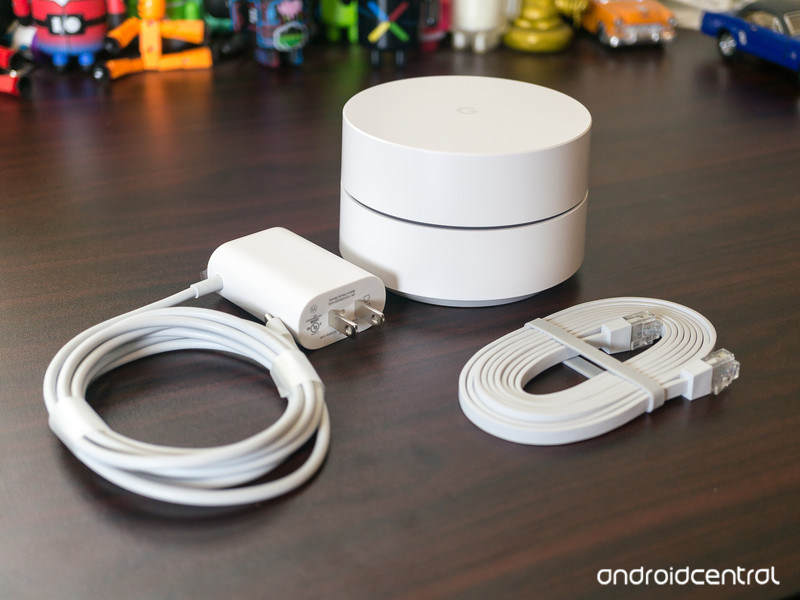
Google Wifi simplifies the router setup experience dramatically, using your smartphone as the primary administrative hub and performing updates silently in the background to ensure that speeds stay fast and coverage stays reliable. On its own, Google Wifi provides a moderate amount of coverage for an apartment or small home, but it’s when one combines the units together — it supports two or three “pucks” for a mesh setup — that things get really interesting.
Instead of using a repeater, which merely captures the signal from the main router and tries to amplify it, Google Wifi uses mesh technology to seamlessly spread signal evenly around the house so speeds stay constant, and there are no nasty drop-off points in remote corners. Here’s what Jerry Hildenbrand said in his review:
I heartily recommend Google Wifi to anyone looking for a way to cover their whole house with a network connection. But I also can recommend the Amplifi system and have plans to look at what eero and Luma have to offer. I can’t say one is any better than the other, but I can tell you that each is a good choice. This is a good place to be, where we have a choice of products that work the way we expect them to work. If you’re deeply tied into the Google ecosystem, go with Google Wifi for a multi-device setup. You’ll like the On.Here integration for connected devices, and the Zigbee and BLE radios mean more functionality may be coming, though we heard that before with OnHub and it didn’t materialize.
If you just need one Wi-Fi router and want something expandable (and pretty cool to use through the app) definitely go with Google Wifi here. The price is comparable to any good Wi-Fi router and you’ll appreciate both the network performance and ease of use.
Jerry refers to other mesh router products, such as Amplifi, Luma and eero, but none of them are available in Canada. Google Wifi’s biggest competitor is Netgear’s Orbi system, which for $499.99 comes with a base unit and a single satellite, but its units have much larger antennas and have generally received glowing reviews from the rest of the industry.
Google Wifi is available April 28 from the Google Store, Best Buy, Staples Canada and Walmart.
See at Google Store
Google Hardware
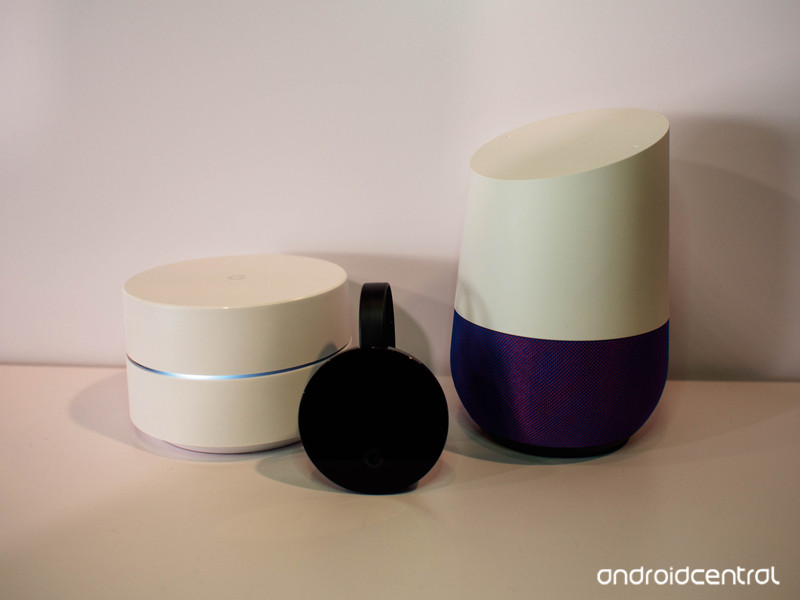
- Google Wifi review
- Google Home review
- Everything you need to know about the Chromecast Ultra
- Chromecast vs Chromecast Ultra: Which should you buy?
Google Wifi:
Google
Amazon
Google Home:
Google
Best Buy
Chromecast Ultra:
Google
Best Buy
How to use a HOTAS controller with any PlayStation VR game

How do I use my HOTAS with PSVR?
In order to experience an even deeper level of immersion while in PlayStation VR, you might want to look into a Hands On Throttle and Stick (HOTAS) controller. This controller gives you a ton of control over your aircraft or vehicle, as they have a familiar joystick for movement in one hand and an adjustable throttle in the other hand.
You can grab a HOTAS controller designed specifically for PS4, but the number of compatible games in PlayStation VR is limited. If you’d like to use your PS4 HOTAS controller on all games, or if you’d like to use a PC HOTAS on PS4, you need something called CronusMax Plus which lets you map buttons and use any controller with PS4.
Here’s everything you need to know about using a HOTAS controller with all of your favorite PSVR games.
See the full guide at VR Heads!
Verizon has the country’s best wireless customer service
Customer support is important to most companies.
Things invariably go wrong with any product or service, and those people need support to get them back to the experience a company tries to put forward for everyone. When what goes wrong is the phone we keep our whole lives on, or the cellular connection that we use as a literal lifeline in our darkest moments, good customer service isn’t just desires, it is necessary.
So, which carriers took the top spot in a new survey of carrier customer support by Tom’s Guide?

Verizon came first this year, beating out last year’s winner AT&T as well as inching past T-Mobile. T-Mobile just edged out AT&T, knocking the Texas-based carrier down to third in this year’s rankings. AT&T added AI-based operators to its support call system, slowing response time and rankling its ratings.
Check out the full results at Tom’s Guide, then tell us if it matches your experience when dealing with your carrier’s tech support.

Best Game Controllers for Android
- Best Overall
- Best for portability
- Best Value
Best Overall
SteelSeries Stratus XL

See at Amazon
If you want a no-compromises controller, something that feels just like the controller you use when you’re sitting in front of your television, SteelSeries has what you need. These controllers look and feel solid. No cheap buttons, wiggly joysticks, or any of the typical problems you find with cheap mobile gaming controllers. You’re getting what you pay for here, which means you’re paying a little more than you would for the average gamepad.
Bottom line: If you want the best controller for your gaming, SteelSeries built the Stratus controller for you.
One more thing: This version of the controller only comes in black. If you see a white version of this controller, it’s the iOS-only version and won’t work with your Android phone.
Why the SteelSeries Stratus XL is the best
It’s basically an Xbox Controller, which is exactly what you want if you’re gaming for extended periods.
Microsoft and Sony spend an insane amount of money engineering controllers, because research shows how the different grip design and button placements lead to longer gameplay sessions. When you’re looking for a controller for a phone, it doesn’t make a ton of sense to drift very far from what you know works. SteelSeries borrows quite a bit from the Xbox One design, and it shows when you’re able to comfortably play for extended periods of time.
This controller delivers plenty of battery, a strong connection to the phone, and a quality feel when playing. It’s the perfect gamepad for playing games during a long flight, or during a lunch break at work. It’s comfortable, durable, and capable, exactly what you want if your goal is to own the best possible controller for your gaming needs.
Best for portability
Moga Hero Power

See at Amazon
Playing games when mobile frequently means not having the best place to put your phone when playing. The natural solution is to have a controller that actually holds your phone, and the Moga Hero Power is the best controller for that ultra-portable experience.
It’s designed to be more flat than a standard console controller, so it easily slides into a bag and doesn’t take up much space. When it’s time to play, lift up the center section and drop your phone into the grip. You now have a controller you can take anywhere that lets you play just about anything.
Just don’t walk and play, or video of your epic wall smash will absolutely make it to YouTube.
Bottom line: If portability is what you need, Moga offers the best with the Hero Power controller.
Best Value
8BitDo Zero

See at Amazon
Can we all take a moment to stop and appreciate how small and functional this controller is? It’s a classic SNES format in a package small enough that you could hang it from your car keys. That’s damned impressive.
8BitDo has a history of making quality hardware that appeals to Nintendo nerds, and this latest version if no exception. The buttons are nice and tactile, the battery will last for several days of gaming, and it even comes with a wrist strap just in case.
The big feature here, aside from the physical size, is the price. This controller is available for under $20, so you can grab one cheap and not be terribly concerned with what happens if it doesn’t survive the washing machine because you forgot to check your pockets again.
Bottom line: It’s small, cheap, and sturdy. You want this controller.
Conclusion
There is no such thing as one kind of gamer. If you want a controller for your phone that feels like a console controller, get yourself the SteelSeries Stratus. If portability is the most important feature, the Moga Hero Power is what you need. For those on a budget, or just want something pocketable, 8BitDo nails it with the Zero. Either way you win, because each of these are exceptional controllers delivering quality gaming experiences. Have fun!
Best overall
SteelSeries Stratus XL
See at Amazon
If you want a no-compromises controller, something that feels just like the controller you use when you’re sitting in front of your television, SteelSeries has what you need. These controllers look and feel solid. No cheap buttons, wiggly joysticks, or any of the typical problems you find with cheap mobile gaming controllers. You’re getting what you pay for here, which means you’re paying a little more than you would for the average gamepad.
Bottom line: If you want the best controller for your gaming, SteelSeries built the Stratus controller for you.
One more thing: This version of the controller only comes in black. If you see a white version of this controller, it’s the iOS-only version and won’t work with your Android phone.
Acer Windows Mixed Reality preview: Will this $300 headset bring VR to the masses?
In April 2017 Windows 10 rolled out its Creators Edition update, bringing various new creative tools – such as Paint 3D for three-dimensional editing – into the operating system. The lesser talked about point is that the Windows Mixed Reality platform – which includes Microsoft Hololens support – is also now compatible.
That paves the way for a Mixed Reality future and it’s not just Microsoft banking on that, as five manufacturers – Acer, Asus, Dell, Lenovo and HP – are each developing head-mounted display systems to play nice with the cross-platform Windows setup.
The first of these, the Acer Windows Mixed Reality head-mounted display – which will almost certainly be renamed when it becomes available to buy at the end of 2017 – we got to sample at Acer’s annual conference in New York. All you’ll need to use it is a Windows PC (with discrete graphics – but in the future integrated graphics will be ample), and a head.
Roland Moore-Colyer
First up, let’s breakdown the whole argument between Mixed Reality (MR) and Virtual Reality (VR). The latter, VR, involves being entirely surrounded in a fully virtual world with zero object-based interaction crossing over with the real. Mixed Reality (MR), Microsoft argues, is when greater physical factors from the real world merge with the virtual to create interactive results. Hololens, for example, overlays positional holograms onto a floating heads-up screen which interact in a fully immersive way with the environment around you. You can walk around virtual objects in the real world, as if they’re there.
So it may come as a surprise that Acer’s so-called Windows Mixed Reality setup is a screen. There’s currently no option for the built-in cameras on the headset to deliver the surrounding world in digital form. In that respect, we would call this experience VR.
The MR aspect – limited as it is – comes into play because the same six-degrees of motion that Hololens offers are used to input into the experience: so, say, take a step to the left or right in the real world and it’ll input into the virtual world. Pure VR, by Microsoft’s definition, would only respond to head movements as input, not physical ones (which means HTC Vive clearly blurs the boundaries).
Roland Moore-Colyer
One of the core factors of the Acer Microsoft Mixed Reality experience is the simplicity of setup. The two built-in cameras assess the surrounding environment, so can gauge position and be setup within about 15-seconds without the need for additional sensors in the room (unlike HTC Vive which needs a variety of boxes positioned correctly to enjoy the experience). Plugging in one cable and being transported into another world mere seconds later is a very cool thing indeed.
For our demo we were immersed into Microsoft’s “Cliff House”, which is a virtual house atop a cliff, surrounded by woodland (a little Seattle-esque, we feel, based on the company’s HQ). It’s kitted out with various interactive Windows tools: there are screens to watch movies, dip into 360-degree videos, send mail, listen to music, and effectively navigate around the concept of an operating system’s core in a virtual home environment format.
Which is interesting, but doesn’t really deliver a more functional experience of Windows to any degree. It’s fun, but it feels like a demo of potential rather than a purposeful reason to don a headset to watch a movie within a world of another world – when you could instead just cast to your TV via a laptop, while curled up on the sofa.
Roland Moore-Colyer
That’s one of these things about VR and MR: incredible though the technology is, it’s the genuine use cases that are lacking. This is where the likes of Acer and the other four manufacturers could become so important: the hardware has to be out there for people to experiment and for audiences to begin to understand the options available. Mixed Reality, Virtual Reality; they’re both additional tools in content delivery.
Whatever our view of where things will go, however, it’s the technical quality of the Acer Mixed Reality experience that shines through most of all. For a $299 headset, we weren’t expecting much. And yet, despite the fit not being perfect and some light entering through the rear sides, the quality of visuals is high and we didn’t feel nauseous or too disconnected from the world (some get fearful when strapping a massive unit over their face – whereas this Acer unit can easily be popped up and down by flipping the front section forward). The virtual world looks crisp and clear, with a workable refresh rate, all at a price point that will get people potentially opening their wallets.
Roland Moore-Colyer
With Windows now supporting Xbox titles – and increasing interest in the gaming sector – we can see this immersive option becoming an in-point for gamers. This Acer headset acts as the initial stepping stone, Windows acts as the handrails. What’s needed right now is that breakthrough moment to necessitate its worth however.
So here’s hoping, as this affordable kit could lead to some rather exciting content in the future. At the moment it looks like VR in another form, so a true vision of MR still eludes us.
Chrome warns you when typing anything into non-secure sites
As part of Google’s quest to compel all websites to use the more secure HTTPS protocol, Chrome 62 will flash more warnings when you visit HTTP sites. A few months ago, Chrome 56 (rightly) started labeling unencrypted sites as “not secure” right next to their URLs in the address line if they’re asking for passwords and credit card details. As the Chrome Security Team’s blog post said, though, passwords and credit card numbers aren’t the only types of data worth protecting. That’s why when Chrome 62 rolls out in October, you’ll see the warning pop up whenever you type anything in an HTTP website.
If you’re in incognito mode, you don’t even have to type anything. Chrome will automatically assume you have a higher expectation of privacy, so it’ll flag any HTTP site you visit. Since Google eventually plans to flag everything on the web that doesn’t use encryption, you can expect to see Chrome issue the friendly reminder for more types of situations in future releases. 
Source: Chromium Blog
‘Mario Kart 8 Deluxe’ on the Switch is basically perfect
Mario Kart 8 Deluxe looks set to be the Nintendo Switch’s next must-have game. Regardless of the last Mario Kart title you played — our experiences vary from Mario Kart 64 to DS iterations to the Wii U’s original Mario Kart 8 — Nintendo is aiming to make this the most definitive Mario racer yet. To start, there’s 48 courses and 42 characters (including some Splatoon additions), as well as an upgraded 1080p mode when you’re playing it docked from the Switch and some auto-steering help for younger gamers (or grown-ups who should know better). Those Joy-Con controllers double up as mini-controllers for two-player battles on the go, while a fully fleshed-out battle mode, with several arenas and play modes, form the biggest gameplay addition to the original that launched on the Wii U. Now, you probably knew most of that already, but how does it play? Four editors share their thoughts after a week of racing, while one colleague swears he won’t buy the remake, regardless of how good it might be.
 Jessica Conditt
Senior Reporter
The Joy-Cons shouldn’t work. The two tiny controllers that lock into place on either side of the Nintendo Switch’s main screen should be too small, cluttered and uncomfortable to work as fully fledged gamepads. But, magically, they do.
When we first got the Switch, my partner and I each broke off a Joy-Con and played a few rounds of Snipperclips, but we didn’t really test out the individual gamepads until Mario Kart 8 Deluxe. We were excited: We’d conquered the original game on the Wii U, playing together, alone and with roommates for months on end (all with traditional gamepads, of course).
Before Mario Kart 8 Deluxe, the Switch had mainly functioned as a single-player Zelda machine in my house. This means we didn’t need extra gamepads like the Nintendo Switch Pro Controller, which costs $70 for some ungodly reason. So when my partner and I sat down to play MK8D, we popped out the Joy-Cons — and hesitated.
They were so small. We’d used them before, but not for hours on end, and not as stand-ins for traditional gamepads. The face of each controller has an analog stick on the left side, an array of four action buttons and either the Home or Camera button. The Joy-Cons’ bumpers — crucial buttons for drifting in Mario Kart 8 — are minuscule rectangles flush with the “top” of each controller, so that they actually disappear when reattached to the Switch.
It simply didn’t seem possible that this ridiculously light, palm-size gamepad would be able to compete with something like the Pro Controller. However, to my surprise, it did.
After rolling through one track, my hands had naturally found a comfortable position on the Joy-Con. After two tracks, I wasn’t thinking about missing the bumper or getting a cramp; my attention was on the screen, immersed in the race. By the time we’d finished two full rounds, my partner and I were marveling at the game all over again, impossible gamepads and all.
MKD8 is a beautiful game. Its upgrades are crisp and endearing, and it’s a welcome addition to the Switch, even though I played the original title into the ground. And, yes, even with the Joy-Cons.
 Mat Smith
Bureau Chief
Mario Kart DS, back in 2005, was the last Mario Kart title I owned. This meant I was instantly wowed by the sumptuous glossiness of Mario Kart 8 Deluxe. There’s the vibrant, animated characters, the huge attention to detail that you’ll see only when the action replay slows everything down, and these incredibly grand vistas to race around. Nintendo’s made bigger, wider tracks to accommodate up to 12 racers, as well as adding gravity-defying hover tires and automatic gliders for when you soar off ramps. (This was all new to me.)
Now, even before MKDS, I used to be pretty good at Mario Kart 64. I wasn’t the best, but I’d challenge my mates for pole position and occasionally claim it myself. Alas, that was decades ago. In the now, in 2017, I’m not very good at Mario Kart 8. It’s a fact that’s been (repeatedly) proven both on- and offline. (For the record, I’ve bested my colleague racers once out of twelve races. That’s pretty awful.)
I think it’s because I never had to worry about online rivals when I was playing on an N64 or my DS. I just had to worry about my buddies, their buddies, and the occasional sibling. When it comes to the Switch, there’s no lack of people to play against online — except they’re all better than me. Much better, with many of them presumably putting in the hours to master the Wii U original. (Please read further below for some examples of these monsters.)

Nintendo
I wouldn’t put it all down to my sheer lack of natural karting talent. I think it’s because Mario Kart, over all these iterations, has become more complex. Not only are there 48 tracks to both learn and (maybe) master; there’s 42 characters, with acceleration and weight differences. Add to that vehicle customization: over 26 karts, bikes and ATVs, plus your pick of tires and gliders with minute (but presumably important) speed and handling differences — that’s a lot to work with. So I don’t. At least not in these first initial weeks of playing. I came here to play Mario Kart, not beat myself up over tire choices.
Fortunately, MK8D offers another option: an expanded battle mode. Balloon Battle, which hasn’t changed much, is joined by Coin Runners (collect more than anyone else to win) and Shine Thief, a constantly moving iteration of capture the flag, but with a Shine Sprite. If you’re holding the sprite, your own speed takes a hit, which keeps things interesting. My favorite, however, is the new Renegade Roundup, which is cops-and-robbers but with that Mario staple Pirahna Plants. As change-around is so swift (and weapons so plentiful), it turns into a game that’s downright chaotic. In a fun way. This is tiding me over until I suck less at the racing, and it’s the crux of what this game does so well. Even without the built-in steering assistant, it’s a rare multiplayer game that can be instantly played (and enjoyed) by anyone, regardless of their Mario Kart prowess.
 Matt Brian
UK Managing Editor
Until Mario Kart 8 Deluxe arrived at my house, the Nintendo Switch was sacred. I had one game, Zelda: Breath of the Wild, and my two boys — aged six and seven — weren’t allowed to touch it. It’s not because I’m a bad father (although you could argue otherwise), but because the Switch feels surprisingly fragile undocked, and they had barely scratched the surface of Ocarina of Time on the Nintendo 3DS. However, that changed when a neon box arrived, advertising Nintendo’s latest take on its smash race series. It suddenly became very easy to hand out the Joy-Cons and attempt to show the kids who’s the boss.
Mario Kart 8 Deluxe offers two new features aimed at beginners and younger players: smart steering and auto-acceleration. If you’ve played racing games with children before, you know that fast cars and twisting courses can lead to upset and ultimately result in the loss of a racing buddy. Nintendo knew this, so it placed a small antenna on the back of each kart, a visual cue that lets you know that the console will help keep racers on the track and pointed in the right direction — even when racing in 200cc mode. Inside the game, you can toggle the feature on or off when selecting your kart by hitting the + and – buttons (although it’s not very obvious and took me a while to find).

Engadget
I knew that before I selected the first series of four races on the Mushroom Cup, racing my kids wouldn’t be easy. Like most boys a year apart in age, they’re fiercely competitive and had already honed their Mario Kart skills on the original Wii and 3DS. In practice, they were more than proficient, boosting around corners and finding shortcuts that I had barely noticed. I won, but make no mistake: The game’s automated guidance kept them (and occasionally me) in the running a lot of the time.
From my experience, Nintendo has created a racing system that accounts for fine margins. Sure, you can put the Joy-Con or Pro Controller down and the game will complete the race on your behalf (in some cases winning), but it’s also adept at recognizing when a player isn’t new to Mario Kart. Attempt a drift too late or too early and the auto-steer function will kick in, but you’ll lose nearly all of your momentum, allowing human and AI racers to catch up. It won’t just let you mash the A button and zip around the course with no regard for the layout of the track.
While Nintendo has dialed down rookie driver frustrations, it’s still kept the essence of what makes Mario Kart, erm, Mario Kart. As a teenager, I remember getting into arguments over Mario Kart 64 when my friends would “blue shell” me while leading on the final corner of the last lap. Going from first to third in a couple of seconds will always leave me salty. In MK8D, power-ups are often unrelenting (you can carry two weapons at a time), and in all honesty were the only real bone of contention with my boys.
It’s pretty hard to temper a child’s frustration when he feels he’s racing well and he gets hit by an ink attack, shrunk by lightning and then hit by a barrage of red shells, causing them to slide down the ranks. However, I think I’d rather have that than have them constantly slide off the side of Rainbow Road and generally find it hard to keep the kart moving forward at speed. My kids are constantly begging me to play, so I can only see that as a good thing.
 Sean Buckley
Associate Editor
Despite being an ardent Nintendo fanboy, the announcement of Mario Kart 8 Deluxe for Nintendo Switch did little to stir my interest. Of all the games announced between the console’s first reveal and its official launch, it was by far the least interesting. Sure, Mario Kart 8 was a great game — but it was also “just a port,” a game I’d already played to exhaustion. Like the HD remaster of The Legend of Zelda: Wind Waker on the Wii U, I expected it to hold my attention for a weekend or two at best before fading to the back of my library. Instead, the game has dominated my Switch playtime for the past few weeks. Maybe I’m wrong about Switch remasters of Wii U games.

From a purely clinical point of view, my knee-jerk reaction wasn’t wrong. For the most part, Mario Kart 8 Deluxe is the exact same game I grew tired of on the Wii U — the same tracks, most of the same characters and, with the exception of a few bonus multiplayer modes, all the same features. And indeed, the first evening I tried it on my TV, I found replaying it all pretty underwhelming. The next day, however, I took my Switch out of the dock and played it in the bedroom. Then I took it to a friend’s house and played local multiplayer. The next weekend, I brought it with me to Silicon Valley Comic Con and played both single-player Grand Prix and local multiplayer battles while waiting in line for panels and talks. The game hadn’t changed much, but the experience had.
Ultimately, this is a story I’ve told before. The Nintendo Switch’s portability has consistently surprised me at every turn — not only by keeping me entertained on the go, but by enabling bespoke social experiences on the fly. I knew this worked with games like Puyo Puyo Tetris and Snipperclips, but I didn’t expect the hybrid nature of the console to revitalize a game I’d already put aside. If the Nintendo Switch was nothing but a typical TV console, I probably wouldn’t have played the game for more than a few hours. Instead, I’m obsessed with it again — challenging friends, trying new Kart combinations and struggling to learn how to drive in 200cc mode. Last month, the idea of porting old games to the Nintendo Switch sounding dull to me. Now, the idea sounds amazing. I’m starting to wonder if I would have given up on Wind Waker HD if it was this easy to pick up and play.
 Jamie Rigg
UK Reviews Editor
I love Mario Kart 8. It’s the first racing title I’ve been truly enamored with since turn-of-the-century PlayStation classics Gran Turismo 2 and Crash Team Racing. Back when MK8 was first released, I studied vehicle and character attributes, risk-assessed shortcuts and bested every challenge the game offered. At the time, I returned to it regularly in an attempt to shave milliseconds off my best lap splits, occasionally hopping online to demoralize opponents with my newly perfected lines. Both DLC packs were immediate purchases. And yet, there’s absolutely no chance I’m revisiting the fantastic game on the Switch with Mario Kart 8 Deluxe.
Perhaps I’m bordering on hypocritical, because I don’t think ports and other forms of re-release are always a bad thing. As a former Halo 2 addict, I was fidgeting with excitement the day Halo: The Master Chief Collection was due to be delivered, only to abandon the game when its fundamentally broken multiplayer element irreparably soured my perception.
I can even understand the hype Call of Duty: Modern Warfare Remastered generated. For as long as I can remember, every new entry in the Call of Duty franchise has felt like the same chaotic shooter with new box art. That gamers would want to revisit Modern Warfare and play the first title that was set outside World War II, when there was still some originality to the series, makes sense.
But Modern Warfare Remastered hasn’t turned out to be a particularly fan-friendly affair. The game, available solely as a bonus within the “Legacy Edition” of Call of Duty: Infinite Warfare, doesn’t include the original’s DLC map packs. The cherry on top is that these additional battleground bundles are now nearly twice the price they were ten years ago when Modern Warfare was first released. There’s been a renewed outrage this week in certain corners of the internet (and rightly so) when the Variety Map Pack DLC landed on Xbox One and PCs — and I regard Mario Kart 8 Deluxe with similar sentiment.
The obvious rebuttal is: “Shut up and stop moaning … nobody is forcing you to buy it.”
I paid £40 for Mario Kart 8 when it first came out, and shelled out (pun intended) a further £14 on the two DLC packs, taking my total spend to around £54 (roughly $70 at the current exchange rate). And that’s not even factoring in that MK8 was the primary reason for buying a Wii U more than a year after the system launched in the first place. And now Nintendo thinks I’ll spend more than £40 to buy basically the same game again for the Switch? Fat chance.
The obvious rebuttal is: “Shut up and stop moaning … nobody is forcing you to buy it.” It’s a fair point, but it’s not just the money situation I’m frustrated by (even if my only meaningful avenue of protest is to boycott the game — voting with my wallet, as they say). The thing is, I almost want MK8D. Not for the couple of extra vehicles and Splatoon characters, nor the improved battle mode, which still doesn’t amount to enough additional content for my liking. It’s more that the Switch hardware makes multiplayer so much more accessible, letting you face off with a friend, each with one little Joy-Con in hand, or pairing multiple handhelds locally for serious sessions.
If it were a cheap, download-only port, or if Nintendo at least offered a heavy discount to owners of the Wii U version, I could maybe entertain picking it up. But like I said, it’s not just about the money. I think it’s a pretty lazy, unimaginative attempt by Nintendo to pad out a sparse launch lineup — which Zelda: Breath of the Wild is propping up almost exclusively at this point — while making a quick and easy buck from everyone caught up in the Switch fanfare. And selling it for the same price as the original, three-year-old game is the icing on the unpleasant, greedy cake.
At least I have a new NBA Jam to look forward to.
‘Pictionary’ comes to phones five years after ‘Draw Something’
It has taken its sweet time, but Pictionary (with all the appropriate copyright branding), has landed on iPhones, Android devices and, oh, even Amazon’s app store. The game has two modes. For one, you’re given plenty of time time to draw overelaborate masterpieces in a turn-based game, while in the other you’re playing in a real-time, two-vs-two challenge, which is obviously why you downloaded the app, right? Categories cover people, places, animals, objects, actions and a spicy “Difficult” category, while you can pick and choose from pencils, crayons, paintbrushes and more to communicate that this is obviously an olive tree, why can’t you see that? Stares and stern pen-tapping noises are currently are not supported.
The established drawing game has dragged its feet. Draw Something did the whole Pictionary thing many years ago, to huge success (and then not so much). That said, there’s a certain clout (and search engine preference) to iOS and Android games that match your search requests exactly. The game will also generate a feed of your friends and family’s awkward scribbles, if ever you’re in need of a quick chuckle. The game is free to play, and is available to download now.
Source: Pictionary
 AIVAnet