


Repair Period for First-Gen Apple Watches With Battery Issues Extended to 3 Years
Apple today informed retail store employees and Apple Authorized Service Providers that it is extending the service coverage for first-generation Apple Watch models experiencing battery problems to three years.
In an email (via 9to5Mac), Apple explains that coverage is extended for original Apple Watch models that are seeing swollen or expanded batteries. A public announcement about the service extension has not been made, and it’s not clear if Apple will offer reimbursements for customers who have already paid for battery replacements or have done battery replacements themselves.
Image via MacRumors forum user Rosepod5
Customers who have an original Apple Watch afflicted with a swollen or expanded battery will now be able to have the device repaired for up to three years after its purchase date, even when AppleCare was not purchased for the watch. From the email:
Apple has extended Service coverage for eligible Apple Watch (1st gen) models with an expanded/swollen battery to three years after the original date of purchase. Eligible devices will be covrered for two years beyond the original 1-year Limited Warranty.
Complaints about swollen batteries on the original Apple Watch have been circulating for a few months on reddit, the Apple Support Communities, and the MacRumors forum.
Reports are rare, but it does appear to be an issue affecting a small number of original Apple Watch users. The battery problem causes the Apple Watch screen to pop away from the casing
The first-generation Apple Watch, first introduced in April of 2015, recently reached its second birthday on April 24.
Related Roundups: Apple Watch Series 2, watchOS 3
Tag: Apple retail
Buyer’s Guide: Apple Watch (Neutral)
Discuss this article in our forums
Kanex MultiSync Foldable Travel Keyboard review
Kanex bills its latest portable keyboard, the MultiSync Foldable Travel Keyboard, as a “perfect fold-and-go solution” for phone and tablet users. In essence, it’s a thin keyboard that pairs via Bluetooth and which folds in half when toting around. If you’ve already got a tablet but envy the functionality of a Surface Pro or a 2-in-1 convertible device, this is your stop-gap accessory.
Generally speaking, the problem with creating a convenient portable keyboard is finding the balance between footprint and functionality. Go too small and you’ll find it hard to acclimate yourself; hunting and pecking will slow you down, rendering the keyboard useless. Go too big, though, and you run the risk of not being very portable.

The Kanex MultiSync Foldable Travel Keyboard falls nicely in the middle. There’s just enough space between the keys to keep things natural. You won’t spend too much time getting used to the layout, especially if you spend a lot of time on a laptop.
When opened up, the Kanex provide a V-like shape that calls to mind the ergonomic keyboards of the late 1990’s and early 2000’s. For those of you who can fly through your typing without looking at the keyboard, you’ll probably get used to this one pretty quickly. But, those who need to cross hands from left to right, avoiding the home row layout, you’ll struggle a bit.

The key buttons you’ll use (shift, enter, space, backspace, etc) are in the right locations. Every so often you’ll run into a keyboard that moves things around in the upper right corner, however that’s not the case with the Kanex.
Another common problem with universal or Bluetooth keyboards is trying to accommodate all of the various platforms. Again, Kanex does well in dancing on the line between Android, iOS, and Windows. We were pleasantly surprised that the keyboard didn’t have Windows-specific buttons; these would be wasted on those of us who pair it to an Android tablet or phone.

The keyboard, when not in use, is folded up and held together by a magnetic enclosure. Super-thin, even when doubled over on itself, the unit goes into a bag as easy as a small notepad or slender book. What’s more, there’s almost no weight to the keyboard, making for a very portable accessory.
One issue we run into with almost every portable keyboard is that you can’t put it on your lap. That’s the case here as well. The two halves are strong and sturdy but the middle spine gives it a natural book closing effect when not place on a table. Don’t bother trying this on your lap.
Once you’ve paired the keyboard to your phone or tablet, connecting is as simple as opening it up. Speaking of which, the Kanex allows for up to four devices to be connected to it; swapping from one to the other is done via a shortcut combination on the keyboard. These are clearly identified on the Z, X, C, and V keys and require a quick press of the function key first.

We were incredibly impressed with the battery of the MultiSync Foldable Travel Keyboard. Having set it aside for a few weeks after our initial tests we found it still had a fair amount of juice left in the standby. Our experience was that the Kanex keyboard would give us more than a typical week of usage (1-2 hours per day over five days). To check how much life is left in the battery, simply press function + R and look for the green lights to blink.
For $50 we consider the Kanex MultiSync Foldable Travel Keyboard a must-have accessory, especially if you’re looking to boost productivity. It’s small and thin enough to be considered very portable yet opens to provide a near full-size experience. The battery is downright amazing so feel free to toss it in your bag and tote it back and forth to school all week.
You can purchase the MultiSync Foldable Travel Keyboard from the Kanex website for $49.95. Additionally, we found it listed on Amazon for $39.95 as of the time of this review’s writing. If you can get this for that price, you’ll be getting a steal.
Garmin fenix 5 review
It’s been a few months since Garmin took the wraps off its three new fitness watches, the fenix 5, fenix 5S, and fenix 5X. Even though these are some of the most capable, feature-packed GPS running watches on the market, they only provide a handful of notable improvements over their predecessors in the fenix 3 lineup.
If you’re at all familiar with the fenix 3 HR, you’d know that it was a bit too cumbersome for some folks out there, mainly due to its size and design. Those issues have now been addressed with the new fenix 5 lineup, so let’s get down to it. Is the fenix 5 worth the high price tag? Find out, in our full Garmin fenix 5 review.
Review notes: I’ve been using the Garmin fenix 5 (Sapphire Edition) as my main fitness tracker for a little over three weeks. The Huawei Mate 9 has been my smartphone companion of choice for the duration of this review.Show More
Design
The fenix 5 is smaller and more comfortable than its predecessor
If you’re at all familiar with the company’s last fitness watch, the fenix 3 HR, you’ll be right at home here. The fenix 5 is very similar in design, though it is quite a bit smaller. It’s much easier to wear all day, too. The one I’m using is the standard fenix 5, measuring in at 47 mm, and there are two other models that measure 42 mm and 51 mm, which we’ll talk more about below.
See also:
Best GPS running watches
2 weeks ago
Whichever model you choose, though, you’ll have to accept the watch’s industrial, beefy design. You’ll find a handful of screws around the watch bezel and lugs, while the overall design of the device certainly evokes an outdoorsy vibe. It might be tough to pull off wearing one with a nice shirt or dress, but for most other scenarios, I think the fenix 5 looks just fine.

The silicone band that comes with the fenix 5 is one of my favorite parts of the design. Garmin didn’t cheap out here; the straps feel plenty durable, without feeling too rugged and plasticky. And they’re definitely comfortable enough to wear all day without getting bothersome, which is a big plus.

My fenix 5 Sapphire Edition came with a black silicone band by default and an extra yellow band in the box. There are a variety of different colored bands to choose from, and if you’re feeling really fancy, you can spring for a metal band.
Each one of these bands are outfitted with Garmin’s new QuickFit mechanism, allowing you to switch between metal and silicone bands without tools.

Now let’s talk about that display. The fenix 5 comes with a 1.2-inch color LCD display with a resolution of 240 x 240 (up from 218 x 218). Colors don’t show up around the user interface too often, though you will find them on some of the included watch faces and in different menus.
Speaking of watch faces, a total of nine are preloaded on the watch, each one of them customizable. If that’s not enough, you can download a bunch more and even make a custom face via the Garmin Face It app.
Oh, and as you probably expected, the fenix 5 also has a water rating of 10 ATM, which means it can withstand pressures equivalent to a depth of 100 meters.


Since this isn’t a touchscreen device, you’ll need to resort to pressing buttons to handle all of your navigation. You’ll find two buttons on the right side and three on the left. The right buttons handle the enter and back functions, while the left buttons are for activating the backlight and moving up and down through the interface. Each one of these buttons performs a different function when long-pressed, too, which can get a little confusing at times. I’m actually still finding new menus, and I’ve been wearing this thing every day for three weeks.
Features and performance

As I mentioned earlier, I’ve been using the standard fenix 5 (Sapphire Edition) for this review, but there are two other models you should know about – the fenix 5S and fenix 5X. The fenix 5S is a smaller, more comfortable version of the fenix 5 built for people with more petite wrists. It measures 42 mm (compared to the fenix 5’s 47 mm), but doesn’t sacrifice any multisport features, which is a major plus.
The fenix 5X, on the other hand, is the beefiest model in the lineup, measuring 51 mm and sporting a handful of other features that outdoor fanatics will truly appreciate. 5X owners will get to take advantage of TOPO US mapping, routable cycling maps, and other navigation features like Round Trip Run and Round Trip Ride. To learn more about the other models in the fenix 5 lineup, check out our hands-on post attached below:
Read more: Wrists-on with Garmin’s new fenix 5 lineup at CES 2017
No matter which model you end up choosing, you’ll be able to track pretty much every other performance metric that you’d find on any other fitness tracker out there: steps taken, distance traveled, calories burned, floors climbed/descended, intensity minutes, heart rate, and sleep.

Garmin’s fenix lineup has made a name for itself by packing in basically every sport profile you can imagine, and that’s absolutely the case here. The sport profiles the fenix 5 can track are as follows: trail run, run, treadmill, hike, bike, bike indoor, walk, indoor track, climb, MTB, pool swim, open water, triathlon, ski, snowboard, XC ski, SUP, row, row indoor, golf, swimrun, strength, and cardio. Oh, and if you don’t see your sport of choice on that list, there’s also an “other” option to track generic sport activities.
Don’t miss:
Best fitness trackers
2 weeks ago
The fenix 5 also supports automatic activity recognition, but only for basic activities like running, walking, and biking. It won’t record any GPS data in this case though, so your distance will be recorded based on accelerometer data.

Above all else the fenix 5 is a running watch, and it’s a darn good one
Above all else the fenix 5 is a running watch, and it’s a darn good one. When you’re on a run, the watch will display (by default) your distance, time, pace, lap distance, lap time, lap pace, heart rate, heart rate zone, as well as the current time. You can remove any of these data screens from the watch in the settings menu, or add things like a map, compass, music controls, and more if you’d like.
Aside from all of the standard metrics listed above, the fenix 5 also does a great job at making sure you’re improving over time. It does so with a few different features, such as Training Effect and VO2 max. estimations. Training Effect measures the impact of an activity on your aerobic and anaerobic fitness. As Training Effect accumulates throughout your exercises, it’ll be able to tell you how your activity has improved your fitness. That’s just the CliffsNotes version of Training Effect though. You can get more details here.
The fenix 5 does a great job at making sure you’re improving over time
VO2 max., however, is an estimation of the maximum volume of oxygen you can consume at your maximum performance. This will help indicate your overall athletic performance, and should increase as your fitness level improves.

There are also a few more advanced running features offered here. The fenix 5 will provide your Performance Condition a few minutes into your run, which compares your real-time condition to your average fitness goals. You also get details on your lactate threshold, cadence, and stride length, as well as vertical oscillation, ground contact time, and stress score if you decide to pair your watch to a heart rate chest strap.
Plenty of advanced running features are offered here, too
Once you’re done with your run, more details can be found inside the Garmin Connect app. Here, you can not only get a better look at a map of you run, but also averages on your pace, speed, timing, heart rate, elevation, temperature, and more. Basically, if you’re looking to improve your runs over time, the Connect app will help you do so. It’s not the prettiest piece of software out there (or the most user friendly), but it does display the maximum amount of information if you’re looking for it.


The Garmin fenix 5 will also help make sure you’re recovering properly after each activity. As you’re looking through your performance metrics after an activity, the device will recommend how much rest you should be getting based on your performance. After you finish your exercise, the watch will let you know exactly how long it thinks you should rest, whether that’s a measly four hours or two full days.
After you’re done with a run, it will recommend how much rest you should be getting based on your performance
Garmin partnered with FirstBeat to include this feature in the fenix 5 lineup, but these algorithms have been available in FirstBeat’s Professional Sports offerings for some time. Be advised that the recovery feature on the fenix 5 lineup needs a couple of weeks to adapt to your habits, so the recovery feature might not be the most accurate in the first two or so weeks of use.
As mentioned, this isn’t just a running watch. For swimmers, the fenix 5 will track your distance, pace, stroke count, and more. And when you’re in ski/snowboard mode, it’ll track speed, distance, vertical drop, and will provide an automatic run counter. For golfers, the watch offers up yardage to the front, back, and middle of the green for the courses you’ve downloaded, and also provides things like stat tracking, Green View, AutoShot detection, and auto measure.

The fenix 5 also sports Garmin’s Elevate optical heart rate monitor, which I’ve found to be quite impressive throughout my time with the device. I’ve had really good luck with the heart rate sensors on the vívosmart HR+ and vívoactive HR, and this one’s no different.
The Elevate monitor will track your resting heart rate throughout the day, whether you’re sitting at a desk or taking a lunchtime walk. I’ve tested the fenix 5’s resting heart rate readings against the Polar M600 and vívosmart HR+, and all three devices seem to be spot on with each other. No complaints here!

Garmin fenix 5 HR readings

Wahoo TICKR X HR readings
Things differ a little bit during high-intensity workouts, though. To test the accuracy of the heart rate monitor on the fenix 5, I compared it against the Wahoo TICKR X chest strap, which I’ve found to be very reliable in the past. The results are mostly spot on overall, but there are a few things worth pointing out.
Take a look at the screenshots attached above and to the right. According to this five-mile treadmill run, the fenix 5’s monitor recorded my max heart rate at 175, while the TICKR X recorded a 182 max. The Garmin does tend to be off by 5 bpm or so during higher-intensity workouts every once in awhile, but not so often that it becomes problematic. The discrepancy still worth pointing out, though.
Also during this workout, the fenix 5 recorded an average heart rate of 152, and the TICKR X recorded an average of 163. As you can see in the screenshots, the Garmin device took a little while to record a heart rate of above 150 bpm, while the TICKR X jumped up to 150 bpm almost immediately.
Also read: Fitbit Alta HR review
This has happened a few times over the past couple weeks; not just in this one workout. With that said, if you need an even more accurate heart rate monitor for your exercises, the fenix 5 can thankfully pair with a variety of different ANT+ and Bluetooth Smart sensors. This means you can hook up your chest strap (which will probably be more accurate) to help get you better overall results.


The fenix 5 is also an excellent sleep tracker, though it doesn’t provide as much data as some other trackers out there. This device will record your sleep automatically, so all you need to do is fall asleep with it on your wrist, and you’ll wake up with all of your sleep stats in the app. Easy. In Garmin Connect, you can see your total time asleep, deep sleep, light sleep, and time awake. You’ll also see graphs showing your sleep levels and movement.
It’s an excellent sleep tracker, though it could provide more data
From what I’ve been able to tell, sleep tracking on the fenix 5 has been accurate. All of my middle-of-the-night bathroom breaks are recorded properly, and it’s usually pretty good at telling the exact time I fall asleep and wake up.
The problem is, I still don’t think Garmin Connect does enough with the data it gathers. The Android app will only display your sleep stats over the past seven days, and no more. The Garmin Connect web app, however, will be able to display your sleep stats over the past seven days, four weeks, six months, and even 12 months. I’m not sure why this info is only available on the web, but I really do think it’d be helpful if you could see all of your data in the app.

Garmin Connect sleep stats (web)
I also would have like to see Garmin Connect give suggestions on how to get a better night’s sleep, or at least offer up recommendations on how much sleep I should be getting. There is a handy Insights tab inside Garmin Connect that you’d think would house this data, but unfortunately it only tells you how your sleep compares to other Garmin users.
I really do think there’s a missed opportunity here. It seems like Garmin has focused on making improvements to just about every category in terms of activity tracking, only to leave sleep tracking on the backburner.

One other sore spot on the fenix 5’s spec sheet is the on-board storage amount, or lack thereof. While many other fitness watches on the market come with around 4 GB of on-board storage, the fenix 5 only comes with 64 MB. That means you won’t be able to store any music on the watch itself for phone-free exercising.
On the plus side, you can control your favorite music apps from the watch, so if you do have your phone around you can play, pause, and skip tracks right from your wrist.

One other under-the-hood tidbit you should know about: the fenix 5 also comes with Wi-Fi connectivity, but only on the Sapphire Editions. With Wi-Fi connectivity, you’ll be able to upload data and update your watch’s firmware without needing a Bluetooth-connected phone nearby. So if you don’t have a smartphone, you should go for one of the Sapphire models.
Related Articles
Best smartwatches (April 2017)
2 weeks ago
Best Android Wear watches (April 2017)
3 weeks ago
Of course, thanks to that big 1.2-inch screen, you’ll also be able to receive notifications from just about any app on your smartphone. Calls, texts, and email are all support here, and there’s a spot in the Connect app where you’ll be able to turn on or off notifications from any app. Even though most folks will say you don’t need Twitter or Instagram notifications on your wrist, the option is there if you need it. You won’t be able to reply to any of the notifications you receive, though.
Silent alarms are also present, which you can set directly on the watch, in the app, or on the web interface. I’ve found the vibration motor on the fenix 5 to be a bit jarring (at least in the beginning), though I have gotten used to it over time.

And for those of you who need a little reminder to get up and move every once in awhile, the fenix 5 will remind you to move every hour or so. On certain watch faces you’ll see a small red bar, which fills up when you don’t move. After it alerts you to move, you can “clear” the move bar by walking around for a few minutes.
You’ll still get reminders to ‘Move!’ even if you’ve just finished a workout
The funny thing is, you’ll still get reminders to “Move!” even if you’ve just finished a workout. I went on a 10-mile hike and racked up over 20k steps one day, and my watch kept telling me to get up off my rear end and move. This prompted me to turn move reminders off in the settings menu, though I do understand how they can be useful for some people.

In terms of battery life, Garmin says you’ll be able to get up to two weeks on a single charge in smartwatch mode or up to 24 hours in GPS mode. This is spot on with what I’ve been able to achieve over the past couple weeks.
Two full weeks on a single charge is quite impressive for how many sensors are constantly at work here, and it really gives you peace of mind that you can leave the house for almost two straight weeks without having to charge your watch. Throughout the testing period, I’ve gone out on a few 10-mile hikes with less-than-stellar battery life (around 40%) in GPS tracking mode, and ended the hike at around 30% each time. Not bad!
When you do have to charge up the device, it’s a pretty easy process. Garmin has included a proprietary cable different from the one included with the fenix 3 HR, which can be plugged into the back of the watch. The company hopes this will be the definitive charging mechanism for most Garmin devices going forward, so we should stop seeing new, proprietary cables launch with each wearable.
You can’t wear it and charge it at the same time though, so long-distance runners will need to make sure to have a full charge before they begin their trip.
| Display | 1.2-inch color LCD display 240 x 240 resolution |
| Storage | 64 MB |
| Battery | Smart mode: Up to two weeks GPS/HR mode: Up to 24 hours UltraTrac mode: Up to 60 hours without wrist heart rate |
| Materials | Case: Fiber-reinforced polymer
Bezel: Stainless steel |
| Sensors | GPS + GLONASS Garmin Elevate heart rate monitor Barometric altimeter Compass Gyroscope Accelerometer Thermometer |
| Water resistance | 10 ATM (up to 100 meters) |
| Connectivity | Bluetooth Smart ANT+ Wi-Fi with sapphire editions |
| Notifications | Call, text, calendar, email, music control and much more |
| Compatibility | Android, iOS, Windows |
| Dimensions | Case: 47 x 47 x 15.5 mm
Straps: 22 mm |
Software

Garmin Connect is where you’ll be spending most of your time, as it’s the central hub for all of your data.
The Garmin Connect app is frustrating and wonderful at the same time
It’s compatible with Android, iOS, Windows 10, and there’s also a web interface that you can access here. It took me awhile to accept this, but here’s what you need to know if you’re planning on primarily using the app for all of your fitness data: the app is a more slimmed-down experience, while the Garmin Connect web interface houses pretty much all the fitness data you could imagine. As I mentioned in the sleep section a few paragraphs ago, the Android app will only show your sleep trends over the past week, while the web version will display your sleep trends over a year’s time. Those kinds of variances are found throughout the experience.
As I’ve said time and time again, the Garmin Connect app is frustrating and wonderful at the same time. There are so many different menus to scroll through, and so much data to absorb. The problem is, it’s still not user friendly, and it’ll take you a very long time to get used to where things are located. As is the case with the on-device software, I’m still finding new menus and tabs to this day, and I’ve been using Garmin Connect almost exclusively for over a year now.


When you open the Connect app, you’ll find a screen displaying all of your current activity stats, including steps taken, sleep, active calories burned, activities, intensity minutes, and floors climbed. Swiping to the left will allow you to scroll through your Snapshots, which are detailed pages on each type of activity, such as steps, running, cycling, etc. This is perhaps the most frustrating part of the experience, as it can get confusing very quickly as to where you are in the app. There are so many different sub-menus to explore, and most of these Snapshots have nearly identical layouts.
What does help with navigation a bit is the slide-out menu on the left side, which will give you quick access to the Leaderboard (where you can challenge friends), your Calendar (where you can check up on your activity from any given day), as well as your News Feed (where you can find all of your workouts from the past 30 days) and Insights (where you’ll find tips and tricks on how to improve).

If the Android app isn’t doing it for you, you should definitely check out the web interface. Everything is much cleaner, and the whole thing is easier to navigate. No more getting lost in various sub-menus!
From here, you’ll not only get access to even more details on your workouts, but you can also create training plans, custom courses, custom workouts, and a whole lot more. It’s a much better experience overall, though it is a bit more cumbersome to navigate to a webpage instead of opening an app.
Gallery

Should you buy it?

There are a handful of different models and price points to choose from, so check out the pricing table below to get a better look.
| Garmin fenix 5S | $599.99 | $699.99 |
| Garmin fenix 5 | $599.99 | $699.99 |
| Garmin fenix 5X | N/A | $699.99 |
So, the ultimate question – should you buy the fenix 5? Yes, yes you should. If you have $600 to spend on a high-end GPS running watch, this is a no-brainer. Even if you have $500, I’d say try to scrounge up an extra $100 and get this over the fenix 3 or fenix 3 HR.
The thing to keep in mind about the fenix 5 is that it’s not just a single device you’re buying here. It’s a solid fitness tracker, stellar GPS running watch, and it has tons of sensors baked in that truly make for a well-rounded experience overall.
Sure, it has its fair share of problems. The heart rate monitor isn’t the best out there, and Garmin Connect can take a while to get used to. But if you can get past those few caveats, the fenix 5 is the device for you.
Do you own a fenix 5? How has your experience been thus far? Sound off in the comments below!
Apple Music clips are the new stars of Musical.ly videos
Part creation tool, part social network, the popular Musical.ly app lets users make and share their own music videos using segments of songs. Thanks to a new deal with Apple, the service’s users will be able to add songs from the vast Apple Music library to their latest masterpieces.
Released in 2014, Musical.ly built a massive following that seemed to hit its highest mark last year. The app lets you create 15-second music videos with different video and visual effects, then share to other Musical.ly members. Used by US teens and celebrities alike, the service seems like a perfect fit for Apple, who are currently looking to raise the visibility of video in their Apple Music ecosystem.
The Shanghai-based app developer also launched Livel.ly, a livestreaming app that hasn’t quite caught on with teens like the original app did. Musical.ly is available on the iTunes and Amazon app stores and Google Play.
🚨🚨 Did you know?? We’ve teamed up with @musicallyapp to bring you full versions of your favorite songs without having to leave the app! pic.twitter.com/3eC21V6cme
— Apple Music (@AppleMusic) April 28, 2017
Via: Recode
Source: Apple Music (Twitter)
3D printed from titanium, Stealth Keys are nearly impossible to duplicate
Why it matters to you
The Stealth Key hides its security features inside, thereby making it virtually impossible to copy.
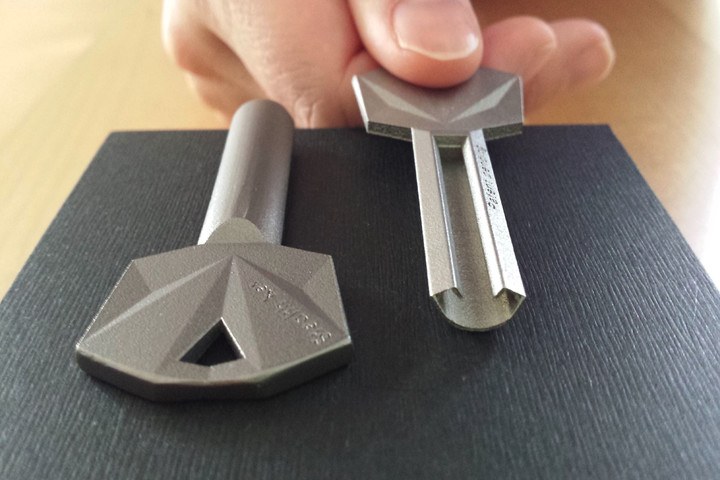
The idea that you might surreptitiously snap a photo of someone’s house key and build a duplicate from it to break into their home sounds like a James Bond plot twist. So too does a 3D-printed titanium solution, which hides its security features inside — thereby rendering it unscannable.
In fact, the so-called Stealth Key is the creation of Swiss company UrbanAlps, which figured out a way to use additive manufacturing to make keys that keep their teeth concealed from view. The result is an alternative to regular, run-of-the-mill keys that can be easily scanned and copied.
“It is made using 3D-metal printing, or more precisely selective laser melting,” company co-founder Alejandro Ojeda told Digital Trends. “Thanks to this approach, we can make complex internal structures that are hidden, to block 3D-scanning of the mechanical code. It is a very simple approach, but one of the most effective ones. If such keys were to be produced using traditional manufacturing it would be impossible or at least very expensive. However, thanks to 3D-metal printing it’s cost effective. Each single key printed is different, even in batches of 850 at the same time.”
“It represents a disruption, both product-wise and manufacturing-wise,” he said.
Ojeda said he started working on the Stealth Key following work in the research and development department of a gas turbine company, where he used 3D-metal printing to invent new turbine parts with increased internal complexity. He then left the company to do a Ph.D. in lasers at the Swiss Federal Institute of Technology before turning his attention to the idea of developing an unbreakable key.
“The first proof-of-concept was rather bulky, but it worked and we have made amazing progress since then,” he continued. “The real challenge is not so much designing the key, but the cylinder to read the key internals. Reliability is one of the main reasons why mechanical cylinders are still dominant — with 90 percent of market share — despite the existence of electronic locks. People take mechanical cylinders for granted, but these genius mechanisms work for 20 to 30 years without a single fault — something electronic systems cannot provide. And there is no battery to change, either.”
Costing around $200, a pair of Stealth Keys and a cylinder lock mechanism is not the cheapest option out there, although it is not dissimilar in price to other high-security systems boasting high-grade cylinders. But if there is one thing it is worth splurging on, it is the peace of mind that comes with knowing that your home is safe.
After all, you never know when a Swiss mastermind with a Ph.D. in lasers and a portable 3D scanner will want to try and break in!
NASA inflatable greenhouse could help feed astronauts on other planets
Why it matters to you
The ability to produce food on a sustainable basis will be an essential requirement of the human colonization of other planets.
If we hope to someday inhabit other planets, astronauts will need more sources of nourishment than the packets of freeze-dried space food they can take with them. It’s not just the nutritional value of fresh produce that has NASA interested in growing greens — researchers think that astronauts would also get a psychological boost from farming.
To that end, NASA collaborated with researchers at the University of Arizona to design an inflatable greenhouse that can be deployed in space and offer astronauts a sustainable bounty of fresh vegetables.
The greenhouse prototype was built as a “bioregenerative life support system” — meaning it recycles air, waste, and water. As astronauts breathe out, they release carbon dioxide, which the plants use to generate oxygen through photosynthesis. Water flows through the roots and back to a storage tank where it’s oxygenated and fortified in a constant cycle. To avoid radiation, the greenhouses would likely be buried under soil, and so would require an artificial light source.
“We’re mimicking what the plants would have if they were on Earth and make use of these processes for life support,” Gene Giacomelli, director of the Controlled Environment Agriculture Center at the University of Arizona, said in a statement to NASA. “The entire system of the lunar greenhouse does represent, in a small way, the biological systems that are here on Earth.”
One of the main goals of future space travel is to carry as little cargo as possible by using things found along the way, a principle called in-situ resource utilization. It’s expensive to launch a rocket. The lighter the cargo, the cheaper the costs. NASA hopes to collect resources like water from regions off Earth rather than carrying it all along.
Moving forward, the researchers will use similar greenhouse prototypes to determine if produce grown in the eighteen-foot-long, eight-foot-wide cylinders could sustain a group of astronauts.
Tech titans Facebook, Google identified as victims of $100M phishing scam
Why it matters to you
It appears that no one is truly safe from phishing attacks, as tech titans Facebook and Google apparently just fell prey to one.
The two high-tech victims of a $100 million phishing attack have been revealed, and they are no other than two of the biggest tech titans in the U.S. That’s right. Even the most technologically advanced among us can’t fully protect themselves from malicious intentions, as Google and Facebook have apparently fallen prey to an elaborate scam involving email phishing and fake suppliers.
According to an investigation and subsequent report from Fortune, the two Silicon Valley, California-based firms were swindled into paying a 48-year-old Lithuanian man more than $100 million.
So what happened? That man, Evaldas Rimasauskas, allegedly planned and executed an elaborate scheme that involved posing as Quanta Computer, a Taiwanese electronics manufacturer whose clients include, you guessed it, Google and Facebook. According to the U.S. Department of Justice, Rimasauskas carried out his crime over the course of two years, forging email addresses, invoices, and corporate stamps.
And it worked.
Rimasauskas successfully defrauded accounting departments at both Google and Facebook, convincing them to transfer tens of millions of dollars to what they thought was Quanta Computer. And by the time either company realized what was going on, the thief had stored over $100 million in bank accounts all across Eastern Europe.
In a statement, Facebook noted, “We recovered the bulk of the funds shortly after the incident and have been cooperating with law enforcement in its investigation.” Google echoed these sentiments, saying ia had “detected this fraud against our vendor management team and promptly alerted the authorities. We recouped the funds and we’re pleased this matter is resolved.”
As for Rimasauskas, the Lithuanian national denies any charge of wrongdoing. “Mr. Rimasauskas cannot expect a fair and impartial trial in the USA. The uncertainty is further increased taking into account the behavior of FBI agents during the interrogations of Mr. Rimašaukas, frightening him with long years in U.S. prisons, and the transfer of computers to U.S. law enforcement officials, which was made without the presence of the owner,” his lawyer, Linas Kuprusevičius, wrote in an email to Fortune.
AI can now duplicate anyone’s voice based on just one minute of training
Why it matters to you
An AI startup called Lyrebird just invented an algorithm that can mimic the voice of any person, based on just 60 seconds of speech.
Do you remember the cool Mission Impossible tech that lets Tom Cruise’s character Ethan Hunt mimic the voice of other characters using some nifty speech synthesis technology?
Well, a Montreal-based startup called Lyrebird (named after the sound-imitating bird) just invented it for real.
“We are developing new speech synthesis technologies which, among other features, allow us to copy the voice of someone with very little data,” Alexandre de Brebisson, one of the PhD students who developed the deep-learning tech behind the project. “Our experiments show that one minute of audio already contains a lot of the DNA of a human voice. We are able to learn a new voice with as little data because our model is able to capture similarities between the new voice and all the voices it already knows. Our models understand the underlying variables that make [one] voice different from another.”
Since the tech was shown off this week, de Brebisson said his team have received dozens of different suggested use-cases by email, some containing applications they’d thought of, and others containing ones that they hadn’t.
Some companies, for example, are interested in letting their users choose to have audio books read in the voice of either famous people or family members. The same is true of medical companies, which could allow people with voice disabilities to train their synthetic voices to sound like themselves, if recorded samples of their speaking voices exist. Another interesting idea is for video game companies to offer the ability for in-game characters to speak with the voice of the human player.
There are plenty more exciting opportunities, which have led to 10,000 people already signing up to be informed of the forthcoming beta version. “We will then add features over time, such as letting companies design a unique voice tailored for their needs, and control the emotion of the [voice] generation,” de Brebisson continued.
While it doesn’t sound perfect yet, it’s not hard to imagine how this might sound in just a few years. Combined with technology such as software for making convincing edits to the moving lips of a person who is speaking, “fake news” circa 2025 should certainly be a whole lot of fun.
Right?
AI can now duplicate anyone’s voice based on just one minute of training
Why it matters to you
An AI startup called Lyrebird just invented an algorithm that can mimic the voice of any person, based on just 60 seconds of speech.
Do you remember the cool Mission Impossible tech that lets Tom Cruise’s character Ethan Hunt mimic the voice of other characters using some nifty speech synthesis technology?
Well, a Montreal-based startup called Lyrebird (named after the sound-imitating bird) just invented it for real.
“We are developing new speech synthesis technologies which, among other features, allow us to copy the voice of someone with very little data,” Alexandre de Brebisson, one of the PhD students who developed the deep-learning tech behind the project. “Our experiments show that one minute of audio already contains a lot of the DNA of a human voice. We are able to learn a new voice with as little data because our model is able to capture similarities between the new voice and all the voices it already knows. Our models understand the underlying variables that make [one] voice different from another.”
Since the tech was shown off this week, de Brebisson said his team have received dozens of different suggested use-cases by email, some containing applications they’d thought of, and others containing ones that they hadn’t.
Some companies, for example, are interested in letting their users choose to have audio books read in the voice of either famous people or family members. The same is true of medical companies, which could allow people with voice disabilities to train their synthetic voices to sound like themselves, if recorded samples of their speaking voices exist. Another interesting idea is for video game companies to offer the ability for in-game characters to speak with the voice of the human player.
There are plenty more exciting opportunities, which have led to 10,000 people already signing up to be informed of the forthcoming beta version. “We will then add features over time, such as letting companies design a unique voice tailored for their needs, and control the emotion of the [voice] generation,” de Brebisson continued.
While it doesn’t sound perfect yet, it’s not hard to imagine how this might sound in just a few years. Combined with technology such as software for making convincing edits to the moving lips of a person who is speaking, “fake news” circa 2025 should certainly be a whole lot of fun.
Right?
Don’t expect OnePlus to act like all the other phone companies, because it won’t
Why it matters to you
When it comes to OnePlus, we should expect the unexpected, as it doesn’t intend to follow a strict release pattern for its phones.
We’re all used to smartphone manufacturers bringing out an updated version of their top device every year. The Galaxy S8 will surely be replaced by the Galaxy S9, and the LG G6 will almost certainly pave the way for the LG G7. OnePlus ignored the unwritten rule last year with the OnePlus 3T, a slightly updated version of the OnePlus 3, which arrived six months into the OnePlus 3’s life.
Does that mean we’ll now see a new OnePlus phone every six months? The answer is no, and it’s actually a good thing.
“We know the upgrade to the OnePlus 3T was not a conventional move, but we’re not a conventional company,” OnePlus’s head of European Marketing, David Sanmartin, told Digital Trends. “We wanted to bring some key hardware upgrades to our users faster than the typical product lifecycle would have allowed, and it’s been a well-received decision overall. But we can’t say whether we will take this same approach in the future.”
Timing
The reason why is an interesting look at how OnePlus is able to react to the changing smartphone market in a different way to its competitors. Describing the company as, “small and nimble,” Sanmartin said it launched the OnePlus 3T because the new hardware became available to use, and it was deemed important enough to integrate into the phone rather than waiting until a OnePlus 4 (or OnePlus 5, as rumor has it). By that time, the Snapdragon 821 chip used in the 3T would be old news anyway.
The OnePlus 3T gave us the chance to enjoy more power, a better camera, and a little larger battery, straight away. Timing played a big part in this, and will likely do so in the future. If better components come along, OnePlus has shown it’s in the position to quickly bring them to us in a revised version of its current phone.

OnePlus 3
OnePlus
While other companies, perhaps most notably Apple, release software updates throughout the lifetime of a phone to introduce new features; OnePlus doesn’t think this is enough. The 3T was its idea of what a feature-packed update should be.
“We implemented these hardware updates to create a much better user experience, that software updates cannot do alone,” the company told us.
Hardware and software updates
OnePlus is pleased with the response to the 3T, but the company isn’t sticking to a single strategy — don’t expect a six monthly update plan from the company just because it did it in the past. However, we should expect a new OnePlus phone — maybe the rumored OnePlus 5 — soon, surely?
“We are always thinking about our next products, but at this point we are still focused on the OnePlus 3T,” Sanmartin continued, adding, “We can’t share any information about future products at this time.”
Whatever happens with the next phone, OnePlus says it will take inspiration from its community during the development process. Sanmartin explained, “That is how we developed the OnePlus 3T, and it seems to have paid off.” It’s not just hardware the community behind OnePlus influences. Changes in the software team mean faster software updates in the future too — a pain-point for OnePlus owners since the beginning. The OnePlus 3T has just received an update to Android 7.1.1, and the March 2017 Android security patch, for example.
It’s fairly straightforward to place an accurate bet on when the next Galaxy, next iPhone, or most other major manufacturer’s new device will arrive. OnePlus is unorthodox, and considerably more unpredictable.
“OnePlus has always been a product company first and aims to create the best product for our community of users,” Sanmartin concluded.
We’ll just have to wait and see if this means we get one phone a year, two phones, or possibly even more than that; regardless of whether any fit in with a preset, annual launch schedule or not.
 AIVAnet