


Portland plans to convert poop into fuel
The city of Portland has come up with an unusual way to replace diesel fuel. It’s going to convert waste methane from sewage into renewable natural gas. That’s right — trucks in the future could run on poop.
Diesel engines are widely used all over the world to move goods, power equipment and generate electricity. But, they’re also one of the largest contributors to environmental pollution. Studies have linked diesel emissions to cancer, cardiovascular and respiratory issues, smog and global climate change. Plus, it’s a finite resource. That’s why cities like Portland are looking into cleaner, more sustainable alternatives.
Earlier this month, the Portland City Council unanimously approved the methane recovery project, which will replace 1.34 million gallons of dirty diesel fuel a year and cut greenhouse gas emissions by 21,000 tons a year. It will also reportedly generate around $3 million in revenue a year, and it will have less impact on the environment than natural gas drilling.
“We are creating a triple-win for the public in terms of revenue, climate action and cleaner air,” said Commissioner Nick Fish. “The renewable natural gas we will produce is truly local and homegrown, a by-product of the waste from every Portland household that we can now repurpose.”
Portland isn’t the first city to explore using wastewater as an alternative energy source. In 2011, New York City planned to turn its daily 1.3 billion gallons of wastewater into biosolids used to harvest methane and butanol. Wastewater has also been used to create clean drinking water (Bill Gates gave it a taste) and craft beer. But, if the idea of consuming former sewage makes you cringe, don’t worry — we’re right there with you.
Via: Auto Blog
Source: Portland Bureau of Environmental Services
Review: OWC’s Thunderbolt 3 Dock Gives Your MacBook Pro 13 More Ports to Work With
Last November, longtime Mac vendor OWC was among the first wave of companies to announce Thunderbolt 3 docks designed to expand the capabilities of the new MacBook Pro. It’s taken a while to finalize the product design, testing, and manufacturing, but OWC’s Thunderbolt 3 Dock is now just about ready to ship and we’ve had a chance to spend some time with a production-ready unit.
Priced at $299, OWC’s Thunderbolt 3 Dock includes an array of 13 ports to allow you to connect a host of devices to your MacBook Pro. It all comes in a package measuring about 9 inches by 3.5 inches and an inch thick, with brushed aluminum around the sides and glossy black plastic on top and bottom.
The design is relatively unobtrusive, although the OWC logo and “Thunderbolt 3 Dock” text on the front are fairly prominent. The dock is powered through a decently large external power brick, which cuts down on the size of the dock itself but means there’s one more piece of equipment to tuck away with all of your other cords.
As for the functional aspects of the dock, OWC has elected to put three frequently used ports on the front: an SD card reader, a combo audio in/out port for headphones and microphones, and a USB-A 3.1 Gen 1 port that delivers up to 1.5 amps of current. It’s a handy set of ports that are most likely to need regular access for connecting and disconnecting peripherals or swapping out memory cards.

The rear of the dock includes ten more ports plus the DC power input from the external brick. There are four more USB-A 3.1 Gen 1 ports, one of which is another 1.5A high-power port while the other three offer the standard 0.9A of current. Also included are an S/PDIF digital audio output port, a FireWire 800 port, and a Gigabit Ethernet port.

Next is a pair of Thunderbolt 3 ports, one of which is used to connect to your MacBook Pro while the other can be used to connect a Thunderbolt 3/USB-C display and/or additional Thunderbolt devices. Adapters can also be used to connect devices with other connectors. Finally, there’s a Mini DisplayPort to support additional displays.
Powering On
There is no power switch on the Thunderbolt 3 Dock, so as soon as you plug in the power brick and connect it to the dock, the unit becomes powered and a blue light comes on on the dock. Similarly, once you connect the dock to a computer, a green light comes on to signify the dock has an active data connection.
The blue and green LEDs are actually located on the bottom of the dock and so they can really only be seen as reflections off of the desk or other surface under the dock, as the dock is elevated slightly on small feet. The design makes it somewhat difficult to see whether the lights, particularly the green one, are on unless you’re in a dim environment. In day-to-day usage, however, things should just work and you shouldn’t need the lights, so having them on the bottom keeps them unobtrusive.
Data Transfer
I connected a USB 3.0 external hard drive to the dock and saw read and write speeds right around 100 MB/s, which isn’t the fastest connection but will likely be fine for many users. If you need faster speeds, you’ll want to use a drive with the latest USB 3.1 Gen 2 standard and connect it directly to your MacBook Pro.

I do not typically use wired networking in my home, but connecting my MacBook Pro to my AirPort Time Capsule via the Ethernet port on the dock I was able to max out my 200/20 internet connection just fine. The Ethernet connection was seamlessly recognized by my Mac from the dock.
Display Support
In line with Thunderbolt 3’s capabilities, OWC says its dock can support a single 5K display or two 4K displays. I connected an LG UltraFine 5K display via the dock and experienced no problems running the display and the dock’s hub capabilities simultaneously over a single cable.

OWC is still testing out various configurations, but you should be able to connect two 4K displays via the dock, one through a Thunderbolt 3 port (potentially with an adapter) and one through the Mini DisplayPort.
Charging Capabilities
With the dock using the Thunderbolt 3/USB-C standard, it can deliver power to your MacBook Pro through the same cable used for data, although the dock only supports up to 60 watts. That’s enough for the 13-inch MacBook Pro, but the 15-inch model can draw up to 85 watts, so it would charge more slowly through the dock than from its power adapter or even continue to drain depending on load.
On the USB-A side, the high-powered 1.5A ports are helpful for charging devices more quickly than a standard USB port or iPhone adapter, but don’t quite match the 2.1A or 2.4A you can get from an iPad power adapter.
Tidbits
I’m not sure if it’s something unique about my unit or my setup or if it’s a general issue, but the dock I received makes a quiet high-pitched hissing sound when powered on and connected to my MacBook Pro depending on what else I have connected to the dock. It’s not terribly bothersome and I’m sure it’s something I could get used to, but I did notice it and so it’s something to be aware of if you’re sensitive to that sort of thing.
Interestingly, the noise stops if an SD card is inserted into the dock, so one potential solution for those experiencing the issue might be to just keep a card in the slot at all times. Similarly, connecting a display to the second Thunderbolt 3 port also stopped the noise.
OWC does include a Thunderbolt 3 cable along with the dock, but it’s only a 0.5-meter cable. On the potential downside, that limits how far from your computer you can put the dock, particularly if you want to put the dock to the left of your computer and much of the cable’s length is then taken up simply reaching across the back of the dock. On the positive side, if you want to keep the dock close to your MacBook Pro, you won’t have a lot of excess cable to deal with on your desk.
Wrap-up
At $299, OWC’s Thunderbolt 3 Dock is a significant investment, but it’s not out of line with other full-featured Thunderbolt 3 docks that should also be hitting the market soon. It offers a wide variety of ports for maximum compatibility, a major plus for those encumbered by Apple’s decision to include only Thunderbolt 3/USB-C ports on the MacBook Pro. It also makes it easy to connect everything on your desk through just one cable so you can quickly pick up your computer and go.
Support for the latest USB 3.1 Gen 2 speeds would have been welcome, but when you’re potentially saturating the Thunderbolt 3 connection with displays and other accessories, it’s perhaps understandable that not everything can run at the highest speeds.
OWC is still awaiting official Thunderbolt 3 certification from Intel and Apple, and so these pre-certified review units may require a firmware update to bring them up to the final shipping version, but OWC is confident that it will receive the necessary certification and that the current advance units will reflect the performance of the final retail units.
Due to the pending certification, OWC isn’t yet able to commit to a specific launch date. The units are otherwise ready to go, so once Intel gives the approval and any final firmware changes are made, OWC will be able to begin shipping and we’ll keep you updated on that progress.
Note: OWC provided the Thunderbolt 3 Dock to MacRumors free of charge for the purposes of this review. No other compensation was received.
Tags: Thunderbolt 3, OWC
Discuss this article in our forums
AT&T Customers With Grandfathered Unlimited iPad Data Plans Will See Throttling After 22GB of Usage
AT&T today sent out emails to customers who continue to have a grandfathered unlimited data plan for the iPad, informing them that its unlimited status is essentially being eliminated on May 24, 2017.
Going forward, customers with an unlimited tablet data plan may see their data usage throttled when using more than 22GB of data during a single bill period. According to AT&T, data may be slowed down during times of network congestion.
While that’s in line with AT&T’s policy for its newly announced unlimited data plans, it’s a big change for iPad owners who are not used to having a data cap in place. Prior to the change, iPad owners with the grandfathered unlimited plan have not been subject to restrictions.
AT&T briefly offered unlimited iPad data plans after the original iPad was released in 2010, but phased them out just months later. Since then, customers who managed to purchase one of the plans have been able to hold onto them, making the unlimited plan highly coveted.
The plans required no contract and cost $29.99 per month, with customers able to transfer them to new iPads and even sell them to other iPad owners. With the change coming on May 24, the original unlimited iPad data plans will be much less attractive.
(Thanks, David and Eli!)
Tag: AT&T
Discuss this article in our forums
John McAfee’s ‘hack-proof’ phone secures the hardware — but what about the software?
Why it matters to you
Looking for an ultra-secure phone? John McAfee’s new device protects its hardware, but most hacks happen through software.
Digital security is a serious concern these days, and it seems like every week we hear of another vulnerability available to hackers who might want to gain access to your phone. Well folks, John McAfee thinks he has the solution, and has finally unveiled the plans for the “most hack-proof phone” ever.
The device is called the McAfee Privacy Phone, and it comes at a cost of $1,100. It was created in partnership with cybersecurity firm MGT and boasts a physical switch that allows the user to disconnect the battery, Wi-Fi and Bluetooth antennas, the camera, and the microphone.
That $1K-plus price tag is pretty steep, but it does highlight the fact that this phone is clearly targeted at enterprise users who might not mind paying a premium for a more secure phone. It’s also important to note that turning off all the communications gear isn’t something that users are supposed to do all the time — just if circumstances call for it.
The phone also has the ability to prevent being connected to StingRay or IMSI-catcher devices that could be used to intercept calls and messages for surveillance purposes.
Of course, there’s a few problems with this approach. As a report from The Verge notes, the real problem when it comes to smartphone security isn’t hardware — it’s software. Not only that, but the McAfee Privacy Phone runs Android — so it’ll be vulnerable to all the same software hacks as other Android phones. While hackers may not be able to gain access to the phone through the communications equipment, they most certainly could through software vulnerabilities.
There’s also an issue with the fact that turning off Wi-Fi and Bluetooth and disconnecting the camera and battery can pretty seriously hamper the user experience — and since it’s physical, anyone with access to the phone could switch the hardware features off — or on — without your knowledge.
In any case, the phone will go on sale later this year, and a version 2 is already in the works for 2018.
Detangle that desk with these mighty wireless mice
Wires are so last century, and at this juncture, the tethered mouse looks more than a bit antiquated. Wireless mice have become the standard for computer interaction. They just make sense: If you’re going to have an input device that constantly moves around by its very design, why would you want anything getting in the way? At this point, there are literally thousands of choices vying for your wireless dollar, from under $20 to well over $100. So which one is the best? While that’s certainly a subjective question, you can’t go wrong with any of the picks below.
The Best
Logitech MX Master ($70+)
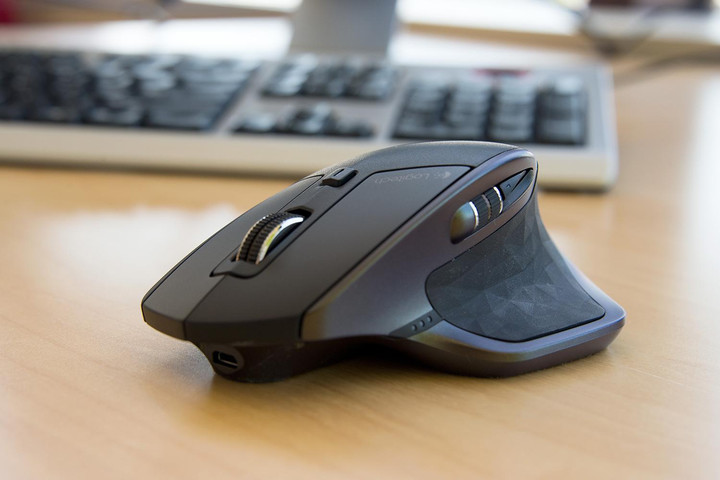
The MX series has been the cream of Logitech’s crop for high-end mice, and the company pulled out all the stops with the “Master” update to its much-loved MX Performance model. While the Master retains the basic shape of the MX line with its distinctive thumb rest flare, the body has been resculpted with a higher back and some eye-catching trim.
The scroll wheel now automatically switches between the gliding “fast scroll” mode and the more usable single-scroll function without the need to press a physical button, and a secondary scroll wheel lets you scroll horizontally with your thumb. Standard left, right, and middle buttons, plus forward and back buttons and a multi-tasting thumb button are all programmable in Logitech’s software.
But it’s what’s on the inside that counts. In addition to a new permanent rechargeable battery, the MX Master is one of the only mice on the market that works wirelessly over RF (with Logitech’s proprietary “Unifying” dongles, one of which is included) and Bluetooth, allowing dongle-free connection to most new laptops and tablets. A handy illuminated button on the bottom of the mouse allows you to switch between three devices, connected via dongle or Bluetooth, without any extra pairing.
The mouse only has two downsides. First, its $100 price tag, and second, its small and pointy forward and back buttons. If those are points of contention for you, the MX Performance (with more finger-friendly browser buttons) is still widely available, and often discounted now that its successor is on the market. Also, if you want a mobile version of this mouse, check out the superb MX Anywhere 2.
Buy one now from:
Amazon Best Buy
The Rest
Best mobile mouse — Logitech Marathon Mouse m705 ($27)
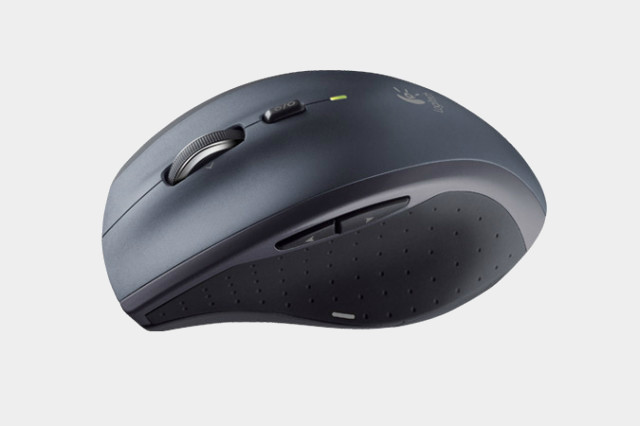
The Marathon Mouse m705 is actually a few years old at this point, and it’s not technically a mobile mouse. Logitech and its competitors sell much smaller models, and this one is often paired with keyboards for desktop sets. But it’s our pick for a great laptop companion because it’s a fantastic traveller. Not only is it smaller and lighter than some of the more elaborate desktop mice available, it’s designed to last for positively ages on a pair of standard AA batteries. The specifications page says that it has a maximum life of three years (yes, years), so even with intense use you’re looking at months and months without a battery swap.
There are smaller mobile mice available, but we’ve found them to be uncomfortable in my medium-sized hands, barely better than a laptop trackpad. The Marathon Mouse m705 has that Goldilocks “just right” quality, a fast-scrolling wheel, forward and back browser buttons plus a multi-tasking button.
The only drawback is that it uses RF wireless and Logitech’s low-profile Unifying receiver, not Bluetooth, so you’ll need an open USB port on your laptop. The MX Anywhere 2 mouse has the same dual RF-Bluetooth functionality as the MX Master above, but it’s smaller and more expensive than the Marathon Mouse m705.
Buy one now from:
Amazon Best Buy
Best ergonomic mouse — Evoluent VerticalMouse ($80+)
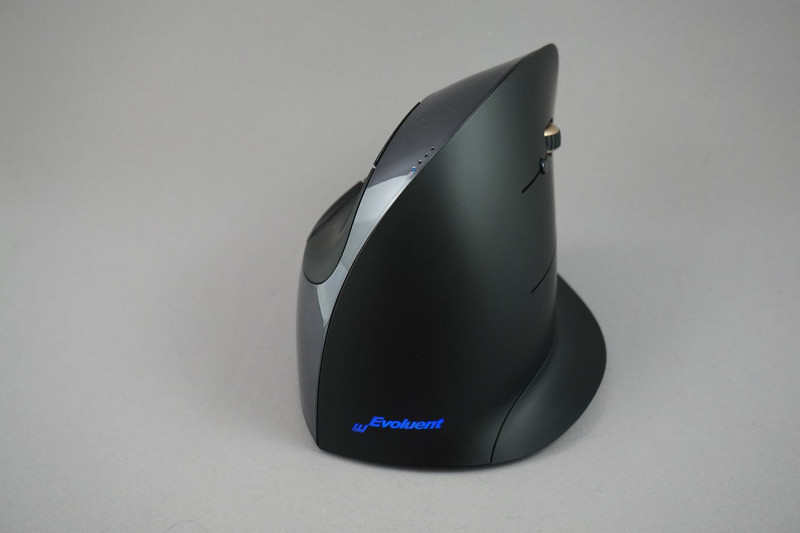
If ergonomics is your primary focus, the Evoluent VerticalMouse is our pick. We ran this bad boy through the gauntlet in 2016, and it’s still one of our favorite mice on the market. Overall, the VerticalMouse looks like a dorsal fin protruding from your desk. The unit tapers toward the flared base, keeping your hand elevated and allowing you to more aptly keep your wrist aligned with your forearm. This positioning relieves physiological stress, potentially minimizing fatigue and the risk of developing Carpal Tunnel Syndrome.
The unit is divided into three main elements. With the right-handed model, the button and wheel are located on the right side of the device. The left side incorporates a rounded indentation for your thumb to rest along. This setup allows you to grip the mouse at a 90-degree abduction angle when compared to a standard mouse.
A series of blue LEDs along the top ridge of the mouse illustrate the current DPI level while in use. One of the biggest drawbacks with this model, however, is that the mouse wheel does not click. Perhaps Evoluent will tweak this slight design flaw in later iterations. Read our VerticalMouse review here.
Buy one now from:
Amazon
Best trackball mouse — Logitech M570 ($28)
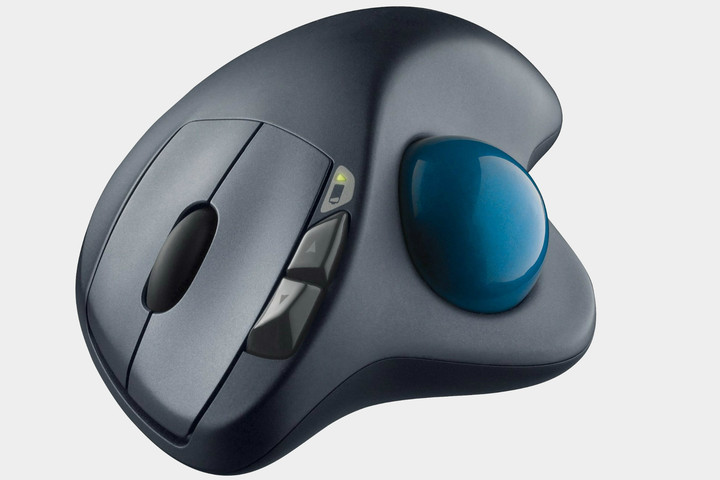
Trackballs aren’t all that popular these days, so your options are limited, and even more limited if you want one that’s wireless. The Logitech M570 is the clear standout in the limited field of conventional stationary trackballs thanks to is standardized mouse shape that puts the ball comfortably under your thumb instead of jutting out beneath your index or middle fingers.
That design choice leaves your fingers free for mouse-style click buttons, plus smartly-placed browser buttons that leave your thumb on the ball. The M570’s ball pops out without any extra pieces or tabs for easy cleaning, and it works with Logitech’s Unifying RF receiver (handy if you share a desktop with a fan of a standard mouse).
Buy one now from:
Amazon Best Buy
Best mouse for gaming — Razer Mamba ($150)

The Razer Mamba comes loaded with plenty of “handy” features, and given it weighs just over 4 ounces, the Mamba certainly won’t hold users back.
Customization is the name of the game with the Mamba. On the bottom of the mouse, there are two hex screws, which are solely for the purpose of adjusting the click force on a user-by-user basis. The Mamba also incorporates Chroma lighting accents on the sides and along the scroll wheel. Users can use either the default color schemes or customize their own. These colors can also be synced with other Chroma-enabled devices.
The lighting accents aren’t frivolous either, as the lighting system can actually be used as a battery life indicator. If the Mamba’s battery drops below preferential levels, the mouse will flash red. Similarly, while the Mamba is charging, the lights will turn green as the battery approaches a full charge. Based on our own testing, the Mamba endured nearly 30 hours of game time on a single charge. This was with the the mouse set at 1,800 DPI, and while utilizing the Mamba’s color cycling effects.
While there are wireless mice with larger battery capacity, 30 hours of continuous use should be enough for the vast majority of individuals. Even if one were to exhaust the Mamba’s batteries, the unique ergonomic design will certainly keep users from feeling the fatigue. The mouse doesn’t come with your run-of-the-mill scroll wheel, either. Rather than simply limiting users to two-directional scrolling, the wheel can be “rocked” left or right for horizontal scrolling. It’s a convenient feature, though it’s not often the most useful. That said, those who use the Mamba for gaming and web surfing will definitely appreciate the added mobility.
Lastly, Razer claims that the Mamba’s wireless latency is one thousandth of a second. This is faster than human reaction time, so if you’re a split second late when trying to snipe your enemy, you really only have yourself to blame. Read our full review here.
Buy one now from:
Razer
Best budget mouse — Microsoft Wireless Mobile Mouse 3500 ($15+)
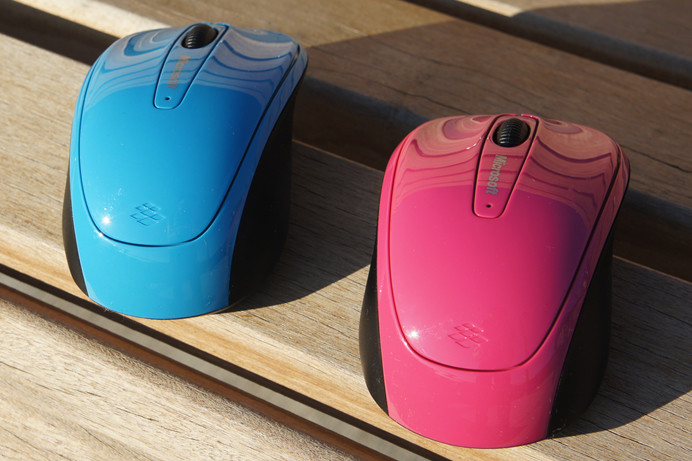
The Microsoft Wireless Mobile Mouse 3500 is a economic, no-frills alternative. The wireless mouse may not blow you away with adjustable click force or customizable accents, but if you’re in need of a wireless mouse and want to spend less than $20, this is your best bet.
The Mobile Mouse 3500 uses the company’s BlueTrack Technology, which capitalizes on a combination of both optical and laser precision for reliable tracking on an array of surfaces. The symmetrical, ambidextrous design also makes the Mobile Mouse 3500 perfect for users of left or right-handed persuasion.
And unlike the other premium mice on our roundup, Microsoft’s offering can last up to eight months on a single charge, which a welcome feature to say the least.
Buy one now from:
Amazon Microsoft Best Buy
MIT built a robot that can 3D print an entire building in about 14 hours
Why it matters to you
A new robotic system could make construction faster, cheaper, and more adaptable.
Never short of an innovative idea or two, researchers at the Massachusetts Institute of Technology developed a new robotic system capable of 3D printing an entire building.
The system involves a tracked vehicle that carries a giant robot arm with a smaller precision-motion arm at one end, able to extrude concrete or spray insulating material. It also has additional digital fabrication end effectors, such as a milling head.
“For this project, we designed a robotic system that’s mobile so that it can go on site, gather its own energy through photovoltaics, and gather its own material to carry out fabrication using local materials like compressed earth or even ice,” Steven Keating, a mechanical engineering graduate who worked on the project, told Digital Trends. “Most importantly, we wanted to make sure that this could integrate into a construction site tomorrow — and would have incredible benefits compared to regular construction techniques.”
These benefits are numerous. For one thing, it can produce structures faster and cheaper than traditional construction methods. It could also be used to make more customized creations, based both on the local materials available and environmental conditions.
“One of the things we’re most excited about is being able to gather environmental data and use this to design on the fly,” Keating said. “If you look at nature, each structure is adapted to its environment. In the future, we imagine that we could use sensors to determine things like ground condition and use all of this information to optimize a design — from thermal sensors to figure out where the floor insulation should go, to solar sensors to work out where the windows should be located.”
This construction process could lead to interesting unique structures, such as curved walls on a building to help it withstand strong winds or certain walls which more insulated than others according to outside temperatures.
Possible applications for the robot 3D printer could include anything from rapid construction of new houses in disaster areas to the promise of building in space at some point.
For now, though, you will have to be satisfied with a proof-of-concept build carried out by the researchers, in which they used the technology to 3D print the basic structure of a 50-foot-diameter, 12-foot-high dome. Total print time? Just 14 hours.
While that is certainly impressive, however, not every aspect of the 3D-printing work is easy.
“One challenge when you’re working on large-scale is that everything becomes a lot bigger in terms of effort,” Keating concluded. “If you want to do a quick test print with a small 3D printer, you can easily do 10 of them in a day. With this, even a single test is a big process. For example, the dome that we created is thousands of pounds of material. Just taking that down is an enormous challenge.”
Time for a deconstruction robot, perhaps?
NASA pushes first launch of its Mars rocket to 2019
The Space Launch System (SLS), the heavy rocket NASA plans to send humans to Mars with, won’t get its first launch until 2019. Tech problems have delayed the project years later than Congress’ originally estimated it would debut, but space agency officials have confirmed that the big lifter’s initial flight will be pushed back again from late 2018 to sometime in 2019.
A NASA official confirmed the delay in a letter appended to a Government Accountability Office report noted that the rocket most likely wouldn’t make its November 2018 first launch deadline. That flight will test the SLS and Orion capsule attached to it, which the agency plans to use to house humans on missions to the Moon and Mars.
Last September, independent analysis deemed the Orion program behind schedule and in danger of going over budget, which is one factor in pushing back the combined launch. The program requires 12 months of work to integrate the Orion in with the crew capsule before delivering it for launch, according to SpaceNews.
While planning for an unmanned debut launch was already strenuous, NASA announced in February that it would consider adding humans to the initial test flight. Officials admitted that adding humans to the equation would likely delay the launch anyway, but it’s unclear if this was a prime factor in the latest decision to suspend the first flight until 2019. If it’s pushed back any farther, it might run behind SpaceX’s planned launch mission, which was itself recently delayed until 2020.
Via: Ars Technica
Source: Government Accountability Office report (PDF)
We destroyed a collectible Doritos bag to get at its hidden MP3 Player
Junk food and summer blockbusters go hand in hand — from the nachos, popcorn and candy you buy at the cinema, to action-hero faces plastered on every brand of potato chips at the supermarket. This has been the way of the world as long as I can remember, but this summer, the pairing may have reached its apex. In a perfect storm of brand synergy, nostalgia and guilty pleasures, Marvel has decided to release the soundtrack to ‘Guardians of the Galaxy Vol. 2’ in the most unconventional format imaginable: a bag of Nacho Cheese Doritos.
Like Frito-Lay’s last “smart bag,” the album-in-a-Doritos-bag gimmick is a bizarre, yet weirdly delightful marketing mess. The film’s soundtrack isn’t hidden in the bag as a CD or thumb drive, nor is it a redemption code for iTunes or Google Play — the album is literally built into the Doritos bag as a faux-cassette player, complete with a headphone jack, buttons to play, rewind, fast-forward, change volume or stop and a mini-USB port to recharge. Again — this is a bag of tortilla chips that you can recharge.

The moment new of this absurd product tie-in reached Engadget, our team had questions. Does it sound any good? Can you transfer the music to your phone? If you tear the bag apart, are you rewarded with a halfway decent media player? We resolved to track down a bag, destroy it, and find out.
You can tell at a glance that the ‘Guardians of the Galaxy’ Doritos aren’t your typical bag of snack chips. For one, the bag itself comes in a display box decorated to look like a vintage stereo, with printed dials and a window peeking through to the bag’s embedded media player. Inside the box are instructions (plug in headphones and turn it on, of course) and an extremely cheap headset reminiscent of 1990s “walkman style” stereo cans with a thin metal headband and flimsy, foam-covered speakers. While the headphones do look a lot like the pair Chris Pratt wore in the original Guardians movie, they put out decidedly low fidelity sound. Maybe it’s an intentional nod to the MP3 player’s facade: cassette tapes never sounded that great anyway.
Either way, the bag’s music player doesn’t need cheap headphones to be mediocre. The ports on ours were so misaligned that we actually couldn’t get the headphones to plug in until we opened the bag and shuffled around the internals. When we finally got the audio port lined up, it worked well enough to fulfill its novelty — but the music was a little distorted, even on good headphones. Fortunately, this is the fault of Doritos’ cheap media player, not the music itself: plugging the bag’s mini-USB charging cable into a PC will let you download the entire album as DRM-free MP3 files encoded at 320kbps.

The novelty of asking someone if they want to listen to music from a snack bag is worth a few laughs, but at $29.99, this is probably the worst way to buy the film’s soundtrack. Getting the music files out of the bag is a bit of a chore, and tearing it apart to get at the electronics doesn’t yield much of a reward — the Doritos MP3 player is little more than a cheap, exposed circuit board sandwiched between two pieces of foam. Without the snack bag, its buttons are too tall and awkward, the audio port is exposed and flimsy and it has no visible user interface to speak of. It’s not even worth pillaging for the player’s microSD card, which holds a paltry 256MB of data. Looks like we destroyed the eBay value of this season’s most ridiculous collector’s item for nothing.
Fitbit says that Flex 2 didn’t explode on its own
Wisconsin resident Dina Mitchell said she suffered second-degree burns on her arm after her Fitbit Flex 2 suddenly caught fire on Tuesday, while she was reading a book.
Today, Fitbit says that didn’t happen.
“Based on our initial investigation, including testing of her device by a leading third-party failure analysis firm, we have concluded that Ms. Mitchell’s Fitbit Flex 2 did not malfunction,” a Fitbit spokesperson says. “The testing shows that external forces caused the damage to the device.”
Fitbit’s conclusion suggests the Flex 2’s lithium polymer battery didn’t overheat after all. Lithium-ion batteries are often the culprit behind exploding devices like the Samsung Galaxy Note 7 or the Basis Peak wearable (both of which were recalled).
For now, Fitbit says it hasn’t received any other complaints of exploding Flex 2s and the company encourages owners to continue wearing the fitness trackers without fear. Yep, even while reading a book.
“The health and safety of our customers is our top priority and, as such, Fitbit products are designed and produced in accordance with strict standards and undergo extensive internal and external testing to ensure the safety of our users,” the spokesperson says.
Elon Musk wants to build a traffic-skipping tunnel utopia
Back in December, SpaceX and Tesla founder Elon Musk sent a frustrated tweet vowing to alleviate traffic by grabbing a tunnel-boring machine and going to work. While this seemed like the usual What If thought Musk dispatches to the Twitterverse, it seems he’s actually going into the tunnel business with his adorably-named new venture, The Boring Company. Today, the futurist released a concept video for what an underground tunnel network might look like in today’s car-focused cities.
When a vehicle drives on to a street-level sled platform, it lowers down to a subterranean network of tunnels and automatically slides the locked-in car to a high-speed track before spitting it back out to rise to its chosen destination. Pedestrians and bikers can walk into an enclosed pod and similarly rocket around below the surface. There aren’t any details or accompanying statements, but it’s certainly a novel concept given that most transportation concepts focus on efficient mass transit, not bypassing traffic-jammed freeways.
Earlier this week, a SpaceX employee posted a photo of The Boring Company’s first digging machine. The pic was removed, but Business Insider saved a screenshot for posterity:

Doubling down on his tweet didn’t come out of nowhere, though. Musk began digging an experimental “demo tunnel” in the SpaceX parking lot back in February. He doesn’t need permits to dig on private company property, but he would need to get them from the city of Los Angeles should he want to dig beyond SpaceX’s campus.
Source: YouTube
 AIVAnet