


Synthetic material replicates photosynthesis to generate energy, clean air
Why it matters to you
Scientists have figured out how to use a synthetic material to trigger artificial photosynthesis, generating energy and converting greenhouse gases into clean air.
Scientists at the University of Central Florida have discovered a method for triggering artificial photosynthesis using a synthetic material — opening up a new way to both generate energy and also convert greenhouse gases into clean air.
“The practical applications of this work include the development of future technology that will transform CO2 (carbon dioxide) into useful materials, including what we call ‘solar fuel,’” Dr. Fernando Uribe-Romo, a research professor who worked on the project, told Digital Trends. “This is very important because at the rate we currently emit CO2, plants on earth are not able to fixate this CO2 back into the earth — resulting in accumulation in the atmosphere, which is why we have global warming.”
The work involved the preparation of materials called metal-organic frameworks (MOFs). These materials contain nanometer-sized holes, making them small enough to absorb carbon dioxide into the material. They are then able to capture sunlight and store its energy in chemical bonds, transforming carbon dioxide into an intermediate state between CO2 and sugar.

Previous work by scientists has demonstrated that MOF materials can be used in this way to absorb energy from natural light. However, those earlier materials were both pricey and rare, and scientists have had difficulty in developing alternative materials able to absorb sufficient energy to trigger photosynthesis.
“We made MOFs that contain titanium, a metal that is used commonly in artificial photosynthesis,” Uribe-Romo continued. “We added molecules that we call ‘light harvesting antennae’ that can help capture sun rays to promote the chemical transformations at more efficient rates.”
These light-absorbing materials are called N-alkyl-2-aminoterephthalates, and allowed for the absorption of blue light.
The eventual target, Uribe-Romo said, is to make synthetic materials that are as efficient as plants, or even more so, when it comes to carrying out photosynthesis. That could still be a way off, however. Right now, what the team has demonstrated is that this is a feasible technology. Next up is plenty more R&D to optimize the technique for real world use-cases.
“I foresee these materials being utilized primarily in large scale technologies that produce large amounts of carbon dioxide, for example power plants or in gas flare at oil refineries or oil drill sites,” Uribe-Romo concluded.
The work is described in a new paper published in the Journal of Materials Chemistry A.
AMD Radeon Crimson ReLive Edition 17.4.4 adds support for ‘Dawn of War III’
Why it matters to you
Gamers who utilize a Radeon graphics card will want to grab these drivers post-haste — especially if they’re planning on doing battle in Dawn of War III.
AMD released version 17.4.4 of its Radeon Software Crimson ReLive Edition drivers, which fixes several known issues and ensure that gamers can be confident they are getting the best possible performance from their hardware setup. The latest iteration of the package should be warmly received by users planning to put their AMD graphics card to work while running Warhammer 40,000: Dawn of War III.
Version 17.4.4 adds support for the hotly anticipated real-time strategy game. The company claims that the drivers offer improvements to performance as great as seven percent when measured against a Radeon RX 580 8GB graphics card utilizing Version 17.4.3 of Radeon Software Crimson ReLive Edition.
Alongside support for Dawn of War III, which launched on Thursday, the drivers also implement a host of other bug fixes. For one, the issue causing corruption as a result of the use of HDMI scaling on certain monitors has seemingly been taken care of, according to materials released by AMD.
In terms of other recent releases, Battlefield 1 should no longer stutter while in Multi GPU mode at 4K display resolutions with DirectX 11 being employed. Meanwhile, Mass Effect: Andromeda will display HDR colors correctly on systems running the Creators Update for Windows 10, an issue that had plagued gamers since Microsoft released the update earlier this month.
Additionally, graphics cards that are part of the Radeon RX 550 series should no longer suffer a hard hang when the user has not rebooted the system for a long period of time.
A reboot prompt has been reinstated to the Radeon Software installation process, which was apparently liable to disappear as a result of a conflict with AMD XConnect technology system configurations. Finally, some incorrect or unavailable feature descriptions have been addressed in the Radeon Settings menu.
Full release notes, instructions, and installation packages for various operating systems are available from AMD’s support site.
Apple may use Wi-Fi routers for wireless charging, according to patent filing
Why it matters to you
Needing to worry about charging could soon be a thing of the past and Wi-Fi routers could play a big role in that.
Apple may be looking to revolutionize wireless charging. The company has long been rumored to implement a new wireless charging technology into the next flagship iPhone — a wireless charging technology that does away with charging mats.
We don’t yet know exactly how the new technology will work, but Apple Insider uncovered a filed patent that could show us another piece to the puzzle. The filing describes a few ways that Apple experimented with wireless charging, but perhaps the most interesting is that a phone could draw power from a Wi-Fi router.
The router would essentially use dual polarization and dual frequency antennas, which could help offer a longer charging range — so eventually you could be able to walk around your house while your device is charging one day.
Of course, this is just a patent filing — there is no official word from Apple on whether or not the company is pursuing this type of technology, or if it is looking into other wireless charging techniques. It is also possible the rumors have been false all along and the iPhone will not end up with any wireless charging whatsoever.
Another part of the patent filing shows Apple using other cellular nodes and even signals from a satellite for charging — but the Wi-Fi router does seem to make the most sense.
Hopefully, Apple’s implementation will take the form of a little more than just a wireless charging mat. It is expected that we will see a total overhaul of how we handle charging in the next few years. Companies like Energous have demonstrated true wireless charging technologies, in which users can walk around the house while their device charges. Energous’ tech didn’t use a Wi-Fi router, but rather a series of stations that can beam energy from certain distances. For example, there is a short-distance option that’s intended for desktop use, and a long-distance base that can beam energy up to 15 feet.
We will have to wait and see if Apple’s tech is anything like Energous’ but rumors suggest Apple is partnering with Energous for the iPhone.
Smartphones suck at low-light photos, but the right software could fix that
Why it matters to you
Smartphones are notoriously bad at low light, but a Google engineer just shot what could be the most detailed low-light smartphone photos yet.
When the average person accepts a dare, the result may range anywhere from a few stitches to some embarrassing photos. But when a Google software engineer accepts a challenge, the result might just be a solution that solves a common problem.
After Florian Kainz, of Google Research’s Gcam team, showed his co-workers a night landscape he’d shot with a DSLR, he was challenged to take the same photo, but with a smartphone. The result? A peek at a shooting and editing process, which he documented in a Google blog post, could eventually wind up in future Google smartphones, like the Pixel.
Kainz took inspiration from the HDR+ mode that combines multiple smartphone photos for better quality, as well as SeeInTheDark, an experimental app that produces low-light images by merging photos and dropping the resolution to a single megapixel. Using similar multiple-shot techniques, Kainz set out to see if he could shoot a photo in the dark but without the noisy images from SeeInTheDark or the limitations of HDR+.
He decided to use a similar bracketing method of merging multiple photos together to get better – and brighter – results. Unlike the automatic HDR+ feature, he merged long exposures instead of images taken at a tenth of a second, using the smartphone’s longest available shutter speed (four seconds for the Nexus 6P and two seconds for the Pixel). The longer exposures would be brighter and merging multiple brighter photos would produce better results, he theorized.
But first, he had to tackle the challenges all cameras face in the dark: focusing. Cameras need light to focus, which means even DSLR users need to switch to manual focus to shoot at night. Kainz then had to program an app that allows the camera’s focus to be manually set. For landscape photos, setting the camera’s focus at infinity worked for most of the subjects he shot, he wrote. The app also allowed him to control the shutter speed and ISO, as well as shooting in DNG, a type of digital negative with more control over the editing process.
Manual camera apps aren’t anything new, but Kainz’s experimental app also shot up to 64 single photos with one press of the shutter button – over six times the maximum ten frames the HDR+ will capture. To test the app, he shot at a number of locations during the light of a full moon as well as nights with no moon.
Kainz was able to successfully shoot low-light shots with detail not possible before, including capturing the Milky Way.
Those shots, with as many as 64 single photos including some black exposures with tape over the lens, were then taken into a desktop photo editing program and merged to eliminate the grain of high ISO. In scenarios where the ground or sky wasn’t sharp, he combined the images using layer masks to determine which parts of which photo showed in the final image.
The result? While the resolution still isn’t the same as a DSLR, Kainz was able to successfully shoot low-light shots with detail not possible before, including capturing the Milky Way.
While the process still requires a tripod, Kainz says an app that could handle the merging of those 64 photos could make low-light photography from a smartphone more accessible, even for users that have no idea how to merge 64 photos or how to use layer masks. “Trying to find out if phone cameras might be suitable for outdoor nighttime photography was a fun experiment, and clearly the result is yes, they are,” he wrote. “However, arriving at the final images required a lot of careful post-processing on a desktop computer, and the procedure is too cumbersome for all but the most dedicated cellphone photographers. However, with the right software a phone should be able to process the images internally, and if steps such as painting layer masks by hand can be eliminated, it might be possible to do point-and-shoot photography in very low-light conditions.”
Kainz doesn’t say whether Google is working on an app that could do all the heavy processing without a desktop computer, but he says the software might just be possible. To see the rest of the shots from the experiment, check out Kainz’ Google Photos album.
Move over, Lego! Pixio building blocks click together with magnets
Why it matters to you
Legos are great, but they can be a bit limiting. Not so with Pixio, which depends on magnets instead of grooves for connection.
Legos are so yesterday. The building blocks of the future are here. Meet Pixio, a new set of magnetic blocks here to ensure that the only obstacle you have to overcome in your construction process is your own imagination.
Described as an “elegant magnetic construction set in which each cubic block can be attached to either side of another block,” Pixio allows architects, artists, and creatives as a whole to create pieces that look like pixelated art. Trust us, it’s trendy.
Each Pixio block can be connected however you want, thanks to its carefully engineered system of powerful magnets. Without any visible fixing elements, you can create just about any object your heart desires in the style of pure pixel art. Unlike Legos, you won’t have to worry about connecting at specific points. Just place it … well, anywhere.
“Many construction sets are available, but we wanted to have one that looked perfect: Without prominent connecting elements, no complicated parts of any kind, and that could be easily assembled and disassembled,” the Pixio team explains on its Kickstarter page. “For this purpose, we chose the ideal shape — a cube, like a pixel in the digital world.” And as for its connectors, Pixio depends on magnets instead of ridges and dents so that any one of the cubes’ sides can be connected with one another.
Each Pixio block measures 8 millimeters cubed and weighs just over a gram. Inside are six powerful magnets whose polarity has been arranged so that the cube can be connected in any sequence on any side. The Neodymium (Nd-Fe-B) magnets found in Pixio promise to lose no more than 2 percent of their magnetic force in five decades, so you and your children (and maybe even your grandchildren) can play with the same set. Pixio is available in 16 colors, and for $19, you can get 50 blocks in six of these colors. If you want all 16 colors, you can get a set of 800 blocks for $149. Blocks have an estimated delivery date of August 2017.
The Royole Moon Viewer is beautiful, but not very functional

The Royole Moon Viewer looks pretty, but doesn’t always work as well.
The Royole Moon Viewer headset was built to work like a stand alone VR cinema. A place where you can watch movies, listen to music, and view things in both 2D and 3D. You can use it to view .mp4 videos, listen to music, and even browse the internet. Unfortunately while it has a design that looks good, this doesn’t exactly translate well into user experience. We’ve got the details here!
Read more at VRHeads.com
Tylt Energi Pro backpack review: Would you like a bag with your battery?

Tylt’s excellent Energi Pro backpack comes with a 20,100mAh portable battery, 12 zippers, and one of the most comfortable set of straps I’ve ever worn.
I have a bag problem. It started years ago when I was looking for a decent messenger back to sling across my shoulders while talking through the city, but since then it’s extended to backpacks, too.
I am constantly searching for the perfect combination of design, comfort, space and features, and with the Tylt Energi Pro I think I’ve found it.
See at Tylt
The hardware

First, let’s get this out of the way: this is a big bag. At 19.5 inches tall by 13.5 inches across and 13 inches deep, the Energi Pro is not going to disappear behind you. It may even have trouble fitting underneath some airplane seats.
But with those dimensions you get two huge compartments, including a main horizontal area that is perfect for camera equipment or other large items that you don’t need access to at all times. The laptop compartment is more traditional, and can hold a 15-inch laptop in its padded, secure sleeve, as well as a tablet and other accessories in a mesh capture.
12 compartments in which to lose your keys, or realize they were in your hand this whole time.
In all, there are 12 compartments, from a small top reinforced sunglasses case to a few secret areas that can hide change and other small niceties. Many of the zippers themselves are water resistant, as is the bag’s external Polyester material itself (though not waterproof).
The gray color scheme isn’t particularly to my liking — I prefer the blue-and-black combination of the cheaper Energi bag) — but everything else, from the comfortable straps and lumbar-reinforced padded backrest to the many thoughtful design touches, suits me just fine.
The battery

One of the main draws of such a bag is the inclusion of a battery, and the cable routing that is built into the design. The former is fine — it’s a high-quality 20,100mAh cell that has two USB-A ports and a USB-C port (as well as a Micro-USB input for charging the battery itself) — and holes up in a side pocket.
I don’t endorse buying a bag for its included battery, however high quality, since it just adds unnecessary cost, but Tylt’s integration is top-notch. The battery supports Quick Charge 3.0 from one of the USB-A ports, and the Type-C port can do USB-PD, which is a nice bonus.

A bag for your cables, water bottle, or anything else you want to hide.
And if you’re into overzealous cord management, the Energi Pro has a network of openings that allow you to snake cables from any of the three ports, when the battery is stowed in the side pocket, to number of compartments within the bag.
I’ll admit to only doing this for a short time, since when I’m traveling I generally only have a couple cables with me and don’t like the idea of them being confined to a particular place in my bag, but it’s there if you want it.
The convenience factor

When I look for a bag, I want it to have places to put all my things, but separated in such a way that makes sense to my brain. The Energi Pro is such a bag: its zippers are logically placed, and despite the lack of a separate side water bottle pouch (the included cable pouch doubles as an optional water bottle holder) I have few complaints about it. I have now taken the Energi Pro on four overseas trips, and have been thankful for its spaciousness and comfort each time.
A big bag with great design, lots of storage, and an enormous battery.
That said, someone who wants a more traditional top-zipper main compartment will be disappointed here: the design is more akin to a camera bag than a typical tech. And at $149, it’s not cheap, especially if you already have a nice, big portable battery and don’t need the included one.
But if that same person is looking for a versatile, well-designed and high-quality travel backpack with a few neat features and some charming quirks — the back’s laptop compartment gingerly swings open in TSA-approved style, and there’s an RFID-protection area for cards and other personals — this will be perfect.
See at Tylt
Have you put a case on your Galaxy S8?
To cover or not to cover your Galaxy S8…
 Samsung’s Alcantara suede case.
The question of whether you should put a case on your phone comes down to individual preference, but the Galaxy S8 may be causing more angst in this area than usual. That’s because, as good looking as the phone is — in either black, silver or Orchid Gray — it’s very slippery, and the sliver of an aluminum frame makes it pretty difficult to grip.
There’s also the issue of easily finding the back fingerprint sensor, which is largely flush with the glass back and difficult to press sight unseen. Finally, there’s the glass itself, which, while not easy to scratch, is still glass.
So, are you using a case on the Galaxy S8? If so, which one? A cursory look at our forums reveals two buzzing threads, one for the Galaxy S8 and the other for the S8+, each full of recommendations.
sublimegolf
04-06-2017 01:36 AM“
I’m excited about the original cases. The silicone and especially the alcantara one.255999
Reply
Some people are opting for the official Samsung cases, such as the Alcantara suede model which, at a cool $49.99, is not cheap.
VW Maverick
04-03-2017 08:19 PM“
Got my first of many.
The $4 Ringke Onyx.Mav. :cool:https://uploads.tapatalk-cdn.com/20170404/b97914dd5cafcdd68c10de491b54361c.jpg
Reply
Others are going super cheap, like the $9 Ringke Onyx and $10 Spigen Liquid Air Armor, which has become my case of choice.
More: Spigen’s Galaxy S8 cases, reviewed

jcp007
04-21-2017 04:08 PM“
I was pleasantly surprised by how much more slim the GS8 Otterbox Defender case is compared to the one on my GS7. At it’s thickest point on the top and bottom of the GS8 case, it’s thinner than the Defender of the GS7. The cutout on the back provides a perfect visual reference for those making such a big deal about the placement of the fingerprint sensor. I have medium sized hands and have no…
Reply
Those looking for a bit more protection, and are willing to put up with some bulk, are turning to the tried-and-true Otterbox Defender, which is reportedly slimmed down in this year’s model.
What’s your Galaxy S8 case of choice? Sound off in the forums!
Samsung Galaxy S8 and S8+
- Galaxy S8 and S8+ review!
- Galaxy S8 and S8+ specs
- Everything you need to know about the Galaxy S8’s cameras
- Get to know Samsung Bixby
- Join our Galaxy S8 forums
Verizon
AT&T
T-Mobile
Sprint
How to customize the Galaxy S8’s Always On Display
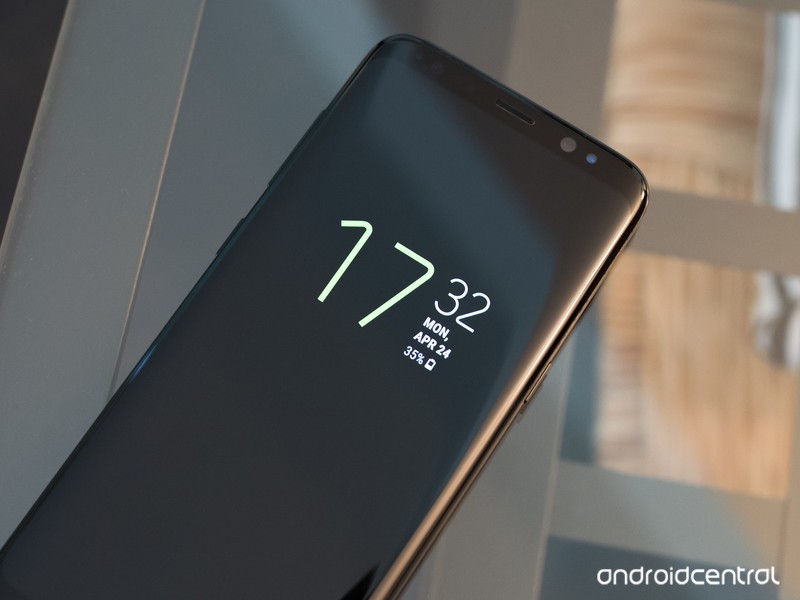
Samsung has slowly improved its Always On Display — here’s how to get started with it.
Even when your Galaxy S8’s display is “off,” it isn’t really off. Always On Display triggers right away, and continues to show you useful information that’s available at a glance so you don’t always have to turn on the whole display just to check the time or see if you have notifications. It’s a neat tool that works well right out of the box, but is even better once you get into the settings and customize things a bit.
How to customize Always On Display
To get started with customizing the Always On Display, head to Settings, Lock screen and security then Always On Display. Now let’s see what’s in there and what you can do with it.You have six different main clock styles to choose from: digital clock, analog clock, world clock, calendar, image and edge clock. They’re all pretty self-explanatory and have small previews of what they look like generally.
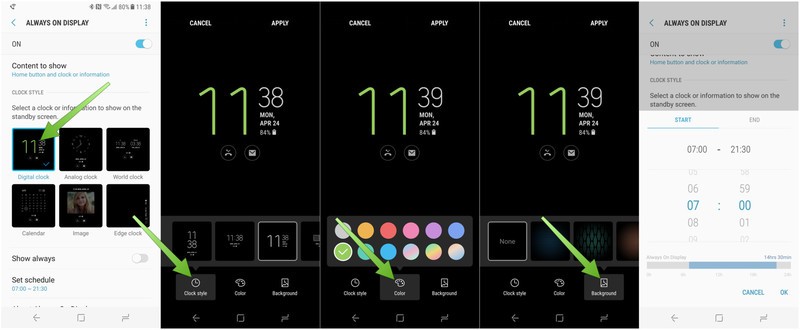
Tap the Always On Display style you want to use, and you’ll launch into a customization screen where you can tweak different aspects of the screen.
- The customization options differ based on which of the styles you’re working from, but basically come down to the clock style, color and background.
- With a few of the styles you’ll also be able to tap on blank spots on the screen to add more information like a second clock or an image.
To change different aspects of the screen, tap the buttons at the bottom of the editor to see the different options — swipe to the left to see extra options, if available.
Once you’re all tuned up just how you like it, tap Apply at the top of the screen.
Now stay put in the Always On Display settings, because there are a few more changes you can make aside from the design.
- By default, the phone is set to always show the Always On Display (I mean, it’s right in the name!) but you don’t have to keep it that way — you can set a schedule for when it is turned on.
Tap the Show always toggle to turn it off, then tap Set schedule to choose when Always On Display is enabled.
- For example you can only have it on during the working day, and off at night, to save battery.
Scroll to the correct start time, then tap End and scroll to the correct end time and tap OK to set the schedule.
After a little back-and-forth tweaking things, you’ll find a combination of styles and settings that work for you. It’s a great way to customize the look and functionality of your Galaxy S8.
Samsung Galaxy S8 and S8+
- Galaxy S8 and S8+ review!
- Galaxy S8 and S8+ specs
- Everything you need to know about the Galaxy S8’s cameras
- Get to know Samsung Bixby
- Join our Galaxy S8 forums
Verizon
AT&T
T-Mobile
Sprint
LG’s mobile sales up 10%, nearly returns to profitability thanks to the G6
LG isn’t out of the woods yet, but this quarter was a good start.
LG’s financial shortcomings in its “Mobile Communications” division are well known, but its Q1 2017 earnings report paints an improved picture. LG sold 14.8 million phones in the quarter, which was a solid 10% jump from this time last year. For the first three months of the year, LG’s mobile division had revenues of $2.61 billion, which was up 4% quarter-over-quarter and 2% year-over-year — LG says the improvement was driven by strong sales in the Americas of the new LG G6 and many mass-market models.

Though the small bump in revenues is good, the important change has been on the backside where structural changes have cut costs and nearly returned the division to profitability. The Mobile Communications business lost money overall, but it was basically a rounding error — meanwhile its operating margin improved to 0%, which is a heck of a lot nicer than the -10% it has been hovering around for the last year.
LG’s other divisions are much larger, but Mobile Communications still has to be profitable.
While LG’s other divisions — like home entertainment and home appliances — are much larger and more profitable than the mobile division, it has been a point of emphasis for LG to return its mobile division to profitability after several weak quarters. Looking at the results in Q2 will paint an even clearer picture of where LG’s mobile business stands, as it will include a full three months of LG G6 sales, and presumably another month of streamlining the business into profitability.
Despite annoying regional differences and a long delay before launch, the LG G6 has been received much better than the LG V20 or LG G5 of 2016 — something LG will hopefully be riding for both sales but also some brand awareness going through 2017. Whether you care for LG’s current lineup of phones or not, I think we can agree it’s important to have another strong competitor to Samsung at the top end of the Android market, if not in other lower-end market segments as well.
LG G6
- LG G6 review!
- LG G6 specs
- LG G6 vs. Google Pixel: The two best cameras right now
- Everything you need to know about the G6’s cameras
- LG forums
Verizon
Sprint
T-Mobile
AT&T
B&H
 AIVAnet
