


Amazon’s New ‘Echo Look’ Camera Has Machine Learning to Help You Make Better Fashion Choices
Amazon today announced the expansion of its popular Echo line with the $200 Amazon Echo Look, a device that packs in all of the typical Echo functionalities and adds on a hands-free camera with built-in LED lighting that can give users an edge on their wardrobe choices. With Echo Look, users can take full-body photos and videos using their voice, and view the content on the connected Amazon iOS and Android apps.
Thanks to the Echo Look’s depth-sensing camera, users’ outfits pop in the foreground while the background is blurred, making it easier to see what they’re wearing. Photos can be saved to an ongoing “look book” that will log what users wear every day so as to not duplicate outfits, and the pics can be shared easily on social networks or through texts. Taking a video allows users to quickly replay the clip on their phone so they can see their outfit from every angle in the moment, making it easier to decide on what to wear.
With Echo Look, you can take full-length photos of your daily look using just your voice. The built-in LED lighting and depth-sensing camera let you blur the background to make your outfits pop, giving you clean, shareable photos.
Get a live view in the Echo Look app or ask Alexa to take a short video so you can see yourself from every angle. View recommendations based on your daily look and use Style Check for a second opinion on what looks best. And, because Alexa is built in the cloud, she’s always getting smarter—and so will Echo Look.
Echo Look also comes equipped with a machine learning feature called Style Check, allowing users to take two pictures of two separate outfits and compare the two in order to make the best choice. Combined with advice from fashion specialists, Style Check gives users a percentage bar of what outfit works better in the moment, and what fits better on each individual user.
“Alexa, take a photo.” Introducing Echo Look—hands-free camera and style assistant.Request an invitation https://t.co/3jiktJdD0k @amazonecho pic.twitter.com/bFATRwNvq6
— Amazon.com/Fashion (@AmazonFashion) April 26, 2017
Otherwise, Echo Look functions like any other Echo device. Users can set alarms, listen to the news and audiobooks, get traffic alerts, control their smart home devices, check the weather, and more. With the launch of Echo Look, Amazon now sells the Echo in three iterations: the traditional Echo ($179.99), the Echo Dot ($49.99), and the new Echo Look ($199.99). An official release date for the Echo Look has not yet been announced, but users interested can sign up for an invitation on the device’s Amazon page.
Tags: Amazon, Amazon Echo
Discuss this article in our forums
Fitbit Alta HR review
Anyone who has used one of Fitbit’s entry-level fitness trackers in the past will know what to expect from the Fitbit Alta HR. Simply put: this is the Fitbit Alta, plus heart rate monitor.
What that means is that you’re getting a device that is great for passive users and that will reliably track steps taken, sleep quality, and basic activities. It has one of the best app ecosystems out there and a solid design that’s comfortable to wear. However, this is not a device meant for serious athletes or even anyone with more than a passing interest in running or other activities such as CrossFit.
For those casual users though, this is a likeable and well-made tracker that is worthy of your consideration. This is our Fitbit Alta HR review.
See also:
Best fitness trackers
2 weeks ago
Design
In terms of appearance, this device barely deviates from the Fitbit Alta that came before it. It’s a slim tracker that blends into its strap. It also has a simple black screen that requires a firm tap to activate and scroll through. This is the only input the Alta HR will recognize and it’s not particularly sensitive – it gets annoying quickly. You can also turn on the screen to check the time (or a chosen metric) by bringing your wrist up to your face. This only works about 80% of the time, unfortunately.

The straps have been updated since the last generation of Altas, and now use a more conventional and less fiddly locking system, which is certainly a welcome addition. The other good news is that you can swap out the straps to find the one that best suits your personal style (or lack thereof). And yes, it is backwards compatible with the Alta, meaning you can try all the fancy leather and metal straps that are already out there.
See also:
Fitbit Alta review
March 29, 2016
The Alta HR is comfortable to wear, doesn’t get in the way much and is certainly a welcome break from my bulky vívoactive HR. It’s visible enough to say ‘hey, I track my health’ but not ostentatious enough to draw unwanted attention.

Battery life is fairly middling and although it claims it can manage seven days, I’ve found mine tends to start running low at around five. I’ve seen better from far more feature-packed devices, but it’s long enough not to be an issue for most use cases. Oh, and the charger is proprietary (so don’t lose it), but it is easy to use and charges fairly quickly.
Fitness and health tracking
Nearly everything the Fitbit Alta HR does, happens on the downlow
But this device is all about the fitness tracking. Earlier, I described the ideal user for this device as being ‘passive’ and that’s particularly accurate seeing as nearly everything the Fitbit Alta HR does, happens on the downlow.
Step counting of course happens in the background and is pretty accurate for the most part, but so too does most activity tracking. That is to say that you don’t ‘tell’ the Alta HR that you’re going for a run or engaging in sports; rather, it will try and detect that on its own. You do have the option to start a walk, hike or run if you want to sync with the GPS through the app, but there’s no way to manually begin other activities.

Specifically, the Fitbit Alta HR can automatically identify and track walks, runs, outdoor bike, the elliptical machine, aerobic workouts, and the all-too generic “sports”. As an entry-level fitness tracker, there is no GPS built-in here. There’s no water resistance this time around unlike the Flex 2, so swimming is off the cards. There’s also no way to track weight training, which for me is a big letdown. Looking at the Fitbit during a workout also doesn’t provide any useful information.
See also:
Fitbit Flex 2 review
December 12, 2016
Fortunately, the algorithm here – called ‘SmartTrack ’– appears fairly impressive and accurate. Only now it has the added benefit of a heart rate monitor for even better accuracy. It can successfully auto-detect bike rides and runs which never ceases to amaze, but that said, it’s not infallible. I recently used some edge trimmers to cut the grass around the edge of my lawn for instance, which the Alta HR recorded as a bike ride!

If you’re dedicated to your workouts, the heart rate monitor will help you see your fitness improve over time
The heart rate monitor provides an interesting additional metric for your workouts, but it’s not as accurate as more sports-oriented trackers and doesn’t provide a particularly detailed report after activities. Rather, it mainly comes in useful as a way to track your heart rate throughout the day and to provide you with a score for your resting heart rate. This is a useful measure of overall fitness and a nice addition to have. If you’re dedicated to your gym sessions and runs, you’ll be able to see your fitness improve over time.
Related:
Fitbit Charge 2 review
November 3, 2016
Jogging and other forms of steady-state cardio in particular cause the left ventricle to grow, which in turn allows the body to pump more blood with fewer beats and this in turn helps to reduce stress and cortisol production. You can also check your current heart rate at any time during the day, and the heart rate monitoring should result in a slightly more accurate total for your daily calorie burn as well.

The impressive sleep tracking and related ‘resting heart rate’ metric
The heart rate monitor also ensures that users can take advantage of the new and improved sleep tracking, which now breaks your sleep down into four distinct stages: Awake, REM, Light, and Deep.
This is possibly the best implementation I’ve yet to experience with sleep tracking. It’s accurate in my testing and the additional information is very welcome and useful. I’m going to miss this when I stop using the Alta HR, and luckily any other Fitbit that includes a heart rate monitor will be able to do this going forward.

Oh, and there’s also movement reminders, which are pretty much par for the course these days. Although it is a nice touch when the device challenges you to ‘feed it’ 177 steps.
Smart features

Remember one thing: this is not a smartwatch
There are some very basic smartwatch features here. Specifically, you can receive notifications on your wrist as with most other trackers these days as well as calls and calendar reminders. Notifications are limited to just a few apps, though and messages are truncated even when you choose the maximum length for them in the settings. After they’ve disappeared, there’s no way of getting them back to see the messages you missed. It’s nice not having to get your phone out to see who texted you or who is calling, but that’s as far as it goes. Do not buy this as a smartwatch!
Software

The big bonus of using any Fitbit device is the software. The Android app remains one of the most intuitive and useful of any fitness tracking solution on the Play Store, and there is fantastic support and integration from a wide range of other services ranging from Alexa and IFTTT to MyFitnessPal. Insights are useful and the ‘badges’ and messages are generally motivating.

The popularity of Fitbit is also a big plus here – as it means you’ll be much more likely to be able to find friends to compete with. I’ve been challenging my wife with the Weekend Warrior challenge, which has been a fun way to encourage a few more steps out of us both. I’ve heard it said before that the best fitness tracker is the one your friends are using and for many, there is likely to be some truth to that.

Conclusion

The big question is whether or not the Fitbit Alta HR can improve your health and help you lose weight. The answer to that is… yes! If you diligently track your calories consumed and calories burned (and make sure to maintain a deficit), you should see steady weight loss. The heart rate monitor will only help make that calculation more accurate and the automatic activity tracking is seamless and certainly useful. Less driven users will likewise benefit from the ability to track runs and monitor their sleep and resting heart rate. As they say: that which is monitored, improves.
That said, those looking for full smartwatch features or who are more serious about their training should look elsewhere for something that comes with more precise and fully-featured activity tracking. I’ll be sticking with my vívoactive HR. This does a lot for a basic health tracker but falls short of being a full sports tracker.

As I said before, this is pretty much the standard Alta with a heart rate monitor and a few new sleep tracking functionalities built in. But that heart rate monitor makes a big difference and opens up a lot more possibilities for sleep tracking and calorie counting. It is refinement rather than true innovation, but that’s often what yields the best and most reliable technology.
It’s refinement rather than innovation, but that’s often what yields the best and most reliable technology.
You pay a little more for a Fitbit as compared with similar products from other manufacturers, but in exchange you get a reliable brand with a thriving ecosystem. It’s nice to wear, good at what it does, and has a decent amount of features for basic health and light activity tracking. If you are a casual user looking to collect a little data about your health and maybe shed a few pounds, then the Fitbit Alta HR is a fairly comprehensive and very reliable choice.
Are you interested in the Alta HR? Have you used one in the past? Let us know what you think in the comments below!
Acer Aspire Switch 3 Pro leaks confirm low-cost specifications
Why it matters to you
Acer’s 2-in-1 range could have a new entry-level version of its convertible tablets in the near future.
Acer may well have a new 2-in-1 tablet design in the works that comes in cheaper than its Switch Alpha 12, though it may have a similar design. Although not officially announced by Acer, leaked information gives us a good idea of what the convertible laptop will look like, as well as what some of its internal specifications could be.
One of the most interesting aspects of the new Acer system, which point to it being an entry-level option, is that it’s said to have a Pentium N4200 processor. Although a classic nomenclature of Intel’s processor lineup, it is weaker than the more commonplace Core i3, i5 and i7 CPUs.
However, that should help keep costs down, even though the retail listings for the unannounced 2-in-1 paint it as costing more than 600 euros ($650). That is most likely a placeholder price, so we would expect the actual cost to be far lower.
Other specifications that these listings cite, include 64GB of internal storage and that it will run Windows 10 Pro as its operating system. TabletMonkey’s leaked images show that, much like the Switch Alpha 12, the Switch 3 Pro will have a slimline black bezel, with a kickstand for media viewing and a detachable keyboard.
We also know that it has a combination of USB Type-A and Type-C ports, as well as a MicroSD card slot, which will allow for expanded storage beyond the basic 64GB.
We still don’t have a full list of specifications for the device, with no idea about potential hardware options or how much memory it may come with. There’s also no word on the battery life, which is of paramount importance in portable devices like this.
Official information about the Switch 3 Pro is expected to be released in the next 48 hours, as Acer’s annual product launch event in New York takes place on Thursday.
7 things you can do to make your iPhone safer
Smartphones are quite possibly our most used devices. Think about the amount of personal and sensitive data that you have on your smartphone. The thought of it falling into the wrong hands is very scary. From credit card information to our personal photos, there’s a lot to protect, and smartphones must be handled with care when it comes to security.
The iOS platform has had some issues with vulnerabilities, and malware has even made its way into the App Store. One of the best things about iOS, however, is Apple’s ability to respond quickly to any problems by pushing updates to customers worldwide at the same time.
But you need to play your part to ensure iPhone security. Take action and enable all the features that iOS offers, so that even if your phone is lost or stolen, you’ll still have the ability to track it and wipe it remotely. The following guide will take you around iOS and show you some simple things that will make your iPhone more secure.
TouchID, Passcode, Apple ID, and tracking
Touch ID and Passcode
You need some lock screen security to prevent people from being able to access your iPhone. Touch ID is a great, convenient feature that allows you to use your fingerprint instead of having to type in a passcode. Many of the apps on the App Store, such as document apps, can use Touch ID for security, however, it may not be as secure as a really strong passcode. If you’re concerned about using your fingerprint for security, you can choose to use a passcode only. The most secure passcode would be an alphanumeric passcode that includes both letters and numbers. If you want to use a password that is difficult to crack, we suggest that you use numbers, letters, and symbols.
To set up an alphanumeric passcode you can follow these steps.
Step 1: Go to Settings > Touch ID & Passcode > Turn On Passcode. If you already have a passcode tap Change Passcode.Step 2: Tap on Passcode Options.Step 3: Select Custom Alphanumeric Code.
Alphanumeric passwords are the hardest to crack. Believe it or not, some of the most popular passwords are 12345678 or Administrator. Alphanumeric passwords allow you to have numbers, letters, and symbols such as @, #, or &.
When it comes to security, a normal 4-digit numeric password has only 10,000 possible combinations. A hacker will be able to get this password in no time at all using a program. In iOS you have the option to create alphanumeric passwords of up to 37 characters. The more characters you use, the harder it will be to crack. As a comparison, if you used all 37 character combinations of numbers, letters, and symbols, the total jumps to around six duovigintillion possible combinations (or 77 to the 37th power). It would be virtually impossible to guess this password, but it may be impossible to remember it, too.
Apple ID and Two-Factor Authentication
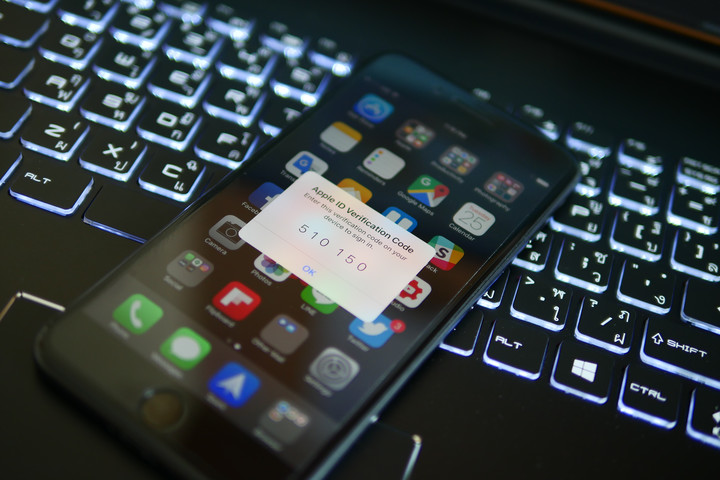
When you first set up your iPhone, you should take the time to make an Apple ID. Your Apple ID works with iCloud, App Store, and even iMessage. The Apple ID is your Apple email address that ends in @icloud.com or @me.com. If you don’t have one, you can just create one using your current email address, such as Gmail.
Once you have an Apple ID, you should set up two-factor authentication. Once you set this up, nobody will be able to access your account, even if they have your password. When someone tries to access your account, a code will be sent to your device which allows you to log in. If you remember our story on the iCloud hack, then you know how important this can be.
Follow these steps to set up two-factor authentication.
Step 1: In iOS 10.3 or later, go to Settings > [user’s name] > Password & Security. If you’re using iOS 10.2 or earlier, go to Settings > iCloud > [your Apple ID] > Password & Security.Step 2: Select Turn On Two-Factor Authentication.Step 3: Follow the on-screen instructions if you’re asked your Apple ID security questions.Step 4: Add a trusted phone number.
Tracking, Location Access, and Find My iPhone
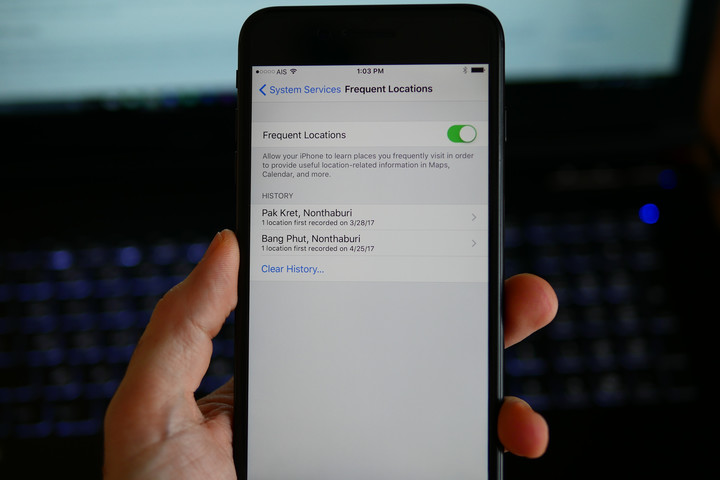
Did you know that your iPhone can track you? If Frequent Locations is enabled, your iPhone will save your location every time you connect to Wi-Fi. You can stop your iPhone from saving these locations by going to Settings > Privacy > Location Services > System Services > Frequent Locations. Once you’re there, you can turn the option off, and also you can tap Clear History to get rid of any saved locations on your iOS device.
While you’re in Location Services, you may want to take a look at which apps have access to your location. Every app that needs your location will ask you to allow it to access your location first. You can opt to limit access only while the app is in use, or you can deny access altogether.
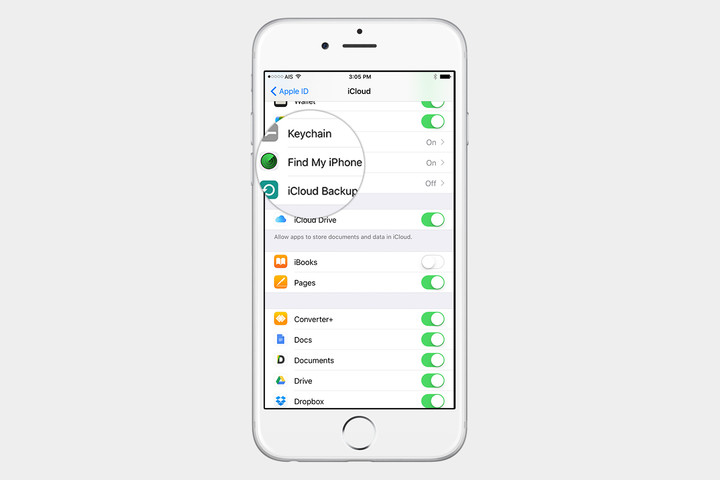
Find my iPhone will enable you to locate, and even remotely erase, your iOS device in case it is lost or stolen. You have to make sure that the location services setting is turned on by going into Settings > Privacy > Location Services. To enable Find My iPhone go to Settings > [your name] > iCloud > Find My iPhone. After that, you can go to iCloud.com to locate your smartphone and access it remotely.
Best app deals of the day! 6 paid iPhone apps for free for a limited time
Everyone likes apps, but sometimes the best ones are a bit expensive. Now and then, developers make paid apps free for a limited time, but you have to snatch them up while you have the chance. Here are the latest and greatest apps on sale in the iOS App Store.
These apps normally cost money, and this sale lasts for a limited time only. If you go to the App Store and it says the app costs money, that means the deal has expired and you will be charged.
More: 200 Awesome iPhone Apps | The best Android apps for almost any occasion
System Activity Monitor

Take a deep dive into your iPhone to see what’s going on inside. The System Activity Monitor App is an iOS activity monitor that provides a unique Dashboard view for all iOS devices.
Available on:
iOS
gTasks Pro

Sync your tasks with Google and across your Apple devices. Keep tabs on all your Google tasks and your calendar in one place.
Available on:
iOS
FoxResume

FoxResume is a utility that helps you create your resume instantly so that you can get the job you wish. No need to sit and waste your time formatting and aligning your resume. Get FoxResume, fill your details, and generate your resume.
Available on:
iOS
Direction Compass

This map is also a compass and orients itself automatically. Find your exact position in your district, your city, or your country.
Thermo-Hygrometer is a weather app, using GPS location. It displays outside temperature, humidity, air pressure, and THI of current location.
Available on:
iOS
Beep

Want to censor swearing in a video? Or want to make an unnecessary censorship video? Do both or either with this app.
Available on:
iOS
Magnifier Flash

Pick your iPhone to transform it instantly into a magnifying glass with a flashlight that comes in full screen with light and with no wasted screen space.
Available on:
iOS
Google adds support for languages of Indian subcontinent to Chrome and Gboard
Why it matters to you
If you speak a language native to the Indian subcontinent, you have probably found the quality of Google Translate’s translations a little disappointing. Luckily, that’s changing.
Google Translate may be able to handle more than a hundred languages, but it supports some more robustly than others. Take English, for example — support for English is built natively into the search giant’s Android operating system, Google’s Chrome browser, and dozens of other mobile and web products. But on Tuesday, Google remedied things a bit with support for nine languages spoken on the Indian subcontinent.
In March 2017, Google introduced a machine learning algorithm to Google Translate, its eponymous translation platform, that significantly improved accuracy by using a “broader context” to figure out the most “relevant” translations. It understands Russian, Vietnamese, and dozens more of the 103 languages that Google Translate currently supports, and the Indian rollout is an expansion of the effort. Now, Google Translate can interpret nine languages that are widely used on the subcontinent — Hindi, Bengali, Marathi, Tamil, Telugu, Gujarati, Punjabi, Malayalam, and Kannada — and translate them between any other tongue.
Google said the new technique improves the quality of translation “more in a single jump than we’ve seen in the last ten years combined,” Google said.

Alongside the addition of Indian to Translates’s AI-assisted lexicon, Google added machine learning-powered translation to the Chrome browser’s built-in Translate functionality. Now, when you encounter a webpage with foreign text, Chrome will automatically offer to translate it using Google’s new neural network-assisted technique.
“This means higher quality translations of everything from song lyrics to news articles to cricket discussions,” Google said.
In addition to the Chrome and Google Translate enhancements, Google’s bringing support for more Indian languages to its Gboard software keyboard for Android and iOS. More than 11 new languages will join the fray, including Hindi, Bengali, Telugu, Marathi, Tamil, Urdu, and Gujarati. They’re replete with support for auto-correction, prediction, and two layouts each — one for the native language script and one for the QWERTY layout for transliteration, which lets you spell words phonetically using QWERTY alphabet and get text output in your native language script.

Finally, Google’s adding a Hindi dictionary in the Google Search app. In collaboration with Oxford University Press, it has brought the Rajpal & Sons dictionary online with full support for transliteration. Next time you tap a term in Google Search, you’ll get a dictionary definition and meanings, including English translations.
These updates are on the heels of auto-translated local reviews in Maps, which Google introduced on Monday. Google Maps automatically translates reviews into your system’s default language — saving you the trouble of having to copy and paste it to a translation app. And it includes the review in its original language, for anyone who wants to clarify a word or two.
Google adds support for languages of Indian subcontinent to Chrome and Gboard
Why it matters to you
If you speak a language native to the Indian subcontinent, you have probably found the quality of Google Translate’s translations a little disappointing. Luckily, that’s changing.
Google Translate may be able to handle more than a hundred languages, but it supports some more robustly than others. Take English, for example — support for English is built natively into the search giant’s Android operating system, Google’s Chrome browser, and dozens of other mobile and web products. But on Tuesday, Google remedied things a bit with support for nine languages spoken on the Indian subcontinent.
In March 2017, Google introduced a machine learning algorithm to Google Translate, its eponymous translation platform, that significantly improved accuracy by using a “broader context” to figure out the most “relevant” translations. It understands Russian, Vietnamese, and dozens more of the 103 languages that Google Translate currently supports, and the Indian rollout is an expansion of the effort. Now, Google Translate can interpret nine languages that are widely used on the subcontinent — Hindi, Bengali, Marathi, Tamil, Telugu, Gujarati, Punjabi, Malayalam, and Kannada — and translate them between any other tongue.
Google said the new technique improves the quality of translation “more in a single jump than we’ve seen in the last ten years combined,” Google said.

Alongside the addition of Indian to Translates’s AI-assisted lexicon, Google added machine learning-powered translation to the Chrome browser’s built-in Translate functionality. Now, when you encounter a webpage with foreign text, Chrome will automatically offer to translate it using Google’s new neural network-assisted technique.
“This means higher quality translations of everything from song lyrics to news articles to cricket discussions,” Google said.
In addition to the Chrome and Google Translate enhancements, Google’s bringing support for more Indian languages to its Gboard software keyboard for Android and iOS. More than 11 new languages will join the fray, including Hindi, Bengali, Telugu, Marathi, Tamil, Urdu, and Gujarati. They’re replete with support for auto-correction, prediction, and two layouts each — one for the native language script and one for the QWERTY layout for transliteration, which lets you spell words phonetically using QWERTY alphabet and get text output in your native language script.

Finally, Google’s adding a Hindi dictionary in the Google Search app. In collaboration with Oxford University Press, it has brought the Rajpal & Sons dictionary online with full support for transliteration. Next time you tap a term in Google Search, you’ll get a dictionary definition and meanings, including English translations.
These updates are on the heels of auto-translated local reviews in Maps, which Google introduced on Monday. Google Maps automatically translates reviews into your system’s default language — saving you the trouble of having to copy and paste it to a translation app. And it includes the review in its original language, for anyone who wants to clarify a word or two.
NASA’s latest image of the James Webb Space Telescope is beautiful
Why it matters to you
The James Webb Space Telescope will give us an unprecedented look into distant galaxies and new understanding about the origins of our universe.
Now that spring has arrived, NASA has released a new image of the largest and most expensive space telescope in history — and, in our eyes, it’s the most glorious yet.
After two decades of construction, the agency announced the completion of the James Webb Space Telescope last November, following the first important pretest to measure its primary mirror. Over the next few months, the telescope went through a series of grueling trials that shook, rattled, and froze the state-of-the-art machine, subjecting it to conditions it will have to face in outer space. Now, with the final gold-coated segment of its 21-foot-wide mirror array in place, the telescope sprawls like an enormous sunflower.
Scheduled to launch in October 2018, the Webb telescope will be the most powerful telescope in existence, built to capture infrared light from the first galaxies of the ancient universe.
To launch the satellite, the Webb telescope’s sunshield will be folded a dozen times before being packed into a bullet-shaped capsule. Once 930,000 miles distant from Earth (at the Earth-Sun L2 Lagrange point), the array will unravel in a glorious, sky-gazing display.
“The groundbreaking sunshield design will assist in providing the imaging of the formation of stars and galaxies more than 13.5 billion years ago,” Webb sunshield manager Jim Flynn said in a statement last November. “The delivery of this final flight sunshield membrane is a significant milestone as we prepare for 2018 launch.”
At $8.7 billion in construction and operating costs, the Webb telescope is more than four time as expensive as its predecessor, the Hubble Space Telescope, and 100 times more powerful. However, where the Hubble was within reach of astronauts who could spacewalk to the telescope if anything were to wrong, the Webb will be too far into space for an easy mission. For that reason, it’s imperative that everything work as planned before the Webb telescope is sent on its journey.
Ditch the wires with these $10 magnetic Bluetooth headphones
Our friends at Thrifter are back again, this time with a basic pair of Bluetooth headphones for just $10!
If you’ve been considering making the move to Bluetooth headphones but don’t want to spend a ton to try them out, this may be the perfect set for you. Right now you can pick up Mpow’s magnetic Bluetooth headphones for just $9.99 with coupon code OVDVN7JA, which is a savings of $23. Keep in mind that at this price you won’t be getting Bose quality headphones, but if you are looking to try something out, or need a new set of headphones for the gym, these may be perfect for the job. With the built-in magnets, you’ll be able to wrap these around your neck like a necklace so you don’t lose them.

With nearly 250 reviews at Amazon, these headphones are rated at 3.8 out of 5 stars. Odds are you can find sillier ways to spend $10 today, so why not give these headphones a shot!
See at Amazon
For more great deals be sure to check out our friends at Thrifter now!
Grab the complete C# coding bootcamp for $41!
Learning to code can be difficult, especially diving head first into C# coding. If you are looking to create apps, develop websites or just learn some new skills, you could spend tons of money and dedicate lots of time to learn more about it. Luckily, you don’t have to go broke or spend all of your free time studying just to learn some new skills.
Learn to code with C# on the cheap! Learn More
For a limited time, you can purchase this $41 complete C# coding bootcamp bundle that will get you started. You’ll have access to 11 different courses that will help you understand APIs, better understand arrays and collections and much more.

The bundle offers:
- C# Programming from Zero to Hero: The Fundamentals
- A 16-Hour C# Course with Microsoft Visual Studio 2013
- A 20-hour C# 6.0 Course with Web Forms and Intro to Unity
- C# Advanced Topics: Take your C# Skills to the Next Level
- C# Basics for Beginners: Learn C# Fundamentals by Coding
- C# Developers: Learn the Art of Writing Clean Code
- C# Intermediate: Classes, Interfaces and OOP
- C#: The Complete Foundation
- C# Performance Tricks: How to Radically Speed Up Your Code
- Boost your C# with Structural and Creational Design Patterns
- Boost your C# with Behavioral Design Patterns
Normally priced at nearly $800 you won’t want to miss out on this great savings for these 11 courses. You’ll have access to 90 hours of materials and can really push your career to the next level with this bundle.
Save 94% right now! Learn More
You won’t have long to pick this up for just $41, so if you are interested you’ll want to act quick.
 AIVAnet