


Round Corner: pimp your device with round screen corners (Review)

The LG G6 and Galaxy S8 introduced a visually-pleasing display with round corners – something you don’t exactly see everywhere. And while this particular detail can’t be considered a major change in design language, it’s tiny differences like this one that make a difference between stagnating and next-generation smartphone design.
That being said, not everyone will have the money to buy an LG G6 or a Galaxy S8, but if the idea of rocking a smartphone with rounded corners appeals to you, you should know an alternative is available – just download and install an app on your phone and you’ll easily be able to get that round corner look your heart desires.
Developer: Yogesh Dama
Price: Free (In-app purchases)
Download: Google Play Store
Setup
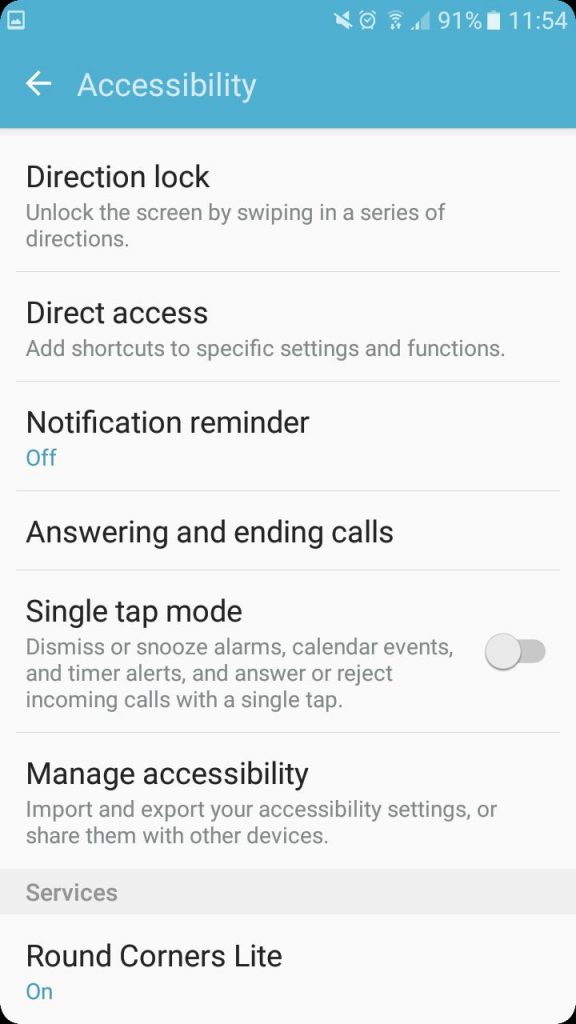
It’s quite easy to start using Round Corners. Just install it on your device and start pimping your device. Note that when you get started for the first time, you’ll need to grant a few permissions. For starters, enable System Overlay in order to let it draw corners over apps. Secondly you have to enable Accessibility Service, which is required to get running app configurations. After that you’re ready to start customizing your corners.
 Experience
The app’s main screen is from where you get to toy with corner size and opacity. Round Corners also allows you to specify which corners you want to enable or to disable – so for example, you can have the app round only the Left Top Corner or Left Bottom Corner and get a more atypical look. The free version only features one corner design, but upgrade to the Premium Version and you’ll get to choose from 40+ more.
 Furthermore, when using Round Corners you have the option of setting specifics looks for individual apps. Let’s say you want rounded corners in the Camera app, but not in the Email app – just go to the Apps section and specify which of your applications should get the round corner treatment and which shouldn’t.
 The app works well enough, however I noticed that once I maxed out the Corner Size, the edges of the display became quite unresponsive, to the point of which it got so annoying that I was forced to revert back to smaller corners. I’m not sure most users would like to have maximal round corners anyway – as they eat up a lot of space and make the phone look a bit odd.
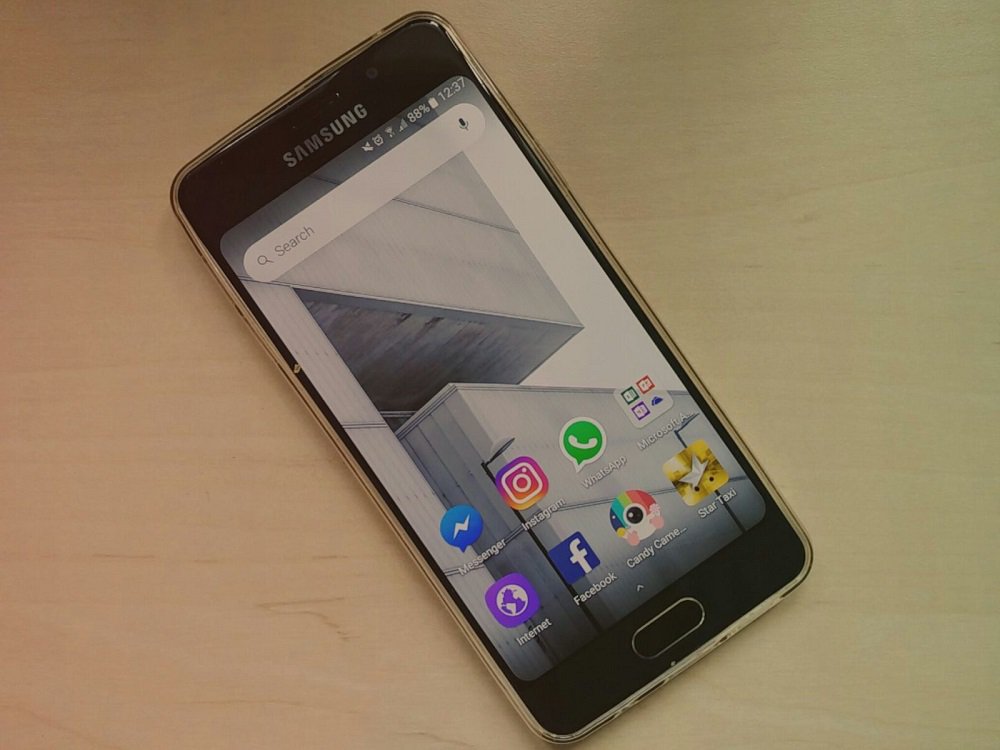 So the best thing to do, is to stick to more discrete corners. This allows the corners to seamlessly blend with the black body of your phone (assuming it does have a back body, but most phones do, so). On my Samsung Galaxy A3 (2016), more thicker corners also had the effect of covering the notifications appearing in the upper left corner – so you have to get the corners’ size just right in order to ensure this doesn’t happen. On top of that, sometimes corners are not exactly smooth and exhibit glitches.



The app is also plagued by advertisements that appear out of the blue when you least expect it. When you try and modify the settings of individual apps, you’ll be annoyingly bombarded with pop ups suggesting you upgrade to the Premium version. Aggressive advertising is not the key, folks!
Conclusion
Surely, Round Corners won’t magically transform your Android device into the LG G6 or a Galaxy S8, but if you you’re bored with the square-ish look of your phone and are curious of how a phone with rounded corners would feel like in your hands, you can simply give this application a try. Sure the app isn’t perfect – the responsiveness issue near the corners are the main case of concerns, but given the case that the app has been last update on April 17, we’re hopeful the developers will fix the issue in the near future.
Internet Archive will ignore robots.txt files to keep historical record accurate
Why it matters to you
The Internet Archive provides a great way to look back at the evolution of the web, and this decision should help preserve the accuracy of the experience.
The Internet Archive has announced that going forward, it will no longer conform to directives given by robots.txt files. These files are predominantly used to advise search engines on which portions of the page should be crawled and indexed to help facilitate search queries.
In the past, the Internet Archive has complied with instructions laid out by robots.txt files, according to a report from Boing Boing. However, it has been decided that the way that these files are calibrated is often at odds with the service that the site sets out to provide.
“Over time we have observed that the robots.txt files that are geared toward search engine crawlers do not necessarily serve our archival purposes,” stated a blog post that the organization published last week. “Internet Archive’s goal is to create complete ‘snapshots’ of web pages, including the duplicate content and the large versions of files.”
Robots.txt files are increasingly being used to remove entire domains from search engines following their transition from a live, accessible site to a parked domain. If a site goes out of business, and is rendered inaccessible in this way, it also becomes unavailable for viewing via the Internet Archive’s Wayback Machine. The organization apparently receives queries about these sites on a daily basis.
The Internet Archive hopes that disregarding robots.txt files will help contribute to an accurate representation of prior points in the web’s history, removing their capacity to muddy the waters with instructions intended for search engines.
The organization has already ceased referring to robots.txt files on sites and pages related to the U.S. government and the U.S. military, to account for the enormous changes that can be made to domains between one administration and the next. This decision has caused no major problems, so there are high hopes that discontinuing the use of the files more broadly will be helpful.
ZTE Axon 7s: News and rumors
Why it matters to you
The Axon 7 was one of our favorite smartphones of 2016, and the new version — the Axon 7s — could be even better.
ZTE’s Axon 7 was one of the best smartphones of 2016. It’s high-end audio, speedy processor, and slick aluminum design matched — and in many cases bested — the competition’s hardware. Now, it’s getting an upgrade in the form of the Axon 7s, an ever-so-slightly enhanced version of the Axon 7 designed to compete with new phones from LG and Samsung.
It’s in some ways a spiritual successor to the Axon 7 Max, a beefed-up version of the Axon 7 that featured a 4,100mAh battery, a Snapdragon 821, and 6GB of RAM. There isn’t much to go on yet, but here’s everything we know about the Axon 7s so far.
Design

If early renders of the Axon 7s are any indication, it won’t look radically different from the original. ZTE’s new flagship sports the same 2.5D curved, all-metal unbody as last year’s model, and retains the front-firing stereo speakers, rear fingerprint sensor, and edge-to-edge screen.
There’s a notable addition on the rear, though: A 12MP Sony IMX368 sensor. Like the LG G6 and Huawei P10, the Axon 7s has a secondary camera lens that can handle wide-angle and low-light photography.
Specs

The Axon 7s’s internals aren’t all that radically different from the Axon 7’s. The screen is the same size (5.5 inches), and resolution (2,560 x 1,440 pixels), the primary camera (20MP with a f/1.8 aperture and 1.25µm pixels) and selfie sensor (8MP) haven’t changed, either. But enhancements are in tow.
The Axon 7s packs Qualcomm’s Snapdragon 821 chip and Adreno 530 graphics, a slight step up from its predecessor’s processor (Snapdragon 820). It boasts 6GB of RAM, up from the Axon 7’s 4GB of RAM, and a 3,400mAh battery compatible with Qualcomm’s Quick Charge 3.0 technology. And it adds a MicroSD slot and compatibility with Google Daydream, Google’s mobile virtual reality platform.
In fact, one of the only areas that hasn’t seen improvement is the Axon 7s’s software. It ships with Android 6.0 Marshmallow on board, a version behind Android 7.0 Nougat, the newest. Luckily, ZTE says it’s upgradeable via a software update.
Pricing and Availability

At just $500 for a 128GB model, the Axon 7s sounds like a worthy successor to the Axon 7. Unfortunately, it sounds like it won’t be all that easy to get.
For now, it’s only available for government use in China. It’s specifically targeted at security-conscious officials, shipping with encryption and tools designed to prevent unauthorized tracking, data mining, and other forms of digital malfeasance.
But there’s a chance it’ll become broadly available later on. If and when the Axon 7s goes on sale outside of China, we’ll update this post with pricing and availability details.
Microsoft’s wearable resurgence will begin with a commercial smartwatch
Why it matters to you
Microsoft’s return to the wearable space may be modest to start with, but could herald a much larger investment.
Microsoft has announced its first wearable since it officially canceled the Band 3. Although it doesn’t have a name just yet, we know that it’s aimed at business customers, has a square display, and is fitted within a silicon watch strap. Microsoft hopes it will replace larger handheld devices for tasks such as inventory management and adding automation to guest services.
Ever since Microsoft halted sales of its Band 2 fitness tracker in 2016, it has not been clear whether Microsoft would ever re-enter the market. Its Band 3 was canceled before going on sale and since then not much has been heard of Microsoft’s wearable plans. The unnamed business-to-business smart device, though, could represent the beginning of a return.
Said to be produced by German manufacturer TrekStor, the device will be “compact and intuitive,” according to Microsoft (via MSPowerUser). It will be capable of running Universal Windows applications and will make use of Microsoft’s Azure cloud for services like Microsoft Cognitive Services, which suggests compatibility with applications that leverage artificial intelligence.
Some of the suggested tasks that Microsoft hopes its smartwatch wearable could take over include adding automation in industrial manufacturing, improvements to patient care in healthcare settings, and fleet and asset management.
In short, Microsoft hopes its wearable can replace bulkier, handheld touchscreen devices more commonly used in commercial settings. The device will opt for a much more compact design, offering a 1.54-inch display, with Wi-Fi and Bluetooth wireless connectivity. It will support voice messaging and have enough battery life to keep it running for a single day at a time.
All of that hardware will power the Windows 10 IoT Core operating system, an OS designed specifically for devices that operate on the Internet of Things. Microsoft also talked up the device’s security in its breakdown.
Noting that it will be in use by commercial operators and thereby put in harm’s way more often than a consumer device, Microsoft has also made a big deal of its ruggedness. The device will utilize Gorilla Glass 3 for the display and will feature a strong strap and clasp system.
Microsoft didn’t give us any information on pricing or availability but said that it would announce more about the product in the coming months.
Intel Optane 32GB review

Research Center:
Intel Optane 32 GB
Intel Optane is here. First announced almost two years ago, Intel’s new storage technology proved elusive as anticipated dates slipped and speculation about problems circulated. Even now, it’s early days for the technology. Intel’s only stand-alone Optane drive, the DC 4800X, targets enterprise exclusively with a suggested retail price of $1,520 for 375GB of storage. If you can obtain one — it’s not sold through major online retailers.
That’s obviously not going to work for home users, but Intel didn’t want to leave them out. The company’s solution is a compromise. Instead of shipping an Optane Memory drive for home use, the company is selling a cache drive available in 16GB of 32GB capacities. They’re affordable, too, with MSRPs of $44 and $88, respectively.
Debuting at a low price is an interesting move, and contrary to how a tech giant like Intel would normally introduce cutting-edge hardware. Yet the tactic is also risky, because it positions Optane as an optional add-in rather than a straight replacement to a typical hard disk or solid state drive. Does the gamble pay off? Or does Optane Memory need more time in the oven?
What the cache?
Optane redefines cutting edge storage technology. It’s not based on the flash memory tech that powers modern solid state drives, and Intel hasn’t gone out of its way to reveal what makes Optane work. Yet Intel’s first consumer release of it, in the form of a cache drive, is a bit old-fashioned.
A cache drive is essentially a middle manager that sits between your PC’s RAM and a hard disk. Its goal is to queue up data that you’re likely to need so that it can be quickly accessed when requested. A handful of hard drives already use the same tactic (and have for years), although the cache in those drives was made up of traditional solid state memory, not Intel’s fancy new Optane hardware.
 Bill Roberson/Digital Trends

The Microsoft Surface Studio, for example, has a hard disk paired with between 64GB or 128GB of solid state storage, which is used as a cache. Seagate sells an entire line of ‘Desktop SSHD’ drives that pair a spinning disk with 8GB to 16GB of solid state storage, all in a traditional 3.5-inch internal hard drive chassis.
However, these solutions are pre-configured. Users usually can’t select the size of the cache, choose to turn it off, or later replace it with a better version while retaining the hard disk. Intel’s Optane Memory is an add-in solution that’s configurable, and targets enthusiasts who already have their own home-brew rig.
Very specific requirements
A drop-in Optane Memory cache drive would be an awesome solution for old PCs that already have a hard disk. Unfortunately, that’s not how it works.
While the Optane Memory module physically slots into the common M.2 slot, it’s only compatible with recent motherboards, such as the new B250 and Z270 series, along with Intel’s 7th-generation Core chip. Even the 6th-generation Intel Cores, and their companion 100-series chipsets, are not supported. AMD’s hardware, including Ryzen, is also excluded.
Optane redefines cutting edge storage technology.
That’s a bummer, as it greatly limits the target audience. The setup requirements might also befuddle users. While we were provided a fully built system for testing Optane Memory, we couldn’t help but notice a long list of instructions and preferred settings in Intel’s information sheet. The drive only works with the primary boot drive, and ties itself to the serial number of the boot drive when installed, meaning you’ll need to set the Optane Memory up again if you ever change your boot drive. A BIOS update and Optane drivers are also required.
Anyone looking to install Optane Memory will need to have a good understanding of PC hardware. It’s not as easy as installing a video card.
The test system
Intel provided a pre-built test system for review. It was configured with an Intel Core i5-7500 processor, an Asus Prime B250-Pro motherboard, and 16GB of DDR4-2400 RAM. The Intel Optane Memory 32GB module was paired with a Western Digital Black 1TB 3.5” SATA hard disk. It ran Windows 10 Pro 64-bit Anniversary Update.
We tested performance in the benchmarks below first with Optane Memory enabled, and then with it disabled. As you’ll see below, we ran most of the benchmarks several times in succession, to see how load times change as additional data is, or isn’t, cached into the drive.
CrystalDiskMark has good things to say
We start with CrystalDiskMark’s sequential read and write tests. This is the only test that we run on all system, from laptops to desktops to hard drives, so it provides a good relative sense of performance even if the benchmark doesn’t directly relate to a particular real-world use.
The benchmark comes out favorably for Optane Memory, particularly in read speeds. The sequential read numbers posted here are equivalent to a mid-range M.2 solid state drive like the Samsung PM951, which is common in laptops and off-the-shelf desktops.
A great deal of write performance is traded in return, but that’s not unusual. In fact, the 290 megabytes per second achieved with Optane Memory turned on is on par with entry-level solid state drives. These are solid scores.
Real-world testing with real-world results
CrystalDiskMark is only one benchmark, however. And a cache drive like Optane Memory is designed to make a hard disk feel like a solid state disk in normal, everyday tasks. To test that, we ran Optane through boot time, Windows 10 file search time, and Chrome launch time tests. We ran each test three times in a row.
All three tests produced similar results. Optane Memory grabbed a lead over the hard disk on the first run, with a margin of victory that ranged from huge to massive. The Chrome launch time task loaded 62 times more quickly on Optane than on the hard disk. Not bad!
However, the gains were almost completely negated in successive runs. Why? Well, Intel’s not the only one making smart use of data. Even normal hard disks have small caches. The WD Black 1TB drive in the Intel test rig has a 64 megabyte cache. In addition to that, Windows is always trying to make better use of data by keeping it active in system RAM rather than flushing it.
Intel Optane 32 GB Compared To

WD PR4100 NAS

Plextor M8Pe

Intel SSD 750 Series

Seagate Backup Plus Ultra Slim…

LaCie Porsche Design hard drive

Samsung T3 Portable SSD MU-PT2T0B

Transcend SSD370

Crucial BX200 960GB

Toshiba Q300 480GB HDTS748XZSTA

Samsung Portable SSD T1

ioSafe Solo G3

ioSafe Rugged Portable

HP MediaSmart EX487

Corsair Flash Survivor (8GB)

Crucial Gizmo! 256MB
Those tactics mostly negated the advantage of Optane in successive runs. However, the value of fast first-run load times shouldn’t be understated. It contributes significantly to system feel. After all, how often do you open a program, close it, and then immediately open it again?
Transferring from an external drive nets interesting results
The real-world testing showed Optane Memory working as it should in the most predictable conditions. However, we were curious what might happen when moving files to or from the boot drive with Optane active. Will performance fall back to speeds limited by the hard disk it’s paired with, or will there still be some benefit?
These tests were performed with Samsung’s Portable SSD T1 1TB, one of the fastest USB drives available, over a USB 3.0 connection. We transferred a file containing Sid Meier’s Civilization VI, which weighed in at 7.63GB.
The results were varied. We did see a significant performance bump when moving files from a USB drive, but only in the first two runs. The third run was unusually slow. Curious, we rebooted and re-tested the system several times and found this general pattern to be repeatable. While the Optane Memory accelerated the first two file transfers, it often failed to handle the third, resulting in an unusually long file transfer time. It did on one occasion load quickly on the third try, too, but then loaded slowly on the fourth.
Results were more consistent with file transfer times from the test PC to the Samsung Portable SSD T1 1TB. Optane Memory was faster every time, but only by five or six seconds. It’d be difficult to notice the difference without a stopwatch.
On balance, Optane Memory didn’t offer much benefit when transferring files to or from a USB drive. It accelerated transfers in bursts, but eventually ended up close to the speed of the hard disk it was paired with. That makes sense. Data transferred from an external drive must eventually end up on the hard disk, so it will become the bottleneck.
Game Load tests
Intel, as part of its Optane Memory marketing push, is targeting gamers…sort of. The company has spoken about how it could benefit gamers, saying Optane Memory can launch games “up to 67 percent faster,” and load levels “up to 65 percent faster.” However, the company didn’t show us game-specific load times.
We decided to test using two games – Deus Ex Mankind Divided and Civilization VI.
As you can see, the results consist of one positive and one negative result. Deus Ex saw absolutely no noticeable benefit from Optane Memory. However, Civilization IV consistently loaded much more quickly. It was twice as quick as the hard disk on the first run, and seven to eight seconds quicker on later runs.
While Optane might help in select games, it may offer no help at all in others. That inconsistency makes it a no-go. As always, gamers are best served by purchasing the largest solid state drive they can afford.
But how does it feel?
The benchmarks we ran did show that Optane Memory provides the promised performance improvement when paired with a hard disk. Yet there’s more to it than numbers. While solid state drives provide amazing transfer speeds, it’s latency that makes them wonderful. Users have come to expect that a program or menu will open as soon as it’s clicked or tapped. Hard disks don’t react quickly enough.
The Chrome launch time task loaded 62 times faster on Optane than on the hard disk.
Optane Memory does. Its benefit was obvious from the moment we turned on the test rig. With Optane enabled the boot time was short, and the system was immediately responsive from the moment Windows 10’s desktop appeared. Without, the system felt hesitant. Even the Start Menu and Windows Explorer could take a second to respond. That may sound insignificant, but it’s rather frustrating.
However, its benefits are only up to those enjoyed by an entry-level solid state drive. It doesn’t feel slower, but it also doesn’t feel quicker. That’s no real surprise, and Intel never said Optane Memory can beat a solid state drive. Still, most enthusiasts now prefer using a solid state drive for a boot drive, and there’s nothing in Optane Memory that will lure them away from that solution.
Warranty information
Intel’s Optane Memory drive comes with a five-year warranty against manufacturer defect. This is a strong guarantee, and most users will probably upgrade to a different storage solution before the warranty term expires.
Our Take
Intel’s Optane memory successively accelerates storage for less than $100. Its performance benefit over a stand-alone hard disk ranges from reasonable to outstanding. More importantly, it makes a system with a hard disk behave as though it has a solid state drive in day-to-day use.
However, Optane is hampered by its restrictive system requirements. Though it would be a perfect upgrade for an older rig with a hard disk, it only works with new systems that have the latest Intel motherboards and processors. That puts Optane Memory in a tough spot.
Is there a better alternative?
This is where Intel’s Optane Memory gets into trouble. Our 32GB review model, priced at $88, performed well, but it must be paired with a hard disk. The WD Black 1TB drive in our test rig retails for $75. That puts the total price for storage just north of $160.
The DT Accessory Pack
Intel BX80677I57500 7th Gen Core desktop processor
$199.89
Gigabyte GA-B250M-DS3H LGA1151 motherboard
$79.62
WD Blue 1TB SATA hard drive
$50
Solid state drives with 256GB of storage are often sold for $80 to $90. Those with 480GB to 525GB are sold for as little as $140. 1TB drives start at $250.
Optane Memory’s compatibility requirements mean it will only be interesting to enthusiasts who are building, or have just built, a new rig. Those enthusiasts will likely prefer using a solid state drive as the boot drive, rather than going with Optane Memory’s hybrid solution. Though slightly more expensive, it performs in all scenarios, and will be less hassle when it comes time to upgrade to a new drive.
How long will it last?
Intel provides a five-year warranty for Optane Memory, which is great. This is the first generation of a new technology, however, so current Optane Memory modules will become obsolete quickly. Stand-alone consumer Optane drives are likely to appear this year, as well, though pricing is anyone’s guess.
Should you buy it?
No. Intel Optane does what it says on the tin, but its restrictive compatibility, and the low pricing of current solid state drives, squeezes Optane out of recommendation territory.
Say hello to the Halo, an 8K, 3D, 360-degree pro camera that’s super portable
Why it matters to you
Professional 360 cameras tend to be big and bulky, but the new Yi Halo weighs less than eight pounds while packing 17 camera units.
Yi Technology, the company shaking up the action camera market with its budget-friendly shooters, is moving into the professional 360-degree space. On April 24, the company launched the Yi Halo, a stereoscopic 8K 360 camera, and the consumer grade Yi 360 VR camera, during the NAB conference in Las Vegas.
The Halo uses 17 camera units paired with Google Jump software. Unlike the 16-camera GoPro Odyssey, that 17th camera on the Yi rig points straight up to capture a seamless stitch that includes the sky (or ceiling). Yi Technology says the Halo is the only hardware using Google Jump to include an up-view camera unit.
Those 17 cameras and Jump stitching software work together to create an 8K x 8K resolution at 30 frames per second. To double the frame rate, the resolution can be stepped down to 5.8K. As a stereoscopic camera, the lenses are arranged in a way that mimics the offset of actual eyes, creating a more realistic, 3D-like effect when using VR goggles.
While pro-level VR rigs tend to be heavy and restrictive, Yi says the Halo is designed to shoot from anywhere. The entire unit weighs less than 7.5 pounds, while the battery allows for 100 minutes of recording on one charge. The unit can also be plugged in for longer shoots. A built-in screen allows controls straight from the camera, while an Android app lets the user do it remotely, including previewing the stitched footage.
Designed by the same team that crafted the Yi 4K and 4K+ action cameras, the Halo has undergone 100,000 hours of stress tests to ensure durability, the company says.
Thanks to a modular design, the camera units on the Halo can be upgraded. A one-click firmware update process is also designed to help the device stay current, Yi says. These aspects are ideal, as 360-degree cameras and the industry are still nascent and ever-changing.
“Virtual reality provides incredible new opportunities for creators,” said Sean Da, CEO of Yi Technology, in a statement. “But it also poses a whole new level of challenges. To truly meet the promise of VR, the image quality, capture and stitching needs to match the immersive experience. To be truly active, you have to be able to shoot when and however you want, from many points of view, and without worrying about losing power; and you have to know it will just work, in your control, now and in the future. That is why we spent so many personal hours researching, perfecting and stress-testing the Yi Halo. And why we are so excited to see what today’s amazing creators will do with what is now the most advanced VR system out there.”
Along with the pro-level VR system, the company also announced a consumer-grade option. The Yi 360 VR camera is the only consumer camera with 360 capture up to 5.7K with automatic stitching, the company says. Details are scant at the time of writing.
Details on either camera’s price and release dates are not yet available. Both new cameras are being displayed this week during the NAB Show in Las Vegas.
You can now see public transportation options in Paris within Apple Maps
Why it matters to you
While Transit options have been available in the U.S. for a couple years now, Apple has just debuted the feature in Paris.
No need to delay planning your trip to Paris any longer. Apple Maps has finally brought the city into the 21st century — at least insofar as your sense of direction (or lack thereof) is concerned. Over the weekend, the iEmpire added transit options to Maps for the French capital, which means that you can now determine how to get from the Eiffel Tower to your hotel via public transportation.
Much as you can in Google Maps, Apple now allows you to find subway, RER and bus lines, and Transilien lines in the app. If you tap on any given station, you can see all the options for arrivals and departures, and real-time information about impending departures. This, for the record, isn’t something that Google Maps currently has available to offer.
And as another added benefit (exclusive to Apple), you can see all station entrances in Apple Maps, so you don’t have to wander around the vicinity wondering how you get underground or to the right stop.
While public transportation options have been available in U.S. cities since 2015, Apple has been slower to roll this feature out across the world. In fact, of the major world capitals, only Berlin, Prague, and a few cities in the U.K. have Transit options already.
That said, Apple does have a few other perks in its Maps app. If you’re an Apple Watch owner, you’ll be pleased to know that your wearable will vibrate with distinct vibration patterns to tell you which way to turn once you’ve reached an intersection. That means no more walking around with your face glued to your phone. And if you’re in Paris, you can find Autolib car-sharing stations, and Vélib bike-sharing stations, too. Alas, you won’t be able to see whether there are spaces or bikes available, but you can’t have it all.
The earth’s got some space junk in its trunk, and the situation is not good
Why it matters to you
Space debris is likely to make space travel impossible if we don’t come up with a solution to clean it up soon.
Scientists met in Germany last week to discuss a looming but practically invisible problem facing humanity — the millions of pieces of space junk orbiting our planet. Debris large enough to destroy a spacecraft has more than doubled in less than a quarter-century, according to experts at the seventh European Conference on Space Debris, and the issue is getting exponentially worse as small satellites are being launched in unprecedented numbers.
There are some 5,000 objects larger than three feet, 20,000 objects over four inches, and 750,000 objects around 0.4 inches orbiting Earth. “For objects larger than one millimeter (0.04 inch), 150 million is our model estimate for that,” Holger Krag, who heads the European Space Agency’s space debris office, told conference attendees. “The growth in the number of fragments has deviated from the linear trend in the past and has entered into the more feared exponential trend.”
Krag and others are worried about what’s called the Kessler syndrome, which describes a cascade affect of collisions that create more and more debris until space travel is effectively impossible. Although we’re still safe from such a syndrome, satellites already have to make regular avoidance maneuvers to avoid smacking into trash.
The debris problem is difficult to envision from Earth. Space, after all, looks like a spacious void from down here. But in a dramatic video released last week, ESA puts the problem into perspective, depicting the space around Earth with cinematic drama and an ominous score.
Beginning 9.5 billion miles away, where space debris is scarce, the video quickly ushers us to the geostationary ring of Earth’s orbit, where the average distance between two objects is less than 120 miles. We’re soon within low earth orbit, where two-thirds of all large manmade space objects orbit, including around 600 active satellites and thousands of fragments, rocket stages, and defunct satellites. Orbiting within this region, the International Space Station sports scars on its surface from the occasional impact with debris.
Luckily, some agencies have set out to tackle the space problem: The ESA and the Japanese Aerospace Exploration Agency (JAXA). However, with a JAXA test mission failing earlier this year, space debris remains an unsolved problem humanity will have to face soon or risk remaining on Earth indefinitely.
Google Maps business reviews now automatically speak your language
Why it matters to you
You can now more easily check out that local Russian eatery with Google Maps’ automatic review translation feature.
The days of wandering around a new locale looking struggling to find something to eat are long gone. Now, numerous options exist to not only locate a quality meal but to offer up actual choices beyond just grabbing a value meal from the closes fast food joint.
The same applies to points of interest in general, where it’s no longer true that road trips need to involve long hours of boredom punctuated by quick stops in major metropolitan areas. There are many apps and services aimed at providing travel information, and Google Maps has upped its own game lately to include more options and, just recently, the company added the ability to automatically translate reviews so that language becomes less of a barrier.
Essentially, the newest update is all about making it easier to access reviews in other languages. In the past, users would need to copy and paste reviews from Google Maps into a translation app like Google Translate. Now, Google Maps will automatically translate reviews into your system’s default language.
That way, if you’re looking at the local Russian eatery and see numerous reviews in the Russian language — perhaps a good sign — then you can simply peruse the reviews without any tedium. Just open the listing, and the reviews will be in your native language and ready to read. To clear up any translation quality issues, Google also provides the review in its original language for anyone who wants to clarify a word or two.

Google has spent a good deal of time and effort working to make its Google Maps business listings more accurate and helpful. It’s offered the ability for some time now for users to update business information in addition to adding reviews and ratings. That means that the core business information provided Google Maps is likely to provide a better foundation for the social networking reviews that provides some of the filler.
The new feature also benefits from Google’s ongoing efforts to improve its translation efforts. Machine learning improvements mean that Google Translate offers more accurate and useful translations, and the company is rolling that extra intelligence out to more of the 103 overall languages supported by Google Translate. Today, Google’s neural machine translation is available for nine major languages in total, ranging from English, Spanish, and French to Chinese, Japanese, and Korean.
Now, when you’re out and about, you can check out local businesses no matter where you are and no longer fret about whether or not you speak all of the relevant languages. Just open up Google Maps and start reading reviews in your native language, and check for the “Translated by Google” tag to recognize when you’re getting Google’s version of a translated review.
Google Maps business reviews now automatically speak your language
Why it matters to you
You can now more easily check out that local Russian eatery with Google Maps’ automatic review translation feature.
The days of wandering around a new locale looking struggling to find something to eat are long gone. Now, numerous options exist to not only locate a quality meal but to offer up actual choices beyond just grabbing a value meal from the closes fast food joint.
The same applies to points of interest in general, where it’s no longer true that road trips need to involve long hours of boredom punctuated by quick stops in major metropolitan areas. There are many apps and services aimed at providing travel information, and Google Maps has upped its own game lately to include more options and, just recently, the company added the ability to automatically translate reviews so that language becomes less of a barrier.
Essentially, the newest update is all about making it easier to access reviews in other languages. In the past, users would need to copy and paste reviews from Google Maps into a translation app like Google Translate. Now, Google Maps will automatically translate reviews into your system’s default language.
That way, if you’re looking at the local Russian eatery and see numerous reviews in the Russian language — perhaps a good sign — then you can simply peruse the reviews without any tedium. Just open the listing, and the reviews will be in your native language and ready to read. To clear up any translation quality issues, Google also provides the review in its original language for anyone who wants to clarify a word or two.

Google has spent a good deal of time and effort working to make its Google Maps business listings more accurate and helpful. It’s offered the ability for some time now for users to update business information in addition to adding reviews and ratings. That means that the core business information provided Google Maps is likely to provide a better foundation for the social networking reviews that provides some of the filler.
The new feature also benefits from Google’s ongoing efforts to improve its translation efforts. Machine learning improvements mean that Google Translate offers more accurate and useful translations, and the company is rolling that extra intelligence out to more of the 103 overall languages supported by Google Translate. Today, Google’s neural machine translation is available for nine major languages in total, ranging from English, Spanish, and French to Chinese, Japanese, and Korean.
Now, when you’re out and about, you can check out local businesses no matter where you are and no longer fret about whether or not you speak all of the relevant languages. Just open up Google Maps and start reading reviews in your native language, and check for the “Translated by Google” tag to recognize when you’re getting Google’s version of a translated review.
 AIVAnet