


Missed out on the NES Classic? Don’t worry, building one is easier than you think
With Nintendo’s announcement of the end of production on the NES Classic, a lot of gamers are still wondering how to get their old-school fix. Thankfully, it couldn’t be easier to create your own out of a Raspberry Pi and some inexpensive electronics. This walkthrough will have you spinning up your favorite Mario titles in the span of an afternoon, with no soldering or coding required.
Parting it out
A Raspberry Pi 3 model B sits at the heart of our system. The tiny computer costs less than $40, and is more than powerful enough to emulate not just NES games, but a swath of older consoles and specialized software, including special versions of Minecraft and Doom.
A Raspberry Pi 3 model B sits at the heart of our system.
It doesn’t come with any of the necessary accessories, so we went ahead and picked up a USB power supply, HDMI cable, and MicroSD card, as well as a couple of heatsinks to keep the chips cool. There are kits available for those who don’t feel like sourcing the parts themselves.
While almost any USB controller will work, we found some that are very reminiscent of the original NES controllers. The Raspberry Pi 3 has built-in Bluetooth, so controllers like the Steelseries Stratus should work as well. It’s even possible to use Xbox and Playstation controllers, if they’re connected over USB.
While setting the naked Pi down next to the TV is certainly an option, a case provides a lot of benefits for ease of use, aesthetic appeal, and cable management. There are tons of options for generic Raspberry Pi cases all over the Internet, but we wanted something that looked like a NES, at least somewhat. With a suite of 3D printers at our disposal, we set about finding a design from Thingiverse and printing out our own.


We don’t necessarily recommend that course of action. The 3D printed case looks novel, but we spent a lot of time tweaking the model, printing multiple prototypes, and cleaning the final product of stray plastic strands. Even with experience, and the exceptional Lulzbot Taz, it took us a week of trial and error to print an acceptable case.
Users that don’t have a 3D printer, or just want to skip the tough stuff and start playing Mario, should look to Amazon for NES-inspired Raspberry Pi cases. We picked up an NES-inspired case for just $20 that’s built for just such a purpose.
It charges for the novelty factor, though. Literally hundreds of generic cases can be found for as little as five dollars. There’s even cases designed to attach to your TV, or hang on the wall, which might free up some space on your entertainment center. Buy whatever fits, slap an NES stick on it, and call it a day.
Some assembly required
The Pi should easily cover NES and SNES games.
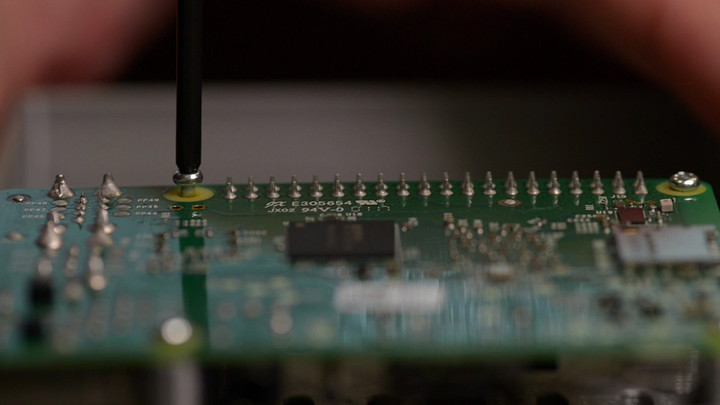
With our parts in hand, it’s time to put everything together. This is the simplest part of the process. Just up the Raspberry Pi with the holes in the case for the screw mounting holes in each corner, and tighten them down in a star pattern. Only apply enough pressure to hold the unit in place. There’s no need to clamp it too tightly.
Our 3D printed case used two clamps to keep the upper and lower half together, but that process may differ depending on each case. Again, there’s no need to tighten the mounting screws as much as possible.
Baking the Pi
Thankfully, someone else has done the legwork putting together a version of the Raspberry Pi OS that supports a large set of emulators right out of the box. It’s called RetroPie, and we’ll walk through the steps in general below, while you can find an up-to-date guide with troubleshooting and further details on the RetroPie Wiki.

At arm’s length, the process is simple. Download the complete OS image from the RetroPie site, and use a program to write that image file to the MicroSD card. A free program called Win32DiskImager will ask you to select the image file’s location, and the drive to write to. Keep in mind this will erase the MicroSD card, so backup any files that were already on it before imaging. Once Wind32DiskImager finishes its job, RetroPie is installed to the SD card. Slide it into the slot on the Raspberry Pi and plug in the HDMI and USB power to boot up.
On first boot, the system will head straight into controller configuration for Emulation Station, the name of the software that manages the emulators and configuration. Plug in a controller and follow the steps to define each button and stick on the controller. RetroPie’s installation guide has a few handy diagrams that can help assist with the process.
After configuration is complete, there still won’t be any systems listed in the main menu, but that’s to be expected – Emulation Station only shows systems that have games associated with them. Take a USB drive, formatted FAT32 (which should be most small thumb drives), and create a folder called “retropie” on it while plugged into a computer.
Plug the drive into the Pi, and wait for the green light on the front to stop blinking, indicating the Pi has finished creating a file structure on the thumb drive. Plug the USB drive back into the computer, and a handful of new subfolders will be waiting in the retropie folder. Choose the “roms” folder, then find the appropriate system – NES, in our case – and copy game files into that folder.
Once the transfer is complete, plug the USB drive back into the Pi, and once again wait for the green light on the front to stop blinking. Press whatever button is bound to Start, and choose Restart Emulation Station. The games are now copied to the system, so you can unplug the USB drive and game on.
Emulation software generally doesn’t cause any legal issues, whereas the actual game files tend to be protected by copyright and trademark law. A good rule of thumb is that users can keep a digital backup of a game they physically own, but you’ll want to check local laws and statutes for accurate information on the legality of emulation and ROMs.
Playtime is fun time
That’s all there is to it. RetroPie supports a wide array of older game systems, and users can add more if need be, assuming the Pi’s performance allows for it. That should easily cover NES and SNES games, and depending on cooling and power, may even include PSP or Dreamcast titles. We’ve selected our favorite emulators for each system, and many them are already included with the RetroPie installation described here.
The homebrew solution might cost slightly more than a NES Classic, depending on which parts are included, but the advantages over Nintendo’s now-discontinued offering are clear. Wireless controllers, a vast library of games, access to more systems, and a personal touch are all part of the package with a Raspberry Pi-based emulation system. With all that included, it seems more than worth an hour of assembly and a little extra legwork.
Apple is issuing its Watch owners an Earth Day fitness challenge
Why it matters to you
Beyond the fact that stickers are cool, our planet is even cooler. Apple wants to raise awareness about the environment, and you can be part of the fun.
Earth Day is this Saturday, and in celebration Apple is launching the latest Apple Watch Challenge. As a part of the event, Apple Watch owners are challenged to get their butts outside and completely 30 minutes of exercise — after which they’ll unlock a slew of new iMessage stickers and special achievements.
“Get outside and celebrate Earth Day on April 22 and earn this award. Go for a walk, run, cycle, wheelchair, or swim workout of 30 minutes or more in the Workout app or any third-party app that writes these workouts to Health. You will also earn special stickers for Messages,” said Apple in a statement announcing the challenge.
The Apple Watch challenge isn’t the only thing Apple is doing in celebration of Earth Day. The company has also launched a video series featuring interviews with key Apple employees leading Apple’s effort to address climate change and use safer materials. The company also touted its new campus, which is highly climate-friendly. In fact, the campus will feature a hefty 9,000 native and drought-resistant trees, and is powered completely by renewable energy.
Apple has long made an effort to be among the more climate-conscious tech companies. At this point, 96 percent of its operations are powered by renewable energy — including retail stores, offices, distribution centers, and so on. As part of that, 100 percent of Apple’s operations are renewable in 24 countries.
Apple has also partnered with forestry companies to create more sustainably managed forests — and in partnering with WWF in China, Apple has helped transition a hefty 320,000 acres of forest toward Forest Stewardship Council certification. And, of course, the company has created Liam, a robot aimed at tearing down old Apple devices so that components can be reused for new Apple devices. Liam has so far been put to work on using the aluminum enclosures from the iPhone 6 to create Mac Mini computers.
And in terms of helping its own customers to pursue a healthy lifestyle, hopefully Apple’s latest Apple Watch challenge will be enough to get you outside for at least 30 minutes.
Waymo says Uber hid a LiDAR device based on its technology
The legal battle Waymo waged against Uber is getting more and more intense, and the Alphabet-owned division is showing no signs of slowing down. It has just accused the ride-hailing company of covering up a trade secret theft in a new set of court of documents. Waymo says Uber hid a Light Detection and Ranging (LiDAR) device — the system that serves as self-driving cars’ “eyes” — that former Google engineer Anthony Levandowski developed based on its technology. If you’ll recall, Waymo filed the lawsuit after another one of its engineers revealed that Levandowski downloaded 9.7 GB of confidential materials related to its self-driving system before leaving company. He then established Otto, the autonomous truck company that Uber ended up acquiring for its own self-driving ambitions.
Alphabet’ self-driving division submitted the documents to court in an effort to convince a federal judge to ban Levandowski from working on Uber’s self-driving project. It says it only discovered the device after one of Uber’s engineers was forced to admit its existence, something Matt Kallman, a spokesperson for the beleaguered ride-hailing firm, strongly denied.
Kallman told Bloomberg that his company made the device available to Waymo from the start, so it could inspect and even photograph it as part of court-ordered information sharing. He further clarified that it’s merely an abandoned project that didn’t even reach prototype stage. Waymo’s sudden focus on the device, he told the publication, “represents a strategic pivot… and a retreat from its original claims.”
In previous statements, Uber said it never touched any of the 14,000 files Levandowski allegedly stole and that it’s been working on a LiDAR system before he came onboard. Further, it said its LiDAR system, whch isn’t even ready for us, has a single-lens design that’s vastly different from Waymo’s multi-lens tech. The device mentioned in the court documents apparently pertains to a second LiDAR technology that more closely resembles Waymo’s. We’ll know next month whether the accusation is solid enough to sway a federal judge once preliminary injunction hearings begin.
Source: Bloomberg
Pinterest fixes its broken visual search tool for Chrome
Pinterest thought it launched something cool when it added visual search to its Chrome browser in March. It was supposed to be able to pinpoint specific items in an image, say a pair of sunglasses somebody’s wearing in a photo, and find pins with similar objects. Unfortunately, it didn’t always work as intended. It tended to capture screenshots of whole windows instead of specific objects you want to look up, and the website can’t find objects within screenshots once they’re already pinned on the site. To address the issue, Pinterest’s extension now uses Javascript to look for the most interesting rectangle in a web page, which most likely contains the image you want to pin.
Here’s how it works: it looks for the most interesting rectangle by taking a screenshot of the page and downgrading it. The extension then looks at the colors in the pixelated image to separate the background from the photos. It switches colors to simpler ones until it’s basically a bunch of white blocks representing pictures against a blue background. By pinpointing the most prominent rectangle on a web page, the extension increases its chances of finding the object you want to look up.
You’ll need to install the social network’s Chrome extension to use its enhanced visual search tool. Once you’re done, simply right-click on an empty space on a website and click Search. The company says the feature is now out for everyone, but give it a bit of time to make its way to your browser if you can’t see the option yet.
Via: VentureBeat
Source: Pinterest
Researchers use ambient light sensors to steal browser data
Why it matters to you
There’s yet another unexpected way for hackers to attack a system and steal our data, this time using its ambient light sensor.
There are more ways to access your data than by exploiting the various software vulnerabilities and hardware bugs that we seem to hear about on a daily basis. Our gadgets actually have all kinds of weaknesses that could allow nefarious parties to steal our information, and some of them are things we’d probably never consider.
One of those weaknesses stems from the fact that our PCs, tablets, and smartphones are stocked with sensors that extract information from our environments and use that data to make our devices more useful. Some researchers have found a way to use the innocuous-seeming ambient light sensor to grab potentially sensitive browser data and pass it along.
The ambient light sensor is used for a couple of purposes. It detects background light levels and adjusts screen brightness, and it works as a proximity sensor to determine when to shut off a smartphone’s screen during a call. As the researchers point out, the ambient light sensor is quite precise, and can measure light intensity from completely dark to incredibly bright.
The specific hack that the researchers developed uses the ambient light sensor to pick up color and lighting information from the screen by tapping into the data the sensor passes to the system. Because the sensor’s data is affected by what’s being displayed on the screen, it can be used in a variety of ways to pick up browser information that affects the light that the screen is giving off.
One simple example is the colors of visited links, which are normally obfuscated by the browser to avoid just this kind of snooping. Essentially, the light sensor readings can be used to distinguish between visited and unvisited links and thus inform an attacker as to which links the user had previously visited.
Another example involves using the ambient light sensor data to grab QR codes. That data can be used for such things as hijacking a user’s account when a QR code is used to provide emergency access to an account.
So far, the researchers have managed to create attacks that work in Firefox and Chrome on Android devices and on PCs with ambient light sensors. Certain problems exists, such as changing lighting conditions in real-world situations, and also screen brightness variations. Nevertheless, the attack presents yet another reason to wonder who might be stealing our information in ways that we’d never imagine — or prepare against.
You can now start your Mercedes car via Alexa or Google Assistant
It’s official. Voice assistants are everywhere.
They’re in our phones, speakers, washing machines, and now, cars. Mercedes-Benz has announced that both Alexa and Google Assistant will work on all of its 2016 and 2017 models released in the US. Apart from a compatible car, you will need an active Mercedes Me account and a subscription to mbrace, Mercedes’ smartphone platform in the US that costs $199 a year after a six-month free trial.
- Google Home review: Better than Amazon Echo?
- What is Google Assistant and how does it work?
- 7 best Google Home compatible devices you can buy today
So, starting 21 April, owners of newer Mercedes can command their Google Home or Amazon Echo to remotely start or lock their vehicles. They can also send addresses to their in-car nav system. In its announcement, Mercedes explained how the integration works:
“Customers with Google devices can simply say, ‘Ok, Google, tell Mercedes me to start my car,’ and it will remotely start the customer’s car. Another available feature includes remote lock. With Alexa devices, customers can say, ‘Alexa, ask Mercedes me to send an address to the car’ for remote navigation input and point-of-interest requests.”
And here’s a promo video that shows the integration in action:
Mercedes first revealed that in December 2016 that it would soon support Google Assistant on Google Home. The company has also said that Europe will get these same features in the near future.
Valve is trying to end account smurfing in ‘Dota 2’
Valve is changing the way Dota 2 is played, at least on a meta level. Beginning May 4th, players will be required to register a unique phone number to their accounts in order to queue up for ranked matches. That’s one account per phone number, ostensibly placing a hard limit on the number of ranked accounts that any one player can have.
Before you get any fresh ideas, Valve says online services that provide virtual phone numbers won’t work in this new system. Nice try.
The move is designed to curb the practice of smurfing — when a high-ranked player creates a new account and jumps into competitive matches against people of vastly lower skill levels.
“Players using multiple accounts create a negative matchmaking experience at all skill brackets, so our goal is to add just enough friction to this process that the number of players doing this will be noticeably reduced,” the Dota 2 team writes.
Notice the developers don’t promise to stop smurfing entirely. The (non-virtual) phone number requirement makes it really difficult to establish more than one ranked Dota 2 account, but Valve seems to recognize some players will inevitably sneak their way around it.
Smurfing isn’t a problem just for Dota 2. Valve previously implemented Prime Matchmaking in Counter-Strike: Global Offensive requiring a phone number for ranked play, but that program is opt-in. The developers of other competitive online titles, including League of Legends’ Riot Games, are also looking for ways to combat harmful smurfing practices. Meanwhile, Overwatch director Jeff Kaplan recently said he didn’t think smurfing was a big deal at all.
Source: Dota 2
The Moto Z2 Play looks very familiar
You probably picked up the Moto Z Play for its long battery life, mid-range price and compatibility with Motrola’s flagship modular backs. If you were worried that those components wouldn’t work on the next version of the handset, don’t — leaked images of the Moto Z2 Play from TechnoBuffalo suggest that the device will be almost visually identical to the original. Well, there is one notable change: the Moto Z Play’s square button has been replaced with a round one.
Ultimately, this isn’t too much of a surprise — any drastic changes to the phone’s chassis would have made it incompatible with the battery, camera back and other accessories created for the Moto Z line. Keeping the same shape was important. Unfortunately, beyond form factor and the hard-point connector that confirms mod compatibility, the leak tells us precious little else about the phone. The leaked image’s clock does have a date listed for June 8th, however, which could be a tease, but take that with a grain of salt. If we hear anything, we’ll let you know.
Source: https://www.technobuffalo.com/2017/04/21/moto-z2-play-first-look-exclusiv
Lawsuit takes aim at Google, Huawei over Nexus 6P battery issues
A federal class action complaint has been filed accusing Google and Huawei of fraud, breaching warranty and improperly handling customer complaints after a number of Nexus 6P smartphones unexpectedly shut down and became trapped in “boot loop” cycles. The suit was filed in the United States District Court for the Eastern District of Texas, and it claims Google and Huawei have never publicly admitted there were issues with the Nexus 6P, even while they continued to sell the phone.
The Nexus 6P hit the market in late 2015. It’s a $500 smartphone with a 5.7 inch screen that was, overall, a welcome improvement over the previous year’s Nexus 6. As long as it didn’t suddenly shut off with full battery, that is.
The plaintiffs in today’s lawsuit want to force Google and Huawei to issue a recall or repair program, and provide monetary compensation to those affected. The filing includes a few pages of Reddit comments and tweets from dissatisfied Nexus 6P customers; it notes the boot looping complaints began around September 2016.
“When bootlooping occurs, the phone is essentially a very expensive paperweight,” the suit reads. “After the Defect occurs, the Phone no longer operates whatsoever. It cannot be used to make calls, send text messages, access the internet, or use any other function available on the Phone. Consumers lose all access to any data or information stored on the Phone, including any photographs or other intellectual property.”
The Nexus 6P joins a handful of other past-gen Android phones embroiled in lawsuits over dysfunctional devices, including LG’s G4, V10, G5, V20 and even the Nexus 5X.
Source: Chimicles & Tikellis LLP
This leak shows Microsoft finally plans to take on Chromebooks
Microsoft has an event scheduled next month, and it could take the stage to unveil its version of a Google Chromebook.
The company is also expected to debut its Windows 10 Cloud operating system at the 2 May event in New York City. Reports have claimed it will introduce the software alongside its own hardware, and now, thanks to internal Microsoft document obtained by Windows Central, it appears as though Microsoft’s new hardware will be low-end devices that can compete with Google’s cloud-focused Chromebook laptops.
Windows Central
The Microsoft document details the minimum hardware specifications for “Windows 10 Cloud performance”. The chart includes decent specs like 4GB of RAM, a quad-core Celeron or better processor, either 32GB or 64GB of storage – the kind of specs you’d find in a Chromebook. Microsoft is also pitching an “all-day” battery life and seems to be targeting students, something Google does with Chromebooks.
- Microsoft will now release major Windows 10 updates twice a year
Other rumours have claimed Microsoft has developed a clamshell design for a low-priced laptop. Could this be the Windows 10 Cloud-powered hardware it is expected to unveil in a few weeks? Looks like we’ll have to wait to see.
- What’s new in Windows 10 Creators Update?
- The best new features from the Creators Update
 AIVAnet