


Comcast hopes to launch an NBC-focused streaming TV service
Comcast is apparently more than a little envious of internet-only streaming services like CBS All Access and HBO Now. Bloomberg contacts claim that the cable giant is planning to introduce an online video service that would revolve around shows from NBCUniversal networks, including Bravo, SyFy and USA. Most of the details are still up in the air, including whether or not there would be a live feed, but the aim would be to launch sometime within the next 12 to 18 months (sometime in mid-to-late 2018).
Comcast has declined to comment.
The long wait might stem from conditions surrounding Comcast’s NBCUniversal takeover. The company can’t offer services based solely around its own content until September 2018. It would have to either include video from outside sources or else sit tight. Either is an option, however. As tipsters revealed not long ago, Comcast has obtained national rights for multiple cable networks in case it wants an equivalent to multi-network services like DirecTV Now, PlayStation Vue or Sling TV.
It’s easy to see this happening. Rival telecoms also want in on streaming TV, and Comcast in particular has been warming up to online video. And it likely wants a safety net given that it only just resumed adding subscribers in 2016 after 9 years of losses through cord-cutting and economic hardship. If internet video eventually supplants cable, Comcast will want to be ready.
The question is whether or not an NBC-centric service would find broad appeal. While it would be alluring to cord cutters who regularly watch NBC shows, it might not be as compelling if you can’t find either internet-exclusive material (as with CBS) or premium shows that normally require an expensive cable package (see: HBO). Unless both the price and content are just right, it may be more tempting to sign up for universal TV services that offer a wider selection.
Source: Bloomberg
Mpow portable wireless Bluetooth speaker review

The Mpow Portable Wireless Dual 10W Drivers Bluetooth Speaker is sleek in design and boasts a 33-foot range. The 7.4V/2600 mAh Li-on battery gives up to 8 hours of playback time. It is ultra-portable and can easily be hidden away in a corner.
Hardware specs:
- Bluetooth Version: V4.1
- Bluetooth Profile: A2DP/AVRCP/HFP/HSP
- Bluetooth Range: 33 feet
- Input Voltage: DC/5V
- Battery Capacity: 7.4V/2600mAh
- Charge Time: 4 Hours
- Play Time: up to 8 hours
Setup
Pairing and setting up the Mpow to any device is simple; turn it on and navigate to Bluetooth settings in the phone. I did not have to select any random button combination on the speaker to put it in pairing mode as it was already seeking. On the speaker, there are buttons for Power, Play/Pause, and controls for volume, but everything can be handled through the device, so we can set it and forget it.

Whenever I test out a new Bluetooth speaker, I have my own set of parameters: First, can I hear it over the water in the shower? Since this speaker is not water-resistant, I set it on my bathroom counter, which is only a few feet from the shower. It worked as expected, and I could easily hear the spoken words of a podcast.
Next, I put it to the outdoor test: Can I place the speaker on my back patio and hear the music in the background while entertaining company?
Ideally, the music should be loud enough that guests can hear it, and when a song they like comes on, they can easily turn it up. But, it should also be at a point where the neighbors aren’t going to call the police for a noise complaint. This, too, was successful, but I noticed that the music wasn’t as clear as I would have hoped.
When listening to the podcast, everything seems fine, but music sounds a little choppy. The Mpow website states that a phone could be at least 33 feet away and still connect, which I did find to be the case. I could come and go, inside and outside and the music still played. The farther away I got from the device, of course, the worse the sound quality would get.

My last test with Bluetooth speakers is what happens when I get a phone call. Since it was paired to my phone and set as my primary audio source, when I received a phone call, the music stopped. Additionally, I could hear my ringtone through the speakers, and then I took my call with the Mpow’s built-in microphone.
Although I use Bluetooth in my car for my phone calls, and I while can appreciate this function, I typically want to take phone calls privately. It, of course, easy to change the audio output to my phone rather than through the Bluetooth unit, but it would be nice to have a transfer audio button on the device like my car.
It did pass my functionality tests, so with that, I’m happy with the quality of this $60.00 speaker. It was not all rainbows and kittens, though.
The Mpow speaker takes four full hours to charge, and even though that gives about eight solid hours of playback, four hours is a long time to charge a device for that amount of function.
I wouldn’t mind seeing a two-hour charge for eight hours–that is what I expect out of my phone, so I think of speakers in a similar same way, especially at this size. I do like that it will give me eight hours of use, and I could always try to put it near an outlet to alleviate the need to charge, but that ultimately takes away from the portability aspect.
Although the volume can be controlled from either the phone or the speaker, which is handy, there is an audible tone that is emitted when increasing or decreasing the volume. This make the listener lose a second of content, which may not be a big deal. The tone completely overtakes the audio, so in podcasts, I would completely miss the punchline of a great joke simply by adjusting volume.

At the end of the day, I can deal with the downsides. It is an economy speaker with decent quality, just as long as you are in-range. It is not a high-end speaker, but this is apparent when handling it and factoring price. If you keep your phone in your pocket to manage the playlist, don’t stray too far, especially if you are having company over, otherwise it’s not a bad device to pick up.
At the time of this post, the speakers are on sale for $46.99. With the extra $13.00 off, I’d be more convinced to pick one up. And, thanks to a 45-day money back guarantee and 18-month warranty, there really is not reason not to do so.
ZTE Quartz offers Android Wear 2.0 and 3G, but it’s only for T-Mobile
ZTE is officially getting into the Android Wear game.
The company has unveiled the Quartz and said it will be available online from 14 April or from 21 April via T-Mobile for just $192 (about £154). It features a round 1.4-inch AMOLED display, 768MB RAM, 4GB ROM, interchangeable 22mm bands, IP67 water-resistant body, 500mAh battery, 3G connectivity, and GPS. It’s also got one button on the side that’ll activate Google Assistant or access your apps.
VentureBeat’s Evan Blass already revealed in February that ZTE is coming out with an Android Wear device. It’s different from the company’s 5.5-inch Quartz Android phone from the past. Also, while many manufacturers are already on their third-generation Android Wear watch, this is ZTE’s first. But it has worked on activity trackers, such as the Venus 1 and Venus 2, both of which debuted in 2016.
- ZTE Blade V7: All about that metal, that metal, no plastic
Unfortunately, the watch is missing NFC, as well as a heart rate monitor and a rotating dial. You’ll also need to be a T-Mobile subscriber to fully take advantage of this watch, which means it may only be a US-only device at launch. But it does run Android Wear 2.0, and because the software rollout has been delayed many times, there are only a few affordable watches available running the update.
See Pocket-lint’s Android Wear 2.0 guide for more about the software.
Sony’s new superthin E Ink tablet costs just $700
Despite being the only horse in the niche race, Sony continues to develop E Ink devices. The company has tried to sell higher-end professionals on edit-friendly displays since it released the 13.3-inch Digital Paper in 2014, which cost a whopping $1,100. The latest version, DPT-RP1, incrementally improves on its predecessors. But its $700 price tag might still be hard to stomach for a device ultimately trying to out-value regular paper.
The new Digital Paper keeps the 13.3-inch size but boosts the resolution from 1200 x 1600 dots to 1650 x 2200 dots. It’s also lighter and thinner, with new quirks like using NFC to unlock. Unfortunately, the model still only reads PDFs. But Sony is also pairing it with a Digital Paper App for desktop that converts websites and documents to PDF form and sends them wirelessly to the DPT-RP1. You’ll have to ping the edited documents back to the hub computer to upload them to the cloud, though, as the device doesn’t appear to have that capability.
While Sony’s slowly driven the price down, knocking $100 off later in 2014 before reaching its current $700 price point, it’s still an expensive way to mark up PDFs. And it’s no longer the only E Ink-editing game in town, with startup reMarkable’s E Ink device launching last fall. But with the latter still honing its prototypes, at least the latest Digital Paper will almost certainly come out soon. It’s scheduled to go on sale in Japan on June 5th.
Via: The Verge
Source: Sony
AT&T acquires wireless spectrum company Straight Path for $1.6 billion
Why it matters to you
With the $1.6 billion purchase of Straight Path Communications, AT&T expands the reach of its wireless network as it plots its future in 5G.
If paying customers are carriers’ bread and butter, spectrum might be their lifeblood. It is the frequency where communications signals travel — the medium where text messages, phone calls, and data flow from your smartphone to a cell phone tower, and it is in demand if AT&T’s recent purchase is any indication.
On Monday, AT&T acquired Straight Path Communications, a spectrum holding company, for $1.6 billion. As part of the deal, AT&T will receive valuable licenses in the 39GHz, 28GHz, and 620MHz bands — frequencies ideal for the next generation of high-speed wireless. According to AT&T, Straight Path’s spectrum covers the entire United States.
More: The FCC is finally moving forward on 5G
“The merger of AT&T and Straight Path Communications marks a vital point for us,” Straight Path CEO Davidi Jonas said in a statement. “Importantly, this merger provides Straight Path shareholders with a compelling return since Straight Path’s spin-off to become an independent public company in 2013, with an initial price per share of $6.40 on July 31, 2013.”
It is absconsion for Straight Path, which previously came under fire for submitting fraudulent paperwork. In November 2015, the U.S. Federal Communications Commission (FCC) investigated the firm after an anonymous source alleged that Straight Path had obtained renewal of band licenses from the FCC by submitting filings incorrectly claiming that it had constructed systems that were never built. Straight Path launched an internal investigation that aligned with the agency’s findings.
Under the terms of a settlement, Straight Path will surrender 20 percent of its licenses to the FCC and pay two civil penalties. In addition, 20 percent of any sale proceeds must be paid to the U.S. Treasury.
More: Net neutrality win: The internet is a utility that the FCC will regulate, says federal court
The Straight Path purchase is yet another notch in AT&T’s spectrum belt. Earlier in 2017, the carrier acquired FiberTower, a bankrupt startup that owns airwaves in the 24GHz and 39GHz bands. It was recently awarded a contract to build FirstNet, the nation’s first wireless network for first responders, in 20MHz low-band spectrum.
AT&T is not the only one gobbling up frequencies. Dish Network recently traded assets to EchoStar for spectrum in the 28GHz band. Verizon finalized its acquisition of XO Communications, which includes spectrum in the 28GHz and 39GHz band. The FCC has also announced plans to offer licensed use in the 28GHz, 37GHz, and 39GHz bands; unlicensed use in the 64-71 GHz bands, and shared access in the 37-37.6 GHz band.
All of the movement is largely in anticipation of 5G. According to the FCC, the next generation of cellular could offer data speeds of up to a gigabit per second. The high-frequency spectrum is not without limitations, namely the inability to travel far distances or through walls. But that is not stopping companies like AT&T and others from charging full steam ahead.
Microsoft’s Surface Dial gets more useful with Djay Pro support
Why it matters to you
If you’ve wanted to use the popular djay Pro app with your Surface Studio and Surface Dial, now’s your chance.
Microsoft’s Surface Dial accessory was featured prominently in the incredibly effective Surface Studio introduction video, creating a bit of excitement for an input device that promises to make creative workflows more efficient and fun. Since then, things have quieted down, with developers slowly adding support for the peripheral’s unique functionality.
Of course, like Apple’s Touch Bar input device on its MacBook Pro machines, the ultimate value of the Surface Dial depends entirely on a critical mass of popular applications that make use of it. One example is Djay Pro, an iOS and MacOS app that was just released for Windows 10, MS Power User reports.
More: Microsoft details which apps will support the Surface Dial at launch
The app’s developer, Algoriddim, utilized the Project Islandwood bridge technology that Microsoft built to make porting apps from iOS to Windows 10 an easier process. As such, while Djay Pro isn’t a Universal Windows Platform (UWP) app, it has the advantage of fully supporting all of the iOS app’s functionality.

Perhaps more interesting is the application’s support for the Surface Dial. As expected, the Surface Dial provides for quick and fluid access to a number of key features, such as access to filters, adjusting levels, moving through tracks, and more. The app itself appears to be a full-feature option and makes considerable use of Windows 10’s other main feature, touchscreen support.
In addition, because the Surface Dial works with any Bluetooth-enabled Windows 10 device, you are not limited to Microsoft’s Surface hardware. One exception is that the ability to plant the Surface Dial on a display and interact with an application on-screen is so far limited to the Surface Studio, with support for the feature expected to make its way to certain other Surface machines at some point.
You can pick up the app from the Windows Store. It is $50 and it integrates with Spotify, Groove Music, and iTunes for a wide range of streaming music options.
Microsoft’s Surface Dial gets more useful with Djay Pro support
Why it matters to you
If you’ve wanted to use the popular djay Pro app with your Surface Studio and Surface Dial, now’s your chance.
Microsoft’s Surface Dial accessory was featured prominently in the incredibly effective Surface Studio introduction video, creating a bit of excitement for an input device that promises to make creative workflows more efficient and fun. Since then, things have quieted down, with developers slowly adding support for the peripheral’s unique functionality.
Of course, like Apple’s Touch Bar input device on its MacBook Pro machines, the ultimate value of the Surface Dial depends entirely on a critical mass of popular applications that make use of it. One example is Djay Pro, an iOS and MacOS app that was just released for Windows 10, MS Power User reports.
More: Microsoft details which apps will support the Surface Dial at launch
The app’s developer, Algoriddim, utilized the Project Islandwood bridge technology that Microsoft built to make porting apps from iOS to Windows 10 an easier process. As such, while Djay Pro isn’t a Universal Windows Platform (UWP) app, it has the advantage of fully supporting all of the iOS app’s functionality.

Perhaps more interesting is the application’s support for the Surface Dial. As expected, the Surface Dial provides for quick and fluid access to a number of key features, such as access to filters, adjusting levels, moving through tracks, and more. The app itself appears to be a full-feature option and makes considerable use of Windows 10’s other main feature, touchscreen support.
In addition, because the Surface Dial works with any Bluetooth-enabled Windows 10 device, you are not limited to Microsoft’s Surface hardware. One exception is that the ability to plant the Surface Dial on a display and interact with an application on-screen is so far limited to the Surface Studio, with support for the feature expected to make its way to certain other Surface machines at some point.
You can pick up the app from the Windows Store. It is $50 and it integrates with Spotify, Groove Music, and iTunes for a wide range of streaming music options.
Samsung’s ‘Value Pack’ update brings goodies to Gear S3 smartwatch users
Why it matters to you
This update to the Gear S3 smartwatch may seem rather unassuming, but it actually enhances one of the best smartwatches on the market with an assortment of helpful little improvements.
Samsung has unveiled a “Comprehensive Value Pack” update to its Gear S3 and S2 smartwatches that introduces a host of interface enhancements and tweaks to Samsung Health, Reminders, and various other apps and functions. Users can download the update now through the Samsung Gear app, though most of the additions are limited to the Gear S3.
Health seems to be the primary focus of this release, as Samsung has revised the user experience on Gear S3 with new, colorful line and bar graphs for heart rate monitoring, a stretching guide, and the ability to auto-locate and record paths on a map while running. You can also now sync pace-setting targets with the Samsung Health app on your phone.
More: ZTE’s Quartz is one of the most affordable Android Wear 2.0 smartwatches yet

Samsung
Voice reminders are seeing a boost as well. Previously, you couldn’t set a specific date for reminders through S Voice, but Samsung has added this function to the Gear S3 and S2 in th latest update. The Gear S3 has also gained a few readability options through the accessibility menu, with new grayscale, dark screen, and negative colors settings.
In the event you lose your Gear S3, you’ll be pleased to know you can now add personal information to the lock screen through the Find My Gear section of the Gear Manager app. Other additions have been made to the smartwatch’s altimeter/barometer, stopwatch, News Briefing app, Settings menu, and watch faces. Users can now customize select faces on the Gear S3 with a series of complications, like music playback buttons and date readouts.
We were reasonably impressed with the Gear S3 when we reviewed it in December, calling it the best watch an Android owner could buy. Samsung’s top-notch build quality and laundry list of unique features, including LTE connectivity, make it stand out among the competition.
Crazy Circuits are Lego-based electronics kits delivered to your door
Why it matters to you
Want your kids to learn about building electronics, but worried about the complexity and cost? This innovative Kickstarter concept makes it easy.
Like showering without your swimming trunks on in high school, learning electronics can be a little daunting. Fortunately, the good folks at Brown Dog Gadgets are here to help. (With the second part only, we should stress.)
They’ve created a fascinating new Kickstarter campaign that offers a way to learn the basics of electronics without having to break out your soldering iron, thanks to a series of “Crazy Circuits” parts that attach directly onto regular Lego bricks.
More: Cheap-to-buy, easy-to-build mini Lego drone is the stuff of childhood dreams
“We’re former educators, and the biggest gripe we’ve had with a lot of learning systems out there is they’re typically way too expensive, charging $12 to $15 per part,” co-creator Joshua Zimmerman told Digital Trends. “What we wanted to do with this system was build off something that everyone would know how to use, and which would be extremely common. What fits the bill better than Lego?”
In addition to Lego, Crazy Circuits can be used in sewing, attached to construction paper, or utilized to create art using conductive inks and paints.
“One of the things we’ve had the most fun with is dusting off the old Lego sets from our childhood and wiring them so they light up,” Zimmerman continued. “But you can also use the Lego as an easy building system, so you don’t need to 3D print a body. We had a friend who built a synthesizer using our parts, and someone else who used it to make a piece of interactive clothing using conductive thread on fabric. We’ve put together a system that’s so wide-ranging, people can come up with ideas we’ve never thought of.”
The bold idea is to launch a subscription electronics delivery service, kind of like a Geek Box for … geeks (wait, that analogy doesn’t work!), in which every month new projects are delivered to your door, complete with instructions. Deliveries will include both beginner and advanced projects, with all the pieces you need right there in the box.
For the Kickstarter campaign, you can either buy one-off sets, or subscribe to the service for a maximum of 12 months. Prices start at $35 for a beginner’s pack, with deliveries set to begin in September.
How to use Amazon’s Alexa on the Huawei Mate 9
Alexa, Amazon’s artificially intelligent assistant, is spreading like wildfire. It’s in robots, vacuum cleaners, and apps coded by the more than 10,000 developers with Alexa Voice Services. More conveniently, though, it’s on a smartphone — the Huawei Mate 9.
More: Need a doctor? Just talk to Alexa and its new HealthTap integration
The Mate 9 is the first to ship with native Alexa support, thanks to close collaboration between the two companies. A March over-the-air update installs the app that puts the AI assistant at your fingertips. In many ways, it’s just like Alexa on the Echo, but the Mate 9’s flavor of Alexa has peculiarities worth mentioning. Here’s everything you need to know.
How to set up Alexa on the Mate 9

Setting up Alexa on the Mate 9’s a cinch once you have the update (to check, go to Settings > System Update > and the software update version is MHA-L29C567B183). Open the new Huawei Alexa app on your phone and you’ll be prompted to enter your Amazon account credentials (set up an account if don’t have one). Next, you’ll need to read and accept the Terms of Service agreement to continue.
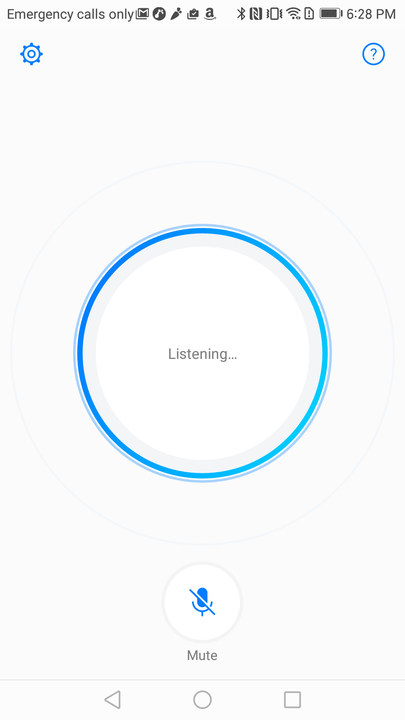
The Huawei Alexa app does not offer much in the way of customization, but it is not completely devoid of options. A Quick Start setting lets you launch Alexa by making a gesture with your knuckle on any screen, though you may have some trouble triggering this. A language selector lets you switch between one of three languages: German, British English, and English. There’s also a link to the official, separate Amazon Alexa phone companion app, which lets you control Alexa’s settings. On the main screen of the app, you’ll see a giant mic to trigger Alexa, and an icon below to mute Alexa when you are not using the assistant.
How to use Alexa on the Mate 9

Personalizing Alexa on the Mate 9 requires installing Amazon’s dedicated Alexa app via the Google Play Store. It lets you enter a home and work address (for traffic updates and directions), and you can link your calendar, check your search history, manage your shopping list, and more.
Every time you want to use Alexa, you have to open the Mate 9’s Alexa app. Unlike Apple’s Siri on iOS devices and Google Assistant on Android devices, there isn’t a hands-free way to interact with Amazon’s assistant — you have to open the app and tap on the bright blue microphone icon. That may not sound like a big deal, but when you’re used to lazily lobbing commands at the Google Assistant and Amazon’s own Echo speakers, it feels like a step backward.
More: BMW set to make Amazon’s Alexa your backseat driver this fall
Carrying on a conversation with Alexa on the Mate 9 seems a little harder than it should be, too. The Huawei Alexa app does not prevent the screen from dimming — when your phone switches off automatically, you have to unlock if you want to feed Alexa a follow-up command. You can set the auto-dim time to the maximum (10 minutes) by heading to Settings > Display > Sleep > 10 minutes. Keep in mind that this will drain your battery faster.
A Huawei spokesperson told Digital Trends that the company’s working closely with Amazon on solutions. They weren’t willing to provide a timeline, but it’s good to know they’re coming.
What you can — and can’t — do with Alexa on the Mate 9

In many ways, Alexa on the Mate 9 feels like a natural extension of the assistant’s other manifestations. The Huawei Alexa app, just like the Echo, can tell the time in any country, supply a weather report, or provide a customized daily sports and news summary from NPR, CNN, the Associated Press, and more.
Here are a few of the commands Alexa supports:
- “Alexa, what’s the time?”
- “Alexa, flip a coin.”
- “Alexa, 10 dollars to pounds.”
- “Alexa, 15 times 32.”
- “Alexa, how’s the weather outside today?”
- “Alexa, set a timer [X] minutes.”
- “Alexa, add milk to my shopping list.”
- “Alexa, what’s on my calendar?”
- “Alexa, start a 7-minute workout.”
- “Alexa, tell a bedtime story to [your child’s name here].”
Alexa on the Mate 9 is fully compatible with Amazon’s Kindle and Audible services. If you ask it, “Alexa, read my Kindle book,” it will read the most recent addition to your library using text-to-speech technology. Asking, “Alexa, read my audiobook” prompts it to start or resume any audiobook you’ve purchased from Audible. You can play different titles, skip chapters, restart chapters, or go back to a specific chapter.
You can also control smart home devices and connected cars. If you have a Philips Hue or Samsung SmartThings devices, for example, you can use Alexa on the Mate 9 to toggle the lights, switch TV channels, and more. Hyundai’s Blue Link platform lets you remotely start vehicles, change the interior temperature, and turn on the horn and lights. Here’s a list of all the supported Internet of Things devices for Alexa — some of these may not work with the Huawei Alexa app.
Unsurprisingly, the Huawei Alexa app is tightly integrated with Amazon’s shopping platform. You can place an order for anything on Amazon Prime, including Amazon Fresh groceries, Amazon Prime Pantry non perishables, and Amazon Prime Now 2-hour delivery items. You can say, “Alexa where’s my stuff?” to get tracking information on packages, and you can take advantage of Alexa-exclusive deals that run regularly throughout the year.
More: Yamaha announces it is bringing Alexa voice control to its MusicCast products
With the Huawei Alexa app, you get access to Amazon’s collection of more than 10,000 skills, or apps, that tap the assistant’s voice recognition. Particularly useful ones include the My Chef app, which can read recipes, send shopping lists, and track expiration dates. Uber and Lyft’s apps can summon rides to your approximate location; Fitbit’s app can tell you how many steps you’ve taken; the Capital One app details your bank balance; and apps from Dominos, Pizza Hut, and Grubhub can place your favorite delivery orders.
Alexa on the Mate 9 isn’t quite on par with Amazon’s Echo speakers, though. It cannot add reminders to the Mate 9’s note-taking app, instead tossing them to Amazon’s web-based To-Do list. Alarms are a no-go, too. Most surprisingly, the Huawei Alexa app doesn’t support Prime Music, Amazon’s catalog of millions of songs, albums, playlists, and radio stations. Considering Amazon sells a paid subscription exclusively for Alexa-enabled Echo speakers (Amazon Music Unlimited), it is a bizarre omission.
Not to fret, though. Huawei said future versions of the app will add new features and integrations. Here’s hoping music is one of them.
 AIVAnet