


Indie hit ‘Besiege’ is adding online machine-making duels
The war machine construction game Besiege has been a darling of Steam’s Early Access scene, and for good reason: its extremely flexible building block system has let people’s imaginations run wild. You’ve had to play solo, though, which sometimes makes it hard to show off your creations. Spiderling Games is about to throw the gates wide open, though. The developer is prepping a Multiverse update that, as the name suggests, adds online play. As many as 8 builders can join in, whether it’s to compete against each other or to team up on challenges. And you won’t be limited to the challenges that ship with the game, either.
Multiverse is adding a level editor with a slight twist: other players can join in and interact while you’re still building. You can test concepts in real time, or see if you can build a fortress before your friends find a way to take it down. Think of it as building Lego creations with mischievous siblings. The editing tools so far look like they’re powerful without being overwhelming, so this could be worth trying even without the multiplayer aspect.
The update isn’t slated to arrive until near the end of the third quarter (somewhere around September), but you might want to drop some cash early if you like the concept. Spiderling is raising the Early Access price of the game from $8 to $10 when Multiverse arrives, so it’ll be relatively costly to hold out.
Via: VentureBeat
Source: Steam, Spiderling Games
Purify your wine for a delectable drinking experience with the Üllo Wine tool
Why it matters to you
Wine lovers, this one’s for you. If you want to drink a glass of wine that’s as close to its natural state as possible, you need the Üllo Wine.
If you can’t go to Napa Valley, bring Napa Valley to you. It’s may not be so difficult if you have Üllo Wine, a new tool that promises to purify and aerate your glass of vino, removing sulfites and restoring its natural taste; it’s almost as though you were drinking it straight from the barrel on a vineyard.
Promising to be the first and only multi-purpose wine tool capable of selectively filtering sulfites out of wine without altering any of its other properties, the Üllo Wine seeks to return a bottle of red, white, or rosé to its most natural form. The process uses a patent-pending polymer to selectively remove sulfites, but keeps the natural flavors of the wine intact. The filtering process is simple: just place Üllo on top of a wine glass or fit it on the custom designed Üllo carafe or decanter, and pour.
More: A brilliant biophysicist has developed a wine bottle that doesn’t drip
Sulfites tend to give wine an unpleasantly bitter taste, but the Üllo Wine Purifier claims to be able to use its Selective Sulfite Capture technology to filter away these excess particle. It also behaves as an aerator, so you’re enhancing your wine drinking experience from just about every vantage point.
“With Üllo, Wine drinkers everywhere can experience pure wine for the first time,” said the company’s CEO and founder James Kornacki. “We designed Üllo not only for those with sulfite allergies, but for all wine drinkers to experience the taste of pure wine as if they were drinking a glass right at the vineyard.”
Aside from its filter, Üllo also makes carafes and decanters, all from hand blown glass, so you can find a product for any vinophile in your life. To check out more about the Üllo Wine Purifier and its companion products, visit http://www.ullowine.com, or pick one up in person at Best Buy, Bloomingdales, or Brookstone.
How to convert a container ship into a world-class superyacht explorer
Why it matters to you
If your inner explorer is ready for glacial expeditions with friends, Kilkea is ready to take you.
Most superyacht images depict traveling in the Caribbean or the Meditarrean, with an emphasis on beautiful people, sun decks, pools, and luxurious living. Vard 1-08 Kilkea is not a typical superyacht. When she’s finished, Kilkea will be prepared for expeditions in any water that can handle her 16-foot draft, including the Arctic and Antarctica.
Kilkea is 268 feet long and 59 feet wide at her widest. She started as a platform supply vessel, according to New Atlas. She’s a container ship that has been stripped and is now in the process of conversion at Vard shipyards. Shackleton Superyachts is the builder., while U.K. yacht designers Bannenberg & Rowell Designs are designing the exterior and interior. The superyacht is brokered by Edmiston Yacht Brokerage.
More: The biggest, baddest, most extravagant superyachts ever conceived
Kilkea’s ice-classed hull will be able to travel much farther north and south than most superyachts, but she’s not an icebreaker, so her crew will have to be cautious. She is designed to go up to 30 days without re-stocking or re-fueling.
The ship’s owner will be able to host up to 36 expedition guests depending on the final layout decisions. The current plans include a proposed helicopter deck and space for stored tenders and small planes so guests won’t have to meet Kilkea in port. There will be plenty of room for spacious salons, dining rooms, and lounging areas. One of the concept images shows a pool with lounge chairs, which doesn’t quite fit with travel through icy waters. On the other hand, not all expeditions are in cold climates.
Although Kilkea is a large ship, the conversion has focused on eco-consciousness and low fuel consumption. She will have a top speed of 15.4 knots and cruise at 12 knots. Ample power for her expedition is provided by four electric generators paired with four diesel engines that drive two adjustable pitch propellers.
Chances are the eventual buyer will change the Vard 1-08 Kilkea’s name. They’ll have the right to do so after paying the ship’s $72 million price tag.
The Shaper by NOWA is a smartwatch that looks like a classic timepiece
Why it matters to you
Who says high fashion and high tech aren’t compatible? Certainly not the Shaper by NOWA, a new watch blending timeless design with new age innovation.
With a schedule as busy as yours, the last thing you ought to have to think about is keeping time. Luckily, there’s a new watch on Kickstarter that will do that for you, regardless of what time zone you’re jetting into or out of. Meet the Shaper by NOWA, a collection of watches for frequent fliers that connects to your smartphone for automatic time zone changing as well as activity and sleep tracking, all with the timeless look of an analogue face.
Promising to be the slimmest intelligent watch ever made, the Shaper wants to prove that beauty and brains can most certainly mix on your wrist.
While there may not be much revolutionary behind the concept of the Shaper, the elegant (and rather traditional) design is certainly something that’s not all that common in today’s smartwatches. The NOWA watch syncs with your smartphone to ensure that it’s always giving you an accurate reading, and will also keep tabs on the number of steps you’ve taken and distance traveled in a day. All this information is made available in a straightforward application, and automatically recorded in either Apple Health or Google Fit, depending on your operating system.
More: ZTE’s Quartz is one of the most affordable Android 2.0 smartwatches yet
While the Shaper may look like a classic watch, it certainly boasts a bit more underneath the hood. Promising eight months on a single standard CR2025 battery, this watch was designed in Paris by Eric Gizard, who sought to create a simple, slim, and comfortable timepiece that could be worn every day. And thanks to its Swiss part movement, you won’t have to worry about this watch slowing down.
Other components are also made with quality materials, like the Italian calf leather strap, durable stainless steel casing, and Sapphire coated glass. With nearly two weeks left in its campaign, the Shaper has already surpassed its funding goal, raising over $45,000 from 372 backers as of press time. If you’d like to preorder one of these watches for yourself, you can do so for $119, and expect a shipment in July of this year.
You think you want a ‘budget’ gaming laptop, but trust us – you don’t
Gaming performance is becoming a standard feature in laptops, in part because it’s cheaper than ever for manufacturers to pack powerful graphics cards into their products. That’s given rise to a new breed of budget gaming laptops that appear, at a glance, far more capable than those available just a few years ago.
Like jumbo shrimp, a budget gaming laptop might seem a contradiction. Yet major manufacturers like Dell and Acer have dedicated some serious resources to developing affordable gaming laptops in the sub-$1,000 range. Unfortunately, like every laptop under $1,000, these systems often cut corners to deliver usable products at such affordable price points.
Cutting more than costs
Therein lies the problem. A budget laptop offers the bare minimum you need to get work done on the go, while a gaming laptop is a luxury item. Establishing a middle ground between the two presents some unique problems.
More: Xbox Project Scorpio: Everything you need to know about Microsoft’s newest console
Gaming laptops are powerful, portable computers that allow you to play games you’d normally need a big, bad desktop rig to enjoy. They let you do something you can’t with a normal laptop, thanks to their emphasis on powerful hardware and durable industrial design.
With that in mind, cutting corners in one area to deliver in another is an exercise in self-defeat for these budget-minded rigs. They’re trying to reconcile two contradictory forces, and suffer for it.
The budget gaming laptops that have come through our offices have a few things in common. First, they all boast an entry-level graphics card, usually the Nvidia GeForce GTX 1050. Though not always capable of delivering smooth performance at 1080p and high detail settings, the GTX 1050 — and its sibling, the GTX 1050Ti – isn’t the problem.
A decent gaming laptop should let you forget you’re playing on a laptop at all.
Instead, the problems are found in display quality, and build quality. Every budget gaming notebook we’ve reviewed has had issues in one, and usually both, of these areas. Flimsy hinges, cheap keyboards, and atrocious displays seem to come standard on these machines. These elements are all critical to gaming, and because they’re baked into the laptop, they can’t be upgraded later. What you get is what you’re stuck with until you buy an entirely new laptop.
Crossing the narrow threshold between a $900 laptop and a $1,200 laptop, though, almost universally remedies these problems. Build quality leaps forward, keyboards become excellent, and displays deliver a far more vibrant image. The Acer Predator VX 15 isn’t much fun to use. Acer’s Predator 15, which starts around $1,300, is one of the best gaming laptops money can buy.
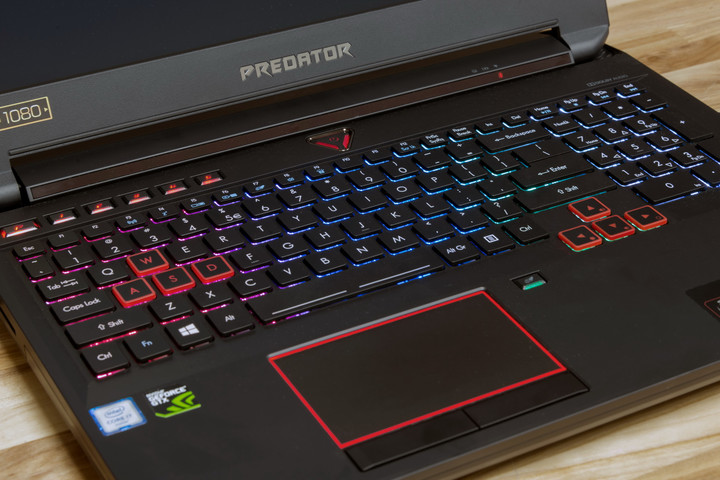
Acer Predator 15
Admittedly, that’s almost always the case, right? Spend more, and you get more. But in this case, budget gaming laptops find themselves just outside the goldilocks zone. They’re cheap enough to be appealing, but not quite expensive enough to be well made.
Minimum requirements
Standard budget laptops deliver the essentials you need to get online and run an office suite. But what’s the bare minimum you need to enjoy a PC game? Gaming is experiential, and there’s a lot more to enjoying a game than hitting 60 frames per second. Making a gaming laptop that is enjoyable to use is about more than just packing a powerful graphics card into a gaudy black and red chassis.
Personally, I haven’t done any serious gaming from a desktop in years – and I’m pretty much a dedicated laptop user. I’ve explored the Capital Wasteland through an old MacBook Pro running an Nvidia GPU, I’ve learned how not to play Hanzo on a Dell Inspiron 15 7000 Gaming, and most recently I’ve dismantled drug cartels in Bolivia with a Dell XPS 15 in my lap.

For me, budget or not, a decent gaming laptop should let you forget you’re playing on a laptop at all. A big part of that is having a decent display, and a well-designed chassis, in addition to powerful internal components. Hook up an external mouse, and a good gaming laptop should give a full gaming experience without being chained to a desk. Budget gaming laptops just aren’t there yet.
Gaming laptops are great, if you pay for them
The gaming notebook market has finally achieved a balance between price and performance, and there are some great gaming laptops out there right now. From sleek Razer Blades to brash Acer Predators, there’s something for every taste. The only problem is price, as they all cost $1,000 or more.
There aren’t any great budget gaming notebooks on the market right now.
That’s a lot of money, but if spending that kind of cash on a gaming system is just not feasible, you’re not alone, and you have options. First, if you’re like me and gaming on a laptop is your preferred method, just wait a little while and try to find a last-gen gaming laptop refurbished on Amazon or from the manufacturer — or keep saving until you can comfortably cross over into the $1,000 threshold.
Alternatively, don’t get a gaming laptop at all. There simply aren’t any budget gaming notebooks on the market right now that are worth the trouble. It’s easy to convince yourself that a budget gaming laptop makes sense if you don’t have much to spend, but you’ll end up spending as much in two years to replace what you buy now, once you’ve grown to hate it.
Don’t do that to yourself. Instead, start saving for the Razer Blade you really want, or start checking out desktop components on NewEgg. An $800 gaming laptop isn’t worth your time or money.
Galaxy S8 vs. Galaxy Note 8: The hype train [#acpodcast]
This week, Daniel is joined by Alex Dobie, Florence Ion and Jerry Hildenbrand to talk about the Galaxy S8, and whether some of the things that have been criticized about it will be fixed in the Galaxy Note 8 later this year. Will Samsung return the Note series to its specs-heavy glory, or choose to keep specs and features conservative after a rough 2016?
And the LG G6 is available this week, and it’s better than we expected it to be! Does that matter when the Galaxy S8 is ready to be unboxed in under two weeks? Did LG do enough to hype it?
Finally, Comcast is launching its own wireless service called Xfinity Mobile. It’s a mess of caveats and bloatware, but it also may be the best option for current Comcast customers, since it runs on Verizon’s network.
Note: There is a bit of swearing in this week’s episode, but it’s confined to the last five minutes of the show.
Podcast MP3 URL: http://traffic.libsyn.com/androidcentral/androidcentral331.mp3
The NVIDIA Shield TV is the best thing that ever happened to PC gaming

As if we needed another reason to get a Shield TV.
The NVIDIA Shield TV is one of our favorite Android devices of all time. At least it’s one of my favorite Android devices of all time. It’s the best Android TV box, is well supported by the company that makes it, and has the oomph to push out FHD HDR video to any TV that supports it.
Gamestream isn’t new but it’s a thing that didn’t get the attention it deserved.
And it’s a helluva way to play PC games on that big 50-inch+ screen in your living room.
NVIDIA Gamestream isn’t anything new. And it’s not just for the Shield TV so if you have a Shield tablet or a Shield portable you can get in on the same action at a smaller scale. What it does is let you play your games from your gaming PC, but have a remote screen and controller. Cool concept, right? The thing is that it’s way cooler than you think it is once you try it.
How to set up GameStream on your NVIDIA Shield TV
I’ve always loved video games. I usually buy the next AAA title before I read any reviews just because I love playing games. I did just that with Mass Effect: Andromeda, and don’t regret it. Anyhoo, I bought the PS4 version because I also like to kick back in a soft chair and play games in the living room. After I was 90% complete I decided I liked the game enough to give EA a few more dollars and bought the PC version only to be bummed out because your EA account doesn’t sync between the console versions and the PC. Thanks, Sony, Microsoft, and Origin.

I didn’t feel like starting over so I was going to dig out a monstrous long HDMI cable, but while I was digging for it I saw my Shield TV box and remembered Gamestream. If you love to game and have a decent gaming rig (full system requirements here) this is the shit.
It was super easy to set up, the response between controllers or keyboard/mouse and the screen is at least 99% as good as playing local and I get to chill in my La-Z-boy with my feet up and shoot stuff. I was hooked the minute I tried it and made sure my favorite games were set up so I could play them the same way. Now I can play ME: Andromeda as well as Fallout 4, Far Cry, The Witcher 3 and even old favorites like Thief in style. And I have an underpowered Steambox to give to the neighbor’s kid because this is just plain better.
Consoles are great but if you have a gaming PC, a Shield TV is better. Flame on.
I know I’m not the only gamer out there who isn’t gung ho for one particular bit of hardware to play games on and plenty of people have a console or two and a gaming PC. For anyone reading who thinks the same way, you really need a Shield TV just so you can do the Gamestream thing.
In fact, NVIDIA could cash in on just how great this is if it wanted to. Gamers spend a lot of money and won’t balk too much at the price of a set-top box that can run Android apps and games, will soon have Google Assistant and can remote play the games they love with Ultra settings instead of console jaggies and stutters. They should demo this stuff in every GameStop in every mall in America and drop a $20-off coupon for one in the box my $700 video cards came in.
This is what’s cool about the way Android is distributed. Sure, the distribution model lends itself to fragmentation and devices being left behind, but that’s the companies not being on their toes and doing the right thing. Letting a company that knows how to do hardware use Android in ways like the Shield TV does is how you get cool stuff. Everyone loves cool stuff.
See at Amazon
Windows 10 can set up a PC using your voice
Windows installations have come a long way over a few decades. It used to be that you had to hand-hold the system, but it’s increasingly automatic — you can even nuke an existing install with relative ease. And now, you don’t even need to touch the keyboard for certain manually-guided steps. As The Verge has noticed, the Windows 10 Creators Update brings Microsoft’s Cortana assistant into the setup process. You can tell Windows to connect to your WiFi network, choose keyboard options and sign into your Microsoft Account with little to no typing.
This will only be of limited use if you have a complex configuration, of course, and you can take the hands-on approach if you’d rather not talk to an AI helper. Still, this could be an important step toward simplifying computers, making them a little less intimidating to newcomers. It should be helpful to more experienced users, too. You’ll have to sit down in front of your computer at some point, but this lets you wander across the room while accomplishing some important tasks.
Wow, Windows 10 now includes Cortana during setup. When you clean install you can use your voice to setup a PC. Really neat pic.twitter.com/tnboxH10JP
— Tom Warren (@tomwarren) April 6, 2017
Source: The Verge
‘Shadow Brokers’ give away more NSA hacking tools
The elusive Shadow Brokers didn’t have much luck selling the NSA’s hacking tools, so they’re giving more of the software away — to everyone. In a Medium post, the mysterious team supplied the password for an encrypted file containing many of the Equation Group surveillance tools swiped back in 2016. Supposedly, the group posted the content in “protest” at President Trump turning his back on the people who voted for him. The leaked data appears to check out, according to researchers, but some of it is a couple of decades old and focused on platforms like Linux.
If anything, the leak might backfire. Edward Snowden notes that while the leak is “nowhere near” representing the NSA’s complete tool set, there’s enough that the NSA should “instantly identify” where and how the kit leaked. This doesn’t mean the Shadow Brokers themselves are about to face capture. However, this may give the agency info it needs to both connect the dots (how much of a role did NSA contractor Harold Thomas Martin III play in the online leak, for instance?) and prevent a repeat incident.
Does this open a can of worms? It’s hard to say — researchers are still combing over the data. If there are any hacks that can be made useful, though, this could be problematic for server operators worried about cybercrime. If nothing else, it shows that the Shadow Brokers didn’t reveal their full hand.
Via: CyberScoop
Source: Shadow Brokers (Medium)
Your shoe will also be your running coach with the new Altra Torin IQ
Why it matters to you
Get real-time feedback on your running form and more, all from the sole of your shoe. It’s all thanks to the Altra Torin IQ.
Getting the right pair of shoes to run in has always been of the utmost importance, but now, Altra and iFit have made your footwear more important still. Meet the Altra Torin IQ powered by iFit, described as the world’s first smart shoe. What’s so intelligent about this sneaker? It’s the running coach that’s built into each pair that promises to give you “accurate running intelligence in four critical areas and live coaching feedback during every run.”
“For too long, the two main metrics to measure your run have been ‘how far?’ and ‘how fast?’” said Altra’s president and co-founder, Brian Beckstead. “With Altra Torin IQ shoes, you get a much richer picture of your run with real-time coaching. We analyze the problems in real time, and provide you with proactive suggestions so you can correct and improve right away. Running has never been smarter.”
More: These trail running shoes offer exceptional performance both up and downhill
Despite the presence of a smart coach in the shoe itself, you won’t be weighed down during your run. Featuring full-length but super-light sensors and transmitters in the midsole of each shoe, the Altra Torin IQ gives you live data for each foot. By way of Bluetooth technology, the shoe is able to communicate with the companion Altra IQ iFit app, and give you information about your landing zone, impact rate, contact time, and cadence. The app also keeps tabs on your pace, distance, and time.
While you’re running, the Altra Torin IQ will give you live feedback on your movement, both on your app screen and verbally. For example, by tracking your landing zone, this shoe can help you avoid landing with a harsh heel strike or in a manner that is too far forward on your toes. And thanks to the shoes’ dual sensor, you’ll get feedback on how hard each foot is hitting the ground, and if need be, how to land more softly and achieve better balance.
Despite the high-tech nature of these shoes, you’ll be able to use them just about anywhere. Promising to be rain- and puddle-resistant, you can take your Altra Torin IQs anywhere you want to go. And the flexible electronics packet embedded in the sole is good for about 600 miles, although Altra guarantees replacement should the sensor system fail.
So if you’re looking for a way to step up your pace, you may be looking for a new pair of smart shoes.
 AIVAnet