


Google’s crackdown causes fake Maps listings to drop by 70 percent since 2015
Why it matters to you
Google Maps is a tool to get from point A to point B — but it could lead you astray if a fake listing gets through. Since 2015, the company has reduced such listings by 70 percent.
Google Maps is getting more accurate. The internet giant said it has taken a number of steps over the past few years to reduce fake results popping up in Google Maps — and they appear to be working. The number of fake listings has fallen by a whopping 85 percent, and those fake listings, Google says, are identified before they even appear on Google Maps.
Google has also reduced the number of fake live listings by 70 percent compared to the peak reached in June 2015.
More: Watch this astounding trip around the world, made entirely from Google Maps
The fake listings come largely from Google My Business, which itself extends over to Google Maps and even Google Search. Many of the fake listings are an attempt by people to defraud businesses or sometimes to extort customers.
Google also commissioned a study from the University of California, San Diego, to get a little more insight into abuse on Google Maps — so that it could continue to improve listings on Maps.
According to the study, roughly two out of five fake listings were bad actors posing as locksmiths, plumbers, electricians, and so on. Despite the fact that Google routinely discovered and disabled the fake listings, the perpetrators would still cycle through different addresses and VoIP phone numbers.
Around 10 percent of fake listings actually belonged to legitimate businesses — like hotels and restaurants — which scammers then claimed ownership of. These scams affected customers as well. Booking a hotel room online, for example, might seem exactly like the real thing, but the businesses were then being told to pay referral fees.
There are a number of ways that Google is reducing fake listings on Maps. For starters, the company is prohibiting bulk registrations at most addresses, and preventing companies from listing new addresses a long distance away without valid verification.
Latest WikiLeaks release involves ‘Grasshopper,’ a toolset for creating custom hacks
Why it matters to you
The leaked documents show that the agency has tools that make it easy to create custom attacks.
WikiLeaks has stirred up some serious controversy and concern with its various Vault7 leaks, which have uncovered numerous CIA hacking projects. The organization isn’t done yet, apparently, as it continues to release information on methods used by the U.S. intelligence agency to break into target computer systems.
The most recent release involves what’s called “Grasshopper,” specifically a collection of software tools used by the CIA to attack Microsoft’s Windows platform. The tools are essentially building blocks that CIA agents can use to snap together custom attacks, as Ars Technica reports.
More: Wikileaks’ ‘Vault 7’ proves Big Brother and criminal hackers use the same tricks
The WikiLeaks Grasshopper release includes a set of user guides that are not unlike those issued by commercial software developers. While not the tools themselves, the documents provide a solid overview of how the tools function and what potential targets might want to look for in determining if their own systems have been subject to CIA attack.
As one document describes:
“Grasshopper is a software tool used to build custom installers for target computers running the Microsoft Windows operating system. An operator uses the Grasshopper builder to construct a custom installation executable.
The operator configures an installation executable to install one or more payloads using a variety of techniques. Each payload installer is built from individually configured components that implement part of the installation procedure.
The operator may designate that installation is contingent on the evaluation of the target environment. Target conditions are described using a custom rule language. The operator may configure the tool to output a log file during execution for later exfiltration.”
Grasshopper includes a variety of tools and techniques for a wide range of hacking functions, including methods for evading antivirus software. The WikiLeaks release also highlights a few of the organizations that use tools like Grasshopper, such as the Advanced Engineering Division (AED) that develops the CIA’s implant code and the Remote Development Branch (RDB) that develops remote implants.
What’s perhaps most fascinating about Grasshopper is its apparent focus on being easy to use. The tools do a lot of the work for agents, such as evaluating systems to make sure the target system has the right configuration for the chosen attack.
It’s likely that WikiLeaks will continue to release this kind of information. Whether or not it makes hackers’ jobs easier by giving them hints as to what kinds of tools are most effective remains an open question. But there’s no doubt that the most recent information makes the CIA’s job more difficult, including the fact that it holds the agency up to some ridicule for allowing the information to leak in the first place.
LastPass users, here’s what to expect in Android O
The company details what using LastPass will be like in Android’s next tasty iteration.
Do you use LastPass? And do you plan to use Android O on your device? In a lengthy blog post, LastPass detailed what to expect from the password manager now that Android will offer auto-fill capabilities across the entire operating system.

From its blog:
Here at LastPass, the hands-down, most-exciting part of Android O is Autofill APIs. Users running Android O will save tons of typing time and stay more organized thanks to Autofill APIs.
Autofill More than Passwords
Using LastPass on Android makes you more secure, but it also saves you time. You don’t have to spend time typing lengthy passwords in your browser or your favorite apps. Autofill APIs are going to let us save you even more time on your Android device, because we’ll be able to help you fill in more than just passwords. The Autofill Framework lets apps like LastPass recognize credit card forms and addresses as you come across them. If you’ve got that information stored in your vault, we’ll be able to safely fill it for you.
As an example, let’s say you’re treating yourself to a new pair of headphones. You open the Amazon app, and to sign in, you’ll just tap on the screen to unlock LastPass and we’ll show you the matching sites in your vault. You find the right headphones, put them in your cart, and go to checkout. Do you want to ship them to work, or to the house? Tap again, and we’ll present you with the addresses you’ve stored in LastPass. Which credit card do you want to use? Tap again, choose your Amazon Visa, and voila, you’re two days away from new headphones. As long as they’re in LastPass, you’ll never have to type an address or a credit card number again.
Performance and Security Improvements
In addition to the time savings, we anticipate other performance improvements as well. Today, LastPass relies on Android’s accessibility features to identify password fields we can help you fill. The accessibility approach has two drawbacks which we believe Autofill will address: (1) it’s more processor-intensive, counteracting the time we want to save our users, and (2) it requires that users grant us extra permissions. The Autofill Framework is purpose-built to allow apps like LastPass to fill eligible forms on a user’s behalf, and nothing else. We believe strongly in user privacy and security, and we’re happy to see Google introduce this method for safer, more efficient browsing.
Overall, you’ll be able to choose LastPass’s virtual vault to store your passwords, credit card information, and oft-used addresses. The service will extend its abilities to the entire operating system, as per Android O’s autofill mechanism.
It’s unclear yet just how it will work on Android O, but it sounds like you’ll be able to choose LastPass as the default password manager, which is nice if you’re particularly invested in an account with the company. 1Password recently announced it would do the same.
Android O
- Everything new in Android O
- Should you put Android O on your phone?
- How to install the Android O Developer Preview
- Android O isn’t in the Android Beta Program yet
- Join the Discussion
Amazon Alexa finally lets you control the colour of lights with your voice
Amazon’s Alexa AI has long been able to control smart lights with via voice commands, but oddly, not their colour.
Although you could turn off or on all sorts of smart lamps from the likes of Philips Hue or LIFX and so many others, you were otherwise limited. Sure, some bulbs let you dim them too, but one of the most fun aspects of smart-home control has been the idea that you could change the colour of your lights and change the mood of your home in an instant. For some reason, however, Alexa didn’t allow this capability.
- What Philips Hue smart bulbs are there and which should you buy?
- Eight lighting tips for your home: An expert shares her design secrets
Technically, Amazon Echo devices did let you select pre-programmed “scenes” in order to change colour or to dim light. But now, thanks to an update that’s gone live, Amazon has unveiled an Alexa-specific control so that all you have to say is “Alexa, set the bedroom light to purple” or “Alexa, make the living room warmer” in order to make your smart lamps switch to purple or go warmer, respectively.
Alexa will remember up to 100 shades and colours, Amazon said, so you can say things like “cool white” or “purple”. And these voice commands work across the Hue line, TP-Link Kasa, and LIFX bulbs. With this new skill, Amazon has brought Alexa up to speed with Google Home, which could change smart lamp colours since launch. Check out our versus guide to see how else Echo and Google Home differs.
This Ford smart crib simulates actual car rides to lull your baby to sleep
What is it about car rides that make kids pass out?
Is it the gentle vibrations, the glow of lights, the hum of the engine, or the closed-in environment? Ford has been asking itself all these questions, apparently, because it just debuted a smart crib for infants that essentially mimics a car ride. Called Max Motor Dreams, the crib features LED lights and bottom-mounted speakers, which seem to simulate street lights and muffled engine sounds, respectively.
- New Ford Mustang offers 12-inch all-digital display, smartphone unlocking
- Ford wants its electric self-driving delivery vans to launch drones
Ford
It’ll subtly vibrate and rock to simulate the movements of riding in a backseat. And because it’s smart, it comes with an app that parents can use to track their car’s route and actually reproduce the sound and feeling of that drive for their baby. This is one high-tech bassinet. Unfortunately, Roadshow said that Ford has only built one, but if there’s enough interest, the automaker could enter full production.
Ford’s Spanish arm is holding a sweepstakes right now so that a lucky set of parents out there can get Max Motor Dreams for their little one. They just have to sign up to test drive one of Ford’s Max vehicles.
DJI’s next drone basically looks like a much smaller Mavic Pro, leak reveals
DJI is probably coming out with a new drone, and it’s super tiny
Leaked images of a new device, supposedly called the Spark, have appeared on Chinese DJI forums, though the site is now down. It appears to have the same foldable design of the Mavic Pro, only smaller. A video of the drone shows that it can be hand-held and has a vertical-tilting camera. Already there’s a lot of speculation floating about whether it’s a low-cost “selfie” drone or one meant for racing.
- Best drone photos ever: Stunning images taken from up high
- The best GoPro photos in the world, prepare to lose your breath
To be clear, it’s unknown if Spark will definitely have foldable arms, considering it’s so mini. We also don’t know anything about the controller and whether it comes with a companion app or not. There’s a lot of unknowns right now. DJI hasn’t even confirmed the Spark or that it is working on a new drone, of course, but it did recently trademark the name “Spark”. So, that’s something at least.
The Mavic Pro was DJI’s smallest drone when it released. We imagine the Spark will be available at a cheaper price point for those unwilling to drop $1,000 on a Mavic Pro. Check out Pocket-lint’s Best Drones guide to see what else the Spark may go up against.
YouTube TV needs more channels, but it gets the basics right
YouTube TV launched earlier this week, bringing another option to the quickly growing online TV subscription space. It’s basically the cord-cutting dream; being able to watch shows, news or sports as they happen instead of waiting for your favorite sitcom to show up on Hulu the next day. Of course, YouTube TV and its competitors (which include Sony’s PlayStation Vue, Sling TV and DirecTV Now) all have their flaws. There isn’t a perfect option out there yet, but after spending the better part of the week watching YouTube TV I can say it definitely has some things going for it over the competition — but it’s also pretty clearly a service in its infancy.
Probably the most important question when looking at a streaming TV service is whether it has the channels you need. Unfortunately, it’s getting harder and harder to do a true comparison between these four streaming services, as all of them besides YouTube offer multiple package at different price points. YouTube TV’s offering gets you a total of 39 channels plus access to YouTube Red original series for $35 a month. 10 more channels are coming soon, and you can add Showtime or Fox Soccer Plus for $11 or $15 a month, respectively. Users can add up to five additional family members to their plan, too. Here’s the complete channel lineup:
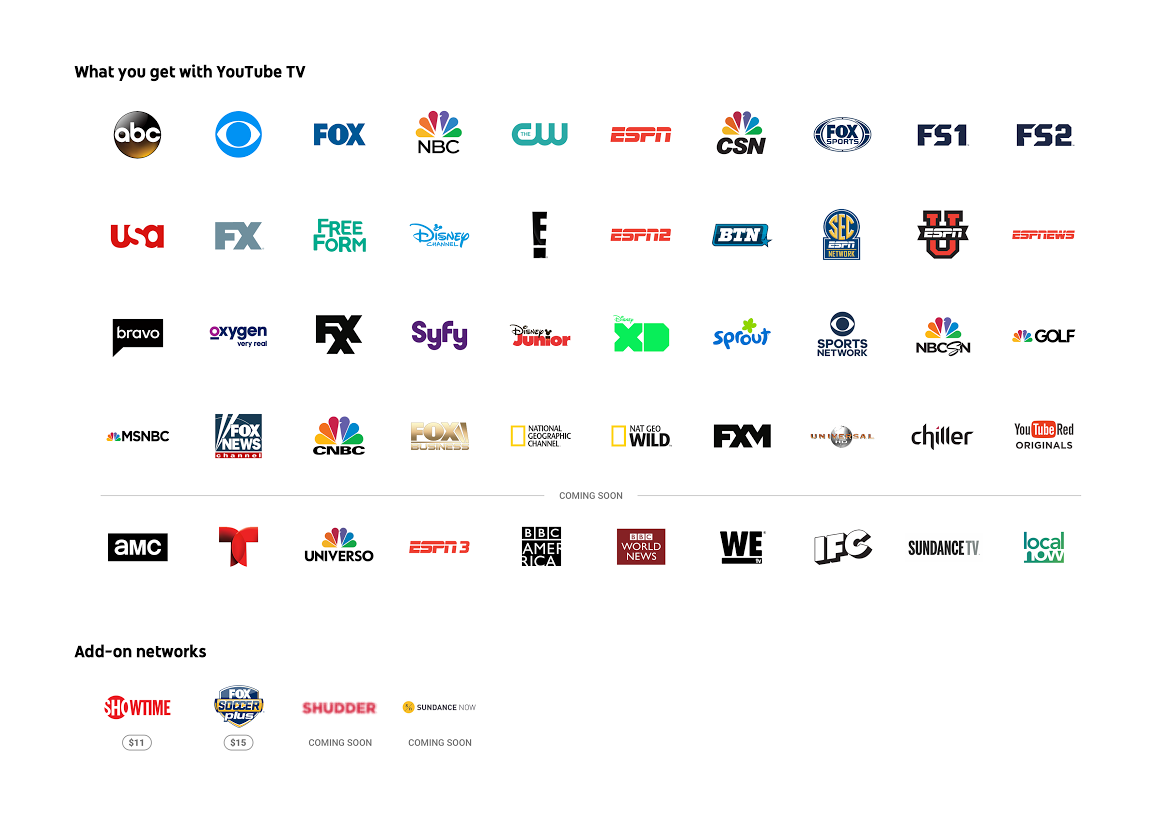
Highlights include local and national programming from all four major networks, sports from ESPN and Fox Sports, plus major cable news networks MSNBC, CNBC and Fox News. YouTube is also adding AMC and BBC America soon, though there’s no timeframe yet. Big omissions compared to the competition include TNT, TBS, Cartoon Network, Comedy Central, MTV, CNN, Lifetime, Animal Planet, Nickelodeon and many others. While the simplicity of YouTube TV’s plan is appreciated compared to the complex options the most over-the-top providers offer, there’s no doubt that YouTube TV trails the competition in sheer channel numbers.
Assuming the current channel lineup works for you, there are still a few things to know before you try and sign up. For starters, YouTube TV is only available in New York, Los Angeles, San Francisco, Chicago and Philadelphia — if you’re not in or around one of those metropolitan areas, you’ll have to wait. I imagine YouTube will move quickly to roll the service out in more cities, but you might have to look elsewhere if you want to cut the cord immediately.
At launch, YouTube TV is only available on Android and iOS devices or via the web. That’ll cover just about everyone, but right now the only way to get the service on a big screen is with a Chromecast. (TVs that have Casting functionality built-in will also work). Google promises to add support for other set-top boxes and consoles going forward, but for now YouTube TV is primarily a phone-first affair.
Provided that all works for you, the next big question is what the experience of using YouTube TV is like. Services like this often have complicated and confusing UI, whether we’re talking about your standard Xfinity cable box or PlayStation Vue. For my money, Google’s done about as good a job as it can with YouTube TV’s interface, managing to tie together four main sections — a DVR-style video library, live content, search and recommendations — in a way that’s not too complicated.

Everything starts from the home screen, which includes recommendations for shows to record, popular live programming, a “resume watching” section with things you’ve started but didn’t finish and a list of various categories to browse. That list includes things like “drama on now,” movie recommendations, YouTube Red originals, and a longer “try something new” area that serves up shows you might like based on your history.
It doesn’t take long for these sections to populate with things that were at least somewhat in my wheelhouse. After I started watching a few episode of Parks and Recreation, The Goldbergs and NCIS (I swear it was just for testing purposes), YouTube TV suggested I check out Brooklyn Nine-Nine, The Mindy Project and NCIS: Los Angeles, all reasonable suggestions given what I had checked out at that point.
Every show has its own landing page, similar to what you might find on Hulu or Netflix. It’ll show you all episodes that are coming up, and you’ll also see what’s available on-demand. It’s not clear exactly why certain shows have large catalogs available while others only have episodes you can watch after “recording” their live airings — and that’s one of the trickier things about YouTube TV. It would definitely be helpful if you could see all programs available on-demand, all in one place.

If you add a show to your library from this landing page, YouTube TV will “record” all future episodes and add them to your library as they air.With unlimited storage, there’s no reason to be picky about adding things to your collection. Everything you save will live in the “library” tab, organized into various categories. At the top is a list of everything being recorded or scheduled to be recorded in the near future, followed by your most-watched and most recently recorded shows and movies. Below that you’ll find everything you ever added to your library. Since this can get packed pretty fast, YouTube TV gives you a number of options to sort it. There are filters for movies, shows, sports and events (in the app, those filters are right at the top of the library page). You can also sort either alphabetically or by what’s most popular.
Speaking of sports, YouTube TV handles them in a unique way. You can follow teams across the four major US sports leagues; every time a team you follow plays a game, it’ll be recorded. That’s assuming that team’s game is broadcast on a channel YouTube TV has access to, which may often not be the case. You can also follow the Premier League, Formula One, the PGA tour and a number of others — for sports that aren’t team-based, you can choose to follow everything and have all the live events recorded. It’s one of the better parts of YouTube TV, even if you won’t always find games from the team you’re interested in.

The last major parts of the service you’ll want to know about are live feed and search. When you click on the “live” tab, you get a vertically scrolling list of every channel available to you and what’s currently playing. That list looks great on mobile — the top-most channel takes up about a third of the screen and starts a video preview almost instantly. As you scroll through the list, other channels pop into that slot. If you just want to “see what’s on” and get watching, this is an excellent way to do so. If you want to see what else is on a given network, they’re all listed out in the search tab; you can find what shows are coming up next there.
Unsurprisingly, search is more than just a simple box to type in. By default it shows you a list of genres, networks, trending programs, sports leagues and then types of shows as you scroll. Even if you don’t start typing into search, this page will let you narrow down what you’re looking for and provide you with plenty of things to start watching. When searching, you can obviously look by title, but you can also use natural language to find things like “police dramas” or “sci-fi movies.”

A good video service needs all of these myriad ways of finding and keeping track of your content — but it also needs to be fast and get out of your way when it’s time to watch. Fortunately, YouTube TV succeeds on that count. Live preview and recorded content start up almost instantly; there’s usually a few seconds of buffering before the stream hits peak quality, but from there it’s all good. You can adjust the quality of the stream all the way up to 1080p, just like the normal YouTube app. For now, there’s no 4K content available or any word on when that might happen.
Once you’re actually watching something, the service works just like YouTube’s standard app — just turn your phone on its side to get into full-screen video. Sending YouTube TV to my Chromecast also worked like a charm, making this a viable living room solution if you shell out the cash for Google’s little streaming puck. Streaming live TV looked nearly as good as Netflix or Hulu through my Apple TV. It felt comparable to PlayStation Vue, the live TV streaming service I’ve used the most thus far.
Ultimately, YouTube TV is a solid new option in the growing live streaming TV space. To me, the UI is a lot better than some of the competition, but the channel selection does lag behind some of the packages you can find on Sling TV, PlayStation Vue or DirecTV Now. Fortunately, none of these service make you sign a contract, and YouTube TV is giving a free month to new users. You’ll also get a free Chromecast when you pay for your first month of YouTube TV, which is pretty much essential unless you watch everything on your computer or phone. For my part, I’m sticking with Hulu and Netflix for now — I don’t place that high a premium on live content. If you do, though, a free month of YouTube TV is worth a shot.
Two Marines punished for online misconduct under new policy
Two Marines have been disciplined for posting disrespectful comments about a female soldier on social media, The Washington Post reports. It’s the first time the Marine Corps has officially punished someone for online misconduct since last month’s nude photo scandal.
The two active-duty Marines are from the 2nd Battalion, 4th Marine Regiment, stationed in California. They allegedly made demeaning comments about one of their enlisted leaders and a female Marine who had completed infantry training, a military official told The Washington Post. They were reduced in rank and lost pay.
“The Marines and Sailors of 2nd Battalion, 4th Marines do not tolerate personal attacks on their Marines, online or elsewhere,” said the unit’s commander, Lt. Col. Warren Cook, in a statement. “This kind of behavior flies in the face of our service’s core values and this organization refuses to condone it.”
The Marine Corps faced intense scrutiny and criticism last month when it was revealed that the US Naval Criminal Investigative Service was looking into a Facebook group that shared nude photos of female servicewomen. It promptly started to crack down on soldiers’ social media habits, publishing updated guidelines that expressly forbid various forms of online sexual harassment.
Source: The Washington Post
Gboard studies your behavior without sending details to Google
Last June, Apple started testing differential privacy, a method to gather behavior data while anonymizing user identities. The company expected it would improve QuickType predictions. Google has just begun trying out a similar method with Gboard to improve its automatic suggestions, but has taken a different approach to ensuring privacy: Keeping data on the device, not uploading it to the cloud.
It does this by downloading the latest text prediction model to your device, improves it by learning from behavior data on your phone and then sending a summary of the changes to the cloud. This is combined with all the other single-device updates and a new shared prediction model is created to download and start the process all over. Google’s research scientists are calling this method ‘Federated Learning.’
Keeping the learning process local on your device by uploading small summaries to servers instead of large data batches reduces both power drain and bandwidth required. That might make it less of a strain on devices and cloud services than Apple’s technique, which adds “mathematical noise” to user data in order to protect identities. Google’s testing Federated Learning out first on Android’s keyboard, Gboard, to improve its word suggestions. In the future, it might be used to improve each user’s own personal language models on Gboard, as well as adjust photo rankings based on which types people look at, share and/or delete.
Via: VentureBeat
Source: Google Research Blog
Dept. of Labor claims Google’s pay disparities are ‘systemic’
After suing Google for not releasing employment data, the US Department of Labor now claims pay disparities between men and women are widespread throughout the company. Although Google claims it has successfully closed its gender pay gap, Labor department officials testified in court in San Francisco today that Google may have violated federal employment laws, the Guardian reports. According to regional director Janette Wipper, the department found “systemic compensation disparities against women pretty much across the entire workforce.”
Today’s hearing was part of the Department of Labor’s lawsuit against the search giant that started in January. As a federal contractor, Google is required to hand over employment records to the government, but the company has repeatedly refused, claiming that the records request were too broad and invaded their employee’s privacy.
The labor department got their data from a 2015 snapshot of salaries, the Guardian notes, but Wipper used the information to argue in court that Google should be compelled to release more information. Wipper says the department needs to be able to review earlier data and conduct confidential employee interviews in order to “understand what’s causing the disparity.” If Google continues to withhold employment data, the department’s lawyers have asked the court to sever the company’s contracts with the federal government and bar Google from doing business with the government in the future.
Google’s lawyers, on the other hand, called it a “fishing expedition” and argued again that the information was irrelevant to a compliance review. Google attorneys also claimed the Department of Labor’s request was an unreasonable search that violated the company’s fourth amendment rights. In a statement, Google “vehemently” disagreed with the accusations and called the government’s data into question. “Every year, we do a comprehensive and robust analysis of pay across genders and we have found no gender pay gap,” the statement said. “Other than making an unfounded statement which we heard for the first time in court, the DoL hasn’t provided any data, or shared its methodology.”
While Google has been slowly inching towards diversity and many tech giants have pledged to close the gender pay gap, the Department of Labor has been cracking down on discrimination of all sorts in the industry. Earlier this year the department sued Oracle for allegedly conducting discriminatory employment practices.
 AIVAnet