


Android Wear 2.0 is making its way to the LG G Watch R and Watch Urbane
LG’s fabled Android Wear smartwatches will be able to roll with the rest of ’em for a little while longer.
The LG G Watch R and first-generation LG Watch Urbane may seem like aging fuddy-duddy smartwatches to some, but they’re still holding on. The three-year-old Android Wear smartwatches are slowly seeing the update for Android Wear 2.0.

Per Android Police, wearers of the G Watch R and Watch Urbane have confirmed the arrival of Android Wear 2.0 on their respective smartwatches. It’s possible they’re part of a “third wave” of updates, too, the first of which hit the Fossil Q Founder, Casio Smart Outdoor Watch, and TAG Heuer Connected, and the second of which began rolling out to other Fossil, Michael Kors, Nixon, and Polar watches.
A quick shout out to those sporting Motorola’s second-generation Moto 360 or the original Huawei Watch. We figure you’re likely hoping you’re next in line for the update to Android Wear 2.0.
Android Wear
- Everything you need to know about Android Wear 2.0
- LG Watch Sport review
- LG Watch Style review
- These watches will get Android Wear 2.0
- Discuss Android Wear in the forums!
Chevy Bolt EV test drive: It’s electric!
Green is all the rage; not the color (I’m more of a blue guy myself), but instead the enviro-friendly type. There are few consumer goods more environmentally taxing than cars; considering how many are always on the road churning out smog, combined with fluctuating prices at the gas pump, it’s little wonder that electric cars are getting all the attention these days. And it’s not just hip new outfits like Tesla having all the fun; old American standards like Chevy are also seizing the chance to go green with EVs of their own. Last year I had the chance to test drive the Volt, Chevrolet’s half-electric Plug-In Hybrid – and today, I finally got to take its sibling for a spin. The star of today’s video is the Chevy Bolt EV, the vehicle that Chevrolet promises will “reinvent” the electric car.
My name is Michael Fisher, but my drag name is MrMobile (that’s drag racing – sorry RuPaul fans). This video is a brief glimpse at the Chevy Bolt EV, filmed after about five hours driving the car in Boston. You’ll learn what the Bolt EV is, what it offers, and what to expect ahead of my Chevy Bolt 2017 review coming later this year. In the meantime, there’s plenty to feast your green eyes upon; hit that play button up top, and take a ride with me (cue Nelly).
Stay social, my friends
- YouTube
- The Web
- Snapchat
Runtastic made a cooking app with top-down videos like the ones on FB
Fitness and diet go hand in hand, so naturally, a team behind a popular running app would also want to launch a cooking app.
At a time when cooking videos are all over our social media feeds, Adidas-owned Runtastic has taken it upon itself to bring a collection of recipes it already posted to YouTube and repackage them for a new, official app called Runtasty. Like any other video recipe on social media, you get a top-down view of the steps, but Runtastic has claimed that its recipes are “dietitian-approved” and easy to prepare.
- Adidas buys European fitness app startup Runtastic
The idea is that, with Runtastic, Runtasty should help you get your nutrition journey sorted alongside your fitness journey. There are 23 categories for meals that fit a variety of diet requirements, such as vegan, dairy-free, or low-carb recipes. The app even includes some “convenient kitchen hacks” that will teach you how to do common sous chef-like tasks including cutting onions.
And like any other recipe/cooking service, there are ways to save your favourite recipes, get nutritional facts, and whatnot. If any of this interests you, Runtasty is available now for iOS and Android users.
The app is free to download and use.
Adobe wants to use AI and machine learning to beautify your selfies
Forget about Photoshopping. People now edit their selfies using computer vision, machine learning, and artificial intelligence.
Several apps from Snapchat to Meitu all use these technologies so that they can adjust what your device’s camera sees – even in real-time. For instance, Snapchat has lenses that can make it look like you’re wearing a crown, while Meitu can instantly beautify your portraits. So, at a time when selfies are everywhere, it makes sense that Adobe, the maker of Photoshop, would want to leverage such technologies as well.
- What’s the point of Snapchat and how does it work?
- What is Meitu and why is everyone using it?
- What is Prisma and how does it turn your pics into artwork?
- What is Facebook Stories and how does it work?
Sensei, an extension of Adobe that dabbles in artificial intelligence and machine learning, has released a trailer for some new features that it is working on – and they all seem to be focused on improving selfies. But Adobe hasn’t announced if or when these features will be included in its apps; the video only says Adobe is “exploring what the future may hold for selfie photography powered by Adobe Sensei”.
The video itself shows a man taking an alright selfie but then drastically improving using tools like artificial depth of field, which adjusts the perspective from which the photo was taken. The video also shows the ability to copy the style of any given image and transfer it to your selfie or another image. Adobe said these features combine the “power of artificial intelligence and deep learning”.
And everything is done right on your smartphone, whether you’re effect editing, automatically photo masking, or using the photo style transfer technology. Adobe promises it can transform a typical selfie into a “flattering portrait with a pleasing depth-of-field effect that can also replicate the style of another portrait photo”.
Who knows when we’ll be able to get our hands on these Adobe features, but the Kim Kardashian-West in us is super excited.
Australian regulator sues Apple over phone-bricking ‘Error 53’
When iPhone owners hoping for a cheap screen repair started getting the notorious, phone-bricking Error 53 message last year, the company claimed it was a security measure meant to protect customers from potentially malicious third-party Touch ID sensors. An iOS patch eventually alleviated bricking issues, but some consumer rights advocates still aren’t pleased with Apple’s lack of transparency. This week, the Australian Competition and Consumer Commission announced it will be taking legal action against Apple for allegedly making “false, misleading, or deceptive representations about consumers’ rights” under Australian law.
According to a statement released today, the ACCC looked into the Error 53 reports and found that Apple “appears to have routinely refused to look at or service consumers’ defective devices if a consumer had previously had the device repaired by a third party repairer, even where that repair was unrelated to the fault.” In other words: it is illegal under Australian Consumer Law for Apple to disqualify your iPhone for future repairs just because you got your screen fixed at a mall kiosk.
Meanwhile, in the US, at least five states (Kansas, Nebraska, Minnesota, Massachusetts and New York) have introduced “right to repair” bills that would give small businesses and third-party repair services more freedom to buy replacement parts or get access to official repair manuals for everything from smartphones to large appliances and tractors. Combine that growing right-to-repair support in the US with the ACCC’s new lawsuit in Australian and it seems Apple’s walled garden of repairs could be slowly be forced to open up its gates.
Source: Australian Competition and Consumer Commission
Spotify’s plan to go public might not include an IPO
Now that Spotify is locking down long-term deals with record labels, the company’s next big task is going public. Before you run to the hills at the sound of financial speak, this influx of cash could help the company you know and love keep delivering the tunes you listen to on a daily basis. Rather than a typical initial public offering (IPO), Wall Street Journal says that the Swedish company may instead use a direct listing.
Rather than stock price being set by the aforementioned underwriters (how IPOs work), the share price will be determined based on supply and demand. If no one wants the stock, it’ll be cheap; if everyone wants it, the opposite will happen. WSJ’s sources say that Spotify is hoping for a $10 billion public valuation.
Now, none of this could happen until September, but the current thinking is that going direct will save on the underwriting fees and dilution of existing shares (ensuring existing stakeholders won’t lose money when new stock is issued). Thus, Spotify saves money that could otherwise be used to shore up additional licensing agreements. On the other hand, going the IPO route might give Spotify more money to keep licensing deals in place.
By going public this way, it could keep outsiders from regulating and controlling the company (something similar to what Snapchat did earlier this year) as well. However it shakes out, it sounds like we’ll have a few months before it takes place.
Via: Bloomberg
Source: Wall Street Journal
This is what AI sees and hears when it watches ‘The Joy of Painting’
Computers don’t dream of electric sheep, they imagine the dulcet tones of legendary public access painter, Bob Ross. Bay Area artist and engineer Alexander Reben has produced an incredible feat of machine learning in honor of the late Ross, creating a mashup video that applies Deep Dream-like algorithms to both the video and audio tracks. The result is an utterly surreal experience that will leave you pinching yourself.
Deeply Artificial Trees from artBoffin on Vimeo.
“A lot of my artwork is about the connection between technology and humanity, whether it be things that we’re symbiotic with or things that are coming in the future,” Reben told me during a recent interview. “I try to eek a bit more understanding from what technology is actually doing.” For his latest work, dubbed “Deeply Artificial Trees”, Reben sought to represent “what it would be like for an AI to watch Bob Ross on LSD.”
To do so, he spent a month feeding a season’s worth of audio into the WaveNet machine learning algorithm to teach the system how Ross spoke. Wavenet was originally developed to improve the quality and accuracy of sounds generated for text-to-speech systems by directly modelling the original waveform using each sample point (up to 16,000 every second for 16KHz audio), rather than rely on less effective concatenative or parametric methods.
Essentially, it’s designed to take in audio, make a model around what it’s heard, and then produce new audio based on its model, Reben explained. That is, the system didn’t study the painter’s grammar or vernacular idiosyncrasies but rather his pacing, tone and inflection. The result is eerily similar to how Ross talks when he focuses on the painting and speaks in hushed tones. The system even spontaneously generated various breath and sigh noises based on what it had learned.
Reben has been refining this technique for a while. His previous efforts with Wavenet first trained the neural network to mimic the styles of various celebrities based off of each person’s voice. Their words are jumbled and indecipherable but the cadence and inflections are spot on. You can hear that it’s President Obama, Ellen DeGeneres or Stephen Colbert speaking, even if you can’t understand what they’re saying. He also trained the system to generate its best guess as to what an average English-language speaker would sound like based on the input from a 100-person sample.
For the video component, Reben leveraged a pair of machine learning algorithms, Google Deep Dream models on TensorFlow and a VGG model on Keras. Both of these operate on the already familiar Deep Dream system wherein the computer is “taught” to recognize what it’s looking at after being fed series of training images that have been pre-categorized. The larger the training set, the more accurate the resulting neural network will be. But, unlike systems such as Microsoft’s Captionbot, which only report on at what they’re seeing, Deep Dream will overlay the image of what it thinks it sees (be it a dog or an eyeball) on top of the original image — hence the LSD trip-like effects. The result is an intensely disconcerting experience that, honestly, is not far from what you’d experience on an actual acid trip.

Interestingly, both components of this short movie — the audio and video — were produced independently. The audio portion required a full season’s worth of speech in order to generate its output. The video portion, conversely, only needed a handful of episodes to stitch together. “Really, it’s what a computer perceives Bob Ross to sound like along with a computer ‘hallucinating’ what it sees in each frame of the video,” Reben explained.
Hands-On With Apple’s New ‘Clips’ Video App
Apple today released “Clips,” a new app that’s designed to make it easy to create short videos that can be easily shared via Messages and social networking apps like Facebook, Instagram, and Twitter.
Clips, as the name suggests, lets you combine several video clips, images, and photos with voice-based titles, music, filters, and graphics to create enhanced videos that are up to an hour in length.
Clips isn’t hard to use, but the interface does take a bit of time to get used to, so we went hands-on with the app to show MacRumors readers just how it works.
When you open up Clips, you can choose to record video using the front or rear facing cameras, take a photo (with either camera) or choose a photo or video from your library. Once you’ve decided what you want to do, there are several ways to edit and enhance your content.
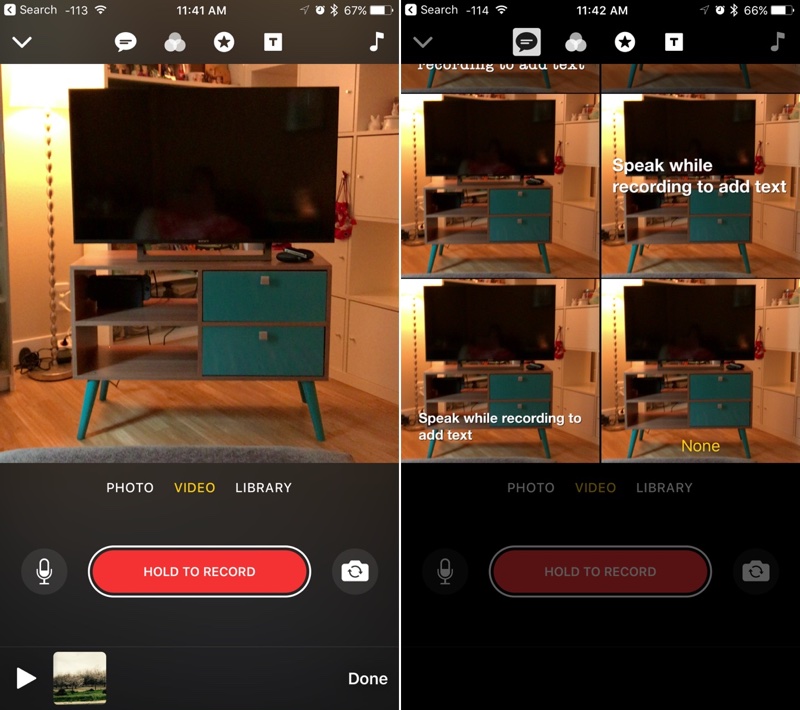
The speech bubble at the top allows you to record your voice, which is transcribed into titles that overlay a photo or a video. Next to that, there’s a filter button that changes the look of your video with one of eight filters, and the third button at the top of the app, which looks like a star, is for inserting images.

There are several caption images like “Wow!” and “Nice!” plus time/date/and location graphic options. You’ll also see your frequently used emoji. Adding music can be done with the music icon on the far right of the app, and there are many built-in background music options in a variety of genres, or you can use your own music. You can choose to record voiceovers and use the original sound in a pre-recorded video, or turn it off entirely.

You’ll want to choose all of your enhancement options before you start making any kind of recording, because they’re applied in realtime. If you’re recording, hold down the red button to capture video, and if you’re using a photo, you’ll hold down the same button to add photo frames to the clip. The length of time the button is held determines how long the photo is featured in your overall Clip timeline, which is at the bottom of the app.
Multiple photos can be combined into a slideshow, a single video can be enhanced, multiple videos can be combined, or photos and videos can be combined. Apple’s even included customizable transition screens that can be added to your timeline. Each element in the timeline can be customized differently with all of the tools in Clips.

When a Clip is finished, it can be saved to your Photos app or uploaded to social networks like Facebook and Instagram. There are also quick options for sending a Clip to a friend in the Messages app, with all of your favorite people listed front and center.
Tag: Clips
Discuss this article in our forums
Apple CEO Tim Cook Speaks on Diversity and Inclusion at Auburn University
Apple CEO Tim Cook visited his alma mater Auburn University this afternoon, where he held a talk with students at the Telfar B. Peet Theatre. Auburn University student paper The Auburn Plainsman shared details on the talk, which covered topics like diversity and inclusion, subjects Cook is passionate about and often covers in speeches.
Cook told students that it’s important to be prepared to encounter people with diverse backgrounds in every career field. Students, he says, will work at companies where they will need to work with people from other countries and serve customers and users from all over the world.
Image via The Auburn Plainsman
“The world is intertwined today, much more than it was when I was coming out of school,” Cook said. “Because of that, you really need to have a deep understanding of cultures around the world.”
“I have learned to not just appreciate this but celebrate it,” Cook said. “The thing that makes the world interesting is our differences, not our similarities.”
Cook went on to explain that Apple believes you can only create a great product with a diverse team featuring people with many backgrounds and different kind of specialities. “One of the reasons Apple product work really great… is that the people working on them are not only engineers and computer scientists, but artists and musicians.”
Cook has spoken at Auburn University several times in the past, and looks fondly at the time he spent there. “There is no place in the world I’d rather be than here,” Cook told students. “Brings back a lot of memories. I often think that Auburn is really not a place, it’s a feeling and a spirit. Fortunately, it is with you for all the days of your life. It has been for me at least.”
According to The Auburn Plainsman, an exclusive interview conducted with Tim Cook will also be featured on the site later.
Note: Due to the political nature of the discussion regarding this topic, the discussion thread is located in our Politics, Religion, Social Issues forum. All forum members and site visitors are welcome to read and follow the thread, but posting is limited to forum members with at least 100 posts.
Tag: Tim Cook
Discuss this article in our forums
Runtastic’s video recipe app feeds your fitness regime
It makes sense that the folks behind a running app would launch a new video recipe app. Cooking clips from Tasty and Delish seem to be taking over everyone’s Facebook feed lately, so now is the time to hop onboard. Runtastic has already filled its YouTube channel with the top-down videos, so including them in its new mobile app, Runtasty , isn’t too much of a stretch for the fitness company.
Eating right is as important as working out if you’re trying to get healthy or stay fit. These recipes are “dietitian approved” to be healthy, quick, tasty, easy to make and require a minimal amount of ingredients. There are 23 categories for meals that fit many dietary requirements, like vegan, dairy-free or low-carb recipes. In addition to the video instructions, Runtasty will have how-to “kitchen hack” videos that will teach you how to manage common adulting tasks like cutting onions or cooking the perfect steak.
Just like other recipe apps, Runtasty will also have a way to save your favorite recipes and get nutritional facts about the foods you’re putting in your face. Better yet, you don’t need to wait to get all this delicious video goodness — iOS and Android versions of the app are ready to download right now.
Via: 9to5Mac
Source: Runtastic
 AIVAnet