


AMD 500 series graphics card names and RAM sizes detailed
Why it matters to you
AMD’s RX 500 series graphics cards may be closer to release than previously thought, and the suggested pricing pits them directly against Nvidia’s Pascal cards.
Listings for AMD’s long-rumored 500 series graphics cards have begun to appear online, giving us out first idea of the naming convention AMD has opted for, as well as the amount of RAM those cards come with. We even have some idea about pricing, though international conversions are rarely straight forward.
Along with AMD’s suspected top-end graphics cards based on its Vega architecture, AMD has been working on a 500 series lineup to compete more directly with some of Nvidia’s Pascal graphics processors (GPU). Now several AMD partners and retailers have begun listing 500 series graphics cards on their sites.
The first manufacturer spotted with AMD 500 cards in the wild was Asus, which listed RX 550, 570, and 580 GPUs on its site’s support section. They come in a variety of flavors, with the RX 550 offering 2GB and 4GB variants, and the RX 570 and 580 coming with 4GB and 8GB of memory respectively. Those latter two, however, do look set to come in factory overclocked versions, based on their Strix OC labeling.
More: Recent hands-on photos confirm that Radeon RX 500 Series cards are on the way
Joining Asus in its early reveal, Sapphire has an even bigger spread. It too has 550, 570, and 580 RX cards listed on an online retailer (as per VideoCardz). Its cards’ memory options are much the same as Asus’, though its RX 580 does have an option for a 4GB variant too. There is also a “mini” RX 570 listed, as well as Nitro and Pulse iterations, which could suggest overclocking or cooling differences.
MSI didn’t want to be left out it seems, and has a pair of RX 500 series listings for the 570 and 580, with the same memory configurations as the others. Its cards and those listed by other retailers, all look set to come with a combination of HDMI, DVI-D and DisplayPort connectors, with the RX 580 having dual HDMI outputs.
Although it’s not clear if listed prices are placeholders for now, we can use them to give us a rough idea of what we can expect when these cards are launched. Without the 20 percent VAT sales tax that the EU levies on products, the RX 550 is listed around the 100-euro mark, which is approximately $105, though that doesn’t factor in sales taxes.
The RX 570 raises the bar to anywhere between 180 euros ($190) and 240 euros ($255), while the cheapest RX 580 with 4GB memory starts at 235 euros ($250). Its priciest option, however, can go for as much as 305 euros ($325).
The retailer listings slate some of these cards for an April 10 availability, so we may not have to wait long to learn more about AMD’s upcoming 500 series GPUs.
Fever Scout lets you track your temperature over 7 days with zero interruptions
Why it matters to you
If your child has a fever, the Fever Scout could easily help you keep track of your child’s temperature over a seven-day period.
Regular thermometer not cutting it? VivaLnk, the company behind eSkin technology and the Digital Tattoo, is offering a smart alternative that continuously measures temperature.
The Fever Scout, which is placed under the arm, uses eSkin technology, which delivers “biometric data precisely and instantaneously without compromising comfort.” It looks like a flexible bandage, and it stays on the body thanks to “medical-grade” adhesives that are included in the box.
More: This ‘digital tattoo’ unlocks your Moto X, looks like a disgusting boil

Once you pair it with the companion iOS and Android app via Bluetooth, you can get continuous temperature updates for up to seven days until you have to recharge the device again. It charges through a magnetic docking station, which also doubles as a Bluetooth range extender up to 131 feet (in case you want to check the data from anywhere in the house).
One of the downsides is the data is only uploaded to the cloud if there’s a connected device nearby — meaning you’ll have to set up a phone or tablet at home to get temperature data from Fever Scout, which will then upload it into the cloud so you can access the data when you’re not at home.
More: Loki Wi-Fi meat thermometer monitors your meal, tells you when it’s done
While Fever Scout’s design may look like it was made for children, the company says there’s no age limit on who can use it. It’s approved by the U.S. Food and Drug Administration, and it’s available for purchase now from the product’s website and Amazon for $60. Eight adhesives are included, but you can buy more packs of eight for $8.
Waze is finally coming to Android Auto as beta invites start going out
Android Auto is finally getting an update.
Google demoed Waze integration in Android Auto back at I/O 2016, but we haven’t seen any progress on that front. Back in February, Android Auto picked up an app switcher for maps, hinting at the availability of navigation options other than Google Maps.
It now looks like Waze is finally about to make its way to the car, as invites are being sent out to beta test Waze on Android Auto. Invites going out to the Waze beta community reveal that the Android Auto client will be available for testing shortly, although there isn’t any mention of when it will kick off. Here’s the email that’s being sent out to members in the Waze beta community:
Hello,
We are exciting to update that the beta testing for Waze Android Auto will be started soon (no date yet)! As part of the preparation, we wanted to check the beta community’s interest in taking part of the testing project.
We’re still in the early phases and will continue to update you when we have more details; However, if you’re interested in testing it in the future, please fill in this form.
**Note: You should only complete this form if you have/are planning to buy an Android Auto (AA) device.
Regards,
Waze Beta Team
With I/O 2017 a few months away, it is likely we’ll see a final version of Waze for Android Auto make its debut at the event. If you’re interested in taking a look at what’s on offer and don’t want to wait until the stable release is available, hit up the link below to enrol in the Waze beta community.
Sign up for Waze beta testing
All About Android Auto
- Getting started with Android Auto in your car
- Using Android Auto natively on your phone
- Android Auto news
- Apps that work with Android Auto
- Join the Android Auto discussion!
How to view your location history in Google Maps

See where you’ve traveled with Google Maps.
Google Maps has a nifty Timeline feature that lets you browse the places you’ve visited along with the routes traveled. The feature was overhauled in 2015, and Google has added the ability to collate images you’ve taken at a particular location, allowing you to get a better overview of your travels.
It certainly comes in handy if you’re looking to see all the images you took at a particular location, or if you’re trying to get a highlight of your weekly or monthly activity.
- How to view your location history in Google Maps
- How to disable location tracking
How to view your location history in Google Maps
Launch Google Maps.
Tap the more button (three horizontal lines) on the top left corner.
Tap your timeline.
Tap the calendar icon to view a particular day.

Swipe left or right to switch months.
Tap a date to view your location history. You’ll see the route traveled, along with the duration and length of the overall journey.

How to disable location tracking
Timeline is certainly a useful feature if you’re interested in looking at your previous travel data, but it also comes off as creepy (Google tracks everything). Fortunately, you can easily turn off location tracking in Maps.
Tap the more button (three horizontal lines) on the top left corner.
Tap Settings.
Tap Personal content.

Tap the field that says Location History is on under Location Settings.
Tap the switch next to each device for which you’d like to disable location tracking.

There’s also the option to pause tracking for your account as a whole. To do so, toggle Location History to off, and select OK in the dialog box that follows.
That’s all there is to it! I like the feature a lot as it gives me a detailed look at where I’ve been over the course of the month (and how much time I wasted being stuck in traffic). What are your thoughts on the location history feature? Like it? Feel like it’s an intrusion of your privacy? Sound off in the comments below.
Sony’s impressive Xperia XZs is available Apr. 5, but you should wait for the Premium
Sony has a new phone out tomorrow, but you may want to wait for the real upgrade.
Sony makes a lot of phones, and many of them aren’t particularly noteworthy in the U.S. Thanks to a long-term contract with Verizon that isn’t set to expire until next year, Sony can’t sell phones with fingerprint sensors in the country, making them more of a difficult proposition than they otherwise would be.

This week, the Xperia XZs is going on sale at Amazon and other online retailers for $700, a steep price to pay for any phone, never mind one that doesn’t include the latest and greatest technology. The XZs was one of four phones that company announced during MWC 2017, and while it is an impressive handset in every way, it doesn’t stand up to the competition.
Sony Xperia XZs specs
The phone is, for all intents and purposes, a repackaging of the Xperia XZ released in September, swapping out the 3GB of RAM and 32GB of internal storage for 4GB and 64GB, respectively. It also has a Snapdragon 820 processor, which is unchanged from the XZ, along with a 2,900mAh battery. The major difference, aside from the bump in memory, is the new 19MP Motion Eye camera, which reportedly brings a new camera sensor that’s better in low light and faster to autofocus.
For $700, the above sounds like a pretty lousy deal, especially with no fingerprint sensor. Sure, Sony’s got some great software in there — the phone ships with Android 7.1.1 Nougat — but if you’re really into the whole “I need a Sony” thing, you can get your fix in a couple of months with the gorgeous, far-more-impressive Xperia XZ Premium, which bumps up the spec sheet considerably, sporting a 4K HDR-ready display and a Snapdragon 835 platform.
If you’re not into waiting, though, you can get the Xperia XZs starting April 5 at Amazon.
See at Amazon
Here’s what is coming to the Gear VR this month!
Are you ready for more Gear VR apps?.intro

The biggest mobile VR library is getting a lot bigger this month! Oculus is planning a big surprise party for the Gear VR near the end of the month, with a bunch of games launching with support for the new Controller! Adding a special Controller you can see from inside the headset is going to be a lot of fun, but it’s far from the only thing coming to the Gear VR this month.
Read more at VR Heads!
T-Mobile now offers free roadside assistance with its SyncUp connected car solution
Flat tire? Harrowing highway repair? T-Mobile has you covered.
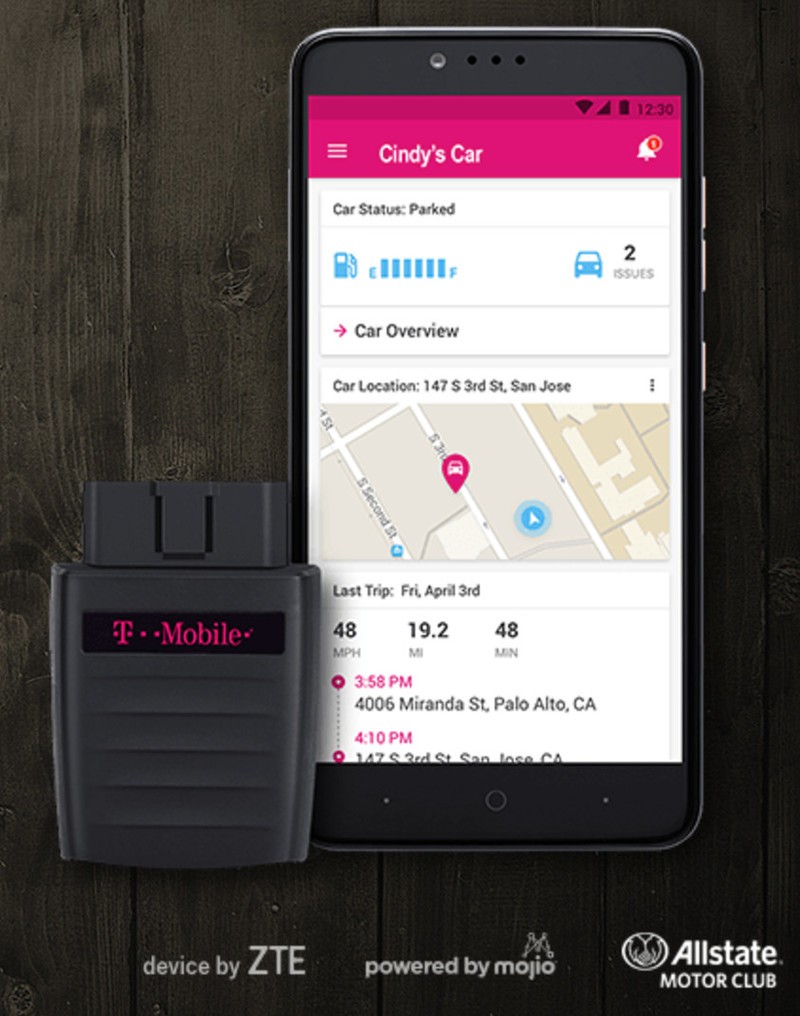
Last November, T-Mobile did what a lot of wireless carriers are doing: it got into the connected car game. But it did so cautiously, launching a small tool called SyncUp Drive in partnership with ZTE and Mojio that plugs into the OBD-II port of any car made after 1996.
The idea is to not only give its connected users a way to monitor their car’s health, but to provide a 4G LTE hotspot to passengers, along with other useful information. Multiple cars in a family can talk to one another to provide updates on whereabouts without having to text or make an unsafe call, while drivers also get a readout of potentially dangerous behavior and speeding alerts.
Now, T-Mobile says that after demand was double its initial forecasts, it is launching free roadside assistance with Allstate Motor Club. Anyone who buys a SyncUp Drive and at least 2GB of data per month on a 2-year plan gets the roadside assistance included. T-Mobile says that the addition was the biggest request from existing customers. The SyncUp Drive product itself is also down to $48 from $150.
To receive free roadside assistance, existing customers just need to update the SyncUp Drive app in the Play Store.
Do you use SyncUp Drive? If so, how do you like it? Let us know in the comments!
See at T-Mobile

Samsung Galaxy S8 ‘Microsoft Edition:’ Everything you need to know

What exactly is the “Microsoft Edition” of the Samsung Galaxy S8 (GS8)? How is it different than the regular version? And why would you want to buy an Android phone from Microsoft?
Last week, Microsoft quietly (and somewhat curiously) said that it will sell a version of Samsung’s new flagship smartphone in its U.S. retail stores. The phone, The GS8 “Microsoft Edition,” immediately grabbed online headlines, and in the process created some confusion.

Microsoft still hasn’t made an official announcement or issued a press release for the GS8 Microsoft Edition. So a number of questions still remain … or at least, they did. Read on for everything you need to know about the GS8 Microsoft Edition.
What Windows users need to know about the Samsung Galaxy S8
What the hell is the Samsung Galaxy S8 Microsoft Edition?
The GS8 Microsoft Edition is exactly the same as the regular GS8 you’d buy from a wireless carrier or other retail, with a few very minor differences. The Microsoft Edition is available directly (and only) at physical Microsoft Stores in the U.S. Also, Microsoft reps in stores selling the device will help new owners install a wider variety of Microsoft Android apps on the devices before they actually leave with their new phones.
Is there anything that’s different about the GS8 Microsoft Edition, other than apps?
Nope. It’s all about the apps and the in-store purchase experience.
From Microsoft:
Neither the hardware nor the software is different from other Samsung Galaxy S8 and S8+ devices.
Why buy a GS8 through Microsoft?
Why would you want to buy a Samsung phone from Microsoft, as opposed to, say, AT&T?
Um. Well … we’re not really sure. It’s not exactly hard to search Google Play for the word “Microsoft” and then install any and all apps of interest. And there aren’t any apps that are exclusive to the Microsoft Edition of the GS8, at least not according to a Microsoft employee named Ivan, who helped us pre-order a GS8 Microsoft Edition at the Microsoft Store in Boston.
Microsoft presumably gets a cut of the profits for each phone it sells or some sort of comparable compensation for its efforts. So you could buy the phone from Microsoft simply to support the company. If you live very close to a Microsoft Store, you could do it for convenience. Or, if for some reason you feel as though you’d have trouble finding all of the available Android apps from Microsoft, you could want a Store staffer to help you navigate Google Play. (But honestly, that would be kind of sad.)
Samsung DeX may beat Microsoft’s Continuum, but it’s still no slam dunk

Is the GS8 Microsoft Edition available for the ‘Big Four’ U.S. carriers?
No, it’s not.
The GS8 Microsoft Edition is only currently available for pre-order for AT&T customers. Ivan at the Microsoft Store Boston also told us that the plan is to offer Verizon Wireless versions of the GS8 Microsoft Edition, but the Boston store wasn’t offering Verizon preorders when we placed our AT&T order.
Ivan told us that Microsoft currently has no plans to offer Sprint or T-Mobile versions of the GS8 Microsoft Edition. (Microsoft didn’t confirm or deny this information.) So unless you’re an AT&T customer, the GS8 Microsoft Edition might not be for you, at least not for now. (You could unlock the phone and hope for the best on your carrier of choice, but that’s not ideal.)
From Microsoft:
Right now customers can pre-order devices with AT&T.
Does the GS8 Microsoft Edition come in both smaller and larger “+” sizes?
Yep. You can get the GS8 Microsoft Edition in both sizes. Again, it’s the same as the regular GS8 phones, except for all the Microsoft Android apps and the Microsoft Store availability.
Does it come in different colors?
No, it doesn’t. Right now the GS8 Microsoft Edition is only available in black, according to Microsoft.
Will it be available via online Microsoft Stores?
No. The whole idea is for customers to pick up the device physically, so the store reps can help them install the full array of Microsoft software.
From Microsoft:
Regarding online availability, Samsung Galaxy S8 and S8+ devices are currently only available for pre-order at U.S. physical Microsoft Store locations, as we want to ensure a best-in-class customer experience.
Is the GS8 Microsoft Edition cheaper or more expensive than the regular version?
The Microsoft version of the AT&T GS8 costs the same amount as the one you’d buy from AT&T: $749.99 for the 64GB GS8 Microsoft Edition and $849.99 for the 64GB GS8+ Microsoft Edition.
When will the GS8 Microsoft Edition be released?
Right now, Microsoft expects the phones to be available for pick up at its stores on the official GS8 launch day: April 21, 2017. The sooner you order yours, the more likely you’ll be able to get it that day. AT&T also says it will ship its GS8s so that they arrive “by April 21.”
From Microsoft:
Customers can pre-order Samsung Galaxy S8 and Galaxy S8+ devices in black now and purchase beginning April 21, at U.S. Microsoft Store locations …

Will Microsoft have GS8s on display in its retail stores?
Yes, at least according to Ivan from the Boston store. That’s notable because there is little or no Windows phone presence in Microsoft Stores today, and its endorsement of a Samsung Android phone could have significant implications on the future of Windows Mobile. (It’s also just weird, right?)
Do Microsoft Office apps come pre-installed on the GS8?
We’ve heard conflicting reports on this one, and though past versions of the Samsung Galaxy phones came with Office apps installed, the GS8 will apparently be different and will not ship with preloaded Microsoft apps, according to the company.
From Microsoft:
The applications do not come pre-loaded on the device. Microsoft Store associates will assist Samsung Galaxy S8 customers to set up their devices in the store to ensure every customer is ready to work, play and connect on their device when they leave.
Has Microsoft ever sold an Android phone in its stores before?
No way, no how. The GS8 Microsoft Edition is the first Android phone ever sold in a Microsoft Store.
From Microsoft:
This will be the first Android mobile phone sold at Microsoft Store, as we are always looking for new ways to provide value to customers and believe in offering an assortment of products to enable our customers to experience the best of Microsoft.
Hit Samsung’s website for details on the new phones.
And for more in-depth GS8 coverage and expert analysis, read:
Samsung Galaxy S8 and S8+: Everything you need to know
Samsung Galaxy S8 and S8+
- Galaxy S8 and S8+ hands-on preview!
- Galaxy S8 and S8+ specs
- Everything you need to know about the Galaxy S8’s cameras
- Get to know Samsung Bixby
- Join our Galaxy S8 forums
Verizon
AT&T
T-Mobile
Sprint
VR coasters are improving rapidly and discarding what doesn’t work
Rapid iteration and constant improvements are leading to and incredible future for VR in theme parks.

Alongside the launch of Galaxtic Attack, the new virtual and augmented reality layer to Mind Eraser at Six Flags America, Samsung and Six Flags have rolled out some significant improvements to the concept of VR coasters. The Samsung Galaxy S6 that sat in the heavily modified Gear VR for Superman: Ride of Steel has been upgraded to a Galaxy S7, and that’s far from the most interesting thing that has changed since last season.
Samsung and Six Flags have worked together to improve the fit of the headsets, dramatically increase the graphics in the headset, and make it much easier to bring users in and out of these experiences to help with potential ride delays. It’s a lot to have fixed over a relatively small period of time, and from our chat with Six Flags’ Sam Rhodes on what comes next it’s clear this pace for improvement isn’t going anywhere.
Read more at VR Heads!
Will you be using a Galaxy S8 screen protector?

It’s a new year with a new Samsung flagship — and another curved screen to try and protect.
As we patiently wait for the release of the Samsung Galaxy S8, we’ve already started thinking ahead to all the awesome accessories that will help keep your new phone protected and looking stylish.
One key accessory that some folks absolutely swear by is a tempered glass screen protector. If you’ve spent any time in the Galaxy S7 forums this past year, you’ll know that finding a quality screen protector for the curved screens of the Galaxy S7 and S7 edge has proved exceedingly difficult. Many suffered from the dreaded “halo effect”, which is especially prevalent with flat screen protectors on curved screens, while others had issues with adhesiveness or touch sensitivity. Eventually, we saw proper curved screen protectors emerge that offered true edge-to-edge protection, addressing the issues that plagued the early releases.
Now, any time we write about screen protectors, we always get a few contrarians in the comments who say screen protectors are a waste of money and they’ve never had so much as a scratch on their screens. And hey, that might actually be the case for some people. But why is a tempered glass screen protector so important? Because life happens — just ask Biggmac419 who shared the following story in the forums:
Biggmac419
02-13-2017 09:45 PM“
I’m a firm believe in tempered glass 2 years ago I was riding my motorcycle about to go for a jog and it flew out of my pocket and was ran over by what a bicyclist said 4 cars. He was a good guy and gave it back. This is how it was returned. The best 40$ I ever spent. And invisible shield replaced it for 6.95 shipping. AMAZING!!!
Reply
And the results:

It’s worth noting that you can see this particular screen protector from ZAGG didn’t need edge-to-edge protection to fully protect this Note 5 from sure destruction.
We won’t be able to figure out for sure which screen protectors will work best until the Galaxy S8 has been officially launched and we’ve all had some time to test and try out different screen protectors, but here’s hoping accessory manufacturers nail the design and functionality right out of the gate this time around.
If you’re still not convinced on the value of a screen protector for your phone, we’d suggest picking up a case that offers a lip around the edge of your phone so that your screen is protected properly if you place it screen-down on a table.
These are the best Galaxy S8 cases available so far
Here are some curved glass screen protectors that seem promising, to say the least:
Incipio Curved Glass Screen Protector
Incipio’s Plex Plus Shield Edge screen protectors for the Galaxy S8 aren’t available yet, but they sure look promising. They claim to be custom-crafted tempered glass sheets that will fit your phone like a glove and allow for perfect touch sensitivity.
See at Incipio
Otterbox Alpha Glass Screen Protector
If you trust in Otterbox to keep your phones safe, you’ll be happy to know it’s offering a curved glass screen protector for the Galaxy S8. No word yet on whether its screen protector is also compatible with its cases, but it looks like a promising option if you’re not scared off by the price. They’re expected to start shipping out by April 28.
See at Otterbox
SuperShieldz 3D curved glass
Supershieldz are experts in protecting smartphone screens. If you’re looking for tempered glass protection for your Galaxy S8 with curved edge-to-edge protection that won’t break the bank, you can order yours in advance from Amazon.
See at Amazon
Samsung Galaxy S8 and S8+
- Galaxy S8 and S8+ hands-on preview!
- Galaxy S8 and S8+ specs
- Everything you need to know about the Galaxy S8’s cameras
- Get to know Samsung Bixby
- Join our Galaxy S8 forums
Verizon
AT&T
T-Mobile
Sprint

