


Study shows Uber created some new taxi jobs, but hurt wages
One of the taxi industry’s biggest complaints against its competition at ridesharing companies like Uber in Lyft is the idea that these newcomers have been siphoning away jobs from regularly employed taxi drivers. According to a new study of data from the US Bureau of Labor Statistics, however, that was not actually the case.
The research paper titled “Drivers of Disruption? Estimating the Uber Effect” was published by the University of Oxford and examines the effects Uber had on the local labor force when it rolled out to major American cities like New York, Los Angeles and San Francisco between 2009 and 2015. As the MIT Technology Review reports, the numbers of self-employed drivers did shoot up by 50 percent after Uber’s arrival in each city, but the total number of regularly employed taxi drivers also had a small increase.
Despite the employment bump, the numbers don’t exactly paint a positive picture for the post-Uber taxi workforce. The data also showed that taxi drivers’ average hourly earnings dropped by around 10 percent after Uber’s arrival in a city. The self-employed drivers, on the other hand, saw their wages increase by about that much at the same time. According to MIT, the difference in hourly wages is likely because self-employed Uber drivers can make more efficient use of their time, so the per-ride pay works out to a better hourly wage.
While these statistics come directly from the federal government, Uber has been known to oversell potential earnings when trying to entice new drivers. And it’s hard to imagine any of these drivers are going to be happy once the company’s self-driving fleet becomes a reality.
Via: MIT Technology Review
Source: Uber Drivers of Disruption
The blazing 240Hz gaming monitor from Asus set to hit shelves in February
Why it matters to you
The Asus Swift features a remarkable 240Hz refresh rate, which will undoubtedly push competitors to up their game and speed up their monitors.
Asus’ planned ROG PG248Q will feature a native, not overclocked, refresh rate well in excess of the fastest monitors available from competitors. Now we finally have a release window. You should be able to get your hands on the fastest Swift monitor no later than the end of February.
Speaking of speed, the Swift features a native refresh rate of 240Hz. That speed doesn’t come without some sacrifice, though. The ROG PG248Q has a max resolution of 1920 x 1080 pixels and features a TN panel for the display. So your games are not going to be as high-res as they could be and your colors might end up a little washed out. Still, this is not a monitor for pitch-perfect color accuracy, this is a monitor for gaming at impossible speeds.
With that in mind, a 1080p panel is a pretty good choice, given you would need a monstrous machine to even come close to hitting 240 frames per second at anything higher than 1080p in most modern games.
In true Asus ROG style, this isn’t just a fast monitor, it’s a flashy monitor. The custom ROG styling will be supplemented with what Asus calls its “light signature” technology. Essentially, there’s a light in the base of the monitor, which you can customize with three included light covers, according to Hexus.
More: AMD talks frame pacing in games using multiple Radeon GPU cards.
As if 240Hz was not fast enough, the new ROG monitor will also boast support for Nvidia’s G-Sync technology, which will go even further to smooth out your gaming experience, providing lightning-fast visuals and buttery-smooth performance.
Asus teased the ROG PG248Q on its Republic of Gamers blog, claiming that the monitor isn’t just fast, it is the fastest in the world. There is no word on just how much it will cost you to have the “fastest LCD ever” but given the blisteringly fast native refresh rate and solid-looking industrial design, this monitor is not going to be a budget option.
Story originally published in October 2016. Update on 01/27/16 by Jayce Wagner: Added information regarding its release window and “light signature” technology.
Amazon’s open Alexa takes on Apple’s closed HomeKit initiative
Why it matters to you
The home automation market is creating a choice between fewer but more-secure Apple HomeKit devices, and the more open Amazon Alexa.
Apple’s HomeKit serves as the foundation of its own unique approach to home automation technology. HomeKit is a set of software tools that developers and device manufacturers can use to build solutions tying together various smart devices like lighting, appliances, and home security systems.
HomeKit has been fairly successful, with a number of partners making a wide range of home automation products using Apple’s platform, and it benefits from being the first to have been built into a popular operating system in iOS 10. However, competition from competitors like Amazon’s Alexa and the brand-new Google Home has been fierce, and Apple’s usual strategy of maintaining firm control over the platform might be holding it back, as Reuters reports.
More: Apple enlists the help of home builders to preinstall its HomeKit in new homes
Whereas Amazon is relatively open in its approach to working with partners making solutions that tie into the Alexa platform, Apple requires more stringent certification requirements for companies that want to make products using HomeKit. One requirement is that only Apple-certified factories can make “special chips” that are required to integrate with it, along with particular Wi-Fi and Bluetooth networking components.
The required chips aren’t cheap, adding between 50 cents and $2 to the cost of a HomeKit-based device, with larger manufacturers getting the usual volume purchase discounts. All told, Apple’s restrictions can delay the development process and make resulting home automation products more expensive.
The net result is that while Apple’s strategy results in more tightly integrated solutions with greater privacy, security, and convenience for customers, it also means that Amazon’s Alexa has grown faster than HomeKit. Where there are currently around 100 Apple-certified products, Alexa enjoys over 250. And that delta could grow given how much easier it is to rapidly develop and roll out third-party apps and devices.
In the end, the question remains as to whether Apple’s strong smartphone presence will carry HomeKit along with it, or if Amazon will widen its lead sufficiently to become a more important standard. For customers, it’s a decision between greater ease-of-use, potentially better security, higher prices, and fewer choices in HomeKit solutions, and a wider choice of less expensive but potentially harder to use and less secure Alexa devices. Time will tell which approach will end up dominating the home automation market.
Dell XPS 13 2-in-1 review

Research Center:
Dell XPS 13 2-in-1
Once bulky and awkward, 2-in-1 devices matured with grace in 2016. Awesome new options from Acer, HP, and Lenovo suddenly made the 2-in-1 a reasonable alternative to a traditional clamshell laptop. Unlike their predecessors, these devices didn’t sacrifice laptop usability to gain tablet convenience.
There was one company notably missing from their ranks – Dell. But that changed at CES 2017, as the company proudly launched its XPS 13 2-in-1. The late arrival of this system puts all the more pressure on it. In mid-2016 it would’ve had little competition. Today, that’s no longer true.
You’ll need at least $999 to buy the XPS 13 2-in-1. That only snags you a Core i5-7Y54 processor, 4GB of RAM, and a 128GB hard drive. Since the Dell’s competitors tend to offer 8GB of RAM and a 256GB SSD in base models, this new XPS faces an uphill battle. Can it emerge victorious, or does it disappoint?
Staying true to its heritage
The original Dell XPS 13 is now two years old, so you might expect the company to go a new direction with the design of its 2-in-1. Instead, the company has stuck to the formula. The Dell XPS 13 2-in-1 we received, with its matte silver display lid, is hard to distinguish from the original XPS 13 we reviewed in 2015. Only an indentation near the display hinge – and the fact this model has two small hinges, rather than one broad hinge – gives it away.
Luckily for Dell, the original’s formula is still rather unique. The combination of a professional metal exterior with soft-touch, faux-carbon-fiber weave interior, is unlike anything else sold today. We still think it’s a great design. It’s subtle enough to fit in at a meeting, but luxurious enough to justify the XPS line’s pricing. And the soft-touch interior feels more inviting that the cold aluminum or magnesium used by rivals.
 Dan Baker/Digital Trends
 Dan Baker/Digital Trends
 Dan Baker/Digital Trends
 Dan Baker/Digital Trends
Of course, the XPS 13 2-in-1 does make an important tweak to the formula. The display hinge allows 360-degree rotation, making it possible to enjoy a tablet experience. Dell’s hinge design works as well as its rivals, such as Lenovo’s Yoga line, or HP’s Spectre x360 laptops. Swinging it up is a breeze, and stay in place once adjusted where you’d like. The XPS 13 2-in-1 is also slightly smaller and lighter than both the HP Spectre x360 and Lenovo Yoga 910, which means it’s easier to use as a tablet.
More: Dell XPS 13 review (Kaby Lake)
Make no mistake; this device still isn’t thin enough, or light enough, to entirely work as a stand-alone tablet. An iPad Air is still far lighter, so if you want a tablet specifically, the XPS 13 2-in-1 won’t do. But the XPS 13 2-in-1 comes as close to that experience as any 2-in-1 with a 360 degree hinge, and it’s perfectly fine for half-hour bouts of web surfing from a couch.
Limited ports, webcam woes, and a stylus joins the party
Unlike the normal XPS 13, which tries to support legacy connections, the XPS 13 2-in-1 goes all-in on USB Type-C. There’s only two such connections available, one of which also handles Thunderbolt 3. Either USB Type-C port can be used to charge the system. There’s also a microSD card reader, a headset jack, and a lock slot.
Dynamic Power Mode isn’t a gimmick – it boosts performance noticeably.
The slim connection options aren’t strange in this category, but users should keep them in mind. You’re probably going to need a dongle. At least Dell includes one USB Type-C to USB Type-A adapter in the box.
Several wireless connection options are available including 802.11ac Wi-Fi, Bluetooth 4.2, and Miracast. This is about the best you’ll find on a modern PC.
Unfortunately, Dell hasn’t resolved the awkward location of the XPS 13’s 720p webcam. It remains below the display in laptop mode, which leads to an unflattering angle. However, Dell say the webcam’s orientation will rotate if the 2-in-1 is switched to tent mode, or tablet mode, which puts a band-aid on the problem. The webcam will support Windows Hello after a planned Windows update, according to Dell. A fingerprint reader with Windows Hello support is also included.
Finally, the touchscreen is compatible with Dell’s Active Pen, an active stylus that supports 2,048 levels of pressure sensitivity. This is not included, but sold for $49. Dell didn’t send one for use with our XPS 13 2-in-1 review unit, so we can’t comment on its quality.
A class-leading keyboard, with a mediocre touchpad
It’s great the Dell XPS 13 2-in-1 makes a passable tablet. Frankly, though, that’s a secondary concern. We think every 2-in-1 needs to be built on a great laptop. That means it needs a great keyboard.
And the Dell XPS 13 has a great keyboard. Though slightly smaller than some competitors –- a design decision that translates to small backspace key –- the keyboard is otherwise near perfect. Each key provides smooth, long travel, and an enjoyable bottoming action that’s firm without feeling harsh. The overall experience is essentially identical to the regular XPS 13.

Dan Baker/Digital Trends
Keyboard backlighting is standard, though only two brightness settings are available. Both are dim enough that they’re usable in a dark room. Some light leaks around the keys, and particularly from a few function keys, but the overall look is like other high-end laptops.
More: The best laptop you can buy
The touchpad has also changed little from the original XPS 13, and it’s one trait that’s starting to feel outdated. There’s nothing wrong with it, as it feels perfectly responsive, and it’s large for the XPS 13 2-in-1’s footprint. But competitors have new tricks. Acer and HP now use ultrawide touchpads that offer almost twice the usable space, and Apple has moved to a gigantic touch surface that absolutely dwarfs this Dell.
A beautiful display with a few quirks
Dell has long used its expertise in displays to enhance the XPS series, and the XPS 13 was a standout at time of its introduction, not only because of solid test results, but also because of an optional 3,200 x 1,800 touchscreen. Times have changed since then. Most competitors now offer similar options. Some, like the Lenovo Yoga 910, even serve up 4K resolution.
On paper, Dell doesn’t move the display forward. The base XPS 13 2-in-1 has a 1080p touchscreen, which our review unit equipped, and the most expensive models improve that to 3,200 x 1,800 resolution. The usual IPS panel technology is offered, behind Gorilla Glass NBT. That’s great. It’s also nothing new.
Let’s start with the bad. We measured a maximum brightness of just 251 lux. That’s bright enough for most situations, but noticeably dimmer than competitors. The HP Spectre x360 and Lenovo Yoga 910 hit 355 and 340 lux, respectively. Another oddity is the gamma curve, which came in at a measurement of 2.6. That indicates a display that skews way darker than it should. And indeed, blacks do appear overly dark on the XPS 13 2-in-1.
These oddities are balanced by solid results elsewhere. The color gamut spans 97 percent of sRGB and 75 percent of AdobeRGB –- both numbers are a point or two behind the Dell’s main competitors. However, the XPS 13 2-in-1 produced an excellent contrast ratio of 1120:1. That’s on par with contrast standouts like the MacBook Pro 13, and the Microsoft Surface Book. As mentioned, the XPS 13 2-in-1’s display is not bright, so strong contrast comes from excellent black level performance.
Dell XPS 13 2-in-1 Compared To

Acer Spin 7

HP Spectre x360 13-w023dx

Samsung Notebook 7 spin

Dell Inspiron 17 7000 2-in-1 (2016)

Acer Switch Alpha 12

Dell Inspiron 13 7000 2-in-1 (2016)

Huawei Matebook

Vaio Z Flip

Toshiba Satellite Radius 12…

Dell XPS 15

Dell Inspiron 11 (2015)

Dell Inspiron 13 7000 Special…

HP Envy Spectre 360x – 13-4003dx

Toshiba Satellite Click 2 Pro

HP Spectre 13t x2
It’s clear this 2-in-1’s display makes some sacrifices, and those sacrifices won’t work for everyone. We’re not sure why the backlight is so dim, or why the gamma skews so dark. Still, in subjective viewing, we were impressed by the screen. It delivers vibrant color and inky blacks, traits that help high-quality videos and games pop. A professional photographer won’t be pleased with this screen, but a more casual user will come away impressed.
The speakers don’t stand out
The XPS 13 2-in-1 has speakers, and they produce sound. Moving on…
Seriously. Sound quality is not a priority for this system, and it shows. The speakers don’t sound bad, and they provide clear sound in most situations, at most volumes. But they’re not loud, and they don’t sound crisp – good enough for a meeting, or a podcast, but inadequate for watching a movie. You’ll want to pair it with headphones, or external speakers.
Dell’s Dynamic Power Mode isn’t a gimmick
The XPS 13 2-in-1 is thinner and lighter than the normal XPS 13, yet retains an equally excellent keyboard, and bundles in touchscreen. Something had to give, and that something is the processor.
Dell has opted for Intel’s low-powered “Y-Series” processors, formerly known as the Core M line. These chips are designed to draw less power, but suffer a performance penalty for it. Our review unit came with the Core i7-7Y75, while base models of the XPS 13 come with the Core i5-7Y54.
To eek every ounce of performance from the Y-Series, Dell has introduced a feature called Dynamic Power Mode. Normally, the Intel processor works with a maximum thermal design power (TDP) of seven watts. With Dynamic Power Mode, Dell can temporarily increase that to nine watts. It’s like bumping up the rev limiter on a high-performance sports car — without the risk of blowing the engine.
Does it work?
Geekbench 4’s single-core test gives Dynamic Power Mode a chance to strut its stuff. The XPS 13 2-in-1 actually beat the HP Spectre x360, which is powered by a 15-watt Core i7-7500U. It also left the Acer Spin 7 in the dust, despite the fact Acer’s system was reviewed with the exact same processor.
The benefit becomes harder to see in the Geekbench 4 multi-core test. There, the XPS 13 2-in-1 does fall behind the HP Spectre x360 and Lenovo Yoga 910, but it also continues to run rings around the Acer Spin 7. The XPS 13 2-in-1 is over 25 percent quicker than the Spin 7.
So far, so good, but there is some bad news. Handbrake held back the XPS 13 2-in-1, which required over thirty minutes to transcode our 4K test clip to x.265. That’s actually a bit longer than the Spin 7, and twice as long as the HP and Lenovo.
That result is not unusual. Handbrake is the worst enemy of the Y-Series, because it forces the chip to run flat-out for a long time. Eventually the processor, which is passively cooled, hits its power peak. It simply can’t sustain maximum performance long enough to complete the test.
The question, then, is how you plan to use your system. In most situations, the XPS 13 2-in-1 performs surprisingly well, giving little ground to competitors with chips that draw more power. If you plan to run a processor-demanding task for a half-hour, though, the XPS 13 2-in-1 will fall behind.
More: CES 2017 proves 2-in-1s are becoming the new normal
We think Dynamic Power Mode does its job. Just be aware of its limits. We doubt many readers are considering the XPS 13 2-in-1 for video editing or similar processor-heavy work, but if you are, think again – you’ll need a larger laptop for that.
The SSD is no slouch
A variety of hard drive options are available with the XPS 13 2-in-1, ranging from 128GB to 1TB. Our review unit came with a 256GB solid state drive connected over PCI Express. The drive was a Toshiba XG4, which is common in laptops.
There’s nothing to complain about here. While the drive isn’t the fastest we’ve tested, it performs well across the board, and its write speeds are better than average. This certainly isn’t going to hold you back.
Not cut out for gaming
Gaming is not this system’s goal, as is true with most 2-in-1 laptops. Intel HD graphics powers games and, because it’s on a chip with a lower power draw than typical, performance suffers. Dynamic Power Mode does not apply here.

3DMark’s Fire Strike test drives the point home. There, the Dell XPS 13 2-in-1 scores just 608, which is about 30 percent less than the HP Spectre x360. The Lenovo Yoga 910 does even better, scoring 933.
To be clear, none of these laptops are great for games, but the XPS 13 2-in-1 is notably worse. Running Civilization VI at 1080p resolution is unenjoyable no matter the settings, unless you have a thing for slideshows. Players will have to reduce the settings of most new 3D games to the lowest preset to have any hope of acceptable performance.
Smaller battery doesn’t cut endurance
At just 2.7 pounds, and no greater than .54 inches thick, the XPS 13 is easy to tuck into a bag. It’s not as slim as competitors like the Acer Spin 7, but a tapered chassis helps it feel small enough.
To keep it small, Dell has reduced the battery’s capacity from 60 watt-hours (in the most recent XPS 13) to a more mundane 46 watt-hours. That’s not bad; it’s barely less than the Apple MacBook Pro 13, which is a fair bit heavier, and larger. But any reduction will make frequent fliers feel skeptical.
Thankfully, the reduction in battery size doesn’t have much impact on endurance. The Dell XPS 13 2-in-1 lasted four hours and fifty-four minutes in our demanding Peacekeeper test. That’s exactly the same as HP’s Spectre x360, and more than either the Lenovo Yoga 910 or the Acer Spin 7. The Dell XPS 13 with Core i7-7500U processor does last slightly longer, hitting five hours and seven minutes.
The XPS 13’s design remains unique.
Our 1080p video loop extended the battery to 10 hours, 37 minutes, which exceed the Core i7-equipped Dell XPS 13, and also beats the Lenovo Yoga 910. The HP Spectre x360 lasted just six additional minutes.
It’s clear that Dell’s reduction in battery size hasn’t compromised endurance. The XPS 13 2-in-1 lasts longer than average. Do note, however, that versions with the 3,200 x 1,800 display will not last quite as long, due to higher power draw from the screen.
A bit too much bloat
The XPS line has always forgone the bloatware, and there’s little to be found on the XPS 13 2-in-1. McAfee Antivirus does make an appearance, complete with an upgrade nag-screen, and there’s also a Dell warranty sign-up.
Warranty information
Dell ships the XPS 13 2-in-1 with a one year warranty. That’s typical for a notebook, no matter its price. However, Dell does offer a unique support plan called “Premium Support.” The company says this plan, which starts at $89 per year. This plan activates on-board diagnostics that can advise you of a problem, such as hard drive failure, before it happens, and schedule a fix before the failure occurs. It’s an interesting option, but it’s hard to say if it’s worth the price.
Our Take
We gave the Dell XPS 13 2-in-1 our Best of Computing at CES 2017. Handing out such an award is always a risk. Sometimes, a device doesn’t hold up to closer scrutiny. But Dell’s latest is rock solid. It posted great scores in our benchmarks and, just as importantly, is a joy to use every day. Just be prepared to pay for quality. Starting at $999, or $1,299 as-tested, this is not an affordable machine.
Is there a better alternative?
Plenty of excellent competitors exist including the Acer Swift 7, Asus Transformer Book 3, HP Spectre x360, Lenovo Yoga 910, and Lenovo ThinkPad Yoga X1. Many of these systems are quite good, but the HP Spectre x360 is the 2-in-1 to beat.
The DT Accessory Pack
ProCase 13 – 13.5 inch sleeve case
$20
Logitech MX Anywhere 2 wireless mobile mouse
$57.70
Aukey USB-C Hub with 4 USB 3.0 ports
$13
Choosing between the Dell and the HP is difficult. They offer similar performance by most metrics, including battery life and display quality. However, Dell’s XPS 13 2-in-1 starts at $999, while the HP Spectre x360 starts at $899. HP also bundles twice the RAM and hard drive space in its base model, both of which are upgrades you’ll notice every day. Dell’s advantage lies in its size. It’s noticeably smaller than the HP in every dimension, and that makes it easier to use as a tablet.
How long will it last?
The XPS 13 2-in-1 has the latest, 7th-generation Intel processor technology, and most models equip a solid-state drive that connects over PCI Express. Bluetooth 4.2 is supported, though Wireless AD is not. Still, this laptop is as future-proof as any sold today.
Should you buy it?
Yes. The Dell XPS 13 2-in-1’s strength lies in how well it melds the productivity of a laptop with the convenience of a tablet. Like the HP Spectre x360 and Lenovo Yoga 910, it’s a great laptop, and it’s more usable as a tablet than either. We recommend shoppers go for the step-up models, rather than the baseline entry – and if you do, you’ll end up with one of the best 2-in-1s ever made.
New pig-human hybrid embryos could be used to grow transplantable organs and tissues
Why it matters to you
The shortage of organs suitable for transplant may be alleviated as scientists get closer to using animals to grow human organs.
Scientists for the first time have created an embryo that is part human and part pig as part of a groundbreaking experiment that published this week in the biochemistry journal Cell. This incredible chimera was developed by a team of researchers from the Graduate School of Agriculture and Department of Advanced Bioscience at Kindai University in Japan. Heralded as one of the most successful chimeras to date, the experiment is a leap forward for the field of regenerative medicine, which is searching for ways to produce human organs using animal models.
The complicated procedure involves the injection of human induced pluripotent stem (iPS) cells into a developing pig blastocyst. These iPS cells are a type of stem cell that has been created from an adult cell and has the ability to differentiate into a variety of cell types including neuronic, cardiac, pancreatic and more. In the procedure developed by the Kindai team, a laser beam was used to make an opening in the outer membrane of a pig blastocyst cell. The channel was wide enough for a needle to deliver the human iPS cells into the matrix of the developing embryo. The resulting hybrid cell was then implanted into a female pig (sow) and allowed to develop for four weeks.
More: SkinGun helps burn victims quickly regrow skin by spraying them with their own stem cells
After a month of in situ development, the embryo was harvested and analyzed. It was found that a small fraction of the pig embryo was composed of human cells. The human stem cells that were present had grown into precursor cells capable of eventually developing into heart cells, liver cells, and neurons.
Though researchers cautioned that the results were “highly inefficient,” the experiment hold promise as a model to better understand human embryonic and stem cell development as well as explore human disease progression. These results also may lead to the future use of farm animals as a host for growing transplantable human tissues. The future application of the technology may provide organs suitable for transplant and could help lessen the worldwide organ shortage that currently exists.
Fatal final words: Driver habits study shows most common texts before crash
Why it matters to you
There’s something you can do so friends and family won’t feel pressured to return text messages while driving.
Every day distracted driving factors in more than eight fatalities and almost 1,200 injuries in the U.S., according to the Centers for Disease Control and Prevention (CDC). Texting while driving isn’t the only dangerous distraction, but a recent survey of drivers’ behind-the-wheel texts by AutoInsurance Center reveals why people continue to text and what they text about, including final messages before fatal crashes.
AutoInsurance Center surveyed 2,060 drivers about their in-car texting behaviors. The survey looked at generational differences, message importance, how frequently they sent texts while driving, most common messages, and more. The company also analyzed 21 final text messages sent before fatal crashes.
More: Cops can’t get drivers to put phones down
The most common reason cited by survey respondents for texting behind the wheel were pressure to quickly reply to someone they care about (26 percent), making plans (19 percent), not wanting to take too long to respond to messages (17 percent), and needing directions (15 percent). The remainder were boredom, pressure to respond to a work-related message, and loneliness.
When asked about the importance level of their texts sent while driving, only eight percent said the messages were very or extremely important. Otherwise, the messages were deemed somewhat important (39 percent), not particularly important (36 percent), and unimportant (18 percent). While the mix varied from millennials to baby boomers, message recipients were almost all the time family members or close friends, ranging from 87 to 92 percent. The rest were to colleagues or acquaintances.
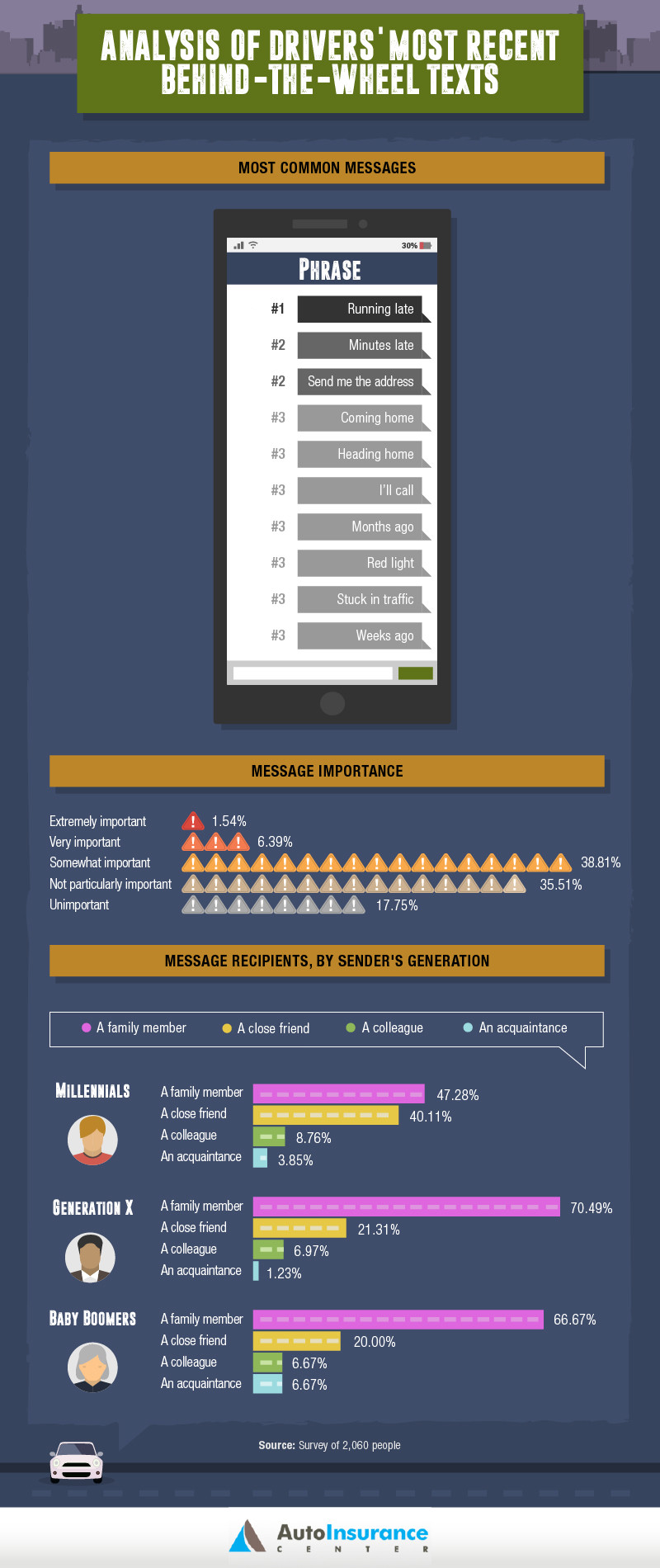
A decided minority of drivers self-reported that they always or usually send text messages when driving, ranging from six percent of millennials to three percent of Generation Xers, and no baby boomers. Just over 90 percent of baby boomers said they never text and drive, with no texting reported by Generation X and millennials 58 percent and 49 percent, respectively.
The AutoInsurance Center analysis of final text messages, the last messages sent before fatal crashes, found the three phrases most often included in the messages were “Driving drunk,” “I’ll be dead,” and “I love you.” The CDC’s report that approximately one-third of crash fatalities involve alcohol shows a dangerous combination driving, drinking, and texting.

The AutoInsurance Center recommends that, in addition to never texting while driving ourselves, to let our families and friends know we would much rather have them reach their destinations safely than return messages they receive while they are driving.
The best hoverboard that you can buy
 We know, we know. Technically, these boards don’t actually hover, but “hands-free scooter” just doesn’t sound as cool. It’s been a tough few years for the hoverboard industry. For a time, the damn things just wouldn’t stop catching fire. According to the Consumer Product Safety Commission, hoverboard-related fires between December 2015 and February 2016 were responsible for more than $2 million in property damages nationwide. Some college campuses and airlines have banned self-balancing scooters altogether, and the United Kingdom has completely outlawed their use in any public space.
More: Who certified the exploding Samsung Galaxy Note 7 safe? Samsung did
With all this negative publicity, you might wonder, “why buy a hoverboard?” Uh, because they’re awesome. These motorized, self-balancing devices are easy to pick up and tons of fun to ride, and, honestly, the hardest thing about a hoverboard is trying to look cool while riding it. These puppies can actually be an effective mode of transportation, capable of reaching speeds close to 10 mph and “hovering” for nearly 20 miles on a single charge. Best of all, there are finally self-balancing scooters on the market that are guaranteed not to explode violently at your feet! Amazon even rescinded its February 2016 decision to cease hoverboard distribution.
With that in mind, here are our picks for the best — and least explode-y — hoverboards on the market.
Our pick

Why you should buy this: It’s compact, affordable, and simple to control.
The best
Razor Hovertrax 2.0
Razor’s Hovertrax 2.0 is a fantastic basic hoverboard at a decent price.
$348.00 from Amazon
Who it’s for: Anyone and everyone
How much will it cost: $400
Why we chose the Razor Hovertrax 2.0:
Remember Razor? Chances are, you’re familiar with the scooter that put them on the map around the turn of the millennium. They haven’t gone anywhere, and now that they’ve received their UL 2722 safety certification, they’re making moves to get into the hoverboard game. The Hovertrax 2.0 — so named because the first edition was pulled from stores after safety concerns arose — is a true rival for the Swagtron series, offering all the same bells and whistles, for the same price, with a more recognizable brand name.
The Hovertrax is also capable of supporting 220 pounds for about an hour of riding, and it features a battery pack that automatically shuts off once it reaches a full charge. Razor’s board doesn’t bring anything new to the table, sure, but it’s bringing competition to a market that didn’t have much, if any, which is only a good thing for the future of hoverboarding.
Razor also released an upgraded version, called the Hovertrax DLX 2.0, that includes some awesome new paint jobs and multi-color LED displays. Unfortunately, they’re currently only available from Brookstone for nearly $600.
Read more here
These are the 12 best radio stations you can stream online
Despite the ever-growing number of music fans turning to streaming services such as Apple Music, Spotify, and Pandora for radio-style programming, the broadcast format is by no means dying. Offering listeners hand-selected singles at the cutting edge of music, radio DJs continue to be among the most important proprietors of new sonic trends around the globe, trusted curators with the all-important human touch. Instead of pumping in your favorite band to an algorithm, try tuning in to one of these twelve amazing online stations — you’re sure to find something you’ll enjoy.
Related: Our massive playlist of the catchiest songs ever will get you humming
Here is our list of the top 12 radio stations with internet feeds. For access to live streams, simply click the name of the station and stream via its website.
KEXP 90.3 FM — Seattle, WA

Seattle’s best public radio station is run in a partnership between the University of Washington and Paul Allen’s Experience Music Project, highlighting the best new alternative music from around the globe. Particularly known for its live studio sessions, KEXP is often among the first major media outlets to showcase up-and-coming bands the world over, making it a great place to hear new music before all of your Spotify-loving friends.
Download it now for:
Android iOS
KCRW 89.9 FM — Santa Monica, CA

An NPR-member station based out of the Santa Monica College campus, KCRW was founded in 1945 to train ex-serviceman in the then-emerging technology of radio. Now it’s just a great place to find emerging music. Creators of the famed Morning Becomes Eclectic radio program, a show which highlights new music and live performances from talented indie artists, KCRW is an excellent place to hear well-curated musical selections, as well as to catch up on national news.
Download it now for:
iOS Android
XRAY.fm KXRY 107.1 FM — Portland, OR

Portland’s most-acclaimed independent radio station serves up the sounds of the city’s popular underground music scene to a global audience. A crowd-funded station which formed in 2012, XRAY offers a varied selection of music and progressive talk radio programming, and has been broadcasting around the clock for nearly two years now thanks to the help of nearly 70 part-time DJs.
Download it now for:
iOS Android
Dublab — Los Angeles, CA

Dublab is an internet-only broadcast that showcases the cutting edge of the DJ universe five days a week. The station also offers each live show for download via its website during the two days a week it isn’t live. With a rotating cast of all-star DJs that includes world-renowned heavyweights like Daedelus, Teebs, Flying Lotus, and more, dublab is among the best streams on earth for fans of emerging beat music.
Download it now for:
iOS
KUTX 98.9 FM — Austin, TX

Owned and operated by the University of Texas in Austin, KUTX showcases a range of genre-specific programming ranging from indie and pop to disco, latin, and other genres. It’s an eclectic mix of shows, but they are each extremely vibrant and well-curated, making it an excellent place to find something new and unexpected.
Download it now for:
Android iOS
WFMU 91.1 FM — Jersey City, NJ

WFMU is the grandaddy of them all. The longest-running independent radio station in the U.S., this listener-funded station offers a freeform variety of eclectic shows that are sure to provide something for everyone. That said, such freeform formatting is a blessing and a curse, as some hours will prod listeners to tune in elsewhere.
Download it now for:
iOS Android
BBC Radio 6 — United Kingdom

When it was first launched in 2002, BBC Radio 6 became the first new station created by the BBC in more than three decades. A digital-only channel that focuses on alternative music from all over the globe, Radio 6 plays everything from guitar music to dance, jazz, and soul cuts.
Download it now for:
iOS Android
WWOZ 90.7 FM — New Orleans, LA

For those who aren’t lucky enough to live inside the Big Easy, WWOZ offers up the sounds of its fair city to the world, showcasing New Orleans’ famed jazz, soul, bounce, and R&B each day. The station’s selections center largely around the jazz tradition — which is still alive and well in the city — providing an amazing look inside one of the world’s most interesting and storied sonic universes.
Download it now for:
iOS Android Blackberry
WQXR 105.9 FM — New York, NY

Among the finest — and most listened-to — classical radio stations in the world, New York’s WQXR is also one of the oldest FM stations in the world. Showcasing the best of composers new and old, it’s an excellent place to tune into when looking for some serious music for work or study. It’s also the perfect pairing for that nice bottle of red wine you have stashed away.
Download it now for:
iOS Android
KUSF 90.3 FM — San Francisco, CA

The extremely varied sounds of the Bay Area are best explored via KUSF, the University of San Francisco’s radio station. A glimpse of the region which delves deep into the complex communities that have thrived there for decades, KUSF’s programming is overtly Californian, providing listeners with warm-weather jams which they’ll be hard-pressed to find elsewhere.
Download it now for:
iOS Android
Radio Free Brooklyn — Brooklyn, NY

A community radio station ran out of the basement of a bike shop in (you guessed it) Brooklyn, NY, Radio Free Brooklyn offers interesting independent programming throughout the day, with a variety of interesting talk and music shows to take you through your day the Brooklyn way.
Berlin Community Radio — Berlin, Germany

The cutting edge of Europe’s hippest city can be explored via Berlin Community Radio, which showcases the latest in underground music from Europe and beyond. Those who are tired of searching blogs for new sounds will almost certainly find their latest muse on these internet airwaves.
Super Bowl LI — Modern Dad’s guide to the big game!
The final game of the NFL season is nearly upon us. Here, now, is your Dad Guide to making the most of it.
Super Bowl LI (which, uh, explains why I call it Super Bowly) is coming Feb. 5 (at 6:30 p.m. on Fox). And if you’re as excited as I am to see the Atlanta Falcons humiliate the New England Patriots (it could happen), then you’ll of course be glued to the game. But for those of us who have cut the cable cord, there are questions!!!
Like, how can you watch the Super Bowl without cable? Is anyone streaming it? Should I buy a new TV? Will Tom Brady cheat again? And can I see Phil talk into a dirty oven?
We answer all those questions — and more — in Modern Dad’s Guide to Super Bowl LI! Here are some handy links to everything I talk about in this vid.
- Indoor HD antenna
- Help for positioning said antenna
- The best sound bar and sub for your TV
- The more affordable sound bar and sub
- Amazon Echo Dot
Subscribe to Modern Dad on Youtube!
Yo is an actual at-home male fertility test you just use with your phone
Ah, technology.
Thanks to the wonder of a smartphones, as well as app-enabled devices, you can now test male fertility from the comfort of home. A new setup, called Yo, is able to turn your phone’s camera into a microscope powerful enough to zoom in on a man’s sample of “swimmers” and determine its concentration level. The higher the concentration, the better chance a man has at successful fertilisation.
The $50 (roughly £40) kit comes with a sample cup, a powdered solution you need to mix with your sample, a dropper to collect the sample, and a test slide for the sample. It also comes with a camera device that attaches to your Android phone or iPhone. Simply slip the test slide with the sample into the device, then connect your phone, and Yo will record a live video and simultaneously processing the results.
You’ll get a sample count along with an explanation of the results through the companion app, which is available for iOS and Android phones. Yo is FDA-approved, and according to reports, is a medically legit way of figuring out a male’s fertility status.
Yo is available to preorder now for $49.95 and will begin shipping in February. The kit includes enough supplies for two tests.
 AIVAnet