


3D-printed ceramics and metals might finally arrive this year
Remember 3D printing? A couple years ago it was hotly tipped to revolutionize manufacturing, since you could have a whole factory in your home! Except, really, it wouldn’t, because spending hundreds or thousands of dollars on a box to make cute plastic doodads wasn’t really what most folks wanted. A few years later, having a 3D printer at home is still generally unnecessary, but that may change, and soon. Ish.
Formlabs, for instance, has turned up at CES touting an experimental resin that can enable people to create ceramic objects with regular 3D printing. Ceramic particles are suspended inside the resin, which prints out just as the plastic currently used for additive manufacturing. But when you fire your new creation in an oven, it hardens just like a regular piece of ceramic, suitable for glazing and use just like the real thing. Unfortunately, it’s just a demo for now, but the company is hoping to develop the material ready for wider consumption this year.
Then there’s 3D printing with metal, which is seen as something of a holy grail for many industries looking to craft tools, parts and devices. It’s possible right now, using sintering, and is both costly and time-consuming in a way that means it’s outside the reach of most hobbyists. Florida startup Ability 3D is looking to change that with its metal addictive manufacturing 3D printer that’s actually designed for the home — or, at least, workshop or garage.

The unit has been set up like a regular 3D printing, but the head has been swapped out for a MIG welder on a moving plate. It can accept regular MIG welding wire, enabling it to produce doodads out of aluminum, steel and stainless steel. But one innovation that the company is proud to talk about is the addition of a trimming bit to clean up printed objects. For instance, we saw this block of solid aluminum (pictured) that had been printed and polished across four layers.
The company was founded by Ben Willard, a 3D printer technician, and his wife Nicholl Hyatt, who is in marketing. Hyatt explained that Willard grew tired of “waiting around for MakerBot” to build a printer that could handle metal. As such, he was motivated to develop his own, which he plans to launch on Kickstarter in March.

At $3,000 it isn’t cheap, but considering the potential of the device to empower hobbyists to produce metal components, it may be quite a big deal. Hyatt also said that she’s had a lot of interest from classic car fans looking to craft replacement parts that are otherwise unavailable. Point is, we may be close to the day when 3D printing doesn’t instantly bring to mind images of useless tchotchkes.
Click here to catch up on the latest news from CES 2017.
IMDb tells California it will continue to publish actors’ ages
With age discrimination rife in Hollywood, California wanted to do something about it. That meant introducing a new law that didn’t actually target the root cause of the problem — i.e. penalizing the people who engage in the practice — but instead stopped websites from publishing an individual’s age. IMBb, the movie listing website owned by Amazon, was told in September that it would need to remove ages and birthdates of performers by January 1st, 2017. It’s been a week since the deadline passed and IMDb hasn’t done a thing.
On Thursday, IMDb issued a court filing asking judges to introduce a preliminary injunction that would stop the Attorney General of California from enforcing California Assembly Bill 1687. It argues that instead of tackling unfair industry practices, the state had “chosen instead to chill free speech and to undermine access to factual information of public interest.” The company believes it violates the First Amendment, and that should be enough for it to not be enforced.
The law in question dictates that “information obtained on an Internet Web site regarding an individual’s age will not be used in furtherance of employment or age discrimination.” In just over three months, over 2,300 people have requested to have their ages removed from the IMDbPro service, which provides detailed information for casting agents and other professionals in the industry. Helen Mirren, shown above, previously said that ageism in Hollywood is “outrageous,” particularly in regards to “ridiculous” casting decisions that match much older men with young female love interests.
While legal action is ongoing, IMDb says it won’t pull age information from its listings. Bear in mind that while the movie website may be forced to comply in the future, other public websites like Wikipedia will still be able to freely share such data.
Via: CNET
Source: IMDb Legal Filing (PDF)
The best coffee table of CES
After weeks of trials and tribulations, I’m excited to announce Engadget’s Best of CES winner in the hotly contested coffee table category: Retrobit’s Mega Table.
Okay, so I’ve only seen one coffee table at CES, and I’m also not in charge of our awards. But the Mega Table is pretty great anyway. It’s a wooden coffee table with a giant wooden d-pad and action buttons, that can be used to control all manner of games consoles.
The device here is just a prototype, but Retrobit is planning on heading to a crowdfunding site to make it a reality. At an estimated $500, it’s not exactly an impulse buy, but I’ve bought more expensive coffee tables in my time, and its dual-purpose design might make it an interesting conversation piece for your games room.

Edgar Alvarez contributed to this report.
Click here to catch up on the latest news from CES 2017.
BlackBerry’s ‘Mercury’ prototype makes a cameo on our CES stage
We knew a new BlackBerry was coming, and we were even pretty sure it would have one of those classic physical keyboards. Sure enough, when official word of the BlackBerry “Mercury” prototype dropped during the show, people nostalgic for the smartphone company’s golden years swooned. But how did this happen? What did TCL, the company now in charge of making BlackBerry hardware, get right? And more importantly, when will TCL and BlackBerry let slip all of the really juicy details? Jason Gerdon, senior manager of communications for TCL America, joined us on the Engadget CES stage to take us through it all, and we’ve put together a quick little primer to sum up what we’ve learned.
Click here to catch up on the latest news from CES 2017.
Volkwagen is adding Amazon Alexa to its cars
Ford isn’t the only auto company adding Amazon’s Alexa to its cars — Volkswagen plans to do the same. From the quick demo I had on the CES show floor, it seems like a pretty smart pairing. VW’s Alexa-enabled cars will basically have full access to everything the Echo can do, but the company built its own skill to enable a handful of car-centric features.
For starters, you can ask Alexa to give you the status of your car. This one is more useful when you’re not actually in it, but if you’re at home you can hear about whether your car is locked or unlocked, how much fuel is left, whether it’s charing or not (if it’s an EV), and what its approximate range is. You can then ask Alexa to lock or unlock the car or even beep the horn if you need to help someone find it.
You can also ask Alexa to buy supplies for your car. Since owners have to sync their VW Car-Net accounts with Amazon to get Alexa working, that means Alexa will know exactly what kind of oil or windshield wipers work with your specific vehicle.
Naturally, Alexa can help with directions as well. If you’re at home, you can ask for a route and Alexa will tell you how long it’ll take. It then asks if you want to send that route to your car. If you say yes, it’ll be waiting for you in your navigation system all set to go. Of course, you can ask for directions in the car as well, but if you’re planning your trip before leaving home you might as well remove a step from the process once you’re behind the wheel. While you’re at it, if you’re listening to media at home, you can ask Alexa to pause it and resume it once you’re back in the car.
The last feature is one of the most useful, at least to someone like me who forgets everything. VW added location-based reminders, so you can ask your car to remind you to pick up dinner when you leave work or grab the mail when you arrive home. A VW spokesperson says that its solution is better than using location-based reminders in Android or iOS because your phone doesn’t ping the GPS often enough to reliably remind you when you’re leaving or arriving somewhere. That may be true, but I’ve never noticed my phone taking the “10 to 20 minutes” the VW spokesperson claimed it routinely takes for a smartphone to activate a location based reminder. Either way, it’s a useful addition to VW’s software.

In Amazon’s Alexa app, you’ll see everything that you’ve asked your car, just like you can see everything you ask the Echo speaker. That’s also where you’ll go to complete any shopping orders you try and place, and you can find your reminders there as well. I got a quick in-car demo of Alexa, and it’s worth noting that nothing you ask Alexa shows up on the car’s infotainment system. That makes sense, as there shouldn’t be anything there to distract you from the task of driving. But even if you’re not actually driving, your phone will remain the place to go if you want to see what’s in your cart or what reminders you set up.
VW says that there’s no timeframe yet for when Alexa will come to its cars, unfortunately, as it’s still under development. But the good news is that any VW with its Car-Net software will get Alexa eventually. The service has been around since 2013, so that’s a pretty good range of cars. Hopefully it’ll launch sooner than later — Ford says its going to begin its Alexa rollout later this month.
Click here to catch up on the latest news from CES 2017.
Source: VW
ASUS ZenFone AR hands-on: It will probably be great once it works

This is where my ZenFone AR hands on would be, if that were possible.
ASUS hopped on stage and announced two thin, light, and beautiful new phones for everyone to enjoy. We’ve spent some time with the ZenFone Zoom and look forward to seeing what that new camera and snappy new software can do in the real world, but the ZenFone AR isn’t quite as ready to be used as its sibling. That makes some sense when you consider this phone isn’t coming to market until much later than the ZenFone Zoom, but it also means most of the really cool things this phone is supposed to be capable of aren’t quite ready for evaluation.
We’ve got some photos for you to look at, and some thoughts on the design of the exterior, but it’ll be a little while before we can fully appreciate everything this phone is capable of.
The outside

A lot of the exterior of this phone is not exactly standard for ASUS. The back of the phone is a textured material that feels somewhere in between faux leather and plastic, which is a good thing. It doesn’t seem likely to get scuffed up like Moto leather, and there’s no squish to take away from how solid the phone feels. The aluminum band around the outside is polished smooth and helps the phone feel thinner than it is, with a plastic rim in between the glass front and the bezel so you’re not setting the phone on anything that could scratch the display when you set it face down.
ASUS built all of the Tango functionality on Android 6.0, and when the upgrade to 7.0 happened none of those AR-related features survived.
The things that are most interesting about this phone, as the name suggests, are on the inside. This is the first phone with a Snapdragon 821 processor that has been optimized to handle Google Tango, complete with a camera array that differs wildly from Google’s first Tango partner, Lenovo. As the first phone that can handle both Daydream and Tango, there’s a lot of testing to be done to see how well all of this comes together. Unfortunately, none of the Tango stuff is available to try out yet. ASUS built all of the Tango functionality on Android 6.0, and when the upgrade to 7.0 happened none of those AR-related features survived. It’ll be a while before that changes.
The potential
While Tango isn’t ready to be tested, there are some interesting software decisions being made that are worth talking about. For example, ASUS has a separate notification setting for when you’re using VR that switches over immediately when Daydream is launched. This is a huge deal if you’ve ever had a standard Android notification drop down and totally disorient you when you’re in the middle of a Daydream app, and like any other notification setting it can be set to allow specific users to interrupt if they’re really needed.
It’ll be a little while before we’re able to see if a phone really needs 8GB of RAM.
It’ll be a little while before we’re able to see if a phone really needs 8GB of RAM and how well a phone so much thinner than the Lenovo PHAB 2 Pro handles Tango before things like heat become a problem. Despite that, ASUS set out to make a Tango phone you’d actually want to carry around and use as your personal phone, and that’s a massive step forward for Tango. Where other Tango have been clearly purpose built for specific use cases, the ZenFone AR is shaping up to be a decent phone that also does cool VR and AR things. Assuming the performance really does work out, this could be a fantastic phone to own.
Google Home: What’s fit for the web isn’t always something that should be read aloud

Reading something is very different from hearing it spoken by a creepy robot.
I’ve been thinking about something Phil showed me a while back. If you have a Google Home, ask it “What do sea otters do to baby seals?” and listen to the reply — but not with kids in the room.
The family room means family friendly and not all families are the same.
You get a long drawn out answer about how they drown them by trying to mate with them. Using words that can’t (or shouldn’t, anyway) be applied to animals that aren’t human. A discussion of rape that is simply not fit for every living room.
I know why it says what it says — because it’s working as intended. If you enter the same search at Google on the web or from your phone, you’ll find that the featured snippet at the top of the page is an excerpt from an article at IFLScience titled Animals can be Jerks which reads exactly as described by the title. It’s an interesting article, and probably something a teacher of appropriately aged children would appreciate even with the bit of anthropomorphism they include. The key is the appropriate age part.
Now imagine it coming from a speaker in the middle of your living room with a 4-year old child listening.

That’s not something every parent would approve of, and probably enough for some families to pull the cord, put it back in the box and return it or let it collect dust in the closet. I can’t blame those parents — descriptions of violent behavior is something a parent should be able to protect their child from in the way they think is appropriate. I’m not sure how I would have reacted if my kids were still very young, but I know I wouldn’t think it was very cool for Google to just do that out loud with no warning since they probably know the ages of my kids based on my email or web history.
While you have to be age appropriate to sign into Google Home and use it, everyone within earshot can hear it. It’s the responsibility of the owner to use Google Home properly in all situations, but come on — were you really expecting what you heard when you asked that question? I wasn’t. I’m sure even worse featured snippets are out there if someone really wanted to look.
There has to be a new middle ground between private and public for a product like Google Home.
The proper way to address this according to Google is to report the featured snippet as inappropriate. The problem is that it’s not inappropriate on a website that doesn’t read it aloud. I don’t think the search is made better by removing an interesting result featured at the top as long as a creepy female robotic voice isn’t reading it out loud to the kids. And Google Home is designed to be out in the open in front of everyone doing its thing. It’s no longer private once it comes out of the speaker.
I don’t know what needs to be done. That’s OK, there are people who are paid to know what to do. I just think that Google needs to do something to give everyone a way to make sure that the things being spoken by Google Home are appropriate for everyone who can hear it. Add it to the rest of the settings as an option and people who don’t care won’t even know it’s there. The only solution I can come up with right now is to consider Google Home as not family friendly in all situations, which isn’t very good for something designed for the living room.
Six new technologies that will enable faster, better internet to the world
By Cat DiStasio
The internet is one of the most important inventions of the modern era. However, current estimates say that only 40 percent of people around the globe have access. As internet connectivity becomes ever more important, new technologies are emerging to connect the entire globe with better, faster service. On several continents, research and development projects are underway to provide internet connectivity via high-altitude balloons — not unlike those used to capture weather data, unmanned solar-powered drones and next-generation wireless routers. Each offers higher speeds and more reliability than current modes, plus the obvious benefit: getting the world online, all at the same time.
Facebook aims for solar-powered internet-beaming drone

Facebook founder Mark Zuckerberg is famous for expressing a desire to connect the entire globe to the internet, and the company wants to launch giant soaring drones to beam out internet access around the world. Facebook’s own Connectivity Lab has developed a solar-powered drone with a wingspan as large as that of a Boeing 747. Dubbed Aquila, the drone took its first test flight in June 2016 and, while not equipped with internet technology at the time, the flight was a huge success. The actual flight lasted a whopping 96 minutes (66 minutes longer than planned), and helped the research team tackle the next phase of innovation. Someday, Facebook hopes the highly energy-efficient drones will fly in a 60-mile radius while simultaneously beaming out internet access wherever needed.
MIT’s 330 percent faster WiFi

Just a few months ago, researchers at MIT’s Computer Science and Artificial Intelligence Lab (CSAIL) announced a breakthrough in new wireless internet that is 330 percent faster and twice the bandwidth of existing technology. Dubbed MegaMIMO 2.0, the technology uses multiple transmitters and receivers to relay data simultaneously, increasing the amount of data in a given bandwidth. This development could someday lead to better, faster internet in public spaces and large gatherings like concerts and sporting events. The new technology could also address the issue of spectrum crunch by distributing data differently so that backups and congestion on the network simply don’t occur.
Li-Fi leaves WiFi in the dark?

Last year a French startup developed a wireless internet technology based on LEDs that they claim is 100 times faster than existing WiFi. The so-called “Li-Fi” exploits the flicker rate of LED lamps, which is typically imperceptible to the naked eye. That frequency is much higher than the radio waves conventional wireless internet employs. Li-Fi requires light to work, so it can’t pass through walls like WiFi, but it can be used to specifically target a specific user. What’s more, its secure nature makes it a potential fit in places like hospitals or schools where speed and privacy are high priorities.
Project Loon floats balloon-based internet access

Long before Facebook launched its own drone to beam internet through the sky, Google began Project Loon, a similar initiative that relies on balloons. The high-altitude internet-equipped balloons are designed to spread connectivity in rural parts of Africa and Southeast Asia, plus anywhere else that access is spotty. The project gained traction in 2013 when Google tapped residents of California’s Central Valley to volunteer to let the team install an antenna on their home in order to test the beaming balloons. Three years and many tests later on several continents, Project Loon (now operating under X, formerly Google X) continues to perfect its internet-beaming technology in the hopes of someday filling in the empty spots in the data coverage map.
NASA gears up to beam internet into deep space

During his 340-day mission aboard the International Space Station, American astronaut Scott Kelly became somewhat of an Instagram star, posting jaw-dropping views of the Earth (and beyond) from his outpost in the stars. So, people probably take for granted the notion that astronauts have internet access. In reality, sending data through space is nearly as complicated as space travel itself, but NASA deployed new tech to the ISS in 2016 that could eventually be used to relay internet service even farther into deep space. If Elon Musk and Richard Branson ever find themselves living on Mars, they’ll surely be grateful to the good folks at NASA for making sure they can still tweet from their new homes on the Red Planet.
Samsung’s satellite idea

Consumer electronics company Samsung has a big idea for stretching the interwebs around the globe — using satellites. In 2015, the company proposed a global network of 4,600 satellites floating in low-Earth orbit that could beam up to 1 zettabyte (1 trillion gigabytes) a month. The plan would fly satellites closer to Earth than previous schemes to provide access at speeds internet users are already accustomed to at home. Will Samsung’s satellite web ever actually happen? It’s not likely, but wild ideas like this keep the conversation going.
Lofelt Basslet is more than just a subwoofer for your wrist
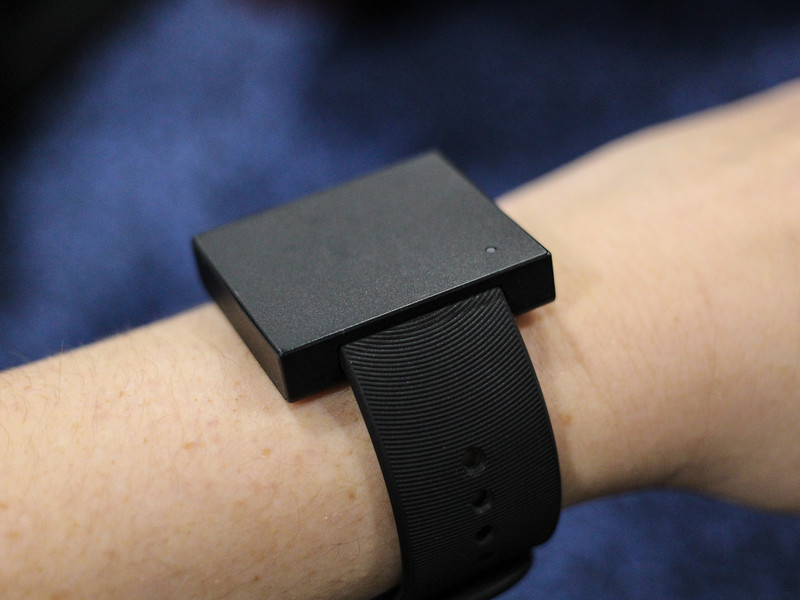
This vibrahaptic wearable has more potential than simply shaking along to your tunes.
Honestly, I’m not into the idea of wearing a smartwatch full-time. I’ve never been a watch person and having something on that big feels almost intrusive. But weirdly, I found myself excited about the Lofelt Basslet, despite the fact that all it does is vibrate on your wrist.
It sounds kooky, I know. Why the hell would anyone want anything as plain and simple as this little wristlet that buzzes along to your music? Well, I hate to offer this kind of explanation, but it’s not for everyone — it’s for enthusiasts.
See, I’m really enthused by electronic music. Trance, techno, house, drum and bass, goa psy — if it’s got a hard beat and a weird-looking dude from Europe behind the turntable, I’m there. I love going to concerts and shows, but they’ve become less frequent as my life has become busier. The Basslet can imitate that sort of experience, though, so I can easily transcend to that place with the actual vibrating subwoofers. That sort of feedback helps me get into the groove and feel that atmosphere. And if you flip this thing so it’s on the bottom of your wrist, it’s even more effective.
If it’s got a hard beat and a weird-looking dude from Europe behind the turntable, I’m there.
All this is possible due to the vibrotactile LoSound engine featured in the Basslet. The wearable produces frequencies up to 250Hz that, Lofelt claims, still remain silent to the outside world. Your seat partner on the train will have no idea you’re secretly raving. The music is transmitted to the Basslet through a separate wireless connector, which plugs into a 3.5mm headphone jack. The two snap together with a pair of magnets and charge at the same time with any Micro-USB cable.
There’s also the more practical way of using the Basslet — if you’re a virtual reality head, that is. Leave the adapter plugged into the headphone jack and then pop into a game like Gunjack 2: End of Shift on the Daydream View. Every time you get hit, you’ll feel feedback from the game on your wrist. It adds an almost-tangible element to even the most entry-level VR experience.
I’ve yet to try the Basslet for an extended period of time, so I can’t speak yet to how comfortable it is to actually walk and wear. But I do like the idea of added immersion when you’re just trying to get through the day. Isn’t it better to walk and jam out instead of sulking about everything that’s wrong?
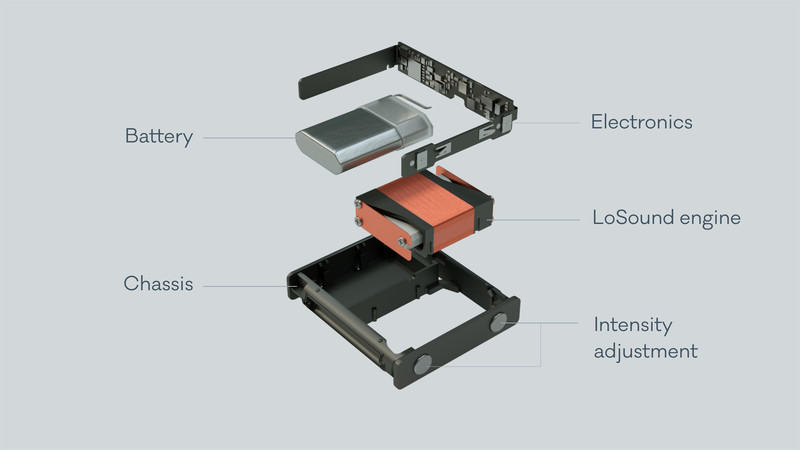
It’s also worth considering the real world application of this sort of technology. The Basslet’s clever way of shoving all that vibrahaptic feedback into such a small package means it can be used in cars. One major auto manufacturer, which Lofelt has not yet disclosed, has already invested in bringing this technology into its cars. It could be used in situations like helping you navigate the road without looking at a screen, or shaking the seat if there’s an accident up ahead. Human beings are visceral; regardless of whether the world features more touch screens, we’ll always want that haptic feedback. Might as well figure out a way to do so efficiently and unobtrusively.
How to make a fitness app part of your daily routine
Technology is transforming fitness.
It used to be that fitness apps were primarily used to count calories, and check in after workouts. That’s no longer the case. There are dozens of fantastic apps out there, and they cater to what you are specifically looking for. Whether you’re always looking for a new fun app to help motivate you along, or you’ve never been inclined to look into them at all, fitness apps can help make your average day healthier.
Keeping fit is easier than ever
Most of us get some amount of exercise every day, just by living our lives. We walk around, in some cases all day long. Plenty of fitness apps will track this and let you know what your activity level is like each day, including the number of steps taken and calories burned based off of your height and weight. There are apps which do this without ever even needing to be opened after you initially set them up.
Fitness doesn’t have to be a chore, at least not with these apps.
If you’re just starting a fitness routine, there are apps that can help build workout plans, count calories, give you videos so you can workout at home and much more. It might seem a little strange at first to have an app tracking your fitness level. By integrating these apps into your day you can see how active you already are, without ever having to hit the gym. That isn’t to say that all fitness apps are made for that purpose. They’ve branched out, and the abundance of choice lets you determine what you need out of a fitness app.
More: 4 interactive apps that will keep you entertained
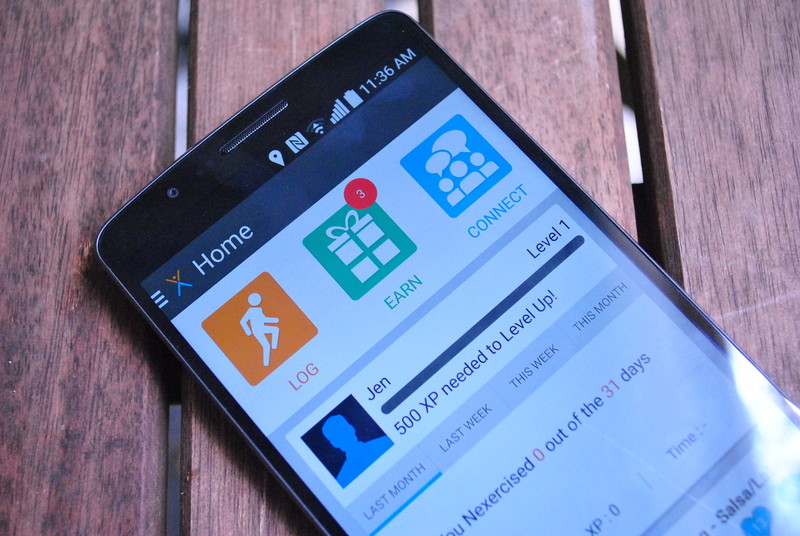
If you’re looking for something that turns fitness into a game there is Zombies, Run!, The Walk, or even Pokémon Go. Nexercise is an app that turn fitness into an actual game, letting you earn experience points, level up, add friends and win prizes. Charity Miles donates money to a charity of your choice for the distance you run. Fitness doesn’t have to be a chore, at least not with these apps. They take what you’re already doing, and put a spin on it to make it fun and encourage you to do more.
One size fits all fitness is a thing of the past

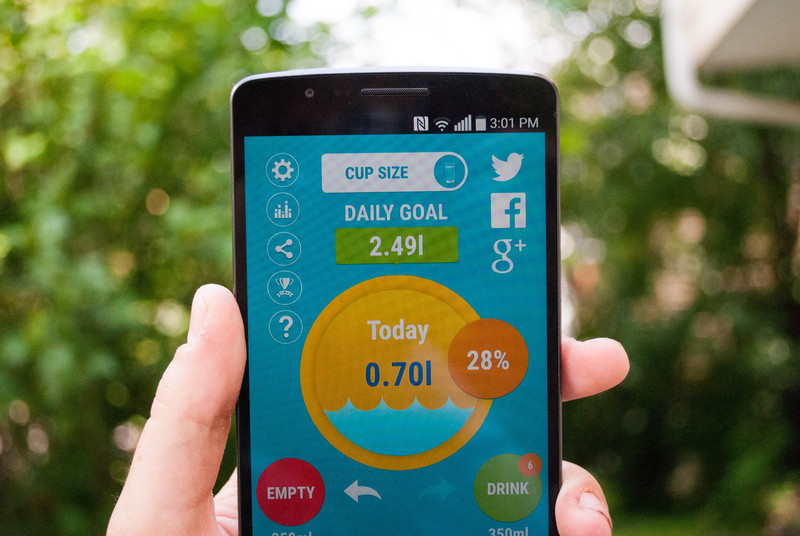
Even if you aren’t particularly fitness-minded, integrating an app into your life can be a benefit. With unobtrusive tracking apps, you can see your daily activity levels. While that might not seem like much, if you’re a city dweller you could be walking miles every day without ever realizing it. These apps can help with your health as well, outlining when you have more energy for activity, or what your stamina is like. Some games even have fitness benefits that are purely accidental, like Ingress where walking around to capture portals is a game mechanic. Apps like Aqualert can even help to make sure you’re drinking enough water. Fitness apps are no longer just for the people who live and breathe getting, and staying in shape. They’re built now to be friendly to everyone no matter what your level of motivation might be.
With the ways that fitness apps have diversified, there really is something out there for absolutely everyone.
- Sleep Trackers: Sleep as Android, Sleepbot
- Calorie and Water Trackers: Aqualert: Water Reminder H20, Cron-O-Meter
- Activity Trackers: Google Fit, Moves
- Pedometers: Noom Walk Pedometer: Fitness, Accupedo Pedometer
- Games that require walking around: Ingress, The Walk, Pokémon GO
- Run Trackers: Run Keeper, Runtastic
- Apps that make fitness fun: NexTrack:Making Exercise Fun, Zombies,Run!
These aren’t the apps from years ago which were tailored for a specific type of person to use. Rather, they have spread their influence and tried to find new niches for people who might not usually use a fitness app. The analytics and data can be fantastic if you’re a fan of graphs and charts, but even better is the fact that using these apps can actually help you to live a healthier life. We only get one body, so why not treat it right with the help of technology?
It doesn’t matter what your activity level is like on a day to day basis. Everyone can benefit from having a fitness app in their life. It can be something small like simply tracking your activity levels, or detailed down to your caloric intake and workout intensity. No matter where you sit on the fitness spectrum, there is an app for you. So are you using any of these apps, or is there a fitness app that you stand by already? Tell us all about it in the comments!
 AIVAnet